
MSBA-203 · Lesson 6 of 12 · 19 min
Defender for Cloud Apps
▶ Video coming soon A video version of this lesson is on the way.
One finding from the MSBA-101 course's Defender review had stayed with Ines. When Teodor first looked at cloud discovery, it showed that branch staff had been using three free file-sharing services to send scanned documents to families and hospitals. Nobody had approved them, nobody knew what had been shared, and the agency's privacy policy said client information would stay in Microsoft 365. The cloud apps chapter of the workbook started there, but it went further, because shadow IT is only one of the problems that Microsoft Defender for Cloud Apps addresses.
What a cloud access security broker does
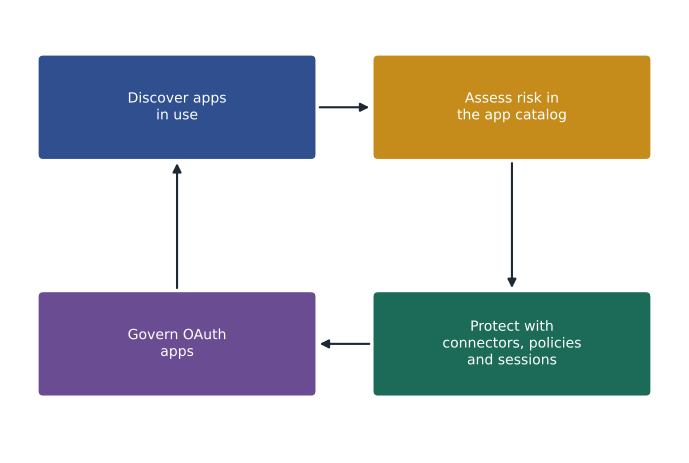
Defender for Cloud Apps is Microsoft's cloud access security broker (CASB). A CASB sits, logically, between an organization's people and the cloud services they use, and does four jobs. It discovers which cloud apps are in use. It assesses the risk of each app. It protects sanctioned apps, including Microsoft 365, by watching activity and files through their APIs and by controlling sessions in real time. And it governs apps that have been given access to the organization's data, especially OAuth apps that people have consented to.
Licensing follows the usual pattern. Defender for Cloud Apps is included in Microsoft 365 E5 and in the E5 Security add-on, and is also sold alone. At Corvallin only the six IT administrators held it, so Teodor's first question to the portal was not technical: which of its features act on all users, and which are licensed only for those who hold it? He recorded the answer from Microsoft's service description in the workbook, and treated organization-wide monitoring as a licensing item for 2027 while using discovery to measure the problem.
Discovering shadow IT
Cloud discovery builds a picture of the cloud apps people use from network traffic. The simplest source for an organization with managed Windows devices is the Defender for Endpoint integration: onboarded devices report the cloud services they connect to, wherever the device is, so a branch laptop on a client's home Wi-Fi is still counted. Organizations with on-premises firewalls or proxies can also upload or stream their logs. The discovery dashboard then shows the apps in use, how many users and devices use each one, how much data was uploaded and downloaded, and a risk score for each app.
Corvallin's discovery data, collected from the newly onboarded Windows devices in early November 2026, showed 214 distinct cloud apps. Most were expected: Microsoft 365, the VisitWise scheduling app, the payroll provider, two hospital referral portals, mapping services and news sites. The interesting rows were the file-sharing and conversion services.
| Category | Apps found | Users | Decision |
|---|---|---|---|
| File sharing | Three free services plus OneDrive and SharePoint | 41 users on the free services | Sanction OneDrive and SharePoint; mark the free services unsanctioned after a warning period |
| PDF conversion | Five online converters | 63 users | Monitor; publish the built-in alternatives in Microsoft 365 |
| Generative AI | Six public chat assistants | 58 users | Monitor; covered by the AI-use policy in the MSBA-205 course |
| Personal webmail | Four services | 97 users | Monitor only; block sending attachments through policy in 2027 if licensing allows |
Assessing app risk
Every app in the cloud app catalog has a risk score from 1 to 10, calculated from dozens of factors in four groups: general information about the vendor, security (such as multifactor authentication support and encryption), compliance with standards such as ISO 27001, SOC 2 and HIPAA, and legal factors such as data ownership and retention terms. Organizations can adjust the weight of each factor to match their own priorities. A care agency, for example, might weigh health privacy compliance more heavily than a retailer would.
Teodor did two things with the catalog. He tagged the approved apps as sanctioned, which makes the discovery dashboard clearer and lets policies treat them differently, and he looked up each of the three free file-sharing services. All three scored poorly on data ownership terms and on security features, and one stored data in a country outside Corvallin's privacy commitments.
Blocking unsanctioned apps
Tagging an app as unsanctioned is more than a label when Defender for Cloud Apps is integrated with Defender for Endpoint and network protection is on. The unsanctioned app's domains become indicators in Defender for Endpoint, and onboarded devices block access to them, showing the user a notification. Organizations can also choose monitored status, which lets users continue after a warning page, a useful step between allowing and blocking.
Ines did not want to cut staff off overnight from a tool they used to send documents to families. The change plan had three steps. In the week of November 9, branch managers told their teams that OneDrive sharing links were the approved way to send documents outside the agency, and Ama's team published a one-page guide with screenshots. On November 16 the three services were set to monitored, so staff saw a warning that pointed to the guide but could continue. On November 30 they would become unsanctioned and blocked. Discovery data would show whether the warning had worked before the block took effect.
Protecting Microsoft 365 with the app connector
Discovery sees traffic; an app connector sees inside an app. Defender for Cloud Apps connects to Microsoft 365 through Microsoft's APIs and reads its activity and file data, which lets it apply policies to what happens inside SharePoint, OneDrive, Exchange Online and Teams. Connectors exist for many other major software as a service products as well. With the Microsoft 365 connector in place, several kinds of policy become possible.
| Policy type | What it watches | Example at Corvallin |
|---|---|---|
| Anomaly detection | Built-in behavioural detections that learn normal activity | Impossible travel, mass download, unusual file deletion, suspicious inbox manipulation rules |
| Activity policy | Specific activities matching filters | Alert when an admin changes a sharing setting outside working hours |
| File policy | Files in connected apps by content, sharing and owner | Find files shared with personal email addresses that contain health card numbers |
| Session policy | Real-time actions during a session, through Conditional Access | Block downloads from unmanaged devices in the payroll app |
| App discovery policy | New or risky apps in discovery data | Alert when a new app with a risk score under 5 is used by more than 10 users |
Anomaly detection policies matter most for incident response, because they are on by default and their alerts join Defender XDR incidents. In September, a "suspicious inbox manipulation rule" detection had been one of the signals in the coordinator's incident. Teodor's workbook listed the built-in anomaly policies and the alert each produces, so the help desk would recognize them.
Investigating a cloud app alert
The activity log in Defender for Cloud Apps records what users and apps did in connected services: sign-ins, file downloads, sharing changes, mailbox actions, admin changes. Filters narrow it by user, app, activity type, IP address, location and device, and every alert links straight to the activities that triggered it. The same events are available in advanced hunting in the CloudAppEvents table, so an investigation can move between the two.
The first real Defender for Cloud Apps alert in Teodor's workbook arrived on November 10: a mass download detection for an intake coordinator, who had downloaded 340 files from the Intake team site in eleven minutes. The activity log showed the downloads came from her usual laptop, at her usual office IP address, during working hours, through the OneDrive sync client after she had added the site's document library to File Explorer. There were no new sharing links, no uploads elsewhere and no sign-in risk. Teodor confirmed with her by phone that she had just synced the library to work from it, classified the alert as informational, expected activity, and wrote a short note for the help desk: syncing a large library looks exactly like a mass download, and the evidence that separates the two is the device, the location, the client and what happened to the files afterwards.
He also tuned the policy. Anomaly detection policies let administrators adjust sensitivity and exclude specific, known activity, but every exclusion is a blind spot, so instead of excluding the sync client he lowered the alert's severity for activity from compliant, onboarded devices and kept it high for everything else. A mass download to an unmanaged device remained exactly the kind of event the policy existed to catch.
| Evidence | Suggests legitimate use | Suggests compromise |
|---|---|---|
| Device | The user's managed, onboarded laptop | An unknown or unmanaged device |
| Location and IP address | Usual office or home network | Anonymous proxy, unfamiliar country |
| Client | OneDrive sync client, Office apps | Scripts, unfamiliar user agents, an OAuth app |
| What happened next | Files edited in place | Files shared externally, uploaded elsewhere or deleted in bulk |
| Sign-in | Normal risk, expected MFA method | Risky sign-in, new MFA method, token anomaly |
Session control with Conditional Access
Some risks can only be controlled while a session is running. Conditional Access app control routes a user's session to a supported app through Defender for Cloud Apps, which can then monitor it or apply session policies: blocking downloads, protecting downloaded files with sensitivity labels, blocking copy and paste or printing, or blocking uploads of sensitive content. The trigger is a Conditional Access policy in Entra ID that uses the session control to use Conditional Access app control, typically scoped to unmanaged devices.
Corvallin's design from the MSBA-202 course already blocked most access from unmanaged devices. The exception was a group of home care staff who used personal phones in a browser to check schedules. Session control would let them read schedules while blocking downloads of client documents, which is a better balance than all or nothing. It went into the 2027 plan, because it needs Defender for Cloud Apps licensing for those users.
Governing OAuth apps
The last job is the one attackers have learned to exploit. When a user signs in to a third-party app with their Microsoft account and agrees to its permissions, the app receives an OAuth token that lets it read or change data through Microsoft Graph, often without the user signing in again. A malicious or compromised app with permission to read mail is a perfect tool for an attacker, and it survives password resets.
App governance, part of Defender for Cloud Apps, inventories the OAuth apps registered or consented to in the tenant, shows which permissions each holds, how much data it has accessed through Graph, who consented and whether it is verified, and flags apps that are overprivileged, unused or behaving unusually. Policies can alert on or automatically disable apps that meet risky conditions.
Teodor's first app governance review turned up an app called a PDF assistant, consented to by three staff members in 2023, before the MSBA-202 course restricted user consent. It held permission to read and send mail as the user and had made Graph calls as recently as October. Nobody could say who made it. He disabled the app in the portal, revoked its permissions in Entra ID, checked the three users' mailboxes for rules and forwarding, and added a line to the identity triage checklist from lesson 4: every compromised account investigation includes a check of the user's app consents.
// OAuth apps that accessed mail through Microsoft Graph in the last 30 days
CloudAppEvents
| where Timestamp > ago(30d)
| where ActionType == "MailItemsAccessed"
| where isnotempty(RawEventData.AppId)
| summarize Accesses = count(), Users = dcount(AccountObjectId) by AppId = tostring(RawEventData.AppId)
| order by Accesses desc
Worked problem
Deciding what to do with a discovered app
Discovery shows that 22 intake and billing staff use an online PDF editor with a risk score of 4. It has no multifactor authentication support and its terms let the vendor keep uploaded files. Staff use it to fill in referral forms. What should Teodor recommend?
Show solution
- Check whether Microsoft 365 already provides the capability: Microsoft Edge and the Office apps can fill and sign PDF forms.
- The app's low score and data-retention terms make it unsuitable for client information.
- Communicate the alternative first, with instructions for the forms staff actually use.
- Set the app to monitored, so users see a warning that points to the alternative.
- After a warning period, and if discovery shows use has fallen, set it to unsanctioned so onboarded devices block it.
Answer: Provide and teach the built-in alternative, warn through monitored status, then block as unsanctioned, rather than blocking without notice.
Common mistakes
MistakeBlocking every unsanctioned app the day it is discovered.
InsteadOffer an approved alternative, warn with monitored status, then block.
MistakeTreating risk scores as fixed truth.
InsteadAdjust factor weights to the organization's priorities and read the factors behind the score.
MistakeResetting a compromised user's password and assuming the attacker is gone.
InsteadCheck and revoke the user's OAuth app consents too; tokens granted to apps survive password resets.
MistakeAssuming session control works without Conditional Access.
InsteadSession policies need a Conditional Access policy that uses Conditional Access app control.
Summary and key terms
- Defender for Cloud Apps discovers, assesses, protects and governs cloud apps.
- Cloud discovery uses Defender for Endpoint and network logs; the cloud app catalog rates each app's risk.
- Unsanctioned apps can be blocked on onboarded devices; monitored status warns first.
- App connectors enable anomaly, activity and file policies inside Microsoft 365; session policies need Conditional Access app control.
- App governance finds overprivileged and suspicious OAuth apps, whose access survives password resets.
- Cloud access security broker
- A service that discovers, assesses, protects and governs cloud app use.
- Shadow IT
- Cloud apps used without the organization's approval.
- Cloud app catalog
- Microsoft's database of cloud apps with risk scores and factors.
- Unsanctioned app
- An app the organization has marked as not approved, which can be blocked on onboarded devices.
- Conditional Access app control
- Routing sessions through Defender for Cloud Apps to apply real-time session policies.
- App governance
- Monitoring and control of OAuth apps and their permissions.
Practice problems
Work each problem on paper first, then reveal the answer to check.
How does marking an app unsanctioned block it on a laptop at a client's home?
Show answer
Its domains become Defender for Endpoint indicators, and network protection on the onboarded device blocks them anywhere.
Why do OAuth apps matter in a compromise investigation?
Show answer
An app granted permissions keeps access through its tokens even after the user's password is reset.
What triggers a session policy?
Show answer
A Conditional Access policy that routes the session through Conditional Access app control.
Lesson quiz · 5 questions
Score 60% or more to complete this lesson.
Create a free account to save your progress, take quizzes and earn a certificate.