
MSBA-203 · Lesson 5 of 12 · 19 min
Defender for Endpoint essentials
▶ Video coming soon A video version of this lesson is on the way.
Email and identity were where the September attack happened, but Ines was clear that the next one might start somewhere else. "A nurse plugs a USB stick from a client's family into a branch laptop," she said at the October planning meeting. "What happens?" Ama Owusu-Pratt, who runs the help desk and manages Corvallin's roughly 520 Windows devices through Intune, knew the honest answer: Microsoft Defender Antivirus would scan the stick, and beyond that, it depended on which laptop and which licence. This lesson is the endpoint chapter of the workbook, written by Ama and Teodor together.
It builds on the MSBA-210 and MSBA-211 courses, which cover deploying Windows and managing devices with Intune. Here the focus is threat protection: what Microsoft Defender for Endpoint does, how its two plans differ, how devices are onboarded, which protections to turn on first, and what an administrator can do when a device is under attack.
Plan 1, Plan 2 and what they include
Defender for Endpoint is sold in two plans, licensed per user, with each licensed user able to protect several devices. Plan 1 provides the prevention layer: next-generation antivirus, attack surface reduction, device control, firewall and network protection, centrally managed. It is included in Microsoft 365 E3. Plan 2 adds detection and response: endpoint detection and response (EDR) with a device timeline and alerts, automated investigation and remediation, advanced hunting on device data, response actions such as isolation and live response, and the core capabilities of Defender Vulnerability Management. It is included in Microsoft 365 E5 and the E5 Security add-on. Smaller organizations use Defender for Business, a version designed for up to 300 users.
| Capability | Plan 1 | Plan 2 |
|---|---|---|
| Microsoft Defender Antivirus with cloud-delivered protection | Yes | Yes |
| Attack surface reduction rules, controlled folder access, network protection | Yes | Yes |
| Device control, such as removable storage rules | Yes | Yes |
| Manual response actions such as running a scan | Yes | Yes |
| Endpoint detection and response, device timeline | No | Yes |
| Automated investigation and remediation | No | Yes |
| Isolate device, live response, collect investigation package | No | Yes |
| Advanced hunting on device events | No | Yes |
| Vulnerability management core capabilities | No | Yes |
Corvallin's licences gave a clear but uncomfortable picture. Office staff with E3 licences were covered by Plan 1 on their devices; the six IT administrators' devices had Plan 2; and the branch laptops shared by home care staff were used mostly by people with F3 licences. Teodor did not try to solve frontline licensing in the workbook. He wrote down what each device had, so the board's 2027 licensing review would be a decision about known gaps rather than a surprise.
Onboarding devices
A device is onboarded when its built-in Defender for Endpoint sensor is connected to the organization's tenant and reporting to the Defender portal. On Windows 10 and Windows 11, the sensor is part of the operating system; onboarding means giving it the tenant's configuration. Intune is the usual way to do that for managed devices: once the connection between Intune and Defender for Endpoint is turned on in both portals, an endpoint detection and response policy in Intune's endpoint security area can onboard devices automatically. Other methods include Group Policy, Configuration Manager, a local script for testing, and onboarding packages for macOS, Linux, iOS and Android.
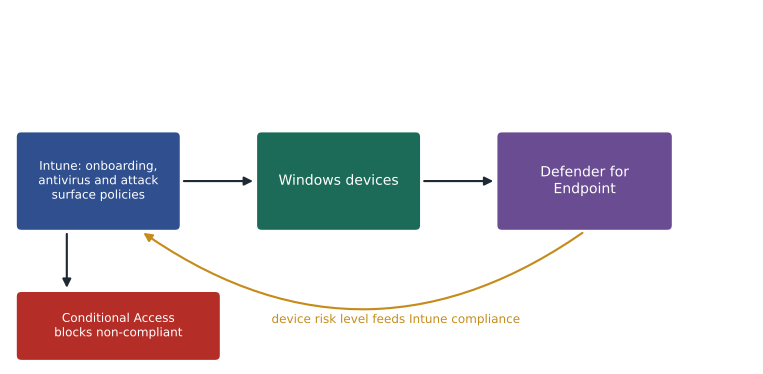
The connection also works in the other direction. Defender for Endpoint calculates a device risk level from its alerts, and Intune compliance policies can require that a device's risk be at or below a chosen level. Conditional Access then blocks access to Microsoft 365 from devices that are not compliant. That chain means a laptop with an active threat can lose access to email and files automatically until the threat is cleaned up, which is one of the clearest examples of Zero Trust in practice.
Ama's onboarding plan ran in rings. In the week of October 26 she onboarded the IT team's devices and the head office, watched the device inventory and health pages, and fixed two laptops whose sensors could not reach the service because of an old proxy setting at one branch. The second ring, all other branch devices, followed in the first week of November. By November 13 the inventory showed 512 onboarded Windows devices and 8 that had not checked in for more than a month, which turned out to be laptops in a storeroom awaiting disposal.
Next-generation protection
Microsoft Defender Antivirus is the antivirus engine built into Windows, and Defender for Endpoint manages and extends it. The settings that matter most are real-time protection, cloud-delivered protection, which sends metadata about suspicious files to Microsoft's cloud for an immediate verdict, block at first sight, which holds a new suspicious file for a few seconds while the cloud analyses it, and potentially unwanted application blocking. Tamper protection stops anyone, including malware running with administrator rights, from turning these protections off on the device; it should be on everywhere and managed centrally.
Exclusions deserve special care. Antivirus exclusions tell Defender not to scan certain files, folders or processes, usually because a business application is slow or misbehaves. Every exclusion is a place where malware can hide, and attackers look for common ones. Ama found three folder exclusions on branch laptops, added years earlier for an old scheduling client that Corvallin no longer used. She removed them and wrote the rule for the workbook: an exclusion needs a named application owner, a reason, a narrow scope and a review date.
Attack surface reduction
Attack surface reduction (ASR) rules block behaviours that malware commonly uses but legitimate software rarely needs, such as Office apps creating child processes, scripts launching downloaded executables, or processes trying to steal credentials from the Windows security subsystem. Each rule can be set to off, audit, warn or block. The safe way to deploy them is to start in audit mode, which records what the rule would have blocked without blocking it, review the results in the Defender portal's attack surface reduction report for a few weeks, add narrow exclusions for genuine business needs, and then switch to block.
| Stage | Duration | What happens |
|---|---|---|
| Audit | Two to four weeks | Rules record matches; nothing is blocked; reports show which applications would be affected |
| Review | One week | Each match is identified as legitimate or suspicious; owners confirm business needs |
| Exclusions | As needed | Narrow file or folder exclusions for confirmed business needs, documented |
| Block | Ongoing | Rules enforce; users see a notification; matches still appear in reports |
Other Plan 1 protections fill gaps the rules do not. Controlled folder access protects chosen folders from changes by untrusted applications, a defence against ransomware. Network protection blocks connections to malicious domains and IP addresses from any application, not only the browser, and is required for web content filtering. Device control governs removable storage. Ines's USB question had its answer here: Corvallin's policy now blocks executable files from running from removable drives and allows read-only access to USB storage on branch laptops, with write access only for a small group of office staff who exchange files with hospitals, and every attempt is logged.
Endpoint detection and response
Prevention stops most attacks; detection and response deals with the rest. On devices with Plan 2, the sensor records process, file, network, registry and sign-in activity, and Microsoft's detection logic raises alerts when that activity matches attacker behaviour. Each alert links to the device timeline, a record of what happened on the machine before and after, and to the process tree that shows which program started which. Alerts join incidents with email and identity alerts in the usual way.
Response actions are available from the device page and from incidents:
| Action | Effect | Plan |
|---|---|---|
| Run antivirus scan | Starts a quick or full scan on the device | 1 and 2 |
| Isolate device | Cuts the device off from the network except for the Defender service, so the investigation can continue | 2 |
| Restrict app execution | Allows only Microsoft-signed applications to run | 2 |
| Collect investigation package | Gathers logs and forensic data from the device | 2 |
| Live response | Opens a remote shell session for an investigator to examine and collect files | 2 |
| Stop and quarantine file | Stops a running file and quarantines it on all devices where it is found | 2 |
Automated investigation and remediation (AIR) examines alerts on its own, following playbooks that check related files, processes and persistence mechanisms. Depending on the device group's automation level, it can remediate on its own or wait for an administrator to approve actions in the Action center. Microsoft recommends full automation for most organizations, because waiting for approval gives an attacker time. Corvallin set the IT administrators' devices to full automation and planned the same for the rest once licensing allowed.
Vulnerabilities and device health
Defender Vulnerability Management, part of Plan 2 in its core form, lists software and configuration weaknesses on each device, rates them by exposure and known exploitation, and links each one to a remediation recommendation that can be sent to Intune as a task. For devices without Plan 2, Ama relied on Intune's update rings and reports. The most important finding of the autumn was not a single vulnerability but a category: the 140 branch laptops still running Windows 10, which Microsoft stopped supporting on October 14, 2025. Corvallin had bought Extended Security Updates as cover while they were replaced, and the workbook linked to the MSBA-210 course's replacement plan.
Watching sensor and protection health
A protection that has quietly stopped working is worse than one that was never deployed, because everyone assumes it is there. The device inventory in the Defender portal shows each device's onboarding status, sensor health, antivirus mode and the last time it reported. Ama added three checks to her weekly routine: devices whose sensor is inactive or misconfigured, devices where Defender Antivirus is in passive mode or out of date, and devices that have not reported for more than 14 days. On devices with Plan 2, advanced hunting makes the second check easy to repeat.
// Devices whose antivirus signatures are more than 3 days old
DeviceTvmSecureConfigurationAssessment
| where ConfigurationId == "scid-2011"
| where IsCompliant == 0
| project DeviceName, Timestamp, Context
| order by DeviceName asc
The weekly check found its first real problem in mid-November: four head office desktops whose antivirus had dropped into passive mode after a trial of another security product years earlier had left a registry setting behind. Nobody had noticed because the desktops showed as onboarded. Ama fixed them through Intune and added the antivirus mode column to the inventory view she shares with Teodor.
Phones and tablets
Many of Corvallin's frontline staff work only from a phone. Defender for Endpoint has apps for Android and iOS that provide web protection against phishing sites, and on Android, malware scanning, with the device's risk feeding into Intune compliance just as on Windows. Licensing and deployment for mobile depend on the user's licence and on whether the phone is enrolled or uses app protection only. Teodor listed mobile protection as an open item for the licensing review rather than promising it.
Worked problem
Responding to a ransomware alert on a branch laptop
At 2:15 in the afternoon, Defender for Endpoint raises a high-severity alert on a branch laptop used by a scheduler with an E3 licence: an unknown executable launched from a downloaded archive and began encrypting files in a shared folder. Controlled folder access blocked some writes. The laptop has Plan 1 only. What can Ama do, and what should she do?
Show solution
- Plan 1 does not offer isolation or live response, so she cannot cut the device off from the portal.
- Containment must be physical or network-based: ask the scheduler to unplug the laptop from the network and turn off Wi-Fi, or have Felix block the port.
- Run a full antivirus scan from the portal and confirm the file was quarantined.
- Check in Intune whether the alert has made the device non-compliant through its risk level, and if not, block the device's access manually, for example by disabling the device in Entra ID, so Conditional Access stops it reaching Microsoft 365.
- Check the shared folder's version history in SharePoint or OneDrive to restore any encrypted files.
- Escalate to Teodor and the monitoring partner, open an incident record and keep the laptop for investigation rather than wiping it at once.
Answer: Contain it through the network and access controls, scan and confirm quarantine, restore files from version history, and escalate. The case also shows why Plan 2 isolation matters for shared branch devices.
Common mistakes
MistakeTurning on every attack surface reduction rule in block mode on day one.
InsteadStart in audit mode, review matches, add narrow exclusions, then block.
MistakeAdding broad folder exclusions to fix a slow application.
InsteadRequire an owner, a reason, a narrow scope and a review date for every exclusion.
MistakeLeaving tamper protection off so the help desk can troubleshoot antivirus.
InsteadKeep tamper protection on and change settings centrally.
MistakeWiping an infected device immediately.
InsteadContain it first and preserve evidence for the investigation.
Summary and key terms
- Defender for Endpoint Plan 1 provides prevention; Plan 2 adds detection, automated investigation, response actions and vulnerability management.
- Intune onboards devices and pushes protection policies; Defender returns device risk that compliance and Conditional Access can use.
- Next-generation protection relies on real-time and cloud-delivered protection, block at first sight and tamper protection.
- Attack surface reduction rules should move from audit to block after review.
- Isolation, live response and automated remediation require Plan 2; exclusions and unsupported Windows versions are common gaps.
- Onboarding
- Connecting a device's Defender sensor to the organization's tenant.
- Attack surface reduction rule
- A rule that blocks a behaviour commonly used by malware.
- Tamper protection
- A setting that prevents local changes to Defender's protections.
- Endpoint detection and response
- Recording and analysing device activity to detect and respond to attacks.
- Device isolation
- Cutting a device off from the network except for the Defender service.
- Device risk level
- Defender's rating of a device based on its active threats, usable in Intune compliance.
Practice problems
Work each problem on paper first, then reveal the answer to check.
How does an alert on a device lead to blocked access to email?
Show answer
Defender raises the device risk level; an Intune compliance policy marks the device non-compliant; Conditional Access blocks non-compliant devices.
Why should attack surface reduction rules start in audit mode?
Show answer
To see which legitimate applications would be blocked before enforcing.
Name two response actions that require Plan 2.
Show answer
Any two of: isolate device, live response, restrict app execution, collect investigation package, automated investigation.
Lesson quiz · 5 questions
Score 60% or more to complete this lesson.
Create a free account to save your progress, take quizzes and earn a certificate.