
MSBA-201 · Lesson 7 of 12 · 19 min
Directory synchronization with Entra Connect and Cloud Sync
▶ Video coming soon A video version of this lesson is on the way.
Corvallin's on-premises Active Directory had grown for fifteen years. It held 512 user accounts for 450 staff, which was the first problem; 1,100 computer objects for roughly 300 actual computers, which was the second; and an organizational unit called "Temp - do not delete" that nobody would explain, which was the third. Before any of it went near Microsoft 365, Teodor had to decide how accounts would get from Active Directory into Microsoft Entra ID, which tool would do it, and what should be left behind.
This lesson explains directory synchronization: why organizations do it, what gets synchronized, the two Microsoft tools that do it, Microsoft Entra Connect Sync and Microsoft Entra Cloud Sync, and the important changes Microsoft announced in 2026. The AB-650 exam outline focuses on managing identities once they exist rather than on installing sync tools, but any administrator of a hybrid tenant meets synchronization in their first week.
Why synchronize
Organizations that already run Active Directory usually want people to keep one identity: the same user name and password for their Windows computer, the file server and Microsoft 365. Directory synchronization copies users, groups and optionally devices from Active Directory to Microsoft Entra ID and keeps them in step. When human resources changes a job title in Active Directory, or the help desk disables a leaver, the change reaches Microsoft 365 on the next synchronization cycle, which by default runs every 30 minutes for Connect Sync and every few minutes for Cloud Sync.
Synchronized objects have Active Directory as their source of authority. That means most of their attributes cannot be edited in the cloud: the Microsoft 365 admin center shows them as synced from on-premises, and changes must be made in Active Directory. Cloud-only properties, such as licences, Teams settings and cloud group memberships, are still managed in the cloud.
Choosing how people sign in
Synchronization copies identities, but the organization must also decide how sign-ins are checked. There are three options, and the choice affects resilience as much as convenience.
| Method | How a sign-in is checked | Strengths | Weaknesses |
|---|---|---|---|
| Password hash synchronization (PHS) | Entra ID checks a hash of the password hash copied from AD | Simple; sign-in works even if on-premises is down; enables leaked-credential detection | Password hashes (of hashes) are stored in the cloud, which some policies forbid |
| Pass-through authentication (PTA) | Lightweight agents on-premises check the password against AD in real time | Passwords are validated only on-premises; on-premises account policies apply at once | Sign-in depends on the agents and AD being reachable |
| Federation (for example AD FS) | Entra ID redirects sign-in to an on-premises federation service | Supports special requirements such as some smart card scenarios | Most infrastructure to run and protect; outages stop all sign-ins |
Microsoft recommends password hash synchronization for most organizations, often as the main method and at least as a backup when PTA or federation is used, because it keeps sign-in working during on-premises outages and lets Microsoft Entra ID Protection detect credentials that have been leaked on the internet. Corvallin chose PHS together with Seamless single sign-on, which lets domain-joined office computers on the corporate network sign in to Microsoft 365 without retyping a password.
Preparing Active Directory
Synchronization copies whatever it is pointed at, so preparation pays off. Microsoft provides the IdFix tool to find common problems, such as duplicate or invalid proxy addresses and user principal names, characters that are not allowed, and blank required attributes. Teodor's preparation list had five items.
| Preparation step | Why it matters |
|---|---|
| Remove or disable stale accounts and computers | Old objects become old cloud objects, consuming licences and causing confusion |
| Fix user principal names to use a routable, verified domain | Users signing in as name@corvallin.local cannot use a domain Microsoft 365 can verify |
| Clean up duplicate proxy addresses and attributes with IdFix | Duplicates cause synchronization errors and mail delivery problems |
| Decide which organizational units and groups to synchronize | Filtering keeps service accounts and test objects out of the cloud |
| Record the plan for the source anchor attribute | The anchor permanently links each AD object to its cloud object |
The user principal name problem is common in older domains. Corvallin's Active Directory domain was corvallin.local, a name that cannot be verified in Microsoft 365 because nobody can own a .local domain on the internet. The fix was to add corvallincare.example as an alternative UPN suffix in Active Directory and change every user's UPN to name@corvallincare.example, matching their email address, before the first synchronization. Changing UPNs affects some on-premises applications, so Teodor tested it with the IT team's own accounts first.
The source anchor deserves care. It is an immutable attribute, by default ms-DS-ConsistencyGuid, that ties each Active Directory object to its Entra ID object. If a user is moved between forests or recreated, the anchor decides whether Entra ID treats them as the same person. Microsoft's tools set the anchor during installation, and changing it later is difficult, so it belongs in the plan from the start.
Microsoft Entra Connect Sync
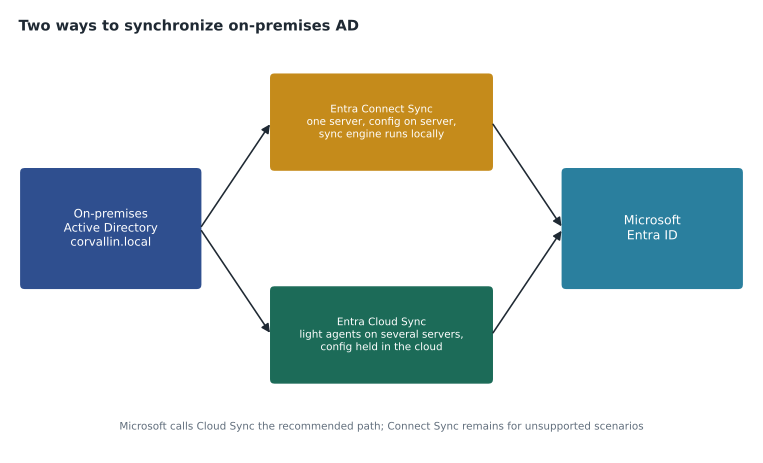
Microsoft Entra Connect Sync, formerly Azure AD Connect, is the long-established tool. It runs on a Windows Server in the organization's network, includes a full synchronization engine with its own database, and is configured on that server through a wizard and a rules editor. It supports a very wide range of scenarios, including complex attribute rules, multiple forests that reference each other, and large directories, and it can also configure federation with AD FS and pass-through authentication.
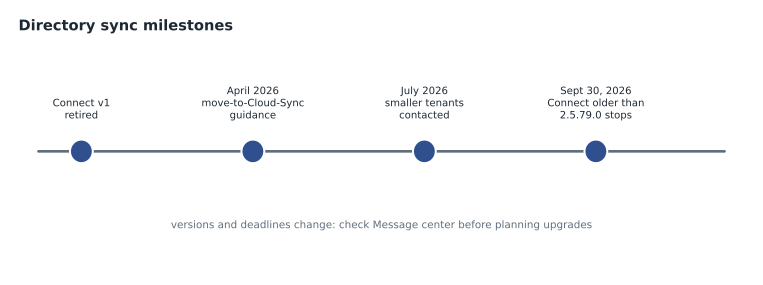
Connect Sync has drawbacks that matter more each year. It is a single server that must be patched, protected as carefully as a domain controller and kept up to date. If it fails, synchronization stops until it is repaired or a staging server is promoted. Its configuration lives on the server, so changes require someone with access to it. And older versions are retired on a schedule: Microsoft announced that Connect Sync versions earlier than 2.5.79.0 would be retired on September 30, 2026, after which synchronization on those versions stops working. Versions older than Connect V2 were already retired, and upgrading from them requires a swing migration to a new server rather than an in-place upgrade.
Microsoft Entra Cloud Sync
Microsoft Entra Cloud Sync takes a different approach. Instead of a full sync engine on-premises, it uses lightweight provisioning agents installed on one or more Windows servers, often domain controllers or member servers. The configuration lives in Microsoft Entra ID and is managed from the Entra admin center; the agents simply carry out what the cloud tells them. Several agents can run at once, so if one server fails, another continues, and Microsoft updates the agents automatically.
In April 2026 Microsoft published guidance that organizations should begin moving from Connect Sync to Cloud Sync, calling Cloud Sync its strategic direction and the place where new synchronization features are built. Microsoft said it would start with smaller customers whose needs Cloud Sync already meets, contacting them from July 2026, and give larger and more complex organizations more time. Microsoft also publishes a decision guide and a guided migration tool, and organizations with a confirmed blocker can stay on Connect Sync until Cloud Sync supports their scenario.
Cloud Sync now covers the common scenarios: password hash synchronization, password writeback for self-service password reset, Exchange hybrid attributes, directory extensions, filtering by organizational unit, single and multiple connected forests, and disconnected forests, which Connect Sync cannot handle. It can also provision groups from Entra ID back to Active Directory. It still has limits. Microsoft's comparison lists, among other things, a limit of 150,000 objects per domain, smaller maximum group sizes than Connect Sync, no advanced custom sync rules beyond its expression builder, limited attribute-based filtering and no merging of attributes from several domains. Device synchronization is supported but configured separately, and the guided migration tool may treat it as a blocker.
| Question | Connect Sync | Cloud Sync |
|---|---|---|
| Where does configuration live? | On the sync server | In Microsoft Entra ID |
| What runs on-premises? | A full sync engine and database on one active server | Lightweight agents, several for resilience |
| High availability | Staging server, promoted by hand | Multiple active agents with automatic failover |
| Disconnected forests | Not supported | Supported |
| Very large or complex directories | Supported, with advanced rules | Limits on objects, group size and rule complexity |
| Microsoft's direction | Supported for scenarios Cloud Sync cannot yet handle | Recommended path; new features land here |
Corvallin's choice
In 2022, Corvallin had one forest, 512 user objects, about 60 groups worth keeping, and no unusual sync rules. It needed password hash synchronization, password writeback and Exchange hybrid attributes for the mailbox migration. At the time, Cloud Sync did not yet support everything an Exchange hybrid migration needed, so Teodor installed what was then called Azure AD Connect, now Microsoft Entra Connect Sync, with a staging server for resilience, scoped it to the Staff and Groups organizational units, and left out "Temp - do not delete" entirely after confirming it held only test objects from 2012. Looking back in 2026, his note in the margin of the plan is short: every one of those requirements is now on Cloud Sync's supported list, so an organization in Corvallin's position today would start with Cloud Sync.
Worked problem
Sizing the synchronization scope
Active Directory holds 512 user accounts. Of these, 37 are disabled leavers, 18 are service accounts that run on-premises applications, 7 are test accounts, and the rest are current staff. The Staff OU contains only current staff and the 37 disabled leavers. If Teodor scopes synchronization to the Staff OU only, how many users will synchronize, and what should he do about the leavers?
Show solution
- Current staff: 512 - 37 - 18 - 7 = 450.
- Users in the Staff OU: 450 current staff + 37 disabled leavers = 487.
- Service and test accounts are outside the scope, so they stay on-premises.
- Disabled leavers would synchronize as blocked cloud accounts, adding clutter but no access.
Answer: 487 users would synchronize. Teodor moved the 37 leavers to a separate Leavers OU outside the scope first, so exactly 450 current staff appeared in Entra ID, matching the HR headcount.
Watching synchronization
Synchronization problems are rarely dramatic; they show up as one user whose title will not update, or a new account that never appears. Both tools report errors. Connect Sync shows them on the server and in Microsoft Entra Connect Health in the Entra admin center, which also monitors the servers. Cloud Sync shows the status of each configuration and agent, along with provisioning logs, in the Entra admin center. The Microsoft 365 admin center displays a directory synchronization status card, including the time of the last sync and any errors, such as duplicate attributes.
Common errors have common causes. Duplicate attribute errors mean two objects claim the same proxy address or UPN, often because a cloud-only account was created before synchronization and then an Active Directory user with the same address arrived. Microsoft Entra ID can soft match or hard match an incoming Active Directory object to an existing cloud object, by email address or by the source anchor, to avoid creating a duplicate; administrators who create cloud accounts in advance of synchronization need to understand matching to avoid ending up with two Nadia Prevosts.
Moving identities to the cloud over time
Many organizations synchronize with the intention of depending less on Active Directory over time. Corvallin went all the way. Its frontline staff never used domain-joined computers; their phones and tablets were managed by Intune and signed in only to Microsoft 365. Once the last mailbox had moved, the file server had been migrated to SharePoint and the old scheduling system had been replaced by a cloud app with single sign-on through Microsoft Entra ID, Active Directory added nothing but a dependency. In December 2022 Teodor turned off directory synchronization for the tenant, which converts every synchronized object into a cloud-managed one, and then decommissioned the sync servers and the domain controllers. Since then, every Corvallin identity has been managed in the cloud. Organizations that cannot switch everything at once now have a gentler option: Microsoft has introduced the ability to convert the source of authority of individual synchronized objects from Active Directory to the cloud, starting with groups and extending to users in supported scenarios. Because the feature has been rolling out in stages, check its current status in Microsoft Learn before planning around it.
"The best synchronization," Ines had said when she first read the plan, "is the one we eventually stop needing." It took Corvallin ten months.
One last practical point: whichever tool an organization uses, the servers running it are as sensitive as domain controllers, because they can change identities in both directories. Microsoft recommends treating them as tier 0 assets, restricting who can sign in to them, keeping them patched and monitoring them closely.
Common mistakes
MistakeSynchronizing the whole directory, stale objects and all.
InsteadClean up with IdFix, remove stale objects and scope synchronization to the OUs that matter.
MistakeLeaving user principal names on a .local domain.
InsteadAdd a verified, routable UPN suffix and change UPNs before the first sync.
MistakeRunning an old Connect Sync version until it stops.
InsteadKeep Connect Sync current, plan for version retirements, and evaluate Cloud Sync, which Microsoft now recommends.
MistakeEditing a synchronized user's job title in the Microsoft 365 admin center.
InsteadChange synchronized attributes in Active Directory, the source of authority.
Summary and key terms
- Directory synchronization copies users, groups and devices from Active Directory to Microsoft Entra ID; Active Directory stays the source of authority.
- Password hash synchronization is Microsoft's recommended sign-in method for most hybrid organizations; PTA and federation suit special requirements.
- Prepare AD first: remove stale objects, fix UPNs to a verified domain, clean attributes with IdFix and decide the scope.
- Connect Sync is a full engine on one server; Cloud Sync uses lightweight agents managed from the cloud and is Microsoft's recommended path since 2026.
- Connect Sync versions earlier than 2.5.79.0 were scheduled to stop working on September 30, 2026; monitor sync status and errors in the admin centers.
- Directory synchronization
- Copying identities from on-premises Active Directory to Microsoft Entra ID and keeping them in step.
- Source of authority
- The directory where an object's attributes are mastered and must be edited.
- Password hash synchronization
- A sign-in method in which Entra ID validates passwords using a synchronized hash.
- Pass-through authentication
- A sign-in method in which on-premises agents validate passwords against Active Directory.
- Provisioning agent
- The lightweight on-premises component of Microsoft Entra Cloud Sync.
- Source anchor
- An immutable attribute linking an Active Directory object to its Entra ID object.
Practice problems
Work each problem on paper first, then reveal the answer to check.
Why must UPNs on a .local domain be changed before synchronizing?
Show answer
A .local domain cannot be verified in Microsoft 365, so users would not get usable sign-in names.
Name two advantages of Cloud Sync over Connect Sync.
Show answer
Any two of: configuration held in the cloud, lightweight agents, several active agents for failover, automatic agent updates, support for disconnected forests.
Where should you change the department of a synchronized user?
Show answer
In on-premises Active Directory, the source of authority.
Lesson quiz · 5 questions
Score 60% or more to complete this lesson.
Create a free account to save your progress, take quizzes and earn a certificate.