
MSBA-201 · Lesson 11 of 12 · 21 min
Monitoring service health and usage
▶ Video coming soon A video version of this lesson is on the way.
Three weeks after the last mailbox moved in 2022, at 8:40 on a Tuesday morning, the help desk phones lit up. Outlook on the web was slow for everyone, and some people could not open shared mailboxes at all. Ama Owusu-Pratt's first instinct, formed over years of on-premises support, was to restart something. There was nothing to restart. The servers were Microsoft's, in Microsoft's data centres, and the only question that mattered was whether the problem was Corvallin's or Microsoft's.
Teodor opened Service health in the Microsoft 365 admin center. An incident had been posted eleven minutes earlier: users in the region might experience delays accessing Exchange Online, with Microsoft engineers investigating. He posted a message in the org-wide team, set the help desk's phone greeting to mention the incident, and subscribed to updates. Forty minutes later the incident was resolved. Nobody had restarted anything, and the help desk had spent the time answering calls with facts instead of guesses.
Monitoring a cloud service is different from monitoring servers. An administrator cannot see Microsoft's hardware, but can see what Microsoft reports about its services, what changes are coming, how the organization is using what it pays for, how well its network reaches Microsoft, and whether its data is protected. This lesson covers the tools for each, which together make up the monitoring part of the AB-650 tenant domain.
Service health
The Service health page in the Microsoft 365 admin center, under Health, shows the current status of each service the tenant uses and any active issues. Issues come in two kinds. An incident is a critical service problem, usually with noticeable user impact, such as mail not being delivered. An advisory is a problem with limited scope or impact, such as a feature not working for some users, often with a workaround. Each issue has a title, the affected services, a status that changes as Microsoft investigates, user impact, and a history of updates, including a preliminary root cause and, for significant incidents, a post-incident report.
| Status | What it means |
|---|---|
| Investigating | Microsoft is aware and looking into the issue |
| Service degradation | The service is slower or partly unavailable |
| Service interruption | The service is unavailable for affected users |
| Restoring service | The cause is known and a fix is being applied |
| Extended recovery | The fix is in place but full recovery takes longer |
| Service restored | The issue is resolved |
| Post-incident report published | A detailed report is available for download |
Administrators can also report an issue from Service health if users are affected by something not yet listed, which helps Microsoft correlate reports. And the Issue history tab keeps resolved issues, useful when someone asks a week later why a message was delayed.
Service health notifications
Nobody watches a dashboard all day. Service health can send email notifications to up to two addresses when issues are posted and updated, filtered to chosen services and to incidents, advisories or both. Teodor sent notifications for Exchange Online, SharePoint, Teams, Microsoft Entra and Intune to the IT shared mailbox, so that whoever was on duty would see them. Administrators can also receive alerts in the Microsoft 365 Admin mobile app, and organizations with their own monitoring tools can read service health through the Microsoft Graph service communications API, which exposes the same issues and messages programmatically.
Service health shows what Microsoft knows about. Some problems are local: a misconfigured DNS record, an expired certificate on a connector, a Conditional Access policy that blocks a group. A good habit is to check Service health first, and if nothing matches, to treat the problem as local until proven otherwise.
Message center
Where Service health covers what is going wrong now, Message center covers what will change. Microsoft posts announcements about new features, changes to existing features, retirements and actions administrators must take before a deadline. Each post has an identifier beginning with MC, a category such as Plan for change or Stay informed, the affected services, tags such as Major update, Admin impact, User impact or Retirement, and often a date by which something will happen.
Message center can send a weekly digest email and immediate emails for major updates and data privacy posts, filtered to chosen services. Posts can be marked as read, archived, shared with colleagues, and synchronized with Microsoft Planner, which turns them into tasks with due dates that a team can assign and track. Corvallin synchronized Message center to a Planner plan called Tenant changes, and Teodor spent twenty minutes every Monday triaging new posts: ignore, read later, or create a task.
Worked problem
Triage in practice
One Monday Message center has 23 new posts. Teodor's rule is: posts tagged Admin impact with a date in the next 90 days become tasks; posts about features Corvallin does not use are archived; everything else is read and marked read. Eight posts are tagged Admin impact, of which five have dates in the next 90 days. Six posts are about products Corvallin does not license. How many tasks, archives and reads are there, if no post falls into two groups?
Show solution
- Tasks: Admin impact posts with dates within 90 days = 5.
- Archived: posts about unused products = 6.
- Remaining posts to read: 23 - 5 - 6 = 12, including the three Admin impact posts with later dates.
Answer: 5 tasks, 6 archived and 12 read. One post in the read pile was the retirement notice for older Microsoft Entra Connect Sync versions from Lesson 7. It no longer affected Corvallin, which had stopped synchronizing in 2022, but Teodor forwarded it to the Kittiwake clinic, whose tenant Corvallin would be merging in 2027, in case anything there still synchronized.
People who are not administrators can still see Message center if they hold the Message Center Reader role, which suits change managers, trainers and branch IT champions who need to know what is coming without any admin rights. Corvallin gave the role to its two trainers so they could prepare staff for interface changes before they arrived.
Usage reports and Adoption Score
The Reports section of the Microsoft 365 admin center shows how the organization uses each service over 7, 30, 90 or 180 days: active users, email activity, mailbox usage, OneDrive and SharePoint activity and storage, Teams activity, Microsoft 365 Apps usage and more. Reports can be exported for analysis. They answer practical questions. Are people using Teams or still emailing attachments? Which mailboxes are close to their limit? Are any licensed users not using the service at all?
By default, reports conceal user, group and site names, showing anonymized identifiers instead. An administrator can turn this off under Settings, Org settings, Reports, if the organization's privacy policy allows identifying individuals in usage reports. Dr. Ostrander-Bey agreed to identifiable reports for licence management only, and Teodor documented that decision and who could see the reports.
Adoption Score goes further, measuring how people collaborate and communicate across categories such as communication, meetings, content collaboration and mobility, along with technology experience measures such as endpoint and network health. It can show how an organization compares with similar ones and recommend actions. It aggregates data and is designed to measure the organization, not individuals.
Worked problem
Finding unused licences
The active users report for the last 90 days shows 452 licensed users. Of these, 431 were active in at least one service. Of the 21 inactive users, 9 are staff on long leave whose accounts are blocked, 7 are leavers whose accounts should have been removed, and 5 are new hires who started in the last week. E3 licences are among those held by the 7 leavers: 4 E3 and 3 F3. What should Teodor do?
Show solution
- Staff on long leave: keep licences only if their mail and files must stay available; Corvallin's policy keeps them.
- New hires: expected to be inactive so far; no action.
- Leavers: follow the leaver checklist from Lesson 4, convert mailboxes to shared if needed, then remove licences.
- Licences freed: 4 E3 and 3 F3, which can cover the next hires instead of buying new seats.
Answer: Complete the leaver process for the 7 leavers and reuse their 7 licences. Teodor also traced why the leavers had been missed: a manager had not told the help desk, which led to a new step in the HR exit checklist.
Licence monitoring
Licensing needs its own monitoring. The Licences page under Billing shows purchased, assigned and available licences for each subscription, and the subscriptions page shows renewal dates. Group-based licensing errors, described in Lesson 4, appear in the admin center and in the Entra admin center. Pay-as-you-go services, such as some Copilot and agent capabilities and Microsoft 365 Backup, are billed through a linked Azure subscription, so their costs appear in Azure cost management, where budgets and alerts can warn before spending passes a limit. Teodor set a budget alert for the backup service before enabling it.
Network connectivity insights
Microsoft 365 performance depends heavily on the network path from each office to Microsoft's network. The Network connectivity page in the Microsoft 365 admin center, under Health, collects measurements from Windows devices and from the Microsoft 365 network connectivity test tool, and shows a score for each office location along with insights such as distant network egress, slow DNS resolution or proxy servers that inspect traffic. To see results per office, administrators add office locations with their address and network ranges, or let Microsoft detect them.
Corvallin's North branch had a low score. The insight explained why: its traffic to Microsoft 365 travelled over a VPN to head office before reaching the internet, adding latency to every Teams call. Felix configured the branch router to send Microsoft 365 traffic, identified by Microsoft's published endpoints, directly to the internet, which is the approach Microsoft's network principles recommend. The branch score rose from 54 to 81, and complaints about choppy calls stopped.
Microsoft 365 Backup
Microsoft 365 services are highly available, but availability is not the same as backup. If a user, an administrator or ransomware deletes or encrypts content, the service faithfully keeps the damaged version. Recycle bins, version history, retention policies and the 30-day restore windows already described cover many mistakes. Microsoft 365 Backup adds protection against large-scale loss by keeping point-in-time backups of selected Exchange Online mailboxes, OneDrive accounts and SharePoint sites, stored immutably within the Microsoft 365 boundary and the organization's data location.
Microsoft 365 Backup is set up from Settings in the Microsoft 365 admin center. It is billed on a pay-as-you-go basis through an Azure subscription linked to the tenant. Once billing is connected, administrators create protection policies that choose which mailboxes, OneDrive accounts and sites to protect, either individually or with rules, such as all SharePoint sites or every user in a group. Restores can return a SharePoint site or OneDrive to a previous point in time, either in place or to a new address, and can restore whole mailboxes or individual items found by search. Restore performance is designed for large-scale recovery, such as many sites after a ransomware attack.
| Task | What to check |
|---|---|
| Set up | Linked Azure subscription, billing permissions, a budget alert |
| Protect | Protection policies cover the right mailboxes, OneDrive accounts and sites, including new ones |
| Monitor | Policy status and any protection errors; coverage of recently created sites |
| Restore | Choose a restore point, restore in place or to a new location, verify the result |
| Test | Rehearse a restore of a test site at least once a quarter |
Corvallin protected the intranet, the clinical and finance sites, the shared mailboxes and the mailboxes and OneDrive accounts of leadership and finance. Teodor's first quarterly test restored the Policies site from three days earlier to a new address. It worked, it took under an hour, and it gave Ines the answer she wanted for the board's risk register.
A weekly routine
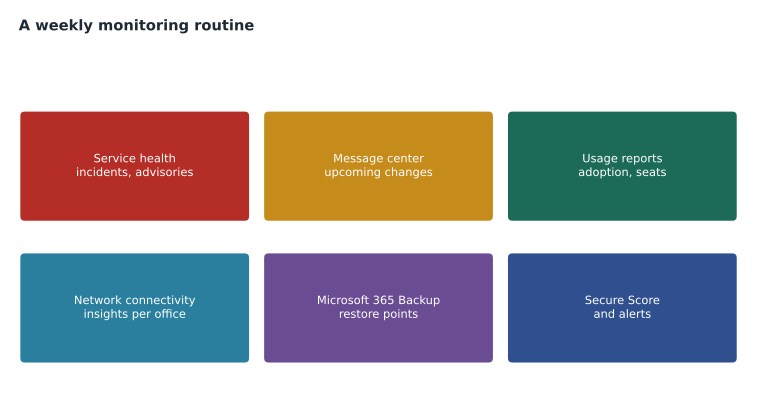
Monitoring works best as a habit rather than a reaction. Teodor's Monday routine took about an hour:
| Check | Tool | Looking for |
|---|---|---|
| Open incidents and advisories | Service health | Anything still affecting users |
| New announcements | Message center with Planner | Admin impact and retirements with dates |
| Usage and licences | Reports and the Licences page | Unused licences, shortages, mailboxes near limits |
| Directory sync and licensing errors | Admin center home page and Entra admin center | Failed objects or groups |
| Office network scores | Network connectivity | Locations with falling scores |
| Backup coverage | Microsoft 365 Backup | Unprotected new sites, failed policies |
| Security posture | Secure Score and alerts in Defender | New recommendations and high-severity alerts |
"The first month I did this, it took half a day," he told Ama when he handed part of the routine to her. "Now it takes an hour, and most weeks nothing is wrong. That is the point."
Common mistakes
MistakeRestarting local equipment or changing settings before checking Service health.
InsteadCheck Service health first; if Microsoft has an incident, communicate and wait for updates.
MistakeReading Message center only when something breaks.
InsteadTriage it weekly, sync it to Planner and turn admin-impact posts into dated tasks.
MistakeAssuming high availability means backups are unnecessary.
InsteadUse recycle bins, retention and Microsoft 365 Backup for protection against deletion and ransomware, and test restores.
MistakeRouting branch Microsoft 365 traffic through a distant VPN hub.
InsteadSend Microsoft 365 traffic to the internet locally, guided by network connectivity insights.
Summary and key terms
- Service health shows incidents and advisories with status and history; notifications can go to two email addresses or through the Graph API.
- Message center announces upcoming changes and retirements; triage it weekly, optionally synchronized with Planner.
- Usage reports and Adoption Score show how services are used; user names are concealed by default.
- Network connectivity insights score each office and suggest fixes such as local internet egress.
- Microsoft 365 Backup protects selected mailboxes, OneDrive accounts and sites with immutable restore points, billed pay-as-you-go through Azure.
- Incident
- A critical service issue with noticeable user impact posted in Service health.
- Advisory
- A service issue with limited scope or impact, often with a workaround.
- Message center
- The admin center feed of upcoming changes, new features and retirements.
- Adoption Score
- An organization-level measure of how people use Microsoft 365 and of technology experience.
- Network connectivity insights
- Admin center measurements and recommendations about each office's network path to Microsoft 365.
- Protection policy
- A Microsoft 365 Backup setting that chooses which mailboxes, OneDrive accounts and sites to back up.
Practice problems
Work each problem on paper first, then reveal the answer to check.
What is the difference between an incident and an advisory?
Show answer
An incident is a critical issue with noticeable user impact; an advisory has limited scope or impact.
Which role lets a trainer read Message center without admin rights?
Show answer
Message Center Reader.
How is Microsoft 365 Backup billed?
Show answer
Pay-as-you-go through an Azure subscription linked to the tenant.
Lesson quiz · 5 questions
Score 60% or more to complete this lesson.
Create a free account to save your progress, take quizzes and earn a certificate.