
MSBA-201 · Lesson 12 of 12 · 21 min
Case study: migrating a company into Microsoft 365
▶ Video coming soon A video version of this lesson is on the way.
In the spring of 2023, a year after Corvallin's own migration finished, the board announced that the agency was acquiring Pellwood Physiotherapy, a group of three clinics with 38 staff that provided physiotherapy to many of Corvallin's clients. Pellwood ran on Google Workspace: Gmail, Google Calendar, Google Drive and Google Meet, managed part-time by the practice manager. Its domain was pellwoodphysio.example. The deal would close in four weeks, and Ines wanted Pellwood's staff working in Corvallin's tenant within ten weeks of closing, without losing a single client email or treatment note.
This capstone pulls together every lesson in the course. It follows Teodor as he plans and runs the migration, and at each stage it asks you to make the decision before reading what he did. Treat it as a worked problem: the goal is to see how tenant planning, domains, settings, users, groups, roles, synchronization and the three workloads fit together in a real project.
Stage 1: Assess
Teodor started by collecting facts, not by opening the admin center. He met the Pellwood practice manager, Gwendolyn Aske, and listed what existed.
| Area | What Pellwood had | Notes |
|---|---|---|
| People | 38 staff: 26 physiotherapists and assistants, 12 front desk and admin | Most work on tablets in clinics; front desk on shared PCs |
| 38 Gmail mailboxes plus 4 shared addresses (bookings, billing and two clinics) | About 210 GB of mail in total | |
| Calendars | Individual calendars and 9 treatment room calendars | Rooms booked through calendar invitations |
| Files | About 160 GB in Google Drive, including shared drives per clinic | Treatment templates and scanned forms |
| Domain | pellwoodphysio.example, DNS at a registrar the practice manager controls | SPF and DKIM set up for Google |
| Identity | Google accounts only; no Active Directory | Passwords managed by each user |
| Other | A clinic booking system that sends confirmation email as bookings@pellwoodphysio.example | Sends through Google's mail servers |
Before reading on, decide: should Pellwood get its own tenant, or join Corvallin's? Lesson 1 gives the answer. One production tenant per organization is the default unless there is a legal or business reason for more. Pellwood would become part of Corvallin, its staff would share clients with Corvallin's nurses, and nobody wanted cross-tenant collaboration between colleagues. Teodor planned to bring Pellwood into Corvallin's existing tenant.
Stage 2: Plan
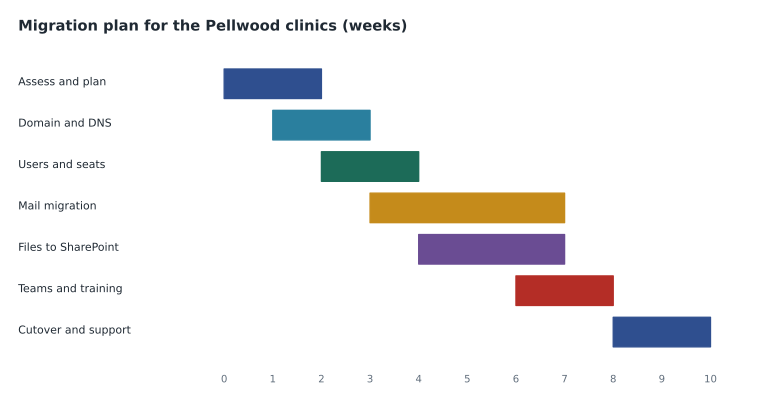
Teodor wrote a short migration plan using the same headings as the tenant plan in Lesson 1, with one decision log entry per choice.
| Decision | Choice | Lesson |
|---|---|---|
| Tenant | Join Corvallin's existing tenant | 1 |
| Domain | Add and verify pellwoodphysio.example; keep it as a secondary address for two years; new primary addresses on corvallincare.example | 2 |
| Identity | Cloud-only accounts, since Pellwood has no Active Directory | 4, 7 |
| Licences | 26 F3 for clinical staff on tablets, 12 E3 for front desk and admin | 1, 4 |
| Groups | A Pellwood Staff dynamic group, three clinic groups, licensing groups reused | 5 |
| Roles | Gwendolyn gets Helpdesk Administrator scoped to a Pellwood administrative unit | 6 |
| Google Workspace migration in the Exchange admin center | 8 | |
| Files | Migration Manager from Google Drive into clinic team sites and OneDrive | 9 |
| Collaboration | One team per clinic from the branch template, plus Pellwood joins the org-wide team | 10 |
| Monitoring and recovery | Watch Service health, message trace and usage reports after cutover; set retention and recycle bin expectations for the new sites | 11 |
One decision deserved more thought: addresses. Pellwood's clients knew pellwoodphysio.example, and its name would remain on clinic signs for a year. Teodor considered keeping pellwoodphysio.example as the primary address for Pellwood staff, but Ines wanted everyone to present as one organization, and having two primary domains would complicate sign-in and address books. The compromise: corvallincare.example became every Pellwood user's primary address and user name, and pellwoodphysio.example stayed as a secondary address on every mailbox, so mail to old addresses would keep arriving indefinitely.
Stage 3: Domain and DNS
The domain work followed Lesson 2 exactly. Teodor added pellwoodphysio.example in the Microsoft 365 admin center and gave Gwendolyn the TXT verification value, which she added at the registrar. The domain verified within the hour. He then deliberately left the MX record pointing at Google, because mail could not move until mailboxes existed and were ready, and planned the cutover for week 8.
SPF needed care. During the migration, mail for pellwoodphysio.example might be sent from both Google and Microsoft 365, and the booking system would keep sending through Google until it was reconfigured. Teodor and Gwendolyn updated the SPF record to include both providers for the transition period, and planned to remove Google's include after the booking system was moved to send through Microsoft 365 using an authenticated connection.
Transition SPF record for pellwoodphysio.example:
v=spf1 include:spf.protection.outlook.com include:_spf.google.com -all

After cutover and booking system change:
v=spf1 include:spf.protection.outlook.com -all
Stage 4: Users, licences, groups and roles
Because Pellwood had no Active Directory, accounts were cloud-only. Teodor built a CSV from Gwendolyn's staff list, including department, job title, office location and manager, and created the accounts with the Graph PowerShell script from Lesson 4. The department value Pellwood Clinical placed 26 people into the frontline licensing group automatically, and the other 12 joined the office licensing group, so licences arrived without a single manual assignment.
Worked problem
Checking licence capacity before the import
Before the import, Corvallin has 352 F3 licences with 343 assigned, and 120 E3 licences with 114 assigned. Pellwood needs 26 F3 and 12 E3. How many licences must be bought, and of which type?
Show solution
- Available F3: 352 - 343 = 9. Needed: 26. Shortfall: 26 - 9 = 17.
- Available E3: 120 - 114 = 6. Needed: 12. Shortfall: 12 - 6 = 6.
- Without buying more, 17 clinical staff and 6 admin staff would land in their groups with licensing errors.
Answer: Buy at least 17 F3 and 6 E3 licences before the import. Teodor ordered 20 F3 and 8 E3 to keep a few spares, and confirmed the new seats appeared on the Licences page before running the script.
Groups followed Lesson 5: a dynamic Pellwood Staff group based on the department attribute, a security group per clinic for site access, and distribution of announcements through the existing dynamic distribution groups once Pellwood staff's job titles matched Corvallin's conventions. For administration, Teodor created a Pellwood administrative unit with dynamic membership and assigned Gwendolyn the Helpdesk Administrator role scoped to it, so she could reset her colleagues' passwords during the transition without any power over the rest of the agency. The assignment was removed three months later, at the end of the project. Corvallin did not yet use Privileged Identity Management in 2023; today the same assignment would be an eligible one in PIM with an automatic end date, as Lesson 6 describes.
Each new user also needed multifactor authentication registered before cutover. The help desk ran registration sessions at each clinic in week 6, using the authenticator app on clinic tablets and phones, and Ama tracked completion in the authentication methods registration report in the Entra admin center.
Stage 5: Mail and calendars
For mail, calendars and contacts, Teodor used the Google Workspace migration method in the Exchange admin center. It requires some setup on both sides: a project and service account in Google Cloud with domain-wide delegation, so Microsoft can read the Google mailboxes, and a migration endpoint and batch in Exchange Online. Microsoft's documentation describes the steps, and an automated option helps create the Google side. Mail is routed between the two systems during migration using a subdomain for each side, so that new mail reaches the right place whichever system it arrives at.
Pellwood's 210 GB moved in three batches over two weeks: one clinic at a time, starting with the smallest. Shared Google addresses became Exchange shared mailboxes with Full Access and Send As granted to the right groups, as in Lesson 8, and the nine treatment rooms became room mailboxes with booking policies. The final batch was completed in week 8, the MX record was switched to Exchange Online at 6 p.m. on a Friday with its TTL already lowered, and Teodor watched message traces through the evening as mail started arriving in the new mailboxes.
Worked problem
Choosing a cutover time
The MX record's normal TTL is 3,600 seconds. Teodor lowered it to 300 seconds two days before cutover. If he changes MX at 6:00 p.m., by what time should almost all senders be using the new record? What would the answer have been without lowering the TTL?
Show solution
- With a 300-second TTL, caches expire within 5 minutes, so senders follow the new record by about 6:05 p.m.
- With the original 3,600-second TTL, caches could hold the old record for up to 1 hour, until about 7:00 p.m.
- During that window some mail would still reach Google, where the migration routing forwards it, but monitoring would be harder.
Answer: About 6:05 p.m. with the lowered TTL, against about 7:00 p.m. without it. Teodor raised the TTL back to an hour the following Monday.
Stage 6: Files
Google Drive content went to SharePoint and OneDrive with Migration Manager, which supports Google Drive as a source. Teodor connected Migration Manager to Pellwood's Google Workspace, ran a scan, and mapped each clinic's shared drive to the document library of that clinic's new team site, and each person's My Drive to their OneDrive. Google Docs, Sheets and Slides were converted to Word, Excel and PowerPoint files during migration. The scan flagged some files that could not be migrated as they were, such as Google Forms and very large files, and Gwendolyn decided what to do with each.
Sharing followed Lesson 9: the clinic sites allowed sharing only with existing guests, and an old Pellwood archive site was made read-only and excluded from search results. Teodor reviewed the sharing reports for the new sites after the migration and found that two Google folders shared with "anyone with the link" had arrived as content shared with everyone in the organization; he corrected both within the hour. In 2026, the data access governance reports described in Lesson 9 would make the same check faster.
Stage 7: Teams and training
Each clinic received a team from the branch template, with the clinic manager and Gwendolyn as owners, and Pellwood staff joined the org-wide team. Meeting policies already in place applied automatically through group assignments: clinical staff received the clinical meeting policy, and frontline staff the frontline app setup policy that pinned Shifts. Felix added the clinics as office locations in network connectivity, as in Lesson 11, and found one clinic sending all traffic through an old firewall that inspected Teams traffic; replacing the rule improved call quality before anyone complained.
Training was short and practical. Each clinic had one hour on Outlook and Teams, delivered by Corvallin's trainers, who had read every relevant Message center post in advance, plus a one-page "where things went" guide showing where each kind of Google file now lived.
Stage 8: Cutover, support and closure
Week 8 was cutover week; weeks 9 and 10 were support. Teodor kept a simple risk register through the whole project and reviewed it every Friday.
| Risk | Mitigation | Outcome |
|---|---|---|
| Booking confirmations fail SPF after cutover | Reconfigure the booking system to send through Microsoft 365 before removing Google from SPF | Done in week 9; no failures |
| Staff cannot sign in on day one | MFA registration sessions in week 6, help desk at each clinic on Monday | 3 resets, all handled by Gwendolyn |
| Licence shortage at import | Buy and confirm seats before running the script | No licensing errors |
| Overshared files arrive from Google | Sharing reports for the new sites after migration | 2 folders corrected |
| Old Google accounts stay active | Suspend Google accounts after 30 days, export a final archive, then cancel | Cancelled in week 14 |
Monitoring after cutover used the routine from Lesson 11: Service health for anything Microsoft-side, message trace for missing mail, usage reports to confirm all 38 people were active in Exchange and Teams within a week, and the clinic sites and shared mailboxes added to the retention settings Corvallin already used. When the agency adopted Microsoft 365 Backup in 2024, the Pellwood sites were in its first protection policy. The Google Workspace subscription was suspended after 30 days, a final export was archived according to Corvallin's retention policy, and the subscription was cancelled.
Reflection
At the project review, Ines asked Teodor what he would do differently. He had three answers, and they make a good checklist for any migration into Microsoft 365. First, check licence capacity and DNS ownership on day one, because both depend on other people and take time. Second, find every system that sends mail as the organization, such as booking systems, scanners and marketing tools, before touching SPF or MX. Third, run oversharing checks after every file migration, because sharing settings never translate perfectly between platforms. In November 2026, when Corvallin acquired Kittiwake Physiotherapy, an 18-person clinic with its own Microsoft 365 Business Premium tenant, those three answers became the first page of the plan for merging that tenant into Corvallin's in 2027.
"And the thing that went best?" Ines asked.
"The decision log," Teodor said. "Every question anyone asked during the project, the answer was already written down."
Common mistakes
MistakeCreating a separate tenant for an acquired company that will merge into the organization.
InsteadBring it into the existing tenant unless there is a legal or business reason not to.
MistakeSwitching MX before mailboxes and migration routing are ready.
InsteadVerify the domain early, migrate in batches, and change MX at a planned cutover with a lowered TTL.
MistakeRemoving the old provider from SPF while a system still sends through it.
InsteadMove every sending system first, then tighten SPF.
MistakeTrusting that file sharing permissions migrated correctly.
InsteadReview sharing reports, or data access governance reports where available, after migration and fix broad sharing.
Summary and key terms
- Assess first: people, mail, calendars, files, domains, identity and every system that sends mail.
- Plan with a decision log that ties each choice back to tenant, domain, identity, licensing, group, role and workload principles.
- Verify the domain early, keep old addresses as secondary addresses, and manage SPF carefully during coexistence.
- Create cloud-only users with attributes that drive groups and licences, scope helper roles with administrative units and PIM, and register MFA before cutover.
- Move mail with the Google Workspace migration and files with Migration Manager, then monitor, back up, check for oversharing and close the old service.
- Google Workspace migration
- An Exchange Online migration method that moves Gmail, calendars and contacts into Exchange.
- Migration Manager
- A SharePoint admin center tool that moves content from file shares and other cloud storage into Microsoft 365.
- Cutover
- The moment users and mail switch from the old system to the new one.
- Coexistence
- The period when old and new systems run side by side during a migration.
- Risk register
- A list of project risks with mitigations and outcomes, reviewed regularly.
Practice problems
Work each problem on paper first, then reveal the answer to check.
Why did Teodor keep pellwoodphysio.example as a secondary address on every mailbox?
Show answer
So mail sent to old Pellwood addresses would keep arriving after the switch to corvallincare.example primary addresses.
What must happen before Google's include is removed from Pellwood's SPF record?
Show answer
Every system that sends as pellwoodphysio.example, including the booking system, must send through Microsoft 365.
Name two checks to run after a file migration.
Show answer
Any two of: a sharing or data access governance report for oversharing, read-only and search settings for archive sites, retention or backup coverage for new sites, usage reports showing activity.
Lesson quiz · 5 questions
Score 60% or more to complete this lesson.
Create a free account to save your progress, take quizzes and earn a certificate.