
MSBA-201 · Lesson 6 of 12 · 20 min
Administrative roles and role-based access
▶ Video coming soon A video version of this lesson is on the way.
The 2022 tenant plan said Global Administrators would be kept to a handful. By September 2026, seven accounts at Corvallin held the role, including the disabled account of a former IT manager. Nobody had planned it that way. Over four years, each person had needed to do something once, and the quickest way to let them was to grant the most powerful role in the tenant. When a phishing incident that autumn forced a full security review, described in the MSBA-101 course, Ines asked a pointed question: "If any one of those seven accounts is phished, what can the attacker do?"
The answer was "everything": read every mailbox, delete every site, add their own accounts, change sign-in rules and lock the agency out of its own tenant. This lesson explains how Microsoft 365 avoids that risk through role-based access control: built-in administrator roles with narrow permissions, scoping with administrative units, time-limited activation with Privileged Identity Management, and a few habits that keep privileged access small and visible.
How Microsoft 365 roles work
An administrator role is a named set of permissions. Assigning a role to a user, or to a group that is allowed to hold roles, gives the user those permissions. Most Microsoft 365 administrator roles are Microsoft Entra roles, defined in the directory and honoured by the Microsoft 365 admin center and the service admin centers. A Microsoft Entra role such as Exchange Administrator lets its holder manage Exchange Online, including in the Exchange admin center. Some services also have their own internal role systems, such as Exchange Online role groups, Purview role groups and Intune roles, which allow finer control inside that service.
Roles are assigned in the Microsoft 365 admin center under Roles, in the Microsoft Entra admin center under Roles and administrators, or with Microsoft Graph PowerShell. Each role's description lists exactly what it allows, and the Entra admin center can show who holds a role, how they received it and when.
The roles that matter most
Microsoft Entra ID has dozens of built-in roles. A Microsoft 365 administrator does not need to memorize them, but should know the common ones and what makes them dangerous or safe.
| Role | What it allows | Who at Corvallin |
|---|---|---|
| Global Administrator | Everything in the tenant, including assigning any role | Two emergency access accounts; Teodor and Ines eligible only |
| Privileged Role Administrator | Manage role assignments and Privileged Identity Management | Nobody day to day; Global Administrators cover it when activated |
| Security Administrator | Manage security settings in Defender and Entra | Teodor |
| Exchange Administrator | Manage Exchange Online | Teodor, eligible for 4 hours at a time |
| SharePoint Administrator | Manage SharePoint and OneDrive | Teodor, eligible for 4 hours |
| Teams Administrator | Manage Teams settings and policies | Felix, eligible for 4 hours |
| User Administrator | Create and manage users and groups, reset passwords for non-admins | Teodor, eligible for 4 hours |
| Helpdesk Administrator | Reset passwords and invalidate sessions for non-admins and helpdesk peers | Ama, eligible for 8 hours, and help desk staff |
| License Administrator | Assign and remove licences, edit usage location | Finance systems analyst |
| Global Reader | Read everything a Global Administrator can see, change nothing | Ines, permanently; auditors when needed |
| Reports Reader | View usage reports and Adoption Score | The operations director |
| Message Center Reader | Read Message center posts | Branch IT champions |
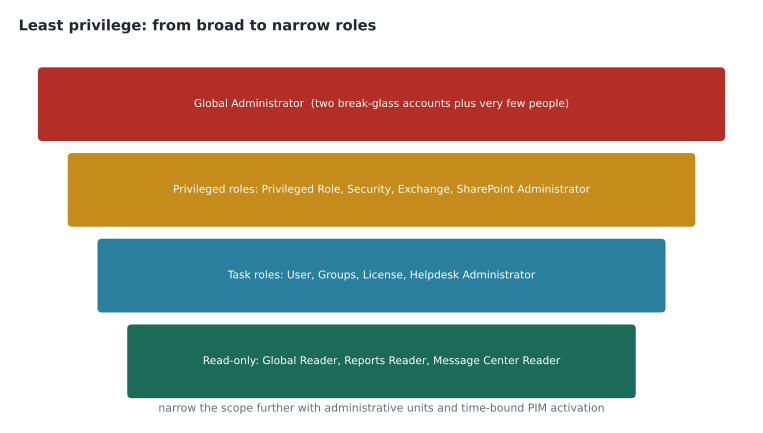
The pattern is clear. The broad roles at the top are held by very few people and, as the next sections explain, are activated only when needed. Most daily work is done with task roles such as User Administrator, Helpdesk Administrator and License Administrator, and people who only need to look use read-only roles such as Global Reader and Reports Reader.
Least privilege in practice
Least privilege means giving each person the smallest set of permissions that lets them do their job, for the shortest time necessary. It limits the damage a compromised account, a mistake or a malicious insider can do. Microsoft's own guidance is to keep Global Administrators to fewer than five, to prefer the least privileged role that can perform a task, and to use separate administrator accounts from everyday accounts so that a phishing email opened in Outlook cannot be used with admin rights.
Teodor applied this in three steps. First, he listed every admin task anyone at Corvallin actually performed, from resetting passwords to managing meeting policies. Second, he matched each task to the least privileged built-in role that allowed it, using Microsoft's documentation of least privileged roles by task. Third, he removed the Global Administrator role from everyone except the two emergency accounts, made himself and Ines eligible rather than permanent holders, and gave each person the narrower roles their tasks needed. Seven Global Administrators became two named, eligible people plus the emergency accounts.
Worked problem
Picking the least privileged role
Ama's help desk staff need to reset passwords for frontline users, unblock users who are stuck, and read service health. They must not create users, change licences or reset passwords for administrators. Which role or roles should they hold?
Show solution
- Password resets for non-administrators: Helpdesk Administrator allows this; Password Administrator is even narrower but covers only passwords.
- Invalidating sessions for stuck users: Helpdesk Administrator allows it.
- Reading service health: Service Support Administrator or Message Center Reader roles cover health and messages; Helpdesk Administrator can also view service health in the admin center.
- Creating users and changing licences: excluded, so User Administrator and License Administrator are not appropriate.
Answer: Helpdesk Administrator meets every need without the excluded powers. Teodor later scoped it to an administrative unit for frontline staff so the help desk could not reset passwords for office managers either.
Separate admin accounts
Corvallin's administrators each received a second, cloud-only account used only for administration, named in a recognizable pattern such as adm-teodor@corvallincare.onmicrosoft.com. The admin account had no mailbox and no licence beyond what administration required, and it was protected by phishing-resistant multifactor authentication. Daily email, browsing and Teams happened in the ordinary account, which held no admin roles at all. Using the onmicrosoft.com domain for admin accounts also meant they would work even if something went wrong with the custom domain or with synchronization from Active Directory.
Microsoft enforces multifactor authentication for sign-in to its admin portals, including the Microsoft 365 admin center, the Entra admin center and the Azure portal. Administrators who have not set up a strong method will be required to, so planning phishing-resistant methods such as FIDO2 security keys, passkeys or Windows Hello for Business for admin accounts in advance avoids surprises.
Administrative units
Some roles are too broad even when they are the right type. A help desk technician at the North branch should reset passwords for North branch staff, not for everyone in the agency. Administrative units solve this. An administrative unit is a container in Microsoft Entra ID that holds users, groups or devices, and roles can be assigned with an administrative unit as their scope. A Helpdesk Administrator scoped to the North Branch unit can reset passwords only for users in that unit.
Administrative units can have assigned membership or dynamic membership based on rules, just like dynamic groups. Corvallin created five units, one per office plus one for frontline staff, filled dynamically from the office location and department attributes. Assigning roles scoped to administrative units requires Microsoft Entra ID P1 for the administrators involved. A newer option, restricted management administrative units, protects especially sensitive objects, such as the executive team's accounts, so that only administrators assigned specifically to that unit can change them, even if they hold tenant-wide roles.
Connect-MgGraph -Scopes "AdministrativeUnit.ReadWrite.All", "RoleManagement.ReadWrite.Directory"
$au = New-MgDirectoryAdministrativeUnit -DisplayName "North Branch" `
    -Description "Users based at the North branch office"
# Scope the Helpdesk Administrator role to this unit for one technician
$role = Get-MgDirectoryRole -Filter "displayName eq 'Helpdesk Administrator'"
$tech = Get-MgUser -UserId "adm-north.tech@corvallincare.onmicrosoft.com"
New-MgDirectoryAdministrativeUnitScopedRoleMember -AdministrativeUnitId $au.Id `
    -RoleId $role.Id -RoleMemberInfo @{ Id = $tech.Id }
Privileged Identity Management
Even with the right roles, a permanently assigned privileged role is a standing risk: the account is powerful every minute of every day, even though its holder uses the power for perhaps an hour a week. Microsoft Entra Privileged Identity Management (PIM) replaces permanent assignments with eligible ones. An eligible administrator holds no permissions until they activate the role, for a limited time such as two hours, often after providing a reason, completing multifactor authentication and, for the most sensitive roles, receiving approval from someone else. When the time runs out, the permissions disappear.
PIM also keeps a full history of who activated which role, when and why, can send alerts when roles are activated, and supports access reviews, where role holders or their managers confirm periodically that the access is still needed. PIM requires Microsoft Entra ID P2 licences, included in Microsoft 365 E5 or available as an add-on, for the administrators who use it.
| Assignment type | Permissions | Best for |
|---|---|---|
| Active, permanent | Always on | Emergency access accounts only |
| Eligible | On only after activation, for a set time | Most privileged roles held by people |
| Active, time-bound | On between a start and end date | Consultants or a project with a fixed end |
PIM went live at Corvallin in autumn 2026. Teodor became an eligible Global Administrator whose activation needs a reason, multifactor authentication and Ines's approval; for everyday work he activates narrower roles, such as Exchange, SharePoint or User Administrator, for up to four hours. Ines is also eligible for Global Administrator but day to day holds only Global Reader, permanently, so she can see everything without being able to change it. Ama activates Helpdesk Administrator and an Intune role for up to eight hours on her working days, and Felix activates Teams Administrator for up to four. Most days, nobody activates Global Administrator at all. A contractor helping to plan the merger with Kittiwake Physiotherapy, the clinic Corvallin acquired in November 2026, received a time-bound User Administrator assignment that ends automatically on March 31, 2027. "That will be the first time a contractor's access ends on the day the contract does," Ines said.
Role-assignable groups
Roles can be assigned to groups that are created as role-assignable, so that adding a person to the group gives them the role. This is convenient, but it also means that whoever controls the group's membership controls the role. Microsoft therefore protects role-assignable groups: only Privileged Role Administrators and Global Administrators can manage their membership, and they cannot be dynamic. Combined with PIM, a role-assignable group can be made eligible for a role, so its members still have to activate it.
Roles inside the services
Some tasks need permissions that Entra roles do not cover finely enough. Exchange Online uses role groups, such as Organization Management, Recipient Management and Help Desk, built from management roles. Purview uses its own role groups, such as eDiscovery Manager and Compliance Data Administrator. Intune uses Intune roles with scope tags. The pattern is the same everywhere: pick the narrowest built-in role, create a custom one only if necessary, and assign it to as few people as possible. When the Exchange admin center or Purview portal says a user lacks permissions even though they hold a Microsoft Entra role, the service-specific role groups are the place to look.
Reviewing and monitoring privileged access
Roles drift. People change jobs, projects end and temporary assignments become permanent by neglect. Teodor scheduled a quarterly review: export every role assignment, check each against the task list, remove anything unneeded, and confirm the emergency accounts still worked. He also set alerts in the audit log for any change to Global Administrator assignments and any sign-in by an emergency account. The review that started all this removed eleven role assignments, including the Global Administrator role still held by the former IT manager's disabled account, which would have become active again if anyone had re-enabled it.
Connect-MgGraph -Scopes "RoleManagement.Read.Directory", "User.Read.All"
Get-MgRoleManagementDirectoryRoleAssignment -All -ExpandProperty Principal |
    Select-Object @{ n = "Role"; e = { (Get-MgRoleManagementDirectoryRoleDefinition -UnifiedRoleDefinitionId $_.RoleDefinitionId).DisplayName } },
                  @{ n = "Assignee"; e = { $_.Principal.AdditionalProperties.userPrincipalName } },
                  DirectoryScopeId
By the end of the review, Ines's question had a different answer. If any one of the everyday accounts were phished, the attacker would find no admin roles on it at all. If an admin account were compromised, it would hold only a narrow role, or an eligible role that needed another person's approval to activate.
Common role questions on the job and on the exam
Several role questions come up again and again. Can a User Administrator reset a Global Administrator's password? No: password reset rights for administrators are restricted so that a lower role cannot take over a higher one, and Microsoft documents which roles can reset which. Can someone manage Exchange without a Microsoft Entra role? Yes, through Exchange role groups, though Microsoft recommends the Entra roles for most organizations because they are visible in one place. Is the Global Reader role safe to give widely? It cannot change anything, but it can read sensitive configuration, so it should still be limited to people who need it.
Another frequent question is how to give an outside partner, such as a reseller in the Cloud Solution Provider program, the access it needs. Microsoft provides granular delegated admin privileges (GDAP), which let a partner hold specific roles in the customer's tenant for a limited period, instead of the broad, permanent access of older partner relationships. Ines asked Corvallin's reseller to switch to GDAP with only the roles it needed for licensing support, ending on the contract renewal date.
Finally, roles should be tested before they are trusted. After assigning a narrower role, Teodor asked each person to perform their usual tasks while he watched, and adjusted the assignment if something failed. That avoided the classic outcome of least privilege done badly, in which frustrated staff ask for Global Administrator back because the narrow role "doesn't work".
Common mistakes
MistakeGranting Global Administrator to anyone who needs to do one admin task.
InsteadFind the least privileged built-in role for the task and assign that instead.
MistakeDoing admin work from the same account used for email and browsing.
InsteadUse a separate cloud-only admin account with phishing-resistant multifactor authentication.
MistakeLeaving privileged roles permanently active.
InsteadMake them eligible in PIM, with time limits, reasons and approval for the most powerful roles.
MistakeGiving tenant-wide help desk roles when staff support only one branch.
InsteadScope roles with administrative units.
Summary and key terms
- Microsoft 365 uses role-based access control; most admin roles are Microsoft Entra roles, and some services add their own role groups.
- Keep Global Administrators to fewer than five, including two emergency access accounts, and use the least privileged role for each task.
- Use separate cloud-only admin accounts with phishing-resistant multifactor authentication.
- Administrative units scope roles to a subset of users, groups or devices.
- Privileged Identity Management makes roles eligible, time-limited and auditable; review all assignments regularly.
- Role-based access control
- Granting permissions through named roles rather than to individuals directly.
- Least privilege
- Giving each person only the permissions they need, for as long as they need them.
- Administrative unit
- A Microsoft Entra container used to limit the scope of role assignments.
- Privileged Identity Management (PIM)
- A Microsoft Entra feature for eligible, time-limited, approved and audited role activation.
- Eligible assignment
- A role that grants no permissions until the holder activates it.
- Role-assignable group
- A protected group that can be assigned Microsoft Entra roles.
Practice problems
Work each problem on paper first, then reveal the answer to check.
Which role lets auditors see all settings without being able to change them?
Show answer
Global Reader.
What licence do administrators need to use Privileged Identity Management?
Show answer
Microsoft Entra ID P2, included in Microsoft 365 E5 or as an add-on.
How would you let a technician reset passwords only for users in one office?
Show answer
Assign Helpdesk Administrator (or Password Administrator) scoped to an administrative unit containing that office's users.
Lesson quiz · 5 questions
Score 60% or more to complete this lesson.
Create a free account to save your progress, take quizzes and earn a certificate.