
MSAZ-349 · Lesson 9 of 12 · 21 min
Common distractors
▶ Video coming soon A video version of this lesson is on the way.
A distractor is a wrong option written to look right. Good distractors are not random: they are the answers a candidate with partial knowledge is most likely to choose. That makes them predictable, and a candidate who knows the patterns can often remove two options before deciding between the last two. On the evening of Saturday, November 14, 2026, right after the diagnostic, Ama sorted the 21 items she missed by the reason she chose the wrong answer. Nadia then grouped the reasons into the patterns this lesson describes, because the same patterns appear in SC-200 items year after year even as the products change.
Ama's sort gave six groups: five near-synonyms, four answers with too much privilege or the wrong scope, four qualifier misreadings (described in lesson 2), three answers from the wrong product, three retired or replaced features, and two KQL misreadings. None of the 21 came from knowing nothing at all. Every miss had a moment where the right answer was in reach and a well-built distractor pulled her away.
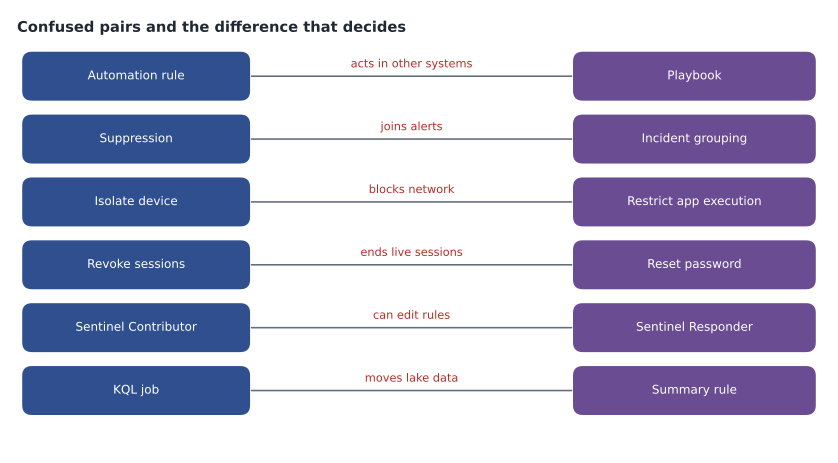
Near-synonyms
The most common SC-200 distractor is a feature that does something similar to the right answer but not quite the same. The exam writer picks two features that a candidate might mix up and makes the scenario depend on the difference. Isolating a device and restricting app execution both limit a device, but only isolation cuts network traffic. Suppression and incident grouping both reduce incidents, but suppression stops a rule running for a time while grouping joins alerts. Revoking sessions and resetting a password both affect a compromised account, but only revoking ends sessions already established. KQL jobs and summary rules both write to tables, but a KQL job brings lake data into analytics while a summary rule stores aggregates.
The defence is a list of pairs with the deciding difference written in one line each, which Ama keeps at the front of her review deck. When an item's options include both halves of a pair, she stops and asks which difference the scenario turns on. The scenario always contains a word that decides it: 'network', 'running again', 'current session', 'old data'.
| Pair | Deciding difference |
|---|---|
| Automation rule or playbook | Playbooks act in other systems; automation rules change incidents and call playbooks |
| Suppression or incident grouping | Suppression pauses the rule; grouping joins alerts into one incident |
| Isolate device or restrict app execution | Isolation blocks network traffic; restriction blocks unsigned programs |
| Revoke sessions or reset password | Only revoking ends sessions already established |
| KQL job or summary rule | A KQL job moves lake data into analytics; a summary rule stores aggregates |
| Scheduled rule or NRT rule | NRT runs every minute with some query limits; scheduled runs from every 5 minutes |
| Threat analytics or threat intelligence indicators | Analytics is reports and exposure; indicators are matchable values |
Too much privilege, too wide a scope
Microsoft's exams consistently prefer the least privilege and the narrowest scope that meet the requirement. A distractor often offers an answer that works but grants more than needed: Sentinel Contributor where Responder is enough, Security Administrator where Security Reader is enough, a role on the subscription where a role on one resource group would do, or a tenant-wide setting where a device group setting would do. The words that signal this pattern are 'least privilege', 'minimize', 'only' and 'must not be able to'.
The defence is to read each option as a question: what else does this let the person or the setting do? If the answer includes something the scenario says should not happen, or something the scenario does not need, the option is probably a distractor. Ama's four misses of this kind all chose a role that worked. Each time, a smaller role worked too.
The right idea in the wrong product
The Microsoft security stack has several products that do similar things in different places, and exam items use that. A question about blocking a malicious file across devices might offer a Purview data loss prevention policy, a Defender for Cloud Apps file policy and a Defender for Endpoint indicator; only the last blocks execution on devices. A question about investigating what a user read in a mailbox might offer advanced hunting's EmailEvents, which records delivery, and Purview Audit's MailItemsAccessed, which records reading. Both are real; only one answers the question.
The defence is to name the product before reading the options. Ama's habit is to write the product name in the margin of her scratch sheet, as in 'Defender for Endpoint, indicators' or 'Purview Audit', after reading the scenario and before looking at the choices. If her answer is not among the options, she has misread the scenario; if it is, the other products' options are distractors.
Retired and renamed features
Security products change quickly, and exam items written for a current outline will use current features. Distractors sometimes name a retired feature that once did the job. The examples Ama keeps are the Log Analytics agent, retired on August 31, 2024 in favour of the Azure Monitor Agent; the ThreatIntelligenceIndicator table, replaced by ThreatIntelIndicators and ThreatIntelObjects; Microsoft incident creation rules, which do not apply in the Defender portal; and managing Sentinel in the Azure portal, which ends on March 31, 2027. When an option names one of these, it is almost always wrong for a current scenario.
Renamed features are subtler. Azure Active Directory is Microsoft Entra ID, Microsoft 365 Defender is Defender XDR, and some advanced hunting tables have changed names over time. The exam uses current names, so a candidate who learned the old names needs to recognize the new ones; a distractor will not usually use an old name for a feature that still exists.
First, next and best
Some distractors are correct actions in the wrong order. A question asking what to do first in an active compromise wants containment, not a long-term fix such as a Conditional Access policy. A question asking what to do next after an alert has been triaged wants scoping, not closing. A question asking for the best long-term solution wants the fix, not the immediate containment. All of the options may be things a good analyst would eventually do, and the qualifier word decides which one the item wants.
KQL misreadings
Lesson 8 covered reading queries, and the distractors in KQL items follow their own patterns. The commonest is valid syntax that does the wrong thing: take where top is needed, count where dcount is needed, an inner join where leftanti is needed, or contains where the requirement stresses efficiency. The second is a correct query over the wrong table, such as EmailEvents for a question about clicks, which belong in UrlClickEvents. The third is a time window that looks right but is not: ago(30d) in a Defender table is fine, ago(90d) in the same table returns no more than 30 days, and a datetime range written in local time misses the events it was meant to catch.
Ama's two KQL misses on the diagnostic were both of the first kind. In one, she chose a query with summarize max(Timestamp) by DeviceId when the item asked for the full latest record per device, which needs arg_max(Timestamp, *). In the other, she chose has_any where the item required every term to appear, which needs has_all. Both errors came from reading the function names quickly rather than asking what each returned.
Over-selecting in multiple-answer items
Multiple-answer items have their own distractor: an option that is true in general but not part of the solution to this scenario. An item asking which two actions meet a requirement might list three true statements about the product, and the candidate who chooses the three true ones gets the item wrong. The instruction line, such as 'Each correct answer presents part of the solution. Choose two', tells the candidate how many to choose, and Ama treats it as a requirement like any other. If three options seem right, one of them fails a requirement she has not yet checked.
A related pattern is the option that is part of a good solution but not needed. If the requirement is to send high severity incidents to a Teams channel, an option to create a new analytics rule is not wrong in itself, but nothing in the requirement asks for it. Choosing it would mean doing extra work, and exam items that say 'minimize administrative effort' count that against it.
Myths about guessing
Candidates pass around rules of thumb for guessing, and most of them do not survive a careful look at Microsoft items. The longest answer is not more often correct; Microsoft's item writers are trained to keep options of similar length. Options with absolute words such as 'always' or 'never' are not automatically wrong; some product behaviours really are absolute, such as an automation rule never creating an incident from raw data. And the answer is not more often in one position than another; delivery systems usually shuffle options.
What does survive is the method this lesson describes: name the requirement, name the product, remove options that fail least privilege or scope, check the pairs, and let the qualifier decide. When a guess is still needed after that, it is a guess between two options rather than four, which doubles the chance of being right.
Writing distractors to learn them
Nadia's most effective exercise for Ama was writing items rather than answering them. Each Saturday from March to May 2027, Ama will write two items for an area she has studied that week, each with one correct answer and three distractors drawn from the patterns: one near-synonym, one with too much privilege or the wrong product, and one in the wrong order or using a retired feature. Writing a good distractor forces her to know exactly why it is wrong, which is the knowledge the exam tests. Renata, preparing for SC-300, answers Ama's items and Ama answers hers, and each of them records which distractors worked.
| Week | Area | Distractor patterns to use |
|---|---|---|
| March 6 and 13 | Roles and retention | Too much privilege; wrong tier |
| March 20 and 27 | Connectors and data collection | Retired agent; wrong table |
| April 3 and 10 | Device groups and ASR | Wrong scope; near-synonym actions |
| April 17 and 24 | Analytics rules and automation | Suppression and grouping; automation rule and playbook |
| May 1 and 8 | Incident response | Reset and revoke; wrong product |
| May 15 and 22 | Hunting | KQL job and summary rule; take and top |
The exercise also changes how she reads items on the day. Once a candidate has written a few dozen distractors, a well-built wrong answer looks less like a trap and more like a familiar shape, and recognizing the shape is half of removing it.
A second elimination, by product
Nadia gave Ama one more practice item to try the product-first habit. 'A user reports that a third-party app she approved last week is sending messages from her mailbox. You must stop the app from accessing any user's data while you investigate, with the least effort.' The options were a Purview data loss prevention policy for outgoing mail, a Defender for Endpoint indicator for the app's file hash, an Entra ID password reset for the user, and revoking the app's permissions and disabling it in Defender for Cloud Apps. Before reading the options, Ama wrote 'Cloud Apps or Entra ID, app governance' in the margin, because the access is an OAuth grant to a cloud app, not a program on a device.
With that note, the elimination took seconds. The data loss prevention policy acts on content, not on the app's access, and would leave the app able to read mail. The file indicator acts on devices, and the app runs in the cloud. The password reset affects one user and does not remove a consent that the app holds as a token grant. Only the Cloud Apps action stops the app for every user at once. The distractors each named a real product with a real security action, and each failed because it was the wrong product for where the access lived. Ama added the item to her deck under 'wrong product', next to the three diagnostic misses of the same kind.
Worked problem
Eliminating options
An item says: 'An analyst must be able to assign incidents, change their status and run an existing playbook on an incident. The solution must use the principle of least privilege. Which two roles should you assign?' The options are Microsoft Sentinel Contributor, Microsoft Sentinel Responder, Microsoft Sentinel Playbook Operator, Logic App Contributor and Owner on the resource group.
Show solution
- Name the needs: manage incidents; run an existing playbook. Nothing about creating rules or editing playbooks.
- Owner grants far more than needed: remove it.
- Sentinel Contributor manages incidents but also edits content; Responder manages incidents with less privilege: keep Responder, remove Contributor.
- Logic App Contributor edits playbooks; running an existing one needs only Playbook Operator: keep Playbook Operator, remove Logic App Contributor.
- Two options remain, which matches 'choose two'.
Answer: Microsoft Sentinel Responder and Microsoft Sentinel Playbook Operator.
Common mistakes
MistakeDistractors are random wrong answers.
InsteadThey are built from likely confusions, which makes them predictable.
MistakeIf an option works, it is correct.
InsteadThe best answer also meets least privilege, narrowest scope and the qualifier in the question.
MistakeA real feature in the options must be relevant.
InsteadReal features from the wrong product are common distractors.
MistakeOld feature names may appear as correct answers.
InsteadCurrent items use current features and names; retired features are usually distractors.
MistakeEvery sensible action is right in any order.
InsteadFirst, next and best ask for different actions.
Summary and key terms
- Distractors follow patterns: near-synonyms, excess privilege or scope, wrong product, retired features, wrong order and KQL misreadings.
- Keep a list of confused pairs with the deciding difference for each.
- Prefer the least privilege and narrowest scope that meet every requirement.
- Name the product before reading the options.
- Treat retired or replaced features as distractors in current scenarios.
- Let the qualifier decide between actions that are all eventually right.
- Distractor
- A wrong option written to attract candidates with partial knowledge.
- Near-synonym
- A feature similar to the right answer that differs in the detail the scenario depends on.
- Least privilege
- Granting only the permissions needed for a task.
- Qualifier
- A word in a question, such as first or minimize, that decides between otherwise correct answers.
- Elimination
- Removing options that fail a requirement before choosing among the rest.
Practice problems
Work each problem on paper first, then reveal the answer to check.
What is the deciding difference between suppression and incident grouping?
Show answer
Suppression pauses the rule; grouping joins alerts into one incident.
Which words signal a least-privilege distractor pattern?
Show answer
Least privilege, minimize, only and must not be able to.
Why does Ama write the product name before reading options?
Show answer
To spot options from the wrong product and catch misreadings.
Which agent was retired on August 31, 2024?
Show answer
The Log Analytics agent, replaced by the Azure Monitor Agent.
What does a 'first' question in an active compromise usually want?
Show answer
Containment.
Lesson quiz · 5 questions
Score 60% or more to complete this lesson.
Create a free account to save your progress, take quizzes and earn a certificate.