
MSAZ-349 · Lesson 6 of 12 · 22 min
Review: managing incident response
▶ Video coming soon A video version of this lesson is on the way.
The second skill group, responding to security incidents, carries 35 to 40 parts in 100 of the exam. It is the group Ama practises most at work, and her diagnostic result in it was her best: 15 of 21. Nadia warned her that familiarity can be a trap here. 'On shift you do what our playbooks say. The exam asks what Microsoft's products can do, and sometimes the right answer is a tool we have not needed yet.' This lesson reviews the three areas of the group: responding in Defender XDR across all the Defender products and Purview, responding on devices with Defender for Endpoint, and investigating Microsoft 365 activity.
The review uses incident 4196 from November 12, 2026 as its thread: the compromise of a contractor's account at Brightfield Merchandising, which ran from a replayed session at 09:57 to disabled access at 10:44 and resolution as a true positive the next afternoon. Each part of the lesson asks what the exam would want an analyst to do at that point, and where the exam's answer and Harrow & Finch's practice differ.
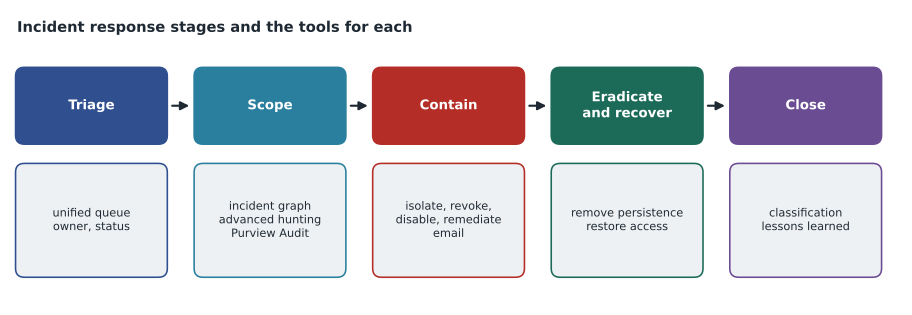
The unified incident queue
In the Defender portal, alerts from Defender for Endpoint, Office 365, Identity, Cloud Apps, Defender for Cloud, Purview data loss prevention and insider risk, Entra ID Protection and Sentinel analytics rules all land in one queue, where Defender's correlation groups related alerts into incidents. An incident has one owner, a severity, a status of Active, In progress or Resolved, and on resolution a classification: True positive, Informational expected activity, or False positive, each with a determination such as phishing or compromised account. The activity log records every change, and comments hold notes for the team.
Exam questions on the queue tend to test what triage should change and what it should not. Assigning an owner and moving the status to In progress shows the incident is being worked. Raising severity is right when the scope turns out larger than the alert suggested. Merging or linking incidents is right when correlation missed a connection. Closing a true positive before containment is complete is never right, whatever the wording. In 4196, three alerts arrived within ten minutes: Sentinel's new-country-then-MFA-change rule, Entra ID Protection's atypical travel detection and Defender for Office 365's suspicious inbox rule alert. Defender joined them into one incident because they shared the user entity.
Responding across the Defender products
The study guide lists responses for each product, and the exam often asks which product holds the action needed. For email, Defender for Office 365 lets analysts find messages with Threat Explorer or advanced hunting and remediate them by moving them to junk, deleting them softly or hard, with actions tracked in the Action center. For identities, Entra ID lets analysts revoke sessions, require a password reset, and confirm a user compromised in Identity Protection, which raises the user's risk so risk-based Conditional Access acts. Defender for Identity can disable the account in on-premises Active Directory when the user is synchronized from there. Defender for Cloud Apps can suspend a user, require sign-in again or revoke an app's OAuth permissions. Defender for Cloud handles workload alerts on servers, storage, databases and containers, with recommendations to fix the weakness that allowed the activity. Purview's data loss prevention and insider risk alerts appear in the queue with links to the policy match and the content involved.
| Need | Where the action is | Note |
|---|---|---|
| Remove a phishing message from every mailbox | Defender for Office 365, Threat Explorer or advanced hunting remediation | Tracked in the Action center |
| End an attacker's current sessions | Entra ID, revoke sessions | Tokens may stay valid until they expire unless continuous access evaluation applies |
| Make risk-based policy act on a user | Entra ID Protection, confirm user compromised | Raises user risk to high |
| Disable a synchronized account in Active Directory | Defender for Identity action | Also available through attack disruption |
| Stop a risky third-party app reading mail | Defender for Cloud Apps, revoke app or OAuth permission | Review consent settings afterwards |
| Investigate an alert on a storage account | Defender for Cloud | Follow the linked recommendation |
In 4196, Nadia's containment at 10:44 combined three of these: disabling the account in Entra ID, revoking its sessions and removing the inbox rule that moved invoice messages to the RSS Feeds folder. An exam version of the same scenario might ask which single action stops the attacker's current access most quickly. The answer is revoking sessions together with disabling sign-in, because a password reset alone does not end a replayed session that is already authenticated. The attacker's eleven failed attempts between 10:45 and 11:20 showed that the containment had worked.
Security Copilot and agents
The study guide asks candidates to investigate and remediate threats using Security Copilot and its agents in the Defender portal. Copilot can summarize an incident, explain a script or command line, generate a KQL query from plain language and draft an incident report. Agents, such as the phishing triage agent, take on a defined task, report their reasoning and leave decisions to analysts where configured. Organizations with Microsoft 365 E5 receive an allowance of security compute units each month, 400 for every 1,000 paid licences; Harrow & Finch's 320 E5 licences give it 128 units.
Nadia scored Copilot's outputs during 4196: five of nine were usable without change. It missed the session reuse and the file downloads, wrote one query with a time zone error, and suggested a password reset that the team did not need to follow. The exam lesson is the same as the work lesson. Copilot helps an analyst move faster, but its summaries and queries are checked against the evidence before anyone acts on them.
Complex attacks and case management
The study guide also mentions investigating complex attacks and managing cases. A complex attack spans several products and incidents: a phishing message, a compromised account, a device used for lateral movement (MITRE ATT&CK tactic TA0008) and data moved out. The incident graph and the attack story show how the entities connect, and advanced hunting fills the gaps between alerts. Case management, newer in the Defender portal, lets a team group related incidents and work items into a case with tasks and owners, which suits a long investigation better than a single incident. Because the feature was still developing in 2026, Ama has put it on her list to check in the portal in May.
Responding on devices
Defender for Endpoint gives the device-level response actions. The device timeline shows every recorded event on a device, filterable by time and type, and is where an analyst reconstructs what happened before and after an alert. Isolation cuts a device off from the network while keeping its connection to the Defender service; selective isolation can allow Outlook, Teams and Skype for Business to keep working. Restrict app execution allows only Microsoft-signed applications to run. A full or quick antivirus scan can be started remotely. Files can be stopped and quarantined across devices. An investigation package collects forensic data such as running processes, scheduled tasks, services and event logs into a downloadable archive.
Live response opens a remote shell on a device for deeper work: listing processes, collecting files with getfile, running scripts from the library and placing files on the device. It needs the live response advanced feature, an appropriate role and, for unsigned scripts, the separate setting covered in lesson 5. On each incident, the evidence and response tab lists files, processes, accounts and other entities with their verdicts and remediation status, and attack disruption incidents carry a tag and a title marking the automatic action.
| Goal | Action |
|---|---|
| Stop a device spreading malware while keeping investigation possible | Isolate device |
| Let staff keep using Outlook and Teams during isolation | Selective isolation |
| Allow only Microsoft-signed programs to run | Restrict app execution |
| Collect processes, services, tasks and logs for forensics | Collect investigation package |
| Copy one suspicious file from a device | Live response getfile, or collect file from the file page |
| Stop a malicious file everywhere it is running | Stop and quarantine file |
Investigating Microsoft 365 activity
The third area covers evidence that lives outside Defender's own tables. Purview Audit records user and administrator activity across Exchange, SharePoint, OneDrive, Teams and Entra ID. Audit Standard keeps records for 180 days by default, and Audit Premium keeps them for a year by default, with longer retention available. Searches can filter by user, activity and date, and results export for analysis. The MailItemsAccessed event, which records which messages were read through which client and session, is the key evidence for deciding what an attacker saw in a mailbox. In 4196 it showed 64 messages read, 51 in the inbox and 13 in sent items.
Content search, part of Purview eDiscovery, finds content such as messages and files that match conditions across mailboxes and sites, so an analyst can find every copy of a phishing message or every file containing a leaked word. It needs eDiscovery permissions, which the SOC does not hold at Harrow & Finch; the compliance team, led by Carmen Ortiz, runs searches on request. Microsoft Graph activity logs record HTTP requests made to Microsoft Graph by applications and users in the tenant. They are sent through Entra ID diagnostic settings to a workspace, where they land in the MicrosoftGraphActivityLogs table, and they help show what an attacker or a malicious app did through the API rather than through a mailbox client.
MicrosoftGraphActivityLogs
| where TimeGenerated between (datetime(2026-11-12 15:50) .. datetime(2026-11-12 16:50))
| where UserId == "<object id of the compromised account>"
| summarize Requests = count() by RequestMethod, RequestUri
| order by Requests desc
The query's time window is in UTC: 09:50 to 10:50 local time in central North America, six hours behind UTC in November, becomes 15:50 to 16:50. Copilot's time zone error during 4196 was exactly this kind, which is why Ama writes the conversion on her scratch sheet whenever a scenario gives local times.
Sentinel incidents in the Defender portal
Incidents created by Sentinel analytics rules are worked in the same queue as Defender's own, but some Sentinel features travel with them. Incident tasks, which automation rules can add, give the analyst a checklist, such as the five phishing tasks Harrow & Finch adds to every phishing incident. Watchlists, such as RecentlyCompromised, which held the Brightfield contractor's account for 30 days after 4196, can be used in rules and hunting to treat known entities differently. Playbooks can be run on an incident or on one of its entities by anyone with Playbook Operator, which is why Nadia holds that role. Exam questions sometimes ask where a Sentinel feature appears after the move to the Defender portal; the safe answer is that incident handling is unified, while Sentinel's configuration pages, such as analytics rules, watchlists and data connectors, sit under the Microsoft Sentinel section of the portal's navigation.
Purview alerts in the queue
Data loss prevention and insider risk alerts reach the incident queue too, and the exam can ask how an analyst should treat them. A data loss prevention alert says that content matching a policy, such as payment card numbers, was shared, sent or copied in a way the policy watches. The analyst can see which policy matched, who acted and where the content went, but the content itself may be visible only to people with the right Purview roles. An insider risk alert is pseudonymized by default, so the analyst sees a generated identifier until an insider risk investigator reveals the name. The right response is usually to work with the team that owns the policy rather than to act on the user directly.
Measuring the response
The study guide does not list metrics, but scenario questions sometimes describe a goal such as reducing the time to acknowledge high severity incidents. The tools for that are automation rules that assign incidents and notify the on-call analyst, and workbooks that report time to acknowledge and time to close. Harrow & Finch's weekly SOC workbook for the fortnight to November 12, 2026 showed 31 incidents created and 27 closed, a median of 20 minutes to acknowledge and 3.9 hours to close. Incident 4191, a high severity alert on a till PC overnight, missed its containment target, which is why Nadia added a notification rule that sends overnight high severity incidents to the on-call address and an automation rule that assigns them to the on-call analyst.
Worked problem
Ordering the containment
A question describes an account compromise like 4196: an attacker has a replayed session, has registered a new authenticator app and has created an inbox rule. The answer options list five actions. Which order gives the fastest stop to current access, followed by removal of persistence, with the evidence kept?
Show solution
- Current access first: disable sign-in for the account and revoke its sessions, so the replayed session ends.
- Persistence next: remove the attacker's authenticator registration so it cannot be used to sign in again.
- Then remove the inbox rule, after recording its details in the incident, because it is evidence.
- Then search the audit log for MailItemsAccessed and file activity to scope what was seen and taken.
- Last, restore access with a verified identity check, a Temporary Access Pass and a phishing-resistant method.
Answer: Disable and revoke sessions, remove the authenticator, record and remove the inbox rule, scope with the audit log, then restore access safely.
Common mistakes
MistakeA password reset ends an attacker's current session.
InsteadAn authenticated session can continue; revoke sessions and disable sign-in.
MistakeClosing an incident as true positive is fine once the alert is understood.
InsteadResolve only after containment and scoping are complete.
MistakeIsolation cuts the device off from Defender too.
InsteadIsolation keeps the connection to the Defender service so investigation continues.
MistakeAudit Standard keeps records for a year.
InsteadStandard keeps 180 days by default; Premium keeps a year by default.
MistakeContent search is a Defender XDR feature for analysts.
InsteadIt is part of Purview eDiscovery and needs eDiscovery permissions.
MistakeCopilot's incident summary can be acted on directly.
InsteadCheck Copilot's outputs against the evidence before acting.
Summary and key terms
- Alerts from every Defender product, Purview and Sentinel join one incident queue with statuses Active, In progress and Resolved.
- Each response action lives in a product: email in Defender for Office 365, identities in Entra ID and Defender for Identity, apps in Defender for Cloud Apps, workloads in Defender for Cloud.
- Revoking sessions and disabling sign-in stops current access; a password reset alone does not.
- Defender for Endpoint offers timelines, isolation, restricted execution, investigation packages and live response.
- Purview Audit, Content search and Microsoft Graph activity logs cover Microsoft 365 evidence.
- Security Copilot speeds investigation, but its outputs are checked before use.
- Incident classification
- The resolution label for an incident: true positive, informational expected activity or false positive.
- Selective isolation
- Device isolation that still allows chosen communication apps to work.
- Investigation package
- A downloadable archive of forensic data collected from a device.
- MailItemsAccessed
- An audit event recording which mailbox items were read and through which session.
- Microsoft Graph activity logs
- Records of HTTP requests made to Microsoft Graph in the tenant.
Practice problems
Work each problem on paper first, then reveal the answer to check.
Which action makes risk-based Conditional Access treat a user as high risk?
Show answer
Confirming the user compromised in Entra ID Protection.
What does selective isolation allow?
Show answer
Chosen communication apps such as Outlook and Teams to keep working while the device is isolated.
Where do Microsoft Graph activity logs land in a workspace?
Show answer
The MicrosoftGraphActivityLogs table.
How long does Audit Premium keep records by default?
Show answer
One year.
Why did Defender join the three 4196 alerts into one incident?
Show answer
They shared the same user entity within a short time.
Lesson quiz · 5 questions
Score 60% or more to complete this lesson.
Create a free account to save your progress, take quizzes and earn a certificate.