
MSAZ-349 · Lesson 8 of 12 · 22 min
Reading KQL in questions
▶ Video coming soon A video version of this lesson is on the way.
KQL appears all over SC-200: in detection questions, hunting questions, ingestion questions about transformations and even in response questions about scoping. Most items do not ask the candidate to write a query from nothing. They show a query, or a query with gaps, and ask what it returns, why it returns nothing, which operator completes it, or which change makes it meet a requirement. Ama's KQL clinic with Nadia from October 2026 taught her to write queries; this lesson is about reading them quickly and accurately under time pressure, which is a different skill.
Nadia's reading method has four steps, and Ama practises it on every listing until it is automatic. First, find the table: it tells you what kind of rows you start with and which columns exist. Second, read the filters in order: each where line removes rows. Third, find the shape change: summarize, project, join or make-series decides what the output looks like. Fourth, read the last line: it decides the order, the number of rows and sometimes the chart. Only then read the question again and compare.
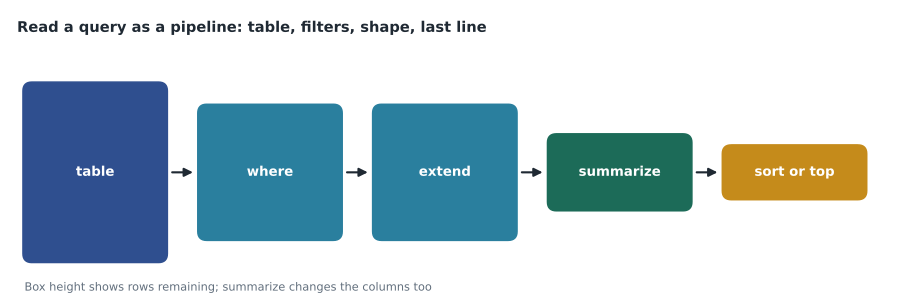
The pipeline and what each stage does
KQL passes a table of rows from one operator to the next through the pipe character. The order matters, because each operator works only on what the one before it produced. A where line after summarize can only filter on the summarized columns. A project line removes every column it does not name, so later lines cannot use the removed columns. An extend line adds a column and keeps the others. These rules explain many exam traps: a query that summarizes by account and then filters on DeviceName fails, because DeviceName no longer exists after the summarize.
SigninLogs
| where TimeGenerated > ago(1d)
| where ResultType != "0"
| summarize Failures = count() by UserPrincipalName, IPAddress
| where Failures > 20
| order by Failures desc
Read with the method, this query starts from Entra ID sign-ins, keeps the last day, keeps only failures (ResultType is a string, and "0" means success), counts failures for each pair of user and address, keeps pairs with more than 20, and sorts them with the largest first. Its output has exactly three columns: UserPrincipalName, IPAddress and Failures. A question asking which line to change so that the output also shows the application would need AppDisplayName added to the by clause, or a make_set of it in the summarize.
String operators
KQL has many ways to compare strings, and exam options often differ only in the operator. The double equals sign, ==, is an exact match and case-sensitive. The =~ operator is an exact match that ignores case. The has operator matches whole terms, which are runs of letters and digits separated by other characters, and it ignores case; it is fast because it uses the term index. The contains operator matches any substring, ignores case and is slower. The in operator matches any value in a list, case-sensitively, and in~ ignores case. has_any and has_all check lists of terms.
| Expression | Matches "Invoke-WebRequest -Uri"? | Why |
|---|---|---|
| ProcessCommandLine == "invoke-webrequest -uri" | No | Exact match is case-sensitive |
| ProcessCommandLine =~ "invoke-webrequest -uri" | Yes | Exact match ignoring case |
| ProcessCommandLine has "webrequest" | Yes | The hyphen splits Invoke from WebRequest, and has ignores case |
| ProcessCommandLine has "request" | No | "request" is only part of the term WebRequest |
| ProcessCommandLine contains "webrequest" | Yes | Substring match ignoring case |
| ProcessCommandLine has "Uri" | Yes | "Uri" is a whole term after the hyphen |
The fourth row is the one that catches people. The hyphen in Invoke-WebRequest separates Invoke from WebRequest, so has "webrequest" matches, because has ignores case. What has cannot do is match part of a term: has "request" does not match, because Request is not a separate term, while contains "request" would. Ama keeps a one-line rule on her review card: has finds words, contains finds pieces.
Time in queries
Every Defender and Sentinel table stores time in UTC, in a column called Timestamp in Defender tables and TimeGenerated in Sentinel tables; in the unified platform many Defender tables have both. The ago function counts back from now, so ago(1h) means the last hour. The between operator includes both ends of its range. The bin function rounds times down into equal buckets, which is how queries count events per hour or per day. A scenario that gives local times needs converting: in November, Winnipeg and Des Moines are six hours behind UTC, so 10:00 local is 16:00 UTC; in summer, during daylight time, they are five hours behind.
DeviceLogonEvents
| where Timestamp between (datetime(2026-11-12 15:00) .. datetime(2026-11-12 18:00))
| where ActionType == "LogonFailed"
| summarize Failures = count() by bin(Timestamp, 1h), DeviceName
| order by Timestamp asc
The listing below simulates what bin and summarize do, using a handful of made-up logon times. It rounds each time down to the start of its hour and counts how many fall in each hour, which is the same arithmetic the KQL query asks Defender to do over millions of rows.
from collections import Counter
from datetime import datetime

failures = ["2026-11-12 15:04", "2026-11-12 15:41", "2026-11-12 15:59",
            "2026-11-12 16:00", "2026-11-12 16:32", "2026-11-12 17:15"]

def bin_hour(text):
    t = datetime.strptime(text, "%Y-%m-%d %H:%M")
    return t.replace(minute=0)

counts = Counter(bin_hour(f) for f in failures)
for hour in sorted(counts):
print(hour.strftime("%H:%M"), counts[hour])15:00 3 16:00 2 17:00 1
What this code does
The listing takes six failed logon times as text, turns each into a date and time, and sets its minutes to zero so that it falls into the bucket for the start of its hour. It then counts how many times fall into each bucket and prints each hour with its count, earliest first. The time 16:00 belongs to the 16:00 bucket, not the 15:00 one, because buckets start exactly on the hour.
Joins
Joins combine two tables on a matching column, and the exam likes their defaults. In KQL, a join without a kind is innerunique: it removes duplicate keys from the left table before matching, so a query can return fewer rows than a candidate expects. kind=inner keeps every match. kind=leftouter keeps every left row, with empty values where there is no match. kind=leftanti keeps only left rows with no match, which is how a query finds, for example, devices with no recent logon or accounts not on a watchlist. kind=rightanti does the same from the right side.
let watch = _GetWatchlist("BreakGlassAccounts") | project UPN = SearchKey;
SigninLogs
| where TimeGenerated > ago(1h)
| join kind=inner (watch) on $left.UserPrincipalName == $right.UPN
| project TimeGenerated, UserPrincipalName, IPAddress, ResultType
A typical question shows a query like this one with the join kind left blank and asks which kind returns only sign-ins by listed accounts. The answer is inner. If the requirement were sign-ins by accounts not on the list, the answer would be leftanti. The let statement at the top defines a name for the watchlist query so the join can use it; the semicolon ends the let.
Aggregations and the last line
A few aggregation functions appear again and again. count() counts rows. dcount() counts distinct values, approximately for very large sets. make_set() builds a list of distinct values, and make_list() a list with duplicates. arg_max(TimeGenerated, *) keeps, for each group, the row with the latest time, which is how queries find the most recent state of each device or account. The last line usually decides order or size: order by (or sort by) sorts, top 10 by sorts and keeps ten, and take 10 returns any ten rows with no order, which makes it wrong whenever the question asks for the largest or the latest.
Operators that change columns
Several operators change the columns of a result without changing its rows, and options in exam items often swap one for another. project keeps only the named columns, in the order named, and can rename or calculate columns as it goes. project-away removes the named columns and keeps the rest. project-rename renames columns and keeps everything. project-reorder changes the order. extend adds calculated columns and keeps the rest. A question that asks how to remove one sensitive column from a long result with the least change is answered by project-away; a question that asks for a result with exactly three columns is answered by project.
Column names are case-sensitive in KQL, as are table names and function names. A query that refers to devicename instead of DeviceName fails with an error rather than returning nothing. That difference can matter in a 'why does this query fail' item: an error points to a name or syntax problem, while an empty result points to filters that remove every row, such as a case-sensitive comparison or a time window in the wrong zone.
Taking strings apart
Security data often hides the useful part of a value inside a longer string, and three tools take strings apart. parse extracts parts of a string into new columns using a pattern with fixed text and placeholders. extract uses a regular expression and returns one captured group. split breaks a string into an array at a separator. For JSON values, such as the AdditionalFields column in many Defender tables, parse_json, or the shorter todynamic, turns the text into a dynamic value whose properties can be read with dot notation. mv-expand turns an array into one row per element, which is how a query lists each recipient of a message or each entity of an alert separately.
DeviceEvents
| where Timestamp > ago(1d)
| where ActionType == "AntivirusDetection"
| extend Details = parse_json(AdditionalFields)
| project Timestamp, DeviceName, FileName, ThreatName = tostring(Details.ThreatName)
Combining and shaping results
union stacks rows from several tables with similar columns, such as DeviceLogonEvents and IdentityLogonEvents, so that one query can look across devices and domain controllers. When the tables have different column names for the same idea, the query renames them with project before the union. distinct returns the unique combinations of the named columns. make-series builds a time series with a value for every bucket, including buckets with no events, which summarize with bin does not do; that matters for charts and for anomaly functions such as series_decompose_anomalies, which need evenly spaced values. render draws a chart in the portal and does nothing to the data itself.
The iff function returns one of two values depending on a condition, and case does the same for several conditions. isempty and isnotempty test for empty strings, which matter because many Defender columns are empty rather than null when a value is missing. A query that filters with where InitiatingProcessAccountName != "" behaves like where isnotempty(InitiatingProcessAccountName).
Gap-filling items
Some items show a query with one or more blank lines and a list of operators or values to drag into them. Ama's method is to work out what shape the result must have before looking at the choices. If the requirement asks for a count per user, the gap before the last line is almost certainly a summarize with a by clause. If it asks for the latest record per device, it is a summarize with arg_max. If it asks for accounts that never did something, it is a join with kind=leftanti or a where with !in. Then she checks the time filter and string comparisons in the lines around the gap, because a correct operator in the gap does not save a query with a case-sensitive comparison on the wrong value.
Distractors in these items are often valid KQL that does the wrong thing. take in place of top, count in place of dcount, contains in place of has when the requirement mentions performance, and inner in place of leftanti are the four Ama has met most often in practice sets. Each one runs without error, which is why the error log entry for them always records the requirement word that should have decided the choice: 'largest', 'distinct', 'efficient' or 'never'.
| Requirement word | Operator it points to | Common distractor |
|---|---|---|
| largest, most, top | top N by | take |
| distinct, unique, how many different | dcount() or distinct | count() |
| latest, most recent per | arg_max() | max() alone |
| never, not in, missing | join kind=leftanti or !in | inner join |
| efficient, fastest, indexed | has | contains |
| every hour including empty hours | make-series | summarize by bin() |
Worked problem
Finding why a query returns nothing
A candidate sees this requirement: list devices that connected to a suspicious domain in the last day. The query is: DeviceNetworkEvents, then where Timestamp > ago(1d), then where RemoteUrl == "Files-Share-Docs.example", then summarize by DeviceName. The domain in the table is stored in lower case. Why does the query return no rows, and what is the smallest fix?
Show solution
- Find the table: DeviceNetworkEvents has RemoteUrl, so the column exists.
- Read the filters: the time filter is fine; the second uses ==, which is case-sensitive.
- The stored value is files-share-docs.example in lower case, so the exact case-sensitive match fails on every row.
- The smallest fix is to change == to =~, which ignores case, or to use has with the domain.
- The summarize and output are fine once rows reach them.
Answer: The == comparison is case-sensitive and the stored domain is lower case; change == to =~.
Common mistakes
MistakeA where line after summarize can filter on any original column.
InsteadAfter summarize, only the by columns and the aggregates exist.
Mistakehas and contains behave the same.
Insteadhas matches whole terms using the index; contains matches any substring and is slower.
MistakeA join with no kind keeps every match.
InsteadThe default is innerunique, which removes duplicate left keys first.
Mistaketake 10 returns the top ten.
Insteadtake returns any ten rows; use top 10 by for the largest.
MistakeTimes in the tables are local.
InsteadAll tables store UTC; convert scenario times before reading a filter.
Summary and key terms
- Read a query in four steps: table, filters, shape change, last line.
- Each operator sees only what the previous one produced; project and summarize remove columns.
- == is exact and case-sensitive; =~ ignores case; has matches terms; contains matches pieces.
- Tables store UTC; bin rounds times into buckets; between includes both ends.
- The default join is innerunique; leftanti finds rows with no match.
- arg_max finds the latest row per group; top sorts and limits, take does not sort.
- Pipe
- The character that passes the output of one KQL operator to the next.
- Term
- A run of letters and digits that the has operator matches as a whole.
- bin()
- A function that rounds values, often times, down into equal buckets.
- innerunique
- The default KQL join kind, which removes duplicate left keys before matching.
- arg_max()
- An aggregation that returns the row with the largest value of a column in each group.
Practice problems
Work each problem on paper first, then reveal the answer to check.
What does a query output after summarize count() by UserPrincipalName?
Show answer
Two columns: UserPrincipalName and count_.
Which operator finds a whole word ignoring case and uses the term index?
Show answer
has.
Which join kind finds left rows with no match?
Show answer
leftanti.
What is 10:00 in Des Moines in November in UTC?
Show answer
16:00.
Why is take 10 wrong for 'the ten accounts with most failures'?
Show answer
take does not sort; top 10 by Failures does.
Lesson quiz · 5 questions
Score 60% or more to complete this lesson.
Create a free account to save your progress, take quizzes and earn a certificate.