
MSAZ-349 · Lesson 4 of 12 · 22 min
Review: managing a security operations environment
▶ Video coming soon A video version of this lesson is on the way.
The first review lesson covers the Sentinel half of the largest skill group: configuring the Sentinel SIEM and platform, and getting data into it. Ama built much of this with Sunil Rao during the Sentinel sprint from November 2 to 12, 2026, so this lesson is written the way she will review it in March: as a set of questions the exam is likely to ask, each answered from what Harrow & Finch actually did. Defender for Endpoint settings, automation and detections are covered in lesson 5.
For each area the lesson gives the core facts, the decisions an analyst has to make, and the places where exam questions tend to set traps. Where a fact comes from Microsoft's documentation and may change, it is marked as something to check again before the exam.
Where Sentinel lives now
Microsoft has moved Sentinel into the Defender portal, alongside Defender XDR. The Sentinel experience in the Azure portal is scheduled to end on March 31, 2027, after Microsoft extended the original date of July 1, 2026. By the time Ama sits the exam in September 2027, the Defender portal will be the only place to manage Sentinel. Exam questions written for the current outline assume the Defender portal. A candidate who learned Sentinel only in the Azure portal will recognize the concepts but may not recognize where settings are.
Connecting a workspace to the Defender portal changes some behaviour. Incidents from Sentinel and Defender XDR share one queue. The Fusion correlation engine is turned off, because Defender's own correlation takes its place. Microsoft incident creation rules no longer apply, because Defender creates incidents from alerts. One workspace is the primary workspace, and only it receives the Defender XDR connector data. Harrow & Finch made law-hf-sentinel-cc the primary workspace and kept its operations workspace, which does not run Sentinel, separate.
Roles
Sentinel uses Azure role-based access control for most of its permissions. The built-in roles form a ladder. Microsoft Sentinel Reader can view data, incidents and workbooks. Microsoft Sentinel Responder can also manage incidents: assign, change status, add comments. Microsoft Sentinel Contributor can also create and edit analytics rules, workbooks and other content. Two roles cover automation: Microsoft Sentinel Playbook Operator can run playbooks manually, and Microsoft Sentinel Automation Contributor lets Sentinel itself attach playbooks to automation rules; it is meant for the Sentinel service account, not people. Creating or editing the playbooks themselves needs Logic App Contributor on the resource group that holds them.
Exam questions on roles usually describe a person's job and ask for the least privileged role. At Harrow & Finch, analysts like Ama have Responder; Nadia also has Playbook Operator; Sunil has Contributor, Logic App Contributor and Workbook Contributor, eligible through Privileged Identity Management rather than permanent. The trap is choosing Contributor whenever someone needs to do 'more than read'. Managing incidents is Responder's job, and creating rules is Contributor's.
| Need | Least privileged built-in role | Common wrong answer |
|---|---|---|
| View incidents and workbooks | Microsoft Sentinel Reader | Responder |
| Assign and close incidents | Microsoft Sentinel Responder | Contributor |
| Create analytics rules and workbooks | Microsoft Sentinel Contributor | Owner |
| Run a playbook manually on an incident | Microsoft Sentinel Playbook Operator | Logic App Contributor |
| Create and edit playbooks | Logic App Contributor on the playbook resource group | Sentinel Contributor |
| Let automation rules run playbooks | Microsoft Sentinel Automation Contributor for the Sentinel service account | A role for the analyst |
Retention across the tiers
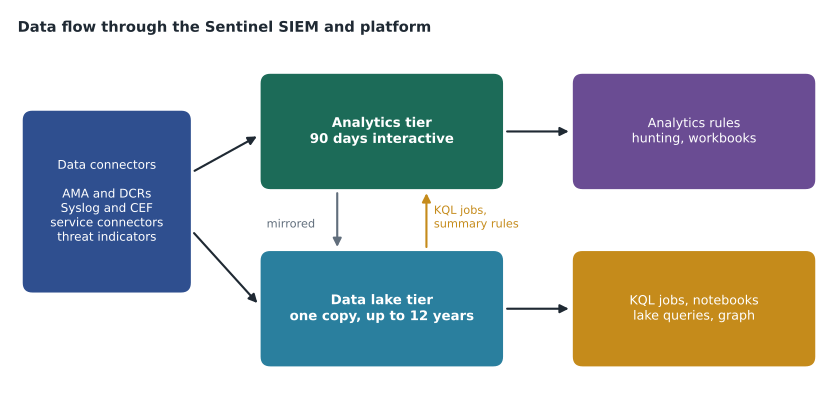
The study guide asks candidates to manage data retention for XDR and Sentinel tables across the analytics, data lake and XDR tiers. The analytics tier is the interactive tier that analytics rules, hunting and workbooks query; Sentinel includes 90 days of analytics retention in its price, and longer analytics retention costs more. The data lake tier keeps a single copy of data for long periods, up to 12 years, at lower cost, and is queried with KQL jobs, notebooks and the lake's own query tools rather than by analytics rules. Tables in the analytics tier are mirrored to the lake, so extending total retention in the lake does not mean storing the data twice. Defender XDR's own advanced hunting tables keep 30 days of data in the XDR tier.
Harrow & Finch's plan, set before onboarding to the lake on December 7, 2026, shows the kind of decisions the exam tests. Identity and audit tables keep 90 days in analytics and two years in total. Security events, firewall logs and raw Defender XDR tables keep 90 days in analytics and a year in total. Azure Firewall's verbose flow logs, at about 7 GB a day, go to the lake only for 180 days, because nobody writes rules against them and they are needed only for occasional investigations. The question to ask for each table is simple: who queries it, how quickly do they need results, and for how long might they need it?
Workbooks and SOC optimization
Workbooks are Sentinel's dashboards, built on Azure Monitor workbooks, and the exam can ask candidates to create and configure them. Harrow & Finch runs five: data collection health, Entra ID sign-ins, firewall overview, a weekly SOC summary and cost and usage. Creating a workbook from a Content hub template needs Workbook Contributor or Sentinel Contributor; viewing needs Reader. A workbook queries data at view time, so a slow query makes a slow workbook, and a workbook is not an alerting tool.
SOC optimization is a page in the Defender portal that recommends changes based on how the workspace is used: data that is ingested but never queried, tables that could move to a cheaper tier, and coverage gaps where a threat scenario lacks rules or data. The exam asks candidates to optimize the platform using these recommendations. The right answer usually acts on the recommendation after checking it, rather than accepting or ignoring it wholesale.
Choosing data connectors
Sentinel's data connectors come mostly from Content hub solutions, which install connectors with their rules, workbooks and hunting queries. The study guide asks candidates to select connectors based on data source requirements, including Windows logs and security events. The choice usually depends on where the data comes from. Microsoft services such as Entra ID, Office 365 and Azure activity have service-to-service connectors that need no agent. Windows machines use the Azure Monitor Agent (AMA) with data collection rules. Linux machines and network appliances send Syslog or Common Event Format (CEF) messages to a forwarder that runs the AMA. Software as a service products may use the Codeless Connector Framework or a vendor's API connector.
Harrow & Finch's Defender XDR connector sends incidents and alerts, plus five raw tables: DeviceProcessEvents, DeviceNetworkEvents, DeviceLogonEvents, EmailEvents and IdentityLogonEvents. It does not stream DeviceFileEvents or DeviceRegistryEvents, which are queried in advanced hunting instead. That is a typical exam decision: stream raw tables only when Sentinel rules or long retention need them, because raw Defender data is a large share of cost.
Windows security events
There are two ways to collect Windows Security events into Sentinel, and the exam covers both. The first is the Windows Security Events via AMA connector: install the Azure Monitor Agent on each machine (directly on Azure VMs, through Azure Arc on other servers), then create a data collection rule that chooses an event set (All, Common, Minimal or Custom with XPath queries) and sends events to the SecurityEvent table. The second is Windows Event Forwarding (WEF), in which Windows machines forward events to a Windows Event Collector server, and the collector runs the AMA and sends the forwarded events onward. WEF suits large numbers of machines where installing an agent on each is impractical.
Harrow & Finch uses both. Its 52 servers, including four domain controllers, run the AMA with the Common event set, plus custom XPath queries on domain controllers and the certificate authority. Its 140 till PCs forward a small custom set of events, including logon successes and failures and new service installations, to a collector called HF-WEC01. A data collection rule transformation drops computer-account network logons, which were about a fifth of server event volume and almost never useful.
SecurityEvent
| where TimeGenerated > ago(1h)
| summarize Events = count() by Computer, EventID
| top 10 by Events
Syslog, CEF and Azure activity
Network appliances and Linux machines use Syslog. Sentinel's Syslog via AMA and CEF via AMA connectors collect them through a Linux forwarder running rsyslog or syslog-ng and the AMA; the forwarder needs Azure Arc if it is not an Azure VM, and it listens on port 514. Plain Syslog lands in the Syslog table and CEF in CommonSecurityLog. A classic trap is configuring the same facility for both Syslog and CEF on one forwarder, which duplicates events. Harrow & Finch's 26 store firewalls send about 116 events a second, roughly 4 GB a day, to two forwarders behind a load balancer.
Azure activity logs record control-plane operations on subscriptions. The current way to collect them for many subscriptions is an Azure Policy assignment that creates diagnostic settings sending activity logs to the workspace. Resource logs, such as Key Vault audit events or storage logs, also use diagnostic settings, and Azure Policy can apply those at scale too.
Threat indicators and custom tables
Threat indicators, such as malicious addresses, domains and file hashes, come into Sentinel through the Microsoft Defender Threat Intelligence connector, TAXII feeds, threat intelligence platforms through the upload API, or manual entry. They are stored in the ThreatIntelIndicators and ThreatIntelObjects tables; the older ThreatIntelligenceIndicator table stopped receiving data on July 31, 2025, so queries and rules written for it need updating. Harrow & Finch connected the Microsoft feed and a retail sharing community's TAXII feed on November 11, 2026, and added six indicators of its own.
Custom log tables hold data that no built-in table fits. Their names end in _CL, they have a schema defined when the table is created, and data reaches them through a data collection rule from the Logs ingestion API or the AMA reading text files. Harrow & Finch plans a codeless connector for its HR and payroll system in January 2027, which will write to a custom table.
Checking that data is arriving
A connector that shows as connected is not proof that data is flowing. Exam questions often describe a symptom, such as an analytics rule that never fires or a workbook that shows gaps, and ask what to check first. The usual answer is to confirm data in the target table before changing rules or connectors. For agent-based sources, the Heartbeat table shows whether the Azure Monitor Agent is reporting from each machine. For all sources, the data collection health workbook and the SentinelHealth table show connector and rule health, and a simple query over the last hour of the target table shows whether new rows are arriving.
Harrow & Finch learned this during the Sentinel sprint, when the firewall overview workbook showed nothing for the Selkirk store. The connector page said connected. The CommonSecurityLog table had rows from every other store. The cause was a firewall configured with the wrong forwarder address. Ama found it by comparing the list of device names in the table with the list of stores, which is exactly the kind of reasoning an ordering or single-answer item rewards: confirm the data, narrow the gap, then look at the source.
Heartbeat
| summarize LastSeen = max(TimeGenerated) by Computer
| where LastSeen < ago(15m)
| order by LastSeen asc
Transformations and cost
Data collection rules can include a transformation, a KQL statement that runs on incoming data before it is stored. Transformations can filter out rows, remove or rename columns and add calculated values. They are the right answer when a question asks how to reduce ingestion of noisy events at the source, without changing the source device, or how to remove a sensitive column before it is stored. They are the wrong answer when a question asks how to shorten retention or move data to a cheaper tier, which are table settings rather than ingestion settings.
Ama's review card for this area has three lines. Filter or trim at ingestion with a transformation. Keep or archive with table retention and tiers. Summarize for long-term reporting with summary rules, which lesson 7 covers. Most cost questions on the exam become easy once the candidate decides which of the three the question is really about.
Worked problem
Choosing a tier for a new table
Sunil plans to collect store Wi-Fi controller logs: about 2.5 GB a day, needed only when investigating a specific store, sometimes up to six months later, and never used by analytics rules. Which tier and retention fit best, and why?
Show solution
- Ask who queries the data: investigators, occasionally, after the fact; no analytics rules.
- Ask how fast results are needed: an investigation can wait for a KQL job or a lake query.
- Ask how long: up to six months, so at least 180 days.
- The lake tier is far cheaper per GB stored and suits rare, retrospective queries.
- Configure the table for the data lake tier only, with 180 days of retention, and use a KQL job to promote a store's data to an analytics table when an investigation needs it.
Answer: Send the Wi-Fi logs to the data lake tier only with 180 days of retention, and promote data with a KQL job when needed.
Common mistakes
MistakeThe Azure portal remains the long-term home for Sentinel.
InsteadThe Sentinel experience in the Azure portal ends on March 31, 2027; manage it in the Defender portal.
MistakeAnyone who manages incidents needs Sentinel Contributor.
InsteadResponder is enough to assign, comment on and close incidents.
MistakeAnalytics rules can run against data in the lake tier.
InsteadRules read the analytics tier; lake data is queried with KQL jobs, notebooks and lake queries.
MistakeWEF replaces the agent completely.
InsteadForwarded events still reach Sentinel through the AMA on the collector server.
MistakeNew rules should keep querying ThreatIntelligenceIndicator.
InsteadThat table stopped receiving data on July 31, 2025; use ThreatIntelIndicators and ThreatIntelObjects.
Summary and key terms
- Sentinel is managed in the Defender portal; the Azure portal experience ends March 31, 2027.
- Connecting to the Defender portal unifies the incident queue, turns off Fusion and uses one primary workspace.
- Choose the least privileged role: Reader, Responder, Contributor, Playbook Operator and Logic App Contributor each have a job.
- The analytics tier serves rules and hunting; the data lake keeps one copy for up to 12 years at lower cost.
- Windows events arrive through the AMA with data collection rules, or through WEF to a collector running the AMA.
- Syslog and CEF use a forwarder with the AMA; threat indicators use the new ThreatIntelIndicators and ThreatIntelObjects tables.
- Primary workspace
- The Sentinel workspace that receives Defender XDR data when connected to the Defender portal.
- Analytics tier
- The interactive Sentinel tier used by rules, hunting and workbooks.
- Data lake tier
- Low-cost long-term storage for Sentinel data, queried with KQL jobs and notebooks.
- Data collection rule
- A rule that tells the Azure Monitor Agent what to collect, how to transform it and where to send it.
- Windows Event Forwarding
- A Windows feature that forwards events from many machines to a collector server.
Practice problems
Work each problem on paper first, then reveal the answer to check.
Which role lets an analyst assign and close incidents without editing rules?
Show answer
Microsoft Sentinel Responder.
Where do CEF messages land in Sentinel?
Show answer
The CommonSecurityLog table.
What happens to Fusion when a workspace connects to the Defender portal?
Show answer
It is turned off, because Defender's correlation replaces it.
How are Azure activity logs collected at scale across subscriptions?
Show answer
With an Azure Policy assignment that creates diagnostic settings.
Why does Harrow & Finch not stream DeviceFileEvents to Sentinel?
Show answer
It is queried in advanced hunting instead, avoiding the cost of a large raw table that no Sentinel rule needs.
Lesson quiz · 5 questions
Score 60% or more to complete this lesson.
Create a free account to save your progress, take quizzes and earn a certificate.