
MSAZ-329 · Lesson 7 of 12 · 21 min
Reading PySpark, SQL and KQL in questions
▶ Video coming soon A video version of this lesson is on the way.
DP-700 is one of the few Microsoft associate exams that expects candidates to read three languages. Microsoft's description of the candidate says it plainly: skilled in SQL, PySpark and KQL. Questions show short listings and ask what they return, what is wrong with them, or which keyword belongs in a blank. Ines writes PySpark every day and T-SQL most days, but she had written KQL for only three weeks when she took the diagnostic, and four of her misses were on listings. Two were KQL, one was a PySpark write mode and one was a SQL window function.
This lesson is a reading course. It shows the shapes of listings that appear on the exam, explains how to read each language quickly, and practises the hot area habit of reading the whole statement before choosing a value. None of the listings here run in the browser; they are for reading, as on the exam.
A reading method
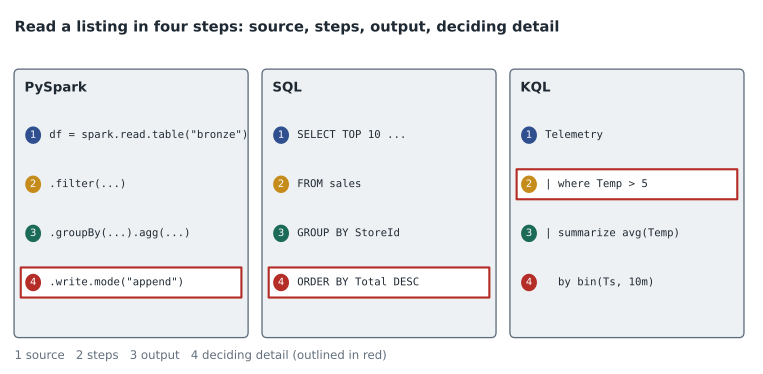
Nikolai's method has four steps and works for all three languages. First, find the source: which table, DataFrame or stream the listing reads. Second, find the output: what it writes, returns or displays, and in what mode. Third, trace each step in order and say in plain words what it does to the rows: filter, add a column, group, join, sort. Fourth, check the question's requirement against the trace. Most listing questions turn on one step: a filter in the wrong place, a join of the wrong type, a write mode that duplicates rows, or a window that is too wide.
Reading top to bottom works for PySpark and SQL with one adjustment: in SQL, the FROM and WHERE clauses run before the SELECT list, so a column alias defined in SELECT cannot be used in WHERE. KQL reads naturally from top to bottom, because each line after a pipe takes the rows from the line above.
PySpark
PySpark listings on the exam are usually DataFrame code in a notebook: read a table, transform it, and write it. The things to watch are the transformation functions and the write mode.
df = spark.read.table("lh_raw.stockline_sales")
clean = (df
    .filter(F.col("Quantity").isNotNull())
    .dropDuplicates(["SaleId", "LineNumber"])
    .withColumn("SaleDate", F.to_date("SaleTimestamp"))
    .join(spark.read.table("lh_curated.dim_store"), "StoreNumber", "left"))
clean.write.mode("append").format("delta").saveAsTable("lh_curated.sales_clean")
Traced in words: read the raw sales table; keep rows with a quantity; keep one row per sale line; add a date column; attach store attributes, keeping sales with no matching store; and append the result to the curated table. The question underneath might be: 'The notebook runs twice for the same day. What happens?' The answer is that the second run appends the same rows again, because append does not check for existing rows and dropDuplicates only removes duplicates within one run. The fix is a MERGE on SaleId and LineNumber, or an overwrite of that day's partition.
Other PySpark functions to recognize include groupBy with agg for aggregation, window from pyspark.sql.functions for time windows, Window.partitionBy with row_number for keeping the latest row per key, explode for turning arrays into rows, and the Delta Lake DeltaTable API, whose merge, whenMatchedUpdate and whenNotMatchedInsert methods are the PySpark form of MERGE. Structured streaming code uses readStream and writeStream, with a checkpoint location and an output mode of append, update or complete, and a withWatermark call that sets how long to wait for late events.
SQL
SQL on DP-700 appears in two dialects. Spark SQL runs in notebooks against lakehouse tables. T-SQL runs in warehouses and SQL analytics endpoints. They share most syntax for SELECT, joins, GROUP BY and window functions, but differ in places: Spark SQL has MERGE INTO and CREATE TABLE ... USING DELTA; T-SQL has stored procedures, CREATE TABLE AS SELECT, COPY INTO and transactions across tables. A lakehouse's SQL analytics endpoint is read-only for tables, so a question that tries to UPDATE a lakehouse table through it is pointing at a mistake.
WITH ranked AS (
    SELECT CustomerId, Email, UpdatedAt,
           ROW_NUMBER() OVER (PARTITION BY CustomerId ORDER BY UpdatedAt DESC) AS rn
    FROM stage.customers
)
SELECT CustomerId, Email, UpdatedAt
FROM ranked
WHERE rn = 1;
Traced: number each customer's rows from newest to oldest, then keep row 1. That returns one row per customer, the most recent. Exam variations change one detail. If ORDER BY UpdatedAt has no DESC, the listing keeps the oldest row. If PARTITION BY is missing, it keeps one row for the whole table. If RANK is used instead of ROW_NUMBER, ties on UpdatedAt can return two rows for one customer. Ines's diagnostic miss was the RANK variant.
COPY INTO dbo.stage_prices
FROM 'https://sthfsupplier.blob.core.windows.net/prices/2026/11/*.csv'
WITH (FILE_TYPE = 'CSV', FIRSTROW = 2, FIELDTERMINATOR = ',');
COPY INTO is the warehouse's bulk loader. It reads files from storage, here CSV with a header row skipped, and inserts them into a table. Questions may ask which option skips the header (FIRSTROW = 2), or which statement loads files fastest into a warehouse (COPY INTO rather than many INSERT statements).
KQL
KQL queries start with a table name and pass rows through operators separated by pipes. The operators to know cold are where (filter rows), project (choose columns), extend (add columns), summarize (group and aggregate), bin (round a time into a window), join, top, order by or sort by, and take. Functions such as arg_max return the row with the highest value of an expression per group, which is the KQL way to keep the latest row per key.
readings_clean
| where Timestamp > ago(1d) and UnitType == "freezer"
| summarize AvgTemp = avg(TemperatureC), Readings = count() by UnitId, bin(Timestamp, 10m)
| where AvgTemp > -12
| order by UnitId asc, Timestamp asc
Traced: take cleaned readings from the last day for freezers; group by unit and 10-minute window, computing the average temperature and the count; keep windows warmer than −12; sort. The second where runs after summarize, so it filters windows, not readings. If the question asks for readings warmer than −12, the filter belongs before summarize. That placement is exactly the kind of detail a hot area question puts in a drop-down.
.create-or-alter function CleanReadings() {
    readings
    | where isnotnull(TemperatureC)
    | extend TemperatureC = todouble(TemperatureC)
    | project Timestamp, UnitId, UnitType, TemperatureC, Battery
}
.alter table readings_clean policy update
@'[{"Source": "readings", "Query": "CleanReadings()", "IsEnabled": true}]'
Management commands start with a dot. An update policy runs a function on each batch of rows ingested into a source table and writes the result to a target table. Questions may ask what happens when the function refers to a column that no longer exists. Ingestion into the target fails for those batches, which is what happened in eh_sensors on November 10.
Hot area habits
Hot area questions replace part of a listing with drop-down boxes. Three habits help. Read the entire listing first, including the lines after the drop-downs, because later lines constrain earlier choices. Translate each option into plain words before choosing: 'append' adds rows, 'overwrite' replaces the table, 'merge' updates matches and inserts the rest. And check types: a drop-down after bin() needs a time span such as 10m, not a number of rows.
When two options both seem right, look at what the requirement says about repeat runs, ties, late data and nulls. Those four situations decide more listing questions than any other detail.
Merging in Spark SQL
Many listings on the exam are about keeping a target table correct when a load reruns or when changes arrive. The tool is MERGE. In a notebook, Spark SQL's MERGE INTO works on Delta tables.
MERGE INTO lh_curated.sales_clean AS t
USING sales_today AS s
  ON t.SaleId = s.SaleId AND t.LineNumber = s.LineNumber
WHEN MATCHED THEN UPDATE SET *
WHEN NOT MATCHED THEN INSERT *
Traced: compare today's rows with the target on the two key columns; where a row already exists, replace its values; where it does not, insert it. Running this twice for the same day leaves the table the same as running it once, which is what 'idempotent' means and what the append version earlier in this lesson lacked. A variation adds WHEN NOT MATCHED BY SOURCE THEN DELETE, which removes target rows that are not in the source; that is only correct when the source is a complete copy, not a daily increment. An exam option that adds that clause to an incremental load is a trap, because it would delete every row not loaded today.
Joins and views in KQL
KQL joins look different from SQL ones. The syntax is left | join kind=inner (right) on Key. The default kind is innerunique, which removes duplicate keys on the left side before joining, and which surprises people who expect SQL behaviour. Questions may show a join that returns fewer rows than expected and ask why; the default kind is often the answer. lookup is a related operator that adds columns from a small dimension table to a large fact table efficiently. Materialized views are created with a management command and keep an aggregation up to date as data arrives, so a dashboard query can read the view instead of summarizing billions of rows each time.
| Trap | Language | What to check |
|---|---|---|
| Filter after aggregation | KQL, SQL | Is the filter on rows or on groups? |
| Append on rerun | PySpark | Is the write idempotent? |
| Ties in a ranking | SQL | ROW_NUMBER or RANK? |
| Default join kind | KQL | innerunique or inner? |
| Delete on not matched by source | SQL | Is the source complete or incremental? |
| Timestamp type | KQL | Does bin get a timespan such as 10m? |
Ines keeps this table on a card next to her keyboard during practice. Each time a listing question catches her, she adds the trap to the card if it is new. By the end of the focused review she expects the card to be full, and in the final week she will review the card instead of rereading notes.
Reading speed comes with volume. Nikolai's suggestion is a daily ten-minute drill from February: one short listing in each language, read aloud in plain words before checking what it does by running it in a practice workspace. Thirty listings a week for twelve weeks is over three hundred, enough that the common shapes become familiar and the unusual detail in an exam listing stands out. He also suggested writing the plain-words version first and the code second when building labs, so that the habit runs in both directions. A candidate who can turn 'keep the latest row per customer' into ROW_NUMBER, arg_max and a Window in PySpark without looking anything up will rarely be caught by a listing question, because the deciding detail in the question will be the one that differs from what they would have written.
Worked problem
Filling in a KQL blank
A query must return, for each freezer, its single most recent reading. It reads: readings_clean | where UnitType == "freezer" | summarize ____ by UnitId. Which expression fills the blank?
Show solution
- The requirement is one row per freezer, the latest one, with its values.
- count() returns a number per freezer, not the reading. Not a fit.
- max(Timestamp) returns the latest time but not the temperature at that time.
- arg_max(Timestamp, *) returns the whole row with the highest Timestamp per group.
- take 1 is an operator, not an aggregation, and would return one row for all freezers.
Answer: arg_max(Timestamp, *), which keeps the full latest row for each UnitId.
Common mistakes
MistakeA where after summarize filters the original rows.
InsteadIt filters the grouped results; filter rows before summarize.
MistakedropDuplicates prevents duplicates across repeated runs.
InsteadIt removes duplicates within one DataFrame; repeated appends still duplicate rows unless you merge or overwrite.
MistakeRANK and ROW_NUMBER always return the same rows.
InsteadRANK gives ties the same number, so filtering rank = 1 can return several rows per key.
MistakeA lakehouse's SQL analytics endpoint can update tables.
InsteadIt is read-only for tables; change data with Spark or use a warehouse.
MistakeKQL management commands use the same syntax as queries.
InsteadThey start with a dot, such as .create-or-alter function.
Summary and key terms
- Read every listing in four steps: source, output, each step in plain words, and the requirement.
- In PySpark, watch the write mode, dropDuplicates scope, joins, windows and the Delta merge API.
- In SQL, remember that WHERE runs before SELECT, ROW_NUMBER and RANK differ on ties, and COPY INTO is the warehouse bulk loader.
- In KQL, operators pass rows down the pipe; know where, project, extend, summarize, bin, join, arg_max and management commands.
- For hot areas, read the whole listing first and translate each option into plain words.
- Repeat runs, ties, late data and nulls decide many listing questions.
- Write mode
- How a Spark write treats existing data: append, overwrite, error or ignore.
- Window function
- A SQL function such as ROW_NUMBER that computes values over a partition of rows.
- arg_max
- A KQL aggregation that returns the row with the highest value of an expression per group.
- Update policy
- An eventhouse setting that runs a function on newly ingested rows and writes the result to a target table.
- Management command
- A KQL command, starting with a dot, that creates or changes database objects.
Practice problems
Work each problem on paper first, then reveal the answer to check.
What happens if a notebook that appends a day's rows runs twice?
Show answer
The rows are appended twice; use a merge or overwrite that day's data.
Which SQL function can return two rows per key when filtering on 1?
Show answer
RANK, when there are ties.
In KQL, where should a filter on individual readings go?
Show answer
Before summarize.
Which statement loads files into a warehouse table in bulk?
Show answer
COPY INTO.
What does an update policy do when its function refers to a missing column?
Show answer
Ingestion into the target table fails for those batches.
Lesson quiz · 5 questions
Score 60% or more to complete this lesson.
Create a free account to save your progress, take quizzes and earn a certificate.