
MSAZ-329 · Lesson 10 of 12 · 21 min
Hands-on practice in a trial capacity
▶ Video coming soon A video version of this lesson is on the way.
Reading about Fabric and doing Fabric are different skills, and the exam rewards the second. A question that describes a deployment rule, a KQL update policy or a OneLake shortcut is easy for someone who has set one up and hard for someone who has only read about it, because the person who has built it remembers the screens, the error messages and the order of steps. Nikolai's rule for Ines is simple: every skill marked 'seen' or 'not met' in her plan gets at least one lab, and every lab ends with a short note in her own words about what surprised her.
This lesson covers where to practise, how to set up a practice environment safely and cheaply, a set of labs mapped to the outline, and how to keep the practice honest so that it builds exam readiness rather than just familiarity.
Where to practise
There are three common places to practise. The first is a Fabric trial capacity. A trial gives a person a capacity of 64 capacity units for 60 days, which is enough to run lakehouses, warehouses, notebooks, pipelines, eventhouses and Activator at the scale of a practice lab. A trial is started from the account manager in the Fabric portal, if the tenant allows it; a Fabric administrator can turn off the ability for users to start trials, and many companies do. Microsoft has also changed trial terms over time, so the length and size should be checked when starting one rather than assumed.
The second place is a development workspace on the company's own capacity. At Harrow & Finch, Ines already has a development workspace on the F64 capacity in Canada Central that the team uses for real work. Practising there is convenient but has a cost: her labs use capacity units that the team needs, and a careless lab, such as a notebook that reads every table in a loop, could throttle the capacity for colleagues. Nikolai and she agreed she will use it only for labs that need the team's real sources, such as the on-premises gateway to the store systems, and will run them after 6 p.m.
The third place is the guided exercises on Microsoft Learn. Many Learn modules for DP-700 include an exercise with step-by-step instructions that runs in the learner's own Fabric trial or capacity. They are well written and match the outline, but because the steps are given, they practise following instructions more than making decisions. Ines will use them as a starting point and then change one thing in each, such as loading a different file or adding a failure path, so that she has to think.
| Place | Good for | Watch out for |
|---|---|---|
| Personal trial capacity | Everything at lab scale, freely | May be blocked by the tenant; ends after the trial period; check current terms |
| Company development workspace | Labs that need real sources or the gateway | Shares capacity with real work; follow team rules and work out of hours |
| Microsoft Learn exercises | Guided introduction to a feature | Steps are given; change something to make it a decision |
Setting up safely
A practice environment should be safe to break and should contain nothing that would cause a problem if it leaked. Ines follows four rules. First, practice data is generated or public, never copied from production: she generates fake sales and fake telemetry with a short notebook, and uses public data sets for larger files. Second, practice workspaces are named clearly, with a prefix such as 'lab-', so that no one mistakes them for real work. Third, no secrets live in notebooks: when a lab needs a connection, she uses a Fabric connection or workspace identity rather than pasting a key into code. Fourth, she cleans up at the end of each week, deleting items she no longer needs so that the trial does not fill with half-finished work.
A fifth rule applies when practising on a trial: watch the end date. A trial capacity's items are kept for a short time after the trial ends, but anything not moved to a paid capacity is eventually removed. Labs are disposable by design, but notes are not, so Ines keeps her lab notes in her study notebook rather than only in a Fabric notebook.
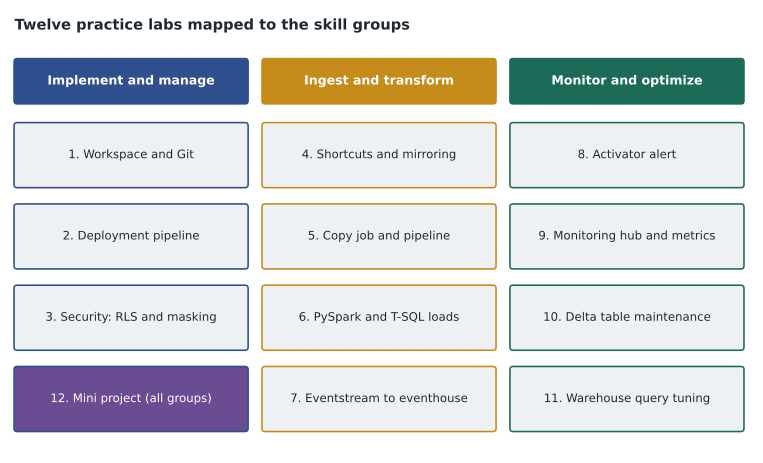
A lab set mapped to the outline
The labs below cover every skill that Ines marked 'seen' or 'not met'. Each takes between 45 and 90 minutes. They are grouped by skill group so that she can schedule them alongside the focused review from lessons 4 to 6.
| Lab | Skill group | What to build | What to check |
|---|---|---|---|
| 1. Workspace and Git | Implement and manage | Connect a lab workspace to a repository; commit, branch and update | Item changes appear in Git; an update brings a change back |
| 2. Deployment pipeline | Implement and manage | Three stages with a rule for a lakehouse connection | Deployed notebook points at the test lakehouse |
| 3. Security | Implement and manage | RLS, column security and masking on a warehouse table | Test users see the right rows, columns and masked values |
| 4. Shortcuts and mirroring | Ingest and transform | A OneLake shortcut and, where possible, a mirrored database | Data is readable without copying |
| 5. Copy job and pipeline | Ingest and transform | Incremental copy job; pipeline with a failure path | Rerun copies only changes; failure sends a message |
| 6. Transformations | Ingest and transform | PySpark and T-SQL loads with MERGE and deduplication | Rerun leaves the table unchanged |
| 7. Streaming | Ingest and transform | Eventstream to eventhouse, update policy, windowed KQL | Clean table fills as events arrive |
| 8. Alerts | Monitor and optimize | Activator rule on a stream condition | Alert fires on a test event |
| 9. Monitoring | Monitor and optimize | Use the monitoring hub and Capacity Metrics app | Find the heaviest operation of the day |
| 10. Delta maintenance | Monitor and optimize | OPTIMIZE, V-Order and VACUUM on a table of small files | File count drops; history shows the operations |
| 11. Warehouse tuning | Monitor and optimize | Compare single-row inserts with COPY INTO; read query insights | Set-based load is far faster |
| 12. Mini project | All | A small end-to-end solution from source to alert | Every part runs from one pipeline |
Generating practice data
Most labs need data with a known shape, so that the result can be checked. Ines writes a small generator for each lab. The Python below makes fake truck temperature readings with one compartment that warms up, which is the data she needs for the streaming and Activator labs. It is plain Python so that it runs anywhere; in a Fabric notebook the same list could be turned into a Spark DataFrame and written to a table or sent to an eventstream.
import random
random.seed(7)

readings = []
for minute in range(10):
    for truck in ("T01", "T02"):
        base = 3.0 if truck == "T01" else 2.5
        drift = 0.4 * minute if truck == "T01" else 0.0
        temp = round(base + drift + random.uniform(-0.2, 0.2), 1)
        readings.append((minute, truck, temp))

limit = 5.0
run = {"T01": 0, "T02": 0}
for minute, truck, temp in readings:
    run[truck] = run[truck] + 1 if temp > limit else 0
    if run[truck] == 3:
        print(f"minute {minute}: alert for {truck} at {temp} degrees")

print("readings made:", len(readings))minute 8: alert for T01 at 6.3 degrees readings made: 20
What this code does
The program makes ten minutes of readings for two trucks. One truck starts at 3 degrees and warms by 0.4 degrees a minute, with a little random noise; the other stays near 2.5. It then walks through the readings in time order, counting how many readings in a row each truck has been above 5 degrees and resetting the count when a reading is back under the limit. When a truck reaches three warm readings in a row, it prints an alert, which is the same rule an Activator alert would apply. Finally it prints how many readings it made, so the expected alert can be checked against the data.
The generator is small, but it gives a known answer: one alert, for T01, at the third warm minute. When Ines builds the Activator lab, she will send the same readings into an eventstream and check that the alert fires once, for the right truck. If it fires twice, or for T02, she knows the rule is wrong, not the data. This is the practical value of generated data: it turns 'it seems to work' into 'it gave the expected answer'.
Making practice honest
Labs can create a false sense of readiness. Following a set of instructions without errors feels like learning but may teach only how to click. Nikolai suggested three habits to keep practice honest.
The first is to break things on purpose. After a lab works, change one thing that should make it fail and see what happens: remove a permission, rename a column upstream, stop the gateway, send a malformed event. Exam troubleshooting questions describe exactly these failures, and seeing the real error message once is worth more than reading about it many times.
The second is to explain the lab without notes. At the end of each lab, Ines writes three sentences in her notebook: what she built, what decision she made and why, and what surprised her. If she cannot write them without looking back, she has not yet learned the lab.
The third is to link each lab to questions. After each lab she answers the practice assessment questions on the same skill, or writes two questions of her own in the exam style. If she still misses questions on a skill after the lab, the lab was the wrong one, or she needs to repeat it with a different twist.
Using the capacity wisely
Even a practice capacity has limits. A trial of 64 capacity units is generous for labs, but a notebook left running with an active Spark session keeps using capacity until it times out, and an eventstream left connected to a busy source keeps ingesting. At the end of each session Ines stops her Spark sessions, pauses or deletes eventstreams she no longer needs, and checks the Capacity Metrics app once a week to see what her labs used. That check is itself practice for the monitoring skill group, and it has already taught her something: her first notebook lab used more capacity in its idle session than in its actual work.
For labs on the company capacity, she adds one more step: before she starts, she checks the Capacity Metrics app for the current utilization, and if the capacity is already busy she moves the lab to another evening. This mirrors what she would do at work before a large backfill, and it is the kind of judgement the exam's monitoring questions test.
Scheduling the labs
The labs fit into the plan from lesson 3. During the focused review from February to April, she will do one lab a week alongside the review lesson for the same skill group: labs 1 to 3 with implement and manage, labs 4 to 7 with ingest and transform, labs 8 to 11 with monitor and optimize. The mini project, lab 12, is for the first two weeks of May, when the review is finished and she can put everything together. If her own trial is not available, she will do labs 1 to 11 in her development workspace out of hours and do the mini project in the team's sandbox, which Nikolai has offered to set up.
Worked problem
Choosing a lab for a weak skill
On a practice assessment in March, Ines misses three questions about deployment pipelines: one about which items are supported, one about deployment rules and one about what happens to data when a lakehouse is deployed. Which lab should she do, and what should she change in it?
Show solution
- The three misses are all in one skill: lifecycle management with deployment pipelines.
- Lab 2 builds a deployment pipeline with rules, which covers the second miss directly.
- To cover the first miss, she should add an item type she has not deployed before, such as an eventhouse or a dataflow, and see whether it deploys.
- To cover the third, she should put data in the development lakehouse, deploy it, and look in the test lakehouse: the item deploys but its data does not, which is the point the question tested.
- She ends by writing two exam-style questions of her own on what she saw.
Answer: Lab 2, extended with a new item type and a check of whether lakehouse data moves on deployment.
Common mistakes
MistakeFollowing a guided exercise without errors means the skill is learned.
InsteadChange something, break something, and explain it without notes before counting it as learned.
MistakeAny data is fine for practice.
InsteadUse generated or public data, never production data, and give it a known shape so results can be checked.
MistakeA trial capacity is always available.
InsteadA tenant administrator can turn trials off, and terms change; check before planning on one.
MistakeIdle notebooks cost nothing.
InsteadAn active Spark session uses capacity until it stops; end sessions when a lab is done.
MistakeLabs replace practice questions.
InsteadLabs build understanding; questions check it. Link each lab to questions on the same skill.
Summary and key terms
- Practise in a personal trial, a development workspace or Learn exercises, each with its own trade-offs.
- Use generated or public data, clear names, no secrets in code, and regular cleanup.
- Map labs to the skills marked seen or not met, and schedule them with the focused review.
- Generate data with a known answer so that a lab can be checked, not just run.
- Keep practice honest: break things, explain without notes, and follow each lab with questions.
- Stop Spark sessions and streams after labs, and check capacity use weekly.
- Trial capacity
- A time-limited Fabric capacity a person can start to try Fabric, if the tenant allows it.
- Capacity unit
- The measure of compute that a Fabric capacity provides.
- Generated data
- Fake data made by code with a known shape, used so that results can be checked.
- Lab
- A hands-on exercise that builds and checks one or more skills.
- Mini project
- A small end-to-end solution that combines skills from every group.
Practice problems
Work each problem on paper first, then reveal the answer to check.
How large and how long is a Fabric trial, as last documented?
Show answer
64 capacity units for 60 days; check current terms when starting one.
Who can stop users from starting trials?
Show answer
A Fabric administrator, through tenant settings.
Why use generated data in labs?
Show answer
It has a known shape and answer, so a lab can be checked, and it carries no production data.
Name one way to break a lab on purpose.
Show answer
Remove a permission, rename a column upstream, stop the gateway or send a malformed event.
What should you do at the end of each lab session?
Show answer
Stop Spark sessions, pause or delete unused streams, and write a short note on what you learned.
Lesson quiz · 5 questions
Score 60% or more to complete this lesson.
Create a free account to save your progress, take quizzes and earn a certificate.