
MSAZ-329 · Lesson 12 of 12 · 20 min
Exam day and renewal
▶ Video coming soon A video version of this lesson is on the way.
Months of study can be undone by a missing ID, a webcam that fails its check, or a rushed start after a late bus. None of these has anything to do with Fabric, and all of them are avoidable. This last lesson covers the practical side of the exam: choosing between a test centre and an online sitting, what to prepare in the last few days, what happens at check-in and during the exam, how to read the results, what to do if the result is not a pass, and how to keep the certification current once it is earned.
Ines's exam is booked for Friday, May 28, 2027. She has not yet chosen whether to sit it at a test centre or online, and part of this lesson is how she decides. The details below describe how Microsoft and Pearson VUE have run exams; rules for identification, check-in and the testing room are set by Pearson VUE and can change, so the confirmation email and the current exam policies are the final word for any sitting.
Test centre or online
Microsoft exams are delivered by Pearson VUE, either at an authorized test centre or online with a remote proctor who watches through the candidate's webcam. Both count the same. The choice depends on the candidate's home, equipment and nerves. Ines lives in a busy shared house in Winnipeg with unreliable evening internet, and there is a test centre about 20 minutes from her office. Nikolai sat his own exams online from a quiet room at home and liked not having to travel, but he agreed that her internet made the test centre the safer choice.
| Factor | Test centre | Online |
|---|---|---|
| Room | Provided, quiet, monitored | Your own; must be private, quiet and clear of materials |
| Equipment | Provided | Your own computer, webcam, microphone and a stable connection |
| Travel | Needed; allow time for traffic and parking | None |
| Check-in | At the desk, with ID and a photo | Through the browser, with photos of ID and the room |
| Interruptions | Rare | Any person entering the room or noise can end the session |
| Times | Centre hours | Many times of day, including evenings and weekends |
For an online sitting, Pearson VUE provides a system test that checks the computer, webcam, microphone and connection. It should be run on the same computer, in the same room and on the same network that will be used on the day, at least a few days before, and again the day before. Work computers are often a poor choice because company security software or a VPN can block the exam software. Ines ran the system test on her own laptop at home in November out of curiosity; it passed, but the connection dropped twice during a video call the same evening, which settled the question.
The week before
The last week is about removing risks, not adding knowledge. Ines's checklist for May 24 to May 27 is short. Confirm the booking and its time zone in her Microsoft Learn profile and in the Pearson VUE confirmation. Check that the name on her ID matches the name on her certification profile exactly, including middle names if the profile has them. Look up the test centre address, parking and building entrance, and the time it takes in Friday morning traffic. Plan to arrive at least 15 minutes early, and preferably 30, because check-in takes time and a late arrival can lose the booking. Sleep at a normal time each night, and do no more than an hour of light review on Wednesday and Thursday.
Identification rules are set by Pearson VUE. In general a candidate needs a current, government-issued photo ID with a signature, such as a passport or driver's licence, and the name must match the registration. Some countries or centres ask for a second ID. The confirmation email lists the requirements for the specific sitting, and it is worth reading twice, because ID problems are the most common reason a prepared candidate cannot sit an exam.
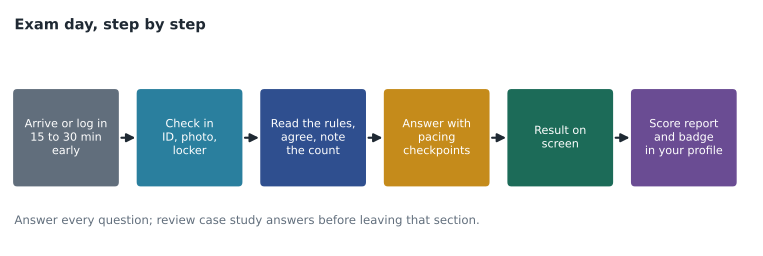
Check-in and the exam room
At a test centre, check-in usually includes showing ID, having a photo taken, signing in, and putting everything except the ID into a locker: phone, watch, wallet, bag, notes and food. The candidate is then shown to a workstation. Some centres provide a small whiteboard or note board and a marker; it is handed back at the end. The room is monitored by staff and cameras. Breaks may or may not be allowed, depending on the exam; if they are allowed, the timer usually keeps running.
Online check-in usually opens 30 minutes before the appointment. The candidate photographs their ID and the room from several sides, removes anything that could be notes, and waits for a greeter and then a proctor. During the exam the candidate must stay in view, should not read questions aloud, and must not leave the room. Online sittings may offer a digital whiteboard instead of paper.
Once the exam starts, the first screens explain the rules, the number of sections and whether any section cannot be revisited. This is the moment to note the number of questions and work out the three pacing checkpoints from lesson 11. Ines's plan is to write them in the corner of her note board before the first question: question numbers and target minutes, plus the case study block.
During the exam
The methods from earlier lessons come together here. For each question, read the last sentence first to see what is asked, then the scenario, naming the deciding requirement. Eliminate options with the patterns from lesson 8. Answer every question, because a blank answer earns nothing and there is no penalty for a wrong one. Mark uncertain questions for review rather than lingering. Check the clock at each pacing checkpoint. Review case study answers before leaving that section. Use the reserve at the end for marked questions, changing an answer only when a clear reason appears, not because of a vague feeling.
The exam may include Microsoft Learn access for some questions on some exams; Microsoft has been adding this to role-based exams, letting candidates open Learn pages in a restricted window. If it is offered on DP-700 when Ines sits it, it will be explained on the instruction screens. It is useful for checking a syntax detail, but searching costs time from the 100 minutes, so the habit Nikolai recommends is to use it only for a marked question during the reserve, never as the first step.
Results and the score report
For most Microsoft exams the pass or fail result appears on screen soon after the last answer is submitted. The score is reported on a scale of 1 to 1,000, and 700 is the passing score. The scale is not a percentage of questions answered correctly: questions can carry different weights, and the scaled score accounts for the difficulty of the questions a candidate received. A score report, available in the Microsoft Learn profile, shows performance by skill group as a bar for each, which is useful whether or not the exam was passed.
After a pass, the Fabric Data Engineer Associate certification appears in the candidate's Microsoft Learn profile, and a digital badge can be claimed and shared. Ines plans to tell Nikolai first and then the data team at the Monday meeting. The certification is valid for one year from the date it is earned.
If the result is not a pass
A failed attempt is information. The score report shows which skill groups were weakest, and the candidate remembers which topics felt unfamiliar. Ines's plan for this case is to write down everything she remembers about the topics, not the questions, on the same day, then to compare that with the score report and the practice log, and to choose two or three weak areas for a short, focused plan.
Microsoft's retake policy sets the timing. A candidate who does not pass can retake the exam after 24 hours. After a second failed attempt, and for each one after that, there is a wait of 14 days. A candidate can take the same exam at most five times in a 12-month period. Each attempt is paid for separately unless a promotion says otherwise. For Ines, a realistic retake would be about three or four weeks after the first sitting, giving time for the focused plan without losing the knowledge built up in the spring.
| Situation | Waiting period |
|---|---|
| After a first failed attempt | 24 hours |
| After a second or later failed attempt | 14 days |
| Attempts allowed | At most five in any 12 months |
Renewal
Role-based certifications such as the Fabric Data Engineer Associate are valid for one year. Renewal is done through a free, online renewal assessment on Microsoft Learn, without a proctor and without a test centre. The renewal assessment is shorter than the exam and covers recent changes to the technology and the role. It can be taken in a window before the certification expires; Microsoft has opened that window six months before the expiry date, and sends emails as the date approaches. If a renewal assessment is not passed, it can be retaken after a short wait, and Microsoft's retake policy for renewals sets the details. If the certification expires without renewal, the candidate must pass the full exam again to regain it.
For Ines, a pass on May 28, 2027 would mean an expiry date around the end of May 2028, with the renewal window opening around the end of November 2027. Her plan is to put two reminders in her calendar on the day she passes: one for December 1, 2027 to look at the Fabric release notes and the renewal assessment, and one for March 1, 2028 to take it, well before the deadline. Because Fabric changes quickly, she will keep the habit of reading the monthly Fabric update blog, which keeps her current for both the job and the renewal.
After the program
Passing DP-700 completes the Fabric Data Engineer program for Ines. For Harrow & Finch, the result matters less than what it represents: a data engineer who can design and run the company's Fabric platform in Canada Central, from the store systems and the Brandon distribution centre through to dashboards and alerts. The skills are what the company is investing in. The certification is a convenient way to show that the investment has worked, and the renewal each year is a reminder to keep them current.
Nikolai has one last suggestion for after the exam: write down, within a week, the three things that most helped and the three that wasted time, and share them with the next person on the team who studies for a certification. Ines has already been asked by a colleague in the analytics team about DP-600, and her practice log, trap card and lab set will be a useful start for him.
Worked problem
Planning a renewal date
Ines passes DP-700 on May 28, 2027. Her certification is valid for one year, and the renewal window opens six months before expiry. When does the window open, and when should she aim to renew?
Show solution
- One year after May 28, 2027 is about May 28, 2028, the expiry date.
- Six months before that is about November 28, 2027, when the renewal window opens.
- Renewing early in the window leaves time for a retake if the first renewal attempt fails.
- A date in early March 2028 is well inside the window and avoids the end-of-quarter rush at work.
Answer: The window opens around late November 2027; she plans to renew in early March 2028.
Common mistakes
MistakeAny photo ID will do.
InsteadThe ID must meet Pearson VUE's requirements for the sitting, and the name must match the registration exactly.
MistakeAn online exam can be taken from a work laptop on the office network.
InsteadCompany security software or a VPN can block the exam; run the system test on the computer and network to be used.
MistakeA score of 700 means 70 out of 100 questions were right.
InsteadThe score is scaled from 1 to 1,000 and is not a simple percentage of correct answers.
MistakeAfter a failed attempt you must wait 14 days.
InsteadThe first retake can be after 24 hours; the 14-day wait applies after a second or later failure.
MistakeRenewal means sitting the full exam again each year.
InsteadRenewal is a free online assessment taken before expiry; the full exam is needed only if the certification lapses.
Summary and key terms
- Choose a test centre or an online sitting based on your room, equipment and connection.
- In the last week, confirm the booking, check the ID name matches, plan the journey and rest.
- At the start of the exam, note the question count and set pacing checkpoints.
- Answer every question, mark uncertain ones and review case study answers before leaving the section.
- The passing score is 700 on a scale to 1,000; the score report shows performance by skill group.
- Retakes follow a 24-hour then 14-day rule, with at most five attempts in 12 months.
- Renew each year with the free online assessment, ideally early in the window.
- Pearson VUE
- The company that delivers Microsoft certification exams at test centres and online.
- Proctor
- A person who supervises an exam to make sure the rules are followed.
- Score report
- A report of an exam result with performance by skill group.
- Renewal assessment
- A free online assessment that extends a role-based certification by one year.
- Retake policy
- Microsoft's rules for when and how often an exam can be taken again.
Practice problems
Work each problem on paper first, then reveal the answer to check.
What should you run before an online exam?
Show answer
The Pearson VUE system test, on the same computer, room and network.
What is the passing score for DP-700?
Show answer
700 on a scale of 1 to 1,000.
How long must you wait after a first failed attempt?
Show answer
24 hours.
How many times can you take the same exam in 12 months?
Show answer
At most five.
How is a role-based certification renewed?
Show answer
By passing the free online renewal assessment on Microsoft Learn before the certification expires.
Lesson quiz · 5 questions
Score 60% or more to complete this lesson.
Create a free account to save your progress, take quizzes and earn a certificate.