
MSAZ-329 · Lesson 4 of 12 · 21 min
Review: implementing and managing an analytics solution
▶ Video coming soon A video version of this lesson is on the way.
The first skill group is the one Ines thinks of as 'everything around the data'. It covers how workspaces are set up, how changes move from development to production, who can see what, and how jobs are started and chained. On the diagnostic she scored 14 of 20 here, her best result, but most of her six misses were on settings she had never needed to change, such as OneLake and data workflow workspace settings, and on orchestration questions with dynamic expressions. This lesson reviews the four areas of the group, with the points that most often turn up as questions.
Each section names the skills in the study guide, summarizes what a candidate should know, and links it back to what Ines did on the Finch Data Hub in the fall. The aim is not to reteach MSAZ-310 and MSAZ-320, but to give Ines a checklist she can test herself against in February.
Configuring workspace settings
The study guide lists four kinds of workspace setting: Spark, domain, OneLake and data workflow. Spark settings decide what compute notebooks and Spark job definitions use. The starter pool gives fast session start with medium nodes and is the default; a workspace admin can create custom pools with a chosen node size and autoscale range, set a default environment with libraries and Spark properties, choose the runtime version, and turn on high concurrency so that notebooks, and pipelines that run notebooks, can share one session. A question that mentions slow session start for many small notebook runs is usually pointing toward high concurrency or the starter pool. A question that mentions a library every notebook needs is pointing toward an environment attached as the workspace default.
Domain settings group workspaces by business area. A Fabric admin creates domains and subdomains, assigns domain admins and contributors, and assigns workspaces to domains. Domains help people find data in the OneLake catalog and let some settings be delegated to the domain. At Harrow & Finch the hub has Sales, Stores and Supply chain domains, and each workspace belongs to one. OneLake settings cover how a workspace's data can be reached, for example whether users can open OneLake data with apps outside Fabric, such as OneLake file explorer, and how long shortcut caching keeps copies of external files. Data workflow settings apply to Apache Airflow jobs, the Fabric item for running Airflow, and control the compute behind them.
| Setting area | Typical question signal | What to look for |
|---|---|---|
| Spark | Notebooks start slowly; every notebook needs the same library | Starter pool, high concurrency, a default environment |
| Domain | Workspaces must be grouped by business unit with delegated admins | Domains, subdomains, domain admins and contributors |
| OneLake | Users must or must not reach data with tools outside Fabric; external data is read repeatedly | External app access, shortcut caching |
| Data workflow | A team runs Apache Airflow DAGs inside Fabric | Apache Airflow job settings and compute |
Lifecycle management
Lifecycle management means moving changes safely from development to production. The outline names three skills: configure version control, implement database projects, and create and configure deployment pipelines. Version control is Fabric's Git integration. A workspace connects to a branch in an Azure DevOps or GitHub repository; supported items are written to the repository as folders of definition files. Engineers commit changes from the workspace to the branch and update the workspace from the branch. 'Branch out' creates a new branch and a new workspace for a feature, so work in progress does not disturb the shared development workspace.
Database projects bring the same discipline to warehouses and SQL databases. A database project holds the schema as SQL files that can be built, compared and deployed with standard SQL tooling. Questions may ask how to keep a warehouse schema in source control, or how to check what will change before a deployment. Deployment pipelines then promote content between stages, from two to ten of them, with development, test and production as the usual three. Deployment rules change values per stage, such as the lakehouse a notebook connects to, and a variable library holds values that differ between stages so that items can refer to a variable rather than a hard-coded name.
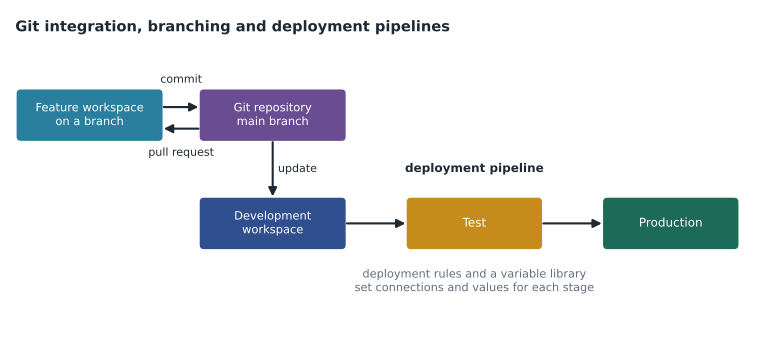
Ines did all of this in the fall, on the FDH Sales workspaces. The question she missed on the diagnostic was about what happens to items that exist only in the target stage. Deployment leaves them alone; it does not delete them. She also hesitated over which way Git sync goes: commit sends workspace changes to Git, update brings Git changes into the workspace.
Security and governance
This area has six skills and produced three of Ines's six misses. Workspace-level access control uses four roles: Admin, Member, Contributor and Viewer. Admins manage the workspace and its access; Members can also share and manage most content; Contributors create and change items but cannot manage access; Viewers can only view and read content, though they can query a SQL analytics endpoint. Item-level access control gives a person rights to one item without workspace access, such as Read on a lakehouse with ReadData for its SQL analytics endpoint or ReadAll for its files through Spark, or Build on a semantic model.
Finer controls work inside items. In a warehouse or a SQL analytics endpoint, row-level security uses a security policy with a predicate function, column-level security uses GRANT or DENY on columns, and object-level security grants or denies whole tables or views. In OneLake, security roles can grant access to particular tables or folders and can include row and column rules, which apply across the engines that respect them. File-level access means controlling folders in the Files area. Dynamic data masking in a warehouse shows masked values to users without the UNMASK permission. Sensitivity labels from Microsoft Purview are applied to items and can travel with data when it is exported. Endorsement marks items as Promoted or Certified, or as Master data, so that people can find trustworthy content.
CREATE FUNCTION security.fn_store_filter(@StoreNumber int)
RETURNS TABLE
WITH SCHEMABINDING
AS RETURN
    SELECT 1 AS allowed
    FROM security.store_access AS a
    WHERE a.StoreNumber = @StoreNumber
      AND a.UserName = USER_NAME();
GO
CREATE SECURITY POLICY security.store_policy
    ADD FILTER PREDICATE security.fn_store_filter(StoreNumber) ON dbo.fact_sales
    WITH (STATE = ON);
Nikolai's tip for this area is to identify the layer first. If the requirement is about who can open the workspace, it is a workspace role. If it is about one item for one group, it is item permissions. If it is about rows or columns inside a table, it is row-level or column-level security, in the warehouse or in OneLake security depending on which engines the users query with. If it is about hiding values while showing the column, it is dynamic data masking. If it is about classification or compliance, it is a sensitivity label. If it is about trust, it is endorsement.
Orchestrating processes
The orchestration area asks three things. First, choose between a pipeline and a notebook. Pipelines are good at copying data, calling many activities in order, handling retries and timeouts, and doing it with little code. Notebooks are good at complex transformations in PySpark or Spark SQL, and can orchestrate other notebooks with the run and runMultiple functions. A question that says 'minimize code' or 'copy from 30 sources on a schedule' points to a pipeline; one that says 'apply complex business logic to semi-structured data' points to a notebook, often run from a pipeline.
Second, design schedules and event-based triggers. Items such as pipelines and notebooks can run on schedules, and more than one schedule can be set. Event-based triggers start a pipeline when something happens, such as a file arriving in a storage location or another job finishing, using events from the Real-Time hub. Third, use parameters and dynamic expressions. A pipeline can take parameters, pass them to activities, and build values at run time with expressions that read parameters, variables, system values and the outputs of earlier activities.
@concat('raw/sales/', formatDateTime(pipeline().parameters.load_date, 'yyyy/MM/dd'))
@activity('Lookup watermark').output.firstRow.last_loaded_utc
@if(greater(activity('Copy sales').output.rowsCopied, 0), 'loaded', 'empty')
The second expression is the kind Ines got wrong on the diagnostic: she remembered output.value instead of output.firstRow for a Lookup activity that returns one row. When the Lookup is set to return only the first row, its output has a firstRow property; when it returns all rows, the output has a value array. Small details like this are easy to check in a real pipeline and hard to guess in an exam.
Labels, endorsement and the catalog
Sensitivity labels and endorsement are short skills on the outline, but they are easy to confuse. A sensitivity label says how confidential an item is, such as General, Confidential or Highly Confidential at Harrow & Finch. Labels come from Microsoft Purview, are applied to Fabric items by people with permission or by default rules, and can be inherited by items created from labelled data. When data is exported to a supported file type, such as an Excel file from a report, the label can travel with the file and its protection. A label does not by itself grant or deny access inside Fabric; access still comes from roles and permissions.
Endorsement says how trustworthy an item is. Promoted means the owner thinks it is ready for others to use; any person with write permission can promote an item. Certified means an authorized reviewer has checked it against the organization's standards; only people the Fabric admin has allowed can certify. Master data marks an item as the single source of truth for core data, such as the store list. Endorsed items stand out in the OneLake catalog and in search, which helps people choose the right table instead of a copy.
A typical exam question mixes the two: 'Analysts keep using an old copy of the store list. You need to make the official version easy to identify.' The answer is endorsement, Certified or Master data, not a sensitivity label. If the question instead says 'Data must be marked Confidential and keep its protection when exported', it is a label.
Choosing a trigger
Orchestration questions often hinge on when a job should start. A schedule suits work that should happen at fixed times, such as the nightly load at 1 a.m. An event-based trigger suits work that should start when something happens, such as a supplier dropping a price file into storage at an unpredictable hour. Event triggers in Fabric use events from the Real-Time hub, such as storage events from Azure Blob Storage or OneLake and job events from Fabric items, and an Activator rule or a pipeline trigger starts the job. A chain of dependent jobs, such as cleaning a table only after its load succeeds, usually belongs inside one pipeline with activities connected on success, rather than as separate schedules that hope the first job finishes in time. Ines's weekly maintenance pipeline is an example: it runs OPTIMIZE and then VACUUM in sequence, so VACUUM never starts while OPTIMIZE is still rewriting files.
Worked problem
Choosing the right control
Store managers must query the curated stores tables in lh_curated through the SQL analytics endpoint, see only their own store's rows, and not see the column with staff phone numbers. They must not be able to open the workspace. Which combination of controls fits?
Show solution
- Workspace access: none, because managers must not open the workspace. So use item permissions instead of a workspace role.
- Item level: share the lakehouse with Read and ReadData, so managers can query its SQL analytics endpoint.
- Rows: add row-level security on the SQL analytics endpoint tables, with a predicate that matches each manager to their store.
- Columns: deny SELECT on the phone number column with column-level security, or exclude it from a view the managers use.
- Check: no step gives workspace access, and each requirement maps to one control.
Answer: Item permissions with Read and ReadData, row-level security for stores and column-level security for the phone column, all on the SQL analytics endpoint.
Common mistakes
MistakeDeployment pipelines delete items that exist only in the target stage.
InsteadItems that exist only in the target are left unchanged.
MistakeCommit brings changes from Git into the workspace.
InsteadCommit sends workspace changes to Git; update brings Git changes into the workspace.
MistakeViewers cannot query a lakehouse's SQL analytics endpoint.
InsteadViewers can read content, including querying the SQL analytics endpoint.
MistakeA Lookup activity that returns one row exposes output.value.
InsteadWith first row only, the output has firstRow; value is the array returned when all rows are selected.
MistakeNotebooks cannot orchestrate other notebooks.
InsteadNotebooks can run other notebooks with run and runMultiple; pipelines add retries and low-code activities.
Summary and key terms
- Workspace settings cover Spark (pools, environments, high concurrency), domains, OneLake access and caching, and Apache Airflow jobs.
- Git integration commits workspace changes to a branch and updates the workspace from it; branch out creates a feature workspace.
- Database projects keep warehouse schemas in source control; deployment pipelines move content through 2 to 10 stages with rules and variable libraries.
- Access is layered: workspace roles, item permissions, row, column and object security, OneLake security roles, masking, labels and endorsement.
- Use pipelines for low-code copying and orchestration, notebooks for complex transformation, and schedules or event triggers to start them.
- Pipeline expressions read parameters, variables and activity outputs, such as a Lookup's firstRow.
- Branch out
- A Git integration action that creates a new branch and a new workspace for a feature.
- Deployment rule
- A setting in a deployment pipeline that changes a value, such as a data source, for one stage.
- Variable library
- A Fabric item that holds values that differ between stages, referred to by other items.
- OneLake security role
- A role that grants access to selected tables or folders in OneLake, with optional row and column rules.
- Dynamic expression
- A pipeline formula, written with @, that builds a value at run time.
Practice problems
Work each problem on paper first, then reveal the answer to check.
Which workspace role can create and change items but cannot manage access?
Show answer
Contributor.
What does a deployment rule do?
Show answer
It changes a value, such as a lakehouse connection, for a particular stage.
What should you choose to hide email values while still showing the column?
Show answer
Dynamic data masking.
When is a pipeline a better choice than a notebook?
Show answer
When the task is low-code copying or orchestrating many activities with retries and timeouts.
Which property holds a Lookup activity's single row result?
Show answer
output.firstRow.
Lesson quiz · 5 questions
Score 60% or more to complete this lesson.
Create a free account to save your progress, take quizzes and earn a certificate.