
MSAZ-329 · Lesson 5 of 12 · 20 min
Review: ingesting and transforming data
▶ Video coming soon A video version of this lesson is on the way.
Ingestion is what Ines has done most since October, so she was surprised to score only 13 of 20 on this group. The misses fell into two clusters. Three were about streaming: which engine to use for a given stream and which window type a requirement describes. Three were about choosing a tool: dataflow, notebook or T-SQL, and lakehouse, warehouse or eventhouse. Only one was about the batch loading she did every day. 'You know how to load the hub,' Nikolai said. 'The exam wants to know whether you can load anyone's.'
This lesson reviews the three areas of the group: loading patterns, batch ingestion and transformation, and streaming. It concentrates on choices, because most questions in this group give a scenario and ask which approach fits.
Loading patterns
A full load replaces the target with a complete copy of the source each time. It is simple and always correct, but it moves more data than needed and gets slower as the source grows. An incremental load moves only new or changed rows. It needs a way to know what changed: a watermark column such as a modified timestamp or an increasing key, change data capture in the source, or a change feed. Fabric offers several incremental tools. A copy job can copy incrementally by watermark or, where the source supports it, by change data capture, which also carries deletes. A pipeline can read a watermark from a control table, copy rows above it, and update the watermark, as Ines's nightly pipeline does. Mirroring keeps a near real-time replica of supported databases without any load logic at all.
Preparing data for a dimensional model means shaping it into facts and dimensions. Dimensions get surrogate keys, and changes to their attributes are handled by type: Type 1 overwrites, Type 2 adds a new row with effective dates so history is kept, and Type 0 never changes. Facts are loaded after their dimensions so that every fact row can find its keys, with an inferred or 'unknown' member when a dimension row has not arrived yet. A loading pattern for streaming data usually lands raw events continuously and builds aggregates on top, rather than trying to compute final results as events arrive.
MERGE INTO dbo.dim_store AS t
USING stage.store_changes AS s
    ON t.StoreNumber = s.StoreNumber AND t.IsCurrent = 1
WHEN MATCHED AND t.Region <> s.Region THEN
    UPDATE SET t.IsCurrent = 0, t.ValidTo = s.ChangeDate
WHEN NOT MATCHED BY TARGET THEN
    INSERT (StoreNumber, StoreName, Region, ValidFrom, ValidTo, IsCurrent)
    VALUES (s.StoreNumber, s.StoreName, s.Region, s.ChangeDate, '9999-12-31', 1);
Choosing a data store
The batch area starts with a choice of store. A lakehouse holds files and Delta tables and is worked with mainly through Spark, with a read-only SQL analytics endpoint for queries. A warehouse holds Delta tables that are created and changed with T-SQL, with transactions across tables, and suits teams who work in SQL. An eventhouse holds KQL databases designed for large volumes of time-stamped events and fast queries over them. A SQL database in Fabric is an operational database for applications, with its data replicated to OneLake for analytics.
| Requirement in the question | Store that usually fits | Why |
|---|---|---|
| Semi-structured files and data science notebooks | Lakehouse | Files plus Delta tables, Spark first |
| A SQL team needs multi-table transactions and stored procedures | Warehouse | Full T-SQL write support |
| Millions of sensor readings a day, queried by time in seconds | Eventhouse | KQL databases built for time series |
| An application needs inserts and updates with low latency | SQL database in Fabric | Operational database replicated to OneLake |
Choosing a transformation tool
The next choice is the tool. Dataflows Gen2 use Power Query, a visual, low-code interface with hundreds of connectors; they suit analysts and moderate volumes. Notebooks use PySpark, Spark SQL or other languages; they suit large volumes, complex logic and anything that needs code libraries. T-SQL in a warehouse suits teams who know SQL and data already in the warehouse, using stored procedures, CREATE TABLE AS SELECT and INSERT ... SELECT. A question that stresses 'no code' or 'business users maintain the logic' points to a dataflow. One that stresses very large data or complex parsing points to a notebook. One that says the team writes SQL and the data is in the warehouse points to T-SQL.
Shortcuts, mirroring and pipelines
Shortcuts point to data without copying it. A OneLake shortcut can point to another lakehouse or warehouse in Fabric, or to external storage such as Azure Data Lake Storage Gen2, Amazon S3 or Google Cloud Storage. The data stays where it is, and queries read it through the shortcut using the shortcut's credentials or the user's identity, depending on the type. Shortcuts suit data that is owned elsewhere and must not be duplicated, such as the supplier price files Harrow & Finch reads from a partner's storage account.
Mirroring replicates a supported database, such as Azure SQL Database, Azure Cosmos DB or Snowflake, into OneLake as Delta tables, and keeps it in sync with very little delay. Compute for replication is free, and so is storage up to a limit tied to the capacity size. Mirroring suits operational data that analysts need fresh, with no load logic to maintain. Pipelines with the copy activity remain the general tool for moving data from many sources on a schedule, and the copy job is a simpler item for copying many tables, fully or incrementally, without building a pipeline.
Transforming with PySpark, SQL and KQL
The outline expects candidates to transform data in all three languages. The operations are the same in each: filter rows, select and rename columns, join tables, denormalize by joining dimensions onto facts so reports need fewer joins, group and aggregate, and handle bad data. Duplicates can be removed with dropDuplicates in PySpark, ROW_NUMBER in SQL, or arg_max or distinct in KQL. Missing values can be filled with defaults, set to an 'unknown' member, or sent to a rejected-rows table with a reason. Late-arriving data needs a plan: a lookback window that reloads the last few days, a MERGE that updates rows already loaded, or, in streaming, a watermark that waits a set time for late events before closing a window. Lesson 7 practises reading these in code.
Streaming: choosing an engine
Fabric has three ways to process streams. Eventstreams capture events from sources such as Azure Event Hubs, IoT Hub, change data capture feeds or custom endpoints, transform them with no-code operations such as filter, aggregate and group by, and route them to destinations such as an eventhouse, a lakehouse or Activator. Spark structured streaming in a notebook reads a stream, applies code transformations and writes to Delta tables, which suits complex logic and lakehouse targets. KQL in an eventhouse ingests streams at high volume and transforms them with update policies and materialized views, and queries them in seconds.
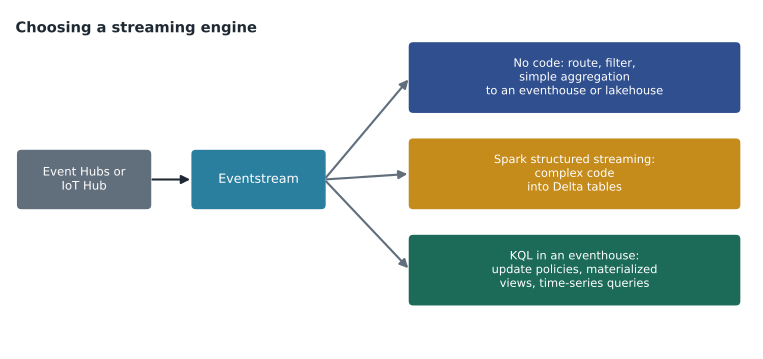
The freezer pilot uses all three: the eventstream routes readings, KQL cleans and queries them in eh_sensors, and a structured streaming prototype writes 10-minute summaries to the lakehouse. On the exam, the signal words are 'no code' for eventstreams, 'Delta tables' or 'complex code' for structured streaming, and 'time-series queries in seconds' or 'KQL' for the eventhouse.
Windowing functions
Windows group a stream by time. A tumbling window splits time into fixed, non-overlapping intervals, such as every 10 minutes. A hopping window has a fixed size but starts more often than its size, so windows overlap: a 10-minute window every 5 minutes. A sliding window produces output when events enter or leave a window of fixed size. A session window groups events separated by gaps shorter than a timeout. A snapshot window groups events that have the same timestamp. Eventstreams offer these window types; in KQL, bin() makes tumbling windows; in Spark, the window function makes tumbling or sliding windows.
readings = [("02:01", -18.4), ("02:04", -18.1), ("02:09", -17.9),
            ("02:12", -16.0), ("02:17", -14.2), ("02:21", -12.6), ("02:28", -11.8)]

def minutes(t):
    h, m = t.split(":")
    return int(h) * 60 + int(m)

windows = {}
for time, temp in readings:
    start = minutes(time) // 10 * 10
    windows.setdefault(start, []).append(temp)

for start in sorted(windows):
    temps = windows[start]
    label = f"{start // 60:02d}:{start % 60:02d}"
print(label, "readings", len(temps), "average", round(sum(temps) / len(temps), 2))02:00 readings 3 average -18.13 02:10 readings 2 average -15.1 02:20 readings 2 average -12.2
What this code does
The program takes seven freezer readings, each with a clock time and a temperature. It works out which 10-minute block each reading falls in by rounding its time down to the nearest ten minutes, then groups the readings by block. For each block it prints the start time, how many readings it holds and their average temperature, which is what a tumbling window does in an eventstream or with bin() in KQL.
The output shows three windows, starting at 02:00, 02:10 and 02:20, with averages of about −18.13, −15.1 and −12.2. A tumbling window never puts a reading in two windows. If the requirement were 'a 10-minute average updated every 5 minutes', the right answer would be a hopping window, and the reading at 02:12 would appear in two of them.
Copy job, pipeline or mirroring?
Three Fabric items can all move data from a database into OneLake, and questions often ask which one fits. The choice depends on how fresh the data must be, how much logic sits around the copy, and how much the team wants to build.
| Need | Copy job | Pipeline with copy activity | Mirroring |
|---|---|---|---|
| Freshness | Scheduled, as often as set | Scheduled or triggered | Near real time, continuous |
| Logic around the copy | Little: choose tables, full or incremental | Any: lookups, branches, notebooks, notifications | None: a replica of the tables |
| Incremental changes | Watermark or change data capture | Built by the developer, for example with a watermark | Handled by the service |
| Sources | Many connectors | Many connectors | Supported databases only |
A question that says 'copy 40 tables incrementally every hour with the least development effort' points to a copy job. One that says 'after the copy, run a notebook, then refresh a semantic model, and email the team if any step fails' points to a pipeline. One that says 'analysts need the source tables in OneLake within seconds of each change, without building any loads' points to mirroring, if the source is supported. Ines's mistake on the diagnostic was choosing a pipeline for the first case; it would work, but the copy job meets the 'least effort' constraint better.
A dataflow is a fourth option when the data needs shaping on the way in and the team prefers a visual tool. Dataflows Gen2 can write to a lakehouse, warehouse or other destination and can refresh incrementally, but they suit moderate volumes. For tens of millions of rows a copy job or pipeline lands the data faster, and a notebook or T-SQL shapes it afterward.
Worked problem
Which window?
A store's door sensors send an event each time a cooler door opens. Operations want to group the openings by visit: any openings less than 2 minutes apart belong to the same visit, and a visit ends after 2 minutes with no openings. Which window type fits?
Show solution
- Tumbling windows split time into fixed blocks; a visit could be split across two blocks. Not a fit.
- Hopping windows overlap with fixed sizes; visits have no fixed length. Not a fit.
- Session windows group events separated by gaps shorter than a timeout, and close after a quiet period. This matches.
- Snapshot windows group events with identical timestamps. Not a fit.
Answer: A session window with a 2-minute timeout.
Common mistakes
MistakeA full load is always wrong for large tables.
InsteadA full load is simple and correct; it fits when the source is small or has no reliable way to detect changes.
MistakeShortcuts copy external data into OneLake.
InsteadShortcuts point to data in place; mirroring and copying create copies.
MistakeDataflows are the best tool for very large, complex transformations.
InsteadNotebooks usually fit large or complex work; dataflows fit low-code, moderate-volume work.
MistakeA hopping window never places an event in two windows.
InsteadHopping windows overlap, so an event can appear in several; tumbling windows never overlap.
MistakeLate data can be ignored in streaming.
InsteadUse a watermark or lookback so late events are still counted within an agreed limit.
Summary and key terms
- Choose full or incremental loads by source size and how changes can be detected: watermarks, change data capture, copy jobs or mirroring.
- Prepare dimensional models with surrogate keys, slowly changing dimension types and dimensions loaded before facts.
- Choose a lakehouse, warehouse, eventhouse or SQL database by workload, and a dataflow, notebook or T-SQL by skills and complexity.
- Shortcuts read data in place; mirroring replicates databases; pipelines and copy jobs move data on a schedule.
- Transform in PySpark, SQL and KQL: denormalize, aggregate, and handle duplicate, missing and late data.
- For streams, choose eventstreams, structured streaming or KQL, and the window type that matches the requirement.
- Watermark
- A value, such as a timestamp, that records how far a load has read so the next load starts after it.
- Change data capture
- A source feature that records inserts, updates and deletes so they can be copied.
- Denormalize
- Join related tables into one wider table so queries need fewer joins.
- Tumbling window
- Fixed, non-overlapping time intervals used to group a stream.
- Session window
- A window that groups events separated by gaps shorter than a timeout.
Practice problems
Work each problem on paper first, then reveal the answer to check.
Which Fabric item replicates an Azure SQL database into OneLake without load logic?
Show answer
Mirroring.
Which store fits millions of time-stamped readings queried in seconds?
Show answer
An eventhouse with a KQL database.
When does a dataflow fit better than a notebook?
Show answer
When the logic should be low-code and maintained by business users, at moderate volume.
What is the difference between tumbling and hopping windows?
Show answer
Tumbling windows do not overlap; hopping windows have a fixed size but start more often, so they overlap.
Name two ways to handle late-arriving batch data.
Show answer
A lookback window that reloads recent days, and a MERGE that updates rows already loaded.
Lesson quiz · 5 questions
Score 60% or more to complete this lesson.
Create a free account to save your progress, take quizzes and earn a certificate.