
MSAZ-312 · Lesson 5 of 12 · 20 min
Large semantic models and XMLA endpoints
▶ Video coming soon A video version of this lesson is on the way.
In the session on Tuesday, November 3, the group went through what the service had done to Finance Margin overnight, and why some of the tools they had used the day before worked at all. Two settings explained most of it: the large semantic model storage format, which decides how big a model can grow and how it is stored, and the XMLA endpoint, which lets tools other than Power BI Desktop and the browser read and change a model in the service.
The large semantic model storage format
By default a semantic model in the service is limited to 1 GB. On Fabric F capacities, Premium P capacities, Embedded A capacities and Premium Per User, the large semantic model storage format removes that limit: a model can then grow as large as the capacity allows, or as large as the capacity administrator sets as the maximum. Power BI Desktop can still upload a file of at most 10 GB, but a model can grow beyond that in the service through refreshes, which is how very large models are usually built. Models in Pro workspaces stay limited to 1 GB.
The format also changes how the model is stored when it is not in memory. Models are kept in files on Azure premium storage and loaded into memory when queried; with the large format, on-demand load is on by default, so the engine pages in only the data a query needs, and an evicted model becomes available again quickly. Microsoft recommends the format even for models that are not large if XMLA tools will write to them, because it improves the performance of XMLA write operations. It is set per model in the model's settings, or as the default for new models in a workspace's settings. Push semantic models do not support it.
Keiko had turned it on for Finance Margin before the first refresh, as Marisol asked, because the order mattered: Microsoft advises enabling the format before the first refresh of a model that might pass 1 GB, and a model created in a region with the large format must stay in that region. Finance Margin was 831 MB in Desktop, but a full refresh can use up to twice the model's memory while the new copy is built beside the old one, and Finance History would grow over time.
| Question | Default format | Large semantic model storage format |
|---|---|---|
| Maximum size | 1 GB | Capacity limit or the maximum the administrator sets |
| Where available | All workspaces | Fabric, Premium, Embedded and Premium Per User |
| Desktop upload limit | 10 GB | 10 GB; larger sizes are reached by refresh in the service |
| Load after eviction | Whole model | On demand, by the pages each query needs |
| Recommended for XMLA writes | No | Yes, even for small models |
What the XMLA endpoint is
Every workspace on a Premium, Premium Per User or Fabric capacity exposes an XMLA endpoint, the same protocol that SQL Server Analysis Services and Azure Analysis Services use. Through it, client tools connect to the semantic models in the workspace as if they were databases on an Analysis Services server. Read-only access lets tools query a model: Excel PivotTables, DAX Studio, Power BI Report Builder and others. Read-write access also lets tools change a model's metadata and process it: SQL Server Management Studio, Tabular Editor, ALM Toolkit, Visual Studio with the Analysis Services projects extension, and PowerShell.
The connection string names the workspace, with a URL in the form powerbi://api.powerbi.com/v1.0/ followed by the tenant name or myorg for the user's own tenant, and the workspace name. Workspace names with spaces must be URL-encoded. Keiko copied the string from the workspace settings in the service, where it is listed under the connection settings, and pasted it into SSMS as the server name, choosing the Microsoft Entra authentication option with multifactor authentication.
Server:  powerbi://api.powerbi.com/v1.0/myorg/FDH-Finance
Auth:    Microsoft Entra MFA (keiko.tanabe@harrowfinch.example)
Database (semantic model): Finance Margin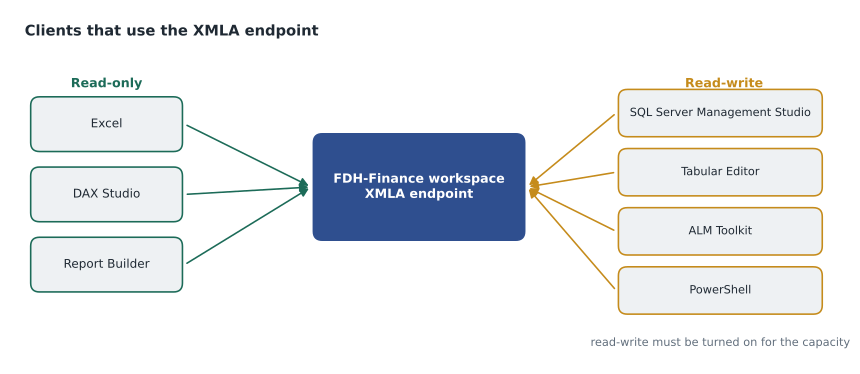
Turning on read-write
By default the endpoint is read-only for the semantic models workload of a capacity. Write access is a capacity setting: a capacity administrator sets the XMLA Endpoint option under the capacity's Power BI workloads to Read Write, and it then applies to every workspace and model on that capacity. For Premium Per User, the same option is in the admin portal's Premium Per User settings. A tenant setting, Allow XMLA endpoints and Analyze in Excel with on-premises semantic models, must also be on; it is enabled by default. Elena Brandt, the data platform lead, who administered the hub's capacities, turned on read-write for the trial capacity and planned to do the same for the F16, but only after the group agreed who could use it.
That agreement mattered because read-write is powerful. Anyone with the right workspace role can, through SSMS or a script, change a model's structure, delete tables or reprocess partitions. Access is still governed by workspace roles and model permissions; the endpoint does not bypass them. Marisol proposed a rule that Elena accepted: XMLA write operations on production models are made only by the BI team, through ALM Toolkit or Tabular Editor with a saved script, and every change is logged with the impact check from lesson 10.
What happens to the PBIX
Microsoft gives one warning prominently. Once a model authored in Power BI Desktop has been changed through the XMLA endpoint, it can no longer be downloaded from the service as a PBIX file. The service's copy is now the master, and the original file is out of date. Teams that use XMLA writes therefore keep the model's definition somewhere else: in a Power BI project folder in Git, in a Tabular Editor folder, or both. Rosa had been in the habit of downloading the file from the service whenever she needed to edit it on a new laptop; from now on she would work from the project in the hub's Git repository, as MSAZ-311 had set up for Sales Overview.
Processing and refreshing through XMLA
Through the endpoint, refreshes can be controlled precisely. A Tabular Model Scripting Language (TMSL) command, a JSON document, can refresh one table, one partition or the whole model, and choose the refresh type: full, data only, calculate or clear. SSMS builds these commands from its menus and can show the script instead of running it, which is how Keiko learned the syntax.
{
  "refresh": {
    "type": "dataOnly",
    "objects": [
      { "database": "Finance Margin", "table": "fact_sales", "partition": "2026Q3" }
    ]
  }
}
Two uses came up straight away. When Nikolai found that a supplier price correction had been loaded late for August, Rosa reprocessed only the 2026 third-quarter partition of fact_sales instead of the whole archive. And for the first load of Finance History, if it ever moved its seven years into import mode, the team could process one year at a time through XMLA, where refreshes have no time limit. The service's enhanced refresh REST API offers similar control, with table and partition targets and parallelism, to pipelines and scripts that call it.
Worked problem
Memory during a refresh
Finance Margin uses 831 MB in memory. A full refresh can need up to twice the memory of the model alone, because the old copy keeps answering queries while the new one is built. On the trial capacity, the largest model allowed in memory is 25 GB; on the planned F16 it is 5 GB. How much memory could a full refresh of Finance Margin need, and does it fit on both?
Show solution
- Twice the model size is 2 × 831 = 1,662 MB, about 1.7 GB.
- On the trial capacity, 1.7 GB is far below 25 GB.
- On the F16, 1.7 GB is also below 5 GB, leaving about 3.3 GB for other work on the same model.
- An incremental refresh needs much less, because only the refreshed partitions are rebuilt.
Answer: Up to about 1.7 GB, which fits on both capacities. The constraint to watch on the F16 is not one model but several models refreshing or being queried at the same time.
Compatibility level and other details
Each model has a compatibility level, a number that says which engine features it can use. Models created in recent versions of Power BI Desktop are at a level that supports everything in this course; older models may need upgrading, which tools such as Tabular Editor can do. Deploying a model from Visual Studio's Analysis Services projects requires a compatibility level of 1500 or higher. Calculation groups, which MSAZ-311 created in Desktop, also depend on a sufficiently recent level.
The endpoint is also how monitoring tools see a model. SQL Server Profiler and DAX Studio connect through it to trace queries and refreshes, as lesson 3 did to check aggregations. In Fabric, workspace monitoring and the capacity metrics app give a broader view, described in MSAZ-321, but for one model's queries a trace is still the most detailed source.
| Tool through XMLA | Needs read-write? | Typical use |
|---|---|---|
| Excel PivotTable | No | Business users exploring a model |
| DAX Studio | No | Running and timing queries, VertiPaq Analyzer |
| SQL Server Management Studio | For scripting and processing | Viewing partitions, running TMSL, refreshing parts of a model |
| Tabular Editor | For metadata changes | Editing measures and properties, scripts, Best Practice Analyzer |
| ALM Toolkit | For deploying | Comparing two models and deploying only the differences |
| PowerShell with the SqlServer module | For changes | Automating refreshes and scripts |
Rosa's checklist for an XMLA change
By the end of the session the group had written a short checklist for any change made to a production model through the endpoint, and Marisol asked Rosa to walk through it with the history model as the example. Step one is to make the change in the Power BI project in Git, not directly in the service, so the definition in the repository stays the master copy. Step two is to run the Best Practice Analyzer rules from lesson 6 on the changed project. Step three is to compare the project with the service model and read every difference listed, because a comparison sometimes shows changes nobody intended, such as a column renamed by accident.
Step four is the impact check from lesson 10: list the reports and other items that depend on the model, and say in the change log which of them the change affects. Step five is to deploy only the selected differences and record the script that the tool produces. Step six is to decide whether a refresh is needed. A new measure needs none; a new calculated column needs a recalculation; a changed Power Query step needs the affected partitions to be reprocessed. Step seven is to open the main report and check the totals that finance relies on.
Rosa timed the whole routine on the history model with a small change, one new measure, and it took 14 minutes, most of it reading the comparison and the impact list. Dana asked whether that was not slow for one measure. Marisol's answer was that the alternative was a republish that would have dropped the model's partitions and cost a long reload, and that most of the 14 minutes was the reading that would catch a mistake before finance saw it. The checklist went into the hub's runbook next to the incident steps from MSAZ-311.
Elena added one administrative step for herself. Every quarter she would export the list of people with write access to the FDH-Finance workspace and check it against the BI team's roster, removing anyone who had moved on. Write access through XMLA follows workspace roles, so the role list is the real control, and an out-of-date list is the most likely way an unexpected change would reach a production model.
Common mistakes
MistakeThe 10 GB Desktop upload limit is the maximum size of a model.
InsteadWith the large format, models can grow beyond 10 GB in the service through refresh.
MistakeRead-write XMLA is on by default for every capacity.
InsteadCapacities default to read-only; an administrator turns on read-write.
MistakeAfter an XMLA change you can still download the PBIX.
InsteadA Desktop-authored model changed through XMLA can no longer be downloaded as PBIX; keep the definition in a project or Git.
MistakeXMLA lets anyone bypass workspace security.
InsteadWorkspace roles and model permissions still apply to XMLA connections.
Summary and key terms
- The large semantic model storage format lifts the 1 GB limit on Fabric, Premium, Embedded and PPU and loads data on demand.
- Enable it before the first refresh of a model that may grow, and for models that XMLA tools will write to.
- The XMLA endpoint lets Analysis Services tools connect to models in a workspace; the URL starts powerbi://api.powerbi.com/v1.0/.
- Capacities default to read-only XMLA; read-write is a capacity setting and should be governed.
- A Desktop-authored model changed through XMLA can no longer be downloaded as PBIX.
- TMSL commands refresh individual tables or partitions; XMLA refreshes have no time limit.
- Large semantic model storage format
- A model setting that removes the 1 GB limit and stores models for on-demand loading.
- XMLA endpoint
- An Analysis Services protocol endpoint that client tools use to query and manage models in a workspace.
- Read-write XMLA
- A capacity setting that allows tools to change and process models through the endpoint.
- TMSL
- Tabular Model Scripting Language, JSON commands for creating, altering and refreshing tabular models.
- Compatibility level
- A number that defines which tabular engine features a model can use.
- On-demand load
- Loading only the data pages a query needs into memory.
Practice problems
Work each problem on paper first, then reveal the answer to check.
What is the default size limit of a semantic model without the large format?
Show answer
1 GB.
Where is read-write XMLA turned on for a Fabric capacity?
Show answer
In the capacity's settings for the Power BI workloads, by a capacity administrator.
Why did Rosa stop downloading the PBIX from the service?
Show answer
Once the model is changed through XMLA it can no longer be downloaded; she works from the Git project instead.
Which TMSL refresh type reloads data without recalculating everything?
Show answer
dataOnly.
Why did Keiko enable the large format before the first refresh?
Show answer
Microsoft advises doing so for models that may pass 1 GB, and it helps XMLA write performance.
Lesson quiz · 5 questions
Score 60% or more to complete this lesson.
Create a free account to save your progress, take quizzes and earn a certificate.