
MSAZ-312 · Lesson 4 of 12 · 21 min
Incremental refresh
▶ Video coming soon A video version of this lesson is on the way.
Monday, November 2 was the session about the nightly refresh. Finance Margin still reloaded three years of sales lines every night, 41.2 million rows, and the refresh history showed a steady 2 hours and 40 minutes, finishing around 3:40 a.m. On the pilot's F16 that refresh would compete with the Direct Lake reframe at about 6:10 a.m. and the morning reports if anything ran late. Only the last few days of sales ever changed. Marisol's goal for the session was to refresh only those days.
Before setting anything up, Marisol moved the model's source. Rosa's original queries read StockLine through the on-premises data gateway. Since October the same cleaned sales lines had been in the hub's wh_sales warehouse, loaded nightly by Ines Duarte's pipelines and reconciled to the cent before 6:00 a.m., so Rosa repointed the Power Query source to the warehouse's SQL connection string. That removed the gateway from the path, and it mattered for incremental refresh in a second way: a Fabric warehouse is a SQL source, so filters in Power Query fold into the SQL query sent to it.
How incremental refresh works
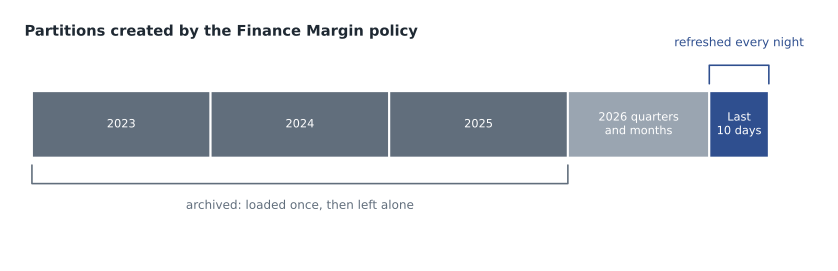
Incremental refresh splits an import table into partitions by date and refreshes only the recent ones. The developer defines a policy in Power BI Desktop; the service creates and manages the partitions when the model is refreshed after publishing. Historical partitions are loaded once and then left alone. Recent partitions are refreshed each time. As time passes, the service merges daily partitions into months, months into quarters and quarters into years, and removes partitions that fall outside the archive period. The partitions are not visible in the Power BI service itself, but they can be seen and managed through the XMLA endpoint.
Setting it up
The setup has three parts. First, two Power Query parameters with the reserved, case-sensitive names RangeStart and RangeEnd, both of the date/time type. Second, a filter step on the table that keeps rows on or after RangeStart and before RangeEnd. The comparison must use greater than or equal at one end and less than at the other, so that no row falls into two partitions. Third, the policy itself, set on the table in Power BI Desktop: how much history to keep, how much to refresh, and some options.
Finance Margin's fact table had been changed in lesson 1 to use an integer DateKey in the form yyyymmdd instead of a timestamp. The parameters are date/time values, so the filter had to convert them to the same integer form. Microsoft's documentation shows this pattern, and Rosa used it as written.
let
    Source = Sql.Database("<wh_sales SQL connection string>", "wh_sales"),
    Sales = Source{[Schema = "dbo", Item = "fact_sales"]}[Data],
    FromStart = Table.SelectRows(Sales, each
        [DateKey] >= Int32.From(DateTime.ToText(RangeStart, [Format = "yyyyMMdd"]))),
    BeforeEnd = Table.SelectRows(FromStart, each
        [DateKey] < Int32.From(DateTime.ToText(RangeEnd, [Format = "yyyyMMdd"])))
in
    BeforeEnd
Folding matters here more than anywhere. If the filter folds, each partition's refresh sends a SQL query with a WHERE clause on DateKey, and the warehouse returns only that partition's rows. If it does not fold, the mashup engine may pull every row and filter them itself, for every partition, which is slower than the full refresh it was meant to replace and can run out of memory. Power BI Desktop warns when it cannot confirm folding, and for SQL sources its check is reliable; Keiko also right-clicked the last step and chose View Native Query, which showed the SQL with both conditions in the WHERE clause.
| Policy setting | Finance Margin value | Reason |
|---|---|---|
| Archive data starting | 3 years before the refresh date | The margin pack compares the current year with two full prior years |
| Incrementally refresh data starting | 10 days before the refresh date | Returns and price corrections reach back up to 7 days; 10 gives a margin |
| Only refresh complete days | On | The refresh runs after midnight; a partial day is never loaded |
| Detect data changes | On, using LastModified | Skip days in the window that did not change |
| Get the latest data in real time with DirectQuery | Off | Finance works on the previous day; real time adds cost and limits |
Choosing the windows
The archive period is how much history the table keeps. The refresh period is how much of it is reloaded on every refresh. Marisol's rule was to make the refresh period as short as possible while still covering every change that the source might make. In the hub, the dedupe step in the curated layer looked back over seven days of loads, because till resends and returns could change a sale up to a week later. Ten days covered that with three days to spare. A refresh period that is too short silently leaves old numbers in place; one that is too long wastes time but is never wrong.
Detect data changes adds a further saving. The policy names a date/time column that records when a row last changed, here LastModified, which the warehouse set on every insert or update. At each refresh the engine checks the maximum value of that column for each day in the refresh window and reloads only the days where it has moved. Microsoft notes that this column must not be the same one used to partition, and that its maximum per period is stored in the model, so a very precise timestamp adds a little memory.
# Rows and time for a full reload versus the incremental policy
full_rows = 41_200_000
full_minutes = 160                      # 2 h 40 min from the refresh history
rows_per_minute = full_rows / full_minutes

rows_per_day = 38_000
window_days = 10
incremental_rows = rows_per_day * window_days

print("Throughput:", f"{rows_per_minute:,.0f}", "rows per minute")
print("Rows per incremental refresh:", f"{incremental_rows:,}")
print("Estimated fact load:", round(incremental_rows / rows_per_minute, 1), "minutes")
print("Share of the full reload:", round(incremental_rows / full_rows * 100, 2), "in 100")Throughput: 257,500 rows per minute Rows per incremental refresh: 380,000 Estimated fact load: 1.5 minutes Share of the full reload: 0.92 in 100
What this code does
The block works out how many rows per minute the old full refresh loaded, then counts the rows in a ten-day refresh window at about 38,000 sales lines a day. Dividing one by the other estimates how long the fact table part of each incremental refresh should take, and the last line shows what small share of the full table that window is.
The estimate said the fact table would take about a minute and a half. Marisol warned that the first refresh after publishing would not be quick at all: it has to create every partition and load all three years once. After that, the nightly refresh would also include the dimension tables, which have no policy and are reloaded in full, and the work of merging partitions at month and year boundaries.
Publishing and the first refresh
Rosa published the model to the FDH-Finance workspace on the trial capacity and started a refresh by hand. It ran for 2 hours and 51 minutes, slightly longer than the old full refresh, because the service created and processed 37 partitions. The next night's scheduled refresh finished in 9 minutes, of which the fact table took a little over 2 and the dimensions most of the rest. Dana asked whether she could see the partitions; Keiko connected SQL Server Management Studio to the workspace's XMLA endpoint, expanded the model, and showed her the list on fact_sales, with year partitions for the archive and day partitions for the refresh window.
Refresh limits shaped the plan. A refresh started in the service on a Premium or Fabric capacity can run for up to five hours; a model in a Pro workspace is limited to two hours. Refreshes started through the XMLA endpoint have no time limit, and for very large models Microsoft describes bootstrapping: creating the partitions without data, then processing them one at a time through XMLA so that no single operation runs into the limit. Finance Margin did not need that, but Finance History, with seven years, might when its detail moved out of DirectQuery one day.
The republishing trap
The next morning Rosa added a measure in Power BI Desktop and was about to publish again when Marisol stopped her. Publishing the file from Desktop replaces the model in the service, and with it the partitions and their data; the next refresh would reload all three years. Worse, if the policy had included a real-time DirectQuery partition, republishing would not even be allowed. For a model with incremental refresh, changes after the first publish should be deployed as metadata only, through the XMLA endpoint with a tool such as ALM Toolkit or Tabular Editor, or through deployment pipelines, which keep the data in place. Lesson 6 covers those tools.
Worked problem
How far back to refresh
A sales line can be corrected up to 7 days after the sale. The refresh runs at 1:00 a.m. with Only refresh complete days on. The team considers refresh windows of 5, 7 and 10 days. Which windows guarantee that a correction made on day 7 after a sale is loaded?
Show solution
- With complete days only, a refresh on the morning of day D covers the days D−1, D−2 and so on, back as far as the window.
- A correction made 7 days after a sale changes the sale's day, which is 7 days before the correction. The next morning that day is 8 days back.
- A 5-day or 7-day window does not reach 8 days back, so the correction would never be loaded.
- A 10-day window reaches 10 days back and covers it with 2 days to spare.
Answer: Only the 10-day window. A window has to cover the longest correction delay plus the day on which the correction itself is loaded.
Real-time hybrid tables
The policy has one more option, Get the latest data in real time with DirectQuery. When it is on, the service adds a DirectQuery partition after the import partitions, so queries for the current day go to the source and always see the latest rows. The result is a hybrid table, part import and part DirectQuery. It is available only on Premium, Premium Per User and Fabric capacities, not Pro, it requires Only refresh complete days, and its filter must fold; a non-folding query cannot be used because the DirectQuery partition depends on it. Grace's store operations team wanted something like this for a same-day sales tile, but Marisol pointed out that the hub's warehouse was loaded nightly, so a real-time partition over it would show nothing new. Same-day figures belonged to the Real-Time Intelligence work described in MSAZ-321.
| Feature | Requirement or limit |
|---|---|
| Incremental refresh | Pro, Premium Per User, Premium, Fabric capacities and Embedded |
| Real-time DirectQuery partition | Premium Per User, Premium, Fabric capacities and Embedded; not Pro |
| RangeStart and RangeEnd | Exact names, date/time type, used by every table with a policy |
| Filter on the table | Must fold to the source for good performance; must fold for real-time |
| Service refresh time limit | Five hours on Premium or Fabric; two hours on Pro |
| XMLA refresh | No time limit; partitions can be processed one by one |
Watching the refresh
After the change, Keiko set up the checks that would tell the team when the policy stopped working. The model's refresh history in the service shows each refresh's start, end and status, and a failed refresh can send an email to the model's owner and to named contacts. She added the BI team's shared mailbox to those contacts. For more detail, the team ran a trace through the XMLA endpoint during the first week's refreshes to see each partition's processing time, which confirmed that the archive partitions were not touched and that the ten day partitions each took a few seconds. She also wrote down the expected nightly duration, about 9 minutes, and agreed with Marisol that a refresh taking more than 30 minutes would be investigated the same day, since that would suggest the filter had stopped folding or the policy had been replaced by a republish.
Common mistakes
MistakeIncremental refresh works with any Power Query filter.
InsteadThe filter must use RangeStart and RangeEnd and should fold; otherwise every partition can read the whole table.
MistakeThe refresh window only needs to cover yesterday.
InsteadIt must cover the longest delay before source rows change, plus a margin.
MistakeRepublish from Desktop after each change, as before.
InsteadRepublishing replaces the partitions; deploy metadata changes through XMLA or deployment pipelines.
MistakeA real-time DirectQuery partition always shows same-day data.
InsteadIt shows only what the source has; over a nightly-loaded warehouse it adds nothing.
Summary and key terms
- Incremental refresh partitions an import table by date, loads history once and refreshes only recent partitions.
- It needs date/time parameters named RangeStart and RangeEnd, a filter using >= and <, and a policy set in Desktop.
- The filter should fold to the source; check with View Native Query or Desktop's warning.
- Choose the refresh window to cover the longest correction delay; Detect data changes skips unchanged days.
- The first refresh builds all partitions; later refreshes are short. Avoid republishing from Desktop afterwards.
- Real-time hybrid tables need Premium, PPU or a Fabric capacity and a folding filter.
- Incremental refresh
- A policy that partitions an import table by date and refreshes only recent partitions.
- RangeStart and RangeEnd
- Reserved date/time Power Query parameters that the service sets for each partition.
- Archive period
- How much history an incremental refresh policy keeps.
- Refresh period
- How much recent data is reloaded on every refresh.
- Detect data changes
- An option that reloads only periods whose change-tracking column has a new maximum value.
- Hybrid table
- A table with import partitions and a real-time DirectQuery partition.
- Bootstrapping
- Creating partitions without data and processing them individually through XMLA.
Practice problems
Work each problem on paper first, then reveal the answer to check.
What type must RangeStart and RangeEnd be?
Show answer
Date/time.
Why did Rosa repoint Finance Margin to the warehouse before setting up the policy?
Show answer
To remove the gateway and use a SQL source on which the filter folds.
Why did the team choose a 10-day refresh window?
Show answer
Corrections reach back up to 7 days, and a correction is loaded the day after it is made, so 10 days covers it with a margin.
How long did the first refresh take, and the next one?
Show answer
2 hours and 51 minutes, then 9 minutes.
Why should Rosa not republish the file from Desktop?
Show answer
It would replace the model's partitions and force a full reload.
Lesson quiz · 5 questions
Score 60% or more to complete this lesson.
Create a free account to save your progress, take quizzes and earn a certificate.