
MSAZ-311 · Lesson 7 of 12 · 20 min
Direct Lake
▶ Video coming soon A video version of this lesson is on the way.
Thursday, November 5, was the day a backfill notebook pushed the trial capacity into throttling for about 40 minutes, and the seventh model session started late while Nikolai sorted it out. Marisol used the delay. When the capacity recovered, she opened Sales Overview, which Keiko had built in Direct Lake mode the day before, and asked what would have happened to the store managers' reports if this had been a weekday morning in the pilot. To answer that, Keiko needed to understand how Direct Lake actually works.
How Direct Lake works
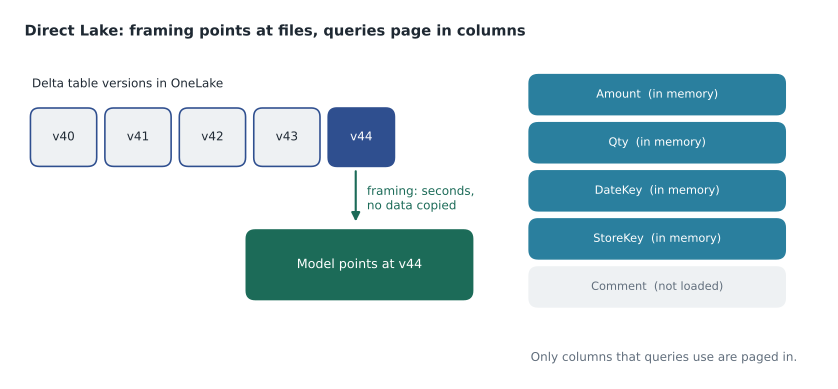
A Direct Lake model has no copy of the data of its own. Its tables point at Delta tables in OneLake, and when a query needs a column, the engine reads that column's Parquet data from OneLake, converts it into the same compressed in-memory format that import models use, and keeps it in memory for later queries. That conversion is called transcoding. Columns that no query has asked for are never loaded, and columns that have not been used for a while can be evicted from memory when the capacity needs it, to be paged back in the next time they are needed.
The first query after a column is loaded from cold is slower than later ones, because of the read and transcoding; after that, queries run at import speed. Marisol called this the model's temperature: a model that people use all day is warm, and its common columns stay in memory; a model opened once a week starts cold each time. Keiko noticed exactly this in her tests, with the first page of the store report taking about four seconds and every later click well under one.
Framing: what a refresh means in Direct Lake
A Direct Lake model does not reload data when it is refreshed. Instead, a refresh performs framing: the engine reads the Delta transaction logs of the model's tables, finds the latest version of each, and records which Parquet files make up those versions. Queries then read exactly those files until the next framing. Framing is a metadata operation that usually takes seconds and copies nothing, which is why Direct Lake suits large tables that change every night.
Framing also gives consistency. Because the model points at one version of each table, a nightly load that writes to the fact table for twenty minutes does not show half-loaded data in reports; reports keep reading the previous version until the model is reframed after the load finishes. By default, a Direct Lake model reframes automatically when its Delta tables change, through a setting usually described as keeping the data up to date. For the hub, Marisol turned that setting off and added a semantic model refresh activity at the end of Ines's nightly pipeline instead, so the model would reframe only after every table had loaded and passed its checks, never between the fact and the dimensions.
Two kinds of Direct Lake
Direct Lake comes in two flavours, and the DP-600 exam expects candidates to know the difference. Direct Lake on SQL endpoints connects through the SQL analytics endpoint of one lakehouse or warehouse. It can use SQL views, but a query against a view, or against a table protected by SQL-based row or column security, falls back to DirectQuery through the endpoint, which is slower. Direct Lake on OneLake reads Delta tables straight from OneLake, can combine tables from more than one Fabric item, and never falls back to DirectQuery; it cannot use non-materialized SQL views, and access is governed by OneLake permissions rather than SQL permissions.
| Question | Direct Lake on OneLake | Direct Lake on SQL endpoints |
|---|---|---|
| Sources | Delta tables from one or more Fabric items | One lakehouse or warehouse through its SQL endpoint |
| Fallback to DirectQuery | Never | For views, SQL row or column security, or exceeded guardrails, if fallback is allowed |
| SQL views | Not supported; use a materialized lake view or a table | Supported, but queries fall back to DirectQuery |
| Composite with import tables | Supported | Not in the same model |
| Exceeding a guardrail | Refresh fails until tables are optimized | Queries fall back to DirectQuery, more slowly |
Keiko's model used Direct Lake on SQL endpoints, because she had created it from the wh_sales warehouse. Marisol explained that for a model whose tables are all plain Delta tables in one warehouse, with no views and with security in the model itself, the two flavours behave almost the same, but that new models built on several items should usually use Direct Lake on OneLake. The model property that controls fallback for the SQL-endpoint flavour can be set to allow automatic fallback, to Direct Lake only, which makes queries fail instead of falling back, or to DirectQuery only. Marisol set it to Direct Lake only during testing, so that any query that would have fallen back produced an error she could investigate instead of a slow report that nobody would report.
Guardrails
Direct Lake has guardrails per capacity size: limits on the number of Parquet files and row groups per table, the rows per table and the model's size on disk, plus a maximum amount of memory for paged-in data. They are evaluated when queries run and, for the model size, across the whole model. The numbers grow with the capacity, and the pilot's F16 has the smaller set.
| Capacity | Parquet files per table | Row groups per table | Rows per table | Model size on disk | Max memory |
|---|---|---|---|---|---|
| F2 to F8 | 1,000 | 1,000 | 300 million | 10 GB | 3 GB |
| F16 | 1,000 | 1,000 | 300 million | 20 GB | 5 GB |
| F32 | 1,000 | 1,000 | 300 million | 40 GB | 10 GB |
| F64 | 5,000 | 5,000 | 1,500 million | Unlimited | 25 GB |
Max memory is not a hard guardrail but a ceiling on how much data can be paged in at once; a model whose queries need more than that keeps evicting and reloading columns, which makes it slow. Exceeding a real guardrail has different effects in the two flavours: in Direct Lake on OneLake, framing fails and the model cannot be queried until the tables are fixed, usually by running OPTIMIZE to reduce the number of files; in Direct Lake on SQL endpoints, queries fall back to DirectQuery if fallback is allowed.
# Check the hub's tables against the F16 Direct Lake guardrails
limits = {"files": 1_000, "row_groups": 1_000, "rows": 300_000_000}
tables = {
    "fact_sales":                 {"files": 412, "row_groups": 640, "rows": 41_200_000},
    "fact_inventory_adjustment":  {"files": 1_140, "row_groups": 1_150, "rows": 5_300_000},
    "dim_customer":               {"files": 9,   "row_groups": 9,   "rows": 310_000},
}

for name, t in tables.items():
    over = [k for k in limits if t[k] > limits[k]]
    status = "OK" if not over else "over the limit on " + ", ".join(over)
print(f"{name:27s} {status}")fact_sales OK fact_inventory_adjustment over the limit on files, row_groups dim_customer OK
What this code does
The example holds the F16 limits for Parquet files, row groups and rows per table, and the statistics Keiko collected for three of the hub's tables. For each table it lists any limit that the table exceeds. The output shows the sales fact and the customer dimension within the limits, and flags the inventory adjustment table, which has more than 1,000 files and row groups because it had been loaded in many small appends.
The flagged table was a real finding. The adjustments had been appended every 15 minutes during a test, leaving 1,140 small files for only 5.3 million rows. Running OPTIMIZE compacted them into a handful of files, after which the table was well inside every limit. Marisol's lesson was that Direct Lake moves some responsibility upstream: the health of the Delta tables, their file sizes and V-Order, now decides how fast and how reliable the reports are.
What Direct Lake cannot do
Direct Lake models have limits that import models do not. Neither flavour supports models in personal workspaces, data gateways, hybrid tables or user-defined aggregations, and string values have a maximum length. In Direct Lake on SQL endpoints, calculated columns and most calculated tables are not supported, apart from calculation groups, what-if parameters and field parameters; Direct Lake on OneLake supports calculated tables and some calculated columns only as previews at the time of writing. Marisol's advice was to treat the warehouse as the place for derived columns: if a report needs a price band or a fiscal week, compute it in wh_sales so every model and every tool sees the same value.
Security and identity
When a Direct Lake model reads OneLake, someone's identity is used to read the files. By default that can be the report viewer's own identity, through single sign-on, which means each viewer needs permission to read the underlying data. Alternatively, the model can use a fixed identity through a shareable cloud connection, so the model reads the files as one account and the model's own row-level security decides what each viewer sees. Microsoft strongly recommends a fixed identity when the model uses row-level security, and that is what Marisol configured for Sales Overview, as lesson 10 explains.
Worked problem
Would the store managers have noticed the throttling?
During the 40-minute throttling on November 5, interactive operations were delayed or rejected on the trial capacity. Sales Overview is Direct Lake, reframed at 6:10 a.m. by the nightly pipeline, and its common columns were in memory. Suppose the same thing happened at 8 a.m. on a pilot weekday, when store managers open their reports. What would they experience, and what would protect them?
Show solution
- Report queries are interactive operations, so they would be delayed or rejected for as long as the capacity was throttled, whatever the storage mode.
- Direct Lake would not help here: the data was already framed and warm, but the queries still need capacity to run.
- Import mode would not help either; throttling affects queries on any model on the capacity.
- What protects reports is keeping heavy background and interactive work, such as ad hoc backfills, out of the reporting window, and sizing the capacity for the morning peak.
Answer: Yes, they would have seen slow or failed visuals. Storage mode does not protect against throttling; scheduling heavy work outside reporting hours and right-sizing the capacity do.
Building and editing Direct Lake models
Direct Lake models can be created from a lakehouse or warehouse in the Fabric service, or in Power BI Desktop, which can live edit a Direct Lake model in the service and, for Direct Lake on OneLake, choose tables from several items in the OneLake catalog. Because the model's definition lives in the service, Git integration and deployment pipelines handle it like any other item. Keiko made all her later changes to Sales Overview in Desktop's live edit mode, saving straight to the Dev workspace.
A Direct Lake checklist
Before the session ended, Marisol and Keiko wrote down what they would check on every Direct Lake model in the hub. First, the Delta tables: file counts and row groups within the guardrails of the capacity, files written with V-Order, and a maintenance job that runs OPTIMIZE after heavy loads. Second, the model: no SQL views behind Direct Lake tables unless fallback is acceptable, derived columns computed in the warehouse, and the Direct Lake behaviour set deliberately. Third, freshness: automatic updates on or off by design, and if off, a refresh step at the end of the load pipeline that runs only after the data checks pass. Fourth, security: a fixed identity connection when the model has its own roles, and permission on the underlying data when it relies on single sign-on. Fifth, temperature: the busiest report pages opened once after each reframe, by a scheduled query or simply by the first user, so that the columns the morning reports need are already in memory when store managers arrive.
Common mistakes
MistakeRefreshing a Direct Lake model reloads all the data.
InsteadA refresh is framing: a metadata operation that points the model at the latest Delta versions.
MistakeDirect Lake on OneLake falls back to DirectQuery when needed.
InsteadOnly Direct Lake on SQL endpoints can fall back; the OneLake flavour fails instead.
MistakeGuardrails only matter for huge tables.
InsteadFile and row group counts matter too; many small appends can exceed them on small capacities.
MistakeDirect Lake protects reports from capacity throttling.
InsteadThrottling delays queries on any model; schedule heavy work outside reporting hours.
Summary and key terms
- Direct Lake models read Delta columns from OneLake on demand, transcode them into memory and evict unused columns.
- Refresh means framing: pointing the model at the latest table versions in seconds without copying data.
- Reframing at the end of the load pipeline gives consistent reports; automatic updates can be turned off.
- Direct Lake on OneLake reads several items and never falls back; Direct Lake on SQL endpoints can fall back to DirectQuery.
- Guardrails limit files, row groups, rows and model size per capacity; OPTIMIZE fixes many small files.
- Use a fixed identity connection with model row-level security, and compute derived columns in the warehouse.
- Transcoding
- Converting Parquet column data into the in-memory format of a semantic model.
- Framing
- The Direct Lake refresh that records which Delta files make up the latest table versions.
- Paging
- Loading columns into memory when needed and evicting them when unused.
- Fallback
- Answering a Direct Lake query with DirectQuery through the SQL endpoint.
- Guardrail
- A per-capacity limit on Direct Lake tables or models, such as rows or files per table.
- Fixed identity
- A single account used by a model to read data, through a shareable cloud connection.
Practice problems
Work each problem on paper first, then reveal the answer to check.
What does a Direct Lake refresh do?
Show answer
Framing: it points the model at the latest version of each Delta table without copying data.
Why did Marisol reframe the model from the pipeline instead of automatically?
Show answer
So reports switch to new data only after every table has loaded and passed its checks.
Which Direct Lake flavour can fall back to DirectQuery?
Show answer
Direct Lake on SQL endpoints.
How was the adjustments table brought within the F16 guardrails?
Show answer
OPTIMIZE compacted its 1,140 small files.
Why use a fixed identity with row-level security?
Show answer
So the model reads data as one account and its own roles decide what each viewer sees.
Lesson quiz · 5 questions
Score 60% or more to complete this lesson.
Create a free account to save your progress, take quizzes and earn a certificate.