
MSAZ-311 · Lesson 2 of 12 · 20 min
Dataflows Gen2 and Power Query
▶ Video coming soon A video version of this lesson is on the way.
The second model session, on Tuesday, October 27, was about the supplier price files. There were about 60 of them in a shared folder, one per supplier per month, and no two suppliers formatted them the same way. One put the SKU in the first column, another in the third; one wrote prices with a currency sign and a comma, another as plain numbers; several repeated their header row halfway down the file. Keiko had been cleaning them by hand every month for years. Marisol wanted the cleaning written down once, as a dataflow, so that it would run the same way every time.
Dataflow Gen2 in one paragraph
A Dataflow Gen2 is a Fabric item that holds one or more Power Query queries. Each query connects to a source, applies a series of steps, and can write its result to a data destination, such as a lakehouse table, a warehouse table, a Fabric SQL database or an Azure SQL database, among others. A dataflow can be refreshed on demand, on a schedule, or by a pipeline. Since April 2026, new dataflows are created with Git integration and deployment pipeline support built in; older dataflows created without it keep working and can be converted with Save As.
Gen2 differs from the original Power BI dataflows, now called Gen1, in several ways that matter for the exam: it writes to destinations that other Fabric items can read, it saves automatically and validates when published, it shows its runs in the monitoring hub, and a pipeline can run it as one step among others. Microsoft recommends Gen2 for new work.
Queries and applied steps
Keiko opened the Power Query editor in the browser and connected to the supplier folder through the connection she had made the day before. The Folder connector returns one row per file, and Power Query offers to combine files with the same layout into one table. Because the suppliers' layouts differed, Marisol had her group the files by supplier first and build one small query per layout, then append them.
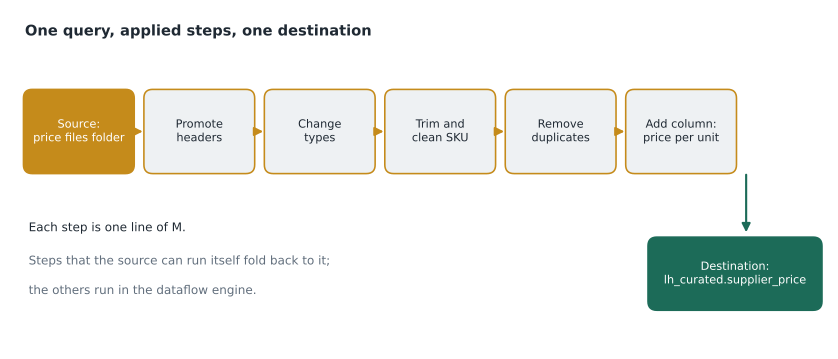
Every action in the editor becomes an applied step, listed in order on the right. Promote headers, change type, trim text, replace values, remove duplicates, add a column: each is a step, and selecting any earlier step shows the data as it was at that point. Behind the steps is the M language. Keiko did not need to write M, but Marisol showed her the advanced editor so she would recognize it in exam questions.
let
    Source   = Csv.Document(File.Contents(path), [Delimiter = ",", Encoding = 65001]),
    Headers  = Table.PromoteHeaders(Source, [PromoteAllScalars = true]),
    NoRepeat = Table.SelectRows(Headers, each [SKU] <> "SKU"),
    Trimmed  = Table.TransformColumns(NoRepeat, {{"SKU", each Text.Upper(Text.Trim(_)), type text}}),
    Price    = Table.TransformColumns(Trimmed, {{"UnitPrice", each Number.From(Text.Remove(_, {"$", ","})), type number}}),
    Typed    = Table.TransformColumnTypes(Price, {{"EffectiveDate", type date}, {"PackSize", Int64.Type}}),
    Deduped  = Table.Distinct(Typed, {"SKU", "EffectiveDate"}),
    PerUnit  = Table.AddColumn(Deduped, "PricePerUnit", each [UnitPrice] / [PackSize], type number)
in
    PerUnit
Each line of the let expression is a step; each step takes the previous one's result. Reading M is mostly reading those names: the query promotes headers, removes repeated header rows, upper-cases and trims the SKU, strips currency signs and thousands separators from the price, sets types, removes duplicate SKU and date pairs, and adds the price per unit. The in clause names the step whose result the query returns.
Cleaning rules, tested on a sample
Marisol asked Keiko to test the rules on a handful of rows before trusting them on 60 files, and to write down what each rule should do to an awkward value. The same logic, written in Python for a quick check, made the expected results easy to see.
# The same cleaning rules as the dataflow, tried on a few awkward rows
rows = [
    {"SKU": " pnt-114 ", "UnitPrice": "$1,152.00", "PackSize": "24", "EffectiveDate": "2026-10-01"},
    {"SKU": "SKU",       "UnitPrice": "UnitPrice", "PackSize": "PackSize", "EffectiveDate": "EffectiveDate"},  # repeated header
    {"SKU": "BRS-030",   "UnitPrice": "86.40",     "PackSize": "12", "EffectiveDate": "2026-10-01"},
    {"SKU": "brs-030",   "UnitPrice": "86.40",     "PackSize": "12", "EffectiveDate": "2026-10-01"},  # duplicate after cleaning
]

clean, seen = [], set()
for r in rows:
    if r["SKU"] == "SKU":
        continue                                    # drop repeated header rows
    sku = r["SKU"].strip().upper()
    price = float(r["UnitPrice"].replace("$", "").replace(",", ""))
    pack = int(r["PackSize"])
    key = (sku, r["EffectiveDate"])
    if key in seen:
        continue                                    # remove duplicates on SKU and date
    seen.add(key)
    clean.append((sku, price, pack, round(price / pack, 2)))

for c in clean:
    print(c)
print(len(rows), "rows in,", len(clean), "rows out")('PNT-114', 1152.0, 24, 48.0)
('BRS-030', 86.4, 12, 7.2)
4 rows in, 2 rows outWhat this code does
The example holds four rows as they might arrive in a supplier file, including a repeated header row and a duplicate that only matches once the SKU is trimmed and upper-cased. It skips the header row, cleans the SKU, turns the price text into a number, and keeps the first row for each SKU and date. The output lists the two clean rows with their price per unit, 48.00 and 7.20, and shows that four rows went in and two came out.
The test caught a mistake in Keiko's first draft: she had removed duplicates before cleaning the SKU, so "BRS-030" and "brs-030" survived as two products. Order matters in a list of steps, and the fix was to move the duplicate removal after the trim and upper-case.
Query folding
When a Power Query source is a database, many steps can be translated into the source's own query language and run there. Filtering rows, choosing columns, joining and grouping can all become a SQL statement that the database executes, so only the result crosses the network. This is query folding, and it is the single biggest influence on dataflow performance against databases.
Steps that the source cannot run, such as some custom functions or text operations, break folding; every step after them runs in the dataflow engine on data that has already been fetched. The editor shows a folding indicator beside each step, so Keiko could see at a glance where folding stopped. Marisol's rule was to put the steps that reduce data, filters and column removal, as early as possible, before anything that breaks folding. Files, such as the supplier CSVs, do not fold at all; for them the cost is simply the data read.
Staging and Fast Copy
A dataflow can stage a query: write its intermediate result to internal storage in the workspace and run later steps with a warehouse compute engine. Staging helps when a query feeds several others, or when large joins and aggregations run faster in SQL than in the mashup engine, but it adds a write and a read, so it can slow down small, simple queries. The staging items, named DataflowsStagingLakehouse and DataflowsStagingWarehouse, appear in the workspace automatically and should be left alone. Fast Copy is another option for large, simple loads: when a query only selects and lightly filters data from a supported source, the dataflow can use the pipeline copy engine underneath, which moves data much faster than row-by-row processing.
Data destinations
A query's destination is set at the bottom of the editor. Keiko chose the lh_curated lakehouse and a new table, supplier_price. Three choices come with every destination. The update method is either replace, which overwrites the table each refresh, or append, which adds the refreshed rows to what is already there. Column mapping decides how query columns line up with table columns, and whether new columns may be added. And column types must be ones the destination supports; Power Query's any type, for instance, has to be set to a real type first.
| Setting | Options | Keiko's choice and why |
|---|---|---|
| Destination | Lakehouse, warehouse, Fabric SQL database, Azure SQL, KQL database, files and others | lh_curated lakehouse table supplier_price |
| Update method | Replace or append | Replace: the folder holds every month's file, so each refresh rebuilds the whole table |
| Schema | Fixed or dynamic mapping | Fixed, so an unexpected new column in a supplier file fails visibly instead of changing the table |
| Types | Must be supported by the destination | Dates as date, prices as decimal number, pack size as whole number |
Choosing append for a query that reads the whole folder would have been a classic mistake: every refresh would add every row again, doubling the table. Append suits a query that returns only new rows, for example one filtered by a date parameter.
Parameters, schedules and pipelines
Dataflows can use parameters, such as the folder path or the earliest effective date to load, so that the same dataflow can point at a test folder in the Test workspace and the real folder in Prod. Parameters can also be set by a pipeline that runs the dataflow, which lets one pipeline pass today's date to several dataflows. Keiko scheduled the supplier dataflow to refresh at 6 a.m. on the second day of each month, after buyers had saved the new files; Marisol suggested making it a step in Ines's pipeline instead, so a failure would show up in the same alerts as every other load.
Worked problem
Replace or append?
The supplier folder holds 60 files totalling about 310,000 rows today, and grows by 5 files and about 26,000 rows each month. The query reads every file. Keiko sets the destination to append by mistake and the dataflow runs monthly. How many rows will supplier_price hold after the third monthly refresh, and how many should it hold?
Show solution
- Refresh 1 reads the current folder: 310,000 rows are appended to an empty table, giving 310,000.
- Refresh 2 reads 310,000 + 26,000 = 336,000 rows and appends them all: 310,000 + 336,000 = 646,000.
- Refresh 3 reads 362,000 rows and appends them: 646,000 + 362,000 = 1,008,000.
- With replace, the table always equals the folder: 362,000 rows after the third refresh.
Answer: 1,008,000 rows with append, against 362,000 correct rows: almost three copies of the data. A query that reads everything should replace.
Monitoring a dataflow
Each refresh appears in the dataflow's refresh history and in the monitoring hub, with the duration of each query and any errors. When the March 2026 file from one supplier arrived with a new column, the fixed schema made the refresh fail with a clear message naming the column, which was exactly what Keiko wanted: a visible failure rather than a silently changed table. The fix took five minutes in the editor.
When a dataflow is the wrong tool
Marisol finished with a warning. Dataflows are friendly, and friendly tools attract work they are not suited to. A dataflow that reads 41 million sales rows every night to add two columns would cost far more capacity than a copy activity followed by a SQL view, and would be slower. Large, plain copies belong in pipelines; heavy joins over large tables often belong in a warehouse or a notebook; dataflows shine where the shaping is varied, the sources are many and small, and an analyst needs to own the logic.
Keiko ended the session by writing a short note in the dataflow's description: what each query reads, what its destination is, which rules it applies and who to ask about it. Marisol called that the cheapest documentation there is, because it travels with the item into Git and into every deployment stage, and the next analyst who opens the dataflow sees it before touching anything. She also asked Keiko to keep one sample file from each supplier in a test folder, so that any future change to the rules could be checked against known awkward cases before it reached the real folder.
Common mistakes
MistakeRemove duplicates before cleaning the key.
InsteadClean and standardize the key first; otherwise values that differ only in case or spaces survive as duplicates.
MistakeAppend is safe for a query that reads all the source data.
InsteadAppend adds every refreshed row again; use replace when the query returns the whole data set.
MistakeQuery folding happens for any source.
InsteadFolding needs a source that can run queries, such as a database; files do not fold.
MistakeStaging always speeds up a dataflow.
InsteadStaging adds a write and a read; it helps large joins and shared queries but can slow small ones.
Summary and key terms
- A Dataflow Gen2 holds Power Query queries that transform data and write it to destinations such as lakehouses and warehouses.
- Applied steps are recorded in M; their order matters.
- Query folding pushes steps back to a database source; put filters early and watch the folding indicators.
- Staging and Fast Copy are options for large or shared queries; staging items in the workspace are system items.
- Destinations need an update method, column mapping and supported types; replace suits queries that read everything.
- Parameters, schedules and pipelines let the same dataflow run in each stage and alongside other loads.
- Power Query
- A data preparation engine and editor used in Excel, Power BI and Fabric dataflows.
- Applied step
- One recorded transformation in a Power Query query.
- M
- The formula language behind Power Query steps.
- Query folding
- Translating Power Query steps into the source's own query language so the source does the work.
- Staging
- Writing a dataflow query's intermediate result to internal storage so later steps run on a warehouse engine.
- Data destination
- The table or store that a dataflow query writes its result to.
- Update method
- Whether a destination is replaced or appended to on each refresh.
Practice problems
Work each problem on paper first, then reveal the answer to check.
What does each line of a Power Query let expression represent?
Show answer
One applied step, taking the previous step's result.
Why should row filters come early in a query against a database?
Show answer
So they fold to the source and less data is fetched.
Which update method suits a query that reads the whole source each time?
Show answer
Replace.
What happens to new dataflows created since April 2026?
Show answer
They are created with Git integration and deployment pipeline support.
When is a pipeline copy a better choice than a dataflow?
Show answer
For large, plain copies with little or no transformation.
Lesson quiz · 5 questions
Score 60% or more to complete this lesson.
Create a free account to save your progress, take quizzes and earn a certificate.