
MSAZ-311 · Lesson 6 of 12 · 20 min
Semantic models and storage modes
▶ Video coming soon A video version of this lesson is on the way.
With the star schema loaded in wh_sales, the sixth model session, on Wednesday, November 4, turned to the layer that people actually see. Keiko's old report was an Excel workbook full of formulas that only she understood. Marisol wanted the hub's numbers defined once, in a semantic model, so that every report, every Excel pivot table connected to it and every Copilot answer drew on the same definition of gross margin. "The model is the contract," she said. "Reports come and go. The model is where we promise what a number means."
What a semantic model is
A semantic model, formerly called a Power BI dataset, is a Fabric item that holds tables, the relationships between them, measures written in DAX, hierarchies, formatting, descriptions and security roles. Reports connect to it; so can Excel, through Analyze in Excel or a live connection, and other tools through the XMLA endpoint. The model is built on the Analysis Services tabular engine, the same engine behind Azure Analysis Services, which stores data in a compressed, columnar, in-memory format and answers DAX and MDX queries.
A model can be built in Power BI Desktop and published, or created and edited directly in the Fabric service from a warehouse or lakehouse, which is how Keiko began: from wh_sales she chose the option to create a new semantic model, picked the fact and dimension tables, and named it Sales Overview. MSAZ-310 noted that Fabric no longer creates a default semantic model automatically for every warehouse and lakehouse; models are created deliberately, which keeps workspaces tidy and ownership clear. Models can also be stored as text in TMDL, the Tabular Model Definition Language, which is what Git integration commits and what the TMDL view in Power BI Desktop edits.
Storage modes
Every table in a model has a storage mode that decides where queries get its data. The choice is the first design decision for a model and the subject of many DP-600 questions.
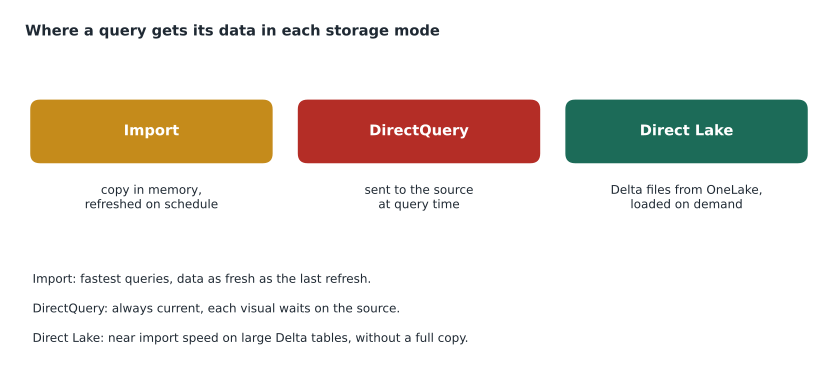
Import copies the data into the model. Queries are answered from memory and are very fast, and the full DAX language is available. The cost is freshness and size: the data is only as current as the last refresh, every refresh reads the source again, and the model must fit within the memory limits of its capacity. Import is the default for most models built in Power BI Desktop, and the right choice for small and medium data that changes on a daily or hourly rhythm.
DirectQuery stores no data. Each visual sends queries to the source, such as a warehouse or Azure SQL database, at the moment it is viewed. Data is always current and size is no limit, but every interaction waits on the source, some DAX functions are restricted, and many users at once can put heavy load on it. DirectQuery suits data that must be up to the minute or is too big to copy, and works best when the source is tuned for it.
Direct Lake, introduced with Fabric, reads Delta tables in OneLake directly into the model's memory when queries need them, without a scheduled import. It combines much of import's speed with freshness close to DirectQuery's, for data that already lives in OneLake. It has its own rules, limits and behaviours, which are the subject of the next lesson.
Composite models and dual mode
A composite model mixes storage modes, for example a large fact table in DirectQuery with small dimensions in import. A table can also be set to dual, which means it is imported but can act as a DirectQuery table when a query joins it to DirectQuery data, so the engine can choose the cheaper path. Composite models also allow building on top of another published model: a report author can connect to Sales Overview, add a small table of their own and a few measures, and publish a new model that extends the shared one without copying it. Aggregation tables, which store pre-summarized data in import mode in front of a detailed DirectQuery table, are a composite-model technique that MSAZ-312 covers in depth.
| Need | Usually best | Why |
|---|---|---|
| Small or medium data, daily refresh, fastest visuals | Import | In-memory queries and full DAX |
| Data must be current to the minute, source can handle the load | DirectQuery | No copy; queries go to the source |
| Large Delta tables already in OneLake, fast visuals, frequent updates | Direct Lake | Reads Delta files on demand; refresh is a metadata operation |
| Large detail table plus small lookups | Composite: DirectQuery or Direct Lake facts, dual or import dimensions | Each table uses the mode that suits it |
| Extend a shared model with local tables | Composite model on a published model | Reuses the shared model without copying it |
Import in more detail
Because import is still the most common mode, Marisol spent some time on how it works. During a refresh the engine reads each table from its source, encodes each column, often with a dictionary of distinct values, and compresses it. Columns with few distinct values, such as region or category, compress to almost nothing; columns with millions of distinct values, such as a transaction timestamp to the second, compress badly and dominate the model's size. Removing unneeded columns and reducing precision, for example splitting a timestamp into a date key and an hour, are the most effective ways to make an import model smaller and faster.
# Rough size of a column in an import model: distinct values drive the dictionary
rows = 41_200_000

def column_mb(distinct_values, bytes_per_value):
    dictionary = distinct_values * bytes_per_value          # each distinct value stored once
    index_bits = max(1, (distinct_values - 1).bit_length())  # bits needed to point at a value
    data = rows * index_bits / 8
    return (dictionary + data) / 1_000_000

for name, distinct, size in [("Region", 4, 8), ("StoreKey", 27, 4), ("DateKey", 1_461, 4),
                             ("SaleTimestamp (to the second)", 18_000_000, 8)]:
print(f"{name:32s} {column_mb(distinct, size):8.1f} MB")Region 10.3 MB StoreKey 25.8 MB DateKey 56.7 MB SaleTimestamp (to the second) 272.8 MB
What this code does
The example estimates how much memory a column takes in an import model, using a simplified version of how the engine stores data: each distinct value once in a dictionary, plus a small pointer per row whose size depends on how many distinct values there are. It runs the estimate for four columns of the 41-million-row sales table. The output shows the region column at about 10 megabytes, the date key at about 57, and a timestamp to the second at more than 260, which is why splitting timestamps into a date and an hour is a standard way to shrink a model.
The simplified estimate ignores the run-length encoding and other tricks the engine uses, which make low-cardinality columns smaller still, but the ranking it shows is right. Keiko removed the timestamp from the model entirely: no report needed sales to the second, and the hour of sale, a column with 24 values, answered every question Grace had asked about busy times.
Refresh, size limits and large models
Import models are refreshed on a schedule, on demand, through a pipeline activity or through the API. A full refresh reads everything; incremental refresh, covered in MSAZ-312, refreshes only recent partitions of large tables. The size an import model may reach depends on its capacity; for models that will grow beyond the default limit, the large semantic model storage format, set in the model's settings and already on for many new models, lets a model grow up to the capacity's memory limit and improves XMLA write operations. Below F64, Fabric capacities have lower memory limits per model, so a pilot on F16 has to be designed with size in mind.
Worked problem
Choosing a mode for each table
Sales Overview has fact_sales (41.2 million rows, growing by about 38,000 a day, in wh_sales), six dimensions, the largest being dim_customer with 310,000 rows, and a small spreadsheet of regional managers that Grace's team edits. Store managers want yesterday's sales by 7 a.m.; head office wants visuals that respond instantly. Which storage modes should Keiko use?
Show solution
- fact_sales is large, already in OneLake as Delta, and updated nightly: Direct Lake suits it, giving fast visuals with a quick metadata refresh after the nightly load.
- The dimensions are also Delta tables in wh_sales, so they can be Direct Lake as well, keeping the whole model in one mode with no import refresh.
- The regional managers spreadsheet is not in OneLake. Either load it into the warehouse with a small dataflow, so it can be Direct Lake too, or add it as an import table in a composite model.
- Loading the spreadsheet into wh_sales keeps one mode and one refresh path, and puts the managers list under the same governance as the other tables.
Answer: Direct Lake for the fact and dimensions, with the spreadsheet loaded into wh_sales by a small dataflow so that it can be Direct Lake too.
Building the model in the service
Keiko built the first version of Sales Overview in the web modelling experience: she created relationships by dragging keys, hid the key columns that report authors should never use, set the data category of the store's city column to City so that maps would work, sorted month names by month number, and added a few measures. She also wrote a description on every table and on the measures she created, because descriptions appear as tooltips in the report field list and are read by Copilot when it answers questions about the model. Marisol checked one thing in particular: that every column a report would use came from a dimension, and every number from a measure, never from a fact column dragged straight onto a visual.
Other tools on the same model
Power BI reports are not the only way into a semantic model. Analyze in Excel gives a pivot table connected live to the model, so finance analysts can slice gross margin in a familiar tool and get exactly the numbers the reports show, instead of exporting data and rebuilding the formulas themselves. The XMLA endpoint, available on Fabric capacities, lets tools such as SQL Server Management Studio, Tabular Editor and DAX Studio connect to the model to query it, inspect it or, with write access enabled, change it. Copilot in Power BI can answer questions in plain language using the model's tables, measures and descriptions. Every one of these routes uses the model's measures and its security, which is the point: the definition of a number lives in one place, and every tool reads it from there.
Keiko tested the Excel route that afternoon with Dana, the accounts payable lead, who had been rebuilding a supplier cost workbook every month. Dana connected a pivot table to Sales Overview, dragged in the cost measure by supplier and month, and found that her own workbook had been including returned goods twice. She asked whether she could stop rebuilding it, and Marisol said that was exactly the point of a shared model.
Who owns the model
A shared model needs an owner. Marisol made the BI team the owner of Sales Overview, put it in the FDH Sales workspaces with the other hub items, and set its endorsement to Promoted, with certification planned after Elena's review, as MSAZ-310 described. Report authors across the company would get Build permission so they could create their own reports on it, but changes to the model itself would go through the BI team and through Git.
Common mistakes
MistakeImport data is always current.
InsteadImport data is as current as the last refresh.
MistakeDirectQuery is always slower than import, so never use it.
InsteadDirectQuery suits data that must be current or is too large to copy, when the source can handle the queries.
MistakeA composite model must copy the shared model it builds on.
InsteadA composite model on a published model reuses it through a live connection and adds local tables.
MistakeTimestamps to the second cost nothing in an import model.
InsteadHigh-cardinality columns dominate model size; reduce precision or remove them.
Summary and key terms
- A semantic model holds tables, relationships, DAX measures, formatting and security, and is the shared definition reports use.
- Import copies data into memory: fastest, but only as fresh as the last refresh and limited by capacity memory.
- DirectQuery queries the source live: always current, but each visual waits on the source.
- Direct Lake reads Delta tables from OneLake on demand: near import speed without a scheduled copy.
- Composite models mix modes; dual tables can act as import or DirectQuery.
- Column cardinality drives import model size; remove or reduce high-cardinality columns.
- Semantic model
- A Fabric item with tables, relationships, measures and security that reports query.
- Storage mode
- The setting that decides whether a table is import, DirectQuery, Direct Lake or dual.
- Import mode
- Storing a copy of the data in the model's compressed in-memory format.
- DirectQuery
- Sending queries to the source at report time instead of storing data.
- Direct Lake
- Loading Delta table data from OneLake into memory on demand.
- Composite model
- A model that combines tables with different storage modes or builds on another model.
- Dual mode
- A table stored in import mode that can behave as DirectQuery when joined to DirectQuery tables.
- TMDL
- Tabular Model Definition Language, a text format for semantic model definitions.
Practice problems
Work each problem on paper first, then reveal the answer to check.
What is the main trade-off of import mode?
Show answer
Very fast queries, but data only as fresh as the last refresh and limited by memory.
When does DirectQuery make sense?
Show answer
When data must be current to the minute or is too large to copy, and the source can handle the queries.
What does a dual-mode table do?
Show answer
It is imported, but can behave as DirectQuery when joined to DirectQuery tables.
Which columns make an import model large?
Show answer
Columns with many distinct values, such as precise timestamps.
Why add descriptions to tables and measures?
Show answer
They appear as tooltips for report authors and help Copilot answer questions about the model.
Lesson quiz · 5 questions
Score 60% or more to complete this lesson.
Create a free account to save your progress, take quizzes and earn a certificate.