
JS-240 · Lesson 8 of 12 · 29 min
WebSockets
▶ Video coming soon A video version of this lesson is on the way.
On Thursday, June 29, 2028, the session turns from who may use the partner API to how fast it can tell them things. Rosa's request at the pilot review was simple: when an agency changes an order, the kitchen should know at once, without anyone reloading a page. The board's first prototype polled the day's orders every 30 seconds with conditional requests, as lesson 2 described, and that works, but every change still takes up to half a minute to appear, and most polls ask a question whose answer is no. Gareth wants Mira to know the alternatives properly before choosing one, and the best known of them is the WebSocket.
This lesson explains how a WebSocket connection is opened with an HTTP upgrade, what the frames on the connection look like, how to design the messages that travel over it, and how to secure it. Mira builds the handshake and a frame by hand, runs a small real server with Node and its built-in WebSocket client, and designs a message protocol for the kitchen. The decision about which technology the board will actually use comes in lesson 9.
Four ways to get updates
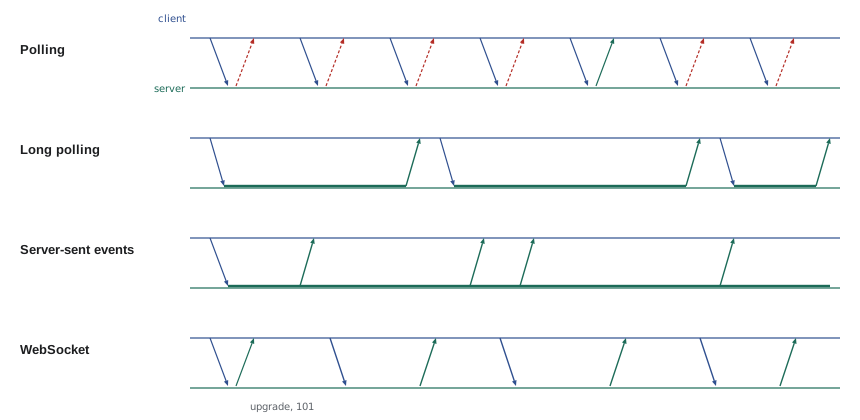
HTTP was designed for a client that asks and a server that answers. For a server to tell a client about something the client did not ask about, there are four common patterns, each a step further from plain request and response.
| Pattern | How it works | Good for | Costs |
|---|---|---|---|
| Polling | Ask every few seconds; usually nothing has changed | Simple dashboards | Delay up to the interval; many empty requests |
| Long polling | Ask, and the server holds the request until there is news or a timeout | Older browsers and proxies | One request per update; tricky timeouts |
| Server-sent events | One long HTTP response that the server keeps writing events into | Server-to-client updates | One direction only; text only |
| WebSocket | An upgraded connection on which both sides send messages at any time | Chat, games, collaborative editing | Its own protocol, proxies, scaling and security to handle |
Opening a WebSocket: the upgrade handshake
A WebSocket starts life as an ordinary HTTP/1.1 GET request with a few special headers. The client asks to switch protocols with Upgrade: websocket and Connection: Upgrade, says which version of the protocol it speaks with Sec-WebSocket-Version: 13, and sends a random 16-byte value encoded as base64 in Sec-WebSocket-Key. A server that agrees answers 101 Switching Protocols, and from that moment the TCP connection no longer carries HTTP at all, but WebSocket frames in both directions.
GET /api/partners/v1/kitchen/live HTTP/1.1
Host: partners.riverside-food-hub.example
Upgrade: websocket
Connection: Upgrade
Sec-WebSocket-Key: dGhlIHNhbXBsZSBub25jZQ==
Sec-WebSocket-Version: 13
Origin: https://partners.riverside-food-hub.example
Cookie: __Host-session=...

HTTP/1.1 101 Switching Protocols
Upgrade: websocket
Connection: Upgrade
Sec-WebSocket-Accept: s3pPLMBiTxaQ9kYGzzhZRbK+xOo=
What this code does
The request is a normal GET with headers asking to switch to the WebSocket protocol, and the browser adds the Origin and any cookies for the site, as it does for other requests. The response is not 200 but 101, and it proves that the server understood the request by returning a value computed from the client's key. The key in the example is the one used in RFC 6455, the WebSocket standard, so the accept value can be checked against it.
The Sec-WebSocket-Accept value is computed by appending a fixed string, defined in RFC 6455, to the client's key, hashing the result with SHA-1 and encoding the hash with base64. It is not a security measure; SHA-1 is used only because it was convenient in 2011. Its purpose is to prove that the server really speaks WebSocket, so that a confused HTTP server or cache cannot accidentally appear to accept the upgrade.
const GUID = '258EAFA5-E914-47DA-95CA-C5AB0DC85B11';

async function acceptFor(key) {
  const hash = await crypto.subtle.digest('SHA-1', new TextEncoder().encode(key + GUID));
  return btoa(String.fromCharCode(...new Uint8Array(hash)));
}

const accept = await acceptFor('dGhlIHNhbXBsZSBub25jZQ==');
console.log('Sec-WebSocket-Accept:', accept);
console.log('matches RFC 6455:', accept === 's3pPLMBiTxaQ9kYGzzhZRbK+xOo=');Sec-WebSocket-Accept: s3pPLMBiTxaQ9kYGzzhZRbK+xOo= matches RFC 6455: true
What this code does
The function joins the client's key and the fixed GUID from the standard, hashes them with SHA-1 through crypto.subtle and encodes the 20-byte hash with ordinary base64. For the sample key printed in RFC 6455, it produces exactly the accept value printed there. Web Crypto still offers SHA-1 for compatibility like this, even though it is no longer used for signatures.
Frames
After the handshake, both sides send frames. Each frame starts with a small header: a FIN bit saying whether this is the last frame of a message, an opcode saying what kind of frame it is, a MASK bit, the payload length and, if the mask bit is set, a 4-byte masking key. Then comes the payload. Messages can be text, which must be valid UTF-8, or binary, and three control opcodes manage the connection itself.
| Opcode | Frame type | Use |
|---|---|---|
| 1 | Text | A UTF-8 message, usually JSON |
| 2 | Binary | Raw bytes |
| 8 | Close | Starts or confirms closing, with an optional code and reason |
| 9 | Ping | Checks that the other side is still there |
| 10 (hexadecimal A) | Pong | The answer to a ping |
Every frame a browser sends to a server must be masked: the payload is combined with the 4-byte key using XOR, and a new random key is used for every frame. Masking is not encryption, since the key travels in the frame. It exists because, in the early experiments with WebSockets, unmasked data could be crafted to look like HTTP requests to badly written proxies in between, poisoning their caches. Frames from the server are never masked. The example builds a masked text frame the way a browser would and decodes it the way a server does.
function encodeMasked(text, mask) {
  const payload = new TextEncoder().encode(text);
  if (payload.length > 125) throw new Error('this sketch handles only short frames');
  const frame = new Uint8Array(6 + payload.length);
  frame[0] = 0x80 | 0x1;              // FIN = 1, opcode 1 (text)
  frame[1] = 0x80 | payload.length;   // MASK = 1, length
  frame.set(mask, 2);
  payload.forEach((b, i) => { frame[6 + i] = b ^ mask[i % 4]; });
  return frame;
}

function decode(frame) {
  const fin = (frame[0] & 0x80) !== 0, opcode = frame[0] & 0x0f;
  const masked = (frame[1] & 0x80) !== 0, len = frame[1] & 0x7f;
  const mask = frame.slice(2, 6);
  const payload = frame.slice(6, 6 + len).map((b, i) => b ^ mask[i % 4]);
  return { fin, opcode, masked, len, text: new TextDecoder().decode(payload) };
}

const hex = (bytes) => [...bytes].map((b) => b.toString(16).padStart(2, '0')).join(' ');
const frame = encodeMasked('{"type":"loaded","orderId":41}', new Uint8Array([0x37, 0xfa, 0x21, 0x3d]));
console.log('first 10 bytes:', hex(frame.slice(0, 10)));
console.log(decode(frame));first 10 bytes: 81 9e 37 fa 21 3d 4c d8 55 44
{ fin: true, opcode: 1, masked: true, len: 30, text: "{\"type\":\"loaded\",\"orderId\":41}" }What this code does
The first byte combines the FIN bit with opcode 1 for text, and the second combines the mask bit with the payload length, which fits in seven bits for messages under 126 bytes. Each payload byte is XORed with one of the four mask bytes in turn, so the bytes on the wire look scrambled even though anyone can reverse them. decode reads the same fields back and applies the mask again, because XORing twice with the same key restores the original.
Longer payloads use an extended length: the 7-bit length 126 means the next 2 bytes hold the length, and 127 means the next 8 bytes do. Messages can also be split across several frames, with FIN set only on the last. No one writes this by hand in production. Browsers implement the client side, and on the server a library such as ws, the most widely used WebSocket package for Node, handles framing, masking, fragmentation, pings and closing.
A real connection with Node
Node 22 includes a WebSocket client as a global, with the same API as the browser's, so Mira can try the protocol end to end without installing anything. The server side is a deliberately small sketch on top of node:http's upgrade event, handling only short text frames, which is enough to watch a handshake, a message in each direction and a clean close.
import http from 'node:http';
import { createHash } from 'node:crypto';

const GUID = '258EAFA5-E914-47DA-95CA-C5AB0DC85B11'; // fixed by RFC 6455
const server = http.createServer((req, res) => { res.writeHead(426); res.end('Upgrade required'); });

server.on('upgrade', (req, socket) => {
  console.log('upgrade', req.url, 'origin:', req.headers.origin ?? '(none: not sent by this client)');
  const accept = createHash('sha1').update(req.headers['sec-websocket-key'] + GUID).digest('base64');
  socket.write('HTTP/1.1 101 Switching Protocols\r\nUpgrade: websocket\r\nConnection: Upgrade\r\n' +
    `Sec-WebSocket-Accept: ${accept}\r\n\r\n`);

  const send = (text) => { // a short unmasked text frame: FIN + opcode 1, then the length
    const p = Buffer.from(text);
    socket.write(Buffer.concat([Buffer.from([0x81, p.length]), p]));
  };
  send(JSON.stringify({ type: 'hello', day: '2028-06-30' }));

  socket.on('data', (buf) => {
    const opcode = buf[0] & 0x0f, len = buf[1] & 0x7f, mask = buf.subarray(2, 6);
    const data = Buffer.from(buf.subarray(6, 6 + len).map((b, i) => b ^ mask[i % 4]));
    if (opcode === 8) { socket.end(Buffer.concat([Buffer.from([0x88, len]), data])); return; } // echo the close
    console.log('server got', data.toString());
    send(JSON.stringify({ type: 'ack', orderId: JSON.parse(data).orderId }));
  });
});
server.listen(3144);
What this code does
node:http emits an upgrade event instead of a normal request when a client asks to switch protocols, and hands over the raw socket. The server answers 101 with the accept value computed from the client's key, then writes frames directly: a text frame starts with the byte 0x81 and the length. Incoming frames from the client are masked, so the server unmasks them with the 4-byte key before reading the JSON, and it answers a close frame by echoing it back.
$ node ws-client.mjs
client: open
client got {"type":"hello","day":"2028-06-30"}
client got {"type":"ack","orderId":41}
client: closed with code 1000
$ cat server.log
upgrade /v1/kitchen/live origin: (none: not sent by this client)
server got {"type":"loaded","orderId":41}const ws = new WebSocket('ws://localhost:3144/v1/kitchen/live');
ws.addEventListener('open', () => console.log('client: open'));
ws.addEventListener('message', (e) => {
console.log('client got', e.data);
const msg = JSON.parse(e.data);
if (msg.type === 'hello') ws.send(JSON.stringify({ type: 'loaded', orderId: 41 }));
else ws.close(1000, 'done');
});
ws.addEventListener('close', (e) => console.log('client: closed with code', e.code));What this code does
The client uses the standard WebSocket API: new WebSocket opens the connection, and open, message and close events report what happens. When the server's hello arrives, it sends a loaded message for order 41, and when the acknowledgement comes back, it closes with code 1000, which means a normal closure. The same code runs unchanged in a browser.
The transcript shows the server's log after the client has finished. The Origin line is worth noticing. A browser always sends an Origin header with a WebSocket handshake, and Node's client, which is not a browser, did not. That difference matters for security, as the next section explains.
Designing the messages
A WebSocket only moves messages; what they mean is up to the application. A good message protocol has a type on every message, ids where replies must be matched to requests, explicit subscriptions so that each client receives only what it needs, and a way to resume after a disconnection without missing events. The studio's draft protocol for the kitchen uses JSON messages.
| Message | Direction | Meaning |
|---|---|---|
| { type: "subscribe", day: "2028-06-30" } | client to server | Send me events for this delivery day |
| { type: "order.changed", seq: 118, order: {...} } | server to client | An order changed; seq numbers every event |
| { type: "resume", day, afterSeq: 117 } | client to server | I was disconnected; send what I missed |
| { type: "loaded", id: "m-7", orderId: 41 } | client to server | The kitchen loaded this order on the van |
| { type: "ack", id: "m-7" } | server to client | The message with this id was processed |
| { type: "error", id, title } | server to client | A message was refused, in problem details style |
The example simulates the protocol with two EventTarget objects standing in for the two ends of a socket. It shows subscription, a change being pushed, an acknowledged message from the kitchen and a refused message, all without a network, so the logic can be tested quickly.
// Two EventTargets stand in for the two ends of a WebSocket.
const toServer = new EventTarget(), toClient = new EventTarget();
const send = (target, msg) => target.dispatchEvent(new CustomEvent('message', { detail: JSON.stringify(msg) }));

// Server side
const subscribers = new Map(); // day -> handler for the client
let seq = 117;
toServer.addEventListener('message', (e) => {
  const msg = JSON.parse(e.detail);
  if (msg.type === 'subscribe') { subscribers.set(msg.day, true); send(toClient, { type: 'subscribed', day: msg.day }); }
  else if (msg.type === 'loaded' && Number.isInteger(msg.orderId)) send(toClient, { type: 'ack', id: msg.id });
  else send(toClient, { type: 'error', id: msg.id, title: `unknown or invalid message: ${msg.type}` });
});
function orderChanged(day, order) {
  if (subscribers.has(day)) send(toClient, { type: 'order.changed', seq: ++seq, order });
}

// Client side
toClient.addEventListener('message', (e) => console.log('client <-', e.detail));

send(toServer, { type: 'subscribe', day: '2028-06-30' });
orderChanged('2028-06-30', { id: 41, trays: 8 });
orderChanged('2028-07-03', { id: 50, trays: 2 });
send(toServer, { type: 'loaded', id: 'm-7', orderId: 41 });
send(toServer, { type: 'delete-all', id: 'm-8' });client <- {"type":"subscribed","day":"2028-06-30"}
client <- {"type":"order.changed","seq":118,"order":{"id":41,"trays":8}}
client <- {"type":"ack","id":"m-7"}
client <- {"type":"error","id":"m-8","title":"unknown or invalid message: delete-all"}What this code does
Each end listens for message events and sends by dispatching a CustomEvent on the other end, which mimics the WebSocket API's message events closely enough to test the protocol. The server remembers which days the client subscribed to, so the change for July 3 is not sent, and it numbers every pushed event with seq so a reconnecting client can ask for what it missed. A message of an unknown type gets an error reply naming its id instead of being silently ignored.
Securing WebSockets
WebSockets have a reputation for being hard to secure, mostly because the usual protections of HTTP stop at the upgrade. Once the connection is open, there are no more request headers, no more cookies checked on each message and no CORS. Five rules cover most of it.
- Use wss: only. The encrypted form, wss://, runs over TLS just like HTTPS. Unencrypted ws:// is acceptable only on localhost for development, as in the demonstration.
- Authenticate at the handshake. The handshake is an HTTP request, so the session cookie and any other checks apply to it. Avoid putting tokens in the URL's query string, where they end up in logs; if a token is needed, issue a short-lived, single-use ticket over a normal authenticated request and send it as the first message.
- Check the Origin header. CORS does not apply to WebSockets: a page on any site can open a WebSocket to any server, and the browser will attach the user's cookies. This is cross-site WebSocket hijacking, and the defence is to accept the upgrade only when Origin is the partner page's own origin. A client with no Origin header is not a browser and must authenticate another way.
- Validate every message. Treat each incoming message like a request body: limit its size, parse it carefully, check its type and fields, and authorize the action, exactly as an HTTP handler would.
- Limit and time out. Cap the number of connections per person and device, the message size and the rate of messages, close connections that stop answering pings, and watch bufferedAmount so that a slow client cannot make the server queue unlimited data.
import { WebSocketServer } from 'ws';

const ALLOWED_ORIGIN = 'https://partners.riverside-food-hub.example';
const wss = new WebSocketServer({ noServer: true, maxPayload: 16 * 1024 });

export function attach(server, sessions) {
  server.on('upgrade', async (req, socket, head) => {
    const session = await sessions.fromCookie(req.headers.cookie);
    if (req.headers.origin !== ALLOWED_ORIGIN || !session || !session.can('days:read')) {
      socket.write('HTTP/1.1 403 Forbidden\r\nConnection: close\r\n\r\n');
      return socket.destroy();
    }
    wss.handleUpgrade(req, socket, head, (ws) => {
      ws.session = session;
      ws.isAlive = true;
      ws.on('pong', () => { ws.isAlive = true; });
      wss.emit('connection', ws, req);
    });
  });
  setInterval(() => { // close connections that stopped answering
    for (const ws of wss.clients) {
      if (!ws.isAlive) { ws.terminate(); continue; }
      ws.isAlive = false;
      ws.ping();
    }
  }, 30000);
}
What this code does
The server is created with noServer, so the application decides in its own upgrade handler whether to accept each connection, and maxPayload refuses any message over 16 KB. The handler checks the Origin header and the session cookie before calling handleUpgrade, so a page on another site, or a signed-out device, gets a 403 and never reaches the WebSocket code. Every 30 seconds each connection is pinged, and one that did not answer the previous ping is terminated.
There is one more practical cost. Theo's web server sits in front of the partner service and must be configured to pass the Upgrade and Connection headers through and to keep idle connections open for longer than its usual timeout, and some office networks and proxies still interfere with WebSockets. For a feature that only needs the server to talk to the client, there is a simpler choice, and that is where lesson 9 begins.
Worked problem
Counting the cost of polling
The board's prototype polls GET /v1/kitchen/days/:date every 30 seconds from 06:00 to 15:00. Most polls get a 304 of about 200 bytes. On a typical day, 9 orders change and each full response is about 6 KB. How many requests does the board make in a day, how many bytes do they move, and how long does a change take to appear on average?
Show solution
- 06:00 to 15:00 is 9 hours, which is 9 × 120 = 1,080 polls at two per minute.
- 9 of them return a full 6 KB response: 9 × 6,000 = 54,000 bytes.
- The other 1,071 return a 304 of about 200 bytes: 1,071 × 200 = 214,200 bytes.
- Total: 54,000 + 214,200 = 268,200 bytes, about 268 KB.
- A change happens at a random moment between polls, so it waits half an interval on average: 15 seconds.
Answer: About 1,080 requests and 268 KB a day, almost all of it empty answers, and each change appears after 15 seconds on average and 30 at worst. That is cheap enough to run, but slow enough that a push-based stream is worth having.
Common mistakes
MistakeThinking the masking key encrypts WebSocket frames.
InsteadThe key is sent in the frame; masking only protects old proxies. Use wss:// for encryption.
MistakeRelying on CORS to stop other sites opening a WebSocket.
InsteadCORS does not apply. Check the Origin header at the handshake.
MistakePutting an access token in the WebSocket URL.
InsteadURLs are logged. Use the session cookie or a short-lived ticket sent as the first message.
MistakeTrusting messages because the connection was authenticated.
InsteadValidate and authorize every message, like a request body.
MistakeLeaving dead connections open.
InsteadPing regularly and close connections that stop answering.
Summary and key terms
- A server can push updates by polling, long polling, server-sent events or WebSockets.
- A WebSocket starts as an HTTP/1.1 GET with Upgrade: websocket and a random Sec-WebSocket-Key; the server answers 101 Switching Protocols with Sec-WebSocket-Accept, the base64 SHA-1 of the key and a fixed GUID.
- After that, both sides send frames: text, binary, close, ping and pong, with client frames masked by a 4-byte XOR key.
- Node 22 has a built-in WebSocket client, and the ws package handles the server side.
- A good message protocol gives every message a type, matches replies by id, uses subscriptions and numbers events so that clients can resume.
- WebSockets must use wss://, authenticate at the handshake, check Origin because CORS does not apply, validate every message and limit connections, message sizes and idle time.
- WebSocket
- A protocol for two-way messages over one long-lived connection, started by an HTTP upgrade.
- 101 Switching Protocols
- The response that accepts an upgrade to another protocol.
- Sec-WebSocket-Key
- A random value sent by the client in the handshake.
- Sec-WebSocket-Accept
- The server's proof that it understood the handshake, computed from the key.
- Frame
- A unit of data on a WebSocket connection, with a small header and a payload.
- Opcode
- The part of a frame header that gives its type, such as text or close.
- Masking
- XORing client-to-server payloads with a 4-byte key, to protect intermediaries.
- Cross-site WebSocket hijacking
- Another site opening a WebSocket with the user's cookies; stopped by checking Origin.
Practice problems
Work each problem on paper first, then reveal the answer to check.
What status code does a server send to accept a WebSocket upgrade?
Show answer
101 Switching Protocols.
How is Sec-WebSocket-Accept computed?
Show answer
Base64 of the SHA-1 hash of the client's key followed by the fixed GUID.
Which frames must be masked?
Show answer
Every frame sent from the client to the server.
Why must a WebSocket server check the Origin header?
Show answer
CORS does not apply, so any site could otherwise open a connection with the user's cookies.
What does the seq number on pushed events let a client do?
Show answer
Ask for the events it missed after reconnecting.
Try it yourself
Read a frame header
Complete header(b0, b1) so that it returns a description of a frame from its first two bytes: fin (true if the highest bit of b0 is set), opcode (the lowest 4 bits of b0), masked (the highest bit of b1) and length (the lowest 7 bits of b1).
Also add kind, using text for opcode 1, binary for 2, close for 8, ping for 9, pong for 10 and other otherwise.
function header(b0, b1) {
  return { fin: false, opcode: b0, masked: false, length: b1 };
}

console.log(JSON.stringify(header(0x81, 0x9e)));
console.log(JSON.stringify(header(0x88, 0x02)));
console.log(JSON.stringify(header(0x09, 0x80)));
Try it yourself
Check the handshake
Complete checkUpgrade(headers) so that it returns accept, or the reason for refusing a WebSocket handshake. Check, in order: upgrade must be websocket in any letter case (not a WebSocket upgrade), sec-websocket-version must be 13 (unsupported version), and origin must be exactly https://partners.riverside-food-hub.example (bad origin).
A missing origin counts as a bad origin, because the kitchen's browser always sends one.
function checkUpgrade(headers) {
  if (headers.upgrade !== 'websocket') return 'not a WebSocket upgrade';
  return 'accept';
}

const ok = { upgrade: 'websocket', 'sec-websocket-version': '13', origin: 'https://partners.riverside-food-hub.example' };
console.log(checkUpgrade(ok));
console.log(checkUpgrade({ ...ok, upgrade: 'WebSocket' }));
console.log(checkUpgrade({ ...ok, 'sec-websocket-version': '8' }));
console.log(checkUpgrade({ ...ok, origin: 'https://prize-draw.example' }));
console.log(checkUpgrade({ upgrade: 'websocket', 'sec-websocket-version': '13' }));
Lesson quiz · 5 questions
Score 60% or more to complete this lesson.
Create a free account to save your progress, take quizzes and earn a certificate.