
JS-240 · Lesson 5 of 12 · 32 min
OAuth and signing in with other providers
▶ Video coming soon A video version of this lesson is on the way.
On Tuesday, June 20, 2028, Mira brings two emails to the session. The coordinator of the Elm Street Seniors Club asks whether her staff could sign in to the partner page with the Microsoft 365 accounts they already use for email, so that nobody has another password to forget, and so that when a staff member leaves, closing their Microsoft account is enough. Northside Family Shelter, which uses Google Workspace, would like the same. Gareth's answer is yes, and the standards that make it possible are OAuth 2.0 and OpenID Connect.
This lesson explains what OAuth is for and what it is not, walks through the authorization code flow with PKCE that every modern sign-in with another provider uses, and shows how the partner service checks the ID token that comes back and maps the person to an agency safely. It also introduces the client credentials grant, which replaces Northside's long-lived API key with short-lived tokens. By the end, Mira has a plan for three ways in: work accounts for Elm Street and Northside staff, local passwords for Westview, and client credentials for Northside's system.
Delegation and identity
OAuth 2.0 was designed to solve a delegation problem: letting one application act on your behalf at another service without giving it your password. When a calendar app asks for permission to read your email account's calendar, OAuth is what issues it a limited access token instead. The standard names four roles.
| OAuth role | Meaning | In the Elm Street sign-in |
|---|---|---|
| Resource owner | The person whose data or identity is involved | An Elm Street staff member |
| Client | The application asking for access | The partner service |
| Authorization server | The service that authenticates the person and issues tokens | Microsoft's sign-in service (Microsoft Entra ID) |
| Resource server | The API that accepts the tokens | Here, only the identity information comes back |
OAuth by itself says what the client may do, not who the person is. OpenID Connect (OIDC), published in 2014, adds identity on top: when the client asks for the scope openid, the authorization server also returns an ID token, a JWT that says who signed in, when, and for which client. Signing in with Microsoft, Google or Apple on almost any website is OpenID Connect. The partner service uses OIDC for identity only; it does not ask to read anyone's email or files, and so it requests no scopes beyond openid, profile and email.
The authorization code flow with PKCE
The flow that every new application should use, for browsers, phones and servers alike, is the authorization code flow with PKCE (Proof Key for Code Exchange, pronounced pixy). RFC 9700, the OAuth 2.0 Security Best Current Practice published in January 2025, requires PKCE for public clients, such as browser apps and phone apps, and recommends it for confidential clients that have a secret, such as the partner service; the OAuth 2.1 draft, which consolidates fifteen years of OAuth documents and was still being finalized in 2026, makes it part of the core flow for everyone. The older implicit flow, which returned tokens directly in the browser's address bar, and the password grant, which handed the user's password to the client, are no longer recommended at all.
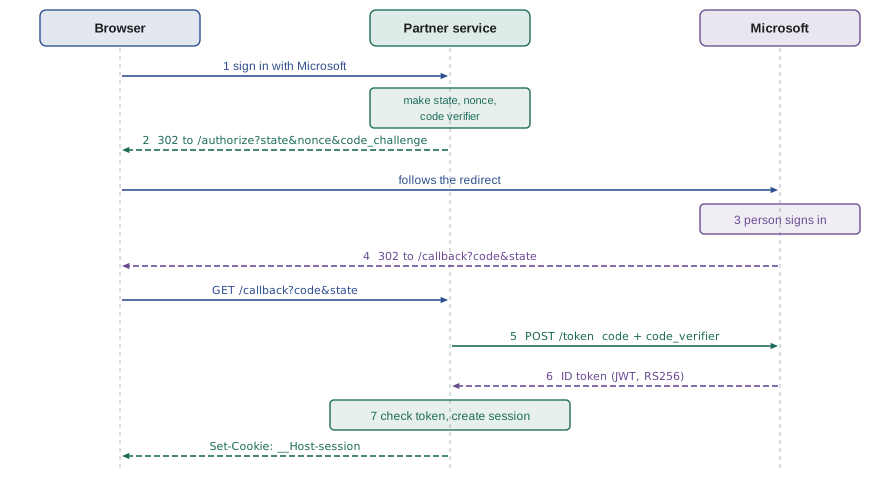
Each step exists for a reason. The browser is sent to the provider, so the password is typed only on the provider's own page and never reaches the partner service. The provider sends back a short-lived, single-use authorization code in the redirect, not a token, because redirects pass through the browser's address bar and history. The partner service exchanges the code for tokens in a direct server-to-server request. And three random values protect the round trip: state ties the response to the request the service actually started, which stops cross-site request forgery against the sign-in itself; nonce ties the ID token to this sign-in, which stops an old ID token being replayed; and the PKCE code verifier proves that whoever exchanges the code is whoever started the flow.
The first step is building the URL that sends the browser to the provider. URLSearchParams handles the encoding.
function authorizationUrl({ endpoint, clientId, redirectUri, state, nonce, challenge }) {
  const url = new URL(endpoint);
  url.search = new URLSearchParams({
    response_type: 'code',
    client_id: clientId,
    redirect_uri: redirectUri,
    scope: 'openid profile email',
    state,
    nonce,
    code_challenge: challenge,
    code_challenge_method: 'S256',
  });
  return url;
}

const url = authorizationUrl({
  endpoint: 'https://login.microsoftonline.com/organizations/oauth2/v2.0/authorize',
  clientId: '7f3c1a2e-0000-4bde-9a51-partnerdemo',
  redirectUri: 'https://partners.riverside-food-hub.example/auth/microsoft/callback',
  state: 'st-91c2', nonce: 'nc-4410', challenge: 'E9Melhoa2OwvFrEMTJguCHaoeK1t8URWbuGJSstw-cM',
});
console.log(url.origin + url.pathname);
for (const [k, v] of url.searchParams) console.log(' ', k.padEnd(22), v);https://login.microsoftonline.com/organizations/oauth2/v2.0/authorize response_type code client_id 7f3c1a2e-0000-4bde-9a51-partnerdemo redirect_uri https://partners.riverside-food-hub.example/auth/microsoft/callback scope openid profile email state st-91c2 nonce nc-4410 code_challenge E9Melhoa2OwvFrEMTJguCHaoeK1t8URWbuGJSstw-cM code_challenge_method S256
What this code does
The URL object holds the provider's authorization endpoint, and assigning a URLSearchParams to its search property encodes every parameter correctly, including the colons and slashes in the redirect URI. response_type code asks for an authorization code, and the scope openid profile email asks only for identity. The state, nonce and challenge would be fresh random values in real use; fixed ones are shown here so the output does not change.
PKCE: the code verifier and the challenge
Before redirecting, the client makes a code verifier: a random string of 43 to 128 characters. It keeps the verifier to itself and sends only the code challenge, which for the method S256 is the base64url encoding of the SHA-256 hash of the verifier. When the client later exchanges the code, it sends the verifier, and the provider hashes it and compares the result with the challenge it received at the start. Someone who intercepted the code, but not the verifier, cannot use it. RFC 7636, which defines PKCE, includes a worked example that any implementation can check itself against.
const b64url = (bytes) => btoa(String.fromCharCode(...new Uint8Array(bytes)))
  .replaceAll('+', '-').replaceAll('/', '_').replaceAll('=', '');

async function challengeFor(verifier) {
  const hash = await crypto.subtle.digest('SHA-256', new TextEncoder().encode(verifier));
  return b64url(hash);
}

function newVerifier() {
  return b64url(crypto.getRandomValues(new Uint8Array(32))); // 32 random bytes -> 43 characters
}

const rfcVerifier = 'dBjftJeZ4CVP-mB92K27uhbUJU1p1r_wW1gFWFOEjXk';
const challenge = await challengeFor(rfcVerifier);
console.log('challenge  ', challenge);
console.log('matches RFC 7636 Appendix B:', challenge === 'E9Melhoa2OwvFrEMTJguCHaoeK1t8URWbuGJSstw-cM');
console.log('a fresh verifier has', newVerifier().length, 'characters');challenge E9Melhoa2OwvFrEMTJguCHaoeK1t8URWbuGJSstw-cM matches RFC 7636 Appendix B: true a fresh verifier has 43 characters
What this code does
challengeFor hashes the verifier with SHA-256 and encodes the 32-byte result with base64url, which is exactly the S256 method. Run on the verifier printed in RFC 7636, it produces the challenge printed there, which shows the implementation is right. newVerifier makes 32 random bytes with crypto.getRandomValues, giving a 43-character verifier; only its length is printed, because the value is different every time.
Handling the callback
When the person has signed in, the provider redirects the browser to the redirect URI with the code and the state in the query string, or with an error, for example when the person pressed Cancel. The callback handler is security-critical, and it checks everything before it trusts anything. It looks up the pending sign-in by the state value, which also proves the request came back from a flow this service started. It refuses an unknown or expired state, handles an error parameter calmly, and then exchanges the code.
const pending = new Map([['st-91c2', { provider: 'microsoft', verifier: 'v-abc', nonce: 'nc-4410', started: 1000 }]]);
const MAX_AGE = 10 * 60; // a sign-in must finish within 10 minutes

function callback(query, now) {
  const params = new URLSearchParams(query);
  const state = params.get('state');
  const flow = state && pending.get(state);
  if (!flow) return '400: unknown or reused sign-in; start again';
  pending.delete(state); // single use
  if (now - flow.started > MAX_AGE) return '400: sign-in took too long; start again';
  if (params.get('error')) return `sign-in stopped at ${flow.provider}: ${params.get('error')}`;
  const code = params.get('code');
  if (!code) return '400: no code';
  return `exchange code ${code} with verifier ${flow.verifier}, expect nonce ${flow.nonce}`;
}

console.log(callback('?code=AUTH-5521&state=st-91c2', 1200));
console.log(callback('?code=AUTH-5521&state=st-91c2', 1210));
console.log(callback('?code=AUTH-0000&state=made-up', 1220));
pending.set('st-77aa', { provider: 'google', verifier: 'v-def', nonce: 'nc-1', started: 2000 });
console.log(callback('?error=access_denied&state=st-77aa', 2100));exchange code AUTH-5521 with verifier v-abc, expect nonce nc-4410 400: unknown or reused sign-in; start again 400: unknown or reused sign-in; start again sign-in stopped at google: access_denied
What this code does
The pending sign-ins are kept on the server, keyed by state, together with the verifier and nonce that must be used later. Each state is deleted as soon as it is used, so a second callback with the same state, which could only be a replay, is refused. An error from the provider, such as access_denied when someone presses Cancel, is reported as a normal outcome rather than a crash.
The redirect URI deserves its own warning. The provider must compare it exactly with the URIs registered for the client, character for character, as RFC 9700 requires. Providers that allowed patterns or prefixes have been tricked into sending codes to an attacker's page on the same domain. In the same spirit, the partner service never accepts a return-to address from the query string without checking that it is a path on its own site, which would otherwise make it an open redirect that phishing emails could use.
Checking the ID token
The token exchange returns an ID token, a JWT signed by the provider. Microsoft and Google sign with RS256, a public-key algorithm: the provider signs with a private key, and anyone can verify with the matching public key, which the provider publishes as a JSON Web Key Set (JWKS) at a URL listed in its discovery document, /.well-known/openid-configuration. Keys are rotated from time to time, so the service fetches the set and caches it rather than copying a key into its configuration. The jose library does this.
import { createRemoteJWKSet, jwtVerify } from 'jose';

// From Microsoft's discovery document; jose caches the keys and refetches when they rotate
const microsoftKeys = createRemoteJWKSet(new URL('https://login.microsoftonline.com/common/discovery/v2.0/keys'));

export async function checkMicrosoftIdToken(idToken, expectedNonce) {
  const { payload } = await jwtVerify(idToken, microsoftKeys, {
    algorithms: ['RS256'],
    audience: process.env.MICROSOFT_CLIENT_ID,
  });
  // Microsoft's issuer contains the tenant id, so check it against the tenant claim
  if (payload.iss !== `https://login.microsoftonline.com/${payload.tid}/v2.0`) throw new Error('bad issuer');
  if (payload.nonce !== expectedNonce) throw new Error('nonce mismatch');
  return payload;
}
What this code does
createRemoteJWKSet downloads the provider's public keys once and picks the right one for each token by its key id, fetching again when a token names a key it has not seen. jwtVerify fixes the algorithm to RS256 and requires the audience to be the partner service's own client id, so an ID token issued to some other application is refused. The issuer and nonce checks finish the job, the second one tying the token to the sign-in that the service started.
A verified ID token proves who signed in at the provider. It does not prove that the person belongs to an agency, and this is where many integrations go wrong. An email address can look like an Elm Street address and still be wrong to trust: in a multi-tenant service such as Microsoft's, the email claim can be set by the administrator of any organization, and it can change. Microsoft's guidance is to identify a person by the combination of the tenant id (tid) and the object id (oid), which cannot be reassigned. Google provides an hd claim, the hosted domain of a Workspace account, which can be trusted only when present, together with email_verified. The partner service maps people to agencies by these stable claims and keeps an allow-list per agency.
const AGENCIES = [
  { agency: 'elm-seniors', provider: 'microsoft', tid: '3c5d1f7a-2b44-4c1e-9e0a-elmstreetseniors' },
  { agency: 'northside', provider: 'google', hd: 'northside-shelter.example' },
];

function agencyFor(provider, claims) {
  for (const a of AGENCIES) {
    if (a.provider !== provider) continue;
    if (provider === 'microsoft' && claims.tid === a.tid) return { agency: a.agency, key: `ms:${claims.tid}:${claims.oid}` };
    if (provider === 'google' && claims.hd === a.hd && claims.email_verified === true) return { agency: a.agency, key: `g:${claims.sub}` };
  }
  return null;
}

const tries = [
  ['microsoft', { tid: '3c5d1f7a-2b44-4c1e-9e0a-elmstreetseniors', oid: 'a17e', email: 'joan@elmstreetseniors.example' }],
  ['microsoft', { tid: '99999999-0000-0000-0000-someoneelse', oid: 'b200', email: 'joan@elmstreetseniors.example' }],
  ['google', { sub: '10442', hd: 'northside-shelter.example', email_verified: true }],
  ['google', { sub: '20991', email: 'someone@northside-shelter.example', email_verified: true }],
];
for (const [p, c] of tries) console.log(p.padEnd(10), JSON.stringify(agencyFor(p, c)));microsoft {"agency":"elm-seniors","key":"ms:3c5d1f7a-2b44-4c1e-9e0a-elmstreetseniors:a17e"}
microsoft null
google {"agency":"northside","key":"g:10442"}
google nullWhat this code does
Each agency is matched by a claim that its provider guarantees: the Microsoft tenant id for Elm Street and the Google hosted domain for Northside. The second try shows why the email is not used: a different tenant can issue an account whose email looks like Elm Street's, and it is refused. The stored key for each person combines stable identifiers rather than the email, so a renamed mailbox is still the same person.
The fourth try is refused too. Its email address ends in Northside's domain, but there is no hd claim, which means it is a personal Google account that someone registered with that address, not an account that Northside's administrators manage. This is OWASP's tenth API risk, unsafe consumption of APIs, in a small form: data from another service, even a large and trusted one, is checked against what that service actually guarantees.
Even with a match, the first sign-in of a new person is not enough to grant access. Each agency has a staff administrator who approves new members on the partner page, and the session records the agency and the person's role, which lesson 6 uses.
Client credentials for programs
Northside's case management system has no person to sign in. For programs that act on their own behalf, OAuth defines the client credentials grant: the program authenticates as itself with a client id and a client secret and receives a short-lived access token. The secret stays in the program's configuration and is sent only to the token endpoint, never to the API, and the access token it receives expires in 15 minutes. If the token leaks from a log, it is soon useless, and if the secret leaks, Theo rotates it without touching anything else.
import http from 'node:http';
import { createHmac, createHash, timingSafeEqual } from 'node:crypto';

const SECRET = Buffer.alloc(32, 7); // demo only; the real key comes from the environment
// Registered clients: id -> SHA-256 of the client secret, and the scopes it may have
const clients = new Map([['northside-cms', {
  secretHash: createHash('sha256').update('s3cr3t-from-the-config-file').digest(),
  scopes: ['orders:read', 'orders:write'],
}]]);

const b64 = (x) => Buffer.from(x).toString('base64url');
function jwt(claims) {
  const data = `${b64(JSON.stringify({ alg: 'HS256', typ: 'JWT' }))}.${b64(JSON.stringify(claims))}`;
  return `${data}.${createHmac('sha256', SECRET).update(data).digest('base64url')}`;
}
function basicAuth(header = '') {
  const [kind, value] = header.split(' ');
  if (kind !== 'Basic' || !value) return [];
  const text = Buffer.from(value, 'base64').toString();
  const i = text.indexOf(':');
  return [decodeURIComponent(text.slice(0, i)), decodeURIComponent(text.slice(i + 1))];
}

http.createServer(async (req, res) => {
  const reply = (status, body) => {
    res.writeHead(status, { 'content-type': 'application/json', 'cache-control': 'no-store' });
    res.end(JSON.stringify(body));
  };
  if (req.method !== 'POST' || req.url !== '/token') return reply(404, { error: 'not_found' });
  let text = '';
  for await (const chunk of req) text += chunk;
  const form = new URLSearchParams(text);
  if (form.get('grant_type') !== 'client_credentials') return reply(400, { error: 'unsupported_grant_type' });
  const [id, secret] = basicAuth(req.headers.authorization);
  const client = clients.get(id);
  const given = createHash('sha256').update(secret ?? '').digest();
  if (!client || !timingSafeEqual(given, client.secretHash)) return reply(401, { error: 'invalid_client' });
  const wanted = (form.get('scope') ?? client.scopes.join(' ')).split(' ');
  if (!wanted.every((s) => client.scopes.includes(s))) return reply(400, { error: 'invalid_scope' });
  const now = Math.floor(Date.now() / 1000);
  reply(200, {
    access_token: jwt({ iss: 'https://partners.riverside-food-hub.example', sub: `client:${id}`,
      aud: 'partner-api', scope: wanted.join(' '), iat: now, exp: now + 900 }),
    token_type: 'Bearer', expires_in: 900, scope: wanted.join(' '),
  });
}).listen(3142);
What this code does
The token endpoint reads a form-encoded body, as OAuth requires, and accepts only the client_credentials grant. The client id and secret arrive in a Basic Authorization header; the secret is compared as a SHA-256 hash with timingSafeEqual, so the server never stores the secret itself. A request for a scope the client was not given is refused, and a successful request gets a 15-minute JWT with Cache-Control no-store, so no proxy keeps a copy.
$ curl -s -u northside-cms:s3cr3t-from-the-config-file -d grant_type=client_credentials -d scope=orders:read localhost:3142/token; echo
{"access_token":"eyJhbGciOiJIUzI1NiIsInR5cCI6IkpXVCJ9.eyJpc3MiOi...(shortened)","token_type":"Bearer","expires_in":900,"scope":"orders:read"}
$ curl -s -u northside-cms:wrong -d grant_type=client_credentials localhost:3142/token; echo
{"error":"invalid_client"}
$ curl -s -u northside-cms:s3cr3t-from-the-config-file -d grant_type=client_credentials -d scope=kitchen:admin localhost:3142/token; echo
{"error":"invalid_scope"}| Who | How they sign in | What the partner service receives |
|---|---|---|
| Elm Street staff | OpenID Connect with Microsoft 365, code flow with PKCE | ID token; session cookie |
| Northside staff | OpenID Connect with Google Workspace, code flow with PKCE | ID token; session cookie |
| Westview staff | Local email and password (lesson 3) | Session cookie |
| Northside's case management system | Client credentials grant | 15-minute access token |
| Kitchen staff | Local email and password, like Westview staff | Session cookie |
| The kitchen board | Enrolled once by Rosa (lesson 12) | Device refresh token and 15-minute access tokens |
Gareth adds one more possibility to the list for later. Passkeys, built on the WebAuthn standard, let a person sign in with a key pair stored on their phone or computer and unlocked with a fingerprint, face or PIN. The private key never leaves the device and is tied to the website's domain, so a passkey cannot be typed into a fake site, which makes it resistant to phishing in a way that passwords and one-time codes are not. Passkeys are supported by the major browsers and phones, and offering them to Westview's staff instead of passwords is on the list for the autumn.
Worked problem
Choosing the right grant
For each client, choose the OAuth grant or other method: (a) the partner page signing in an Elm Street staff member; (b) Northside's nightly order import, running on Northside's own server; (c) a phone app that a Westview youth worker might use in the future; (d) a script someone proposes that would ask staff for their Microsoft password and send it to Microsoft itself.
Show solution
- (a) A person in a browser signing in with a provider: authorization code with PKCE, using OpenID Connect for identity.
- (b) A program acting for itself, with somewhere safe to keep a secret: client credentials.
- (c) A person in an app that cannot keep a secret: authorization code with PKCE, as a public client.
- (d) This is the resource owner password grant, which current guidance says must not be used: the script would see the password, and it would break with multi-factor authentication.
Answer: (a) code flow with PKCE; (b) client credentials; (c) code flow with PKCE as a public client; (d) refused, because handing a password to a third party is exactly what OAuth exists to avoid.
Common mistakes
MistakeTreating OAuth as a way to find out who someone is.
InsteadOAuth delegates access; OpenID Connect adds identity with the ID token.
MistakeSkipping PKCE because the client has a secret.
InsteadRFC 9700 recommends PKCE for confidential clients too, and OAuth 2.1 makes it standard for every client.
MistakeTrusting the email claim to decide which agency someone belongs to.
InsteadUse stable, provider-guaranteed claims such as tid and oid or hd with email_verified, plus an allow-list.
MistakeMatching redirect URIs by prefix.
InsteadCompare them exactly with the registered value.
MistakeAccepting the ID token without checking aud and nonce.
InsteadCheck the audience is your client id and the nonce matches this sign-in.
Summary and key terms
- OAuth 2.0 lets a client act with limited, delegated access without seeing the person's password; OpenID Connect adds identity through a signed ID token.
- Every client should use the authorization code flow with PKCE (RFC 9700); the implicit and password grants are no longer recommended. state protects the sign-in round trip, nonce ties the ID token to it, and the code verifier, whose SHA-256 hash is sent as the S256 challenge, proves that the code is exchanged by whoever started the flow.
- Redirect URIs are compared exactly, and states are single use with a short lifetime.
- ID tokens are verified with the provider's published keys (JWKS), a fixed algorithm, the client id as audience, the issuer and the nonce.
- People are mapped to agencies by stable claims, such as Microsoft's tid and oid or Google's hd with email_verified, never by email alone.
- Programs use the client credentials grant to get short-lived tokens, and passkeys offer phishing-resistant sign-in.
- OAuth 2.0
- A framework that lets a client obtain limited access tokens for a service without the user's password.
- OpenID Connect
- An identity layer on OAuth 2.0 that returns an ID token describing who signed in.
- Authorization code
- A short-lived, single-use value returned in a redirect and exchanged for tokens.
- PKCE
- Proof Key for Code Exchange: a verifier kept by the client and a hashed challenge sent at the start.
- state
- A random value that ties the provider's response to the request the client started.
- nonce
- A random value placed in the ID token to stop it being replayed.
- JWKS
- JSON Web Key Set: the public keys a provider publishes for verifying its tokens.
- Client credentials grant
- An OAuth grant in which a program authenticates as itself to get an access token.
- Passkey
- A phishing-resistant credential stored on a device and tied to a website, based on WebAuthn.
Practice problems
Work each problem on paper first, then reveal the answer to check.
What does OpenID Connect add to OAuth?
Show answer
Identity: an ID token that says who signed in.
What is sent at the start of the flow, the code verifier or the code challenge?
Show answer
The challenge; the verifier is sent only with the code exchange.
Why is the code returned in the redirect rather than a token?
Show answer
Redirects pass through the browser's address bar and history, and the code is useless without the verifier and the server-to-server exchange.
Which Microsoft claims identify a person safely?
Show answer
The tenant id (tid) and the object id (oid).
Which grant does Northside's case management system use?
Show answer
The client credentials grant.
Try it yourself
Validate an ID token
Complete validateIdToken(claims, expected, now) so that it returns the first problem or ok. Check, in order: iss equals expected.issuer (bad issuer), aud equals expected.clientId (wrong audience), now is before exp (expired), and nonce equals expected.nonce (nonce mismatch).
Some providers send aud as an array. Accept an array if it contains the client id.
function validateIdToken(claims, expected, now) {
  if (claims.aud !== expected.clientId) return 'wrong audience';
  return 'ok';
}

const expected = { issuer: 'https://accounts.google.com', clientId: 'partner-web', nonce: 'nc-1' };
const good = { iss: 'https://accounts.google.com', aud: 'partner-web', exp: 500, nonce: 'nc-1' };
console.log(validateIdToken(good, expected, 400));
console.log(validateIdToken({ ...good, aud: ['partner-web', 'other'] }, expected, 400));
console.log(validateIdToken({ ...good, iss: 'https://accounts.example' }, expected, 400));
console.log(validateIdToken({ ...good, nonce: 'nc-old' }, expected, 400));
console.log(validateIdToken(good, expected, 500));
Try it yourself
Exact redirect URIs
Complete allowedRedirect(uri) so that it returns true only if uri is exactly one of the registered redirect URIs. The starter uses startsWith, which lets an attacker's lookalike address through.
Then complete safeReturnTo(path), which returns the path if it starts with a single / (but not //, which browsers treat as another host) and returns / otherwise.
const REGISTERED = ['https://partners.riverside-food-hub.example/auth/microsoft/callback',
  'https://partners.riverside-food-hub.example/auth/google/callback'];

function allowedRedirect(uri) {
  return REGISTERED.some((r) => uri.startsWith(r.slice(0, 45)));
}
function safeReturnTo(path) {
  return path;
}

console.log(allowedRedirect('https://partners.riverside-food-hub.example/auth/google/callback'));
console.log(allowedRedirect('https://partners.riverside-food-hub.example/auth/google/callback/../../steal'));
console.log(allowedRedirect('https://partners.riverside-food-hub.example.attacker.example/cb'));
console.log(safeReturnTo('/orders?day=2028-06-21'));
console.log(safeReturnTo('//attacker.example/login'));
console.log(safeReturnTo('https://attacker.example/login'));
Lesson quiz · 5 questions
Score 60% or more to complete this lesson.
Create a free account to save your progress, take quizzes and earn a certificate.