
JS-240 · Lesson 10 of 12 · 28 min
GraphQL basics
▶ Video coming soon A video version of this lesson is on the way.
On Tuesday, July 11, 2028, Lucy joins the session with a request and a suggestion. The Food Hub's board wants a monthly report on the partner programme: trays per agency, per item and per week, alongside the volunteer hours that cooked them. A friend of Lucy's who works as a developer told her that GraphQL would let her ask for exactly the numbers she wants in one request, instead of waiting for the studio to build each report. Gareth thinks the idea deserves a proper look, and that knowing GraphQL is worth an afternoon in any case, because many large APIs, GitHub's among them, offer it.
This lesson introduces GraphQL: its schema, queries and mutations, and how a server answers a query by calling resolvers. Mira writes a tiny GraphQL-style executor to see how nested queries are answered, meets the N+1 problem and its standard cure, batching, and works through the security questions that GraphQL raises differently from REST. The lesson ends with the studio's decision on Lucy's report.
One endpoint, many shapes
A REST API has many URLs, each returning a fixed shape: GET /v1/kitchen/days/2028-07-12 returns the day with its orders, and the agency names come from somewhere else. GraphQL, created at Facebook in 2012 and published as an open specification in 2015, now maintained by the GraphQL Foundation, takes a different approach. There is one endpoint, usually POST /graphql, and the client sends a query that describes the shape of the answer it wants. The response has exactly that shape.
query {
  day(date: "2028-07-12") {
    date
    capacity
    orders {
      id
      trays
      agency { name }
    }
  }
}
What this code does
The query asks for one delivery day by its date and, inside it, only the fields Rosa's board needs: the capacity and, for each order, its id, trays and the agency's name. Nesting follows the relationships in the data, from day to orders to agency. A different client could ask the same endpoint for different fields and receive a differently shaped answer.
The server knows what may be asked because of the schema, written in GraphQL's schema definition language. The schema lists every type, its fields and their types, and the entry points: Query for reading, Mutation for changes and Subscription for streams of events. Exclamation marks mean a field is never null, and square brackets mean a list.
type Query {
  day(date: String!): Day
  agencies: [Agency!]!
}

type Day {
  date: String!
  capacity: Int!
  orders: [Order!]!
}

type Order {
  id: Int!
  trays: Int!
  status: String!
  agency: Agency!
}

type Agency {
  id: Int!
  name: String!
}

type Mutation {
  markDelivered(orderId: Int!): Order
}
What this code does
Query declares what can be read at the top level, such as a day by date, which takes a required string argument. Each object type lists its fields; Day contains a list of orders, and each Order points to its Agency, which is what makes nested queries possible. The Mutation type declares a change, marking an order delivered, which returns the changed order.
A GraphQL response is JSON with a data property holding the requested shape and, if anything went wrong, an errors array. Unlike REST, GraphQL usually answers 200 OK even when parts of a query fail, with the failures listed in errors and the affected fields set to null. Clients must therefore check errors as well as the status code.
Resolvers: how a query is answered
On the server, each field in the schema has a resolver, a function that produces its value. The server walks the query from the top: it calls the resolver for day, then, for the value it returned, the resolvers for date, capacity and orders, and then, for each order, the resolvers for its fields, including agency. Real servers use a library such as graphql-js, which parses the query, checks it against the schema and runs the resolvers. Mira's tiny version does the same walk in a few lines, without types or validation, to make the idea visible.
// A tiny parser for GraphQL selection sets: fields, arguments and nesting.
function parse(src) {
  const tokens = [...src.matchAll(/\s*([{}():,]|"[^"]*"|-?\d+|[A-Za-z_]\w*)/g)].map((m) => m[1]);
  let i = 0;
  const next = () => tokens[i++], peek = () => tokens[i];
  function selectionSet() {
    if (next() !== '{') throw new Error('expected {');
    const fields = [];
    while (peek() !== '}') fields.push(field());
    next();
    return fields;
  }
  function field() {
    const f = { name: next(), args: {}, fields: null };
    if (peek() === '(') {
      next();
      while (peek() !== ')') {
        const name = next(); next(); // skip ':'
        const raw = next();
        f.args[name] = raw.startsWith('"') ? raw.slice(1, -1) : Number(raw);
        if (peek() === ',') next();
      }
      next();
    }
    if (peek() === '{') f.fields = selectionSet();
    return f;
  }
  return selectionSet();
}

const agencies = { 1: { id: 1, name: 'Northside Family Shelter' }, 2: { id: 2, name: 'Elm Street Seniors Club' }, 3: { id: 3, name: 'Westview Youth Drop-In' } };
const orders = [
  { id: 51, date: '2028-07-12', agencyId: 1, trays: 6 }, { id: 52, date: '2028-07-12', agencyId: 2, trays: 9 },
  { id: 53, date: '2028-07-12', agencyId: 3, trays: 3 }, { id: 54, date: '2028-07-12', agencyId: 1, trays: 2 },
];

const resolvers = {
  Query: { day: (_, { date }) => ({ date, capacity: 40 }) },
  Day: { orders: (day) => orders.filter((o) => o.date === day.date) },
  Order: { agency: (order) => agencies[order.agencyId] },
};
const typeOf = { day: 'Day', orders: 'Order', agency: 'Agency' };

function execute(fields, parent, type) {
  const out = {};
  for (const f of fields) {
    const resolve = resolvers[type]?.[f.name] ?? ((p) => p[f.name]); // default: read the property
    const value = resolve(parent, f.args);
    const child = typeOf[f.name];
    out[f.name] = f.fields === null ? value
      : Array.isArray(value) ? value.map((v) => execute(f.fields, v, child)) : execute(f.fields, value, child);
  }
  return out;
}

const query = '{ day(date: "2028-07-12") { date capacity orders { id trays agency { name } } } }';
console.log(JSON.stringify({ data: execute(parse(query), null, 'Query') }, null, 1));{
"data": {
"day": {
"date": "2028-07-12",
"capacity": 40,
"orders": [
{
"id": 51,
"trays": 6,
"agency": {
"name": "Northside Family Shelter"
}
},
{
"id": 52,
"trays": 9,
"agency": {
"name": "Elm Street Seniors Club"
}
},
{
"id": 53,
"trays": 3,
"agency": {
"name": "Westview Youth Drop-In"
}
},
{
"id": 54,
"trays": 2,
"agency": {
"name": "Northside Family Shelter"
}
}
]
}
}
}What this code does
parse turns the query text into a tree of fields with their arguments and nested selections. execute walks that tree: for each field it calls the type's resolver if there is one, or simply reads the property of the same name, and if the field has a nested selection, it executes that selection on the value, mapping over lists. The output has exactly the shape of the query, which is the defining feature of GraphQL.
The N+1 problem
The executor answers the query correctly, but look at what it asks the data layer. It runs one query for the day's orders, and then, for each of the orders, one query for its agency: with 4 orders, 1 + 4 queries. This is the N+1 problem, and GraphQL makes it easy to fall into, because each resolver is written on its own without knowing that others like it are running at the same moment. With 40 orders on a busy day, it would be 41 database round trips for one request.
The standard cure is batching: instead of fetching each agency at once, each resolver asks a loader for the agency it needs and gets back a promise. The loader collects every request made during the current turn of the event loop and then makes one query for all of them. The pattern was published by Facebook as the DataLoader library; the example builds the core of it.
const agencies = { 1: { id: 1, name: 'Northside Family Shelter' }, 2: { id: 2, name: 'Elm Street Seniors Club' }, 3: { id: 3, name: 'Westview Youth Drop-In' } };
const orders = [
  { id: 51, date: '2028-07-12', agencyId: 1, trays: 6 }, { id: 52, date: '2028-07-12', agencyId: 2, trays: 9 },
  { id: 53, date: '2028-07-12', agencyId: 3, trays: 3 }, { id: 54, date: '2028-07-12', agencyId: 1, trays: 2 },
];

let queries = 0;
const db = {
  agencyById: async (id) => { queries++; return agencies[id]; },
  agenciesByIds: async (ids) => { queries++; return ids.map((id) => agencies[id]); },
};

// Without batching: one query per order
queries = 0;
await Promise.all(orders.map((o) => db.agencyById(o.agencyId)));
console.log('one by one:', queries, 'queries for', orders.length, 'orders');

// With a loader: requests made in the same tick are combined, and repeated ids are fetched once
function createLoader(batchFn) {
  let pending = null;
  const cache = new Map();
  return (key) => {
    if (cache.has(key)) return cache.get(key);
    if (!pending) {
      pending = new Map();
      queueMicrotask(async () => {
        const batch = pending; pending = null;
        const keys = [...batch.keys()];
        const values = await batchFn(keys);
        keys.forEach((k, i) => batch.get(k).resolve(values[i]));
      });
    }
    let resolve;
    const p = new Promise((r) => { resolve = r; });
    pending.set(key, { resolve });
    cache.set(key, p);
    return p;
  };
}

queries = 0;
const loadAgency = createLoader((ids) => { console.log('batch for ids', ids); return db.agenciesByIds(ids); });
const names = await Promise.all(orders.map(async (o) => (await loadAgency(o.agencyId)).name));
console.log('with a loader:', queries, 'query;', names.join(' | '));one by one: 4 queries for 4 orders batch for ids [ 1, 2, 3 ] with a loader: 1 query; Northside Family Shelter | Elm Street Seniors Club | Westview Youth Drop-In | Northside Family Shelter
What this code does
The first part fetches each order's agency separately and counts four queries. The loader instead returns a promise for each request and schedules one microtask, which runs after all the resolvers in the current step have made their requests, to fetch every distinct id in a single call. Northside's id appears twice but is fetched once, because the loader caches the promise for each key, so four orders cost one query.
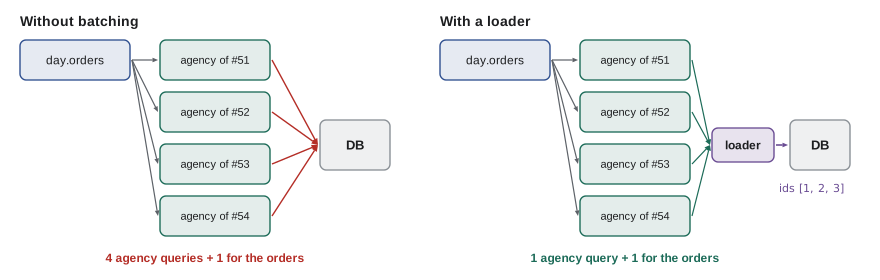
Loaders are created fresh for each incoming request. A loader shared between requests would cache one agency's data and could hand it to another caller, which mixes up both freshness and authorization.
Security in GraphQL
GraphQL changes the shape of several security problems. The single endpoint means that the usual per-URL controls, such as a rate limit per route or a web server rule for one path, see only POST /graphql. Everything has to be enforced inside the server, per field and per query.
- Authorization in resolvers. Every resolver that returns an object checks that the caller may see it, exactly as the scoped repository methods of lesson 6 do. A query can reach an order through many paths, such as day, then orders, or agency, then orders, and each path must apply the same rule.
- Limit depth and cost. A query can nest relationships to any depth, and lists multiply: days, each with orders, each with an agency, each with its orders, and so on. Servers reject queries deeper than a limit and estimate a cost, for example by multiplying the expected size of each list, before running anything.
- Limit aliases and batching. GraphQL lets one request contain the same field many times under different aliases. Attackers have used this to try hundreds of passwords or one-time codes in a single request that a per-request rate limit counts once. Count aliases and operations, not just requests.
- Consider turning off introspection. Introspection lets clients ask the server for its whole schema, which powers good tools. Many teams disable it in production for APIs with no public users, since it also gives an attacker a map.
- Prefer trusted documents. For an API used only by the studio's own clients, the server can accept only queries registered in advance, identified by a hash, and refuse everything else. This removes most of the risks above at once.
// A tiny parser for GraphQL selection sets: fields, arguments and nesting.
function parse(src) {
  const tokens = [...src.matchAll(/\s*([{}():,]|"[^"]*"|-?\d+|[A-Za-z_]\w*)/g)].map((m) => m[1]);
  let i = 0;
  const next = () => tokens[i++], peek = () => tokens[i];
  function selectionSet() {
    if (next() !== '{') throw new Error('expected {');
    const fields = [];
    while (peek() !== '}') fields.push(field());
    next();
    return fields;
  }
  function field() {
    const f = { name: next(), args: {}, fields: null };
    if (peek() === '(') {
      next();
      while (peek() !== ')') {
        const name = next(); next(); // skip ':'
        const raw = next();
        f.args[name] = raw.startsWith('"') ? raw.slice(1, -1) : Number(raw);
        if (peek() === ',') next();
      }
      next();
    }
    if (peek() === '{') f.fields = selectionSet();
    return f;
  }
  return selectionSet();
}

const LISTS = new Set(['agencies', 'orders', 'lines']); // fields the schema declares as lists
function measure(fields, depth = 1) {
  let maxDepth = depth, cost = 0;
  for (const f of fields) {
    cost += 1;
    if (f.fields) {
      const size = f.args.first ?? (LISTS.has(f.name) ? 10 : 1); // assume 10 items for an unbounded list
      const inner = measure(f.fields, depth + 1);
      maxDepth = Math.max(maxDepth, inner.maxDepth);
      cost += size * inner.cost;
    }
  }
  return { maxDepth, cost };
}

const LIMITS = { maxDepth: 4, cost: 500 };
const queries = {
  board: '{ day(date: "2028-07-12") { orders { id trays agency { name } } } }',
  deep: '{ agencies { orders { agency { orders { agency { orders { id } } } } } } }',
  wide: '{ agencies(first: 100) { orders(first: 100) { id } } }',
};
for (const [name, q] of Object.entries(queries)) {
  const a = measure(parse(q));
  const ok = a.maxDepth <= LIMITS.maxDepth && a.cost <= LIMITS.cost;
  console.log(name.padEnd(6), JSON.stringify(a), ok ? 'run' : 'refuse');
}board {"maxDepth":4,"cost":42} run
deep {"maxDepth":7,"cost":12211} refuse
wide {"maxDepth":3,"cost":10101} refuseWhat this code does
analyse walks the parsed query before anything runs, recording the deepest nesting and an estimated cost in which each field costs 1 and each nested selection is multiplied by the size of its list, taken from a first argument or, for fields the schema declares as lists, assumed to be 10. The board's query is shallow and cheap, so it runs. The deep query nests seven levels and the wide one asks for 100 lists of 100, and both are refused without touching the database.
Libraries exist for each of these controls, and a GraphQL server for the partner data would be built with graphql-js or a server package on top of it. The listing shows the setup in outline, checked to be valid JavaScript.
import { graphql, buildSchema } from 'graphql';
import { readFile } from 'node:fs/promises';

const schema = buildSchema(await readFile(new URL('./schema.graphql', import.meta.url), 'utf8'));

export async function handleGraphql(caller, body, makeLoaders, repo) {
  const loaders = makeLoaders(caller); // fresh loaders for every request
  const root = {
    day: ({ date }) => repo.dayForCaller(caller, date), // scoped, as in lesson 6
    markDelivered: ({ orderId }) => repo.markDelivered(caller, orderId),
  };
  return graphql({ schema, source: body.query, rootValue: root, variableValues: body.variables,
    contextValue: { caller, loaders } });
}
What this code does
buildSchema reads the schema definition from a file, and graphql parses, validates and executes each query against it. The root object holds the top-level resolvers, which call the same caller-scoped repository methods the REST API uses, so authorization is not written twice. The context carries the caller and a fresh set of loaders for every request, so batching never shares data between callers.
REST or GraphQL?
| REST (the partner API) | GraphQL | |
|---|---|---|
| Endpoints | Many URLs, one per resource | One endpoint, many queries |
| Response shape | Fixed by the server | Chosen by the client |
| HTTP caching | Natural: GET, ETag, 304 | Harder: queries are usually POST |
| Errors | Status codes and problem details | Usually 200 with an errors array |
| Changing the API | Versions and deprecation headers | Add fields; mark old ones @deprecated |
| Over-fetching and under-fetching | Common; solved with purpose-built endpoints | Rare; the client asks for what it needs |
| Security controls | Per route, plus object checks | Per field, plus depth, cost and alias limits |
GraphQL shines when many different clients, built by different teams, need different slices of a large, connected data model, and the server team cannot build an endpoint for each. The Food Hub has one small team, a handful of clients and a report that changes perhaps twice a year. Gareth's conclusion, which Lucy accepts, is that a new reporting endpoint, GET /v1/reports/monthly?month=2028-07, gives her the report with far less to secure, and that the studio will revisit GraphQL if the number of different reports grows past what one endpoint per report can handle.
Worked problem
Estimating a query's cost
Lucy's friend proposes this query for the board report: agencies, each with orders(first: 50), each with lines (assume 3 per order), each with item { name }. Using the cost rule from the example, with each field costing 1 and each nested selection multiplied by its list size, and assuming 3 agencies, estimate the cost. Would it pass a limit of 500?
Show solution
- The innermost selection, item { name }, costs 1 for name, so item costs 1 + 1 × 1 = 2.
- lines selects item (2) and is a list of 3, so lines costs 1 + 3 × 2 = 7.
- orders(first: 50) selects lines (7), so orders costs 1 + 50 × 7 = 351.
- agencies is a list of 3 and selects orders (351), so agencies costs 1 + 3 × 351 = 1,054.
Answer: The estimated cost is 1,054, so the query would be refused under a limit of 500. Asking for orders(first: 20) would cost 1 + 3 × (1 + 20 × 7) = 424, which passes, and a monthly report endpoint avoids the question altogether.
Common mistakes
MistakeTreating a 200 response from a GraphQL server as success.
InsteadCheck the errors array; parts of a query can fail with status 200.
MistakeWriting resolvers that each query the database for one item.
InsteadUse loaders to batch and cache lookups within a request.
MistakeSharing one loader between all requests.
InsteadCreate loaders per request, so data is not shared across callers.
MistakeRelying on a per-request rate limit for GraphQL.
InsteadOne request can hold many aliases; limit depth, cost and aliases too.
MistakeChecking authorization only at the top-level field.
InsteadEvery resolver that returns an object must check it, whatever path reached it.
Summary and key terms
- GraphQL exposes one endpoint where clients send queries describing the exact shape of the answer they want, checked against a schema of types, fields and the Query, Mutation and Subscription entry points.
- The server answers by calling a resolver for each field, walking the query from the top, and returns data and an errors array, usually with status 200.
- Independent resolvers cause the N+1 problem, which loaders solve by batching requests made in the same tick into one query and caching them, with fresh loaders per request.
- Security must be enforced inside the server: authorization in every resolver, limits on depth, cost and aliases, introspection often disabled in production, and trusted documents where possible.
- GraphQL suits large, connected data used by many different clients; for the Food Hub's one report, a purpose-built REST endpoint is simpler and safer.
- GraphQL
- A query language and runtime in which clients ask one endpoint for exactly the data they need.
- Schema
- The definition of a GraphQL API's types, fields and entry points.
- Query
- A GraphQL operation that reads data; also the schema type for read entry points.
- Mutation
- A GraphQL operation that changes data.
- Resolver
- A function that produces the value of one field.
- N+1 problem
- Making one query for a list and then one more query for each item in it.
- Loader
- An object that batches and caches lookups requested during one tick.
- Trusted documents
- Queries registered in advance and identified by a hash; all others are refused.
Practice problems
Work each problem on paper first, then reveal the answer to check.
How many endpoints does a typical GraphQL API have?
Show answer
One, usually POST /graphql.
What does a resolver do?
Show answer
It produces the value of one field.
Why does a naive resolver for Order.agency cause N+1 queries?
Show answer
It runs once per order, each time querying for one agency.
Why must loaders be created per request?
Show answer
So that cached data is never shared between callers.
Name two limits a GraphQL server should apply before running a query.
Show answer
Maximum depth and maximum estimated cost; also the number of aliases.
Try it yourself
Measure query depth
A parsed query is an array of fields, and each field has name and fields, which is either null or another array. Complete depth(fields) so that it returns the depth of the deepest field: a field with no nested fields has depth 1, and each level of nesting adds 1.
An empty array has depth 0.
function depth(fields) {
  return fields.length;
}

const f = (name, fields = null) => ({ name, fields });
console.log(depth([f('menu')]));
console.log(depth([f('day', [f('date'), f('orders', [f('id'), f('agency', [f('name')])])])]));
console.log(depth([f('a', [f('b')]), f('c', [f('d', [f('e', [f('x')])])])]));
console.log(depth([]));
Try it yourself
Resolve with defaults
Complete resolveFields(obj, names, resolvers) so that it returns an object with one property for each name in names. If resolvers has a function for the name, call it with obj and use its result; otherwise read obj[name].
If a resolver throws, put null for that field and add { path: name, message } to an errors array. Return { data, errors }, leaving errors out when it is empty.
function resolveFields(obj, names, resolvers) {
  const data = {};
  for (const name of names) data[name] = obj[name];
  return { data };
}

const order = { id: 51, trays: 6, agencyId: 1 };
const resolvers = {
  agencyName: (o) => ({ 1: 'Northside Family Shelter' })[o.agencyId],
  internalNote: () => { throw new Error('not allowed for this caller'); },
};
console.log(JSON.stringify(resolveFields(order, ['id', 'trays', 'agencyName'], resolvers)));
console.log(JSON.stringify(resolveFields(order, ['id', 'internalNote'], resolvers)));
Lesson quiz · 5 questions
Score 60% or more to complete this lesson.
Create a free account to save your progress, take quizzes and earn a certificate.