
JS-240 · Lesson 7 of 12 · 28 min
Rate limiting and abuse protection
▶ Video coming soon A video version of this lesson is on the way.
On Tuesday, June 27, 2028, Theo brings a graph from the partner service's access log. On Monday, June 19, at 00:00:03, a script at the Elm Street Seniors Club placed orders for every Monday, Wednesday and Friday in the next 28 days within two seconds of the days opening. Nothing was broken: the club's coordinator had written the script to be first in line after hearing that a delivery day had once filled up. But Northside, which places its orders by hand on Monday mornings, found two of its usual days with almost no capacity left. No password was guessed and no rule was bent, and still the API was used in a way that hurt the other agencies.
This lesson is about limits: how many requests a caller may make, how much each request may cost, and how valuable flows such as booking capacity are protected from being grabbed by whoever is fastest. It compares the common rate-limiting algorithms, shows how a server tells a client to slow down with 429 and Retry-After, slows down password guessing without locking people out, and sets limits on everything a request can make the server do. By the end, Mira has limits for each kind of caller and a fair-share rule for capacity.
Why limits are needed
A server without limits trusts every client to be careful, efficient and honest. Most clients are, most of the time. Limits are for the rest of the time: a script with a bug that retries in a tight loop, a scraper copying the menu every second, someone guessing passwords, or, as on June 19, a perfectly honest client that is simply much faster than the people it competes with. OWASP's list names two risks here.
- API4, unrestricted resource consumption. Requests that cost the server something, such as processor time, memory, database work, storage, outgoing emails or money, must be limited in number and in size.
- API6, unrestricted access to sensitive business flows. Some flows are valuable in themselves, such as booking scarce capacity, and need business rules that limit how much one caller can take, whatever the rate.
The first is solved with rate limits and size limits; the second needs a rule that Rosa agrees with, which is why the lesson ends with a conversation rather than code.
Counting requests: fixed and sliding windows
The simplest limiter is a fixed window: count each caller's requests in the current minute, starting from :00, and refuse any beyond the limit until the next minute starts. It is cheap and easy to understand, and it has one well-known flaw. A caller can send a full minute's allowance in the last second of one window and another full allowance in the first second of the next, so for a moment the rate is twice the limit.
// Fixed window: 60 requests per calendar minute.
function fixedWindow(limit, windowMs) {
  const counts = new Map();
  return (key, now) => {
    const w = Math.floor(now / windowMs);
    const k = `${key}:${w}`;
    const n = (counts.get(k) ?? 0) + 1;
    counts.set(k, n);
    return n <= limit;
  };
}

const allow = fixedWindow(60, 60000);
let accepted = 0;
for (let i = 0; i < 60; i++) if (allow('elm-seniors', 59000 + i * 10)) accepted++; // 59.0 s to 59.6 s
for (let i = 0; i < 60; i++) if (allow('elm-seniors', 60000 + i * 10)) accepted++; // 60.0 s to 60.6 s
console.log(`accepted ${accepted} requests in 1.2 seconds with a limit of 60 per minute`);accepted 120 requests in 1.2 seconds with a limit of 60 per minute
What this code does
The limiter counts requests in buckets named by the caller and the number of the current minute, so the count starts again at zero each time the minute changes. Sending 60 requests just before the minute ends and 60 just after it gets all 120 accepted, because each burst falls into a different window. That doubling at the boundary is why most APIs use a sliding window or a token bucket instead.
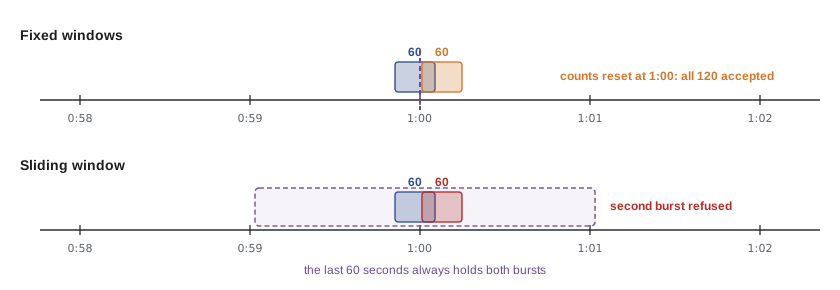
A sliding window avoids the jump by looking back a full window from the present moment rather than from the start of the minute. Keeping a timestamp for every request is exact but uses memory per request. A common approximation, the sliding window counter, keeps just two numbers, the count for the current window and the count for the previous one, and weights the previous count by how much of it still falls inside the last 60 seconds.
// Sliding window counter: an estimate of the requests in the last windowMs.
function slidingWindow(limit, windowMs) {
  const counts = new Map();
  return (key, now) => {
    const w = Math.floor(now / windowMs);
    const current = counts.get(`${key}:${w}`) ?? 0;
    const previous = counts.get(`${key}:${w - 1}`) ?? 0;
    const elapsed = (now % windowMs) / windowMs; // how far into the current window we are
    const estimate = previous * (1 - elapsed) + current;
    if (estimate >= limit) return false;
    counts.set(`${key}:${w}`, current + 1);
    return true;
  };
}

const allow = slidingWindow(60, 60000);
let accepted = 0;
for (let i = 0; i < 60; i++) if (allow('elm-seniors', 59000 + i * 10)) accepted++;
for (let i = 0; i < 60; i++) if (allow('elm-seniors', 60000 + i * 10)) accepted++;
console.log(`accepted ${accepted} requests in 1.2 seconds with a limit of 60 per minute`);
console.log('30 s later:', allow('elm-seniors', 90000) ? 'allowed' : 'refused');
console.log('60 s later:', allow('elm-seniors', 120500) ? 'allowed' : 'refused');accepted 61 requests in 1.2 seconds with a limit of 60 per minute 30 s later: allowed 60 s later: allowed
What this code does
The estimate counts all of the current window's requests plus the share of the previous window's requests that still lies within the last minute. Just after the boundary, almost the whole previous window counts, so the second burst is refused, apart from one request let through as the previous window's weight starts to shrink, and the total stays close to the limit. As time passes, the previous window's weight shrinks, and a minute after the burst the caller can send again.
Token buckets
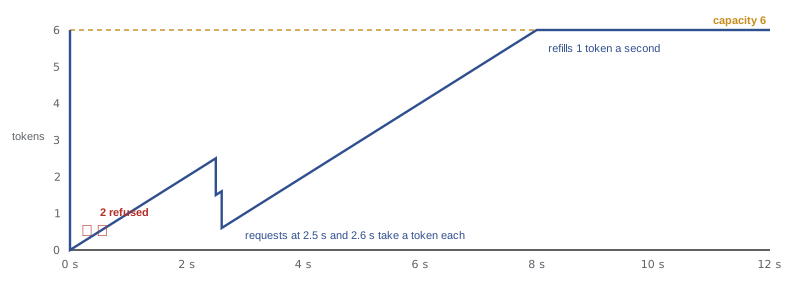
The token bucket is the algorithm most APIs use. Each caller has a bucket that holds up to a fixed number of tokens and refills at a steady rate. Each request takes one token; a request that finds the bucket empty is refused. The capacity sets how big a burst may be, and the refill rate sets the long-run average, so the two can be tuned separately: the partner page can load a dashboard with six requests at once, while the average stays at one request a second.
function tokenBucket({ capacity, perSecond }) {
  const buckets = new Map();
  return (key, now) => {
    const b = buckets.get(key) ?? { tokens: capacity, at: now };
    b.tokens = Math.min(capacity, b.tokens + (now - b.at) * perSecond);
    b.at = now;
    buckets.set(key, b);
    if (b.tokens >= 1) { b.tokens -= 1; return { ok: true, left: Math.floor(b.tokens) }; }
    return { ok: false, retryAfter: Math.ceil((1 - b.tokens) / perSecond) };
  };
}

const take = tokenBucket({ capacity: 6, perSecond: 1 });
const log = (t, r) => console.log(`t=${String(t).padStart(4)} s  ${r.ok ? `ok, ${r.left} left` : `429, retry after ${r.retryAfter} s`}`);
for (let i = 0; i < 8; i++) log(0, take('westview:priya', 0));
log(2.5, take('westview:priya', 2.5));
log(2.6, take('westview:priya', 2.6));
log(30, take('westview:priya', 30));t= 0 s ok, 5 left t= 0 s ok, 4 left t= 0 s ok, 3 left t= 0 s ok, 2 left t= 0 s ok, 1 left t= 0 s ok, 0 left t= 0 s 429, retry after 1 s t= 0 s 429, retry after 1 s t= 2.5 s ok, 1 left t= 2.6 s ok, 0 left t= 30 s ok, 5 left
What this code does
Each bucket starts full and records when it was last updated, so refilling is a multiplication of the time since then by the rate, capped at the capacity. The first six requests at the same instant use the burst allowance, and the next two are refused with the number of seconds until one whole token will have accumulated. After 2.5 seconds, two tokens have come back; after a long pause, the bucket is full again but never fuller than its capacity.
Telling the client to slow down
A refused request gets 429 Too Many Requests, with the partner service's usual problem details body and a Retry-After header saying how many seconds to wait. A well-behaved client waits that long before trying again. Clients that retry for other reasons, such as a 503 or a network error, should use exponential backoff with jitter: wait 1 second, then 2, then 4 and so on, each time adding a random amount so that many clients that failed together do not all retry at the same moment.
Some APIs also tell clients how much of their allowance is left before they hit the limit. For years each API invented its own header names, such as X-RateLimit-Remaining. The IETF's HTTP API working group has been standardizing two fields, RateLimit-Policy, which describes the limit, and RateLimit, which reports what remains and when it resets. The standard was still a draft when this course was written, so the partner service sends Retry-After on every 429, which every client understands, and documents the draft fields as informational.
import http from 'node:http';

// One token bucket per caller: 5 requests at once, then 1 more every 10 seconds.
const CAPACITY = 5, PER_SECOND = 0.1;
const buckets = new Map();

function take(key, now = Date.now() / 1000) {
  const b = buckets.get(key) ?? { tokens: CAPACITY, at: now };
  b.tokens = Math.min(CAPACITY, b.tokens + (now - b.at) * PER_SECOND);
  b.at = now;
  buckets.set(key, b);
  if (b.tokens >= 1) { b.tokens -= 1; return { ok: true, remaining: Math.floor(b.tokens) }; }
  return { ok: false, retryAfter: Math.ceil((1 - b.tokens) / PER_SECOND) };
}

http.createServer((req, res) => {
  const caller = req.headers['x-demo-caller'] ?? 'anonymous'; // the real service uses the authenticated agency
  const r = take(caller);
  if (!r.ok) {
    res.writeHead(429, { 'content-type': 'application/problem+json', 'retry-after': String(r.retryAfter) });
    return res.end(JSON.stringify({ title: 'Too many requests', status: 429, retryAfter: r.retryAfter }));
  }
  res.writeHead(200, { 'content-type': 'application/json', 'x-ratelimit-remaining': String(r.remaining) });
  res.end('{"ok":true}');
}).listen(3143);
What this code does
The server keeps one token bucket per caller, with a burst of 5 and one new token every 10 seconds. When the bucket is empty, it answers 429 with a problem details body and a Retry-After header computed from how long one token takes to come back. The demonstration names the caller with a header so the behaviour is easy to see; the real service takes the key from the authenticated agency or person.
$ for i in 1 2 3 4 5 6 7; do curl -s -o /dev/null -w '%{http_code} ' -H 'X-Demo-Caller: elm-seniors' localhost:3143/; done; echo
200 200 200 200 200 429 429
$ curl -s -i -H 'X-Demo-Caller: elm-seniors' localhost:3143/ | grep -i -E '^HTTP|retry-after|^\{'
HTTP/1.1 429 Too Many Requests
retry-after: 10
{"title":"Too many requests","status":429,"retryAfter":10}
$ curl -s -o /dev/null -w '%{http_code}\n' -H 'X-Demo-Caller: northside' localhost:3143/
200
The transcript shows the burst being used up, the sixth and seventh requests refused, the 429's Retry-After header, and Northside unaffected, because it has its own bucket. That last line is the point of keying limits by caller: one agency's busy script must not slow down another agency.
Choosing the keys and the limits
A limit is only as good as the key it counts by. Counting by IP address is easy but unfair, because all of an agency's staff may share one office address, and it is easy to evade for anyone with more addresses. The partner service counts by the authenticated identity whenever it has one, and by IP address only for requests that have none, such as the public menu and the sign-in page.
| Caller | Key | Burst | Steady rate |
|---|---|---|---|
| Signed-in staff member | agency and person | 20 | 2 per second |
| Agency as a whole | agency | 60 | 5 per second |
| Northside's import program | client id | 30 | 1 per second |
| Kitchen board | device | 10 | 1 per second (it mostly listens to a stream) |
| No credentials (menu, sign-in page) | IP address | 30 | 1 per second |
Theo's server runs the partner service as a single Node process, so the buckets can live in memory. A service that runs several processes needs a shared store, usually Redis or a table in the database, so that each process sees the same counts. Theo's web server also limits requests per IP address in front of the service, which absorbs crude floods before they reach Node at all.
Slowing down password guessing
The sign-in endpoint for Westview's staff needs its own protection. Each attempt costs the server a deliberately slow scrypt calculation, and each one is a guess at someone's password. Two kinds of attack matter: many guesses at one account, and credential stuffing, where an attacker tries email and password pairs leaked from other websites, a few guesses per account across many accounts. Locking an account after five failures stops the first, but it also lets anyone lock any staff member out on purpose. The partner service uses growing delays instead, counted per account and per IP address.
// Growing delays after failed sign-ins: per account and per IP address.
const failures = new Map();
const delayFor = (n) => (n < 3 ? 0 : Math.min(2 ** (n - 3), 900)); // seconds: none after 1 or 2 failures, then 1, 2, 4 ... up to 15 min

function attempt(email, ip, ok, now) {
  const keys = [`acct:${email}`, `ip:${ip}`];
  const wait = Math.max(...keys.map((k) => {
    const f = failures.get(k);
    return f ? f.until - now : 0;
  }));
  if (wait > 0) return `wait ${wait} s`;
  if (ok) { failures.delete(`acct:${email}`); return 'signed in'; }
  for (const k of keys) {
    const f = failures.get(k) ?? { n: 0 };
    f.n += 1;
    f.until = now + delayFor(f.n);
    failures.set(k, f);
  }
  const n = failures.get(keys[0]).n;
  return `wrong password (${n} failure${n === 1 ? '' : 's'})`;
}

let t = 0;
for (let i = 0; i < 6; i++) { console.log(`t=${t}`.padEnd(6), attempt('sam@westview-youth.example', '203.0.113.9', false, t)); t += 1; }
console.log(`t=${t}`.padEnd(6), attempt('sam@westview-youth.example', '203.0.113.9', true, t));
t += 4;
console.log(`t=${t}`.padEnd(6), attempt('sam@westview-youth.example', '198.51.100.4', true, t));t=0 wrong password (1 failure) t=1 wrong password (2 failures) t=2 wrong password (3 failures) t=3 wrong password (4 failures) t=4 wait 1 s t=5 wrong password (5 failures) t=6 wait 3 s t=10 signed in
What this code does
Each failure increases a counter for the account and for the IP address, and from the third failure on, the next attempt must wait 1, then 2, then 4 seconds and so on, up to 15 minutes. During a wait, even the right password is refused, so a guesser gains nothing by hammering the endpoint. A success after the wait clears the account's counter, and the real person is never locked out for long.
Delays slow down guessing at one account; checking new passwords against lists of breached passwords, as lesson 3 described, makes credential stuffing far less likely to succeed; and the work-account sign-ins of lesson 5 move most staff away from passwords altogether, with the provider's own protections, such as multi-factor authentication, in front.
Limiting what each request can cost
Counting requests is not enough if one request can be very expensive. The partner service also limits the size and cost of each request, and each limit is written down next to the reason for it.
| What | Limit | Why |
|---|---|---|
| JSON request body | 64 KB | An order is a few hundred bytes |
| Uploaded file (lesson 11) | 5 MB, one per request | A scanned form |
| Page size for lists | Default 25, maximum 100 | A list of every order ever would be slow and large |
| Database statement | 5 seconds | A slow query must not hold a connection |
| Open streams per device or person (lesson 9) | 3 | Each stream holds memory and a connection |
| GraphQL query depth (lesson 10) | 4 levels | Deep nesting multiplies database work |
| Notification emails per person | 20 per day | Each one is sent by Theo's mail queue |
Protecting the capacity flow
The June 19 script was not a rate problem. Even at one order per second it would have booked every day before anyone at Northside was awake. What it took was capacity, and capacity is a business resource, so the protection has to be a business rule. Mira, Theo and Rosa discussed three options: open booking days at a random time, cap each agency's share of each day, or let Rosa approve orders above a threshold. Rosa chose the second, because it is predictable and the agencies can plan around it.
The rule is that no agency may hold more than 16 of a day's 40 trays until noon three days before delivery; after that, any unbooked capacity is open to everyone. A burst of orders at midnight now gets an agency its fair share and no more, and the rest of the capacity waits for the others.
Worked problem
Applying the fair-share rule
Wednesday, July 5 has 40 trays. By Sunday, July 2, at 09:00, Elm Street holds 16 trays, Northside 10 and Westview 4. Elm Street tries to add 6 more trays at 09:00 on Sunday, and again at 12:30 on Sunday. Noon three days before Wednesday is noon on Sunday, July 2. What happens each time?
Show solution
- Booked so far: 16 + 10 + 4 = 30 trays, so 10 are unbooked.
- At 09:00 the fair-share period is still running. Elm Street already holds 16, the maximum, so adding 6 would make 22: refused with 409 and the problem type fair-share.
- At 12:30 the fair-share period has ended, so only the day's capacity applies.
- 30 + 6 = 36, which is within 40: accepted, leaving 4 trays for anyone.
Answer: The 09:00 request is refused because Elm Street already holds its 16-tray share; the same request at 12:30 succeeds, because after noon on Sunday any unbooked capacity is open to all.
Common mistakes
MistakeUsing a fixed window and assuming the limit is never exceeded.
InsteadBursts at the window boundary can double the rate. Use a sliding window or a token bucket.
MistakeCounting every caller by IP address.
InsteadCount by the authenticated agency or person; use IP addresses only when there is no identity.
MistakeLocking accounts after five failed passwords.
InsteadAnyone could lock staff out on purpose. Use growing delays per account and per IP address.
MistakeRefusing with 429 and no Retry-After.
InsteadTell the client how long to wait, in a Retry-After header.
MistakeTreating capacity grabbing as a rate limit problem.
InsteadIt is a business flow; protect it with a business rule such as a fair share.
Summary and key terms
- Limits protect a service from careless, buggy, abusive and simply very fast clients.
- OWASP's API4 asks for limits on what requests consume and API6 for protecting valuable business flows.
- Fixed windows are simple but allow double bursts at the boundary; sliding windows and token buckets avoid that, and a token bucket's capacity and refill rate set the burst and the steady rate separately.
- Refused requests get 429 with Retry-After, and clients retry with exponential backoff and jitter.
- Limits are keyed by the authenticated agency, person or client, and by IP address only when there is no identity.
- Sign-in uses growing delays per account and per IP address rather than lockouts.
- Each request's size and cost are limited too, and capacity is protected by a business rule: a fair share for each agency until three days before delivery.
- Rate limit
- A maximum number of requests a caller may make in a period.
- Fixed window
- A limiter that counts requests per calendar period and resets at the boundary.
- Sliding window
- A limiter that counts requests in the period ending now.
- Token bucket
- A limiter with a capacity that refills at a steady rate; each request takes a token.
- 429 Too Many Requests
- The status code for a request refused by a rate limit.
- Retry-After
- A response header giving the number of seconds to wait before retrying.
- Exponential backoff
- Waiting twice as long after each failure before retrying, usually with random jitter.
- Credential stuffing
- Trying email and password pairs leaked from other sites.
Practice problems
Work each problem on paper first, then reveal the answer to check.
Why can a fixed window of 60 per minute accept 120 requests in two seconds?
Show answer
Sixty at the end of one window and sixty at the start of the next are counted separately.
Which two numbers describe a token bucket?
Show answer
Its capacity (the burst) and its refill rate (the steady rate).
What header should accompany a 429?
Show answer
Retry-After.
Why does the partner service delay rather than lock accounts after failed sign-ins?
Show answer
Lockouts let anyone lock a staff member out on purpose.
What rule protects capacity from the fastest agency?
Show answer
A fair share of 16 trays per agency per day until noon three days before delivery.
Try it yourself
Backoff with a cap
Complete backoff(attempt) so that it returns the number of seconds to wait before retry number attempt (starting at 1): 1, 2, 4, 8 and so on, doubling each time, but never more than 60.
Then complete retryDelay(response, attempt): if the response has a retryAfter value, return it; otherwise return backoff(attempt). The real client also adds random jitter, which is left out here so the output is predictable.
function backoff(attempt) {
  return attempt;
}
function retryDelay(response, attempt) {
  return backoff(attempt);
}

console.log([1, 2, 3, 4, 5, 6, 7, 8].map(backoff).join(' '));
console.log(retryDelay({ status: 429, retryAfter: 20 }, 3));
console.log(retryDelay({ status: 503 }, 3));Lesson quiz · 5 questions
Score 60% or more to complete this lesson.
Create a free account to save your progress, take quizzes and earn a certificate.