
JS-240 · Lesson 11 of 12 · 31 min
File uploads and storage
▶ Video coming soon A video version of this lesson is on the way.
On Tuesday, July 11, Rosa raised one more request at the end of the session, and on Thursday, July 13, 2028, it is the subject of the whole afternoon. Each agency has a few clients with dietary needs, and today the agencies fax or photograph a signed dietary requirements form and email it to the kitchen, where it gets lost among everything else. Rosa would like the form attached to the order it belongs to. The agencies would like to upload it from the partner page, and Rosa would like to upload the weekly allergen sheet that every agency needs to see.
This lesson covers how files travel in HTTP requests, how a server accepts them safely, checking size, type and content without trusting what the client says, how to name and store them so that an upload can never overwrite or reach anything else, and how to serve them back to the right people only. It also covers a related request that the studio refuses, uploading from a URL, and why. Because the dietary forms contain health information about real people, the lesson ends with what to keep and for how long.
How files travel
There are three common ways to send a file to an API. An HTML form with enctype multipart/form-data sends one or more files and ordinary fields in a single body, separated by a boundary string that the browser chooses. A program can send the file's bytes as the whole body of a PUT or POST, with the file's type in Content-Type. And large systems often let clients upload straight to object storage with a short-lived signed URL, so the file never passes through the application server at all.
The partner page uses a form, so the partner service must read multipart bodies. A multipart body is mostly text: each part starts with two dashes and the boundary, has its own headers, such as Content-Disposition with the field name and file name, then a blank line and the content. The last boundary has two more dashes at the end. The example parses a small one by hand to show the structure; production code uses a tested streaming parser, because the format has many edge cases.
const boundary = '----partnerForm7Mt2';
const body = [
  `--${boundary}`,
  'Content-Disposition: form-data; name="orderId"',
  '',
  '41',
  `--${boundary}`,
  'Content-Disposition: form-data; name="form"; filename="dietary-form.pdf"',
  'Content-Type: application/pdf',
  '',
  '%PDF-1.7 (file bytes...)',
  `--${boundary}--`,
  '',
].join('\r\n');

function parseMultipart(text, boundary) {
  const parts = [];
  for (const chunk of text.split(`--${boundary}`).slice(1)) {
    if (chunk.startsWith('--')) break; // the closing boundary
    const [head, ...rest] = chunk.replace(/^\r\n/, '').split('\r\n\r\n');
    const headers = Object.fromEntries(head.split('\r\n').map((l) => l.split(': ')).map(([k, v]) => [k.toLowerCase(), v]));
    const disp = headers['content-disposition'];
    parts.push({
      name: disp.match(/name="([^"]*)"/)[1],
      filename: disp.match(/filename="([^"]*)"/)?.[1] ?? null,
      type: headers['content-type'] ?? 'text/plain',
      content: rest.join('\r\n\r\n').replace(/\r\n$/, ''),
    });
  }
  return parts;
}

for (const p of parseMultipart(body, boundary)) console.log(p);{ name: "orderId", filename: null, type: "text/plain", content: "41" }
{ name: "form", filename: "dietary-form.pdf", type: "application/pdf", content: "%PDF-1.7 (file bytes...)" }What this code does
The body is split at each boundary line, and the closing boundary, which ends with two extra dashes, stops the loop. Each part's headers are separated from its content by a blank line, and the Content-Disposition header gives the field name and, for files, the file name the browser reported. The file name and the type are only claims made by the client, which is the problem the rest of the lesson deals with.
Never trust the name, the type or the size
Everything about an upload that arrives in headers is chosen by the client: the file name, the Content-Type, even the Content-Length. An attacker can upload an HTML page with a script in it, named dietary-form.pdf and labelled application/pdf. If the service stored it and later served it as HTML, the script would run on the partner service's own origin, with access to the staff member's session. OWASP's file upload guidance and the partner service follow the same rules.
- Allow a short list of types that the feature needs, here PDF, PNG and JPEG, and refuse everything else, including SVG and HTML, which can contain scripts.
- Check the content, not the label. Most file formats start with a fixed sequence of bytes, often called magic bytes: a PDF starts with %PDF-, a PNG with the bytes 89 50 4E 47 0D 0A 1A 0A, a JPEG with FF D8 FF. The service checks that the first bytes match the declared type.
- Enforce the size limit while reading. Checking the size after the whole file has been received means an attacker can still make the server read and store gigabytes. The service counts bytes as they arrive and stops at 5 MB.
- Never use the client's file name for storage. The service stores every file under a random id it chooses itself, and keeps the original name, cleaned up, only as a label to show people.
const SIGNATURES = [
  { type: 'application/pdf', bytes: [0x25, 0x50, 0x44, 0x46, 0x2d] },               // %PDF-
  { type: 'image/png', bytes: [0x89, 0x50, 0x4e, 0x47, 0x0d, 0x0a, 0x1a, 0x0a] },
  { type: 'image/jpeg', bytes: [0xff, 0xd8, 0xff] },
];

function sniff(first) {
  return SIGNATURES.find((s) => s.bytes.every((b, i) => first[i] === b))?.type ?? 'unknown';
}

function check(declared, first) {
  const actual = sniff(first);
  if (!SIGNATURES.some((s) => s.type === declared)) return `415: ${declared} is not allowed`;
  if (actual !== declared) return `422: declared ${declared} but content looks like ${actual}`;
  return 'accept';
}

const enc = (s) => [...new TextEncoder().encode(s)];
console.log(check('application/pdf', enc('%PDF-1.7\n...')));
console.log(check('image/png', [0x89, 0x50, 0x4e, 0x47, 0x0d, 0x0a, 0x1a, 0x0a, 0x00]));
console.log(check('application/pdf', enc('<html><script>steal()</script>')));
console.log(check('image/svg+xml', enc('<svg onload="steal()">')));
console.log(check('image/jpeg', [0x89, 0x50, 0x4e, 0x47, 0x0d, 0x0a, 0x1a, 0x0a]));accept accept 422: declared application/pdf but content looks like unknown 415: image/svg+xml is not allowed 422: declared image/jpeg but content looks like image/png
What this code does
sniff compares the first bytes of the content with the known signatures and names the format it finds. check refuses a declared type that is not on the allow-list with 415 Unsupported Media Type, and refuses content that does not match its declared type with 422. The HTML page pretending to be a PDF is caught by its first bytes, and the SVG is refused before its content is even looked at.
Magic bytes prove only that a file starts the way its format should; a file can be a valid PDF and still contain something harmful. The partner service therefore also scans each upload with an antivirus engine running on Theo's server before anyone can download it, and it re-encodes images, which removes hidden data such as the location where a phone photo was taken, a detail that matters when the photo is of a signed form on someone's kitchen table.
Names and paths
Using the client's file name as a storage path invites path traversal: a name such as ../../config/env, if joined to the uploads folder, points outside it, and a careless server could overwrite its own configuration. Even harmless-looking names cause trouble: two agencies upload form.pdf on the same day, a name contains characters that are not allowed on the server's file system, or a name uses an invisible Unicode character that reverses the text direction, so that a file shown as invoice_fdp.exe is displayed as invoice_exe.pdf. The partner service avoids all of this by never using the name as a path.
function displayName(original) {
  const base = original.split(/[\\/]/).pop();                          // drop any folder part
  const clean = base.normalize('NFKC')
    .replace(/[\u0000-\u001f\u007f\u200e\u200f\u202a-\u202e\u2066-\u2069]/g, '') // controls and direction marks
    .replace(/[<>:"|?*]/g, '_')
    .replace(/^\.+/, '')
    .slice(0, 80);
  return clean || 'file';
}

function storageKey(orderId, n) {
  // The real service uses crypto.randomUUID(); a counter keeps this output predictable.
  return `orders/${orderId}/att-${String(n).padStart(4, '0')}`;
}

const names = ['dietary-form.pdf', '../../config/env', 'C:\\Users\\dev\\scan 2.jpg', 'form\u202Efdp.exe', '...hidden', ''];
const show = (s) => JSON.stringify(s).replace(/[\u0080-\uffff]/g, (c) => '\\u' + c.charCodeAt(0).toString(16).padStart(4, '0'));
names.forEach((n, i) => console.log(show(n).padEnd(26), '->', show(displayName(n)).padEnd(20), storageKey(41, i + 1)));"dietary-form.pdf" -> "dietary-form.pdf" orders/41/att-0001 "../../config/env" -> "env" orders/41/att-0002 "C:\\Users\\dev\\scan 2.jpg" -> "scan 2.jpg" orders/41/att-0003 "form\u202efdp.exe" -> "formfdp.exe" orders/41/att-0004 "...hidden" -> "hidden" orders/41/att-0005 "" -> "file" orders/41/att-0006
What this code does
displayName keeps only the last part of whatever path the browser sent, normalizes the text, removes control characters and the invisible marks that change text direction, replaces characters that file systems reject and strips leading dots. The result is used only as a label on the partner page. The file itself is stored under a key the service generates, so nothing the client sends can ever choose or change where a file is written.
Receiving a file in Node
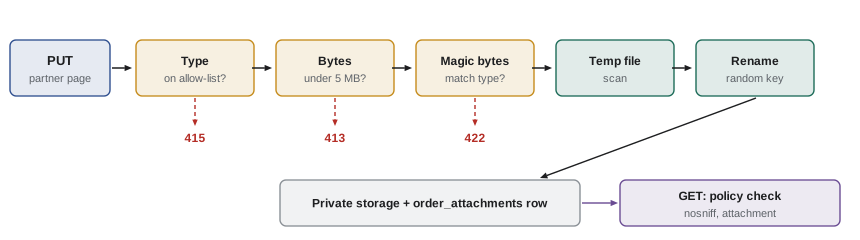
The listing is the heart of the partner service's upload endpoint, simplified to accept the file as the raw body of a PUT, which is how the partner page's JavaScript sends it after the person has chosen a file. It applies every rule so far: an allow-list of types, a size limit checked while the bytes arrive, magic bytes checked on the first chunk, a random name, and a temporary file that becomes visible only when it is complete.
import http from 'node:http';
import { createWriteStream } from 'node:fs';
import { mkdir, rename, rm } from 'node:fs/promises';
import { randomUUID } from 'node:crypto';

const MAX = 5 * 1024 * 1024; // 5 MB
const TYPES = { 'application/pdf': [0x25, 0x50, 0x44, 0x46, 0x2d], 'image/png': [0x89, 0x50, 0x4e, 0x47], 'image/jpeg': [0xff, 0xd8, 0xff] };
await mkdir('uploads/tmp', { recursive: true });

http.createServer(async (req, res) => {
  const fail = (status, title) => { res.writeHead(status, { 'content-type': 'application/problem+json', connection: 'close' }); res.end(JSON.stringify({ status, title })); };
  const type = req.headers['content-type'];
  if (req.method !== 'PUT' || !TYPES[type]) return fail(415, 'Send a PDF, PNG or JPEG file');
  if (Number(req.headers['content-length'] ?? 0) > MAX) return fail(413, 'Files can be at most 5 MB');

  const id = randomUUID();
  const tmp = `uploads/tmp/${id}`;
  const out = createWriteStream(tmp);
  let size = 0, checked = false;
  try {
    for await (const chunk of req) {
      size += chunk.length;
      if (size > MAX) throw Object.assign(new Error('Files can be at most 5 MB'), { status: 413 });
      if (!checked) { // the first bytes must match the declared type
        if (!TYPES[type].every((b, i) => chunk[i] === b)) throw Object.assign(new Error('The file is not really ' + type), { status: 422 });
        checked = true;
      }
      if (!out.write(chunk)) await new Promise((r) => out.once('drain', r));
    }
    await new Promise((r) => out.end(r));
    await rename(tmp, `uploads/${id}`); // only complete, checked files leave tmp
    res.writeHead(201, { 'content-type': 'application/json' });
    res.end(JSON.stringify({ id, type, size }));
  } catch (e) {
    out.destroy(); await rm(tmp, { force: true });
    fail(e.status ?? 500, e.message);
  }
}).listen(3146);
What this code does
The handler refuses anything but the three allowed types with 415 and refuses a declared length over 5 MB with 413 before reading a byte. While the body streams in, it counts the bytes and stops with 413 as soon as the limit is passed, whatever Content-Length claimed, and it checks the first bytes against the declared type. The file is written to a temporary name and renamed into place only when everything has passed, and on any failure the partial file is deleted.
$ curl -s -X PUT -H 'Content-Type: application/pdf' --data-binary @form.pdf localhost:3146/; echo
{"id":"3f9b2c1e-6a1d-4b7e-9c2f-5d8e1a7b0c44","type":"application/pdf","size":36}
$ curl -s -X PUT -H 'Content-Type: application/pdf' --data-binary @fake.pdf localhost:3146/; echo
{"status":422,"title":"The file is not really application/pdf"}
$ curl -s -X PUT -H 'Content-Type: image/svg+xml' --data-binary @fake.pdf localhost:3146/; echo
{"status":415,"title":"Send a PDF, PNG or JPEG file"}
$ curl -s -X PUT -H 'Content-Type: image/png' --data-binary @big.bin localhost:3146/; echo
{"status":413,"title":"Files can be at most 5 MB"}
$ ls uploads | grep -v tmp | wc -l
1
Four uploads, one accepted. The real PDF is stored; the HTML file labelled as a PDF fails the content check; the SVG is refused by type; and the 6 MB file is refused by size, here from its declared length, and would be cut off at 5 MB if the client had lied about it. The last command confirms that exactly one file reached the uploads folder and nothing was left behind.
Where files live
Uploaded files are stored outside any folder that Theo's web server serves directly, in /srv/partner-orders/uploads, so that no URL can ever reach a file without passing through the partner service's checks. Each order's attachments are recorded in an order_attachments table with the storage key, the display name, the checked type, the size, who uploaded it and when. Larger systems use object storage, a service such as Amazon S3 or a compatible one, with a private bucket; the principle is the same. Files are private by default and are reached only through code that checks who is asking.
Serving files back
Downloading an attachment is an ordinary authorized request: GET /v1/orders/41/attachments/att-0001 checks, with the policy from lesson 6, that the caller may see order 41, and only then streams the file. Three response headers make the browser treat it safely.
- Content-Type is the type the service checked, not the one the client sent.
- X-Content-Type-Options: nosniff stops the browser from guessing a different type from the content, which is how an image could once be run as a script.
- Content-Disposition: attachment with the display name makes the browser download the file instead of opening it inside the partner page's origin.
Sometimes a link must work for a short time without a session, for example a link in a notification email that opens the weekly allergen sheet. For that, the service issues a signed URL: the path, an expiry time and an HMAC over both, made with a secret only the server knows. The server checks the signature and the expiry before serving the file, and nobody can change the path or extend the time without breaking the signature. Object storage services offer the same idea as presigned URLs.
const enc = new TextEncoder();
const key = await crypto.subtle.importKey('raw', enc.encode('demo-only-link-signing-secret-32b'), { name: 'HMAC', hash: 'SHA-256' }, false, ['sign', 'verify']);
const hex = (buf) => [...new Uint8Array(buf)].map((b) => b.toString(16).padStart(2, '0')).join('');
const unhex = (s) => new Uint8Array(s.match(/../g).map((h) => parseInt(h, 16)));

async function signLink(path, expires) {
  const sig = await crypto.subtle.sign('HMAC', key, enc.encode(`${path}\n${expires}`));
  return `${path}?expires=${expires}&sig=${hex(sig).slice(0, 32)}`;
}

async function checkLink(link, now) {
  const url = new URL(link, 'https://partners.riverside-food-hub.example');
  const expires = Number(url.searchParams.get('expires'));
  const sig = url.searchParams.get('sig') ?? '';
  const full = new Uint8Array(await crypto.subtle.sign('HMAC', key, enc.encode(`${url.pathname}\n${expires}`)));
  const given = sig.length === 32 ? unhex(sig) : new Uint8Array(16);
  let diff = sig.length === 32 ? 0 : 1;
  for (let i = 0; i < 16; i++) diff |= full[i] ^ given[i];
  if (diff) return '403 bad signature';
  if (now >= expires) return '410 link expired';
  return '200 serve the file';
}

const link = await signLink('/v1/files/allergens-2028-w28.pdf', 1846850400);
console.log(link);
console.log(await checkLink(link, 1846800000));
console.log(await checkLink(link.replace('w28', 'w29'), 1846800000));
console.log(await checkLink(link.replace('1846850400', '1999999999'), 1846800000));
console.log(await checkLink(link, 1846850400));/v1/files/allergens-2028-w28.pdf?expires=1846850400&sig=226775e07ff79ef3692350f542849bae 200 serve the file 403 bad signature 403 bad signature 410 link expired
What this code does
signLink computes an HMAC over the path and the expiry time and puts the first 16 bytes, as hexadecimal, in the query string. checkLink recomputes the HMAC from the path and expiry in the link and compares it byte by byte without stopping early, so changing the file name or pushing the expiry into the future breaks the signature. A correctly signed link is refused with 410 Gone once its time has passed.
Uploading from a URL: server-side request forgery
Northside's coordinator asked whether staff could paste a link to a form stored in their shared drive instead of downloading and uploading it. That would mean the partner service fetching a URL that a client supplied, and it is the classic setting for OWASP's seventh risk, server-side request forgery (SSRF). The partner service runs inside Theo's network. A URL such as http://localhost:5432, http://10.0.0.5/admin or the special cloud metadata address http://169.254.169.254/ points at things that are reachable from the server but never from the internet, and a feature that fetches any URL hands that reach to whoever types the link.
Defences exist: allow only https, allow only a short list of known hosts, resolve the name and refuse private, loopback and link-local addresses, check again after every redirect, limit the size and time of the fetch. Each one has been bypassed in some system by a clever redirect or a domain that resolves differently the second time. For a convenience feature, the studio decides the risk is not worth it, and the partner page instead makes uploading from a phone's camera easy.
What to keep, and for how long
A dietary requirements form can reveal a person's allergies, medical conditions or religion. That is personal health information, and privacy laws, including Canada's PIPEDA and provincial health privacy laws expect organizations to collect only what they need, protect it and keep it no longer than necessary. Rosa, the agencies and Theo agree on rules that the service enforces, not just a policy on paper.
| Rule | How the service enforces it |
|---|---|
| Only the agency that uploaded a form and the kitchen can see it | The lesson 6 policy on every download |
| Forms are deleted 30 days after the order is delivered | A nightly job removes the files and their rows |
| Allergen sheets are deleted after 1 year | The same nightly job |
| Every download is logged with who and when | An access log row per download, kept for 1 year |
| Backups do not keep deleted files for long | Theo's backups of the uploads folder are kept for 14 days |
Worked problem
Budgeting storage
Each of the 3 agencies uploads about 4 dietary forms a week, averaging 1.2 MB each, and Rosa uploads one 0.8 MB allergen sheet a week. Forms are kept until 30 days after delivery, which is about 5 weeks after upload on average; allergen sheets are kept for 52 weeks. Roughly how much space do the uploads use once the rules have been running for a year, and how much do the 14-day backups add?
Show solution
- Forms uploaded per week: 3 × 4 = 12, so 12 × 1.2 = 14.4 MB a week.
- Forms are kept about 5 weeks: 5 × 14.4 = 72 MB at any time.
- Allergen sheets: 52 × 0.8 = 41.6 MB kept.
- Total stored: 72 + 41.6 = 113.6 MB, about 114 MB.
- Backups hold at most 14 days of deleted files: 2 weeks × 14.4 MB = 28.8 MB of forms more, about 29 MB.
Answer: About 114 MB in use and about 29 MB more in backups. Storage is not the constraint; the retention rules exist for privacy, not for space.
Common mistakes
MistakeSaving the file under the name the browser sent.
InsteadStore it under a random key the server chooses; show the cleaned name only as a label.
MistakeTrusting Content-Type to tell what a file is.
InsteadCheck the magic bytes against an allow-list of types.
MistakeChecking the size after the upload has finished.
InsteadCount bytes while reading and stop at the limit.
MistakeServing uploads from a folder the web server can reach directly.
InsteadKeep them outside the web root and serve them through an authorized endpoint with nosniff and Content-Disposition attachment.
MistakeFetching a URL that a client supplied.
InsteadThat invites server-side request forgery; avoid it or use a strict allow-list with address checks.
Summary and key terms
- Files arrive as multipart form bodies, as raw request bodies with a Content-Type, or directly in object storage through signed URLs.
- The file name, type and size in the request are claims by the client: the service allows only PDF, PNG and JPEG, checks magic bytes against the declared type, counts bytes while reading and stops at 5 MB, scans for malware and re-encodes images.
- Files are stored under random keys outside the web root, written to a temporary name and renamed when complete, and the original name is cleaned and used only as a label.
- Downloads are authorized like any request and sent with the checked type, nosniff and Content-Disposition attachment; short-lived signed links carry an HMAC over the path and expiry.
- Fetching client-supplied URLs risks server-side request forgery and is avoided.
- Health information in uploads is protected by retention rules that the service enforces.
- multipart/form-data
- The format in which forms send fields and files, separated by a boundary string.
- Boundary
- The string that separates the parts of a multipart body.
- Magic bytes
- The fixed bytes at the start of a file that identify its format.
- Path traversal
- Using parts such as ../ in a name to reach files outside the intended folder.
- Object storage
- A service that stores files as objects in buckets, such as Amazon S3.
- Signed URL
- A link that includes an expiry time and a signature, valid only until it expires.
- nosniff
- The X-Content-Type-Options value that stops browsers guessing a different content type.
- SSRF
- Server-side request forgery: making a server fetch an address chosen by an attacker.
Practice problems
Work each problem on paper first, then reveal the answer to check.
Which three file types does the partner service accept?
Show answer
PDF, PNG and JPEG.
How does a PDF file begin?
Show answer
With the bytes %PDF-.
Why does the service write uploads to a temporary name first?
Show answer
So that only complete, checked files ever appear in storage.
Which header makes a browser download a file instead of opening it?
Show answer
Content-Disposition: attachment.
Why did the studio refuse upload-from-URL?
Show answer
Fetching a client-supplied URL from inside Theo's network risks server-side request forgery.
Try it yourself
Sniff a file type
Complete sniff(bytes) so that it returns application/pdf if the bytes start with %PDF- (0x25 0x50 0x44 0x46 0x2d), image/png if they start with 0x89 0x50 0x4e 0x47, image/jpeg if they start with 0xff 0xd8 0xff, and unknown otherwise.
Then complete accept(declared, bytes), which returns true only if the sniffed type equals the declared type and is not unknown.
function sniff(bytes) {
  return 'unknown';
}
function accept(declared, bytes) {
  return true;
}

const pdf = [0x25, 0x50, 0x44, 0x46, 0x2d, 0x31];
const png = [0x89, 0x50, 0x4e, 0x47, 0x0d, 0x0a];
const html = [0x3c, 0x68, 0x74, 0x6d, 0x6c];
console.log(sniff(pdf), sniff(png), sniff(html));
console.log(accept('application/pdf', pdf), accept('application/pdf', html), accept('image/jpeg', png), accept('unknown', html));
Try it yourself
Count bytes as they arrive
Complete receive(chunks, max) so that it adds up the lengths of the chunks one at a time and returns 413 after N bytes as soon as the total goes over max, where N is the total at that moment. If all chunks fit, return ok, N bytes.
It must stop at the first chunk that passes the limit and not look at any later chunks; the test prints how many chunks were read.
function receive(chunks, max) {
  let total = 0, read = 0;
  for (const c of chunks) { total += c.length; read++; }
  if (total > max) return { result: `413 after ${total} bytes`, read };
  return { result: `ok, ${total} bytes`, read };
}

const kb = (n) => new Uint8Array(n * 1024);
console.log(JSON.stringify(receive([kb(1000), kb(1000), kb(1000)], 5 * 1024 * 1024)));
console.log(JSON.stringify(receive([kb(2048), kb(2048), kb(2048), kb(2048), kb(2048)], 5 * 1024 * 1024)));
Lesson quiz · 5 questions
Score 60% or more to complete this lesson.
Create a free account to save your progress, take quizzes and earn a certificate.