
JS-240 · Lesson 3 of 12 · 31 min
Sessions and cookies
▶ Video coming soon A video version of this lesson is on the way.
On Tuesday, June 13, 2028, the session starts with the problem the pilot review uncovered. The Westview Youth Drop-In's page sent every request with the agency's API key, so the key had to be in the page, and anything in a page can be read by anyone who opens it. Theo has since given Westview a new key, kept only on Theo's server for a nightly export, and asked that the agencies' staff use the partner page that the studio hosts at partners.riverside-food-hub.example instead. For that page, each staff member needs to sign in as themselves.
This lesson builds that sign-in the traditional way: with a password, a server-side session and a cookie. It covers how cookies work and which attributes make them safe, how a session store keeps track of who is signed in and for how long, how passwords must be stored, and how to stop other websites from making requests on a signed-in person's behalf. By the end, Mira has a working sign-in for Westview's staff, who do not have work accounts that could be used instead. Lesson 5 adds sign-in with work accounts for the other two agencies.
Why a session is needed
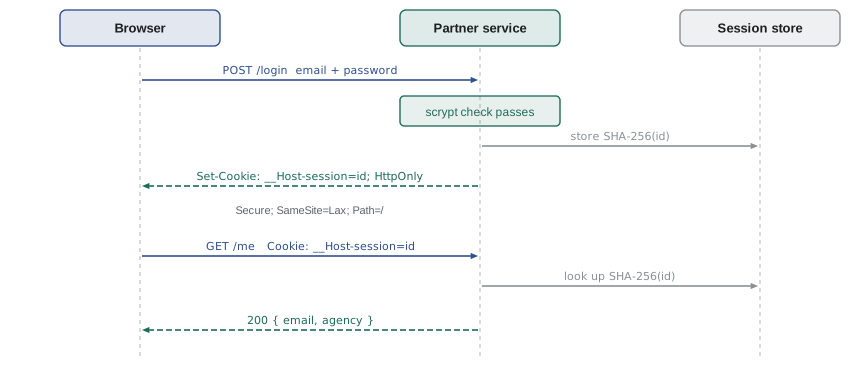
HTTP is stateless: each request stands alone, and the server does not remember the one before. An API key solves this for a program, because the program sends the same secret every time. For a person, sending a password with every request would be dangerous and inconvenient. Instead, the person proves who they are once, with a password, and the server hands back a session identifier: a long random string that stands for that sign-in. The browser sends the identifier back with every later request, and the server looks it up to find out who is calling.
The identifier travels in a cookie, a small piece of data that a server asks the browser to store and send back. The server sets it with a Set-Cookie response header, and from then on the browser adds a Cookie request header to every request to that site. The browser does this by itself, which is both the convenience of cookies and, as the end of the lesson shows, their main risk.
Cookie attributes
A Set-Cookie header holds the cookie's name and value, followed by attributes that tell the browser how to treat it. For a session cookie, the attributes are not optional extras; each one closes a specific hole.
| Attribute | What it does | Session cookie setting |
|---|---|---|
| HttpOnly | Hides the cookie from JavaScript in the page | Always: a script injected into the page cannot read the session |
| Secure | Sends the cookie only over HTTPS | Always |
| SameSite | Controls whether the cookie is sent on requests started by other sites | Lax (or Strict) |
| Path | Limits the cookie to part of the site | / |
| Domain | Shares the cookie with subdomains | Leave it out, so only the exact host gets it |
| Max-Age or Expires | When the browser should delete it | No longer than the session can last |
A cookie whose name starts with __Host- gets extra protection from the browser: it is accepted only if it has Secure, has Path=/ and has no Domain attribute. That guarantees the cookie was set by this exact host over HTTPS and cannot be overwritten by a less trusted subdomain. The partner service names its cookie __Host-session.
The example builds Set-Cookie values and reads a Cookie header, the two string formats a server has to handle.
function serializeCookie(name, value, opts = {}) {
  const parts = [`${name}=${encodeURIComponent(value)}`];
  if (opts.maxAge !== undefined) parts.push(`Max-Age=${opts.maxAge}`);
  if (opts.path) parts.push(`Path=${opts.path}`);
  if (opts.secure) parts.push('Secure');
  if (opts.httpOnly) parts.push('HttpOnly');
  if (opts.sameSite) parts.push(`SameSite=${opts.sameSite}`);
  if (name.startsWith('__Host-') && (!opts.secure || opts.path !== '/' || opts.domain)) {
    throw new Error('__Host- cookies need Secure, Path=/ and no Domain');
  }
  return parts.join('; ');
}

function parseCookies(header) {
  return Object.fromEntries(header.split(';').map((p) => p.trim()).filter(Boolean)
    .map((p) => { const i = p.indexOf('='); return [p.slice(0, i), decodeURIComponent(p.slice(i + 1))]; }));
}

console.log(serializeCookie('__Host-session', 'r4nd0m', { maxAge: 43200, path: '/', secure: true, httpOnly: true, sameSite: 'Lax' }));
console.log(parseCookies('theme=dark; __Host-session=r4nd0m; lang=en'));
try { serializeCookie('__Host-session', 'x', { path: '/app' }); } catch (e) { console.log(e.message); }__Host-session=r4nd0m; Max-Age=43200; Path=/; Secure; HttpOnly; SameSite=Lax
{ theme: "dark", "__Host-session": "r4nd0m", lang: "en" }
__Host- cookies need Secure, Path=/ and no DomainWhat this code does
serializeCookie joins the name, the encoded value and each requested attribute with semicolons, which is the format of a Set-Cookie header. It also enforces the __Host- rules, so a mistake in the settings fails during development instead of producing a cookie the browser would silently reject. parseCookies splits a Cookie header at semicolons and the first equals sign in each part, giving an object of names and values.
The session store
The cookie holds only the identifier. Everything else, such as which staff member is signed in and when the session started, stays on the server in a session store. The partner service keeps sessions in its own PostgreSQL table, so they survive a restart; the examples use a Map. Four rules make a session store safe.
- The identifier is long and random. It is made from at least 128 bits from a secure random source, such as crypto.randomBytes(32) in Node or crypto.getRandomValues in a browser, never from a counter, a time or Math.random.
- The store keeps a hash of the identifier, not the identifier itself. If the table ever leaked, the hashes could not be used as cookies. A plain SHA-256 is enough here, because the identifier is random, not a guessable password.
- Sessions end. An idle timeout ends a session that has not been used for a while, and an absolute timeout ends every session after a fixed time, however busy. The partner service uses 30 minutes idle and 12 hours absolute.
- A new identifier is issued at every sign-in. Reusing an identifier that existed before sign-in allows session fixation, where an attacker plants a known identifier in the victim's browser and waits for them to sign in.
The example is the partner service's store with a fake clock, so that it can show both timeouts in a few lines.
const MIN = 60 * 1000;
function sessionStore(now, { idle = 30 * MIN, absolute = 12 * 60 * MIN } = {}) {
  const store = new Map();
  return {
    create(id, data) { store.set(id, { data, created: now(), lastSeen: now() }); },
    get(id) {
      const s = store.get(id);
      if (!s) return null;
      if (now() - s.lastSeen > idle) { store.delete(id); return 'expired (idle)'; }
      if (now() - s.created > absolute) { store.delete(id); return 'expired (absolute)'; }
      s.lastSeen = now();
      return s.data;
    },
    destroy(id) { store.delete(id); },
  };
}

let t = 0;
const sessions = sessionStore(() => t);
sessions.create('a1', { email: 'priya@westview-youth.example' });
t += 20 * MIN; console.log('20 min:', sessions.get('a1'));
t += 25 * MIN; console.log('45 min:', sessions.get('a1'));
t += 40 * MIN; console.log('85 min:', sessions.get('a1'));
sessions.create('b2', { email: 'sam@westview-youth.example' });
for (let i = 0; i < 24; i++) { t += 29 * MIN; sessions.get('b2'); }
t += 29 * MIN; console.log('after 12.1 h of use:', sessions.get('b2'));20 min: { email: "priya@westview-youth.example" }
45 min: { email: "priya@westview-youth.example" }
85 min: expired (idle)
after 12.1 h of use: expired (absolute)What this code does
The store records when each session was created and last used, and the clock is a function that the example controls, so time can jump forward. Priya's session survives a 25-minute gap because the earlier read reset lastSeen, but a 40-minute gap passes the idle limit and the session is deleted. Sam's session is used every 29 minutes and never goes idle, yet it still ends once it is more than 12 hours old.
Storing passwords
Westview's staff sign in with an email address and a password, so the partner service must store something that lets it check a password later. It must never store the password itself, and it must not store a fast hash such as plain SHA-256 either. If the table leaked, an attacker with a graphics card could try billions of SHA-256 guesses a second against it. A password hashing function is designed to be slow and to need a lot of memory, so that each guess is expensive, and it uses a random salt per password, so that two people with the same password get different hashes and precomputed tables are useless.
| Function | Settings in the OWASP Password Storage Cheat Sheet | Notes |
|---|---|---|
| Argon2id | 19 MiB of memory, 2 iterations, 1 degree of parallelism | First choice |
| scrypt | Cost N = 2^17, block size r = 8, parallelism p = 1 | Built into node:crypto; used by the partner service |
| bcrypt | Work factor of at least 10 | Uses only the first 72 bytes of the password |
| PBKDF2 | 600,000 iterations with HMAC-SHA-256 | Use when a standard such as FIPS requires it |
The partner service uses scrypt, which Node provides without any package, with the cost OWASP recommends. PBKDF2 is the one function also available in the browser's Web Crypto API, so it is the one the example can run here. The salt is fixed only so that the output is the same every time; real code makes a new random salt for every password.
const enc = new TextEncoder();
const hex = (buf) => [...new Uint8Array(buf)].map((b) => b.toString(16).padStart(2, '0')).join('');

async function pbkdf2(password, salt, iterations) {
  const key = await crypto.subtle.importKey('raw', enc.encode(password.normalize('NFKC')), 'PBKDF2', false, ['deriveBits']);
  return crypto.subtle.deriveBits({ name: 'PBKDF2', hash: 'SHA-256', salt, iterations }, key, 256);
}

function sameBytes(a, b) {
  a = new Uint8Array(a); b = new Uint8Array(b);
  let diff = a.length ^ b.length;
  for (let i = 0; i < a.length; i++) diff |= a[i] ^ (b[i] ?? 0);
  return diff === 0;
}

const salt = enc.encode('demo-salt-16byte'); // real code: crypto.getRandomValues(new Uint8Array(16))
const stored = await pbkdf2('maple syrup on a snow day', salt, 600000);
console.log('stored:', `pbkdf2-sha256$600000$${hex(salt)}$${hex(stored).slice(0, 24)}...`);
console.log('right password:', sameBytes(stored, await pbkdf2('maple syrup on a snow day', salt, 600000)));
console.log('wrong password:', sameBytes(stored, await pbkdf2('maple syrup on a snowy day', salt, 600000)));stored: pbkdf2-sha256$600000$64656d6f2d73616c742d313662797465$3388d4072ea1a27f86369f23... right password: true wrong password: false
What this code does
importKey turns the password into a key object that PBKDF2 can use, and deriveBits runs 600,000 rounds of HMAC-SHA-256 over it with the salt, producing 256 bits. The stored string records the algorithm, the iteration count and the salt, so the settings can be raised later and old hashes still checked. sameBytes compares every byte before answering, so the time it takes does not reveal how many leading bytes matched.
Two details in the example matter in production. The stored string names the algorithm and its settings, so that when the recommended cost rises, the service can recognize old hashes and rehash each password with the new settings the next time its owner signs in. And the password is normalized to Unicode form NFKC first, so that an accented letter typed on a phone and on a laptop gives the same bytes.
The rules for the passwords themselves have also changed over the years. Current guidance, including the 2025 revision of the United States NIST digital identity guidelines that many organizations follow, favours length over complexity: no rules requiring a digit and a symbol, no forced changes every few months, a check against lists of passwords known from breaches, and a long minimum length, 15 characters when the password is the only factor. The partner service follows that guidance, and its sign-in page suggests a short phrase rather than a complicated word.
A working sign-in
Mira's session server puts the pieces together with node:http and node:crypto. It has one staff account, signs in with scrypt, keeps hashed session identifiers in a Map and answers three routes: POST /login, GET /me and POST /logout. Running it shows the cookie being set, used and cleared.
import http from 'node:http';
import { randomBytes, createHash, scryptSync, timingSafeEqual } from 'node:crypto';

// scrypt with the cost OWASP recommends: N = 2^17, r = 8, p = 1
const COST = { N: 2 ** 17, r: 8, p: 1, maxmem: 256 * 1024 * 1024 };
function hashPassword(password, salt = randomBytes(16)) {
  const key = scryptSync(password.normalize('NFKC'), salt, 32, COST);
  return `scrypt$${salt.toString('base64')}$${key.toString('base64')}`;
}
function verifyPassword(password, stored) {
  const [, salt, key] = stored.split('$');
  const test = scryptSync(password.normalize('NFKC'), Buffer.from(salt, 'base64'), 32, COST);
  return timingSafeEqual(test, Buffer.from(key, 'base64'));
}

const staff = new Map([['priya@westview-youth.example',
  { name: 'Priya', agency: 'westview', hash: hashPassword('maple syrup on a snow day') }]]);
const DUMMY = hashPassword('no such account');
const sessions = new Map(); // SHA-256 of the session id -> session data
const sha256 = (s) => createHash('sha256').update(s).digest('hex');

function cookiesOf(req) {
  const out = {};
  for (const part of (req.headers.cookie ?? '').split(';')) {
    const i = part.indexOf('=');
    if (i > 0) out[part.slice(0, i).trim()] = part.slice(i + 1).trim();
  }
  return out;
}
async function jsonBody(req) {
  let text = '';
  for await (const chunk of req) text += chunk;
  return JSON.parse(text);
}

const COOKIE = '__Host-session';
http.createServer(async (req, res) => {
  const send = (status, body, headers = {}) => {
    res.writeHead(status, { 'content-type': 'application/json', ...headers });
    res.end(body === undefined ? '' : JSON.stringify(body));
  };
  if (req.method === 'POST' && req.url === '/login') {
    const { email, password } = await jsonBody(req);
    const person = staff.get(email);
    const ok = verifyPassword(password, person ? person.hash : DUMMY) && person;
    if (!ok) return send(401, { title: 'Email or password is wrong' });
    const id = randomBytes(32).toString('base64url');
    sessions.set(sha256(id), { email, agency: person.agency, created: Date.now() });
    return send(200, { signedInAs: person.name }, {
      'set-cookie': `${COOKIE}=${id}; Path=/; Secure; HttpOnly; SameSite=Lax; Max-Age=43200`,
    });
  }
  const id = cookiesOf(req)[COOKIE];
  const session = id && sessions.get(sha256(id));
  if (req.method === 'GET' && req.url === '/me') {
    if (!session) return send(401, { title: 'Sign in first' });
    return send(200, { email: session.email, agency: session.agency });
  }
  if (req.method === 'POST' && req.url === '/logout') {
    if (id) sessions.delete(sha256(id));
    return send(204, undefined, { 'set-cookie': `${COOKIE}=; Path=/; Secure; HttpOnly; SameSite=Lax; Max-Age=0` });
  }
  send(404, { title: 'Not found' });
}).listen(3141);
What this code does
The password is checked with scrypt and the cost from the table, and timingSafeEqual compares the result in constant time. When the email is unknown, the code still runs scrypt against a dummy hash, so that an unknown address takes as long to refuse as a wrong password and the timing does not reveal which staff accounts exist. A successful sign-in creates a fresh 32-byte identifier, stores only its SHA-256 hash and sends the identifier in a __Host- cookie with Secure, HttpOnly and SameSite=Lax.
$ curl -s -X POST localhost:3141/login -d '{"email":"priya@westview-youth.example","password":"wrong"}'
{"title":"Email or password is wrong"}
$ curl -s -D headers.txt -X POST localhost:3141/login -d '{"email":"priya@westview-youth.example","password":"maple syrup on a snow day"}'; echo
{"signedInAs":"Priya"}
$ grep -i set-cookie headers.txt
set-cookie: __Host-session=Qm9vay1vbi1hLXRhYmxlLWlzLW5vdC1hLXNlc3Npb24; Path=/; Secure; HttpOnly; SameSite=Lax; Max-Age=43200
$ grep -o '__Host-session=[^;]*' headers.txt > jar
$ curl -s localhost:3141/me -H "Cookie: $(cat jar)"
{"email":"priya@westview-youth.example","agency":"westview"}
$ curl -s -X POST localhost:3141/logout -H "Cookie: $(cat jar)" -o /dev/null -w '%{http_code}\n'
204
$ curl -s localhost:3141/me -H "Cookie: $(cat jar)"
{"title":"Sign in first"}
The transcript shows the whole life of a session: a refused password, a sign-in that sets the cookie (curl's -D option saves the response headers to a file, and grep copies the cookie into a file called jar for the next commands), a request to /me that the cookie authenticates, a sign-out that deletes the session and clears the cookie, and the same cookie refused afterwards because the server no longer has the session. That last line is the main advantage of server-side sessions over the tokens in lesson 4: signing out, or Theo removing a staff member, takes effect at once.
The curl commands use plain HTTP to localhost for the demonstration. Browsers accept Secure cookies from http://localhost for the same reason, but on the real server the cookie is only ever sent over HTTPS through Theo's web server.
Cross-site request forgery
Because the browser attaches cookies by itself, a page on another website can try to use them. If Priya is signed in to the partner page and visits a malicious site, that site could contain a form that posts to the partner API's withdraw endpoint. The browser would send the request with Priya's cookie, and without protection the server would treat it as hers. This attack is cross-site request forgery (CSRF).
The partner service uses three defences together. SameSite=Lax tells the browser not to send the cookie on cross-site requests other than top-level GET navigations, which stops the forged form post in current browsers. The service also checks the Origin header, which browsers add to cross-site and state-changing requests and which a page cannot fake, and the Sec-Fetch-Site header, which modern browsers send with the value same-origin, same-site, cross-site or none. And it never changes anything on a GET, so the one kind of cross-site request that Lax allows cannot do harm. Many applications also use a CSRF token, a random value that the page must send back in a header or form field; the partner page adds one for its forms, because it costs little and protects older browsers too.
const ALLOWED_ORIGIN = 'https://partners.riverside-food-hub.example';
const SAFE = new Set(['GET', 'HEAD', 'OPTIONS']);

function csrfCheck(req) {
  if (SAFE.has(req.method)) return 'allow';
  const site = req.headers['sec-fetch-site'];
  if (site && site !== 'same-origin' && site !== 'none') return `block: Sec-Fetch-Site is ${site}`;
  const origin = req.headers.origin;
  if (origin && origin !== ALLOWED_ORIGIN) return `block: Origin is ${origin}`;
  if (!site && !origin) return 'block: no Origin or Sec-Fetch-Site';
  return 'allow';
}

const requests = [
  { method: 'POST', headers: { origin: ALLOWED_ORIGIN, 'sec-fetch-site': 'same-origin' } },
  { method: 'POST', headers: { origin: 'https://prize-draw.example', 'sec-fetch-site': 'cross-site' } },
  { method: 'DELETE', headers: { origin: 'https://prize-draw.example' } },
  { method: 'GET', headers: { 'sec-fetch-site': 'cross-site' } },
  { method: 'POST', headers: {} },
];
requests.forEach((r) => console.log(r.method.padEnd(6), csrfCheck(r)));POST allow POST block: Sec-Fetch-Site is cross-site DELETE block: Origin is https://prize-draw.example GET allow POST block: no Origin or Sec-Fetch-Site
What this code does
Safe methods are allowed because the service never changes anything on them. For other methods, the check refuses a request whose Sec-Fetch-Site or Origin header shows that it came from another site, and refuses one with neither header, which a browser would not send for a cross-site post. A real cross-site attack comes from a browser, and browsers always send these headers, so the check stops it without affecting the partner page.
The last line in the example refuses a request with no headers at all. A browser always sends Origin on a cross-site POST, so a request without it is either the partner page in an unusual browser or a program such as curl. Programs are expected to use the bearer tokens of lesson 4, which are not cookies and so are not exposed to CSRF in the first place; cookie sessions are for browsers.
Worked problem
Choosing the timeouts
Westview's staff mostly place orders on Monday mornings, in a single sitting of 10 to 40 minutes, from a shared office computer. Theo suggests an idle timeout of 30 minutes and an absolute timeout of 12 hours. Sam asks for 8 hours idle so he never has to sign in twice in a day. What could go wrong with Sam's suggestion, and how many times a week would the 30-minute rule make a typical user sign in?
Show solution
- With 8 hours idle, a session left open on the shared computer stays usable all day by anyone who sits down at it.
- Most sittings take 10 to 40 minutes. A pause of more than 30 minutes inside one sitting is rare, so most users sign in once per sitting.
- With one sitting a week, a typical user signs in about once a week under the 30-minute rule.
- A sign-out button and the short idle timeout together protect the shared computer.
Answer: Sam's 8-hour idle timeout would leave his session open to anyone using the shared office computer for the rest of the day. With 30 minutes idle and 12 hours absolute, a typical user signs in about once a week, which is a small cost for that protection.
Common mistakes
MistakeStoring the session id in the database as it is.
InsteadStore a hash of it, so a leaked table cannot be used as cookies.
MistakeHashing passwords with SHA-256 and a salt.
InsteadUse a slow password hashing function: Argon2id, scrypt, bcrypt or PBKDF2 with the recommended cost.
MistakeKeeping the same session id after sign-in.
InsteadIssue a new one at every sign-in to prevent session fixation.
MistakeRelying on SameSite alone against CSRF.
InsteadCombine SameSite with Origin or Sec-Fetch-Site checks, and never change anything on GET.
MistakeTelling the user that the email address is unknown.
InsteadGive the same answer, after the same amount of work, for an unknown email and a wrong password.
Summary and key terms
- HTTP is stateless, so a person proves who they are once and the server hands back a session identifier in a cookie, which the browser sends with every later request.
- Session cookies need HttpOnly, Secure and SameSite=Lax or Strict, no Domain, and the __Host- prefix.
- The session store keeps a hash of a long random identifier, ends sessions after an idle and an absolute timeout, and issues a new identifier at every sign-in.
- Passwords are stored with a slow, salted password hashing function: Argon2id, scrypt (N = 2^17, r = 8, p = 1, used by the partner service), bcrypt or PBKDF2 with 600,000 iterations; the stored string records the settings.
- Cross-site request forgery is stopped by SameSite cookies, Origin and Sec-Fetch-Site checks, CSRF tokens on forms and never changing anything on GET.
- Server-side sessions can be ended at once by signing out.
- Stateless
- Each request stands alone; the server keeps no memory of earlier requests unless something is sent with it.
- Session identifier
- A long random string that stands for one sign-in and is sent back with every request.
- Cookie
- A named value that a server asks the browser to store and send back with later requests to that site.
- HttpOnly
- A cookie attribute that hides the cookie from JavaScript in the page.
- SameSite
- A cookie attribute that controls whether the cookie is sent on requests started by other sites.
- Session fixation
- An attack in which a known session identifier is planted before the victim signs in.
- Salt
- A random value stored with each password hash so that equal passwords give different hashes.
- CSRF
- Cross-site request forgery: another site causing a signed-in browser to send a request it did not mean to send.
Practice problems
Work each problem on paper first, then reveal the answer to check.
Which three cookie attributes does every session cookie need?
Show answer
HttpOnly, Secure and SameSite (Lax or Strict).
What do browsers require of a cookie named __Host-session?
Show answer
Secure, Path=/ and no Domain attribute.
Why does the session store hold a hash of the identifier?
Show answer
So that a leaked table cannot be turned back into working cookies.
What settings does OWASP recommend for scrypt?
Show answer
N = 2^17, r = 8 and p = 1.
Name two headers a server can check to stop cross-site request forgery.
Show answer
Origin and Sec-Fetch-Site.
Try it yourself
Build a session cookie
Complete sessionCookie(id, maxAgeSeconds) so that it returns a Set-Cookie value for a cookie named __Host-session with the attributes Path=/, Secure, HttpOnly and SameSite=Lax, in that order, after Max-Age.
Also complete clearCookie(), which returns the same cookie with an empty value and Max-Age=0, which tells the browser to delete it.
function sessionCookie(id, maxAgeSeconds) {
  return `__Host-session=${id}`;
}
function clearCookie() {
  return '';
}

console.log(sessionCookie('Zx9q', 43200));
console.log(clearCookie());
Try it yourself
Rotate the session at sign-in
The store below is a Map from session id to data. Complete signIn(store, oldId, email, newId) so that it deletes any session stored under oldId, stores a new session under newId with { email }, and returns newId.
The example passes the new id in so the output is predictable; real code would make it with crypto.getRandomValues. After signing in, the old id must no longer find anything.
function signIn(store, oldId, email, newId) {
  store.set(oldId, { email });
  return oldId;
}

const store = new Map([['planted-by-attacker', { email: null }]]);
const id = signIn(store, 'planted-by-attacker', 'sam@westview-youth.example', 'fresh-7Kq2');
console.log('id now:', id);
console.log('old id finds:', store.get('planted-by-attacker') ?? 'nothing');
console.log('new id finds:', store.get(id)?.email ?? 'nothing');
Lesson quiz · 5 questions
Score 60% or more to complete this lesson.
Create a free account to save your progress, take quizzes and earn a certificate.