
JS-240 · Lesson 4 of 12 · 31 min
Token-based authentication
▶ Video coming soon A video version of this lesson is on the way.
On Thursday, June 15, 2028, Gareth starts with a question about the session server from Tuesday. "It works because a browser keeps the cookie and sends it back. Who else calls the partner API?" Northside's case management system does, every evening, and from lesson 12 so will the kitchen board. Neither is a person typing a password into a page. Northside's system has used a long-lived API key since April, which works but has two weaknesses: the key never expires, and if it leaks it gives full access until someone notices and revokes it.
This lesson is about tokens: credentials that a program presents in an Authorization header instead of a cookie. It compares opaque tokens, which the server looks up, with self-contained tokens, which the server can check without a lookup, and builds the most common self-contained format, the JSON Web Token, by hand, so that every part of it is understood. It covers the mistakes that have made JSON Web Tokens notorious, and how short-lived access tokens and rotating refresh tokens limit the damage when a token leaks.
Bearer tokens
A bearer token is a credential that works for whoever holds it, like a ticket: the server does not ask who you are, only whether the token is valid. It is sent in the Authorization header with the word Bearer, as in Authorization: Bearer eyJhbGc..., which the OAuth 2.0 standards define. The partner API's existing keys are already bearer tokens; what this lesson changes is what is inside them and how long they last.
Because a bearer token works for anyone who has it, three rules follow. Tokens travel only over HTTPS. Tokens never go in URLs, because URLs end up in logs, browser history and the Referer header of the next page. And tokens should be short-lived, so that a token that does leak stops working soon. The tension is that a program needs to keep working all night without anyone signing in again, which is what refresh tokens, later in the lesson, solve.
Opaque tokens and self-contained tokens
There are two ways to make a token. An opaque token is a random string with no meaning of its own, like a session identifier or the partner API's keys. The server stores it, or a hash of it, and looks it up on every request to find out who it belongs to and what it allows. A self-contained token carries its own information, such as who it was issued to, what it allows and when it expires, and is signed by the server, so that the server can check it by verifying the signature without looking anything up.
| Opaque token | Self-contained token (JWT) | |
|---|---|---|
| Checking it | Look it up in the store on every request | Verify the signature and the claims |
| Revoking it early | Delete it from the store; effective at once | Hard: it stays valid until it expires, unless the server keeps a deny list |
| Size | About 43 characters | Several hundred characters |
| Readable by the client | No: it means nothing | Yes: the content is only encoded, not encrypted |
| Good for | Long-lived credentials, sessions, refresh tokens | Short-lived access tokens checked by many services |
Neither kind is better in general. A service with one database and a handful of clients, like the partner service, loses little by looking tokens up. Self-contained tokens shine when many separate services must check a token issued by one central server, which is how the sign-in providers in lesson 5 work. Mira learns both, because she will meet JWTs from Microsoft and Google whatever the partner service does.
The parts of a JSON Web Token
A JSON Web Token (JWT, often pronounced jot) is three pieces of text joined by dots: a header, a payload and a signature. The header and the payload are JSON objects encoded with base64url, a version of base64 that uses - and _ instead of + and / and drops the = padding, so that the result is safe in URLs and headers. The signature is computed over the first two pieces. The example takes a token apart.
const token = 'eyJhbGciOiJIUzI1NiIsInR5cCI6IkpXVCJ9.eyJzdWIiOiJjbGllbnQ6bm9ydGhzaWRlLWNtcyIsInNjb3BlIjoib3JkZXJzOnJlYWQiLCJleHAiOjE4NDQ1MTEzMDB9.c2lnbmF0dXJlLWdvZXMtaGVyZQ';

const [header, payload, signature] = token.split('.');
const decode = (part) => JSON.parse(atob(part.replaceAll('-', '+').replaceAll('_', '/')));

console.log('header: ', decode(header));
console.log('payload:', decode(payload));
console.log('signature is', signature.length, 'characters of base64url');
console.log('expires:', new Date(decode(payload).exp * 1000).toISOString());header: { alg: "HS256", typ: "JWT" }
payload: { sub: "client:northside-cms", scope: "orders:read", exp: 1844511300 }
signature is 26 characters of base64url
expires: 2028-06-13T12:15:00.000ZWhat this code does
Splitting at the dots gives the three parts, and decoding the first two with atob after swapping the URL-safe characters back shows plain JSON. Anyone can do this, without any key, so a JWT must never contain anything secret such as a password or an internal note. The exp claim is a number of seconds since 1970, which the last line turns into a readable date.
The payload holds claims, statements about the token's subject. Some claim names are registered in the JWT standard, RFC 7519, and every verifier is expected to understand them.
| Claim | Meaning | Example in the partner service |
|---|---|---|
| iss | Issuer: who created the token | https://partners.riverside-food-hub.example |
| sub | Subject: who or what the token is about | client:northside-cms |
| aud | Audience: which service should accept it | partner-api |
| exp | Expiry time, in seconds since 1970 | 15 minutes after issue |
| iat | Issued-at time | The time of issue |
| nbf | Not valid before this time | Rarely needed |
| jti | A unique id for this token | Used for deny lists |
| scope | What the token allows (from OAuth, not RFC 7519) | orders:read orders:write |
Signing and verifying
The signature is what makes a JWT trustworthy. With the algorithm HS256, the signature is an HMAC, a keyed hash, computed with SHA-256 over the text header.payload using a secret key that only the server knows. Changing a single character of the payload changes the HMAC completely, and without the key nobody can compute a new one. The browser's Web Crypto API provides HMAC, so the example can sign and verify a real token. The key and times are fixed so that the output stays the same.
const enc = new TextEncoder();
const b64url = (bytes) => btoa(String.fromCharCode(...new Uint8Array(bytes))).replaceAll('+', '-').replaceAll('/', '_').replaceAll('=', '');
const b64urlJson = (obj) => b64url(enc.encode(JSON.stringify(obj)));
const fromB64url = (s) => Uint8Array.from(atob(s.replaceAll('-', '+').replaceAll('_', '/')), (c) => c.charCodeAt(0));
const keyOf = (secret, usage) => crypto.subtle.importKey('raw', enc.encode(secret), { name: 'HMAC', hash: 'SHA-256' }, false, [usage]);

async function signJwt(claims, secret) {
  const data = `${b64urlJson({ alg: 'HS256', typ: 'JWT' })}.${b64urlJson(claims)}`;
  const sig = await crypto.subtle.sign('HMAC', await keyOf(secret, 'sign'), enc.encode(data));
  return `${data}.${b64url(sig)}`;
}

const secret = 'demo-only-secret-never-use-this-one!';
const jwt = await signJwt({ iss: 'https://partners.riverside-food-hub.example', sub: 'client:northside-cms',
  aud: 'partner-api', scope: 'orders:read orders:write', iat: 1844510400, exp: 1844511300 }, secret);

const [h, p, s] = jwt.split('.');
console.log('header   ', h);
console.log('payload  ', p.slice(0, 40) + '...');
console.log('signature', s);
console.log('total length', jwt.length);header eyJhbGciOiJIUzI1NiIsInR5cCI6IkpXVCJ9 payload eyJpc3MiOiJodHRwczovL3BhcnRuZXJzLnJpdmVy... signature s6iSmB-Xs3su891JqVlf9wCloC8Kp5e7kb8xJmhbrM8 total length 309
What this code does
The header and the claims are turned into JSON, encoded with base64url and joined with a dot, and that text is what gets signed. crypto.subtle.sign computes an HMAC-SHA-256 with the imported key, and the 32-byte result, encoded with base64url, becomes the third part. Run twice with the same claims and key, it gives the same token, which is how the verifier checks it: by computing the signature again and comparing.
Verifying is the more important half, and it is where most JWT mistakes happen. RFC 8725, the JSON Web Token Best Current Practices published in 2020, collects the attacks seen in real systems. The worst ones come from trusting the token to say how it should be checked.
- The none algorithm. The JWT standards allow an unsecured token whose header says alg is none and whose signature is empty. A verifier that reads alg from the header and obeys it will accept a forged token with no signature at all. The cure is to decide the algorithm in the verifier's own code and reject everything else.
- Algorithm confusion. A service that expects RS256, signed with a private key and checked with a public key, can be tricked if its library also accepts HS256: the attacker signs a token with HMAC using the public key, which is public, as the secret. Again, the verifier must fix the algorithm, and the key type with it.
- Skipped claim checks. A valid signature only proves who issued the token. The verifier must also check exp, iss and aud; otherwise an expired token, or a token issued for a different service by the same provider, is accepted.
- Weak secrets. An HS256 secret must be long and random, at least 32 bytes from a secure random source. A short or guessable secret can be found offline from a single token.
const enc = new TextEncoder();
const b64url = (bytes) => btoa(String.fromCharCode(...new Uint8Array(bytes))).replaceAll('+', '-').replaceAll('/', '_').replaceAll('=', '');
const b64urlJson = (obj) => b64url(enc.encode(JSON.stringify(obj)));
const fromB64url = (s) => Uint8Array.from(atob(s.replaceAll('-', '+').replaceAll('_', '/')), (c) => c.charCodeAt(0));
const keyOf = (secret, usage) => crypto.subtle.importKey('raw', enc.encode(secret), { name: 'HMAC', hash: 'SHA-256' }, false, [usage]);

const SECRET = 'demo-only-secret-never-use-this-one!';
const sign = async (h, c) => {
  const data = `${b64urlJson(h)}.${b64urlJson(c)}`;
  return `${data}.${b64url(await crypto.subtle.sign('HMAC', await keyOf(SECRET, 'sign'), enc.encode(data)))}`;
};

async function verifyJwt(token, now) {
  const [h, p, s] = token.split('.');
  if (s === undefined) return 'reject: malformed';
  const header = JSON.parse(new TextDecoder().decode(fromB64url(h)));
  if (header.alg !== 'HS256') return `reject: algorithm ${header.alg} not allowed`;
  const ok = await crypto.subtle.verify('HMAC', await keyOf(SECRET, 'verify'), fromB64url(s), enc.encode(`${h}.${p}`));
  if (!ok) return 'reject: bad signature';
  const c = JSON.parse(new TextDecoder().decode(fromB64url(p)));
  if (c.iss !== 'https://partners.riverside-food-hub.example') return 'reject: wrong issuer';
  if (c.aud !== 'partner-api') return 'reject: wrong audience';
  if (!(now < c.exp)) return 'reject: expired';
  return `accept: ${c.sub} may ${c.scope}`;
}

const claims = { iss: 'https://partners.riverside-food-hub.example', sub: 'client:northside-cms',
  aud: 'partner-api', scope: 'orders:read', exp: 1844511300 };
const good = await sign({ alg: 'HS256', typ: 'JWT' }, claims);
const [gh, gp, gs] = good.split('.');
const forgedNone = `${b64urlJson({ alg: 'none' })}.${b64urlJson({ ...claims, scope: 'kitchen:admin' })}.`;
const tampered = `${gh}.${b64urlJson({ ...claims, scope: 'kitchen:admin' })}.${gs}`;
const otherAudience = await sign({ alg: 'HS256', typ: 'JWT' }, { ...claims, aud: 'volunteer-api' });

console.log('good, in time  ', await verifyJwt(good, 1844510500));
console.log('good, too late ', await verifyJwt(good, 1844511300));
console.log('alg none       ', await verifyJwt(forgedNone, 1844510500));
console.log('tampered       ', await verifyJwt(tampered, 1844510500));
console.log('other audience ', await verifyJwt(otherAudience, 1844510500));good, in time accept: client:northside-cms may orders:read good, too late reject: expired alg none reject: algorithm none not allowed tampered reject: bad signature other audience reject: wrong audience
What this code does
The verifier decides for itself that only HS256 is allowed, so a token whose header claims alg none is refused before anything else happens. crypto.subtle.verify recomputes the HMAC and compares it in constant time, which catches the token whose scope was edited to kitchen:admin. Only then are the claims trusted, and the issuer, audience and expiry checks refuse a token that is genuine but too old or meant for another service.
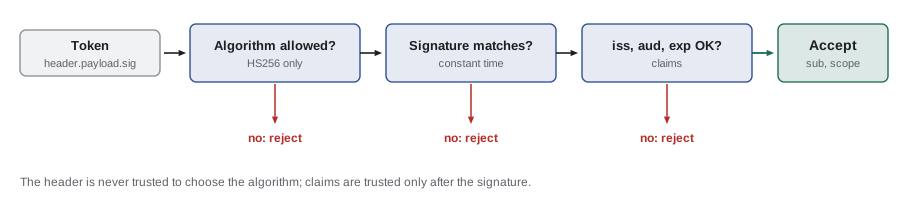
In production, the partner service uses a well-tested library rather than its own JWT code, but the library is configured the same way: one allowed algorithm, the expected issuer and audience, and a small allowance for clock differences between servers. The jose package is a common choice in Node; the listing shows its settings. Mira's hand-written verifier was for understanding, and it helps her read the library's options and know why each one is there.
import { jwtVerify } from 'jose';

const secret = Buffer.from(process.env.TOKEN_SECRET, 'base64'); // 32 random bytes

export async function verifyAccessToken(token) {
  const { payload } = await jwtVerify(token, secret, {
    algorithms: ['HS256'],
    issuer: 'https://partners.riverside-food-hub.example',
    audience: 'partner-api',
    clockTolerance: 30, // seconds of difference allowed between server clocks
  });
  return payload;
}
What this code does
jwtVerify checks the signature and the registered claims in one call, and throws an error if anything is wrong. The algorithms list is the defence against the none and confusion attacks, and the issuer and audience options make the claim checks impossible to forget. The secret comes from an environment variable, decoded from base64, and is never written in the code.
Node's node:crypto module can do the same job without any package, which the partner service uses in its tests. Running the listing with a secret in the environment shows a token being created, accepted, and then refused when it is tampered with or too old.
import { createHmac, timingSafeEqual } from 'node:crypto';

const SECRET = Buffer.from(process.env.TOKEN_SECRET, 'base64');
const b64 = (x) => Buffer.from(x).toString('base64url');

export function sign(claims) {
  const head = b64(JSON.stringify({ alg: 'HS256', typ: 'JWT' }));
  const body = b64(JSON.stringify(claims));
  const sig = createHmac('sha256', SECRET).update(`${head}.${body}`).digest('base64url');
  return `${head}.${body}.${sig}`;
}

export function verify(token, { audience, now = Date.now() / 1000 }) {
  const [head, body, sig] = token.split('.');
  if (!sig) throw new Error('malformed');
  if (JSON.parse(Buffer.from(head, 'base64url')).alg !== 'HS256') throw new Error('wrong algorithm');
  const want = createHmac('sha256', SECRET).update(`${head}.${body}`).digest();
  const got = Buffer.from(sig, 'base64url');
  if (got.length !== want.length || !timingSafeEqual(got, want)) throw new Error('bad signature');
  const c = JSON.parse(Buffer.from(body, 'base64url'));
  if (c.iss !== 'https://partners.riverside-food-hub.example') throw new Error('wrong issuer');
  if (c.aud !== audience) throw new Error('wrong audience');
  if (!(now < c.exp)) throw new Error('expired');
  return c;
}

const t = sign({ iss: 'https://partners.riverside-food-hub.example', sub: 'client:northside-cms',
  aud: 'partner-api', scope: 'orders:read orders:write', iat: 1844510400, exp: 1844511300 });
console.log(t.split('.').map((p) => p.length).join(' + ') + ' characters');
console.log(verify(t, { audience: 'partner-api', now: 1844510500 }).scope);
for (const [what, tok, now] of [['tampered', t.slice(0, -2) + 'AA', 1844510500], ['too late', t, 1844511301]]) {
  try { verify(tok, { audience: 'partner-api', now }); } catch (e) { console.log(what + ':', e.message); }
}
What this code does
sign builds the header and payload, encodes them with Buffer's base64url support and appends an HMAC-SHA-256 made with createHmac. verify refuses any algorithm other than HS256, recomputes the HMAC and compares it with timingSafeEqual, then checks the issuer, the audience and the expiry. The test at the bottom passes fixed times, so it shows a token accepted at one moment and refused one second after it expires.
$ TOKEN_SECRET=$(node -e "console.log(Buffer.alloc(32, 7).toString('base64'))") node jwt.mjs
36 + 228 + 43 characters
orders:read orders:write
tampered: bad signature
too late: expired
Access tokens and refresh tokens
Short-lived tokens limit the damage of a leak, but a program cannot sign in again every 15 minutes. The usual answer is a pair of tokens. The access token is short-lived, often a JWT that lasts 5 to 15 minutes, and is sent with every API request. The refresh token is long-lived, opaque and stored by the server, and is sent only to one endpoint, to get a new access token when the old one expires. The access token goes everywhere but dies quickly; the refresh token lives longer but travels rarely and can be revoked at once.
The current OAuth security guidance, RFC 9700 of January 2025, adds refresh token rotation: every time a refresh token is used, the server issues a new one and invalidates the old. If an old refresh token is ever presented again, someone has a copy that should not exist, so the server revokes the whole family of tokens descended from the original sign-in, logging out both the attacker and the real client, which then signs in again.
// Refresh token rotation with reuse detection.
const families = new Map(); // family id -> { current, revoked }
let n = 0;
const newToken = (family) => `${family}.r${++n}`;

function issue(family) {
  const token = newToken(family);
  families.set(family, { current: token, revoked: false });
  return token;
}

function refresh(token) {
  const family = token.split('.')[0];
  const f = families.get(family);
  if (!f || f.revoked) return 'refused: signed out';
  if (token !== f.current) {
    f.revoked = true;
    return 'refused: reuse detected, family revoked';
  }
  f.current = newToken(family);
  return `ok: new access token and refresh token ${f.current}`;
}

const first = issue('board-kitchen');
console.log('issued      ', first);
console.log('board       ', refresh(first));
console.log('stolen copy ', refresh(first));
console.log('board again ', refresh(families.get('board-kitchen').current));issued board-kitchen.r1 board ok: new access token and refresh token board-kitchen.r2 stolen copy refused: reuse detected, family revoked board again refused: signed out
What this code does
Each sign-in starts a family with one current refresh token, and every successful refresh replaces it, so a token can be used only once. When the copy of the first token is presented after it has already been used, the server cannot tell which caller is genuine, so it revokes the family. The board's next refresh fails too, and it has to be enrolled again, which is the price of making stolen tokens useless.
Where tokens are kept
Where a client keeps its tokens matters as much as how the server checks them. A program on a server, such as Northside's system, keeps its credentials in its own configuration, like any other secret. A browser page is harder. Anything stored in localStorage or sessionStorage can be read by any JavaScript running in the page, so a single cross-site scripting bug would let an attacker copy the tokens and use them from anywhere. For browser pages, the partner service therefore uses HttpOnly cookies for anything long-lived, as in lesson 3, and the kitchen board keeps its 15-minute access token only in memory, in a variable, so that it disappears when the page is closed.
| Client | Long-lived credential | Access credential |
|---|---|---|
| Partner page (browser) | Session cookie, HttpOnly | The same cookie |
| Northside's system (server) | Client secret in its configuration (lesson 5) | 15-minute JWT access token |
| Kitchen board (browser on a tablet) | Refresh token in an HttpOnly cookie limited to the token endpoint | 15-minute access token held in memory |
Worked problem
How long can a stolen token be used?
An attacker copies the kitchen board's access token from a debugging screenshot at 10:02. Access tokens last 15 minutes and this one was issued at 9:58. The attacker also copies the board's refresh token, which the board itself uses at 10:13. When does each stolen token stop working?
Show solution
- The access token was issued at 9:58 and lasts 15 minutes, so it expires at 10:13 whatever anyone does.
- The board uses its refresh token at 10:13, which rotates it; the copy the attacker holds is now an old token.
- If the attacker presents the copy after 10:13, the server detects reuse and revokes the whole family, including the board's new token.
- If the attacker uses the copy first, before 10:13, the board's own refresh then looks like reuse, and the family is revoked at that moment.
Answer: The stolen access token works for at most 11 minutes, until 10:13. The stolen refresh token gives at most one refresh before reuse is detected, and either way the family is revoked and Rosa re-enrols the board, which shows up in the logs as an incident to look into.
Common mistakes
MistakePutting the user's email and internal notes in the JWT payload.
InsteadThe payload is only encoded; anyone can read it. Put only what the receiving service needs.
MistakeLetting the token header choose the algorithm.
InsteadThe verifier fixes the algorithm itself and rejects none and anything else.
MistakeChecking only the signature.
InsteadAlso check exp, iss and aud.
MistakeKeeping tokens in localStorage.
InsteadAny script in the page can read localStorage. Use HttpOnly cookies or memory.
MistakeMaking access tokens last a week to avoid refreshing.
InsteadKeep access tokens short and use rotating refresh tokens.
Summary and key terms
- A bearer token is a credential that works for whoever holds it, sent in the Authorization header, only over HTTPS and never in a URL.
- Opaque tokens are random strings the server looks up and can revoke at once; self-contained tokens such as JWTs carry signed claims that can be checked without a lookup but are hard to revoke early.
- A JWT is a base64url header, payload and signature; the payload is readable by anyone, so it must hold nothing secret.
- Verifiers must fix the algorithm themselves, rejecting none and algorithm confusion, verify the signature in constant time and then check exp, iss and aud (RFC 8725).
- Short-lived access tokens are paired with long-lived refresh tokens that rotate on every use, and reuse of an old refresh token revokes the whole family (RFC 9700).
- Browser pages keep long-lived credentials in HttpOnly cookies and access tokens in memory, not in localStorage.
- Bearer token
- A credential that grants access to whoever presents it.
- Opaque token
- A random token with no meaning of its own, looked up by the server.
- JWT
- JSON Web Token: a signed, base64url-encoded header and payload of claims.
- Claim
- A statement in a token, such as its subject, audience or expiry time.
- HMAC
- A hash computed with a secret key, used as the signature in HS256 tokens.
- Algorithm confusion
- An attack that makes a verifier check a token with a different algorithm or key type than intended.
- Access token
- A short-lived token sent with each API request.
- Refresh token
- A long-lived token used only to obtain new access tokens; rotated on every use.
Practice problems
Work each problem on paper first, then reveal the answer to check.
Why must a JWT payload never contain a secret?
Show answer
It is only base64url-encoded, so anyone can decode it without a key.
What does the verifier do if a token's header says alg is none?
Show answer
It rejects the token, because it accepts only the algorithm it has chosen.
Name the three registered claims every verifier checks after the signature.
Show answer
exp, iss and aud.
What happens when an already-used refresh token is presented again?
Show answer
The server treats it as theft and revokes the whole family.
Where does the kitchen board keep its access token, and why?
Show answer
In memory, so no script can read it from storage and it disappears when the page closes.
Try it yourself
Check the claims
Complete checkClaims(claims, now) so that it returns the first problem it finds, or ok. Check in this order: iss must be https://partners.riverside-food-hub.example (wrong issuer), aud must be partner-api (wrong audience), and now must be before exp (expired).
If the token has an nbf claim, now must also be at or after it; otherwise return not yet valid. Do this check last.
function checkClaims(claims, now) {
  if (now > claims.exp) return 'expired';
  return 'ok';
}

const base = { iss: 'https://partners.riverside-food-hub.example', aud: 'partner-api', exp: 2000 };
console.log(checkClaims(base, 1500));
console.log(checkClaims({ ...base, aud: 'volunteer-api' }, 1500));
console.log(checkClaims(base, 2000));
console.log(checkClaims({ ...base, iss: 'https://evil.example' }, 2500));
console.log(checkClaims({ ...base, nbf: 1800 }, 1500));
Try it yourself
Encode with base64url
Complete toBase64url(text) so that it returns the base64url encoding of a string: standard base64 from btoa, with + replaced by -, / replaced by _ and any = padding removed.
Then complete fromBase64url(s), which reverses it. atob accepts base64 without padding, so you only need to swap the two characters back.
function toBase64url(text) {
  return btoa(text);
}
function fromBase64url(s) {
  return atob(s);
}

for (const t of ['{"alg":"HS256"}', 'subjects?>>', 'a']) {
  const e = toBase64url(t);
  console.log(e, fromBase64url(e) === t);
}
Lesson quiz · 5 questions
Score 60% or more to complete this lesson.
Create a free account to save your progress, take quizzes and earn a certificate.