
JS-240 · Lesson 2 of 12 · 26 min
Versioning and documentation
▶ Video coming soon A video version of this lesson is on the way.
On Thursday, June 8, 2028, Theo joins the session with a printout of an email from Northside Family Shelter. Northside's case management system has been sending orders to the partner API since the first week of the pilot, written by a contractor who has since moved on. The shelter's coordinator wants to know whether the changes planned for the summer will break it. Theo's answer is that they must not, and the session is about how to make sure.
This lesson covers how an API changes without breaking the clients that depend on it: which changes are safe and which break things, how versions are named and chosen, how an endpoint is retired with the Deprecation and Sunset headers, how ETags let clients avoid downloading what they already have, and how the API is described in an OpenAPI document and a changelog that people can actually use. By the end, Mira has a rule for every change on the summer's list.
Who depends on the partner API
Before deciding what is safe to change, the studio needs to know who would notice. The partner API now has four kinds of client, and each reacts to change differently.
| Client | Built by | How it would notice a breaking change |
|---|---|---|
| Northside's case management system | A contractor, no longer available | Orders stop arriving; nobody can fix the client quickly |
| The partner page | Mira | Updated together with the server |
| Rosa's kitchen board (from lesson 12) | Mira | Updated together with the server |
| Scripts and curl commands in the agencies | Agency staff | A command that used to work starts failing |
The partner page and the board can change on the same day as the server, because Mira deploys all three. Northside's system cannot. It is the client that decides the rules: any change that would make its next request fail, or make it misread a response, is a breaking change, and breaking changes need a new version and a long notice period.
Breaking and non-breaking changes
Most changes to a JSON API fall into one of two groups. Adding something that clients can ignore is safe. Removing, renaming or changing the meaning of something that clients use is not. The rule depends on clients ignoring fields they do not know, a habit called being a tolerant reader, and the partner API's documentation now asks for it in so many words.
| Change | Breaking? | Why |
|---|---|---|
| Add a new field to a response | No | Tolerant readers ignore it |
| Add a new optional field to a request | No | Old clients do not send it, and the default applies |
| Add a new endpoint | No | Old clients never call it |
| Remove or rename a response field | Yes | Clients that read it get undefined |
| Change a field type, such as number to string | Yes | Comparisons and arithmetic change meaning |
| Make an optional request field required | Yes | Old clients' requests start failing with 422 |
| Add a value to an enumeration, such as a new status | Often | Clients with a switch statement may not handle it |
| Tighten validation, such as a shorter maximum note | Yes | Requests that used to pass now fail |
The enumeration row is the subtle one. If the kitchen board added a status such as packed, a tolerant client would show it as unknown and carry on, but a client written as a switch over received, withdrawn and delivered might drop the order or crash. Theo's rule for the partner API is that new enumeration values count as breaking unless the documentation listed the enumeration as open from the start. The order status list was documented as closed, so the summer's work keeps the three statuses and records loading on the board separately.
Mira writes a checker that compares the documented fields of a response before and after a change and sorts the differences.
// Compare two versions of a response's documented fields: name -> type.
function compare(before, after) {
  const report = [];
  for (const [name, type] of Object.entries(before)) {
    if (!(name in after)) report.push(`BREAKING  removed ${name}`);
    else if (after[name] !== type) report.push(`BREAKING  ${name} changed from ${type} to ${after[name]}`);
  }
  for (const name of Object.keys(after)) {
    if (!(name in before)) report.push(`safe      added ${name}`);
  }
  return report;
}

const orderV1 = { id: 'number', deliveryDate: 'string', status: 'string', lines: 'array', note: 'string' };
const draft = { id: 'number', deliveryDate: 'string', status: 'string', lines: 'array', notes: 'string',
  updatedBy: 'string', attachments: 'array' };

compare(orderV1, draft).forEach((line) => console.log(line));BREAKING removed note safe added notes safe added updatedBy safe added attachments
What this code does
The first loop walks the old fields and reports any that disappeared or changed type, which are the changes that break existing clients. The second loop reports fields that are new, which tolerant readers can ignore. Running it on Mira's draft shows that renaming note to notes would break every client that reads the note, even though it looks like a small tidy-up.
The draft's rename of note to notes is exactly the kind of change that seems harmless in a code review and breaks a client in production. Mira keeps the name note, and adds updatedBy and attachments, which are safe.
Naming versions
When a breaking change cannot be avoided, the API gets a new version and the old one keeps running for a while. There are three common ways for a client to say which version it wants.
| Where the version goes | Example | Strengths and weaknesses |
|---|---|---|
| In the path | /api/partners/v2/orders | Easy to see, test and route; the partner API uses this |
| In a request header | API-Version: 2028-06-01 | Clean URLs; the version is easy to forget in a curl command |
| In the media type | Accept: application/vnd.riverside.v2+json | Precise per resource; awkward for most clients |
Some large APIs use dates as versions: each client is pinned to the version that was current when it was built, and the server translates older requests and responses step by step. That is powerful, but it needs a team to maintain the translations. For a service with three agencies, Theo prefers the simplest scheme that works: a major version in the path, changed only for breaking changes, and as few versions running at once as possible. The partner API has been v1 since April and will stay v1 through the summer, because every planned change is additive.
Whatever the scheme, the server must answer clearly when a client asks for something it does not have. The example picks a version from a request and refuses unknown ones with a problem response.
const SUPPORTED = { v1: { since: '2028-04-24' } };

function pickVersion(path) {
  const m = path.match(/^\/api\/partners\/(v\d+)\//);
  if (!m) return { status: 404, title: 'Not found' };
  if (!SUPPORTED[m[1]]) {
    return { status: 404, title: `Unknown API version ${m[1]}`, supported: Object.keys(SUPPORTED) };
  }
  return { status: 200, version: m[1] };
}

for (const p of ['/api/partners/v1/orders', '/api/partners/v2/orders', '/api/partners/orders']) {
  console.log(p.padEnd(26), JSON.stringify(pickVersion(p)));
}/api/partners/v1/orders {"status":200,"version":"v1"}
/api/partners/v2/orders {"status":404,"title":"Unknown API version v2","supported":["v1"]}
/api/partners/orders {"status":404,"title":"Not found"}What this code does
A regular expression takes the version segment from the path, and a table of supported versions decides whether it is known. An unknown version gets a 404 that names the versions the server does support, so a developer who mistyped v2 learns what to use instead. A path with no version at all is simply not found.
Retiring an endpoint: Deprecation and Sunset
Even without a new version, endpoints are sometimes retired. The partner API has one: GET /v1/kitchen/days/:date/sheet, which returns the printable day sheet. When the order board goes live, Rosa will not need it, but nobody knows for certain that no agency script calls it. The polite way to retire it is to announce the plan in the API itself, using two standard response headers.
- Deprecation (RFC 9745, published in 2025) says that a resource is deprecated, and since when. Its value is a structured date written as an at sign followed by the number of seconds since 1 January 1970 in UTC.
- Sunset (RFC 8594, 2019) gives the date after which the resource may stop responding, as an HTTP date.
- A Link header with the relation deprecation or sunset points to a page explaining the change and what to use instead.
Clients that read these headers can warn their developers, and the studio's own access log can show who is still calling a deprecated endpoint, which is the inventory knowledge that OWASP's API9 asks for.
function retirementHeaders(deprecatedOn, sunsetOn, infoUrl) {
  const seconds = Math.floor(Date.parse(deprecatedOn + 'T00:00:00Z') / 1000);
  return {
    'Deprecation': `@${seconds}`,
    'Sunset': new Date(sunsetOn + 'T00:00:00Z').toUTCString(),
    'Link': `<${infoUrl}>; rel="deprecation"; type="text/html"`,
  };
}

const h = retirementHeaders('2028-08-01', '2028-11-30',
  'https://partners.riverside-food-hub.example/docs/changes#day-sheet');
for (const [name, value] of Object.entries(h)) console.log(`${name}: ${value}`);Deprecation: @1848700800 Sunset: Thu, 30 Nov 2028 00:00:00 GMT Link: <https://partners.riverside-food-hub.example/docs/changes#day-sheet>; rel="deprecation"; type="text/html"
What this code does
Date.parse turns the deprecation date into milliseconds since 1970 in UTC, and dividing by 1000 gives the seconds that the Deprecation header expects after the at sign. toUTCString produces the HTTP date format that Sunset uses. The Link header points to the changelog entry that explains what replaces the day sheet.
The plan for the day sheet is in the changelog: deprecated from August 1, 2028, with a sunset on November 30, 2028, after the access log has shown at least eight weeks with no calls. If someone is still calling it, Theo will phone them before switching it off. A header is a notice, not a substitute for talking to people.
ETags and conditional requests
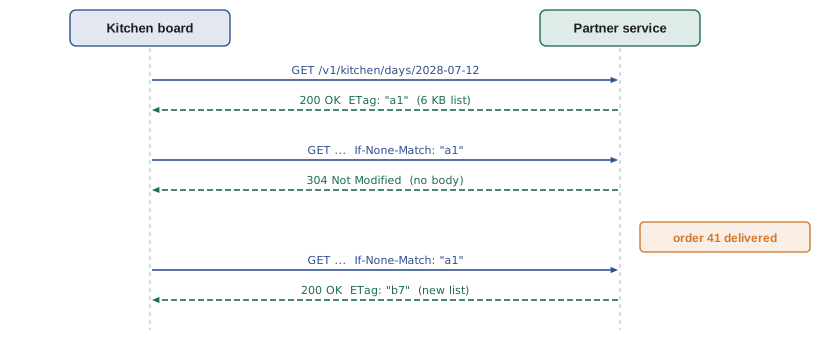
In JS-230, ETags protected updates: a client sent If-Match with the version it had read, and the server refused with 412 if the order had changed. The same header has a second use that matters for the summer's work. A client that already has a copy of a resource can send its ETag in an If-None-Match header, and if nothing has changed, the server answers 304 Not Modified with no body. Before the real-time stream in lesson 9, the board's first prototype polls the day's orders every 30 seconds, and with conditional requests almost every poll costs a few bytes instead of the whole list.
An ETag can be any string that changes when the representation changes. A version number works for a single order. For a list that combines several rows, a hash of the response body is simpler. The worker's crypto.subtle provides SHA-256, the same algorithm Node's node:crypto uses.
async function etagOf(body) {
  const bytes = new TextEncoder().encode(JSON.stringify(body));
  const digest = new Uint8Array(await crypto.subtle.digest('SHA-256', bytes));
  return '"' + [...digest.slice(0, 8)].map((b) => b.toString(16).padStart(2, '0')).join('') + '"';
}

async function getDay(orders, ifNoneMatch) {
  const tag = await etagOf(orders);
  if (ifNoneMatch === tag) return { status: 304, etag: tag };
  return { status: 200, etag: tag, body: orders };
}

let day = [{ id: 31, agency: 'northside', trays: 6, status: 'received' }];
const first = await getDay(day, undefined);
console.log(first.status, first.etag);
const second = await getDay(day, first.etag);
console.log(second.status, 'no body:', second.body === undefined);
day = [{ ...day[0], status: 'delivered' }];
const third = await getDay(day, first.etag);
console.log(third.status, third.etag);200 "e126071c37467ce5" 304 no body: true 200 "4de474618c03761a"
What this code does
The ETag is the first 8 bytes of a SHA-256 hash of the JSON body, written as hexadecimal inside double quotes as the HTTP standard requires. When the client sends back the tag it already has and the data has not changed, the server answers 304 without a body. Once the order's status changes, the hash changes too, so the next request gets the full list and a new tag.
Documentation people use
The partner API is described in an OpenAPI document, a YAML file that lists every path, method, parameter, request body, response and security requirement. OpenAPI 3.1 has been the studio's version since JS-230; version 3.2 of the specification, published in September 2025, adds features such as streaming responses that the studio may adopt later. The document is the contract: tests check responses against it, and the published reference page is generated from it.
paths:
  /me/notifications:
    get:
      summary: List the signed-in staff member's notifications
      security:
        - session: []
        - bearer: []
      parameters:
        - name: after
          in: query
          schema: { type: string }
          description: Cursor from the previous page
      responses:
        '200':
          description: A page of notifications, newest first
        '401':
          $ref: '#/components/responses/Unauthenticated'
components:
  securitySchemes:
    session: { type: apiKey, in: cookie, name: __Host-session }
    bearer: { type: http, scheme: bearer }
What this code does
The path entry documents one endpoint from lesson 9 with its summary, its query parameter and its responses. The security list says that either a session cookie or a bearer token is accepted, and components describes both schemes once so every path can refer to them. The 401 response refers to a shared definition, so every endpoint documents the same error in the same words.
A reference generated from OpenAPI answers what each endpoint does. It does not answer how to get started, how to sign in, or what changed last month. The studio adds three short pages written by hand: a getting-started guide with one complete example from first request to placed order, a page for each problem type at the URL in its type field, and a changelog with one dated entry for every change, marked as added, changed, deprecated or removed. Northside's coordinator now gets an email whenever the changelog has an entry, which is the answer to the email that started the session.
Worked problem
Planning the summer's changes
The summer adds these changes to v1: a new field updatedBy on orders; a new optional field attachments on orders; a new endpoint GET /v1/me/notifications; and a stricter limit on note, from 500 characters to 300, because the kitchen board cannot show long notes. Which of them can go into v1, and what should happen to the note limit?
Show solution
- updatedBy is a new response field: safe for tolerant readers.
- attachments is a new optional field: old clients do not send it, so it is safe.
- GET /v1/me/notifications is a new endpoint: old clients never call it.
- Lowering the note limit from 500 to 300 would make some requests that pass today fail with 422: it is breaking.
- Instead of tightening validation, the board can show the first 300 characters with a link to the full note.
Answer: The first three go into v1 and are listed in the changelog as added. The note limit stays at 500 characters; the board truncates long notes for display instead, so no client's request starts failing.
Common mistakes
MistakeRenaming a field is fine if the new name is clearer.
InsteadEvery client that reads the old name breaks. Keep the old name, or add the new one alongside it and deprecate the old.
MistakeAdding a new status value is always safe.
InsteadClients that switch over the known values may mishandle it. Treat a closed enumeration as part of the contract.
MistakeA Sunset header is enough notice to switch an endpoint off.
InsteadCheck the access log and talk to the clients who still call it.
MistakeA 304 response should include the body again, just in case.
Instead304 means the client's copy is current; it has no body.
Summary and key terms
- A breaking change is any change that makes an existing client's request fail or its reading of a response wrong: removing, renaming or retyping fields, making optional input required, tightening validation, and often adding values to a closed enumeration.
- Adding response fields, optional request fields and endpoints is safe for tolerant readers.
- The partner API keeps a major version in the path and changes it only for breaking changes; unknown versions get a 404 that lists the supported ones.
- Deprecation (RFC 9745) and Sunset (RFC 8594) headers announce the retirement of an endpoint, with a Link to the explanation.
- An ETag sent back in If-None-Match lets the server answer 304 Not Modified with no body.
- The OpenAPI document is the contract, and hand-written guides, problem type pages and a dated changelog make it usable.
- Breaking change
- A change after which an existing client fails or misreads the API.
- Tolerant reader
- A client that ignores fields it does not recognize.
- Deprecation header
- A response header (RFC 9745) saying that a resource is deprecated and since when.
- Sunset header
- A response header (RFC 8594) giving the date after which a resource may stop responding.
- If-None-Match
- A request header carrying the ETag the client already has; the server answers 304 if it still matches.
- 304 Not Modified
- The response meaning the client's copy is current; it has no body.
- OpenAPI
- A standard format for describing an HTTP API: paths, parameters, bodies, responses and security.
- Changelog
- A dated list of every change to the API, marked as added, changed, deprecated or removed.
Practice problems
Work each problem on paper first, then reveal the answer to check.
Why is renaming note to notes a breaking change?
Show answer
Clients that read note would get undefined.
Which three ways of naming a version does the lesson describe?
Show answer
In the path, in a request header and in the media type.
What does the Deprecation header's value @1848700800 mean?
Show answer
The resource has been deprecated since that many seconds after 1 January 1970 UTC, which is midnight UTC on August 1, 2028.
When does a server answer 304 Not Modified?
Show answer
When the ETag in If-None-Match matches the current representation.
What three hand-written pages does the studio add to the generated reference?
Show answer
A getting-started guide, a page per problem type and a changelog.
Try it yourself
Classify a change
Complete classify(change) so that it returns breaking or safe. A change is an object with a kind: add-response-field, add-optional-input, add-endpoint, remove-field, rename-field, change-type or require-input.
The first three kinds are safe and the rest are breaking. Any kind the function does not know should return unknown: review by hand.
function classify(change) {
  return 'safe';
}

for (const kind of ['add-endpoint', 'rename-field', 'require-input', 'add-response-field', 'make-faster']) {
  console.log(kind.padEnd(19), classify({ kind }));
}
Try it yourself
Answer a conditional GET
Complete respond(currentTag, ifNoneMatch) so that it returns 304 Not Modified when the client's tag matches the current tag, and 200 OK, ETag: TAG otherwise.
The client may send several tags separated by commas, such as "a1", "b7", or the single value *, which matches any current version. Trim spaces around each tag before comparing.
function respond(currentTag, ifNoneMatch) {
  if (ifNoneMatch === currentTag) return '304 Not Modified';
  return `200 OK, ETag: ${currentTag}`;
}

console.log(respond('"b7"', undefined));
console.log(respond('"b7"', '"b7"'));
console.log(respond('"b7"', '"a1", "b7"'));
console.log(respond('"b7"', '*'));
console.log(respond('"c3"', '"a1", "b7"'));
Lesson quiz · 5 questions
Score 60% or more to complete this lesson.
Create a free account to save your progress, take quizzes and earn a certificate.