
JS-230 · Lesson 9 of 12 · 30 min
Configuration and environment variables
▶ Video coming soon A video version of this lesson is on the way.
On Tuesday, April 4, Theo reviews the reminders script and finds one line he will not accept: the key for his API, typed into the code as a string. "That file is in Git," he says. "Everyone who can read the repository can now read every volunteer's shifts through my API, and the key will still be in the history after you delete the line." He revokes the key on the spot and issues a new one. Gareth turns it into the day's lesson. "Code is the same everywhere. Configuration is what changes between your laptop, the test runner and the server, and secrets are the part of it that must never be in the code."
This lesson separates configuration from code. It explains environment variables and how Node reads them through process.env, why every value arrives as a string, and how to turn them into a checked, typed configuration object when the service starts, refusing to start if anything is wrong. It shows Node's built-in support for .env files, how the studio keeps secrets out of the repository, and how Theo will provide them on the server. The reminders script gets its key and the API's address from the environment, and the partner service gets a config module that every other module imports.
What counts as configuration
Configuration is everything that is likely to differ between the places the code runs, while the code itself stays the same. For the partner service that means the port it listens on, the address and password of its database, how much detail to log, the kitchen's time zone, the default capacity per day and the browser origins allowed to call it. A useful test, from the widely quoted Twelve-Factor App guidelines, is to ask whether the code could be made public at any moment without revealing a single credential. If not, something that is configuration is hiding in the code.
| Value | Laptop | Tests | Server | Secret? |
|---|---|---|---|---|
| PORT | 3000 | any free port | 3100 | No |
| DATABASE_URL | local PostgreSQL | test database | Theo's managed PostgreSQL | Yes |
| LOG_LEVEL | debug | warn | info | No |
| KITCHEN_TIME_ZONE | America/Toronto | America/Toronto | America/Toronto | No |
| CORS_ORIGINS | http://localhost:5173 | (none) | https://westview-youth.example | No |
| HUB_API_KEY (reminders) | a development key | a fake key | a production key | Yes |
Not everything that varies is configuration in this sense. The menu items and the cut-off rule are part of the kitchen's business, are tested with the code and change through a reviewed code change, so they stay in the code. The default capacity is configuration because Rosa may want it changed without a new release; the capacity of a particular day is data in the delivery_days table.
Environment variables
Every process on Linux, macOS and Windows has a set of environment variables: names with text values that it inherits from the program that started it, such as a terminal or a service manager. They are the standard way to give a program its configuration, because every language and every hosting system supports them and they live outside the code. In Node they appear as properties of process.env.
$ node -e "console.log(process.env.LOG_LEVEL, typeof process.env.PORT, process.env.MISSING)"
undefined undefined undefined
$ LOG_LEVEL=debug PORT=3100 node -e "console.log(process.env.LOG_LEVEL, typeof process.env.PORT, process.env.PORT + 1)"
debug string 31001
What this code does
Without any variables set, LOG_LEVEL and PORT are undefined, as is any name that was never set. Writing NAME=value before a command sets the variable for that one command, which is handy for quick tests. Every value is a string: PORT is '3100', so adding 1 joins the strings and gives 31001 instead of 3101.
That last line is the most important fact about environment variables: their values are always strings. A missing variable is undefined, an empty one is '', the number 3100 is '3100' and the word false is 'false', which is truthy. Code that reads process.env.PORT directly in many places is full of small traps, so the service reads the environment in exactly one place, checks it and converts it.
// What process.env really gives you: strings or undefined.
const env = { PORT: '3100', DAY_CAPACITY: '40', CHECK_IDEMPOTENCY: 'false', LOG_LEVEL: '' };

console.log(env.PORT + 1);                      // joins strings
console.log(Number(env.PORT) + 1);              // converts first
if (env.CHECK_IDEMPOTENCY) console.log("'false' is a non-empty string, so it is truthy");
console.log(env.LOG_LEVEL || 'info');           // '' falls back with ||
console.log(env.LOG_LEVEL ?? 'info');           // but ?? keeps the empty string
console.log(Number(env.MISSING), Number('')); // NaN and 0: both surprising31001 3101 'false' is a non-empty string, so it is truthy info NaN 0
What this code does
PORT + 1 joins two strings, so the value must be converted with Number first. The string 'false' is truthy because it is not empty, so a flag must be compared with the text it should contain. The empty string falls back with || but not with ??, and Number turns undefined into NaN but the empty string into 0, so a missing value and an empty value behave differently unless the code checks for both.
Check the configuration at start-up
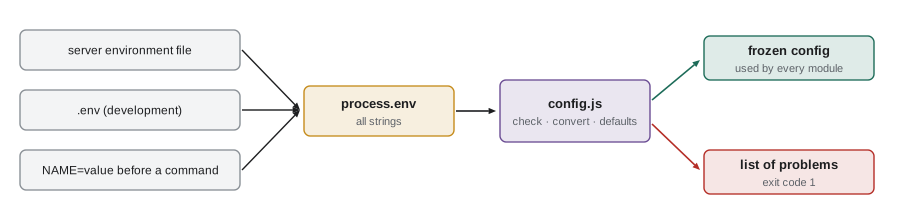
The safest moment to find a configuration mistake is when the service starts, not at two in the morning when the first request needs the missing value. The service's config module reads process.env once, checks every value against a schema, converts the strings to the right types, fills in defaults for optional values, and refuses to start, with a clear list of problems, if anything is wrong. This pattern is called failing fast. Every other module imports the finished, frozen config object and never touches process.env.
// src/config.js
import * as z from 'zod';

const Env = z.object({
  NODE_ENV: z.enum(['development', 'test', 'production']).default('development'),
  PORT: z.coerce.number().int().min(1).max(65535).default(3000),
  DATABASE_URL: z.url({ protocol: /^postgres(ql)?$/ }),
  LOG_LEVEL: z.enum(['debug', 'info', 'warn', 'error']).default('info'),
  KITCHEN_TIME_ZONE: z.string().default('America/Toronto'),
  DAY_CAPACITY: z.coerce.number().int().min(0).max(200).default(40),
  CORS_ORIGINS: z.string().default('').transform((s) => s.split(',').map((o) => o.trim()).filter(Boolean)),
});

const result = Env.safeParse(process.env);
if (!result.success) {
  console.error('Invalid configuration:');
  for (const issue of result.error.issues) console.error(`  ${issue.path.join('.')}: ${issue.message}`);
  process.exit(1); // refuse to start with a broken configuration
}
export const config = Object.freeze(result.data);
What this code does
The schema lists every variable the service uses, with its type and either a default or no default, which makes it required. z.coerce.number() turns '3100' into 3100 and refuses text that is not a number, and the transform turns a comma-separated list of origins into an array. If anything fails, the module prints every problem and exits with code 1 before the server starts listening; otherwise it exports a frozen object so no code can change the configuration while the service runs.
Here is the same idea without a library, so the steps can be seen and run here. It collects every problem rather than stopping at the first, like the order validator in Lesson 6, because a person fixing a broken server wants the whole list at once.
function loadConfig(env) {
  const errors = [];
  const config = {};
  const port = Number(env.PORT ?? '3000');
  if (!Number.isInteger(port) || port < 1 || port > 65535) errors.push(`PORT must be a whole number from 1 to 65535, got "${env.PORT}"`);
  config.port = port;
  if (!env.DATABASE_URL) errors.push('DATABASE_URL is required');
  else if (!/^postgres(ql)?:\/\//.test(env.DATABASE_URL)) errors.push('DATABASE_URL must start with postgres://');
  config.databaseUrl = env.DATABASE_URL;
  const level = env.LOG_LEVEL || 'info';
  if (!['debug', 'info', 'warn', 'error'].includes(level)) errors.push(`LOG_LEVEL must be debug, info, warn or error, got "${level}"`);
  config.logLevel = level;
  config.corsOrigins = (env.CORS_ORIGINS ?? '').split(',').map((s) => s.trim()).filter(Boolean);
  return errors.length ? { ok: false, errors } : { ok: true, config: Object.freeze(config) };
}

console.log(loadConfig({ DATABASE_URL: 'postgres://partner_app:pw@db.example:5432/hub', CORS_ORIGINS: 'https://westview-youth.example, ' }));
console.log(loadConfig({ PORT: '31OO', DATABASE_URL: 'mysql://x', LOG_LEVEL: 'verbose' }));
console.log(loadConfig({}));{ ok: true, config: { port: 3000, databaseUrl: "postgres://partner_app:pw@db.example:5432/hub", logLevel: "info", corsOrigins: [ "https://westview-youth.example" ] } }
{ ok: false, errors: [ "PORT must be a whole number from 1 to 65535, got \"31OO\"", "DATABASE_URL must start with postgres://", "LOG_LEVEL must be debug, info, warn or error, got \"verbose\"" ] }
{ ok: false, errors: [ "DATABASE_URL is required" ] }What this code does
loadConfig checks each value, converts it and records a clear message for each problem, naming the variable and showing what it received. The second call shows why that matters: a port typed with the letter O instead of zeros is reported as exactly that. With all values valid it returns a frozen object, and with any problem it returns the full list, which the service prints before exiting.
.env files for development
Typing every variable before every command is tedious, so in development the values usually live in a file called .env in the project folder, one NAME=value per line. Node has read these files itself since version 20.6: node --env-file=.env src/server.js loads the file into process.env before the program starts. Variables already set in the environment win over the file, so a single value can still be changed for one run. --env-file-if-exists does the same but carries on if the file is missing, and a program can also call process.loadEnvFile() itself.
# .env for local development (never committed)
PORT=3000
DATABASE_URL=postgres://partner_app:dev-only-password@localhost:5432/hub_dev
LOG_LEVEL=debug
KITCHEN_TIME_ZONE=America/Toronto
CORS_ORIGINS=http://localhost:5173
What this code does
Each line sets one variable, and lines starting with # are comments. The development database password is a throwaway value that works only on Mira's laptop, but the file is still never committed, because real secrets end up in such files sooner or later. The npm run dev script from Lesson 2 loads this file with --env-file=.env and restarts the server when code changes with --watch.
Two files keep the team in step without sharing secrets. .env holds real values and is listed in .gitignore, so Git never stores it. .env.example has the same names with empty or harmless values, is committed, and shows a new developer which variables to set. When Mira adds a variable to the config schema, she adds it to .env.example in the same commit.
The parsing rules of .env files are simple but have a few traps: spaces around the equals sign, quotes around values, # characters inside values and lines with no equals sign. The example parses a file the way Node does for the common cases.
function parseEnv(text) {
  const out = {};
  for (const raw of text.split('\n')) {
    const line = raw.trim();
    if (!line || line.startsWith('#')) continue;
    const eq = line.indexOf('=');
    if (eq === -1) continue;
    const name = line.slice(0, eq).trim();
    let value = line.slice(eq + 1).trim();
    const q = value[0];
    if ((q === '"' || q === "'") && value.endsWith(q) && value.length > 1) {
      value = value.slice(1, -1);
      if (q === '"') value = value.replaceAll('\\n', '\n');
    } else {
      const hash = value.indexOf(' #');
      if (hash !== -1) value = value.slice(0, hash).trim();
    }
    out[name] = value;
  }
  return out;
}

const text = `# partner service
PORT = 3000
LOG_LEVEL=debug   # more detail locally
GREETING="Hello\\nkitchen"
NOTE='keep # this'
BROKEN LINE
`;
console.log(parseEnv(text));{ PORT: "3000", LOG_LEVEL: "debug", GREETING: "Hello\nkitchen", NOTE: "keep # this" }What this code does
parseEnv skips blank lines, comments and lines with no equals sign, and trims spaces around names and values. A value in quotes keeps everything inside, including a # character, and double quotes turn the two characters backslash and n into a real new line. An unquoted value ends at a space followed by #, so inline comments work.
Secrets
A secret is any value that gives access: database passwords, API keys, signing keys for tokens. The studio's rules for secrets are strict, because a leaked secret is often invisible until it is misused. Secrets are never written in code, tests, documentation or commit messages; they never appear in logs or error messages (Lesson 11); each environment has its own, so a development key cannot reach production data; and every secret can be rotated, replaced with a new one, without changing code.
Theo's revoked key shows why the last rule matters. Removing a secret from the latest version of a file is not enough: Git keeps every earlier version, and anyone with a copy of the repository has the history. The only real fix for a committed secret is to revoke it and issue a new one, as Theo did. GitHub's secret scanning, which the studio has turned on, warns when a commit contains something that looks like a key.
On the server, Theo provides the environment through the service manager. The partner service runs as a systemd service, and its unit file points to an environment file owned by the service's own user and readable by nobody else. Theo's managed database and the Food Hub's mail provider both let him create several keys and revoke them one at a time, so rotating a secret means creating a new one, updating the environment file, restarting the service and revoking the old one.
# /etc/systemd/system/partner-orders.service (extract)
[Service]
User=partner-orders
WorkingDirectory=/srv/partner-orders
EnvironmentFile=/etc/partner-orders/env
ExecStart=/usr/bin/node src/server.js
Restart=on-failure

# permissions on the environment file
# -rw------- 1 partner-orders partner-orders  312 Apr  4 16:40 /etc/partner-orders/env
What this code does
The unit runs the service as its own user, partner-orders, from its install folder, and loads its variables from an environment file outside the code. Only that user can read the file, so other programs on the server cannot see the database password. Restart=on-failure starts the service again if it crashes, which is why the error handling in Lesson 6 lets a broken process exit.
NODE_ENV deserves a note. Many packages, including Express, check whether NODE_ENV is production and, if so, turn off slow development features such as detailed error pages. The service sets it to production on the server, but it does not use NODE_ENV for its own decisions, such as which database to use: those come from their own variables, so a test that sets NODE_ENV=production by mistake cannot reach the production database.
The reminders script, configured
The reminders script now reads the address of Theo's API and its key from the environment and fetches tomorrow's sign-ups over HTTP, with a 10-second timeout. On the server, Theo's scheduler runs it with the production values; on Mira's laptop and in this example it talks to a small stand-in API that accepts only a test key.
import { writeFile, mkdir, rename } from 'node:fs/promises';
import path from 'node:path';

const { HUB_API_URL, HUB_API_KEY } = process.env;
if (!HUB_API_URL || !HUB_API_KEY) {
  console.error('HUB_API_URL and HUB_API_KEY must be set');
  process.exit(1);
}

const date = process.argv[2] ?? '2028-03-09';
const res = await fetch(`${HUB_API_URL}/signups?date=${date}`, {
  headers: { Authorization: `Bearer ${HUB_API_KEY}`, Accept: 'application/json' },
  signal: AbortSignal.timeout(10_000),
});
if (!res.ok) {
  console.error(`hub API answered ${res.status}`);
  process.exit(1);
}
const { items } = await res.json();

const messages = items.map((s) => ({
  to: s.email,
  subject: `Your ${s.area} shift tomorrow`,
  body: `Hi ${s.name}, see you tomorrow at ${s.start} in ${s.area}.`,
}));
const outbox = path.join(import.meta.dirname, 'outbox');
await mkdir(outbox, { recursive: true });
const file = path.join(outbox, `reminders-${date}.json`);
await writeFile(file + '.tmp', JSON.stringify(messages, null, 2) + '\n');
await rename(file + '.tmp', file);
console.log(`wrote ${messages.length} reminders for ${date}`);
What this code does
The script checks that both variables are set before doing anything, and stops with a clear message and exit code 1 if not. It fetches the sign-ups with the key in the Authorization header and AbortSignal.timeout, so a hanging API cannot keep the script running all night, and treats any status that is not ok as a failure. The rest is the safe write from Lesson 2.
$ node remind.mjs 2028-03-09; echo "exit code $?"
HUB_API_URL and HUB_API_KEY must be set
exit code 1
$ node --env-file=reminder.env remind.mjs 2028-03-09; echo "exit code $?"
wrote 2 reminders for 2028-03-09
exit code 0
$ HUB_API_KEY=wrong node --env-file=reminder.env remind.mjs 2028-03-09; echo "exit code $?"
hub API answered 401
exit code 1
The three runs show the three cases the scheduler must tell apart: no configuration, a working one, and a wrong key that the API refuses. In the third run the variable set on the command line wins over the file, which is how Theo will test a new key before putting it in the environment file. Each failure gives exit code 1 and a message that says what to fix, without printing the key.
Worked problem
Will the service start?
The server's environment file contains PORT=3100, DATABASE_URL=postgresql://partner_app:...@db.internal:5432/hub, LOG_LEVEL=Info, DAY_CAPACITY=40 and CORS_ORIGINS=https://westview-youth.example,. Using the config schema, which values pass, what do the others become or why do they fail, and does the service start?
Show solution
- PORT: '3100' is coerced to 3100, within 1 to 65535: passes.
- DATABASE_URL: a postgresql URL: passes.
- LOG_LEVEL: 'Info' is not one of debug, info, warn, error, because the enum is case-sensitive: fails.
- DAY_CAPACITY: '40' becomes 40: passes. KITCHEN_TIME_ZONE is missing, so the default is used.
- CORS_ORIGINS: split on commas and empty entries removed: ['https://westview-youth.example'], passes.
Answer: The service refuses to start and prints one problem, LOG_LEVEL. Theo fixes the capital letter and it starts; without the check, it would have started and silently logged at the wrong level.
Common mistakes
MistakeA secret in the code is fine if the repository is private.
InsteadEveryone with access to the repository, and its whole history, can read it. Secrets live in the environment.
MistakeDeleting a committed secret in the next commit removes it.
InsteadGit keeps the history. Revoke the secret and issue a new one.
Mistakeprocess.env.PORT is a number.
InsteadEvery environment value is a string or undefined. Convert and check it once, at start-up.
MistakeIf a setting is missing, the service should start anyway and fail later.
InsteadFail fast: check the whole configuration at start-up and refuse to start with a clear list of problems.
Summary and key terms
- Configuration is whatever differs between the places code runs, such as ports, database addresses, log levels and allowed origins, while the code stays the same.
- Programs get it from environment variables, which Node exposes in process.env and which are always strings or undefined.
- The service reads the environment in one config module, checks and converts every value against a schema, applies defaults and refuses to start with a full list of problems if anything is wrong; every other module imports the frozen result.
- In development, values live in a .env file loaded with node --env-file and never committed, alongside a committed .env.example.
- Secrets never appear in code, logs or history; each environment has its own, and they can be rotated.
- On the server, a systemd environment file readable only by the service's user provides them.
- NODE_ENV tunes packages but does not choose resources such as databases.
- Configuration
- Values that differ between environments while the code stays the same.
- Environment variable
- A named text value that a process inherits from the program that started it.
- process.env
- The object in Node that holds the environment variables as strings.
- Fail fast
- Checking configuration at start-up and refusing to run if it is wrong.
- .env file
- A file of NAME=value lines that a development setup loads into the environment.
- --env-file
- A Node option that loads a .env file into process.env before the program starts.
- Secret
- A value that gives access, such as a password or API key.
- Rotation
- Replacing a secret with a new one and revoking the old one.
- NODE_ENV
- A variable many packages read to choose development or production behaviour.
Practice problems
Work each problem on paper first, then reveal the answer to check.
Why is process.env.PORT + 1 a bug?
Show answer
PORT is a string, so + joins it to 1 instead of adding.
What does the config module do if DATABASE_URL is missing?
Show answer
It prints the problem and exits with code 1 before the server starts.
Which file is committed, .env or .env.example?
Show answer
.env.example, with names and harmless values; .env holds real values and is ignored by Git.
What is the only real fix for a secret that was committed?
Show answer
Revoke it and issue a new one.
Why does the service not use NODE_ENV to choose its database?
Show answer
So that a mistaken NODE_ENV value cannot connect a test or laptop to the production database.
Try it yourself
Read the configuration
Complete readConfig(env). It returns { port, capacity, origins }: port from PORT (default 3000), capacity from DAY_CAPACITY (default 40) and origins from CORS_ORIGINS, split on commas with spaces trimmed and empty entries removed (default an empty list).
port must be a whole number from 1 to 65535 and capacity a whole number from 0 to 200. If either is wrong, throw an Error whose message lists every problem, joined with ; , such as PORT must be 1-65535; DAY_CAPACITY must be 0-200.
function readConfig(env) {
  return { port: env.PORT, capacity: env.DAY_CAPACITY, origins: env.CORS_ORIGINS };
}

const tries = [
  {},
  { PORT: '3100', DAY_CAPACITY: '25', CORS_ORIGINS: ' https://westview-youth.example ,, http://localhost:5173' },
  { PORT: '0', DAY_CAPACITY: 'lots' },
  { PORT: '3100.5' },
];
for (const env of tries) {
  try { console.log(JSON.stringify(readConfig(env))); } catch (err) { console.log('error:', err.message); }
}
Try it yourself
Parse a duration
Configuration often holds durations such as IDEMPOTENCY_TTL=24h or REQUEST_TIMEOUT=10s. Complete parseDuration(text) so that it returns the duration in milliseconds for a whole number followed by one unit: ms, s, m, h or d.
Spaces around the text are allowed. Anything else, including a missing unit, a negative number or a decimal, throws an Error with the message bad duration: followed by the original text.
function parseDuration(text) {
  return Number(text);
}

for (const t of ['250ms', '10s', '5m', ' 24h ', '7d', '10', '1.5h', '-3s', '3 hours']) {
  try { console.log(t.trim(), '=', parseDuration(t)); } catch (err) { console.log(err.message); }
}
Lesson quiz · 5 questions
Score 60% or more to complete this lesson.
Create a free account to save your progress, take quizzes and earn a certificate.