
JS-230 · Lesson 2 of 12 · 31 min
Modules, npm and the file system
▶ Video coming soon A video version of this lesson is on the way.
On Thursday, March 9, Lucy sends Mira the format Theo's mail queue expects: one JSON file per batch, in a folder called outbox, with a list of messages that each have a recipient, a subject and a body. "The mail queue checks the folder every minute," Theo adds. "Whatever you do, never let it find half a file." Gareth smiles at that. "Then today we learn how Node finds code, how it installs other people's code, and how it reads and writes files safely."
This lesson explains Node's two module systems, CommonJS and ES modules, and how a project chooses between them. It reviews npm and package.json from the server's point of view, including the difference between dependencies and devDependencies and why fewer dependencies is safer. Most of the lesson is about the file system: reading and writing files with node:fs/promises, building paths that work on every computer, handling missing files and writing a file so that no reader ever sees it half finished. By the end, the reminders script reads a list of sign-ups and leaves a complete batch in the outbox.
Two module systems
Node is older than JavaScript's own module syntax. Before import and export existed, Node invented CommonJS: a file exports values by assigning to module.exports, and another file loads them with require(). Every Node package written before about 2020 used CommonJS, and many still do. ES modules (ESM) are the standard system Mira used in the browser in JS-102, with import and export statements. Node has supported them fully since version 12, and they are now the recommended choice for new code.
| CommonJS | ES modules | |
|---|---|---|
| Export | module.exports = { orderTotal } | export function orderTotal() {} |
| Import | const { orderTotal } = require('./money.js') | import { orderTotal } from './money.js' |
| Loads | Synchronously, when require runs | Before the module runs, all imports first |
| Top-level await | Not allowed | Allowed |
| This file's folder | __dirname | import.meta.dirname |
| File endings | .cjs, or .js by default | .mjs, or .js with "type": "module" |
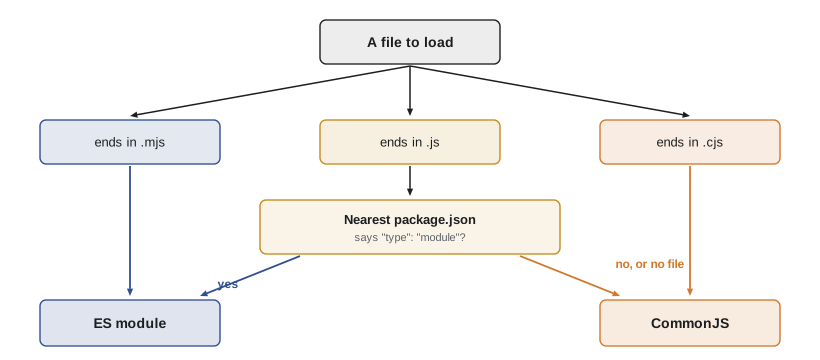
How does Node know which system a .js file uses? It looks at the nearest package.json. If it contains "type": "module", every .js file in the project is an ES module; otherwise .js files are CommonJS. The endings .mjs and .cjs override the setting for a single file. The studio's rule for new Node projects is simple: set "type": "module" and write ES modules everywhere, as in the browser.
The two systems can work together, with care. An ES module can import a CommonJS package, and Node turns module.exports into the default export. Since Node 22.12, CommonJS code can also require() an ES module, as long as that module does not use top-level await. Mira will not need to mix them, but she will meet both kinds of code in other people's packages.
Node's built-in modules can be imported with or without the node: prefix, but the prefix is clearer: import { readFile } from 'node:fs/promises' cannot be confused with a package called fs on npm. Some newer built-in modules, such as node:sqlite and node:test, can only be loaded with the prefix.
// money.js — an ES module in a project whose package.json has "type": "module"
export const TRAY_SERVINGS = { soup: 12, stew: 10, sandwiches: 12 };

export function servings(lines) {
  return lines.reduce((sum, l) => sum + l.trays * TRAY_SERVINGS[l.item], 0);
}

// report.js
import { servings } from './money.js';
import { readFile } from 'node:fs/promises';
What this code does
The first file exports a constant and a function with export, exactly as a browser module would. The second imports a named export from a local file, which must include its extension, and a function from one of Node's built-in modules with the node: prefix. In Node, unlike with a bundler, local imports always need the full file name, including .js.
npm and package.json
Mira used npm in JS-210 to install testing and formatting tools. On a server project, package.json does the same job with a few extra points to watch. Its dependencies are the packages the program needs to run in production, such as a web framework or a database driver. Its devDependencies are needed only while developing: test runners, linters, type checkers. When Theo installs the service on the server, he runs npm ci --omit=dev, which installs exactly the versions in package-lock.json and skips the development tools.
{
  "name": "partner-orders",
  "version": "0.1.0",
  "private": true,
  "type": "module",
  "engines": { "node": ">=27" },
  "scripts": {
    "start": "node src/server.js",
    "dev": "node --watch --env-file=.env src/server.js",
    "test": "node --test",
    "remind": "node scripts/remind.js"
  },
  "dependencies": {
    "express": "^5.2.1",
    "pg": "^8.16.0",
    "zod": "^4.1.0"
  },
  "devDependencies": {
    "eslint": "^10.1.0",
    "prettier": "^3.9.0"
  }
}
What this code does
private: true stops the project from being published to npm by accident, and type: module makes every .js file an ES module. engines records the Node version the code expects, and scripts gives short names for the commands the team runs, such as npm run dev. The service needs only three packages in production: Express for routing, pg for PostgreSQL and zod for validation.
Every package installed is code that runs with the same powers as Mira's own: it can read the database password and the files on the server. Packages can be abandoned, taken over by someone else or, rarely, published with harmful code. The studio follows three rules for server projects: add a dependency only when it saves real work, commit package-lock.json so every install gets the same versions, and run npm audit as part of the CI checks from JS-210. Node's own built-in modules cover more each year, which is why the reminders script needs no packages at all.
Version ranges in package.json follow semantic versioning: MAJOR.MINOR.PATCH, where a major change can break code, a minor change adds features and a patch only fixes bugs. The caret in ^5.2.1 accepts any 5.x.y that is at least 5.2.1, but never 6.0.0. The example checks a few versions against caret ranges.
// Does a version satisfy a caret range such as ^5.2.1 (same major, not lower)?
function parse(v) { return v.split('.').map(Number); }
function satisfiesCaret(version, range) {
  const [M, m, p] = parse(range.slice(1));
  const [vM, vm, vp] = parse(version);
  if (vM !== M) return false;
  if (vm !== m) return vm > m;
  return vp >= p;
}

for (const v of ['5.2.1', '5.2.4', '5.10.0', '5.1.9', '6.0.0', '4.21.2']) {
  console.log(v.padEnd(7), satisfiesCaret(v, '^5.2.1') ? 'accepted' : 'rejected');
}5.2.1 accepted 5.2.4 accepted 5.10.0 accepted 5.1.9 rejected 6.0.0 rejected 4.21.2 rejected
What this code does
The range is split into its three numbers, and so is each version. A different major number is always rejected, a higher minor number is always accepted, and with the same minor number the patch must be at least the one in the range. The rule shown is the one for major versions of 1 or more; npm treats ranges starting with 0 more strictly.
Paths
Files on a server are found by their path. Windows separates folders with a backslash and macOS and Linux use a forward slash, and code that glues strings together with slashes tends to break somewhere. The node:path module builds paths correctly for the computer it runs on. path.join joins pieces, path.resolve makes an absolute path, path.dirname and path.basename take a path apart, and path.extname gives the file ending.
A second trap is the current working directory. A relative path such as 'outbox/batch.json' is relative to the folder the program was started from, process.cwd(), not to the folder that holds the script. When the scheduler starts the reminders script from the home folder, a relative path would point somewhere else. The fix is to build paths from the script's own folder, import.meta.dirname in an ES module or __dirname in CommonJS.
import path from 'node:path';

const here = import.meta.dirname;
console.log('script folder:', path.basename(here));
console.log('joined:', path.relative(here, path.join(here, 'outbox', 'reminders-2028-03-09.json')));
console.log('parts:', path.parse('outbox/reminders-2028-03-09.json'));
console.log('normalized:', path.normalize('outbox/../outbox/./batch.json'));
What this code does
path.join places the correct separator between the pieces, and path.relative shows the result relative to the script's own folder. path.parse splits a path into its root, folder, file name, extension and base name, and path.normalize removes . and .. segments. Building every path from import.meta.dirname keeps the script working whatever folder it is started from.
$ node paths.mjs
script folder: partner-orders
joined: outbox/reminders-2028-03-09.json
parts: {
  root: '',
  dir: 'outbox',
  base: 'reminders-2028-03-09.json',
  ext: '.json',
  name: 'reminders-2028-03-09'
}
normalized: outbox/batch.json
Reading and writing files
The node:fs module has three styles of function: callback functions such as fs.readFile(path, callback), synchronous functions such as fs.readFileSync(path) that block until they finish, and promise functions in node:fs/promises that work with await. On a server, the promise style is the right default. Synchronous calls are acceptable only at start-up, for example to read a configuration file once, because while they run nothing else can.
| Function (node:fs/promises) | What it does |
|---|---|
| readFile(path, 'utf8') | Reads a whole file as text |
| writeFile(path, data) | Creates or replaces a file with the data |
| appendFile(path, data) | Adds data to the end of a file |
| mkdir(path, { recursive: true }) | Creates a folder and any missing parents; no error if it exists |
| readdir(path) | Lists the names in a folder |
| rename(from, to) | Moves or renames a file, replacing the target |
| rm(path, { force: true }) | Deletes a file; no error if it is already gone |
| stat(path) | Size, dates and whether it is a file or folder |
Files read with an encoding such as 'utf8' come back as strings; without one, they come back as a Buffer, Node's type for raw bytes. JSON files are read as text and passed to JSON.parse, and written with JSON.stringify. Passing 2 as the third argument of JSON.stringify indents the output, which makes files that people will read or compare in Git much clearer.
JSON has no date type, so dates are written as strings, usually in the ISO format that Date's toJSON method produces. When a file is read back, JSON.parse can take a second argument, a reviver function, which sees every key and value and can turn date strings back into Date objects. The example writes a small batch and reads it back.
const batch = { built: new Date(Date.UTC(2028, 2, 8, 23, 0)), count: 2, areas: ['Kitchen', 'Grocery'] };

const text = JSON.stringify(batch, null, 2);
console.log(text);

const plain = JSON.parse(text);
console.log(typeof plain.built);

const revived = JSON.parse(text, (key, value) =>
  key === 'built' ? new Date(value) : value);
console.log(revived.built instanceof Date, revived.built.getUTCHours());{
"built": "2028-03-08T23:00:00.000Z",
"count": 2,
"areas": [
"Kitchen",
"Grocery"
]
}
string
true 23What this code does
JSON.stringify with 2 as its third argument writes the object with two-space indentation, and the Date becomes an ISO string through its toJSON method. Parsed normally, built comes back as a string. The reviver function is called for every key, and it turns the value of built back into a Date while leaving everything else unchanged.
When a file is missing, the promise rejects with an error whose code property is 'ENOENT' (error, no entry). Other common codes are 'EACCES' (no permission) and 'EEXIST' (it already exists). Code should check err.code, never the message, because messages can change between versions.
import { readFile } from 'node:fs/promises';

async function readJson(file, fallback) {
  try {
    return JSON.parse(await readFile(file, 'utf8'));
  } catch (err) {
    if (err.code === 'ENOENT') return fallback;
    throw err;
  }
}

const settings = await readJson('settings.json', { sendAt: '18:00' });
console.log('settings:', settings);

try {
  await readJson('broken.json', {});
} catch (err) {
  console.log(`${err.name}: the file is not valid JSON`);
}
What this code does
readJson reads and parses a JSON file and returns a fallback value only when the error code says the file does not exist. Any other error, such as broken JSON or a missing permission, is thrown again, because hiding it would make a real problem look like an empty file. The script has no settings.json, so it uses the defaults, and broken.json contains a typing mistake, so JSON.parse throws a SyntaxError.
$ node read-json.mjs
settings: { sendAt: '18:00' }
SyntaxError: the file is not valid JSON
Writing a file safely
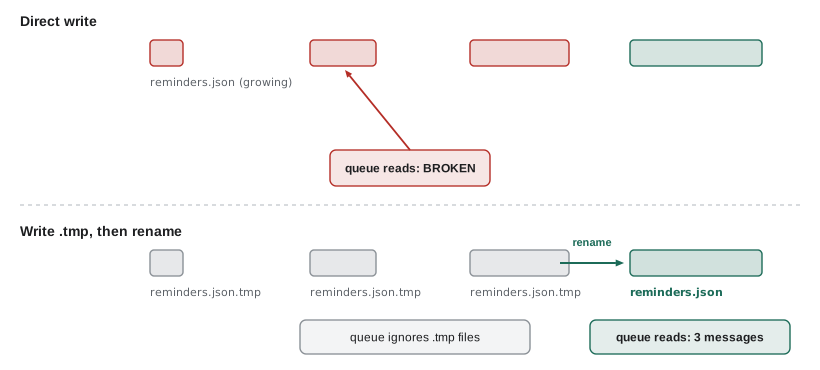
Theo's warning was about a real problem. Writing a file takes time, and a large file is written in pieces. If the mail queue happens to read the outbox while the reminders script is halfway through, it finds a file that ends in the middle of a message and either fails or, worse, sends half the batch. A crash or a full disk during the write leaves the same broken file behind.
The standard fix is to write to a temporary file in the same folder and then rename it to its final name. On Linux and macOS, renaming within one file system is atomic: at any moment, a reader sees either no file or the complete file, never a partial one. Theo's mail queue only picks up files ending in .json, so it ignores the .tmp file while it is being written. The example imitates the two approaches with an in-memory file system and a reader that looks in the middle of a write.
// An imitation file system: writes happen in chunks, and a reader may look in between.
const files = new Map();

function writeInChunks(name, text, peek) {
  files.set(name, '');
  for (let i = 0; i < text.length; i += 10) {
    files.set(name, text.slice(0, i + 10));
    if (i === 10) peek(); // the mail queue looks at the folder mid-write
  }
}
function rename(from, to) { files.set(to, files.get(from)); files.delete(from); }
function mailQueue() {
  for (const [name, text] of files) {
    if (!name.endsWith('.json')) continue;
    try { console.log(`  queue read ${name}: ${JSON.parse(text).length} messages`); }
    catch { console.log(`  queue read ${name}: BROKEN FILE`); }
  }
}

const batch = JSON.stringify([{ to: 'amara' }, { to: 'ben' }, { to: 'diego' }]);
console.log('direct write:');
writeInChunks('a.json', batch, mailQueue);
files.clear();
console.log('write to .tmp, then rename:');
writeInChunks('b.json.tmp', batch, mailQueue);
rename('b.json.tmp', 'b.json');
mailQueue();direct write: queue read a.json: BROKEN FILE write to .tmp, then rename: queue read b.json: 3 messages
What this code does
The imitation writes 10 characters at a time and lets the mail queue look at the folder after the second chunk. With a direct write, the queue finds a .json file that stops in the middle and cannot parse it. With the temporary name, the queue ignores the unfinished .tmp file, and after the rename it finds only the complete batch.
Mira's first version of the reminders script puts these pieces together. For now it reads tomorrow's sign-ups from a JSON file that stands in for Theo's API; Lesson 9 replaces the file with a request to the API, with its address and key taken from the configuration.
import { readFile, writeFile, mkdir, rename } from 'node:fs/promises';
import path from 'node:path';

const date = process.argv[2] ?? '2028-03-09';
const here = import.meta.dirname;

const text = await readFile(path.join(here, 'signups.json'), 'utf8');
const signups = JSON.parse(text).filter((s) => s.date === date);

const messages = signups.map((s) => ({
  to: s.email,
  subject: `Your ${s.area} shift tomorrow`,
  body: `Hi ${s.name}, see you tomorrow at ${s.start} in ${s.area}.`,
}));

const outbox = path.join(here, 'outbox');
await mkdir(outbox, { recursive: true });
const finalPath = path.join(outbox, `reminders-${date}.json`);
const tempPath = finalPath + '.tmp';
await writeFile(tempPath, JSON.stringify(messages, null, 2) + '\n');
await rename(tempPath, finalPath);

console.log(`wrote ${messages.length} reminders to ${path.relative(here, finalPath)}`);
What this code does
The script takes the date from its first argument, reads signups.json from its own folder and keeps the sign-ups for that date. It turns each one into a message with a recipient, a subject and a body, creates the outbox folder if it is missing, writes the batch to a .tmp file and renames it to its final name. Top-level await works because the file is an ES module, so the script reads like a list of steps.
$ node remind.mjs 2028-03-09
wrote 3 reminders to outbox/reminders-2028-03-09.json
$ ls outbox
reminders-2028-03-09.json
$ head -6 outbox/reminders-2028-03-09.json
[
  {
    "to": "amara@example.org",
    "subject": "Your Kitchen shift tomorrow",
    "body": "Hi Amara, see you tomorrow at 09:00 in Kitchen."
  },
Two runs of the script for the same date produce the same file name, so the second run replaces the first instead of adding a duplicate batch. That property, that running a job twice gives the same result as running it once, is called idempotence. It matters for every job that a scheduler might repeat after a failure, and Lesson 8 applies it to the order API.
Large files and streams
readFile loads the whole file into memory at once. That is fine for a batch of reminders, but not for the kitchen's three-year order archive, which Rosa wants summarized each spring. A stream reads a file in pieces and hands each piece to the program as it arrives, so memory use stays small whatever the file size. Combined with node:readline, a stream can be read one line at a time with for await.
import { createReadStream } from 'node:fs';
import { createInterface } from 'node:readline';

const lines = createInterface({ input: createReadStream('archive.csv'), crlfDelay: Infinity });
const trays = {};
let header = true;
for await (const line of lines) {
  if (header) { header = false; continue; }
  const [, item, count] = line.split(',');
  trays[item] = (trays[item] ?? 0) + Number(count);
}
console.log(trays);
What this code does
createReadStream opens the file for reading in chunks, and createInterface splits the chunks into lines. The for await loop receives one line at a time, skips the header and adds up the trays for each item, so only one line is held in memory at a time. The same code would work on a file of a few lines or a few million.
$ node archive.mjs
{ soup: 18, stew: 4, sandwiches: 3 }
The same idea works in the other direction: a writable stream accepts data in pieces, and pipeline from node:stream/promises connects a readable stream to a writable one, such as reading an archive, compressing it with node:zlib and writing the result, with correct error handling at every step.
Worked problem
How much memory does the archive need?
Rosa's archive has 3 years of orders, about 9,000 lines of about 40 bytes each. Node's file streams read 64 KiB (65,536 bytes) at a time. How much memory would readFile need for the text, and how many chunks does the stream read?
Show solution
- File size ≈ 9,000 × 40 = 360,000 bytes, so readFile holds about 360 kB of text at once (and the JavaScript string may take up to twice that).
- Chunks = 360,000 ÷ 65,536 ≈ 5.5, so the stream reads 6 chunks.
- The stream holds at most one 64 KiB chunk plus the current line in memory.
Answer: About 360 kB with readFile, against about 64 KiB at a time with a stream, read in 6 chunks. For this archive either approach works; a stream becomes necessary when a file is too large to fit comfortably in memory.
Common mistakes
MistakeA relative path is relative to the script's folder.
InsteadIt is relative to process.cwd(), the folder the program was started from. Build paths from import.meta.dirname.
MistakeWriting a file with writeFile is safe even if another program is reading the folder.
InsteadA reader can see a half-written file. Write to a temporary name and rename it.
MistakeCatching every error from readFile and returning an empty value is good defensive code.
InsteadOnly ENOENT means the file is missing. Other errors, such as broken JSON or permissions, must not be hidden.
MistakeDevelopment tools belong in dependencies.
InsteadThey belong in devDependencies, so the server can install without them using npm ci --omit=dev.
Summary and key terms
- Node has two module systems: CommonJS, with require and module.exports, and ES modules, with import and export.
- New projects set "type": "module" in package.json and use ES modules, loading built-in modules with the node: prefix. package.json separates production dependencies from development tools, and package-lock.json fixes exact versions; every dependency is trusted code, so server projects keep them few. node:path builds paths that work on every system, and paths should be built from the script's own folder, not the current working directory. node:fs/promises reads and writes files with await; errors are recognized by err.code, such as ENOENT for a missing file.
- Writing to a temporary file and renaming it makes a file appear complete or not at all.
- Streams read and write large files in pieces with little memory.
- CommonJS
- Node's original module system, using require() and module.exports.
- ES module
- The standard JavaScript module system, using import and export.
- dependencies
- Packages a program needs to run in production.
- devDependencies
- Packages needed only during development, such as test runners and linters.
- Semantic versioning
- MAJOR.MINOR.PATCH version numbers, where only a major change may break existing code.
- Current working directory
- The folder a program was started from, which relative paths are resolved against.
- Buffer
- Node's type for raw bytes, returned when a file is read without an encoding.
- ENOENT
- The error code for a file or folder that does not exist.
- Atomic rename
- Renaming a file within one file system, which readers see as happening all at once.
- Stream
- An object that reads or writes data in pieces as it becomes available.
Practice problems
Work each problem on paper first, then reveal the answer to check.
What does "type": "module" in package.json change?
Show answer
It makes Node treat .js files in the project as ES modules instead of CommonJS.
Why should paths be built from import.meta.dirname?
Show answer
So they point to the script's own folder whatever folder the program was started from.
Which error code means a file does not exist?
Show answer
ENOENT.
Why does the reminders script write to a .tmp file first?
Show answer
So the mail queue never sees a half-written .json file; the rename makes the complete file appear at once.
When is a stream better than readFile?
Show answer
When a file is large, because a stream holds only one piece of it in memory at a time.
Try it yourself
Name the batch file
Complete batchFileName(date). For a date written as YYYY-MM-DD, it returns reminders-YYYY-MM-DD.json.
If the date is not in exactly that form (four digits, a dash, two digits, a dash, two digits), it throws an Error with the message bad date: followed by the value. This stops a value such as ../../etc from becoming part of a file path.
function batchFileName(date) {
  return 'reminders-' + date + '.json';
}

for (const d of ['2028-03-09', '2028-3-9', '../../etc/passwd', '2028-03-09x']) {
  try {
    console.log(batchFileName(d));
  } catch (err) {
    console.log(err.message);
  }
}
Try it yourself
Read sign-ups from text
Theo's old export writes one sign-up per line as date;start;area;name. Complete parseSignups(text) so that it returns an array of objects with those four properties.
Skip empty lines and lines that start with #. Trim spaces around each field. Lines that do not have exactly four fields are skipped too, and the function prints skipped line N for each of them, where N is the line number counting from 1.
function parseSignups(text) {
  return [];
}

const text = `# exported 2028-03-08
2028-03-09;09:00;Kitchen;Amara

2028-03-09 ; 13:00 ; Grocery ; Diego
2028-03-09;10:00;Youth garden
`;
console.log(JSON.stringify(parseSignups(text), null, 1));
Lesson quiz · 5 questions
Score 60% or more to complete this lesson.
Create a free account to save your progress, take quizzes and earn a certificate.