
JS-230 · Lesson 5 of 12 · 31 min
Middleware
▶ Video coming soon A video version of this lesson is on the way.
On Tuesday, March 21, Theo brings a list of things every request to the partner service must have before it reaches an order route: an id for the logs, a time measurement, security headers, a parsed body and, above all, a check of who is asking. "If you copy those into every handler, you will forget one," he says. Gareth writes one word on the whiteboard: middleware. "Express is mostly a way of putting functions in a line. Today you write your own and put them in the right order."
This lesson explains middleware, the functions that Express runs in order for each request before, and sometimes after, a route handler. It shows how next() passes control along the chain, how the order of app.use calls decides what runs when, and how middleware can be limited to a path or a single route. Mira writes middleware for request ids, timing and identifying partner agencies by their API keys, adds standard packages for security headers and cross-origin requests, and sees how errors leave the chain. By the end, only a known agency can reach the order routes, and only the kitchen can see the day sheet.
A line of functions
A middleware function has the same arguments as a route handler plus one more: (req, res, next). It can look at the request, change req or res, send a response and stop, or call next() to hand the request to the next function in line. A route handler is simply the last function in the line, the one that sends the response. express.json() from Lesson 4 is middleware: it reads the body, stores it in req.body and calls next().
Middleware is added with app.use(fn), which runs it for every request, or app.use('/prefix', fn), which runs it only for paths under the prefix. It can also be given to a single route, between the path and the handler: app.get('/orders/:id', requirePartner, handler). Express runs everything in the order it was added, so the order of app.use calls in app.js is the order of the line.
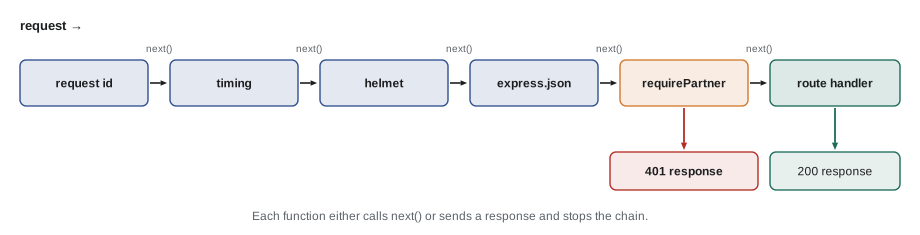
The example builds the core of Express's middleware runner. It keeps a list of functions and calls the first; each function receives a next that calls the one after it.
function run(middleware, req) {
  const res = { sent: null, send(body) { this.sent = body; console.log('  response:', body); } };
  let i = 0;
  function next() {
    const fn = middleware[i++];
    if (fn) fn(req, res, next);
  }
  next();
  return res;
}

const log = (req, res, next) => { console.log('  log', req.method, req.path); next(); };
const auth = (req, res, next) => {
  if (!req.key) return res.send('401 missing API key');
  req.partner = 'northside';
  next();
};
const handler = (req, res) => res.send(`200 orders for ${req.partner}`);

console.log('with a key:');
run([log, auth, handler], { method: 'GET', path: '/orders', key: 'k1' });
console.log('without a key:');
run([log, auth, handler], { method: 'GET', path: '/orders' });with a key: log GET /orders response: 200 orders for northside without a key: log GET /orders response: 401 missing API key
What this code does
run calls the first function and gives it a next function that moves the index on and calls the next one, so each function decides whether the chain continues. With a key, all three run and the handler can use req.partner, which auth added. Without one, auth sends a 401 and never calls next, so the handler never runs.
Two rules follow from this design. A middleware function that neither sends a response nor calls next leaves the request hanging until the client gives up, so every path through a middleware function must do one or the other. And a middleware function must not do both: calling next after sending a response leads to a second attempt to send.
Order matters
Because middleware runs in the order it was added, a few placements are always the same. Request ids and timing come first, so that every later step, including errors, can be logged with them. Security headers come early, so even error responses carry them. Body parsing comes before any route that reads req.body. Authentication comes before the routes it protects, and anything public, such as the menu, is mounted before it or on a path it does not cover.
| Position | Middleware | Why there |
|---|---|---|
| 1 | requestId | Every log line, including errors, can carry the id |
| 2 | timing | Measures the whole request, including the other middleware |
| 3 | helmet | Security headers on every response, even errors |
| 4 | cors | Answers browser preflight requests before any authentication |
| 5 | express.json | Bodies are parsed before routes read them |
| 6 | requirePartner (on /orders) | Only identified agencies reach the order routes |
| 7 | routes | The handlers that send the normal responses |
| 8 | 404 and error handlers | Catch whatever nothing else answered (Lesson 6) |
Writing middleware
The first two pieces Mira writes are small. requestId gives every request an id: it uses the X-Request-Id header if Theo's web server already set one, and otherwise generates a random UUID with node:crypto. It sends the id back in the response, so when an agency reports a problem, Rosa can ask for the id and Mira can find the exact request in the logs. timing records the start time and listens for the response's finish event, which fires after the last byte has been handed to the network, to log the method, path, status and duration.
// src/middleware/request-id.js
import { randomUUID } from 'node:crypto';

export function requestId(req, res, next) {
  req.id = req.get('X-Request-Id') ?? randomUUID();
  res.set('X-Request-Id', req.id);
  next();
}

// src/middleware/timing.js
export function timing(req, res, next) {
  const start = process.hrtime.bigint();
  res.on('finish', () => {
    const ms = Number(process.hrtime.bigint() - start) / 1e6;
    console.log(`${req.id} ${req.method} ${req.originalUrl} ${res.statusCode} ${ms.toFixed(1)} ms`);
  });
  next();
}
What this code does
requestId stores the id on req, so every later function can use it, and sets the same id on the response. timing cannot log anything when it runs, because the response has not been sent yet, so it registers a listener for the finish event and calls next straight away. The listener runs at the end and logs one line per request, with process.hrtime.bigint() giving a precise duration.
A middleware function can also take options. The usual pattern is a function that returns middleware, as express.json({ limit: '10kb' }) does. requireRole('kitchen') below is written that way: it is called once when the app is set up and returns the function that runs for each request.
Who is asking? API keys
Each partner agency gets an API key: a long random string, generated once, that the agency's form or program sends with every request in the Authorization header, as Authorization: Bearer followed by the key. The service looks up which agency the key belongs to and stores it in req.partner, so the order routes know whose orders to show and whose to change. A request with no key or an unknown key gets 401 Unauthorized, which means the service does not know who is asking. A known agency asking for something it may not do, such as the kitchen's day sheet, gets 403 Forbidden.
Keys are secrets, and the service never stores them as they are. When Theo creates a key for an agency, the service stores only its SHA-256 hash, a fixed-length fingerprint from which the key cannot be worked out. When a request arrives, the service hashes the key it received and compares the hashes. If the database were ever copied, the hashes would be useless to whoever copied it. Accounts with passwords need a slower kind of hash, which JS-240 covers along with sessions and tokens; long random API keys are safe with SHA-256.
The example shows the idea with a small fingerprint function, FNV-1a, so that it runs anywhere. FNV-1a is fast but not secure, and the real service uses SHA-256 from node:crypto; the steps are the same. The keys are made-up examples.
// FNV-1a: a simple 32-bit fingerprint, standing in for SHA-256 in this example.
function fingerprint(text) {
  let h = 0x811c9dc5;
  for (const byte of new TextEncoder().encode(text)) {
    h ^= byte;
    h = Math.imul(h, 0x01000193) >>> 0;
  }
  return h.toString(16).padStart(8, '0');
}

// What the database stores: a fingerprint per agency, never the key itself.
const stored = [
  { slug: 'northside', role: 'partner', keyHash: fingerprint('pk_demo_northside_7f3a') },
  { slug: 'kitchen', role: 'kitchen', keyHash: fingerprint('pk_demo_kitchen_19c2') },
];
console.log('stored:', stored.map((p) => `${p.slug}=${p.keyHash}`).join(' '));

function identify(authorization) {
  const [scheme, key] = (authorization ?? '').split(' ');
  if (scheme !== 'Bearer' || !key) return { status: 401, error: 'missing API key' };
  const partner = stored.find((p) => p.keyHash === fingerprint(key));
  return partner ? { status: 200, partner: partner.slug, role: partner.role } : { status: 401, error: 'unknown API key' };
}

console.log(identify('Bearer pk_demo_northside_7f3a'));
console.log(identify('Bearer pk_demo_northside_7f3b'), 'fingerprint', fingerprint('pk_demo_northside_7f3b'));
console.log(identify(undefined));stored: northside=fcb56e7f kitchen=5cda6ed1
{ status: 200, partner: "northside", role: "partner" }
{ status: 401, error: "unknown API key" } fingerprint fdb57012
{ status: 401, error: "missing API key" }What this code does
fingerprint turns a key into a short hexadecimal value, and the stored records keep only those values, never the keys. identify splits the Authorization header into the scheme and the key, fingerprints the key and looks for a stored record with the same value. Changing the last character of the key gives a completely different fingerprint, so a nearly right key is as unknown as a missing one.
The real middleware adds two refinements. Looking up a hash among thousands of keys would mean hashing and comparing every time, so each key starts with an 8-character prefix that is stored in plain text and used to find the one candidate record. And the final comparison uses crypto.timingSafeEqual, which takes the same time whether the first byte or the last byte differs, so an attacker cannot learn anything from how long a wrong key takes to reject.
// src/middleware/auth.js
import { createHash, timingSafeEqual } from 'node:crypto';
import * as partners from '../partners-repo.js';

const sha256 = (text) => createHash('sha256').update(text).digest();

export async function requirePartner(req, res, next) {
  const header = req.get('Authorization') ?? '';
  const [scheme, key] = header.split(' ');
  if (scheme !== 'Bearer' || !key) {
    return res.status(401).set('WWW-Authenticate', 'Bearer').json({ error: 'missing API key' });
  }
  const partner = await partners.findByKeyPrefix(key.slice(0, 8));
  const ok = partner && timingSafeEqual(sha256(key), Buffer.from(partner.keyHash, 'hex'));
  if (!ok || !partner.active) return res.status(401).json({ error: 'unknown or inactive API key' });
  req.partner = partner;
  next();
}

export function requireRole(role) {
  return (req, res, next) => {
    if (req.partner?.role !== role) return res.status(403).json({ error: `needs the ${role} role` });
    next();
  };
}
What this code does
requirePartner reads the Authorization header, answers 401 with a WWW-Authenticate header if there is no Bearer key, and finds the agency by the key's prefix. It compares the hash of the received key with the stored hash using timingSafeEqual and rejects unknown or deactivated agencies. requireRole is a function that returns middleware, so requireRole('kitchen') creates a check that answers 403 for any agency without that role.
Standard middleware from npm
Some middleware is so common that writing it again would be a waste. The partner service uses two widely used packages. helmet sets a group of security headers on every response: for example X-Content-Type-Options: nosniff, which stops browsers from guessing a different file type, and a strict Content-Security-Policy. For a JSON API they matter less than for web pages, but they cost nothing and protect any error page or document the service might return. app.disable('x-powered-by') also stops Express from announcing itself in every response.
cors handles cross-origin resource sharing. Browsers stop a page on one origin from reading responses from another origin unless the server says it may, as Mira learned from the client side in JS-120. The partners' order form is served from the Food Hub's own site, so it needs nothing, but the Westview Youth Drop-In wants to add an order button to its own staff page on another domain. The service must answer the browser's preflight request, an OPTIONS request that asks whether the real request is allowed, and add Access-Control-Allow-Origin to responses for that one origin only.
const ALLOWED = ['https://westview-youth.example'];

function corsHeaders(method, origin, requestHeaders = []) {
  if (!origin) return { status: 'no CORS needed (not a browser cross-origin request)' };
  if (!ALLOWED.includes(origin)) return { status: 'no CORS headers: the browser will block the response' };
  const headers = { 'Access-Control-Allow-Origin': origin, Vary: 'Origin' };
  if (method === 'OPTIONS') {
    const ok = requestHeaders.every((h) => ['authorization', 'content-type', 'idempotency-key'].includes(h.toLowerCase()));
    if (!ok) return { status: 'preflight refused: header not allowed' };
    headers['Access-Control-Allow-Methods'] = 'GET, POST, PATCH, DELETE';
    headers['Access-Control-Allow-Headers'] = 'Authorization, Content-Type, Idempotency-Key';
    headers['Access-Control-Max-Age'] = '600';
  }
  return headers;
}

console.log(corsHeaders('GET', undefined));
console.log(corsHeaders('OPTIONS', 'https://westview-youth.example', ['Authorization', 'Content-Type']));
console.log(corsHeaders('POST', 'https://westview-youth.example'));
console.log(corsHeaders('GET', 'https://evil.example'));
console.log(corsHeaders('OPTIONS', 'https://westview-youth.example', ['X-Debug']));{ status: "no CORS needed (not a browser cross-origin request)" }
{ "Access-Control-Allow-Origin": "https://westview-youth.example", Vary: "Origin", "Access-Control-Allow-Methods": "GET, POST, PATCH, DELETE", "Access-Control-Allow-Headers": "Authorization, Content-Type, Idempotency-Key", "Access-Control-Max-Age": "600" }
{ "Access-Control-Allow-Origin": "https://westview-youth.example", Vary: "Origin" }
{ status: "no CORS headers: the browser will block the response" }
{ status: "preflight refused: header not allowed" }What this code does
A request without an Origin header, such as one from curl or from a server, does not involve CORS at all. For an allowed origin, the function returns that exact origin in Access-Control-Allow-Origin and adds Vary: Origin so caches keep responses for different origins apart; a preflight also lists the allowed methods and headers and how long the browser may remember the answer. An unknown origin gets no CORS headers, so the browser keeps the response from its page.
CORS is a browser rule, not a security barrier for the server. It stops other websites' pages from reading responses in a visitor's browser, but it does nothing against a script or curl, which ignore it. The API key check is what actually protects the orders; CORS only decides which browser pages may use the API on a visitor's behalf.
Limiting how often
A last piece of protective middleware limits how many requests one client can make in a period. If a partner's program has a bug that sends the same request in a loop, a rate limit stops it from flooding the service and the database. The response to a client over its limit is 429 Too Many Requests with a Retry-After header saying how many seconds to wait. The service uses a package for this, but the idea fits in a few lines; the example uses a fixed one-minute window and a fake clock.
function createLimiter(limit, windowMs, now) {
  const windows = new Map(); // key -> { start, count }
  return function check(key) {
    const t = now();
    let w = windows.get(key);
    if (!w || t - w.start >= windowMs) { w = { start: t, count: 0 }; windows.set(key, w); }
    w.count++;
    if (w.count > limit) {
      const retryAfter = Math.ceil((w.start + windowMs - t) / 1000);
      return { status: 429, retryAfter };
    }
    return { status: 200, remaining: limit - w.count };
  };
}

let clock = 0;
const check = createLimiter(3, 60_000, () => clock);
for (const t of [0, 5_000, 10_000, 15_000, 59_000, 60_000]) {
  clock = t;
  console.log(`t=${t / 1000}s`, check('northside'));
}
console.log('other agency', check('elm-seniors'));t=0s { status: 200, remaining: 2 }
t=5s { status: 200, remaining: 1 }
t=10s { status: 200, remaining: 0 }
t=15s { status: 429, retryAfter: 45 }
t=59s { status: 429, retryAfter: 1 }
t=60s { status: 200, remaining: 2 }
other agency { status: 200, remaining: 2 }What this code does
The limiter keeps one window per key, here an agency, with the time it started and a count of requests. A request inside the window adds one to the count, and once the count passes the limit the answer is 429 with the number of seconds until the window resets. At 60 seconds a new window starts, and a different agency has its own window, so one agency's loop cannot block another.
A fixed window is simple but lets a client send twice the limit around the moment one window ends and the next begins. Packages such as express-rate-limit offer sliding windows and can share counts between several server processes through a store such as Redis. The partner service runs one process, so an in-memory store is enough, with a limit of 60 requests a minute per agency.
Putting the chain together
// src/app.js
import express from 'express';
import helmet from 'helmet';
import cors from 'cors';
import { requestId } from './middleware/request-id.js';
import { timing } from './middleware/timing.js';
import { requirePartner, requireRole } from './middleware/auth.js';
import { menuRouter } from './routes/menu.js';
import { ordersRouter } from './routes/orders.js';
import { kitchenRouter } from './routes/kitchen.js';

export const app = express();
app.disable('x-powered-by');
app.use(requestId);
app.use(timing);
app.use(helmet());
app.use(cors({ origin: ['https://westview-youth.example'], allowedHeaders: ['Authorization', 'Content-Type', 'Idempotency-Key'] }));
app.use(express.json({ limit: '10kb' }));

const v1 = express.Router();
v1.use('/menu', menuRouter);                               // public
v1.use('/orders', requirePartner, ordersRouter);           // any partner
v1.use('/kitchen', requirePartner, requireRole('kitchen'), kitchenRouter);
app.use('/api/partners/v1', v1);
What this code does
app.js now builds the line in the order from the table: request id, timing, security headers, CORS for the one allowed origin and body parsing. The menu is public, every order route needs an identified agency and the kitchen routes need the kitchen role as well, which is expressed by listing the middleware before each router in v1.use. Reading the file from top to bottom shows exactly what happens to every request.
When something goes wrong
Middleware can also pass an error along the line. Calling next(err) with an argument tells Express to skip all the normal middleware and route handlers and jump to the first error-handling middleware, a function with four arguments, (err, req, res, next). In Express 5, if a middleware function or handler is async and its promise rejects, Express calls next(err) automatically, so an exception thrown inside await code reaches the error handler instead of crashing the process or leaving the request hanging. In Express 4 the same mistake left the request waiting forever, which is why older code is full of try...catch blocks around every handler. Lesson 6 writes the service's error handler.
Worked problem
How much does the rate limit allow?
The service allows 60 requests a minute per agency. Northside's form makes 4 requests when a coordinator places an order (menu, two availability checks and the order) and 1 request for each page of the order list. How many orders can Northside place in one minute, and what is the most requests it could send in two seconds around a window boundary with a fixed window?
Show solution
- Orders per minute: 60 ÷ 4 = 15.
- A fixed window resets the count at the boundary, so up to 60 requests can arrive just before it and 60 more just after.
- Burst around the boundary: 60 + 60 = 120 requests in about two seconds.
Answer: 15 orders a minute, far more than a coordinator needs, but a buggy program could send up to 120 requests in a burst across a boundary. A sliding window would cap that burst at about 60.
Common mistakes
MistakeMiddleware runs in alphabetical or random order.
InsteadExpress runs middleware in the order it was added, so the order of app.use calls matters.
MistakeCORS protects the API from scripts that misuse it.
InsteadCORS is a browser rule. Scripts and curl ignore it; the API key check is the real protection.
MistakeStoring API keys in the database is fine as long as it has a password.
InsteadStore only a hash, so a copied database does not reveal working keys.
Mistake401 and 403 mean the same thing.
Instead401 means the service does not know who is asking; 403 means it knows and the answer is no.
Summary and key terms
- Middleware functions take (req, res, next) and run in the order they are added; each either sends a response or calls next() to continue. app.use adds middleware for every request or for a path prefix, and middleware can also be listed before a single route or router.
- The partner service runs request ids and timing first, then security headers, CORS and body parsing, then authentication before the protected routes.
- Partner agencies are identified by API keys sent as Bearer tokens; the service stores only SHA-256 hashes and compares them in constant time, answering 401 when it does not know the caller and 403 when the caller lacks permission. helmet sets security headers, cors allows named browser origins, and a rate limit answers 429 with Retry-After when a client sends too much. next(err) and rejected promises in Express 5 send errors to error-handling middleware with four arguments.
- Middleware
- A function (req, res, next) that Express runs for a request before the route handler, or instead of it.
- next()
- The function middleware calls to pass the request to the next function in the chain.
- API key
- A long random secret that identifies a calling program, sent with every request.
- Hash
- A fixed-length fingerprint of data, such as SHA-256, from which the data cannot be worked out.
- 401 Unauthorized
- The response when the server does not know who is asking.
- 403 Forbidden
- The response when the server knows who is asking and does not allow the request.
- CORS
- Cross-origin resource sharing: headers that let a browser page read responses from another origin.
- Preflight
- An OPTIONS request a browser sends to ask whether a cross-origin request is allowed.
- Rate limit
- A cap on how many requests a client may send in a period.
- 429 Too Many Requests
- The response to a client that has passed its rate limit, usually with Retry-After.
Practice problems
Work each problem on paper first, then reveal the answer to check.
What must every middleware function do on every path through it?
Show answer
Either send a response or call next(), but not both.
Why does requestId come before everything else?
Show answer
So every later step, including error handling, can log the request's id.
Why does the service store a hash of each API key instead of the key?
Show answer
So that a copy of the database does not reveal keys that work.
Does CORS stop a script on another server from calling the API?
Show answer
No. Only browsers apply CORS; the API key protects the data.
What does Express 5 do when an async handler's promise rejects?
Show answer
It passes the error to the error-handling middleware automatically.
Try it yourself
Require the kitchen role
Complete requireRole(role) so that it returns a middleware function (req, res, next). If req.partner is missing, the middleware calls res.status(401).json(...) with { error: 'missing API key' }.
If req.partner.role is not role, it answers 403 with { error: 'needs the ROLE role' }, using the role's name. Otherwise it calls next().
function requireRole(role) {
  return (req, res, next) => next();
}

function fakeRes() {
  return { code: 200, status(c) { this.code = c; return this; }, json(d) { console.log(this.code, JSON.stringify(d)); } };
}
const kitchenOnly = requireRole('kitchen');
for (const partner of [{ slug: 'kitchen', role: 'kitchen' }, { slug: 'northside', role: 'partner' }, undefined]) {
  kitchenOnly({ partner }, fakeRes(), () => console.log('next: allowed for', partner?.slug ?? 'nobody'));
}
Try it yourself
Compose middleware with errors
Complete runChain(fns, req). It calls the functions in order with (req, next). When a function calls next() with no argument, the next function runs. When it calls next(err) with an error, the remaining functions are skipped and the chain prints error handler: followed by the error's message.
A function that throws must be treated like one that calls next(err) with the thrown error. When the last function calls next(), nothing else happens.
function runChain(fns, req) {
  for (const fn of fns) {
    try { fn(req, () => {}); } catch {}
  }
}

const a = (req, next) => { console.log('a'); next(); };
const b = (req, next) => { console.log('b'); if (req.bad) return next(new Error('bad request')); next(); };
const c = (req, next) => { console.log('c'); if (req.crash) throw new Error('crashed in c'); next(); };
const d = (req, next) => { console.log('d'); next(); };
runChain([a, b, c, d], {});
runChain([a, b, c, d], { bad: true });
runChain([a, b, c, d], { crash: true });
Lesson quiz · 5 questions
Score 60% or more to complete this lesson.
Create a free account to save your progress, take quizzes and earn a certificate.