
JS-230 · Lesson 3 of 12 · 29 min
Building an HTTP server
▶ Video coming soon A video version of this lesson is on the way.
On Tuesday, March 14, the reminders script is finished and waiting for Theo's review, and the main project begins. Rosa comes to the studio with her order spreadsheet and a list. "The agencies need to see what they can order, place an order, and change it until the cut-off. I need to see what to cook." Gareth draws a box on the whiteboard labelled partner order service and three arrows coming into it. "Every one of those arrows is an HTTP request. Before we use a framework, we will build the box with nothing but Node, so you can see what a framework does for you."
This lesson builds a web server with Node's built-in node:http module. It reviews what an HTTP request and response contain, this time from the server's side. It shows how Node represents them as objects, how to send status codes, headers and bodies, how to read a request body safely and how to choose a response by method and path. Mira tests the server with curl, the command-line HTTP client. By the end, the service lists the kitchen's menu and accepts a first order, and Mira can see exactly which parts are repetitive enough to want Express in Lesson 4.
HTTP from the other side
In JS-120 Mira sent requests with fetch and read the responses. A server does the opposite: it receives requests and writes responses. The messages are the same text-based format. A request has a method such as GET or POST, a path such as /api/partners/v1/menu, headers such as Content-Type and Authorization, and sometimes a body. A response has a status code such as 200 or 404, headers, and usually a body.
POST /api/partners/v1/orders HTTP/1.1
Host: partners.riverside-food-hub.example
Content-Type: application/json
Content-Length: 61

{"deliveryDate":"2028-03-22","lines":[{"item":"soup","trays":4}]}
What this code does
A request starts with a request line: the method, the path and the protocol version. Header lines follow, one per line, then an empty line, then the body. The Content-Length header says how many bytes the body has, so the server knows where the message ends.
The response that comes back has the same shape: a status line, headers, an empty line and the body. Node hides the exact text, parsing requests into objects and building responses from method calls, but knowing the shape explains why, for example, headers must be set before the body is sent: they come first on the wire.
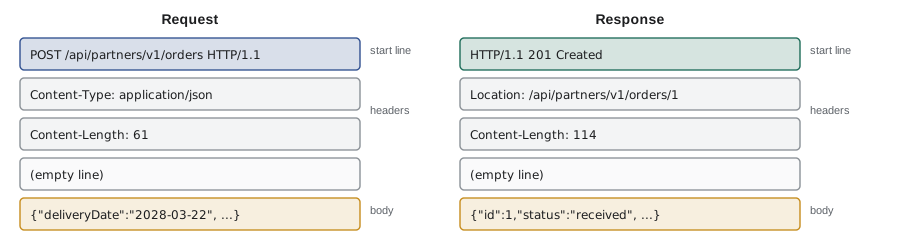
The example parses a raw request into the parts a server works with. Node's own parser is written in C and far stricter, but the result has the same shape.
const raw = [
  'POST /api/partners/v1/orders?dryRun=1 HTTP/1.1',
  'Host: partners.riverside-food-hub.example',
  'Content-Type: application/json',
  'X-Partner-Key: demo-key',
  '',
  '{"deliveryDate":"2028-03-22","lines":[{"item":"soup","trays":4}]}',
].join('\r\n');

function parseRequest(text) {
  const [head, body] = text.split('\r\n\r\n');
  const [requestLine, ...headerLines] = head.split('\r\n');
  const [method, target, version] = requestLine.split(' ');
  const headers = {};
  for (const line of headerLines) {
    const i = line.indexOf(':');
    headers[line.slice(0, i).toLowerCase()] = line.slice(i + 1).trim();
  }
  const url = new URL(target, 'http://' + headers.host);
  return { method, path: url.pathname, query: Object.fromEntries(url.searchParams), version, headers, body };
}

const req = parseRequest(raw);
console.log(req.method, req.path, req.query);
console.log(req.headers['content-type'], '|', req.headers['x-partner-key']);
console.log(JSON.parse(req.body).lines[0]);POST /api/partners/v1/orders { dryRun: "1" }
application/json | demo-key
{ item: "soup", trays: 4 }What this code does
The raw text uses carriage return and line feed at the end of each line, as HTTP requires, and an empty line between the headers and the body. The parser splits off the request line, turns each header into a property with a lower-case name, and uses URL to separate the path from the query string. Node also lower-cases header names, which is why server code reads req.headers['content-type'] whatever case the client used.
The smallest server
http.createServer takes a request handler, a function that Node calls once for every request with two objects. The first, usually called req, is the request: its method, url and headers, and a stream from which the body can be read. The second, res, is the response the handler is building. server.listen(3000) asks the operating system to deliver connections on port 3000 to this program. A port is a number that identifies one listening program on a computer; web browsers use 443 for HTTPS by default, and development servers use numbers such as 3000.
import http from 'node:http';

const server = http.createServer((req, res) => {
  console.log(req.method, req.url);
  res.statusCode = 200;
  res.setHeader('Content-Type', 'text/plain; charset=utf-8');
  res.end('Partner orders service is running\n');
});

server.listen(3000, () => console.log('listening on http://localhost:3000'));
What this code does
createServer registers one function that runs for every request; here it logs the method and path, sets the status code and a header, and ends the response with a line of text. listen starts accepting connections on port 3000 and calls its callback once the server is ready. The program then keeps running, because an open server is something to wait for, until it is stopped with Ctrl+C or a signal.
$ curl -s -i http://localhost:3000/anything
HTTP/1.1 200 OK
Content-Type: text/plain; charset=utf-8
Date: Tue, 14 Mar 2028 15:02:41 GMT
Connection: keep-alive
Keep-Alive: timeout=5
Content-Length: 34

Partner orders service is running
What this code does
curl -i sends a GET request and prints the response's status line and headers as well as the body. The server answered 200 with the text it was given; Node added the Date, Connection and Keep-Alive headers and worked out Content-Length itself. Every path gets the same answer, because the handler does not look at the path yet.
curl is installed on almost every computer and is the quickest way to try a server. The options used in this course are -i to show the response headers, -X to choose the method, -H to add a header and -d to send a body. Browsers can test GET requests too, but they cannot easily send a POST with a JSON body or show all the headers.
The response object
res has several ways to build the response, and they must be used in order: status and headers first, then the body. Once the first piece of the body is written, the headers have been sent and cannot change, and trying gives the error ERR_HTTP_HEADERS_SENT, one of the most common errors in Node servers.
| Method or property | What it does |
|---|---|
| res.statusCode = 201 | Sets the status code (200 if not set) |
| res.setHeader('Content-Type', 'application/json') | Sets one header |
| res.writeHead(201, { ... }) | Sets the status and several headers at once |
| res.write(chunk) | Sends part of the body (sends the headers first) |
| res.end(data) | Sends the last part of the body and finishes the response |
| res.headersSent | True once the headers have gone |
Every request must end with res.end(). A handler that forgets it leaves the client waiting until it times out, and the connection stays open on the server. When a handler has several branches, each branch should end the response exactly once, which is why the server below returns from the handler as soon as a response has been sent.
For an API, most responses are JSON. A JSON response needs the body as a string, a Content-Type of application/json and, ideally, a Content-Length. Content-Length counts bytes, not characters: the é in Café takes 2 bytes in UTF-8, so a body's string length can be smaller than its length in bytes. In Node, Buffer.byteLength(text) gives the byte count; the example uses TextEncoder, which also works in the browser.
function jsonResponse(status, data) {
  const body = JSON.stringify(data);
  return {
    status,
    headers: {
      'Content-Type': 'application/json; charset=utf-8',
      'Content-Length': new TextEncoder().encode(body).length,
    },
    body,
  };
}

const r = jsonResponse(200, { name: 'Café Lumière', trays: 2 });
console.log(r.status, r.headers);
console.log('characters:', r.body.length, 'bytes:', r.headers['Content-Length']);200 { "Content-Type": "application/json; charset=utf-8", "Content-Length": 35 }
characters: 33 bytes: 35What this code does
jsonResponse turns any data into a response with a JSON body and the two headers a JSON API should send. TextEncoder converts the string to UTF-8 bytes, so the length counts each accented letter as 2 bytes. The difference between the character count and the byte count is exactly why Content-Length must be measured in bytes.
Reading the request body
A request body does not arrive all at once. req is a readable stream, and the body comes in chunks as the network delivers them. To get the whole body, the handler collects the chunks until the stream ends; for await (const chunk of req) does this neatly in an async function. Two safety rules apply. First, set a size limit and stop reading if a body is larger: without one, anyone could send a huge body and fill the server's memory. Second, never assume a body is valid JSON; catch the error from JSON.parse and answer 400 Bad Request.
// Collect body chunks with a size limit, as a server must.
async function collect(chunks, limit) {
  let size = 0;
  const parts = [];
  for await (const chunk of chunks) {
    size += chunk.length;
    if (size > limit) return { status: 413, error: `body over ${limit} bytes` };
    parts.push(chunk);
  }
  const text = parts.join('');
  try {
    return { status: 200, data: JSON.parse(text) };
  } catch {
    return { status: 400, error: 'body is not valid JSON' };
  }
}

async function* arrive(...pieces) { for (const p of pieces) yield p; }

const r1 = await collect(arrive('{"deliveryDate":', '"2028-03-22"}'), 100);
const r2 = await collect(arrive('{"lines":', ' [oops'), 100);
const r3 = await collect(arrive('x'.repeat(60), 'x'.repeat(60)), 100);
console.log(r1); console.log(r2); console.log(r3);{ status: 200, data: { deliveryDate: "2028-03-22" } }
{ status: 400, error: "body is not valid JSON" }
{ status: 413, error: "body over 100 bytes" }What this code does
arrive is an async generator that hands over pieces one at a time, imitating how a request body comes in chunks. collect adds up the size as it goes and stops with status 413 as soon as the limit is passed, without waiting for the rest. When all the chunks have arrived it parses the text, answering 400 if the JSON is broken instead of letting the error escape.
Status 413 means Content Too Large and 400 means Bad Request. A third check belongs before reading at all: the Content-Type header. If a client sends a form or plain text to an endpoint that expects JSON, the right answer is 415 Unsupported Media Type, which tells the client what it did wrong.
Choosing a response: routing
A real service has many routes: combinations of method and path, each with its own handler. Without a framework, the handler looks at req.method and the path and decides. The URL class splits req.url into the path and the query string. The service's first version has two routes: GET /api/partners/v1/menu lists what the kitchen offers, and POST /api/partners/v1/orders accepts an order and keeps it in memory for now.
Two status codes tell a client that its request did not match a route, and they mean different things. 404 Not Found means there is nothing at that path. 405 Method Not Allowed means the path exists but does not accept that method, and the response must include an Allow header listing the methods it does accept. The example uses a route table and gets both right.
const routes = [
  { method: 'GET', path: '/api/partners/v1/menu', name: 'list menu' },
  { method: 'POST', path: '/api/partners/v1/orders', name: 'create order' },
  { method: 'GET', path: '/api/partners/v1/orders', name: 'list orders' },
];

function route(method, path) {
  const samePath = routes.filter((r) => r.path === path);
  if (samePath.length === 0) return { status: 404 };
  const match = samePath.find((r) => r.method === method);
  if (!match) return { status: 405, allow: samePath.map((r) => r.method).join(', ') };
  return { status: 200, handler: match.name };
}

console.log(route('GET', '/api/partners/v1/menu'));
console.log(route('POST', '/api/partners/v1/orders'));
console.log(route('DELETE', '/api/partners/v1/orders'));
console.log(route('GET', '/api/partners/v1/trays'));{ status: 200, handler: "list menu" }
{ status: 200, handler: "create order" }
{ status: 405, allow: "POST, GET" }
{ status: 404 }What this code does
route first finds every route with the requested path. If there are none, the answer is 404; if some exist but none has the requested method, the answer is 405 with an Allow list built from the methods that do exist. Only when both match does it pick a handler, which is the same decision every web framework makes for each request.
The first version of the service
Mira's server puts these pieces together. It is about 60 lines, and every part of it is something a framework will later do: matching routes, parsing JSON with a limit, checking the content type, sending JSON with the right headers, setting Location on a new resource and turning errors into responses.
import http from 'node:http';

const MENU = [
  { item: 'soup', name: 'Soup of the day', servingsPerTray: 12 },
  { item: 'stew', name: 'Vegetable stew', servingsPerTray: 10 },
  { item: 'sandwiches', name: 'Sandwich platter', servingsPerTray: 12 },
];
const orders = [];

function sendJson(res, status, data, headers = {}) {
  const body = JSON.stringify(data);
  res.writeHead(status, {
    'Content-Type': 'application/json; charset=utf-8',
    'Content-Length': Buffer.byteLength(body),
    ...headers,
  });
  res.end(body);
}

async function readJson(req, limit = 10_000) {
  let size = 0;
  const chunks = [];
  for await (const chunk of req) {
    size += chunk.length;
    if (size > limit) throw Object.assign(new Error('body too large'), { status: 413 });
    chunks.push(chunk);
  }
  try {
    return JSON.parse(Buffer.concat(chunks).toString('utf8'));
  } catch {
    throw Object.assign(new Error('body is not valid JSON'), { status: 400 });
  }
}

const server = http.createServer(async (req, res) => {
  const url = new URL(req.url, 'http://localhost');
  const route = `${req.method} ${url.pathname}`;
  try {
    if (route === 'GET /api/partners/v1/menu') return sendJson(res, 200, { items: MENU });
    if (route === 'POST /api/partners/v1/orders') {
      if (!req.headers['content-type']?.startsWith('application/json')) {
        return sendJson(res, 415, { error: 'send JSON' });
      }
      const order = { id: orders.length + 1, ...(await readJson(req)), status: 'received' };
      orders.push(order);
      return sendJson(res, 201, order, { Location: `/api/partners/v1/orders/${order.id}` });
    }
    if (url.pathname === '/api/partners/v1/orders') {
      return sendJson(res, 405, { error: 'method not allowed' }, { Allow: 'POST' });
    }
    sendJson(res, 404, { error: `no route for ${route}` });
  } catch (err) {
    sendJson(res, err.status ?? 500, { error: err.status ? err.message : 'server error' });
  }
});

const port = Number(process.env.PORT ?? 3000);
server.listen(port, () => console.log(`listening on http://localhost:${port}`));
What this code does
The handler builds a route key from the method and path and returns the first matching response, so each branch sends exactly one response. readJson collects the body with a size limit and turns broken JSON into an error with status 400, and the try...catch at the end turns any thrown error into a JSON response, hiding the details of unexpected ones behind a plain server error. A successful POST answers 201 Created with a Location header pointing to the new order.
$ curl -s http://localhost:3000/api/partners/v1/menu
{"items":[{"item":"soup","name":"Soup of the day","servingsPerTray":12},{"item":"stew","name":"Vegetable stew","servingsPerTray":10},{"item":"sandwiches","name":"Sandwich platter","servingsPerTray":12}]}
$ curl -s -i -X POST http://localhost:3000/api/partners/v1/orders -H 'Content-Type: application/json' -d '{"partner":"northside","deliveryDate":"2028-03-22","lines":[{"item":"soup","trays":4}]}'
HTTP/1.1 201 Created
Content-Type: application/json; charset=utf-8
Content-Length: 114
Location: /api/partners/v1/orders/1
Date: Tue, 14 Mar 2028 15:02:41 GMT
Connection: keep-alive
Keep-Alive: timeout=5

{"id":1,"partner":"northside","deliveryDate":"2028-03-22","lines":[{"item":"soup","trays":4}],"status":"received"}
$ curl -s -X POST http://localhost:3000/api/partners/v1/orders -H 'Content-Type: application/json' -d '{"lines": [oops'
{"error":"body is not valid JSON"}
$ curl -s -i -X DELETE http://localhost:3000/api/partners/v1/orders
HTTP/1.1 405 Method Not Allowed
Content-Type: application/json; charset=utf-8
Content-Length: 30
Allow: POST
Date: Tue, 14 Mar 2028 15:02:41 GMT
Connection: keep-alive
Keep-Alive: timeout=5

{"error":"method not allowed"}
What this code does
The first request lists the menu as JSON. The second creates an order and shows the 201 status, the Location header and the stored order with its new id. The third sends broken JSON and gets a 400 with a clear message, and the fourth uses a method the path does not support and gets 405 with an Allow header.
The orders are kept in an array in memory, so they vanish when the server stops, and the data is not checked: an order for 400 trays of stew would be stored without complaint. Lessons 6 and 7 fix both. The bigger lesson is in the shape of the code. Every new route would add another if statement to one growing function, every handler would repeat the same JSON and error handling, and paths with ids, such as /orders/17, would need hand-written parsing. That is the work Express takes over in Lesson 4.
Worked problem
Is the body too large?
The service limits request bodies to 10,000 bytes. An order has a fixed part of about 70 bytes and about 30 bytes per order line. A note field of up to 500 characters was added later, and the agencies' names are in English or French, so some letters take 2 bytes. What is the largest number of lines an order can safely have?
Show solution
- Worst case for the note: 500 characters × 2 bytes = 1,000 bytes.
- Room left for lines: 10,000 − 70 − 1,000 = 8,930 bytes.
- Lines: 8,930 ÷ 30 ≈ 297.7, so at most 297 lines.
Answer: About 297 lines, far more than the 3 menu items allow. The limit is generous for real orders but still stops a client from sending megabytes; the business rule on the number of lines will be checked separately in Lesson 6.
Common mistakes
MistakeContent-Length is the length of the body string.
InsteadIt is the number of bytes. Characters outside basic ASCII take more than one byte in UTF-8.
MistakeSetting a header after res.write is fine.
InsteadHeaders are sent with the first piece of the body; after that, changing them throws ERR_HTTP_HEADERS_SENT.
MistakeReading the whole body is safe because clients send small requests.
InsteadAnyone can send a huge body. Set a limit and stop reading with 413 when it is passed.
MistakeA wrong method on an existing path should get 404.
InsteadIt should get 405 Method Not Allowed with an Allow header listing the accepted methods.
Summary and key terms
- An HTTP request has a method, a path, headers and an optional body; a response has a status code, headers and a body, and headers always travel before the body. node:http's createServer calls a handler with req and res for every request, and listen accepts connections on a port.
- The handler sets the status and headers and ends the response exactly once; JSON responses need a Content-Type and a Content-Length measured in bytes.
- Request bodies arrive as a stream of chunks and must be read with a size limit and parsed carefully, answering 413, 400 or 415 when they are too large, broken or the wrong type.
- Routing chooses a handler by method and path; a missing path gets 404 and a wrong method on an existing path gets 405 with an Allow header.
- Doing all of this by hand shows what a framework will automate.
- Request handler
- The function a server calls for every request, with the request and response objects.
- Port
- A number that identifies one listening program on a computer, such as 3000 or 443.
- Status code
- The three-digit number at the start of a response, such as 200, 201, 404 or 500.
- Content-Length
- A header giving the size of the body in bytes.
- Chunk
- One piece of a request or response body as it arrives over the network.
- Route
- A combination of method and path that a server handles in a particular way.
- 404 Not Found
- The response when there is nothing at the requested path.
- 405 Method Not Allowed
- The response when the path exists but does not accept the method; it includes an Allow header.
- 413 Content Too Large
- The response when a request body is larger than the server accepts.
- curl
- A command-line program for sending HTTP requests and showing responses.
Practice problems
Work each problem on paper first, then reveal the answer to check.
What two objects does Node pass to a request handler?
Show answer
The request (req) and the response (res).
Why must headers be set before the body is written?
Show answer
Because they are sent first; once body data has been written the headers are gone.
Why does a body reader need a size limit?
Show answer
Without one, a client could send a huge body and use up the server's memory.
What is the difference between 404 and 405?
Show answer
404 means the path does not exist; 405 means the path exists but not with that method.
Which header tells a client where a newly created order can be found?
Show answer
Location.
Try it yourself
Write a response by hand
Complete formatResponse(status, reason, headers, body) so that it returns the text of an HTTP/1.1 response: the status line HTTP/1.1 STATUS REASON, then one Name: value line per header, then a Content-Length line with the body's length in bytes, then an empty line and the body.
Join the lines with \r\n. The example prints the result with each \r\n shown as | so you can see the line ends.
function formatResponse(status, reason, headers, body) {
  return '';
}

const text = formatResponse(201, 'Created', { 'Content-Type': 'application/json', Location: '/orders/7' }, '{"id":7,"note":"Merci, Café"}');
console.log(text.replaceAll('\r\n', '|'));
Try it yourself
Check a JSON request
Complete checkRequest(req, limit). req has method, headers (lower-case names) and body (a string). The function returns a status code: 415 if content-type does not start with application/json, 413 if the body is longer than limit bytes, 400 if the body is not valid JSON, and 200 otherwise.
Make the checks in that order: content type, then size, then JSON.
function checkRequest(req, limit) {
  return 200;
}

const json = { 'content-type': 'application/json; charset=utf-8' };
console.log(checkRequest({ method: 'POST', headers: json, body: '{"trays":4}' }, 100));
console.log(checkRequest({ method: 'POST', headers: { 'content-type': 'text/plain' }, body: 'four trays' }, 100));
console.log(checkRequest({ method: 'POST', headers: json, body: '{"note":"' + 'é'.repeat(50) + '"}' }, 100));
console.log(checkRequest({ method: 'POST', headers: json, body: '{"trays":' }, 100));
console.log(checkRequest({ method: 'POST', headers: {}, body: '{}' }, 100));
Lesson quiz · 5 questions
Score 60% or more to complete this lesson.
Create a free account to save your progress, take quizzes and earn a certificate.