
JS-230 · Lesson 7 of 12 · 35 min
Connecting to a database
▶ Video coming soon A video version of this lesson is on the way.
On Tuesday, March 28, Theo sets up the partner service's place in the Food Hub's managed PostgreSQL database: a separate schema called partner_orders and a database role, partner_app, that can use only that schema. "Your service cannot read a single volunteer's name," he tells Mira, "and my application cannot change your orders. If either of us has a bug, it stays in its own room." Mira brings the design she sketched with Rosa, and Gareth adds one requirement: "Two agencies will one day order the last trays for the same Wednesday at the same second. I want to see how your code stops that."
This lesson connects the service to a database. It starts with the tables, written as a migration in SQL from WEB-201. It shows how to connect from Node with the pg driver and a connection pool, how to send queries with parameters so that no input can change the SQL, and how to group statements in a transaction that either completes or leaves nothing behind. It solves Gareth's race with a row lock, and puts all database code behind a repository so the rest of the service does not care where the data lives. For local development and tests, the same ideas run on node:sqlite, the database built into Node.
The tables
The design follows WEB-201's rules: one table per kind of thing, a primary key on each, foreign keys between them, and checks in the database for rules that must never be broken whatever program writes the data. Agencies are partners, each order belongs to one partner and one delivery day, and each order has up to three lines. The delivery_days table holds the days the kitchen delivers on and each day's capacity, which Rosa can lower before a holiday.
-- migrations/001_create_partner_orders.sql
CREATE SCHEMA partner_orders;
SET search_path TO partner_orders;

CREATE TABLE partners (
  id          serial PRIMARY KEY,
  slug        text NOT NULL UNIQUE,
  name        text NOT NULL,
  role        text NOT NULL DEFAULT 'partner' CHECK (role IN ('partner', 'kitchen')),
  key_prefix  char(8) NOT NULL UNIQUE,
  key_hash    char(64) NOT NULL,
  active      boolean NOT NULL DEFAULT true
);

CREATE TABLE delivery_days (
  delivery_date  date PRIMARY KEY,
  capacity       integer NOT NULL DEFAULT 40 CHECK (capacity >= 0)
);

CREATE TABLE orders (
  id              serial PRIMARY KEY,
  partner_id      integer NOT NULL REFERENCES partners (id),
  delivery_date   date NOT NULL REFERENCES delivery_days (delivery_date),
  status          text NOT NULL DEFAULT 'received' CHECK (status IN ('received', 'withdrawn', 'delivered')),
  note            text CHECK (length(note) <= 500),
  idempotency_key text,
  created_at      timestamptz NOT NULL DEFAULT now(),
  updated_at      timestamptz NOT NULL DEFAULT now(),
  UNIQUE (partner_id, idempotency_key)
);

CREATE TABLE order_lines (
  order_id  integer NOT NULL REFERENCES orders (id) ON DELETE CASCADE,
  item      text NOT NULL CHECK (item IN ('soup', 'stew', 'sandwiches')),
  trays     integer NOT NULL CHECK (trays BETWEEN 1 AND 10),
  PRIMARY KEY (order_id, item)
);

CREATE INDEX orders_by_day ON orders (delivery_date) WHERE status = 'received';
What this code does
The migration creates the schema and four tables, with foreign keys linking orders to partners and delivery days and lines to orders. CHECK constraints repeat the most important rules from the validation layer, such as 1 to 10 trays and the three items, so even a bug in the service cannot store impossible values. The unique constraint on partner and idempotency key prepares for Lesson 8, and the partial index speeds up the capacity question, which only counts orders that have not been withdrawn.
A migration is a numbered file of SQL that changes the database from one version to the next. Migrations live in the repository with the code, run in order, and are recorded in a table so each runs only once. Theo runs them as part of each deployment with the migration role from WEB-201, never with partner_app, which can read and write rows but cannot change tables.
Connecting from Node
The pg package (also called node-postgres) is the standard PostgreSQL driver for Node. A program does not open a new connection for each query: opening one takes a network round trip, a TLS handshake and a login, often tens of milliseconds. Instead it creates a connection pool, a small set of open connections that queries borrow and return. The pool opens connections as needed up to its maximum and queues queries when all are busy.
// src/db.js
import pg from 'pg';

export const pool = new pg.Pool({
  connectionString: process.env.DATABASE_URL, // read from the environment (Lesson 9)
  max: 10,                                      // at most 10 connections at once
  idleTimeoutMillis: 30_000,
  ssl: { rejectUnauthorized: true },
});

// src/orders-repo.js
import { pool } from './db.js';

export async function listForPartner(partnerId, from, to) {
  const { rows } = await pool.query(
    `SELECT o.id, o.delivery_date, o.status, o.note,
            json_agg(json_build_object('item', l.item, 'trays', l.trays) ORDER BY l.item) AS lines
       FROM orders o JOIN order_lines l ON l.order_id = o.id
      WHERE o.partner_id = $1 AND o.delivery_date BETWEEN $2 AND $3
      GROUP BY o.id
      ORDER BY o.delivery_date, o.id`,
    [partnerId, from, to],
  );
  return rows;
}
What this code does
The pool is created once, when the module is first imported, with the connection details from the environment, a limit of 10 connections and TLS with certificate checking, which Theo's managed database requires. pool.query borrows a connection, runs one statement and gives it back. The SQL text has three numbered placeholders, written as a dollar sign and a number, and the values are passed separately in an array, which is how every query in the service is written.
Rows come back as plain objects whose keys are the column names, so the JavaScript code reads row.delivery_date. PostgreSQL types are converted to JavaScript types: integer to number, boolean to boolean, text to string, timestamptz to Date and json to objects. Two conversions need care. A date column becomes a Date at local midnight, which can shift the day in some time zones, so the service tells pg to return dates as strings. And bigint and numeric come back as strings, because they can hold values too large for a JavaScript number exactly.
Parameters, not string building
In WEB-201, Theo found a nine-line PHP newsletter script from 2014 that built its SQL by gluing the visitor's input into the query text. That is the classic route to SQL injection: if the input contains SQL, the database runs it. The fix is the same in every language: send the SQL text and the values separately, so the database treats the values as data, never as code. The example shows what happens to the query text both ways.
const evil = "2028-03-22' OR '1'='1";

// Wrong: the input becomes part of the SQL text.
const glued = `SELECT * FROM orders WHERE partner_id = 3 AND delivery_date = '${evil}'`;
console.log('glued:', glued);

// Right: the text has a placeholder and the value travels on its own.
const query = { text: 'SELECT * FROM orders WHERE partner_id = $1 AND delivery_date = $2', values: [3, evil] };
console.log('text:  ', query.text);
console.log('values:', query.values);glued: SELECT * FROM orders WHERE partner_id = 3 AND delivery_date = '2028-03-22' OR '1'='1' text: SELECT * FROM orders WHERE partner_id = $1 AND delivery_date = $2 values: [ 3, "2028-03-22' OR '1'='1" ]
What this code does
In the glued version, the quote in the input closes the date string early, and OR '1'='1' makes the condition true for every row, so Northside would see every agency's orders. With parameters, the SQL text never changes: the database receives the whole input as one value for the second placeholder, finds that it is not a valid date and refuses the query. No escaping by hand is needed, and none should be attempted.
Parameters can replace values but not names: a table or column name, or a sort direction, cannot be a placeholder. When a route lets the client choose a sort order, the service maps the client's choice through an allowlist of fixed SQL fragments, as WEB-201 showed with its Java example, so only strings written by the developer ever reach the SQL text.
Writing text and values side by side becomes error-prone as queries grow. A tagged template can build both from one template literal: each embedded expression becomes a numbered placeholder and its value goes into the values array. Libraries such as postgres.js and Slonik work this way; the example builds a small version.
function sql(strings, ...values) {
  let text = strings[0];
  values.forEach((v, i) => { text += `$${i + 1}` + strings[i + 1]; });
  return { text, values };
}

const partnerId = 3;
const from = '2028-03-20';
const to = "2028-03-31'; DROP TABLE orders; --";
const q = sql`SELECT id, delivery_date FROM orders
WHERE partner_id = ${partnerId} AND delivery_date BETWEEN ${from} AND ${to}`;
console.log(q.text);
console.log(q.values);SELECT id, delivery_date FROM orders WHERE partner_id = $1 AND delivery_date BETWEEN $2 AND $3 [ 3, "2028-03-20", "2028-03-31'; DROP TABLE orders; --" ]
What this code does
A tag function receives the fixed parts of the template as an array of strings and the embedded values as separate arguments. sql joins the fixed parts with numbered placeholders in place of each value and collects the values in order, so the dangerous text in to stays a value and never becomes SQL. The result has exactly the shape pool.query expects.
Transactions
Creating an order takes several statements: check the day's capacity, insert the order, insert each line. If the service crashed after inserting the order but before its lines, the database would hold an order with no lines. A transaction groups statements so that they succeed or fail together: BEGIN starts it, COMMIT makes all its changes permanent at once, and ROLLBACK, or any failure before COMMIT, undoes them all. Other connections do not see the changes until the commit.
With a pool, a transaction must run on one connection from beginning to end, because BEGIN and COMMIT belong to a connection, not to the database as a whole. The code takes a client from the pool with pool.connect(), runs every statement on that client and always gives it back with client.release(), in a finally block so that an error cannot leak the connection.
Two agencies, one Wednesday
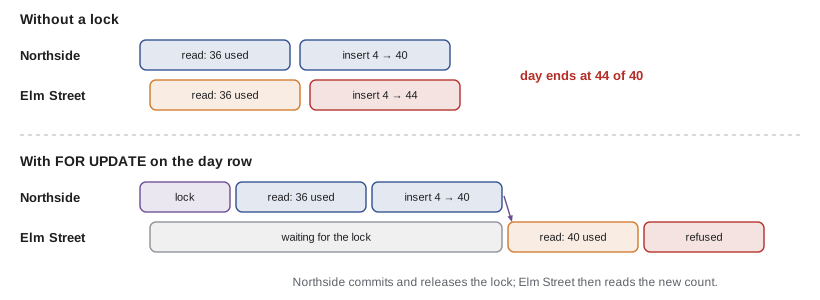
Gareth's race is real. Suppose Wednesday has 4 trays left. Northside and Elm Street both ask for 4 trays at the same moment. Each request checks the capacity, sees 4 left, and inserts its order. Both succeed, and the kitchen is 4 trays over. The checks are correct one at a time but wrong together, because between one request's check and its insert, the other request did the same. The example imitates two requests whose database calls take a little time.
let used = 36;           // trays already ordered for Wednesday; capacity is 40
const wait = (ms) => new Promise((r) => setTimeout(r, ms));

async function order(name, trays, lock) {
  const release = lock ? await lock.acquire() : null;
  try {
    await wait(5);                          // SELECT ... capacity and used trays
    const left = 40 - used;
    if (trays > left) return console.log(`${name}: refused, ${left} left`);
    await wait(5);                          // INSERT the order and its lines
    used += trays;
    console.log(`${name}: accepted, now ${used} of 40`);
  } finally {
    release?.();
  }
}

// A lock: each caller waits for the one before it, then gets its own release function.
function createLock() {
  let tail = Promise.resolve();
  return {
    acquire() {
      let release;
      const done = new Promise((r) => { release = r; });
      const ready = tail.then(() => release);
      tail = done;
      return ready;
    },
  };
}

console.log('without a lock:');
await Promise.all([order('Northside', 4), order('Elm Street', 4)]);
used = 36;
console.log('with a lock on the day:');
const lock = createLock();
await Promise.all([order('Northside', 4, lock), order('Elm Street', 4, lock)]);without a lock: Northside: accepted, now 40 of 40 Elm Street: accepted, now 44 of 40 with a lock on the day: Northside: accepted, now 40 of 40 Elm Street: refused, 0 left
What this code does
Without a lock, both requests read the same count during their first wait, both see 4 trays left and both insert, so the day ends at 44 of 40. With a lock, the second request waits at acquire until the first has finished and called its release function, so it reads the updated count and is refused. In PostgreSQL, SELECT ... FOR UPDATE on the day's row plays the part of the lock, held until the transaction commits or rolls back.
In the database, the lock is a row lock. Inside a transaction, a SELECT of that day's row from delivery_days with FOR UPDATE at the end locks the row. Any other transaction that asks to lock the same row waits until the first commits or rolls back, then reads the new state. Orders for different days lock different rows and do not wait for each other. This is why the delivery_days table exists even though it has only two columns: it gives each day one row to lock.
// src/orders-repo.js (continued)
import { RuleError } from './errors.js';

export async function create(partnerId, { deliveryDate, lines, note }) {
  const client = await pool.connect();
  try {
    await client.query('BEGIN');
    // Lock this delivery day's row so two orders for the same day are checked one at a time.
    const day = await client.query(
      'SELECT capacity FROM delivery_days WHERE delivery_date = $1 FOR UPDATE', [deliveryDate]);
    if (day.rowCount === 0) throw new RuleError(`The kitchen does not deliver on ${deliveryDate}`);

    const used = await client.query(
      `SELECT coalesce(sum(l.trays), 0)::int AS trays
         FROM orders o JOIN order_lines l ON l.order_id = o.id
        WHERE o.delivery_date = $1 AND o.status = 'received'`, [deliveryDate]);
    const wanted = lines.reduce((sum, l) => sum + l.trays, 0);
    const left = day.rows[0].capacity - used.rows[0].trays;
    if (wanted > left) throw new RuleError(`${deliveryDate} has ${left} trays left`);

    const order = await client.query(
      'INSERT INTO orders (partner_id, delivery_date, note) VALUES ($1, $2, $3) RETURNING id, status',
      [partnerId, deliveryDate, note ?? null]);
    for (const l of lines) {
      await client.query('INSERT INTO order_lines (order_id, item, trays) VALUES ($1, $2, $3)',
        [order.rows[0].id, l.item, l.trays]);
    }
    await client.query('COMMIT');
    return { id: order.rows[0].id, deliveryDate, lines, note, status: order.rows[0].status };
  } catch (err) {
    await client.query('ROLLBACK');
    throw err;
  } finally {
    client.release(); // always give the connection back to the pool
  }
}
What this code does
create takes a client from the pool, starts a transaction and locks the delivery day's row with FOR UPDATE, so a second order for the same day waits here. It adds up the trays already ordered, refuses with a RuleError if the new order would pass the capacity and otherwise inserts the order and its lines. Any error rolls the whole transaction back, and the finally block returns the connection to the pool in every case.
The repository
All the SQL lives in one module, orders-repo.js, which exports functions such as create, get, listForPartner and listForDay. Route handlers call those functions and never see SQL or the pool. This is the repository pattern: a layer that hides how and where data is stored behind functions named after what the service needs. It keeps handlers short, puts every query where it can be reviewed together, and makes testing easier, because tests can replace the repository with an in-memory one that has the same functions.
function createMemoryRepo(capacity = 40) {
  const orders = [];
  let nextId = 1;
  const used = (date) => orders.filter((o) => o.deliveryDate === date && o.status === 'received')
    .reduce((sum, o) => sum + o.lines.reduce((s, l) => s + l.trays, 0), 0);
  return {
    async create(partnerId, { deliveryDate, lines }) {
      const wanted = lines.reduce((s, l) => s + l.trays, 0);
      const left = capacity - used(deliveryDate);
      if (wanted > left) throw Object.assign(new Error(`${deliveryDate} has ${left} trays left`), { status: 409 });
      const order = { id: nextId++, partnerId, deliveryDate, lines, status: 'received' };
      orders.push(order);
      return structuredClone(order);
    },
    async get(partnerId, id) {
      const o = orders.find((x) => x.id === id && x.partnerId === partnerId);
      return o ? structuredClone(o) : null;
    },
    async listForDay(date) { return orders.filter((o) => o.deliveryDate === date).map((o) => structuredClone(o)); },
  };
}

const repo = createMemoryRepo();
const a = await repo.create(1, { deliveryDate: '2028-03-22', lines: [{ item: 'soup', trays: 10 }, { item: 'stew', trays: 10 }] });
await repo.create(2, { deliveryDate: '2028-03-22', lines: [{ item: 'soup', trays: 10 }, { item: 'sandwiches', trays: 8 }] });
console.log('order', a.id, 'for partner 1:', (await repo.get(1, a.id)).lines.length, 'lines');
console.log('partner 2 asking for it:', await repo.get(2, a.id));
try {
  await repo.create(3, { deliveryDate: '2028-03-22', lines: [{ item: 'stew', trays: 4 }] });
} catch (err) {
  console.log(err.status, err.message);
}
console.log((await repo.listForDay('2028-03-22')).map((o) => o.partnerId));order 1 for partner 1: 2 lines partner 2 asking for it: null 409 2028-03-22 has 2 trays left [ 1, 2 ]
What this code does
createMemoryRepo returns an object with the same async functions as the PostgreSQL repository, backed by an array. It applies the same capacity rule and returns copies made with structuredClone, so callers cannot change the stored orders by accident, just as rows from a database are fresh objects. get only finds an order that belongs to the partner asking, so a different partner gets null, which the route turns into a 404.
Because a single JavaScript thread runs each function to its end between awaits, the in-memory version has no race in its capacity check. That is a reason to test the real locking against a real database too, which Lesson 10 does with a test database.
A database built into Node
Node 22.5 added node:sqlite, a built-in module for SQLite, the small database that keeps everything in one file or in memory. It needs no server and no package, which makes it handy for scripts, local development and fast tests. Since Node 25.7 it is a release candidate, and in Node 26.11 its classes were renamed Database and Statement, with the old names DatabaseSync and StatementSync kept as aliases. The example below uses DatabaseSync, which works in both. Its functions are synchronous, which is fine for an in-memory database but would block the server for a file on a slow disk.
import { DatabaseSync } from 'node:sqlite';

const db = new DatabaseSync(':memory:');
db.exec(`
  CREATE TABLE delivery_days (delivery_date TEXT PRIMARY KEY, capacity INTEGER NOT NULL DEFAULT 40);
  CREATE TABLE orders (id INTEGER PRIMARY KEY, partner TEXT NOT NULL, delivery_date TEXT NOT NULL REFERENCES delivery_days);
  CREATE TABLE order_lines (order_id INTEGER REFERENCES orders, item TEXT, trays INTEGER CHECK (trays BETWEEN 1 AND 10));
  INSERT INTO delivery_days (delivery_date) VALUES ('2028-03-22'), ('2028-03-24');
`);

const insertOrder = db.prepare('INSERT INTO orders (partner, delivery_date) VALUES (?, ?)');
const insertLine = db.prepare('INSERT INTO order_lines (order_id, item, trays) VALUES (?, ?, ?)');
const usedOn = db.prepare(`SELECT coalesce(sum(trays), 0) AS trays FROM order_lines
                           JOIN orders ON orders.id = order_id WHERE delivery_date = ?`);

function create(partner, date, lines) {
  db.exec('BEGIN');
  try {
    const left = 40 - usedOn.get(date).trays;
    const wanted = lines.reduce((s, l) => s + l.trays, 0);
    if (wanted > left) throw new Error(`${date} has ${left} trays left`);
    const { lastInsertRowid: id } = insertOrder.run(partner, date);
    for (const l of lines) insertLine.run(id, l.item, l.trays);
    db.exec('COMMIT');
    return id;
  } catch (err) {
    db.exec('ROLLBACK');
    throw err;
  }
}

console.log('order', create('northside', '2028-03-22', [{ item: 'soup', trays: 10 }, { item: 'stew', trays: 8 }]));
console.log('order', create('elm-seniors', '2028-03-22', [{ item: 'soup', trays: 10 }, { item: 'sandwiches', trays: 10 }]));
try {
  create('westview', '2028-03-22', [{ item: 'stew', trays: 4 }]);
} catch (err) {
  console.log('refused:', err.message);
}
try {
  create('westview', '2028-03-24', [{ item: 'soup', trays: 3 }, { item: 'stew', trays: 11 }]);
} catch (err) {
  console.log('refused:', err.message);
}
console.log(db.prepare('SELECT delivery_date, count(*) AS orders FROM orders GROUP BY delivery_date').all().map((r) => ({ ...r })));
console.log({ ...db.prepare('SELECT count(*) AS lines FROM order_lines').get() });
What this code does
The example creates an in-memory database, the three tables it needs and two delivery days. prepare compiles each SQL statement once, with ? placeholders for the values, and run, get and all execute it. create wraps the capacity check and the inserts in BEGIN and COMMIT, so the refused orders leave nothing behind: the third breaks the capacity rule in JavaScript and the fourth breaks the trays CHECK in the database, after its first line was already inserted, and ROLLBACK removes that line too.
$ node local-db.mjs
order 1
order 2
refused: 2028-03-22 has 2 trays left
refused: CHECK constraint failed: trays BETWEEN 1 AND 10
[ { delivery_date: '2028-03-22', orders: 2 } ]
{ lines: 4 }
SQLite and PostgreSQL speak slightly different SQL: SQLite uses ? placeholders and has no FOR UPDATE, because it locks the whole database for each write transaction. The service therefore uses SQLite only for quick unit tests of the repository's logic and runs its integration tests against PostgreSQL, the database it uses in production.
Looking after the pool
A few rules keep a pool healthy. Every connection taken with pool.connect() must be released, or the pool slowly runs out and every request waits forever. Long transactions hold locks and connections, so a transaction contains only database statements, never a request to another server or a wait for a person. The pool's maximum must fit the database: Theo's managed PostgreSQL allows 100 connections in total, his application uses up to 40, and the partner service gets 10. When the service shuts down, it calls pool.end() so the database is not left with connections that nobody will close.
Worked problem
How long does the second order wait?
Two orders for the same Wednesday arrive 2 ms apart. Each transaction takes a connection (0.5 ms), locks the day's row, runs the capacity query (3 ms), inserts the order and two lines (3 statements at 1.5 ms each) and commits (2 ms). How long does the second order wait for the lock, and how long does it take in total from its arrival?
Show solution
- First transaction from its start: 0.5 + 3 + 3 × 1.5 + 2 = 10 ms. It takes the lock at 0.5 ms and releases it at the commit, 10 ms after it started.
- The second arrives at 2 ms and asks for the lock at 2 + 0.5 = 2.5 ms, so it waits from 2.5 ms until 10 ms: 7.5 ms.
- It then runs its own 3 + 4.5 + 2 = 9.5 ms of work, finishing at 10 + 9.5 = 19.5 ms, which is 17.5 ms after it arrived.
Answer: It waits 7.5 ms and finishes 17.5 ms after it arrived, against 10 ms without contention. Short transactions keep lock waits short; orders for different days never wait for each other at all.
Common mistakes
MistakeGluing input into SQL is safe if the input has been validated.
InsteadAlways use parameters. Validation can have gaps; parameters make the values data by design.
Mistakepool.query('BEGIN') starts a transaction for the following pool.query calls.
InsteadEach pool.query may use a different connection. Take one client with pool.connect() for the whole transaction.
MistakeChecking capacity and then inserting is safe because each step is correct.
InsteadTwo requests can check at the same time. Lock the day's row with FOR UPDATE inside the transaction.
MistakeA connection taken with pool.connect() is returned automatically.
InsteadIt must be released with client.release(), in a finally block.
Summary and key terms
- The partner service keeps its data in its own PostgreSQL schema with its own role, and its tables are created by numbered migrations whose CHECK and foreign key constraints repeat the most important rules.
- The pg driver talks to PostgreSQL through a connection pool, which keeps a few connections open and lends them to queries.
- Every query sends its SQL text with numbered placeholders and its values separately, which prevents SQL injection; names and sort orders come from an allowlist.
- A transaction groups statements so they succeed or fail together and must run on one client from pool.connect(), released in a finally block.
- A race between two orders for the same day is prevented by locking the day's row with SELECT ...
- FOR UPDATE.
- All SQL lives in a repository module, which can be replaced by an in-memory version with the same functions for tests. node:sqlite provides a built-in database for scripts and quick tests.
- Migration
- A numbered file of SQL that changes the database from one version to the next, run once.
- pg
- The standard PostgreSQL driver for Node.js, also called node-postgres.
- Connection pool
- A set of open database connections that queries borrow and return.
- Parameterized query
- A query whose SQL text has placeholders and whose values are sent separately.
- SQL injection
- An attack in which input changes the meaning of a query because it was glued into the SQL text.
- Transaction
- A group of statements that are committed together or rolled back together.
- Row lock
- A lock on one row, taken with SELECT ... FOR UPDATE, that makes other transactions wait for it.
- Race condition
- A bug in which the result depends on the timing of two operations that overlap.
- Repository
- A module that hides how data is stored behind functions named after what the program needs.
- node:sqlite
- The SQLite database built into Node.js since version 22.5.
Practice problems
Work each problem on paper first, then reveal the answer to check.
Why does the service use a pool instead of a new connection per query?
Show answer
Opening a connection is slow; a pool reuses a few open connections.
What does the database do with the value "2028-03-22' OR '1'='1" sent as a parameter?
Show answer
It treats the whole text as one value, finds it is not a date and refuses the query.
Why must a transaction use one client from pool.connect()?
Show answer
Because BEGIN and COMMIT belong to one connection, and pool.query may use a different one each time.
What does SELECT ... FOR UPDATE do in the create function?
Show answer
It locks the delivery day's row so other orders for that day wait until this transaction ends.
Why does the in-memory repository return copies of orders?
Show answer
So callers cannot change stored orders by accident, as with fresh rows from a database.
Try it yourself
Build a parameterized query
Complete the tag function sql so that a tagged template returns { text, values }, where each embedded value is replaced in the text by a numbered placeholder (a dollar sign followed by 1, 2, 3 and so on), and the values are collected in order.
If a value is an array, it becomes a list of placeholders in parentheses, one per element and numbered on from the ones before, and each element is added to values. This is how an IN list is written safely. The expected output is printed by the example code.
function sql(strings, ...values) {
  return { text: strings.join('?'), values };
}

const q1 = sql`SELECT * FROM orders WHERE partner_id = ${3} AND delivery_date = ${'2028-03-22'}`;
console.log(q1.text); console.log(q1.values);
const q2 = sql`SELECT * FROM order_lines WHERE order_id = ${17} AND item IN ${['soup', 'stew']} AND trays > ${2}`;
console.log(q2.text); console.log(q2.values);
Try it yourself
Trays left per day
Complete traysLeft(days, orders). days is an array of { date, capacity } and orders an array of { date, status, lines }, where each line has trays. Return an object that maps each date in days to the number of trays still available.
Only orders with status received count. Orders for dates that are not in days are ignored. A day can never show fewer than 0 trays left.
function traysLeft(days, orders) {
  return {};
}

const days = [{ date: '2028-03-20', capacity: 40 }, { date: '2028-03-22', capacity: 40 }, { date: '2028-03-24', capacity: 20 }];
const orders = [
  { date: '2028-03-22', status: 'received', lines: [{ trays: 10 }, { trays: 8 }] },
  { date: '2028-03-22', status: 'withdrawn', lines: [{ trays: 10 }] },
  { date: '2028-03-22', status: 'received', lines: [{ trays: 10 }, { trays: 8 }] },
  { date: '2028-03-24', status: 'received', lines: [{ trays: 10 }, { trays: 10 }, { trays: 4 }] },
  { date: '2028-03-27', status: 'received', lines: [{ trays: 5 }] },
];
console.log(traysLeft(days, orders));
Lesson quiz · 5 questions
Score 60% or more to complete this lesson.
Create a free account to save your progress, take quizzes and earn a certificate.