
JS-230 · Lesson 1 of 12 · 31 min
Node.js on the server
▶ Video coming soon A video version of this lesson is on the way.
On Tuesday, March 7, 2028, a week after the volunteer portal pilot started, Gareth opens a new block of sessions with a question for Mira. "For a year and a half, every line of JavaScript you have written has run in somebody's browser. What would change if it ran on a computer in a rack that nobody looks at?" Mira thinks about it. "Nobody would see the console. Nothing would reload the page if it went wrong. And it could read files and talk to the database directly." Gareth nods. "That is the whole course in three sentences."
This lesson introduces Node.js, the program that runs JavaScript outside the browser. It explains what Node is made of and why the same language behaves the same way on both sides, what is different on a server, how the event loop lets one Node process serve many people at once, and how to run scripts, read arguments and exit cleanly. It sets out the two projects of the course: a small reminders script and an order API for the community kitchen's partner agencies. By the end, Mira has run her first server-side script and knows which Node version the studio will use.
Two new jobs for JavaScript
The Food Hub's main back end is Theo's PHP application, which has run the kitchen and lunch counter online since the April 2027 pilot and now serves the volunteer portal's API under /api/v1. It owns the accounts, the volunteers, the shifts and the counter orders, and it will keep doing so. Theo has agreed that two new, small pieces of work can be written in JavaScript on Node.js and run beside his application on the same server.
The first is the reminders script. Lucy wants every volunteer with a shift tomorrow to get a short reminder the evening before. The script will run at 18:00, ask Theo's API for tomorrow's sign-ups, build one message per volunteer and leave the batch in a folder that Theo's mail queue already watches. It has no web pages and no users; it starts, does its job and stops.
The second, and the main project of the course, is the partner order API. Rosa's kitchen cooks extra soup, stew and sandwich platters for three partner agencies: Northside Family Shelter, the Elm Street Seniors Club and the Westview Youth Drop-In. Today the agencies phone or email their orders, and Rosa copies them into a spreadsheet. Twice last winter an order was copied twice, and once a phone message was never copied at all. The new service will let each agency place, change and withdraw its own orders over HTTP, enforce the kitchen's cut-off times and daily capacity, and give Rosa a list of what to cook for each delivery day.
Why not add these to the PHP application? Theo's answer at the planning meeting was practical. The partner service is small and separate: it has its own users, its own tables and its own rules, and it shares nothing with the volunteer data except the server it runs on. Writing it in JavaScript lets the studio reuse the validation and date code that already lives in the riverside-data library, and it lets Mira, who knows JavaScript best, own it. Theo will review every change, set up its database role and put it behind his web server.
| Reminders script | Partner order API | |
|---|---|---|
| Runs | Once each evening at 18:00, then stops | All the time, waiting for requests |
| Talks to | Theo's API (reads) and a folder (writes) | Three partner agencies and Rosa |
| Stores data in | JSON files | PostgreSQL (its own schema) |
| Lessons | 1 and 2 | 3 to 12 |
What Node.js is
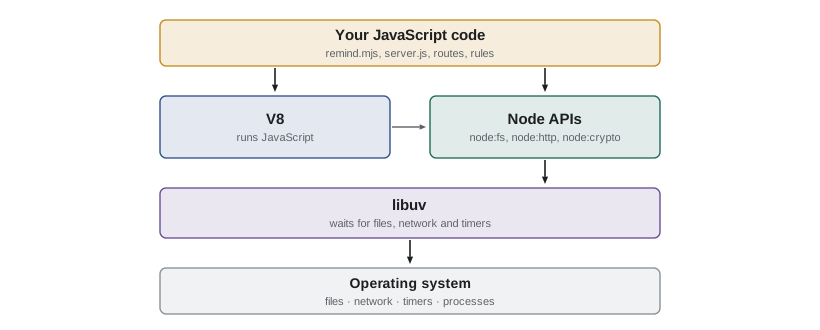
Node.js is a program you install on a computer. It combines three things. The first is V8, the JavaScript engine from Google's Chrome browser, which compiles and runs JavaScript code. The second is libuv, a library written in C that talks to the operating system on Node's behalf: it reads files, opens network connections, runs timers and waits for any of these to finish. The third is Node's own standard library, a set of built-in modules such as node:fs for files, node:http for web servers, node:path for file paths and node:crypto for hashing and random numbers.
Because V8 is the same engine Chrome uses, the language is exactly the same. Variables, functions, objects, classes, promises, async and await, modules and the standard objects such as Map, Set, JSON, Date and Intl all behave as they do in the browser. Many web APIs also exist in Node with the same names: fetch, URL, URLSearchParams, AbortController, TextEncoder, structuredClone, setTimeout and console. Code that uses only these can run on both sides, which is why the order validation functions in riverside-data can be shared between the partners' web form and the server.
What Node does not have is a page. There is no document, no window, no DOM and no localStorage, because there is no browser window to belong to. In their place, Node gives programs access to things a web page is never allowed to touch: the file system, network ports, environment variables, other programs and the computer's processor and memory.
What is different on a server
Gareth lists the differences on the whiteboard, and they shape the rest of the course.
- Nobody is watching. A browser program has a person in front of it who sees an error and reloads the page. A server program runs alone, often for weeks. Errors must be caught, logged and answered, not just shown.
- Many people share one program. A browser program serves one user. One server process serves every partner agency at once, so a slow operation blocks everyone and data held in a variable is shared by all of them.
- The server is trusted, the client is not. Anything that arrives in a request can be wrong, missing or malicious, even if the partners' own form checks it first. The server must check everything again.
- Secrets live on the server. Database passwords and API keys can be kept on the server because no visitor can read its memory or files. They must never be sent to a browser or written into the code that is shared in the repository.
- The server decides what is true. If two agencies order the last trays for Wednesday at the same moment, only the server can make sure the kitchen's capacity is not exceeded.
One process, many requests
How can one Node process serve many people if JavaScript runs one thing at a time? The answer is the same event loop Mira studied in JS-120, now working on the server. When the code asks for something slow, such as reading a file, querying the database or waiting for another server, Node hands the job to libuv and carries on running other JavaScript. When the operation finishes, its callback or promise is queued, and the event loop runs it when the current code has finished.
So while one request is waiting for PostgreSQL, Node can accept another request, check its data and send its own query. A Node server spends most of its time waiting, and waiting costs almost nothing. The danger is the opposite case: code that keeps the processor busy, such as a long loop over a huge array, blocks every request until it ends. The example simulates three requests to a server. Two wait for slow input and output, and one does a long calculation.
// Simulated work: 'waits' finish later without blocking; 'busy' blocks the loop.
let clock = 0;
const log = (msg) => console.log(`t=${String(clock).padStart(3)} ms  ${msg}`);

function handle(name, kind, ms) {
  log(`${name} arrives`);
  if (kind === 'wait') {
    setTimeout(() => { clock += ms; log(`${name} answered after waiting ${ms} ms`); }, ms);
  } else {
    clock += ms; // busy work: nothing else can run during this time
    log(`${name} answered after ${ms} ms of busy work`);
  }
}

handle('A (database query)', 'wait', 40);
handle('B (big calculation)', 'busy', 120);
handle('C (file read)', 'wait', 10);
log('all three requests accepted');t= 0 ms A (database query) arrives t= 0 ms B (big calculation) arrives t=120 ms B (big calculation) answered after 120 ms of busy work t=120 ms C (file read) arrives t=120 ms all three requests accepted t=130 ms C (file read) answered after waiting 10 ms t=170 ms A (database query) answered after waiting 40 ms
What this code does
Requests A and C start slow operations with setTimeout, so the code moves on at once and their answers come later through the event loop. Request B does its work directly, so the simulated clock jumps by 120 ms before anything else can happen, including accepting C. On a real server, every visitor would wait for B in the same way, which is why long calculations do not belong in a request handler.
The simulated times are not exact, because the example adds each delay to one shared clock, but the order of events is the point. A and C finish after B has finished, even though C needed only 10 ms, because the busy work held the only thread. In Node, the fix for a heavy calculation is to move it to a worker thread (node:worker_threads), to a separate process, or to do it ahead of time, as the season report worker in JS-120 did in the browser.
Installing Node and choosing a version
Node is released on a published schedule. Until 2026, a new major version came out every April and October, and the even-numbered versions became Long Term Support (LTS) releases with security fixes for about 30 months. In 2026 the project announced a simpler pattern starting with Node 27: one major release a year, in April, which becomes LTS in October, so every version gets long-term support and the version number matches the year of its first release.
| Version | First released | Long Term Support | End of life |
|---|---|---|---|
| Node 22 | April 2024 | October 2024 | April 2027 |
| Node 24 | May 2025 | October 2025 | April 2028 |
| Node 26 | April 2026 | October 2026 | April 2029 |
| Node 27 (planned) | April 2027 | October 2027 | April 2030 |
| Node 28 (planned) | April 2028 | October 2028 | April 2031 |
For a server, the rule is simple: run an LTS version, and upgrade before its end of life. Theo's server will run Node 27, which is the LTS line in March 2028. Mira's laptop uses a version manager, which lets her install several versions side by side and switch between them per project, and the project records its version in a file so that everyone uses the same one.
node --version
cat .nvmrcv22.22.0 27
What this code does
The first command asks the installed Node for its version, and the second shows the file in which the project records the version it expects. A version manager such as nvm or fnm reads .nvmrc and switches to that version when Mira enters the folder. The version shown is the one installed on the machine that built this course.
Running a script
A Node program is a JavaScript file run with the node command. There is no HTML page and no script tag: node app.mjs reads the file, runs its top-level code, keeps running while there is anything left to wait for, such as a timer, an open connection or a pending promise, and then exits. Gareth's first example is a reminder message builder that prints to the terminal.
const shifts = [
  { volunteer: 'Amara', area: 'Kitchen', start: '09:00', shoes: true },
  { volunteer: 'Diego', area: 'Grocery', start: '13:00', shoes: false },
];

for (const s of shifts) {
  const extra = s.shoes ? ' Please wear closed-toe shoes.' : '';
  console.log(`Hi ${s.volunteer}, see you tomorrow at ${s.start} in ${s.area}.${extra}`);
}
console.log(`Built ${shifts.length} reminders.`);
What this code does
The script is ordinary JavaScript: an array of objects, a for...of loop and template literals. Running node remind.mjs executes it from top to bottom and prints to the terminal instead of a browser console. When the last line has run and nothing is left to wait for, the process exits by itself.
$ node remind.mjs
Hi Amara, see you tomorrow at 09:00 in Kitchen. Please wear closed-toe shoes.
Hi Diego, see you tomorrow at 13:00 in Grocery.
Built 2 reminders.
The file ends in .mjs, which tells Node to treat it as an ES module, the same module system Mira used in the browser with import and export. Lesson 2 explains Node's two module systems and the package.json setting that makes .js files modules too.
Node can also run code interactively. Typing node with no file starts the REPL (read, evaluate, print loop), where each line is run as soon as it is entered and the result is printed. It is handy for checking how a function behaves, much like the browser console. Typing .exit or pressing Ctrl+D twice leaves it.
process: the running program
Every Node program can see a global object called process, which describes the running program and lets it talk to the operating system. A few of its properties are used in almost every server-side script.
| Property or method | What it gives |
|---|---|
| process.argv | The command-line arguments, as an array of strings |
| process.env | The environment variables, as an object of strings (Lesson 9) |
| process.exitCode | The code the program will exit with; 0 means success |
| process.exit(code) | Stops the program at once with that code |
| process.cwd() | The folder the program was started from |
| process.on(event, fn) | Runs fn on events such as SIGTERM (a request to stop) |
| process.version, process.platform | The Node version and the operating system |
The reminders script needs to know which date to build reminders for. Usually it is tomorrow, but Lucy sometimes wants to rebuild a batch for a particular date. The script will take an optional argument, such as --date=2028-03-09. process.argv holds the path to Node, the path to the script and then the arguments, so the script's own arguments start at index 2.
const args = process.argv.slice(2);
console.log('all arguments:', args);

const dateArg = args.find((a) => a.startsWith('--date='));
const date = dateArg ? dateArg.slice('--date='.length) : 'tomorrow';
console.log('building reminders for', date);

if (date !== 'tomorrow' && !/^\d{4}-\d{2}-\d{2}$/.test(date)) {
  console.error('error: --date must look like 2028-03-09');
  process.exitCode = 1;
}
What this code does
process.argv.slice(2) skips the paths of Node and the script and leaves only the arguments typed after the script name. The code looks for one that starts with --date= and takes the text after it, or uses tomorrow if there is none. If the value is not a date, it writes to the error stream with console.error and sets process.exitCode to 1, so the program still finishes normally but reports failure to whatever started it.
$ node args.mjs --date=2028-03-09
all arguments: [ '--date=2028-03-09' ]
building reminders for 2028-03-09
$ node args.mjs --date=soon; echo "exit code $?"
all arguments: [ '--date=soon' ]
building reminders for soon
error: --date must look like 2028-03-09
exit code 1
Exit codes matter for scripts that run unattended. The scheduler that starts the reminders script at 18:00 cannot read the messages it prints, but it can see the exit code: 0 means the job worked, anything else means it failed and someone should look. Setting process.exitCode is usually better than calling process.exit(1), because exit stops the program immediately, even if a log message or a file write has not finished.
For anything more than a flag or two, Node has a built-in parser, util.parseArgs, which handles long and short options, defaults and typed values, and reports unknown options. The plain JavaScript below does the same job for the reminders script's two options, so it can run here.
// A small argument parser: --name=value, --flag and positional words.
function parseArgs(argv, defaults) {
  const options = { ...defaults };
  const positionals = [];
  for (const arg of argv) {
    if (!arg.startsWith('--')) { positionals.push(arg); continue; }
    const [key, value] = arg.slice(2).split('=');
    if (!(key in defaults)) throw new Error(`unknown option --${key}`);
    options[key] = value === undefined ? true : value;
  }
  return { options, positionals };
}

const defaults = { date: 'tomorrow', 'dry-run': false };
console.log(parseArgs(['--date=2028-03-09'], defaults));
console.log(parseArgs(['--dry-run', 'kitchen'], defaults));
try {
  parseArgs(['--dte=2028-03-09'], defaults);
} catch (err) {
  console.log(err.message);
}{ options: { date: "2028-03-09", "dry-run": false }, positionals: [] }
{ options: { date: "tomorrow", "dry-run": true }, positionals: [ "kitchen" ] }
unknown option --dteWhat this code does
Each argument that starts with -- is split at the equals sign into a name and a value, and a name with no value becomes true, which is how flags such as --dry-run work. Words without dashes are collected as positionals. An option that is not in the defaults throws an error, so a typing mistake such as --dte fails loudly instead of being ignored.
Stopping cleanly
A long-running server must stop cleanly when asked. When Theo deploys a new version, the service manager sends the old process a signal called SIGTERM, which means please stop. If the program ignores it, the manager waits a few seconds and then kills it, possibly in the middle of saving an order. A program can listen for the signal with process.on('SIGTERM', ...), stop accepting new work, finish what it has started and then exit. Lesson 12 adds this to the order API. The example simulates the pattern with a list of jobs in progress.
// Graceful shutdown, simulated: finish jobs in progress, refuse new ones.
const inProgress = new Set(['order 41', 'order 42']);
let stopping = false;

function startJob(name) {
  if (stopping) { console.log(`refused ${name}: shutting down`); return; }
  inProgress.add(name);
  console.log(`started ${name}`);
}

function finishJob(name) {
  inProgress.delete(name);
  console.log(`finished ${name}`);
  if (stopping && inProgress.size === 0) console.log('all work finished: exit with code 0');
}

function onSigterm() {
  console.log('SIGTERM received');
  stopping = true;
}

startJob('order 43');
onSigterm();
startJob('order 44');
for (const job of ['order 41', 'order 42', 'order 43']) finishJob(job);started order 43 SIGTERM received refused order 44: shutting down finished order 41 finished order 42 finished order 43 all work finished: exit with code 0
What this code does
The program keeps a set of jobs that have started but not finished. When the stop signal arrives, it sets stopping to true, so startJob refuses anything new, but the jobs already running are allowed to finish. Only when the set is empty does it report that it can exit, which is the order a real server follows before calling server.close().
Worked problem
How many requests can wait at once?
The partner order API's database pool allows 10 connections at a time. A typical request spends 2 ms running JavaScript and 18 ms waiting for PostgreSQL. Roughly how many requests per second can one Node process handle before requests start to queue for a connection, and which limit is reached first?
Show solution
- Each request holds a database connection for about 18 ms, so one connection can serve about 1,000 ÷ 18 ≈ 55 requests per second.
- Ten connections can serve about 10 × 55 = 550 requests per second.
- Each request also needs 2 ms of the single JavaScript thread, so the thread can serve at most 1,000 ÷ 2 = 500 requests per second.
- The thread limit, 500 per second, is lower than the database limit, 550, so the thread is reached first.
Answer: About 500 requests per second, limited by the 2 ms of JavaScript per request. The partner service expects a few hundred requests a day, so one process is plenty; the calculation shows that JavaScript time, not waiting time, sets the ceiling.
Common mistakes
MistakeNode is a different language from browser JavaScript.
InsteadNode runs the same JavaScript on the same V8 engine. What differs is the environment: Node has files, ports and process, and has no DOM.
MistakeA server can trust data that its own web form has already checked.
InsteadAnyone can send any request to a server without using the form. The server checks everything again.
MistakeCalling process.exit(1) is the normal way to report an error.
Insteadprocess.exit stops at once and can cut off unfinished writes. Set process.exitCode and let the program finish.
MistakeA long calculation inside a request handler only slows down that request.
InsteadIt blocks the single JavaScript thread, so every request waits. Move heavy work out of the handler.
Summary and key terms
- Node.js runs JavaScript outside the browser by combining the V8 engine, its own built-in modules and libuv, which does the waiting on the operating system.
- The language and many web APIs are the same as in the browser; there is no DOM, but there are files, network ports, environment variables and the process object.
- A server runs unattended, serves many people at once, cannot trust what it receives and is the place where secrets and the final decisions live.
- One Node process handles many requests because slow input and output is handed to libuv and finished through the event loop, but busy calculations block every request.
- Servers should run an LTS version; from Node 27 every yearly release becomes LTS.
- Scripts read arguments from process.argv, report success or failure with exit codes and should stop cleanly when they receive SIGTERM.
- Node.js
- A program that runs JavaScript outside the browser, built on V8 and libuv.
- V8
- The JavaScript engine from Chrome that Node uses to run code.
- libuv
- The C library that performs file, network and timer operations for Node and reports when they finish.
- Event loop
- The mechanism that runs queued callbacks and promise reactions one at a time when the current code has finished.
- LTS
- Long Term Support: a Node release line that receives fixes for about 30 months and is suitable for servers.
- REPL
- Read, evaluate, print loop: the interactive prompt started by running node with no file.
- process
- The global object that describes the running program: arguments, environment, exit code and signals.
- Exit code
- The number a program returns when it ends; 0 means success and anything else means failure.
- SIGTERM
- The signal a service manager sends to ask a program to stop.
Practice problems
Work each problem on paper first, then reveal the answer to check.
Name the three parts that make up Node.js.
Show answer
The V8 engine, Node's built-in modules and libuv.
Give two browser features that Node does not have and two things Node can do that a web page cannot.
Show answer
No DOM and no localStorage, for example; Node can read and write files and listen on network ports.
Why does a busy loop in one request handler slow down every visitor?
Show answer
JavaScript runs on one thread, so while the loop runs no other request can be handled.
What is in process.argv[2] when you run node remind.mjs --date=2028-03-09?
Show answer
The string --date=2028-03-09.
Why is setting process.exitCode usually better than calling process.exit?
Show answer
It lets the program finish pending work, such as writing logs or files, before it exits.
Try it yourself
Order the event loop
The program prints three lines. Change only the order of the three statements so that it prints sync, then microtask, then timer, which is the order Node runs them in when they are scheduled at the same moment.
Then add one more line at the very end that prints end of script, and make sure the output lists it straight after sync, because all synchronous code runs before any queued work.
setTimeout(() => console.log('timer'), 0);
console.log('sync');
Promise.resolve().then(() => console.log('microtask'));
Try it yourself
Build a reminder line
Complete reminder(signup) so that it returns one reminder message. A sign-up has name, area, start (like 09:00) and shoes (true or false).
The message is Hi NAME, see you tomorrow at START in AREA. and, when shoes is true, it continues with Please wear closed-toe shoes. If name is missing or blank, use there instead, as in Hi there,.
function reminder(signup) {
  return '';
}

console.log(reminder({ name: 'Amara', area: 'Kitchen', start: '09:00', shoes: true }));
console.log(reminder({ name: 'Diego', area: 'Grocery', start: '13:00', shoes: false }));
console.log(reminder({ name: '  ', area: 'Youth garden', start: '10:00', shoes: false }));
Lesson quiz · 5 questions
Score 60% or more to complete this lesson.
Create a free account to save your progress, take quizzes and earn a certificate.