
JS-230 · Lesson 4 of 12 · 29 min
Express routes
▶ Video coming soon A video version of this lesson is on the way.
On Thursday, March 16, Theo looks at the node:http server over Mira's shoulder. "It works, and it's about to become a 600-line if statement," he says. "In PHP I use a framework for exactly this reason." Gareth agrees. "Express is the oldest and most widely used web framework for Node, and version 5 cleaned up most of what people complained about. Today we rebuild yesterday's server with it and add the routes that need ids."
This lesson introduces Express, a small framework that handles routing, request parsing and responses for Node servers. It shows how to create an app, define routes for each method, read route parameters and query strings, send JSON and status codes, and split routes into separate files with routers. It explains how Express chooses between routes, why their order matters, and the path syntax that changed in Express 5. By the end, the partner service has routes for the menu and for single orders by id, organized under one versioned prefix.
What Express does
Express is a package on npm, installed with npm install express. It is deliberately small: it does not include a database layer, templates for web pages or a fixed folder structure. What it does provide is a way to say "when a request with this method and path arrives, run this function", plus helpers on req and res that remove the repetitive work Mira did by hand in Lesson 3. Underneath, it still uses node:http, and req and res are the same objects with extra methods added.
Express 5.0 was released in September 2024, about ten years after version 4, and became the default version on npm in March 2025; the current release in 2026 is 5.2. Its main changes are that a handler that returns a rejected promise now passes the error on automatically, that the path syntax is stricter, and that several old methods were removed. Many tutorials and Stack Overflow answers still show Express 4, so Lesson 6 and this lesson point out the differences where they matter.
Express is not the only choice. Fastify, Hono and Koa are popular alternatives with similar ideas; Fastify is faster and has built-in validation, and Hono also runs outside Node. The studio chose Express because it is the most widely documented, it is maintained under the OpenJS Foundation, and the partner service needs nothing it lacks.
The app and its first routes
An Express program starts by calling express(), which returns an app. Routes are added with methods named after the HTTP methods: app.get, app.post, app.put, app.patch and app.delete. Each takes a path and a handler with the same two arguments as before, req and res. The app is then started with app.listen(port), which creates a node:http server behind the scenes.
import express from 'express';

const MENU = [
  { item: 'soup', name: 'Soup of the day', servingsPerTray: 12 },
  { item: 'stew', name: 'Vegetable stew', servingsPerTray: 10 },
  { item: 'sandwiches', name: 'Sandwich platter', servingsPerTray: 12 },
];
const orders = new Map();
let nextId = 1;

const app = express();
app.use(express.json({ limit: '10kb' }));

app.get('/api/partners/v1/menu', (req, res) => {
  res.json({ items: MENU });
});

app.get('/api/partners/v1/menu/:item', (req, res) => {
  const entry = MENU.find((m) => m.item === req.params.item);
  if (!entry) return res.status(404).json({ error: `no menu item ${req.params.item}` });
  res.json(entry);
});

app.post('/api/partners/v1/orders', (req, res) => {
  const order = { id: nextId++, ...req.body, status: 'received' };
  orders.set(order.id, order);
  res.status(201).location(`/api/partners/v1/orders/${order.id}`).json(order);
});

app.get('/api/partners/v1/orders/:id', (req, res) => {
  const order = orders.get(Number(req.params.id));
  if (!order) return res.status(404).json({ error: 'order not found' });
  res.json(order);
});

app.listen(3000, () => console.log('listening on http://localhost:3000'));
What this code does
express.json() is middleware that reads JSON bodies, with a 10 kB limit, and puts the result in req.body, replacing the readJson function from Lesson 3. Each route is one call that names a method and a path, and the handlers use res.json to send JSON with the right headers and res.status to change the status code. A path segment that starts with a colon, such as :id, is a route parameter whose value appears in req.params.
The same server that took about 60 lines with node:http now takes about 40, and most of what remains is the service's own logic. Express sets Content-Type and Content-Length, answers 404 with a short HTML page when no route matches, turns broken JSON into a 400 error and refuses bodies over the limit with 413. Lesson 6 replaces the HTML error pages with JSON.
curl -s http://localhost:3000/api/partners/v1/menu/stew
curl -s -X POST http://localhost:3000/api/partners/v1/orders -H 'Content-Type: application/json' -d '{"partner":"northside","deliveryDate":"2028-03-22","lines":[{"item":"soup","trays":4}]}'
curl -s http://localhost:3000/api/partners/v1/orders/1
curl -s http://localhost:3000/api/partners/v1/orders/99{"item":"stew","name":"Vegetable stew","servingsPerTray":10}
{"id":1,"partner":"northside","deliveryDate":"2028-03-22","lines":[{"item":"soup","trays":4}],"status":"received"}
{"id":1,"partner":"northside","deliveryDate":"2028-03-22","lines":[{"item":"soup","trays":4}],"status":"received"}
{"error":"order not found"}What this code does
The first request uses a route parameter to fetch one menu item. The second creates an order and the third reads it back by its id, and the last asks for an order that does not exist and gets the route's own 404 message. These are the responses the Express app sends for these requests.
Sending responses
Express adds methods to res that can be chained, because each returns res. The ones the service uses most are in the table. A handler must still send exactly one response; calling res.json twice throws the same ERR_HTTP_HEADERS_SENT error as before, which is why handlers that send an early error response use return res.status(404).json(...).
| Method | What it does |
|---|---|
| res.json(data) | Sends data as JSON with Content-Type application/json |
| res.status(code) | Sets the status code; chain it before json or send |
| res.sendStatus(code) | Sends just the status code with its standard text |
| res.location(url) | Sets the Location header |
| res.set(name, value) | Sets any header |
| res.send(body) | Sends a string, Buffer or object |
| res.redirect(url) | Sends a redirect (302 unless a status is given) |
The example builds a small imitation of Express's response object to show how chaining works: each method changes the response and returns the same object, so the next method can be called on it.
function createResponse() {
  const res = {
    statusCode: 200, headers: {}, body: undefined, sent: false,
    status(code) { this.statusCode = code; return this; },
    set(name, value) { this.headers[name] = value; return this; },
    location(url) { return this.set('Location', url); },
    json(data) {
      if (this.sent) throw new Error('ERR_HTTP_HEADERS_SENT: response already sent');
      this.set('Content-Type', 'application/json; charset=utf-8');
      this.body = JSON.stringify(data);
      this.sent = true;
      return this;
    },
  };
  return res;
}

const res = createResponse();
res.status(201).location('/api/partners/v1/orders/7').json({ id: 7 });
console.log(res.statusCode, res.headers, res.body);
try {
  res.json({ id: 8 });
} catch (err) {
  console.log(err.message);
}201 { Location: "/api/partners/v1/orders/7", "Content-Type": "application/json; charset=utf-8" } {"id":7}
ERR_HTTP_HEADERS_SENT: response already sentWhat this code does
Each method stores something on the response object and returns this, which is the same object, so status(201).location(...).json(...) reads as one sentence. json marks the response as sent and refuses a second call, imitating the error Node gives. Express's real res works the same way, with many more methods.
Route parameters and query strings
A route parameter is a named part of a path. In the route /api/partners/v1/orders/:id, the :id segment matches any value in that position, so /orders/17 and /orders/abc both match, and the value appears as a string in req.params.id. Parameters are always strings, so a numeric id must be converted with Number and checked: Number('abc') gives NaN, and an order lookup with NaN finds nothing, which correctly answers 404.
A query string is the part of a URL after the question mark, such as ?date=2028-03-22&item=soup. Express parses it into req.query, an object whose values are strings. In Express 5 the default parser is the simple one, so ?item=soup&item=stew gives an array for item, and nested forms such as ?filter[date]=... are not expanded. Query values come from the client, so they are as untrustworthy as a body: they may be missing, repeated or very long.
The example turns a path pattern into a matcher, the same idea Express's path-to-regexp library uses. It returns the parameter values for a matching path or null for one that does not match.
function compile(pattern) {
  const names = [];
  const source = pattern.split('/').map((part) => {
    if (part.startsWith(':')) { names.push(part.slice(1)); return '([^/]+)'; }
    return part.replace(/[.*+?^()|[\]\\]/g, '\\$&');
  }).join('/');
  const regex = new RegExp('^' + source + '/?$');
  return (path) => {
    const m = regex.exec(path);
    if (!m) return null;
    return Object.fromEntries(names.map((n, i) => [n, decodeURIComponent(m[i + 1])]));
  };
}

const order = compile('/api/partners/v1/orders/:id');
const line = compile('/api/partners/v1/orders/:id/lines/:item');
console.log(order('/api/partners/v1/orders/17'));
console.log(order('/api/partners/v1/orders/17/'));
console.log(order('/api/partners/v1/orders'));
console.log(line('/api/partners/v1/orders/17/lines/sandwiches'));
console.log(order('/api/partners/v1/orders/caf%C3%A9'));{ id: "17" }
{ id: "17" }
null
{ id: "17", item: "sandwiches" }
{ id: "café" }What this code does
compile splits the pattern into segments, turns each :name segment into a group that matches anything except a slash and escapes the characters of the fixed segments. The resulting regular expression must match the whole path, with an optional trailing slash, and the captured groups become the parameter values once decodeURIComponent has turned escaped characters back into letters. A path with too few segments does not match, so it returns null instead of a partial result.
Path syntax in Express 5
Express 5 uses version 8 of path-to-regexp, which made the path syntax stricter and clearer. Code copied from older examples can fail at start-up with an error such as Missing parameter name, so it is worth knowing the changes.
| To match | Express 4 | Express 5 |
|---|---|---|
| Any path under /files/ | '/files/*' | '/files/*rest' (the wildcard needs a name) |
| Everything, as a last route | '*' | '/*splat', or app.use without a path |
| An optional segment | '/menu/:item?' | '/menu{/:item}' |
| Several options with a regular expression | '/:kind(soup|stew)' | A RegExp object, or a check inside the handler |
A named wildcard puts its value in req.params as an array of the path segments it matched. Characters such as ?, +, ( and ) are reserved in Express 5 string paths, so a route that needs a pattern should either use a real RegExp object as its path or accept a plain parameter and check the value in the handler, which usually gives a clearer error message anyway.
Route order and first match
When a request arrives, Express tries the routes in the order they were added and runs the first one whose method and path match. Usually this does not matter, but it does when two patterns can match the same path. Rosa wants a route that lists today's orders, /orders/today. If it is added after /orders/:id, the parameter route matches first, with id equal to today, and answers 404. The fix is to add the more specific route first.
function makeApp() {
  const routes = [];
  const add = (method, pattern, name) => {
    const parts = pattern.split('/');
    routes.push({ method, name, test: (path) => {
      const p = path.split('/');
      return p.length === parts.length && parts.every((x, i) => x.startsWith(':') || x === p[i]);
    } });
  };
  const handle = (method, path) => routes.find((r) => r.method === method && r.test(path))?.name ?? '404';
  return { add, handle };
}

const wrong = makeApp();
wrong.add('GET', '/orders/:id', 'one order by id');
wrong.add('GET', '/orders/today', "today's orders");
console.log('wrong order:', wrong.handle('GET', '/orders/today'));

const right = makeApp();
right.add('GET', '/orders/today', "today's orders");
right.add('GET', '/orders/:id', 'one order by id');
console.log('right order:', right.handle('GET', '/orders/today'));
console.log('right order:', right.handle('GET', '/orders/17'));wrong order: one order by id right order: today's orders right order: one order by id
What this code does
makeApp keeps its routes in an array and handle returns the first one whose method and pattern match, just as Express does. When the parameter route is added first, it swallows /orders/today, because :id matches any value. Adding the fixed route first lets it win for that one path while every other value still reaches the parameter route.
A good habit is to order routes from the most specific to the most general, and to avoid patterns that overlap when a clearer path is possible. For the partner service, Gareth suggests making today a query rather than a path: /orders?date=2028-03-22 has no overlap at all, and it works for any day, not just today.
Routers: splitting the app into files
A whole service in one file becomes hard to read. express.Router() creates a router, a mini app with its own routes that can be mounted on a path prefix with app.use. Inside a router, paths are relative to where it is mounted, so the orders router defines / and /:id, and mounting it at /api/partners/v1/orders gives the full paths. The service puts each group of routes in its own file under src/routes and assembles them in src/app.js.
// src/routes/orders.js
import { Router } from 'express';
import * as repo from '../orders-repo.js';

export const ordersRouter = Router();

ordersRouter.get('/', (req, res) => {
  const date = req.query.date;           // ?date=2028-03-22
  res.json({ items: repo.list({ date }) });
});

ordersRouter.get('/:id', (req, res) => {
  const order = repo.get(Number(req.params.id));
  if (!order) return res.status(404).json({ error: 'order not found' });
  res.json(order);
});

ordersRouter.post('/', (req, res) => {
  const order = repo.create(req.body);
  res.status(201).location(`${req.baseUrl}/${order.id}`).json(order);
});

// src/app.js
import express from 'express';
import { ordersRouter } from './routes/orders.js';
import { menuRouter } from './routes/menu.js';

export const app = express();
app.use(express.json({ limit: '10kb' }));

const v1 = express.Router();
v1.use('/menu', menuRouter);
v1.use('/orders', ordersRouter);
app.use('/api/partners/v1', v1);
What this code does
The orders router defines its routes relative to its mount point and uses req.baseUrl, the path it was mounted on, to build the Location header without repeating the prefix. app.js creates a router for version 1 of the API, mounts the menu and orders routers on it and mounts the version router at /api/partners/v1. A future version 2 could be mounted beside it while version 1 keeps working for the agencies that use it.
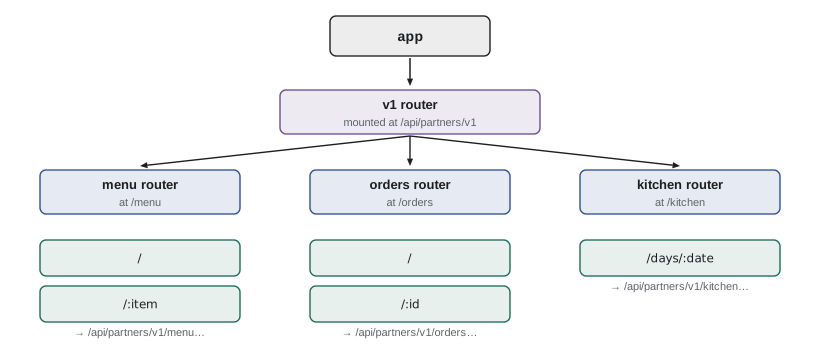
app.js exports the app instead of calling listen. A separate src/server.js imports the app and starts it. Keeping the two apart means the tests in Lesson 10 can import the app and send requests to it without opening a real port, and Lesson 12 adds start-up and shutdown handling to server.js alone.
| Path in the request | Mounted at | Router path | req.baseUrl | req.params |
|---|---|---|---|---|
| /api/partners/v1/orders | /api/partners/v1/orders | / | /api/partners/v1/orders | {} |
| /api/partners/v1/orders/17 | /api/partners/v1/orders | /:id | /api/partners/v1/orders | { id: '17' } |
| /api/partners/v1/menu/soup | /api/partners/v1/menu | /:item | /api/partners/v1/menu | { item: 'soup' } |
Worked problem
Planning the routes
Rosa's list says: agencies must be able to see the menu, place an order, list their own orders for a date range, see one order, change an order before the cut-off and withdraw one. Rosa must be able to see everything for one delivery day. Write the method and path for each, using the resource name orders.
Show solution
- See the menu: GET /api/partners/v1/menu.
- Place an order: POST /api/partners/v1/orders.
- List own orders for a range: GET /api/partners/v1/orders?from=2028-03-20&to=2028-03-31.
- See one order: GET /api/partners/v1/orders/:id.
- Change an order: PATCH /api/partners/v1/orders/:id.
- Withdraw an order: DELETE /api/partners/v1/orders/:id.
- Rosa's day sheet: GET /api/partners/v1/kitchen/days/:date, a separate route because it combines all agencies and needs kitchen permission.
Answer: Six routes on two resources plus one kitchen route. Filters go in the query string, ids in the path, and each change uses the method that describes it, a design Lesson 8 explains in full.
Common mistakes
MistakeRoute parameters are numbers when the path contains digits.
InsteadThey are always strings. Convert with Number and handle NaN.
MistakeExpress 5 accepts the same wildcard paths as Express 4.
InsteadWildcards must be named, as in /*splat, and optional segments use braces, as in /menu{/:item}.
MistakeRoute order never matters.
InsteadThe first matching route wins, so a parameter route added first can hide a more specific one.
MistakeA handler can send an error and carry on to send the normal response.
InsteadEach request gets one response. Use return res.status(404).json(...) so the handler stops.
Summary and key terms
- Express is a small framework on top of node:http that matches routes and adds helpers to req and res. express() creates an app, app.get, app.post, app.patch and app.delete add routes, and app.listen starts the server; express.json parses JSON bodies into req.body with a size limit. res.json sends JSON, res.status sets the code and res.location sets the Location header, and the methods can be chained.
- Route parameters such as :id appear as strings in req.params, and query values appear in req.query, and both must be checked.
- Express 5 needs named wildcards and uses braces for optional segments.
- Express runs the first route that matches, so specific routes go before general ones.
- Routers group related routes in separate files and are mounted on a prefix, and exporting the app separately from the code that starts it makes testing easier.
- Express
- A minimal web framework for Node.js that handles routing and adds helpers to requests and responses.
- App
- The object returned by express(), which holds routes and middleware and can listen on a port.
- Route parameter
- A named part of a route path, such as :id, whose value appears in req.params.
- Query string
- The part of a URL after the question mark, parsed by Express into req.query.
- Router
- A group of routes created with express.Router() and mounted on a path prefix.
- Mount
- To attach a router or middleware to a path prefix with app.use.
- req.baseUrl
- The path prefix a router was mounted on.
- Named wildcard
- An Express 5 pattern such as /*rest that matches the rest of a path and stores it under a name.
Practice problems
Work each problem on paper first, then reveal the answer to check.
What does express.json() put in req.body?
Show answer
The parsed JSON body of the request, or nothing if the request has no JSON body.
A request is made to /orders/abc. What is req.params.id, and what should the handler do?
Show answer
The string abc; Number gives NaN, no order is found, and the handler should answer 404.
How do you write an optional item segment after /menu in Express 5?
Show answer
/menu{/:item}.
Why should /orders/today be added before /orders/:id?
Show answer
Because Express runs the first match, and :id would match today.
Why does app.js export the app instead of calling listen?
Show answer
So tests can use the app without opening a port, and start-up code stays in one place.
Try it yourself
Match a route pattern
Complete matchPath(pattern, path). The pattern is split on /; a segment starting with : matches any non-empty segment and stores it, decoded with decodeURIComponent, under that name. Other segments must be equal.
Return an object of parameters if the whole path matches, or null if the number of segments differs or a fixed segment differs. Ignore one trailing slash on the path.
function matchPath(pattern, path) {
  return null;
}

console.log(matchPath('/orders/:id', '/orders/17'));
console.log(matchPath('/orders/:id', '/orders/17/'));
console.log(matchPath('/orders/:id/lines/:item', '/orders/17/lines/soup'));
console.log(matchPath('/orders/:id', '/orders'));
console.log(matchPath('/orders/:id', '/order/17'));
console.log(matchPath('/partners/:name', '/partners/%C3%89lise'));
Try it yourself
Mount routers
Complete mount(prefix, routes). routes is an array of [method, path] pairs written relative to a router, where / means the router's own path. Return the full paths as strings such as GET /api/partners/v1/orders/:id.
Join the prefix and the path with exactly one slash between them, and make the router path / give just the prefix, with no trailing slash.
function mount(prefix, routes) {
  return routes.map(([method, path]) => method + ' ' + prefix + path);
}

const orders = [['GET', '/'], ['POST', '/'], ['GET', '/:id'], ['PATCH', '/:id']];
console.log(mount('/api/partners/v1/orders', orders).join('\n'));
console.log(mount('/api/partners/v1/menu/', [['GET', '/'], ['GET', '/:item']]).join('\n'));
Lesson quiz · 5 questions
Score 60% or more to complete this lesson.
Create a free account to save your progress, take quizzes and earn a certificate.