
JS-110 · Lesson 6 of 12 · 27 min
Event bubbling and delegation
▶ Video coming soon A video version of this lesson is on the way.
Mira's first counter page has an Add button for each of the eight menu items, and each button has its own click listener. It works. Then Rosa asks for plus and minus buttons beside each item in the order summary, and a Remove button on each order line, and the order lines come and go as trainees add and remove dishes. Mira finds herself attaching listeners every time a line is created and worrying about removing them when it goes. "There is a better way," Gareth says, "and it comes from understanding where an event actually goes after it happens."
The session planned for Thursday, January 28, 2027, follows an event's journey through the DOM tree, which the standard calls propagation, and then uses that journey for a technique called event delegation: one listener on a container that handles events for every element inside it, including elements that do not exist yet.
An event travels through the tree
When the user clicks the word Add inside a button, the click does not happen only to the text. It happens, in a sense, to the button, to the li that contains the button, to the ul, to the section, to the body and to the whole document, because the click was inside all of them. The DOM models this by sending the event on a journey. It travels down from the window to the target, reaches the target, and then travels back up to the window. Listeners on any element along the way can respond.
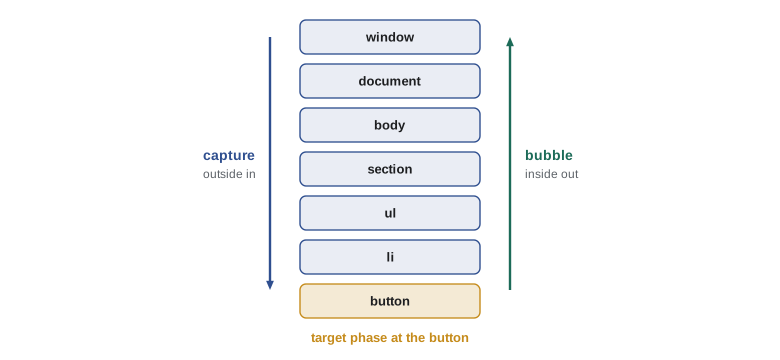
The journey has three phases. In the capture phase the event passes each ancestor from the outside in, from the window down to the target's parent. In the target phase it is at the target itself. In the bubble phase it passes each ancestor again, from the inside out, back up to the window. The path is fixed when the event is dispatched, so moving or removing elements during the journey does not change it.
By default, addEventListener registers a listener for the bubble phase (and the target phase). Passing { capture: true } registers it for the capture phase instead. Almost all everyday code uses bubbling. Capturing is useful when an outer element must see an event before anything inside it, for example to log every click on the page for analytics before individual buttons react.
const list = document.querySelector('.order-lines');
const line = list.querySelector('li');
const button = line.querySelector('button');

list.addEventListener('click', () => console.log('ul capture'), { capture: true });
list.addEventListener('click', () => console.log('ul bubble'));
line.addEventListener('click', () => console.log('li bubble'));
button.addEventListener('click', () => console.log('button'));
// clicking the button prints: ul capture, button, li bubble, ul bubble
What this code does
Four listeners are attached at three levels, one of them for the capture phase. A click on the button first passes the ul on the way down, so its capture listener runs first. Then the button's own listener runs at the target, and the bubbling listeners run on the way back up, the li before the ul.
Modelling propagation
The runner has no tree to propagate through, but the rule is mechanical enough to model. Each node keeps a link to its parent and its own lists of capture and bubble listeners. Dispatching builds the path from the target up to the root, then runs the capture listeners from the top down, the target's listeners and the bubble listeners from the bottom up.
function node(name, parent = null) { return { name, parent, capture: [], bubble: [] }; }

function dispatch(target, type) {
  const path = [];
  for (let n = target; n; n = n.parent) path.push(n);   // target first, root last
  const event = { type, target, stopped: false, stopPropagation() { this.stopped = true; } };
  for (const n of [...path].reverse().slice(0, -1)) {   // capture: root down to parent
    for (const fn of n.capture) { event.currentTarget = n; fn(event); }
    if (event.stopped) return;
  }
  for (const n of path) {                               // target, then bubble up
    for (const fn of n.bubble) { event.currentTarget = n; fn(event); }
    if (event.stopped) return;
  }
}

const doc = node('document');
const ul = node('ul', doc);
const li = node('li', ul);
const btn = node('button', li);
const say = (label) => (e) => console.log(label, '| target', e.target.name, '| current', e.currentTarget.name);

doc.capture.push(say('document capture'));
ul.bubble.push(say('ul bubble'));
li.bubble.push(say('li bubble'));
btn.bubble.push(say('button'));
doc.bubble.push(say('document bubble'));
dispatch(btn, 'click');document capture | target button | current document button | target button | current button li bubble | target button | current li ul bubble | target button | current ul document bubble | target button | current document
What this code does
The path is collected by following parent links from the button to the document. The capture loop walks that path from the top down, stopping before the target, and the second loop walks it from the target back up for the target and bubble phases. Throughout, target stays the button while currentTarget changes to whichever node's listener is running, exactly as in a browser.
Stopping propagation
A listener can call event.stopPropagation() to stop the event travelling any further: listeners on the current element still finish, but no listener on any later element in the path runs. stopImmediatePropagation() goes further and also skips the remaining listeners on the current element. Neither affects the default action; that is preventDefault's job.
function node(name, parent = null) { return { name, parent, listeners: [] }; }
function bubble(target) {
  const event = { target, stopped: false, stopPropagation() { this.stopped = true; } };
  for (let n = target; n && !event.stopped; n = n.parent) {
    for (const fn of n.listeners) fn(event, n);
  }
}

const page = node('page');
const drawer = node('order drawer', page);
const minus = node('minus button', drawer);

page.listeners.push(() => console.log('page: close any open drawer'));
drawer.listeners.push(() => console.log('drawer: note activity'));
minus.listeners.push((e) => {
  console.log('minus: quantity down');
  e.stopPropagation();
});

bubble(minus);
console.log('--- a click on the drawer background');
bubble(drawer);minus: quantity down --- a click on the drawer background drawer: note activity page: close any open drawer
What this code does
When the minus button is clicked, its listener stops propagation, so the drawer and the page never hear about the click. A click on the drawer's background is not stopped, so it bubbles up to the page, whose listener closes the drawer. This shows both the use of stopPropagation and its risk: the page's listener misses every click inside the minus button.
That risk is why Gareth discourages stopPropagation. It is a hidden side effect: whoever writes the next listener higher up the tree, for analytics, for closing menus or for a help overlay, will find that some clicks never arrive and will have to hunt for the reason. It is usually better to let events bubble and have the outer listener check where the event came from, as delegation does.
Events that do not bubble
Most events bubble, but a few do not. focus and blur fire only on the element itself; their bubbling twins are focusin and focusout. mouseenter and mouseleave do not bubble, while mouseover and mouseout do. The load event on an image does not bubble. A non-bubbling event still has a capture phase, so an outer listener registered with capture: true can still see it, although for focus the simplest choice is to listen for focusin.
| Event | Bubbles | Bubbling alternative |
|---|---|---|
| click, input, change, submit, keydown | Yes | (not needed) |
| focus, blur | No | focusin, focusout |
| mouseenter, mouseleave | No | mouseover, mouseout, pointerover, pointerout |
| load and error on images and scripts | No | Listen on the element, or use capture |
| scroll on an element | No | Listen on the element that scrolls |
Event delegation
Bubbling makes a powerful technique possible. Instead of attaching a listener to every button in a list, attach one listener to the list itself. Every click on any button inside the list bubbles up to it, and the listener uses event.target to find out which button was clicked and what it should do. This is event delegation: the container handles events on behalf of its descendants.
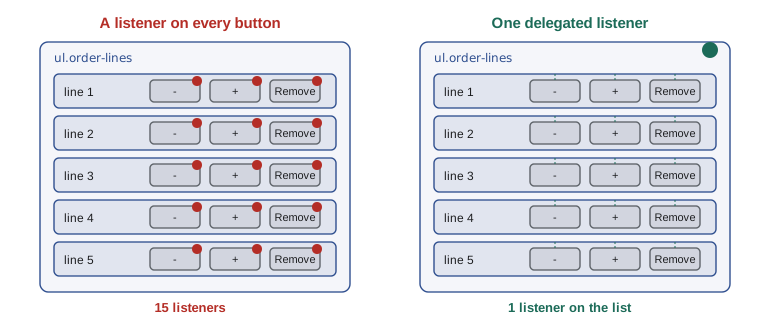
Delegation has three advantages. It uses one listener instead of dozens or hundreds. It works automatically for elements added later, because a new order line's buttons are inside the list and their clicks bubble up like any others; nothing needs attaching when a line is created or removing when it goes. And it keeps all the handling for a component in one place.
The key step is finding the element that matters. event.target is the innermost element clicked, which might be an icon or a span of text inside the button. closest from Lesson 2 walks up from the target to the nearest element with a data-action attribute. If there is none, the click was somewhere else in the list, such as the gap between lines, and the listener ignores it.
<ul class="order-lines">
<li data-code="SOUP">
<span class="name">Lentil soup</span>
<button type="button" data-action="less" aria-label="One fewer Lentil soup">−</button>
<span class="qty">2</span>
<button type="button" data-action="more" aria-label="One more Lentil soup">+</button>
<button type="button" data-action="remove">Remove</button>
</li>
</ul>What this code does
Each button says what it does in a data-action attribute, and the line says which dish it belongs to in data-code. Neither the buttons nor the line need listeners of their own. The aria-label attributes give the plus and minus symbols names that screen readers can read out.
const lines = document.querySelector('.order-lines');

lines.addEventListener('click', (event) => {
  const button = event.target.closest('[data-action]');
  if (!button || !lines.contains(button)) return;   // not one of ours
  const code = button.closest('li').dataset.code;
  handle(button.dataset.action, code);              // 'less', 'more' or 'remove'
});
What this code does
One listener on the list handles every button in every line, including lines added later. closest finds the button from wherever inside it the click landed, and the contains check makes sure the button really is inside this list rather than in some outer element that also uses data-action. The action and the dish code are then handed to a function that updates the order.
The contains check guards against a subtle case. closest keeps walking up past the list if it finds nothing inside it, so in a page where an outer section also had a data-action attribute, a click on a gap in the list could find that outer element. Checking that the list contains the result rules that out.
A table of actions
With delegation, the listener reduces every click to two strings: an action and a code. The natural next step is to look the action up in an object of functions, sometimes called a dispatch table, instead of writing a chain of if statements. Adding a new kind of button then means adding one data-action value in the HTML and one entry in the table.
const order = new Map([['SOUP', 2], ['COOKIE', 1]]);

const actions = {
  more: (code) => order.set(code, Math.min((order.get(code) ?? 0) + 1, 20)),
  less: (code) => {
    const q = (order.get(code) ?? 0) - 1;
    if (q > 0) order.set(code, q); else order.delete(code);
  },
  remove: (code) => order.delete(code),
};

function handle(action, code) {
  const fn = actions[action];
  if (!fn) return console.log('unknown action', action);
  fn(code);
  console.log(action.padEnd(7), code.padEnd(7), JSON.stringify([...order]));
}

handle('more', 'SOUP');
handle('less', 'COOKIE');
handle('more', 'TEA');
handle('remove', 'SOUP');
handle('refund', 'TEA');more SOUP [["SOUP",3],["COOKIE",1]] less COOKIE [["SOUP",3]] more TEA [["SOUP",3],["TEA",1]] remove SOUP [["TEA",1]] unknown action refund
What this code does
The order is a Map from dish code to quantity, and the actions object maps each action name to a small function that changes it. handle looks the action up and calls it, so the delegated listener never needs to know how each action works. Reducing a quantity to zero removes the line, and an unknown action is reported instead of failing silently.
Very little of this involves the DOM. The listener in the page turns a click into an action and a code; everything else is ordinary data and functions that run in the runner exactly as they will on the tablet. After each action, the page redraws the order lines from the Map, using the rendering approach from Lesson 4.
Worked problem
Tracing a delegated click
On the order line above, a trainee taps the plus sign. The plus sign is a text node inside the button with data-action="more". The delegated listener is on the ul. What are event.target, the result of closest('[data-action]'), the code and the order afterwards, if SOUP had quantity 2?
Show solution
- A click's target is always an element, so event.target is the button itself; the text node inside it cannot be a target.
- closest('[data-action]') checks the button first, finds the attribute and returns the button.
- lines.contains(button) is true, so the listener carries on. button.closest('li').dataset.code is 'SOUP'.
- handle('more', 'SOUP') raises the quantity from 2 to 3, which is under the limit of 20.
Answer: The target and the closest match are both the button, the code is SOUP and the order now has 3 soups. Had the button contained an icon element, the target would have been the icon, and closest would still have found the button.
When not to delegate
Delegation suits many similar elements in one container and elements that come and go. It is less suitable for events that do not bubble, such as focus, unless you use their bubbling versions, and for events that fire very often, such as pointermove, where a listener on a large container would run for every movement anywhere inside it. For a single, permanent element, such as the counter page's Clear order button, a direct listener is simpler and clearer.
Delegation also works best with real buttons. Because every action in Mira's markup is a button element with type="button", the delegated click listener also fires when a keyboard user presses Enter or Space on a focused button, so one listener serves mouse, touch and keyboard users alike.
Try it yourself
The path of an event
Each node has a name and a parent (or null at the root). Write phases(target), which returns an array of strings in propagation order: capture NAME for each ancestor from the root down, then target NAME, then bubble NAME for each ancestor from the parent up.
The starter prints the array for a click on a button inside an li inside a ul inside the document.
const doc = { name: 'document', parent: null };
const ul = { name: 'ul', parent: doc };
const li = { name: 'li', parent: ul };
const button = { name: 'button', parent: li };

function phases(target) {
  // return the propagation order
  return [];
}

console.log(phases(button).join('\n'));
Try it yourself
Find the delegated action
Each node has a tag, a data object for its data attributes and a parent. Write actionFor(target, container): walk up from target to the nearest node that has data.action, but stop if you reach container first. Return ACTION CODE, where the code comes from the nearest node at or above the action node that has data.code, or none if no action is found inside the container.
const section = { tag: 'section', data: { action: 'close' }, parent: null };
const list = { tag: 'ul', data: {}, parent: section };
const line = { tag: 'li', data: { code: 'SOUP' }, parent: list };
const more = { tag: 'button', data: { action: 'more' }, parent: line };
const icon = { tag: 'svg', data: {}, parent: more };
const name = { tag: 'span', data: {}, parent: line };

function actionFor(target, container) {
  // return 'ACTION CODE' or 'none'
  return 'none';
}

console.log(actionFor(icon, list));
console.log(actionFor(more, list));
console.log(actionFor(name, list));
Common mistakes
MistakeAn event happens only on the element that was clicked.
InsteadIt travels from the window down to the target and back up, and listeners on every ancestor can respond.
Mistakeevent.target in a delegated listener is the button.
InsteadIt is the innermost element clicked, which may be inside the button. Use closest to find the button.
MistakestopPropagation is a harmless way to stop a click doing two things.
InsteadIt hides the event from every listener further along the path. Prefer checking event.target in the outer listener.
Mistakefocus events can be delegated like clicks.
Insteadfocus does not bubble. Delegate focusin and focusout instead.
MistakeDelegated listeners must be attached again when new items are added.
InsteadNew items are inside the container, so their events bubble to the existing listener.
Summary and key terms
- An event travels in three phases: capture from the window down to the target's parent, the target itself, and bubbling back up to the window.
- Listeners run in the bubble phase by default and in the capture phase with capture: true. event.target stays the element where the event happened, while currentTarget is the element whose listener is running. stopPropagation stops the journey and stopImmediatePropagation also skips the remaining listeners on the current element; both hide events from other code, so use them sparingly. focus, blur, mouseenter and mouseleave do not bubble; focusin and focusout do.
- Event delegation attaches one listener to a container, finds the relevant element with closest and a data attribute, checks that the container contains it and acts; it works for elements added later.
- A dispatch table maps action names to functions.
- Delegation works best with real buttons and bubbling events.
- propagation
- The journey of an event through the DOM tree from the window to the target and back.
- capture phase
- The first phase, in which the event passes the target's ancestors from the outside in.
- target phase
- The phase in which the event is at the element where it happened.
- bubble phase
- The last phase, in which the event passes the target's ancestors from the inside out.
- bubbling
- An event travelling up from the target through its ancestors.
- stopPropagation
- A method that stops an event from reaching any further elements on its path.
- stopImmediatePropagation
- A method that also stops the remaining listeners on the current element.
- event delegation
- Handling events for many descendants with one listener on their container.
- data-action
- A data attribute naming what a button does, used by delegated listeners.
- dispatch table
- An object that maps names, such as action names, to the functions that handle them.
- focusin and focusout
- Bubbling versions of the focus and blur events.
- contains
- A method that tells whether a node is the element itself or one of its descendants.
Practice problems
Work each problem on paper first, then reveal the answer to check.
In what order do a capture listener on the ul, a bubble listener on the ul and a listener on the button run when the button is clicked?
Show answer
ul capture, then the button, then ul bubble.
Why does a delegated listener use event.target.closest('[data-action]')?
Show answer
The target may be an element inside the button, and closest walks up to the button that carries the action.
Why check list.contains(button) in a delegated listener?
Show answer
closest can walk past the list to an outer element, so the check makes sure the match is inside the list.
Which event should you delegate to react to focus moving into a form field?
Show answer
focusin, because focus does not bubble.
What does a dispatch table replace?
Show answer
A long chain of if or switch statements that pick a function by name.
Lesson quiz · 5 questions
Score 60% or more to complete this lesson.
Create a free account to save your progress, take quizzes and earn a certificate.