
JS-110 · Lesson 12 of 12 · 31 min
Capstone: an interactive menu and order page
▶ Video coming soon A video version of this lesson is on the way.
In November, Mira's tip and order calculator ran in a console at the lunch counter, and a trainee typed codes such as SOUP 2. In the capstone sessions, planned for Thursday, February 18, 2027, and the days after it, that calculator becomes what Rosa asked for in January: an order page on the counter tablet, where a trainee taps dishes, chooses a tip for the youth garden and places the order, and where the day's sales are tallied for the kitchen. Rosa plans to try it with the trainees on Tuesday, February 23, and, if the trial goes well, to use it for every lunch from Monday, March 1, 2027.
The capstone brings together every lesson in the course: the DOM tree, selecting and changing elements, creating them from templates, events and delegation, a form with radio buttons, storage, timers, accessibility and the module structure from Lesson 11. As in JavaScript Programming II, page code is shown as listings, and the logic, which is most of the program, is shown as runnable examples that use exactly the same functions the page uses.
Step 1: requirements
Gareth asks Mira to start, as always, by writing down what the page must do, in words that Rosa can check. The requirements below keep everything that worked in the November calculator and add what the tablet makes possible.
| No. | Requirement |
|---|---|
| R1 | The menu shows each dish with its name and price, grouped in tabs: Soups, Sandwiches, Drinks and Treats. |
| R2 | Each dish has an Add button; dishes marked sold out show Sold out and cannot be added. |
| R3 | The order summary lists each dish ordered with minus and plus buttons and a Remove button. Quantities stay between 1 and 20; reducing a quantity below 1 removes the line. |
| R4 | Tax is charged at 13 in 100, the Ontario HST rate, on the subtotal, as in the November calculator. |
| R5 | Tip choices of none, 10, 15 and 20 in 100 are offered as a radio group, calculated on the subtotal before tax. The default is none. |
| R6 | The subtotal, tax, tip and total update immediately and are exact to the cent. |
| R7 | Place order opens a confirmation dialog; Confirm records the order in the day's tally, shows the order number and clears the order. |
| R8 | A reload or accidental back swipe keeps the order in progress; closing the browser does not. |
| R9 | After 90 seconds without activity, a warning appears; after 120 seconds the order is cleared. |
| R10 | Everything works with a keyboard and a screen reader, and changes to the order are announced. |
Rosa reads the list in the kitchen office and adds one note: the tally must not record anyone's name, because the trainees sometimes take orders from people they know and the Food Hub does not need to know who bought lunch. Mira writes it into the design, as Lesson 8 recommended.
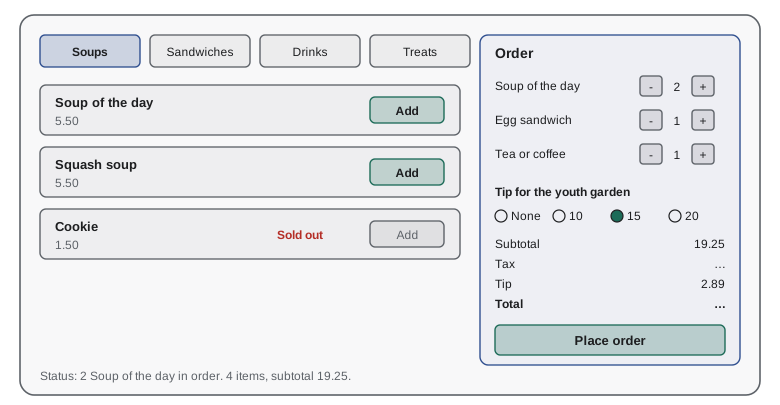
Step 2: the menu and money modules
The menu is data, as in November, with two additions: each dish has a tab, and a soldOut flag that Rosa can set from a small settings panel. Money is kept in cents and formatted only for display. These two modules have no imports and touch nothing outside themselves.
// menu.js
export const MENU = Object.freeze([
  { code: 'SOUP', name: 'Soup of the day', priceCents: 550, tab: 'Soups' },
  { code: 'EGG', name: 'Egg sandwich', priceCents: 625, tab: 'Sandwiches' },
  { code: 'WRAP', name: 'Chicken wrap', priceCents: 700, tab: 'Sandwiches' },
  { code: 'DRINK', name: 'Tea or coffee', priceCents: 200, tab: 'Drinks' },
  { code: 'COOKIE', name: 'Cookie', priceCents: 150, tab: 'Treats' },
]);
export const TABS = ['Soups', 'Sandwiches', 'Drinks', 'Treats'];
export const byCode = (code) => MENU.find((m) => m.code === code);

// money.js
export const money = (cents) => (cents / 100).toFixed(2);
What this code does
menu.js keeps the same five dishes, codes and prices as the November calculator, now with a tab for each, frozen so that no other code can change them by accident. byCode looks a dish up by its code. money.js turns a whole number of cents into a price with two decimals, and is the only place where that formatting happens.
Step 3: the order logic
order.js holds the update function and the derived totals. It is the heart of the page and the part Rosa's rules live in, so it is written and tested first. The update function follows Lesson 11: actions in, a new state out, never changing the old state. The tax rate is a constant at the top, in capitals, where the Food Hub's bookkeeper can find it, as in November.
const TAX_RATE = 0.13; // Ontario HST
const MAX_QTY = 20;
const PRICES = { SOUP: 550, EGG: 625, WRAP: 700, DRINK: 200, COOKIE: 150 };

function update(state, a) {
  const qtyOf = (code) => state.lines.find(([c]) => c === code)?.[1] ?? 0;
  const setQty = (code, qty) => {
    const rest = state.lines.filter(([c]) => c !== code);
    if (qty < 1) return { ...state, lines: rest };
    return { ...state, lines: qtyOf(code) ? state.lines.map(([c, q]) => [c, c === code ? qty : q]) : [...state.lines, [code, qty]] };
  };
  switch (a.type) {
    case 'add': case 'more': return state.soldOut.includes(a.code) ? state : setQty(a.code, Math.min(qtyOf(a.code) + 1, MAX_QTY));
    case 'less': return setQty(a.code, qtyOf(a.code) - 1);
    case 'remove': return setQty(a.code, 0);
    case 'tip': return { ...state, tipRate: a.rate };
    case 'tab': return { ...state, tab: a.tab };
    case 'clear': return { ...state, lines: [], tipRate: 0 };
    default: return state;
  }
}

function totals(state) {
  const subtotal = state.lines.reduce((s, [code, qty]) => s + qty * PRICES[code], 0);
  const tax = Math.round(subtotal * TAX_RATE);
  const tip = Math.round(subtotal * state.tipRate);
  return { subtotal, tax, tip, total: subtotal + tax + tip };
}

let s = { lines: [], tipRate: 0, soldOut: ['COOKIE'] };
for (const a of [{ type: 'add', code: 'SOUP' }, { type: 'add', code: 'SOUP' }, { type: 'add', code: 'EGG' },
                 { type: 'add', code: 'COOKIE' }, { type: 'more', code: 'EGG' }, { type: 'less', code: 'EGG' },
                 { type: 'add', code: 'DRINK' }, { type: 'tip', rate: 0.15 }]) {
  s = update(s, a);
}
console.log(JSON.stringify(s.lines), 'tip rate', s.tipRate);
console.log(JSON.stringify(totals(s)));[["SOUP",2],["EGG",1],["DRINK",1]] tip rate 0.15
{"subtotal":1925,"tax":250,"tip":289,"total":2464}What this code does
The update function handles each action by computing a new list of lines, using small helpers for the current quantity and for setting a quantity, which removes the line when the quantity falls below 1. Adding a sold-out dish returns the same state, so the cookie never reaches the order. totals derives the subtotal from the lines and then the tax and tip from the subtotal, each rounded to the nearest cent, exactly as the November calculator did.
Worked problem
Checking the totals by hand
The order is 2 Soup of the day at 5.50, 1 Egg sandwich at 6.25 and 1 Tea or coffee at 2.00, with a tip of 15 in 100 and tax at 13 in 100. Work out the subtotal, tax, tip and total in cents.
Show solution
- Subtotal: 2 × 550 + 625 + 200 = 1100 + 625 + 200 = 1925 cents.
- Tax: 1925 × 0.13 = 250.25, which rounds to 250 cents.
- Tip on the subtotal before tax: 1925 × 0.15 = 288.75, which rounds to 289 cents.
- Total: 1925 + 250 + 289 = 2464 cents.
Answer: 19.25 subtotal, 2.50 tax, 2.89 tip and 24.64 total, which matches the runnable example's output.
Step 4: the page structure
The HTML is written to work with the browser rather than against it. The tabs follow the ARIA tabs pattern with roving tabindex, the dishes and order lines come from templates, the tip is a real radio group, the status line is a live region that exists from the start, and the confirmation is a dialog element.
<main id="counter">
  <h1>Lunch counter</h1>
  <div role="tablist" aria-label="Menu sections">
    <button role="tab" data-action="tab" id="tab-soups" aria-selected="true" aria-controls="menu" tabindex="0">Soups</button>
    <button role="tab" data-action="tab" id="tab-sandwiches" aria-selected="false" aria-controls="menu" tabindex="-1">Sandwiches</button>
    <!-- Drinks and Treats -->
  </div>
  <ul id="menu" role="tabpanel" aria-labelledby="tab-soups" class="menu"></ul>

  <section aria-labelledby="order-title" class="order">
    <h2 id="order-title" tabindex="-1">Order</h2>
    <ul class="order-lines"></ul>
    <fieldset class="tip">
      <legend>Tip for the youth garden</legend>
      <label><input type="radio" name="tip" value="0" checked> None</label>
      <label><input type="radio" name="tip" value="0.1"> 10 in 100</label>
      <label><input type="radio" name="tip" value="0.15"> 15 in 100</label>
      <label><input type="radio" name="tip" value="0.2"> 20 in 100</label>
    </fieldset>
    <dl class="totals">
      <dt>Subtotal</dt><dd class="subtotal">0.00</dd>
      <dt>Tax</dt><dd class="tax">0.00</dd>
      <dt>Tip</dt><dd class="tip-amount">0.00</dd>
      <dt>Total</dt><dd class="total">0.00</dd>
    </dl>
    <button type="button" id="place-order" data-action="place" disabled>Place order</button>
  </section>
  <p role="status" class="status"></p>
</main>
What this code does
The page has two regions: the menu, shown through a set of tabs, and the order, with its lines, a tip radio group, a description list for the totals and the Place order button. The menu and the order lines start empty because the script fills them from the state. The status paragraph is present and empty from the start, so screen readers announce the messages put into it later.
Two templates, one for a dish and one for an order line, sit at the end of the body, in the form shown in Lesson 4. Every button in them has type="button", a data-action and an accessible name set by the script, such as One more Soup of the day.
Step 5: rendering
view.js draws the menu for the active tab and the order from the state, using the templates. Before drawing it notes which button has focus, and afterwards it puts focus back on the matching button, so a keyboard user who presses plus stays on plus. To check what each render produces, Mira writes the same logic once more as a function that returns HTML text, which the runner can show.
const esc = (s) => String(s).replaceAll('&', '&').replaceAll('<', '<').replaceAll('>', '>').replaceAll('"', '"');
const money = (c) => (c / 100).toFixed(2);
const MENU = { SOUP: { name: 'Soup of the day', priceCents: 550 }, EGG: { name: 'Egg sandwich', priceCents: 625 } };
function orderLinesHTML(state) {
if (!state.lines.length) return '<li class="empty">No items yet</li>';
return state.lines.map(([code, qty]) => {
const { name, priceCents } = MENU[code];
return [
`<li data-code="${esc(code)}">`,
` <span class="name">${esc(name)}</span>`,
` <button type="button" data-action="less" aria-label="One fewer ${esc(name)}">-</button>`,
` <span class="qty">${qty}</span>`,
` <button type="button" data-action="more" aria-label="One more ${esc(name)}"${qty >= 20 ? ' disabled' : ''}>+</button>`,
` <span class="amount">${money(qty * priceCents)}</span>`,
`</li>`,
].join('\n');
}).join('\n');
}
console.log(orderLinesHTML({ lines: [] }));
console.log(orderLinesHTML({ lines: [['SOUP', 2], ['EGG', 20]] }));<li class="empty">No items yet</li> <li data-code="SOUP"> <span class="name">Soup of the day</span> <button type="button" data-action="less" aria-label="One fewer Soup of the day">-</button> <span class="qty">2</span> <button type="button" data-action="more" aria-label="One more Soup of the day">+</button> <span class="amount">11.00</span> </li> <li data-code="EGG"> <span class="name">Egg sandwich</span> <button type="button" data-action="less" aria-label="One fewer Egg sandwich">-</button> <span class="qty">20</span> <button type="button" data-action="more" aria-label="One more Egg sandwich" disabled>+</button> <span class="amount">125.00</span> </li>
What this code does
The function draws one list item for each order line, with the dish name, the minus and plus buttons with full accessible names, the quantity and the line's amount. A line already at the maximum of 20 gets a disabled plus button, and an empty order shows a short placeholder instead. Every value from the data is escaped, so the same function would be safe even if dish names came from Theo's database later.
export function render(root, state) {
  const focused = document.activeElement?.closest('[data-action]');
  const key = focused && root.contains(focused)
    ? `[data-code="${focused.closest('[data-code]')?.dataset.code}"] [data-action="${focused.dataset.action}"]` : null;

  root.querySelector('#menu').replaceChildren(...dishesFor(state.tab).map((d) => dishItem(d, state)));
  root.querySelector('.order-lines').replaceChildren(...orderLines(state));
  const t = totals(state);
  for (const [cls, cents] of [['subtotal', t.subtotal], ['tax', t.tax], ['tip-amount', t.tip], ['total', t.total]]) {
    root.querySelector(`.${cls}`).textContent = money(cents);
  }
  root.querySelector('#place-order').disabled = state.lines.length === 0;
  root.querySelector(`input[name="tip"][value="${state.tipRate}"]`).checked = true;

  if (key) (root.querySelector(key) ?? root.querySelector('#order-title')).focus();
}
What this code does
Before rebuilding, render records which action button had focus, by its dish code and action, as a selector. It then rebuilds the menu and the order lines from templates, sets the four totals with textContent, enables or disables Place order and ticks the right tip. Finally it moves focus back to the matching new button or, if that line has gone, to the order heading, which has tabindex set to -1 for this purpose.
Step 6: events
main.js follows Lesson 11 exactly. Three delegated listeners turn every user action into an action object: a click listener for every button with a data-action, a change listener for the tip radios and a keydown listener on the tab list for roving focus. None of them calculates anything. The only special case is place, which opens the dialog instead of dispatching straight away.
root.addEventListener('click', (event) => {
  const b = event.target.closest('[data-action]');
  if (!b || !root.contains(b) || b.disabled) return;
  if (b.dataset.action === 'place') return confirmOrder(store.getState());
  if (b.dataset.action === 'tab') return store.dispatch({ type: 'tab', tab: b.textContent.trim() });
  store.dispatch({ type: b.dataset.action, code: b.closest('[data-code]')?.dataset.code });
});
root.addEventListener('change', (event) => {
  if (event.target.name === 'tip') store.dispatch({ type: 'tip', rate: Number(event.target.value) });
});
dialog.addEventListener('close', () => {
  if (dialog.returnValue !== 'confirm') return;
  const number = recordOrder(store.getState());     // adds to the day's tally
  store.dispatch({ type: 'clear' });
  status.textContent = `Order ${number} placed.`;
  root.querySelector('#order-title').focus();
});
What this code does
One click listener on the whole page handles the Add, plus, minus and Remove buttons and the tabs, by reading each button's data-action and the dish code of the item it belongs to. The tip radios dispatch a tip action when they change. When the confirmation dialog closes with Confirm, the order is recorded in the tally, the order is cleared, the order number is announced and focus moves to the order heading.
Step 7: storage
Two kinds of data are stored, as Lesson 8 planned. The draft order, the state itself, goes into sessionStorage after every change, so a reload keeps it but closing the browser does not, which meets R8. The day's tally goes into localStorage when an order is confirmed, and holds no names. Both are read with the safe pattern: parse inside try and catch, check the version and the day, and fall back to a fresh value.
const PRICES = { SOUP: 550, EGG: 625, WRAP: 700, DRINK: 200, COOKIE: 150 };

function freshTally(day) { return { version: 1, day, orders: 0, items: {}, salesCents: 0, tipsCents: 0 }; }

function readTally(text, today) {
  try {
    const t = JSON.parse(text);
    if (t?.version === 1 && t.day === today) return t;
  } catch {}
  return freshTally(today);           // missing, broken, old version or yesterday's
}

function recordOrder(tally, lines, tipCents) {
  const items = { ...tally.items };
  for (const [code, qty] of lines) items[code] = (items[code] ?? 0) + qty;
  const sales = lines.reduce((s, [code, qty]) => s + qty * PRICES[code], 0);
  return { ...tally, orders: tally.orders + 1, items, salesCents: tally.salesCents + sales, tipsCents: tally.tipsCents + tipCents };
}

let tally = readTally(null, '2027-02-23');
tally = recordOrder(tally, [['SOUP', 2], ['EGG', 1], ['DRINK', 1]], 289);
tally = recordOrder(tally, [['WRAP', 1], ['DRINK', 2]], 0);
const saved = JSON.stringify(tally);
console.log(saved);
console.log('next morning:', JSON.stringify(readTally(saved, '2027-02-24')));
console.log('broken data :', readTally('{"version":1,', '2027-02-23').orders, 'orders');{"version":1,"day":"2027-02-23","orders":2,"items":{"SOUP":2,"EGG":1,"DRINK":3,"WRAP":1},"salesCents":3025,"tipsCents":289}
next morning: {"version":1,"day":"2027-02-24","orders":0,"items":{},"salesCents":0,"tipsCents":0}
broken data : 0 ordersWhat this code does
readTally accepts a stored tally only if it parses, has the expected version and belongs to today, and otherwise starts a fresh one, so yesterday's sales never mix with today's. recordOrder returns a new tally with the order's dishes, its sales before tax and its tip added. The output shows the tally after two orders, a fresh tally the next morning and a fresh tally when the stored text is broken.
The order number shown after Confirm is simply the new value of orders in the tally, so the first order of the day is 1. Rosa likes this: trainees can call out "Order 14" when the soup is ready.
Step 8: accessibility
Accessibility is built in rather than added at the end. Every control is a native button or radio input; the tabs use roving tabindex; the stepper buttons have names that include the dish; the totals are in a description list so that a screen reader reads each label with its value; the status line announces every change in one short sentence; the dialog traps focus and returns it; and the idle warning from Lesson 9 is announced through the same status line, with a Keep order button that receives focus. Sana's review checklist is short because each item was designed in.
| Check | How the page meets it | Lesson |
|---|---|---|
| Every action works from the keyboard | Native buttons and radios; roving tabindex on the tabs | 5, 10 |
| Focus is visible and never lost | :focus-visible outline; render restores focus | 10, 11 |
| Every control has a meaningful name | aria-label with the dish name on stepper buttons | 10 |
| Changes are announced | role="status" region updated after every action | 10 |
| Sold out is not shown by colour alone | The words Sold out and a disabled button | 3 |
| Time limits can be extended | 30-second warning with a Keep order button | 9 |
| Motion can be reduced | Total count-up and toast movement respect prefers-reduced-motion | 9 |
Step 9: testing a whole lunch
Before the trial, Mira writes a scenario test: a script that replays a realistic lunch rush as a list of actions through the real update and totals functions and checks the receipts. Each order in the scenario is one Gareth worked out by hand. The scenario runs in Node.js as part of node --test and, in the version below, in the runner, printing each receipt in the same column layout as the November calculator.
const TAX_RATE = 0.13; // Ontario HST
const MENU = { SOUP: ['Soup of the day', 550], EGG: ['Egg sandwich', 625], WRAP: ['Chicken wrap', 700],
               DRINK: ['Tea or coffee', 200], COOKIE: ['Cookie', 150] };
const money = (c) => (c / 100).toFixed(2);

function update(s, a) {
  const q = s.lines.find(([c]) => c === a.code)?.[1] ?? 0;
  const set = (n) => ({ ...s, lines: n < 1 ? s.lines.filter(([c]) => c !== a.code)
    : q ? s.lines.map(([c, x]) => [c, c === a.code ? n : x]) : [...s.lines, [a.code, n]] });
  if (a.type === 'add') return set(Math.min(q + 1, 20));
  if (a.type === 'less') return set(q - 1);
  if (a.type === 'tip') return { ...s, tipRate: a.rate };
  return s;
}
function receipt(s) {
  const sub = s.lines.reduce((t, [c, n]) => t + n * MENU[c][1], 0);
  const tax = Math.round(sub * TAX_RATE), tip = Math.round(sub * s.tipRate);
  const rows = s.lines.map(([c, n]) => `${String(n).padStart(2)} x ${MENU[c][0].padEnd(16)}${money(n * MENU[c][1]).padStart(7)}`);
  rows.push(`${'Subtotal'.padEnd(21)}${money(sub).padStart(7)}`, `${'HST'.padEnd(21)}${money(tax).padStart(7)}`,
            `${'Tip'.padEnd(21)}${money(tip).padStart(7)}`, `${'Total'.padEnd(21)}${money(sub + tax + tip).padStart(7)}`);
  return rows.join('\n');
}

const lunch = [
  ['add SOUP', 'add SOUP', 'add EGG', 'add DRINK', 'tip 0.15'],
  ['add WRAP', 'add COOKIE', 'add COOKIE', 'add COOKIE', 'less COOKIE'],
];
lunch.forEach((steps, i) => {
  const s = steps.map((t) => t.split(' ')).reduce((st, [type, x]) =>
    update(st, type === 'tip' ? { type, rate: Number(x) } : { type, code: x }), { lines: [], tipRate: 0 });
  console.log(`Order ${i + 1}`);
  console.log(receipt(s));
});Order 1 2 x Soup of the day 11.00 1 x Egg sandwich 6.25 1 x Tea or coffee 2.00 Subtotal 19.25 HST 2.50 Tip 2.89 Total 24.64 Order 2 1 x Chicken wrap 7.00 2 x Cookie 3.00 Subtotal 10.00 HST 1.30 Tip 0.00 Total 11.30
What this code does
The scenario describes each order as a list of short steps, turns each step into an action and replays it through update with reduce, starting from an empty order. receipt then prints the lines and totals in columns, using padStart and padEnd as the November calculator did, with tax and tip rounded to the cent. The first order is the one checked by hand in Step 3, so its total must match that calculation.
The trial on Tuesday, February 23, is planned as a normal lunch with Mira standing beside the counter taking notes, and Gareth's advice for it is the same as in November: watch, do not help, and write down every moment a trainee hesitates. Each hesitation is a requirement nobody thought to write down.
Step 10: what comes next
If the trial goes well, the page goes into daily use on Monday, March 1, 2027. Two improvements are already planned. When Theo's back end reaches its pilot in April 2027, confirmed orders will be sent to the server as well as tallied on the tablet, using the fetch API from the next course, Asynchronous JavaScript and APIs, so that Rosa can see the week's sales from her office. And the same modules, menu.js, money.js and order.js, will drive a public, read-only version of the menu on the Programs page, so that visitors can see the soup of the day before they come in.
Mira's last note in her project log reads: "The page is about 250 lines of view and wiring and about 150 lines of logic, and the logic is the part with the tests." Gareth's reply is that this is the right way round.
Try it yourself
Format a receipt line
Write receiptLine(qty, name, cents), which returns a line in the receipt's column layout: the quantity right-aligned in 2 characters, then x , then the name left-aligned in 16 characters, then the amount qty × cents as money with two decimals, right-aligned in 7 characters.
Names longer than 16 characters should be cut to 15 characters followed by a full stop, so that the columns stay aligned.
function receiptLine(qty, name, cents) {
  // return the formatted line
  return '';
}

console.log(receiptLine(2, 'Soup of the day', 550));
console.log(receiptLine(12, 'Cookie', 150));
console.log(receiptLine(1, 'Roasted vegetable panini', 875));
Try it yourself
The day's best seller
At closing time, Rosa wants one line from the tally. Write closingLine(tally, names), which returns ORDERS orders, best seller NAME (QTY) using the dish with the highest quantity in tally.items. If two dishes tie, use the one that comes first in tally.items. If there are no orders, return No orders today.
names maps each code to a dish name.
const names = { SOUP: 'Soup of the day', EGG: 'Egg sandwich', DRINK: 'Tea or coffee', COOKIE: 'Cookie' };

function closingLine(tally, names) {
  // return the closing line
  return '';
}

console.log(closingLine({ orders: 31, items: { SOUP: 24, EGG: 11, DRINK: 29, COOKIE: 17 } }, names));
console.log(closingLine({ orders: 2, items: { SOUP: 2, EGG: 2 } }, names));
console.log(closingLine({ orders: 0, items: {} }, names));
Common mistakes
MistakeThe capstone needs a framework because it has many parts.
InsteadThe parts follow the patterns of Lesson 11 and fit comfortably in a few plain modules.
MistakeThe tally can include the customer's name to make it more useful.
InsteadThe Food Hub does not need names, and a shared tablet is the wrong place for personal information.
MistakeTesting the page means tapping through it by hand.
InsteadThe logic is tested automatically with scenario tests; hand testing is for the view, the keyboard and the screen reader.
MistakeRebuilding the order lines is fine as long as it is fast.
InsteadIt also has to restore focus, or keyboard users lose their place after every press.
MistakeThe trial is to show Rosa the page works.
InsteadIt is to watch trainees use it and find the requirements nobody wrote down.
Summary and key terms
- The capstone turns the November console calculator into an order page for the counter tablet.
- It starts from ten requirements written in words Rosa can check. menu.js and money.js hold the dishes and the money formatting; order.js holds the pure update function and derived totals, with tax and tip rounded to the cent; view.js renders the menu and order from the state with templates and restores focus; main.js creates the store, attaches three delegated listeners and opens the confirmation dialog.
- The draft order lives in sessionStorage and the day's tally, without names, in localStorage, both read safely with a version and a day check.
- Accessibility is designed in: native controls, roving tabs, named steppers, a live status line, a modal dialog, an extendable idle warning and reduced motion.
- A scenario test replays whole orders through the real logic.
- A trial with trainees is planned for February 23 and daily use from March 1, 2027, with orders to be sent to the back end after its April pilot.
- requirement
- A statement of something the program must do, written so that the client can check it.
- wireframe
- A simple drawing of a page's layout, without final styling.
- scenario test
- A test that replays a realistic sequence of actions and checks the results.
- order number
- The position of an order in the day, taken from the tally's count.
- focus restoration
- Moving focus back to the equivalent element after part of the page is rebuilt.
- description list
- An HTML list of terms and descriptions, made with dl, dt and dd.
- trial
- A test of a finished page in real use, watched closely to find problems.
- column layout
- Text lined up in columns by padding values to fixed widths.
Practice problems
Work each problem on paper first, then reveal the answer to check.
Why is the tax rate a constant at the top of order.js?
Show answer
So that the bookkeeper's rate is in one place that anyone can find and change.
Where does the draft order live, and why there?
Show answer
In sessionStorage, so it survives a reload but not closing the browser.
Why does readTally check the day?
Show answer
So that a tally left from yesterday is replaced by a fresh one instead of mixing two days' sales.
What does the scenario test check that tapping through the page might miss?
Show answer
That every total in a realistic set of orders is exact to the cent, the same way every time.
What happens to focus after an order is confirmed?
Show answer
It moves to the order heading, so keyboard and screen reader users know where they are.
Lesson quiz · 5 questions
Score 60% or more to complete this lesson.
Create a free account to save your progress, take quizzes and earn a certificate.