
JS-110 · Lesson 11 of 12 · 30 min
Organizing front-end code
▶ Video coming soon A video version of this lesson is on the way.
By the middle of February, Mira's counter.js has grown to about 600 lines, and it has started to fight back. The order is stored in a Map, but the total shown on the screen is kept in a separate variable that the plus button updates and the Remove button sometimes forgets to. The live region's message is built in three different listeners, in three slightly different wordings. A change Rosa asked for, rounding the tip differently, took Mira an hour, because tip calculations turned up in four places. Nothing is badly written on its own; the trouble is the way the pieces are connected.
"This is the moment every front-end project reaches," Gareth says in the session planned for Tuesday, February 16, 2027. "The answer is not a framework, at least not yet. It is a few rules about where data lives, how it changes and how the page is drawn from it." This lesson sets out those rules, shows how to split the code into modules that follow them, and ends with how to test the result and when a framework is worth bringing in.
The problem with scattered state
State is all the data that can change while the page is open: the order lines, the chosen tip, whether the summary panel is open, which tab is active. In a first version, state tends to live in many places at once: in variables, in data attributes, in the text of elements and in classes. Every listener reads some of these places and writes others, and keeping them consistent is up to the programmer's memory. When two places disagree, the page shows a total that does not match its lines, which is exactly the bug Rosa found.
The cure is a rule with a name, single source of truth: each piece of state is stored in exactly one place, in ordinary JavaScript data, and everything else, including what the page shows, is worked out from it. The total is not stored at all; it is calculated from the order lines whenever it is needed. The page's text is not read back to find the quantity; the quantity is read from the data. Values calculated from state in this way are called derived values.
const MENU = { SOUP: { name: 'Lentil soup', priceCents: 550 }, TEA: { name: 'Tea', priceCents: 200 },
               COOKIE: { name: 'Cookie', priceCents: 150 } };

const state = { lines: [['SOUP', 2], ['TEA', 1]], tipRate: 0.15, summaryOpen: false };

// derived values: calculated, never stored
const subtotal = (s) => s.lines.reduce((sum, [code, qty]) => sum + qty * MENU[code].priceCents, 0);
const itemCount = (s) => s.lines.reduce((n, [, qty]) => n + qty, 0);
const tip = (s) => Math.round(subtotal(s) * s.tipRate);

console.log('items', itemCount(state), 'subtotal', subtotal(state), 'tip', tip(state));
state.lines.push(['COOKIE', 3]);
console.log('items', itemCount(state), 'subtotal', subtotal(state), 'tip', tip(state));items 3 subtotal 1300 tip 195 items 6 subtotal 1750 tip 263
What this code does
The state holds only the facts that cannot be worked out from anything else: which dishes, how many, the tip rate and whether the panel is open. The count, subtotal and tip are functions of the state, so adding a line of cookies changes all three automatically, with nothing to forget. Amounts are kept in cents, as in JavaScript Programming I, so the arithmetic is exact.
One way for data to flow
The second rule is about how state changes. Instead of every listener changing the state and the page directly, changes go through one narrow path. A listener turns an event into an action, a small object that describes what the user wanted, such as { type: 'add', code: 'SOUP' }. An update function takes the current state and an action and returns the new state. A render function takes the state and makes the page match it. Data flows around the loop in one direction only, which is why the pattern is called unidirectional data flow.
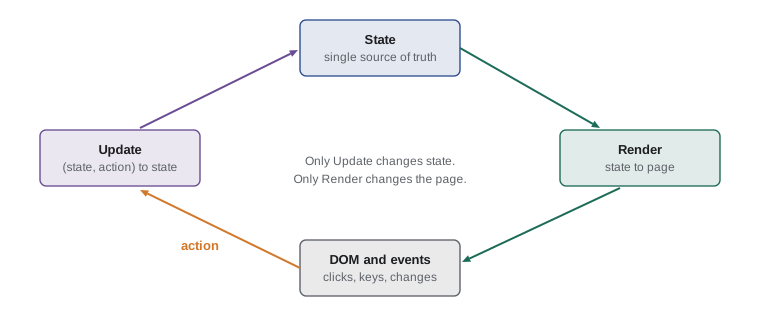
The update function is easy to test because it is pure: the same state and action always give the same new state, and it changes nothing outside itself. Libraries such as Redux call this function a reducer, because it has the same shape as the callback of the reduce method: it takes an accumulated value, the state, and the next item, the action, and returns the next accumulated value.
const MAX = 20;

function update(state, action) {
  switch (action.type) {
    case 'add': {
      const current = state.lines.find(([c]) => c === action.code)?.[1] ?? 0;
      return setQty(state, action.code, Math.min(current + 1, MAX));
    }
    case 'less': {
      const current = state.lines.find(([c]) => c === action.code)?.[1] ?? 0;
      return setQty(state, action.code, current - 1);
    }
    case 'remove': return setQty(state, action.code, 0);
    case 'tip': return { ...state, tipRate: action.rate };
    case 'clear': return { ...state, lines: [] };
    default: return state;
  }
}

function setQty(state, code, qty) {
  const others = state.lines.filter(([c]) => c !== code);
  const exists = state.lines.some(([c]) => c === code);
  if (qty <= 0) return { ...state, lines: others };
  const lines = exists ? state.lines.map(([c, q]) => (c === code ? [c, qty] : [c, q])) : [...state.lines, [code, qty]];
  return { ...state, lines };
}

const actions = [{ type: 'add', code: 'SOUP' }, { type: 'add', code: 'SOUP' }, { type: 'add', code: 'TEA' },
                 { type: 'less', code: 'SOUP' }, { type: 'tip', rate: 0.2 }, { type: 'remove', code: 'TEA' }];
const start = { lines: [], tipRate: 0.1 };
const end = actions.reduce(update, start);
console.log(JSON.stringify(end));
console.log('start unchanged:', JSON.stringify(start));{"lines":[["SOUP",1]],"tipRate":0.2}
start unchanged: {"lines":[],"tipRate":0.1}What this code does
update looks at the action's type and returns a new state object, built with spread syntax, instead of changing the old one. The helper setQty adds, changes or removes one line and keeps the others in order. Because update has the same shape as a reduce callback, a whole list of actions can be replayed with reduce, and the starting state is left exactly as it was.
Returning new objects instead of changing old ones, called immutable updates, has practical benefits. A function that receives the old state can trust it not to change under it. Comparing the old and new state with === tells you at once whether anything changed. And keeping previous states makes an undo button almost free: Rosa has asked for one, and it is now a list of past states.
A small store
The last piece is a store: one object that holds the current state, accepts actions through a dispatch method, runs the update function and tells anyone who is interested that the state has changed. The render function subscribes to the store, so the page is redrawn after every change, and so can the storage code from Lesson 8 and the live region's announcer from Lesson 10. Each one is a few lines and none of them knows about the others.
function createStore(update, initial) {
  let state = initial;
  const subscribers = new Set();
  return {
    getState: () => state,
    dispatch(action) {
      const next = update(state, action);
      if (next === state) return;               // nothing changed: nobody is told
      const previous = state;
      state = next;
      for (const fn of subscribers) fn(state, previous, action);
    },
    subscribe(fn) { subscribers.add(fn); return () => subscribers.delete(fn); },
  };
}

const update = (s, a) => a.type === 'add' ? { ...s, count: s.count + 1 }
  : a.type === 'clear' && s.count > 0 ? { ...s, count: 0 } : s;

const store = createStore(update, { count: 0 });
store.subscribe((s) => console.log('render: count is', s.count));
const stop = store.subscribe((s, prev, a) => console.log('announce:', a.type, prev.count, '->', s.count));

store.dispatch({ type: 'add' });
store.dispatch({ type: 'add' });
stop();
store.dispatch({ type: 'clear' });
store.dispatch({ type: 'clear' });
store.dispatch({ type: 'refund' });render: count is 1 announce: add 0 -> 1 render: count is 2 announce: add 1 -> 2 render: count is 0
What this code does
The store keeps the state in a closure and changes it only through dispatch, which runs the update function and then calls every subscriber with the new state, the old state and the action. Because updates return the same object when nothing changes, dispatch can skip the subscribers entirely in that case. subscribe returns a function that unsubscribes, so after stop is called only the render subscriber hears about the first clear, and nobody hears about the second clear or the unknown action.
Rendering from state
With a store in place, the render function has one job: make the page match the state it is given. The simplest version rebuilds the order lines from the state every time, with the template and fragment from Lesson 4, and sets the totals with textContent. Because it is called after every change and depends on nothing else, the page cannot drift out of step with the data. For the eight-dish menu and a handful of order lines, rebuilding is instant; if it were not, the keyed updates from Lesson 4 could be added inside render without changing anything else.
// view.js: the only module that touches the DOM
import { subtotal, tip, tax, total, itemCount } from './order.js';
import { money } from './money.js';

export function render(root, state) {
  const lines = state.lines.map(([code, qty]) => orderLine(code, qty));  // from the template
  root.querySelector('.order-lines').replaceChildren(...lines);
  root.querySelector('.subtotal').textContent = money(subtotal(state));
  root.querySelector('.tip').textContent = money(tip(state));
  root.querySelector('.tax').textContent = money(tax(state));
  root.querySelector('.total').textContent = money(total(state));
  root.querySelector('#place-order').disabled = itemCount(state) === 0;
  root.querySelector(`input[name="tip"][value="${state.tipRate}"]`).checked = true;
}
What this code does
render reads only from the state and from pure helper functions, and writes only to the page. Every piece of the order display is set from the state each time, including whether Place order is enabled and which tip choice is ticked. Nothing in render remembers anything between calls, so it can be called as often as needed.
Rebuilding has one cost that matters for accessibility: if the element with focus is replaced, focus is lost. The render function therefore notes which button had focus before rebuilding, by its data-action and data-code, and puts focus back on the matching new button afterwards. That small step keeps keyboard users where they were after pressing plus.
Modules for the counter page
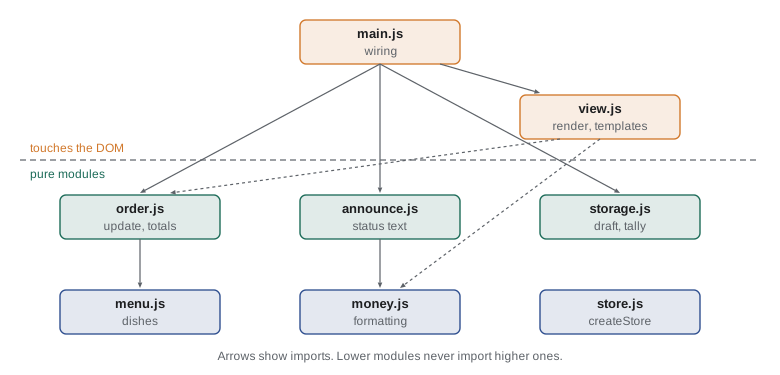
The rules suggest a natural split into modules, using the ES modules from JavaScript Programming II. The modules at the bottom know nothing about the page, so they can be tested in Node.js or the runner. Only view.js and main.js touch the DOM, and only main.js connects everything together.
| Module | Responsibility | Touches the DOM |
|---|---|---|
| menu.js | The menu data: codes, names, prices, tabs | No |
| money.js | Formatting cents as money for display | No |
| order.js | The update function and derived values: subtotal, tax, tip, total | No |
| store.js | createStore | No |
| announce.js | The text for the live region | No |
| storage.js | Safe load and save of the draft and the day's tally | No (uses Web Storage only) |
| view.js | render and the order line template | Yes |
| main.js | Creates the store, attaches the delegated listeners, subscribes render | Yes |
// main.js: wiring only
import { MENU } from './menu.js';
import { createStore } from './store.js';
import { update } from './order.js';
import { render } from './view.js';
import { loadDraft, saveDraft } from './storage.js';
import { announcement } from './announce.js';

const root = document.querySelector('#counter');
const status = root.querySelector('[role="status"]');
const store = createStore(update, loadDraft() ?? { lines: [], tipRate: 0.1 });

store.subscribe((state) => render(root, state));
store.subscribe((state) => saveDraft(state));
store.subscribe((state, prev, action) => { status.textContent = announcement(state, prev, action, MENU); });

root.addEventListener('click', (event) => {
  const b = event.target.closest('[data-action]');
  if (b && root.contains(b)) store.dispatch({ type: b.dataset.action, code: b.closest('[data-code]')?.dataset.code });
});
root.addEventListener('change', (event) => {
  if (event.target.name === 'tip') store.dispatch({ type: 'tip', rate: Number(event.target.value) });
});
render(root, store.getState());
What this code does
main.js imports the pieces, creates the store from a saved draft if there is one, and subscribes three functions: one to draw the page, one to save the draft and one to update the live region. Two delegated listeners turn clicks and tip changes into actions and dispatch them; they contain no calculation at all. The last line draws the page once at the start.
The page loads main.js with a single module script tag, and the browser fetches the imported modules itself, using the relative paths in the import statements. For a page of this size, eight small modules served over HTTP/2 load quickly without any build step. Larger projects usually add a bundler, a tool such as Vite or esbuild that combines and shrinks the modules into a few files for production; Brightwater will add one when the Food Hub's code grows enough to need it.
Testing the pure modules
Because six of the eight modules are pure, most of the counter can be tested without a browser. Node.js has a built-in test runner, node:test, with the assert module for checks; a test file imports a module, calls its functions and asserts the results, and the command node --test runs every test file. Gareth asks Mira to write tests for the rules Rosa cares about most: quantities stay between 1 and 20, removing the last of a dish removes the line, the tip is calculated on the subtotal before tax, and amounts are exact to the cent.
// order.test.js, run with: node --test
import test from 'node:test';
import assert from 'node:assert/strict';
import { update, subtotal } from './order.js';

test('quantity never goes above 20', () => {
  let s = { lines: [['SOUP', 20]], tipRate: 0 };
  s = update(s, { type: 'add', code: 'SOUP' });
  assert.deepEqual(s.lines, [['SOUP', 20]]);
});

test('removing the last soup removes the line', () => {
  const s = update({ lines: [['SOUP', 1]], tipRate: 0 }, { type: 'less', code: 'SOUP' });
  assert.equal(s.lines.length, 0);
  assert.equal(subtotal(s), 0);
});
What this code does
Each test builds a small state, applies an action with the real update function and checks the result with assert. The first test pins down the maximum of 20, and the second checks that reducing a quantity to zero removes the line and the money with it. Running node --test finds and runs every file ending in .test.js and reports which tests pass.
The DOM-facing modules are tested differently: by hand, with the keyboard and screen reader checks from Lesson 10, and in larger projects with browser automation tools such as Playwright that drive a real browser through the page. Keeping that layer thin means there is less of it to test the slow way.
Worked problem
Finding where a bug lives
After a refactor, the total on the counter page is right, but the live region says 3 items when the order has 4. Using the module table, where should Mira look first, and why not elsewhere?
Show solution
- The total is right, so the state and the derived money values in order.js are probably right: the same state feeds both.
- The wrong number is in the announcement, so the first place to look is announce.js, which builds that text from the state.
- If announce.js calls itemCount from order.js, check that it passes the new state, not the previous one; the subscriber receives both.
- view.js and main.js are unlikely suspects: one only draws the page and the other only forwards actions.
Answer: announce.js, and specifically whether it reads prev instead of state. With a single source of truth, a wrong value shown in one place but right in another points straight at the code that shows it.
Progressive enhancement
Not every page should depend on JavaScript. The shift list on the Volunteer page is HTML that the server sends, and it is complete and usable without any script; the filter buttons and search box are an enhancement that the script adds when it runs. If the script fails to load on a volunteer's old phone, they still see every shift. This approach, progressive enhancement, starts from working HTML and adds behaviour in layers. The counter page is different: it is an application used on one known tablet, so it is reasonable for it to require JavaScript, and it says so clearly in a noscript message if scripts are off.
When to use a framework
The pattern in this lesson, state in one place, actions, a pure update function and rendering from state, is the core idea of the popular front-end frameworks and libraries, such as React, Vue, Svelte and Angular. They add efficient rendering that changes only what differs, components that bundle markup, style and behaviour, and large ecosystems of tools. They also add size, build steps and their own rules. For a page with one order form, plain modules are smaller, faster and easier for the Food Hub's next developer to read. For a large application with many screens, a framework repays its cost.
The browser has its own component model too. Custom elements, part of the Web Components standards, let you define new tags, such as order-stepper, with a class whose methods run when the element is added to or removed from the page. They work without a framework in every modern browser and are a good fit for small reusable widgets. Whatever the tool, the rules from this lesson still apply.
Try it yourself
An update function for tips and clearing
Complete update(state, action). Handle three action types and return a new state without changing the old one: add adds 1 to the quantity of action.code (starting a new line at 1, at the end of the list), tip sets tipRate to action.rate, and clear empties the lines. Any other action returns the same state object.
Lines are [code, qty] pairs.
function update(state, action) {
  // handle add, tip and clear
  return state;
}

const s0 = { lines: [['SOUP', 1]], tipRate: 0.1 };
const s1 = update(s0, { type: 'add', code: 'SOUP' });
const s2 = update(s1, { type: 'add', code: 'TEA' });
const s3 = update(s2, { type: 'tip', rate: 0.15 });
const s4 = update(s3, { type: 'refund' });
const s5 = update(s4, { type: 'clear' });
for (const s of [s0, s1, s2, s3, s5]) console.log(JSON.stringify(s));
console.log('unknown action kept the same object:', s4 === s3 ? 'yes' : 'no');
Try it yourself
Derived totals
Write totals(state, prices, taxRate), which returns an object with subtotal, tax, tip and total, all in cents. The subtotal adds quantity × price for each line; tax is Math.round(subtotal * taxRate); tip is Math.round(subtotal * state.tipRate), on the subtotal before tax; and the total adds the other three.
The starter uses a tax rate of 0.1 to keep the numbers simple.
const PRICES = { SOUP: 550, EGG: 625, TEA: 200, COOKIE: 150 };

function totals(state, prices, taxRate) {
  // return { subtotal, tax, tip, total }
  return {};
}

console.log(JSON.stringify(totals({ lines: [['SOUP', 2], ['TEA', 1]], tipRate: 0.15 }, PRICES, 0.1)));
console.log(JSON.stringify(totals({ lines: [['EGG', 1], ['COOKIE', 3]], tipRate: 0 }, PRICES, 0.1)));
console.log(JSON.stringify(totals({ lines: [], tipRate: 0.2 }, PRICES, 0.1)));
Common mistakes
MistakeKeeping the total in its own variable saves recalculating it.
InsteadStored copies drift out of step. Calculate derived values from the state when needed.
MistakeListeners should update the page directly; it is quicker.
InsteadLet listeners dispatch actions, let the update function change state and let render update the page.
MistakeChanging state.lines with push is the same as returning a new state.
InsteadChanging the old object breaks comparisons, undo and anyone holding the old state. Return a new object.
MistakeEvery page should require JavaScript.
InsteadContent pages should work as HTML and be enhanced by scripts; only true applications should depend on JavaScript.
MistakeOrganizing code well needs a framework.
InsteadSingle source of truth, actions, pure updates and rendering from state work with plain modules too.
Summary and key terms
- State is the data that changes while a page is open.
- Keeping each piece of state in one place, a single source of truth, and calculating everything else from it as derived values stops the page drifting out of step.
- In unidirectional data flow, listeners turn events into actions, a pure update function returns a new state for each action, and a render function makes the page match the state.
- Immutable updates return new objects, which makes changes easy to detect and undo easy to add.
- A store holds the state, runs the update on dispatch and notifies subscribers such as render, storage and the live region announcer.
- The counter page splits into pure modules for data, money, the order, the store, announcements and storage, plus view.js and main.js, which alone touch the DOM.
- Pure modules can be tested with node --test.
- Content pages should use progressive enhancement.
- Frameworks and custom elements build on the same ideas and suit larger projects.
- state
- The data that can change while a page is open.
- single source of truth
- The rule that each piece of state is stored in exactly one place.
- derived value
- A value calculated from the state rather than stored, such as a total.
- action
- A small object describing a change the user asked for, such as { type: 'add', code: 'SOUP' }.
- update function (reducer)
- A pure function that takes the state and an action and returns the new state.
- unidirectional data flow
- A design in which events become actions, actions update state and the page is rendered from state.
- immutable update
- Changing data by making a new object instead of modifying the old one.
- store
- An object that holds the state, accepts actions and notifies subscribers of changes.
- subscriber
- A function registered to be called whenever the store's state changes.
- render function
- A function that makes the page match a given state.
- bundler
- A tool that combines and shrinks a project's modules for production.
- progressive enhancement
- Building pages that work as plain HTML and adding behaviour with scripts in layers.
Practice problems
Work each problem on paper first, then reveal the answer to check.
Why should the order total not be stored in the state?
Show answer
It can be calculated from the lines and the tip rate, and a stored copy could disagree with them.
What does an update function return for an action it does not recognize?
Show answer
The same state object, unchanged.
Which modules of the counter page touch the DOM?
Show answer
Only view.js and main.js.
Why can a store skip notifying subscribers when update returns the same object?
Show answer
The same object means nothing changed, so there is nothing to redraw or save.
What does progressive enhancement mean for the shift list?
Show answer
The list works as plain HTML, and the filter and search are added by the script when it runs.
Lesson quiz · 5 questions
Score 60% or more to complete this lesson.
Create a free account to save your progress, take quizzes and earn a certificate.