
GCP-210 · Lesson 8 of 12 · 19 min
Single sign-on and third-party identity providers
▶ Video coming soon A video version of this lesson is on the way.
Teresa Okonjo, Birchline's information security manager, joins the eighth session with a list. Staff today sign in to 23 applications, and 11 of them have their own passwords, so the help desk resets about 40 passwords a week across the stores and a leaver can keep access to a supplier portal for weeks. "Workspace is our chance to fix sign-in," she says. "I want one identity per person, one strong sign-in, and every app switched off the moment someone leaves." That is the goal of single sign-on, and this lesson explains how it works with Google in either role.
Identity providers and service providers
Single sign-on (SSO) lets a user sign in once with one identity and then reach many applications without signing in again. It works by separating two roles. The identity provider (IdP) checks who the user is: it holds the account, checks the password and second factor, and issues a signed statement saying "this is Owen Mitchell." The service provider (SP) is the application the user wants, such as Gmail, a payroll system or a supplier portal; it trusts the identity provider's statement instead of checking a password itself.
Google can play either role. Google can be the service provider, trusting a third-party IdP such as Microsoft Entra ID, Okta or Ping Identity to sign users in to Workspace. Or Google can be the identity provider, so that users sign in with their Google account and then reach other applications that trust Google. Organizations choose based on where they manage identity today.
| Google's role | Who checks the password | Typical organization | Set up in the Admin console under |
|---|---|---|---|
| Service provider (third-party IdP signs users in to Google) | The third-party IdP | Already uses Entra ID, Okta or another IdP for everything | Security, Authentication, SSO with third-party IdP |
| Identity provider (Google signs users in to other apps) | Uses Google as the main identity, or is moving to it | Apps, Web and mobile apps (SAML apps) |
How SAML works
Most enterprise SSO uses SAML, the Security Assertion Markup Language, an open standard for exchanging sign-in statements. The statement is called a SAML assertion, an XML document signed by the identity provider with its private key. The service provider checks the signature with the IdP's certificate (its public key) and, if it is valid, signs the user in.
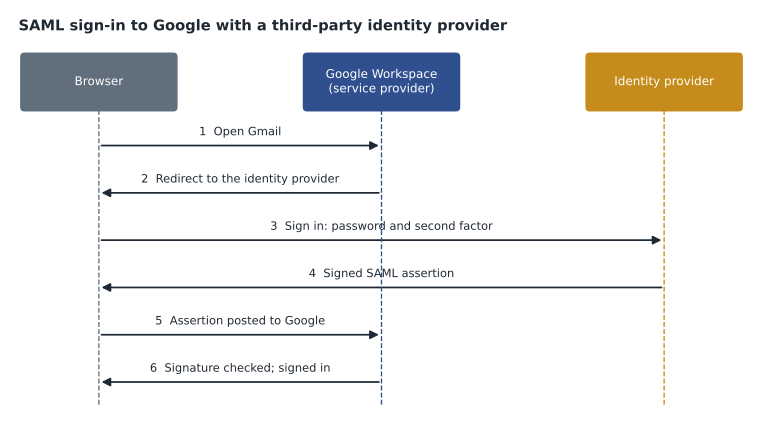
The flow above is SP-initiated: the user starts at Google, which redirects them to the IdP. Many IdPs also support IdP-initiated sign-in, where the user starts at the IdP's portal and clicks an application tile. In both cases, the user never types a password into Google; the password, the second factor and any device checks happen at the IdP.
Setting up SAML always involves the same exchange of information, whichever side Google is on. The identity provider needs to know where to send assertions for the service provider (the assertion consumer service URL, often called the ACS URL) and the service provider's identifier (its entity ID). The service provider needs the IdP's sign-in page URL, sign-out page URL if used and certificate. And both sides must agree on the name ID, the value that identifies the user, which for Google is the user's primary email address.
Third-party SSO profile for Google (values supplied by the identity provider)
  Sign-in page URL:       https://idp.example.net/saml/sso/birchline
  Sign-out page URL:      https://idp.example.net/saml/logout
  Verification certificate: idp-signing-2026.pem (expires 2029-10-31)
  Change password URL:    https://idp.example.net/password
  Use a domain-specific issuer: on
Values Google gives the identity provider
  ACS URL and entity ID: shown on the SSO profile page in the Admin console
  Name ID: the user's primary email address
Google as the service provider: SSO profiles
When a third-party IdP signs users in to Google, the administrator creates an SSO profile in the Admin console with the IdP's sign-in URL and certificate, then assigns the profile to OUs or groups. Assignment is flexible: an organization can send most users to the third-party IdP while keeping some, such as a pilot group or contractors, on Google's own sign-in. Profiles can also be assigned per OU so that different subsidiaries use different IdPs. Google supports SAML and, for some providers, OIDC (OpenID Connect) for these profiles; the console shows the options available.
Two details matter for safety. First, super administrators sign in with Google, not through the third-party IdP, when they go to admin.google.com. Google designed it that way so that a broken IdP cannot lock the organization out of its own Admin console; it is one reason super admin accounts need strong two-step verification in Google. Second, a network mask setting can make SSO apply only to users signing in from certain networks; it is rarely needed and easy to misconfigure.
Users still need Google accounts even when a third-party IdP signs them in. SSO handles authentication; it does not create the Google user. That is why third-party IdPs usually also provision users, creating and updating Google accounts automatically (lesson 7). Okta, Entra ID and others offer both functions for Google in one application connector.
Google as the identity provider: SAML apps
Birchline's decision for the pilot is the other way round. Active Directory is the source of truth, GCDS creates the Google accounts and Google Password Sync keeps passwords the same, so Google can be the identity provider for cloud applications. Teresa likes this because Google's sign-in brings strong two-step verification, passkeys and suspicious-sign-in protection, and because suspending a user in Google (which synchronization does when Active Directory disables them) cuts off every app that trusts Google at once.
In the Admin console, under Apps and then Web and mobile apps, administrators add SAML apps. Google provides a catalogue of preconfigured apps for many common services; for others, the admin adds a custom SAML app and exchanges URLs and certificates with the app vendor. Each app can be turned on for particular OUs or groups, so the payroll system is available only to the Finance and People and culture groups. Many apps also support user provisioning from Google, so that accounts are created and removed in the app as users are added to or removed from Google.
| Application | Users | Method | Who can use it |
|---|---|---|---|
| Staff scheduling app | All staff | Preconfigured SAML app from Google's catalogue | All OUs |
| Payroll system | About 25 | Custom SAML app, with provisioning | acl-payroll group |
| Supplier portal | Buyers, about 40 | Custom SAML app | acl-buyers group |
| Learning platform | All staff | OIDC sign-in with Google | All OUs |
| Old intranet | All staff | Not SAML-capable; retired in 2027 | Not connected |
Certificates expire
Every SAML connection depends on a certificate, and certificates have expiry dates. When an IdP certificate expires and nobody uploaded the new one, sign-in to every connected app fails at once, usually first thing on a Monday. Google's SAML app certificates have expiry dates too, shown in the console. Owen adds every certificate's expiry date to the IT calendar with a reminder 60 days ahead, and Sofia adds a line to the change process: rotate the certificate on the IdP side and upload it on the SP side in the same change window.
Choosing an approach
There is no single right answer to which system should be the identity provider. The exam asks you to match the approach to the organization.
| Situation | Likely approach |
|---|---|
| The organization already uses Entra ID or Okta for sign-in to most apps | Keep that IdP; add Google as a service provider with an SSO profile, and use the IdP to provision Google accounts |
| On-premises Active Directory only, moving to Google | Synchronize with GCDS or Directory Sync, use Google Password Sync, and make Google the IdP for cloud apps |
| A subsidiary uses a different IdP from the parent | Assign a separate SSO profile to the subsidiary's OU |
| Small organization with no directory | Google accounts with Google sign-in and two-step verification; SAML apps from the catalogue as needed |
Trailhead Rentals is a useful test of the rules. Its staff currently sign in to a hosted email service and Dropbox with separate passwords and have no directory at all. When Trailhead joins in January 2027, its 48 users will be created in Google (by CSV, since there is nothing to synchronize from), sign in with Google, and reach the scheduling app through the same SAML app configuration as Birchline staff.
Rolling out SSO safely
SSO changes affect every sign-in, so Birchline rolls them out the same way as any other setting: pilot first. Owen assigns new SAML apps to the Pilot OU for a week before turning them on more widely, and keeps a test user in each target OU so that he can sign in as a normal user and see exactly what staff will see. When a third-party SSO profile is involved, as it will be if Birchline ever moves sign-in to another provider, the profile is assigned first to a test group, then to /Pilot, and only then to the large OUs, with a written note of how to remove the assignment if sign-ins fail.
Testing covers more than a successful sign-in. Owen checks sign-out (does signing out of the app also end the Google session, and should it?), what happens when a suspended user tries the app, how the app behaves when its certificate is about to expire, and whether provisioning creates and removes accounts in the app as expected. The admin audit log and the app's own logs together show each step, which makes problems much faster to find than reports from users.
Finally, every SAML app has an owner outside IT, the person who decides who should use it. For the payroll system that is the payroll lead; for the supplier portal it is the head of buying. Owners review the app's group membership each quarter alongside the admin access review in lesson 9.
Sign-in and session controls
SSO changes where users sign in, so administrators also think about how long sessions last. Workspace's Google session control setting decides how long a user stays signed in to Google services before having to sign in again; it can be set per OU, and Birchline plans a shorter session for /Stores, where tablets are shared, than for head office laptops. With a third-party IdP, the IdP's own session settings also matter. GCP-212 covers session control, two-step verification and context-aware access in depth.
Teresa adds one more benefit for the stores. Because every SAML app trusts Google, a store associate who forgets their password calls the help desk once and regains access to every connected app at the same time, instead of resetting four different passwords. Fewer passwords means fewer reset calls, which is the measure Teresa will report to the leadership team after the migration.
Common mistakes
MistakeAssuming SSO creates Google accounts.
InsteadSSO only authenticates; accounts must still be provisioned by sync, an IdP connector, CSV or the console.
MistakeExpecting super admins to sign in to the Admin console through the third-party IdP.
InsteadSuper admins sign in with Google at admin.google.com; protect those accounts with strong two-step verification.
MistakeLetting a SAML certificate expire.
InsteadTrack every certificate's expiry and rotate it on both sides in the same change.
MistakeTurning on a SAML app for everyone by default.
InsteadTurn each app on only for the OUs or groups that need it.
Worked problem
Diagnosing a failed SSO roll-out
A company assigns a new third-party SSO profile to its /Sales OU. Afterwards, sales staff are redirected to the IdP, sign in successfully, but then see an error from Google and are not signed in. The IdP's administrator says the assertion was sent. What are the likely causes, and in what order should they be checked?
Show solution
- Check the certificate first: if the SSO profile in Google holds an old or wrong certificate, Google cannot verify the assertion's signature.
- Check the name ID: Google expects the user's primary email address; if the IdP sends a different identifier, such as an employee number or a different domain, Google cannot match the user.
- Check the ACS URL and entity ID configured at the IdP against the values on Google's SSO profile page.
- Check that the users exist in Google and are not suspended; SSO cannot sign in an account that is not there.
Answer: Certificate, name ID, URLs and entity ID, then the existence and status of the Google accounts.
Summary and key terms
- Single sign-on lets users sign in once with one identity and reach many apps.
- The identity provider authenticates the user; the service provider trusts the IdP's signed assertion.
- SAML exchanges signed XML assertions, using the IdP's certificate, the service provider's ACS URL and entity ID, and a name ID, which for Google is the primary email address.
- Google can be the service provider, with SSO profiles assigned to OUs or groups for a third-party IdP, or the identity provider, with preconfigured or custom SAML apps for other services.
- Super admins sign in with Google at admin.google.com.
- SSO does not create accounts.
- Track certificate expiry dates.
- Choose the IdP based on where identity is managed today.
- Single sign-on (SSO)
- Signing in once with one identity to reach many applications.
- Identity provider (IdP)
- The system that authenticates the user and vouches for them.
- Service provider (SP)
- The application that trusts the IdP's statement about the user.
- SAML
- An open standard for exchanging signed sign-in statements between IdPs and SPs.
- SAML assertion
- The signed statement an IdP sends to an SP about a signed-in user.
- SSO profile
- The Admin console configuration that sends chosen users to a third-party IdP.
- SAML app
- An application configured in the Admin console to trust Google as its IdP.
- Name ID
- The value in a SAML assertion that identifies the user; the primary email for Google.
Practice problems
Work each problem on paper first, then reveal the answer to check.
In SAML, which side holds the private key that signs assertions?
Show answer
The identity provider.
Why do super admins sign in to the Admin console with Google even when SSO is configured?
Show answer
So that a broken or misconfigured third-party IdP cannot lock the organization out of its own console.
Birchline makes Google the IdP for its payroll system. How is access limited to the right staff?
Show answer
The SAML app is turned on only for the acl-payroll group (or the right OUs).
Lesson quiz · 5 questions
Score 60% or more to complete this lesson.
Create a free account to save your progress, take quizzes and earn a certificate.