
GCP-210 · Lesson 12 of 12 · 19 min
Lab walkthrough: onboarding a new company
▶ Video coming soon A video version of this lesson is on the way.
The last session is a rehearsal. Trailhead Rentals, the kayak and bike rental business Birchline bought in September, will join Workspace in January 2027: 48 staff at three locations, a hosted IMAP email service, a shared Dropbox folder and no directory at all. The DNS accounts for trailheadrentals.example were transferred to Birchline last week, so the real work can now be planned. Sofia gives Owen a test environment, a separate Workspace trial account with a test domain, and asks him to run the whole onboarding there from start to finish, using everything in this course. "Do it once in a sandbox," she says, "and January becomes a checklist." This lesson follows his walkthrough.
Step 1: Gather the facts
Owen starts with a one-page fact sheet, because every later step depends on it.
| Question | Answer for Trailhead Rentals |
|---|---|
| How many people, and what do they do? | 48: 6 office staff and managers, 42 seasonal and year-round rental staff at three locations |
| Which domain do they use? | trailheadrentals.example; DNS now in Birchline's registrar account |
| Is the domain verified in any other Google account? | It was, in a free trial the former owner created; the former owner has now removed it |
| What email system? | A hosted IMAP service; about 60 GB in total |
| What files? | A shared Dropbox folder of about 40 GB: booking sheets, waivers, safety checklists |
| Any directory or identity provider? | None; each person has separate passwords |
| What devices? | Two shared tablets per location, a few office laptops, staff personal phones |
| Which rooms or equipment are booked? | A meeting room at each location and two tour vans |
| Keep the Trailhead brand? | Yes, for at least two years: staff keep trailheadrentals.example addresses |
The fact sheet already settles several design questions. Trailhead keeps its own brand and addresses, so trailheadrentals.example will be a secondary domain, not an alias (lesson 2). There is no directory to synchronize, so accounts will be created by CSV (lesson 3). The office staff need knowledge-worker licences and the rental staff need frontline licences (lesson 6). And with 48 users and an IMAP source, the data migration service will move the mail in one weekend (lesson 11).
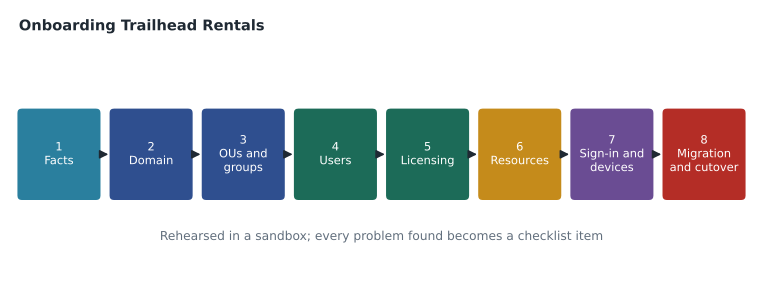
Step 2: Add and verify the domain
In the Admin console's domain settings, Owen adds trailheadrentals.example as a secondary domain, copies the verification string and asks the network team to publish the TXT record. Verification succeeds within half an hour. He does not touch the MX records: they keep pointing to the IMAP host until cutover weekend. On the plan he notes the other DNS records the domain will need before cutover, the Google MX record, SPF, DKIM and DMARC (GCP-211), and lowers the TTL on the existing MX record to 300 seconds a week before cutover so that a mistake could be undone quickly.
Step 3: Build the OUs and groups
Trailhead needs its own settings during the integration, so it gets one OU with two children, following the settings-first rule from lesson 4.
| OU | Holds | Why |
|---|---|---|
| /Trailhead Rentals | Office staff and managers | Trailhead-specific settings and its own admin scope |
| /Trailhead Rentals/Rental staff | Seasonal and year-round rental staff | Frontline licences, shared tablets, no external Drive sharing |
| /Trailhead Rentals/Shared devices | The six location tablets | Kiosk-style device policies |
The groups follow lesson 5's prefixes: dl-trailhead-all for announcements, one dl- list per location, team-trailhead-bookings with Collaborative Inbox for the bookings@trailheadrentals.example address customers already use, and acl-trailhead-ops for the operations shared drive. The bookings group is set so that anyone on the web can post, because customers email it, while only members can view conversations. Location managers own their location lists.
Step 4: Create the users
Trailhead's office manager sends a staff list exported from the payroll system: names, roles, locations and employee numbers. Owen turns it into the bulk upload file with a short script that applies Birchline's naming convention, removes accents and apostrophes from addresses while keeping them in display names, places each person in the right OU and flags duplicates.
import unicodedata
staff = [("Maya", "Lund", "Office", "Manager"), ("Étienne", "Roy", "Lakeside", "Rental guide"),
         ("Siobhán", "O'Neill", "Lakeside", "Rental guide"), ("Daniel", "Kim", "Riverside", "Bike technician"),
         ("Daniel", "Kim", "Bayside", "Rental guide"), ("Ana", "Sousa-Pinto", "Office", "Bookings")]
DOMAIN = "trailheadrentals.example"

def plain(text):
    text = unicodedata.normalize("NFKD", text)
    text = "".join(c for c in text if not unicodedata.combining(c))
    return text.replace("'", "").replace(" ", "").lower()

used, rows = set(), []
for first, last, location, role in staff:
    local = plain(first) + "." + plain(last)
    if local in used:
        local = plain(first) + "." + location[0].lower() + "." + plain(last)
    used.add(local)
    ou = "/Trailhead Rentals" if location == "Office" else "/Trailhead Rentals/Rental staff"
    rows.append((first, last, local + "@" + DOMAIN, ou))
print("First Name [Required],Last Name [Required],Email Address [Required],Org Unit Path [Required]")
for row in rows:
print(",".join(row))First Name [Required],Last Name [Required],Email Address [Required],Org Unit Path [Required] Maya,Lund,maya.lund@trailheadrentals.example,/Trailhead Rentals Étienne,Roy,etienne.roy@trailheadrentals.example,/Trailhead Rentals/Rental staff Siobhán,O'Neill,siobhan.oneill@trailheadrentals.example,/Trailhead Rentals/Rental staff Daniel,Kim,daniel.kim@trailheadrentals.example,/Trailhead Rentals/Rental staff Daniel,Kim,daniel.b.kim@trailheadrentals.example,/Trailhead Rentals/Rental staff Ana,Sousa-Pinto,ana.sousa-pinto@trailheadrentals.example,/Trailhead Rentals
What this code does
The script takes the payroll list, with each person's first and last name, location and role, and builds one upload row per person. It turns names into plain lowercase address parts by removing accents, apostrophes and spaces, adds the location's first letter when two people would get the same address, and chooses the office or rental staff unit from the location. The output is the header and rows of the upload file, with display names left exactly as written.
The output shows the two rules working: Étienne becomes etienne.roy and Siobhán O'Neill becomes siobhan.oneill, while their display names keep the accents and apostrophe, and the second Daniel Kim becomes daniel.b.kim from the Bayside location. Owen adds the password column with generated passwords, sets change at next sign-in to true and uploads the file in the sandbox. All 48 test accounts appear in the right OUs. Because Google will be the identity provider for Trailhead (there is no other), the users will sign in with these passwords and set up two-step verification in their first week, as GCP-212 describes.
Step 5: Assign licences
Automatic licence assignment does most of this. Owen sets Enterprise Standard to be assigned automatically in /Trailhead Rentals and Frontline Standard in /Trailhead Rentals/Rental staff, and no licence in /Trailhead Rentals/Shared devices, which holds devices, not people. He checks the licence count first: the production subscription needs 6 more Enterprise Standard licences and 42 more Frontline Standard licences, which Dana's team orders through the reseller. In the sandbox, a test upload reveals the classic first-day problem from lesson 6, three users created without licences because the trial had too few, which is exactly why Owen orders licences before the upload in January.
Step 6: Create buildings and resources
Trailhead books a meeting room at each location and two tour vans. In Workspace, rooms and equipment are calendar resources, which people book by adding them to a calendar event. Resources can be organized by buildings and given features such as capacity, video conferencing equipment or wheelchair accessibility, which help people find the right room. Buildings and resources can be created one at a time in the console's Directory, Buildings and resources area, or in bulk by uploading a CSV file, which suits Birchline's 40 stores later.
Buildings (bulk upload)
  Building ID, Building name, Floors, Address
  th-lakeside, Trailhead Lakeside, 1, (address)
  th-riverside, Trailhead Riverside, 1, (address)
  th-bayside, Trailhead Bayside, 2, (address)
Resources (bulk upload)
  Resource name, Type, Building ID, Floor, Capacity, Features
  Lakeside meeting room, Meeting room, th-lakeside, 1, 8, Whiteboard; Wheelchair accessible
  Riverside meeting room, Meeting room, th-riverside, 1, 6, Video conferencing
  Bayside meeting room, Meeting room, th-bayside, 2, 10, Video conferencing; Whiteboard
  Tour van 1, Vehicle, th-bayside, , 11,
  Tour van 2, Vehicle, th-bayside, , 11, Wheelchair accessible
Who can book each resource is a booking permission set on the resource's calendar. Anyone at Birchline and Trailhead can book the meeting rooms; only the acl-trailhead-ops group can book the tour vans, and the vans' calendars are managed by the operations lead. GCP-211 covers resource booking policies in more depth.
Step 7: Sign-in, admin roles and devices
With no existing identity provider, Trailhead users sign in with Google, and the payroll and scheduling apps they will use are added to the same SAML apps that Birchline configured with Google as the IdP (lesson 8), turned on for the Trailhead OUs. Owen gives Trailhead's office manager a custom role scoped to /Trailhead Rentals, following lesson 9: reset passwords and sign users out for Trailhead only. The six shared tablets are registered as company-owned devices and placed in /Trailhead Rentals/Shared devices with advanced management and short sessions, while staff personal phones get basic management, as in lesson 10.
Step 8: Migrate and cut over
The migration plan is a small big bang, as lesson 11 suggested: one weekend, everyone at once. On the Wednesday before, the data migration service starts copying mail older than 30 days from the IMAP host. On Friday evening, Owen runs a delta for the remaining mail, changes the MX records for trailheadrentals.example to Google, and copies the Dropbox folder into a new Trailhead Operations shared drive shared with acl-trailhead-ops. On Saturday, he checks test messages to and from the domain and asks the bookings team to confirm that customer emails reach their Collaborative Inbox. On Monday, Sofia and a help desk agent visit the Lakeside location to help staff sign in for the first time. The IMAP service stays active, read-only, for 60 days, which is the rollback plan.
In the sandbox, Owen rehearses everything except the MX change. The rehearsal takes him two afternoons and finds four problems: the licence shortage, a group setting that blocked outside senders from the bookings group, a resource CSV with a misspelled building ID and a forgotten admin role scope that briefly let the test office manager reset passwords for everyone. Each one goes into the January checklist with its fix.
The finished checklist
| Step | Done when | Lesson |
|---|---|---|
| Domain verified as secondary | Console shows trailheadrentals.example verified; MX unchanged | 2 |
| OUs and groups created | Three OUs; groups with owners and correct posting settings | 4, 5 |
| Users uploaded | 48 accounts in the right OUs, passwords to change at first sign-in | 3 |
| Licences assigned | 6 Enterprise Standard and 42 Frontline Standard in use; none unlicensed | 6 |
| Buildings and resources | 3 buildings, 3 rooms and 2 vans with booking permissions | 12 |
| Sign-in and apps | SAML apps on for the Trailhead OUs | 8 |
| Admin roles | Office manager role scoped to /Trailhead Rentals only | 9 |
| Devices | Six tablets registered and managed; phones on basic management | 10 |
| Migration and cutover | Mail and files moved; MX changed; bookings inbox tested; rollback window agreed | 11 |
Sofia reads the list and adds one line at the bottom: "Thank the Trailhead office manager." The best technical plan still depends on the people at the other end, and Maya Lund has spent two weeks gathering staff lists and Dropbox folders for a system she has never used. In GCP-211, Owen will configure the services those 48 people, and then 1,100 more, will use every day.
The rehearsal also produced a timing estimate for January. The domain and directory steps took about four hours, the user and licence steps about two, buildings and resources about one, sign-in, roles and devices about three, and the migration itself one weekend. Sofia books two working days before cutover for Owen and a colleague, which leaves time to fix the unexpected problem that every real onboarding brings.
Common mistakes
MistakeStarting configuration before the facts are gathered.
InsteadWrite the fact sheet first; it settles domain type, provisioning, licensing and migration choices.
MistakeUploading users before ordering licences.
InsteadCheck and order licences first so no one starts without one.
MistakeLeaving admin role scopes at the whole organization by default.
InsteadScope delegated roles to the new company's OUs and test them.
MistakeChanging MX records during rehearsal.
InsteadRehearse everything in a sandbox, but change production mail routing only at cutover.
Worked problem
Counting what January needs
Using the rehearsal's fact sheet, how many new licences of each edition must Birchline order for Trailhead, how many user accounts will be created, and how many calendar resources?
Show solution
- Licences: 6 office staff and managers need Enterprise Standard; 42 rental staff need Frontline Standard; the six tablets are devices and need no user licences.
- User accounts: 6 plus 42 is 48.
- Calendar resources: three meeting rooms (one per location) and two tour vans make five resources, in three buildings.
Answer: 6 Enterprise Standard and 42 Frontline Standard licences, 48 user accounts, and five calendar resources in three buildings.
Summary and key terms
- Onboarding a new company uses every part of directory administration in order.
- Gather the facts first: people, domain, sources, devices, resources and brand.
- Add the domain (here as a secondary domain) and verify it without touching MX records.
- Build OUs around settings and groups around purpose.
- Create users by CSV when there is no directory, applying the naming convention.
- Order licences before creating users and assign them automatically by OU.
- Create buildings and calendar resources, in bulk where possible, with features and booking permissions.
- Configure sign-in, scoped admin roles and device policies.
- Migrate with a tool that fits the scale, cut over on a planned weekend and keep the old system for rollback.
- Rehearse in a sandbox and turn every problem found into a checklist item.
- Sandbox
- A separate test environment, such as a trial account, used to rehearse changes safely.
- Calendar resource
- A bookable room or piece of equipment with its own calendar.
- Building
- A location record used to organize calendar resources.
- Resource feature
- A property of a resource, such as capacity or accessibility, that helps people find it.
- Booking permission
- The setting that decides who can book a resource.
- Fact sheet
- A one-page summary of the facts an onboarding plan depends on.
Practice problems
Work each problem on paper first, then reveal the answer to check.
Why is trailheadrentals.example added as a secondary domain rather than a domain alias?
Show answer
Trailhead staff are separate people who keep their own Trailhead addresses and accounts.
What problem did the sandbox rehearsal reveal about licences?
Show answer
Users uploaded without enough licences were created unlicensed, so licences must be ordered before the upload.
How are the tour vans protected from being booked by anyone?
Show answer
Their booking permissions allow only the acl-trailhead-ops group to book them.
Lesson quiz · 5 questions
Score 60% or more to complete this lesson.
Create a free account to save your progress, take quizzes and earn a certificate.