
GCP-210 · Lesson 4 of 12 · 19 min
Organizational units and policy inheritance
▶ Video coming soon A video version of this lesson is on the way.
Owen arrives at the fourth session with a draft he is proud of: an organizational unit tree that copies Birchline's organization chart exactly, with 61 units, one for every department, store and warehouse team. Sofia looks at it for a long time. "This is a picture of who reports to whom," she says. "An OU tree should be a picture of who needs different settings. Those are not the same thing." The rest of the session explains why, and by the end the tree has 14 units.
What an organizational unit is
An organizational unit (OU) is a container in the Google directory that holds users and devices (and, for some settings, other objects such as Chrome browsers). OUs form a tree: at the top is the top-level organization, which is named after the account and contains everything, and below it are child OUs, which can have children of their own. Every user belongs to exactly one OU at any time. New users go to the top-level organization unless placed elsewhere.
The purpose of OUs is to apply settings. Almost every setting in the Admin console, whether a service is on or off, how Drive sharing works, which Chrome extensions are allowed, can be set for the top-level organization and then changed for specific OUs below it. OUs are also used to scope admin roles, so a regional admin can manage only the users in their region (lesson 9), and to decide which users receive automatic licences (lesson 6).
Inheritance and overrides
Settings flow down the tree. A child OU inherits each setting from its parent unless an administrator overrides it at the child. If Drive external sharing is allowed at the top-level organization, it is allowed in every OU below, unless one of them overrides it. If the Stores OU turns external sharing off, every OU under Stores inherits off, unless one of those overrides it again.
The console shows this on every settings page. With an OU selected, each setting shows either Inherited (with the value from above) or Overridden (set at this OU). An overridden setting can be reverted to inherit, removing the local value so that the parent's value applies again. Sofia's tip is that inherited is the normal state and every override is an exception that should have a reason in the change log.
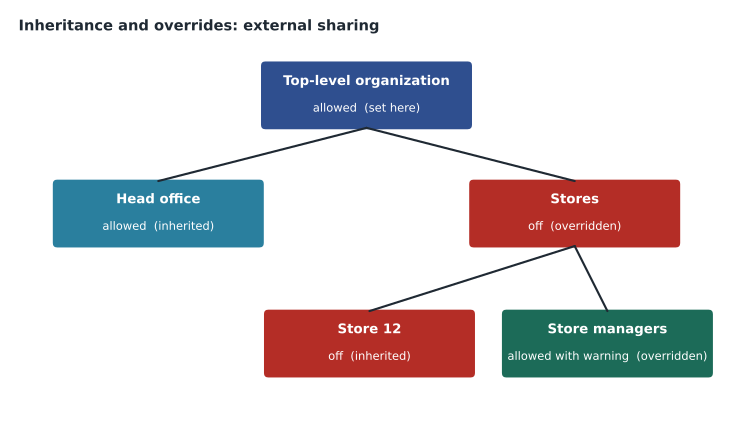
Inheritance has two practical consequences. First, a change at the top-level organization affects every OU that has not overridden that setting, which is usually most of the company; check before changing anything at the top. Second, moving a user from one OU to another changes their settings immediately, because their settings come from their new position in the tree. Moving someone to the wrong OU can switch services on or off for them without any other action.
Working out the effective setting
For any user and any setting, the effective value is found by starting at the user's OU and walking up the tree until a level that sets the value is found. Owen writes the rule as a small function so that he can test his tree design against real cases.
# Each OU path maps to the settings overridden at that level ('/' is the top-level organization).
overrides = {
    "/":                     {"external_sharing": "allowed", "chat": "on", "drive_desktop": "on"},
    "/Stores":               {"external_sharing": "off", "drive_desktop": "off"},
    "/Stores/Store managers": {"external_sharing": "allowed with warning"},
    "/Warehouses":           {"external_sharing": "off"},
    "/Contractors":          {"chat": "off"},
}

def effective(ou, setting):
    path = ou
    while True:
        if setting in overrides.get(path, {}):
            return overrides[path][setting], path
        if path == "/":
            return None, None
        path = path.rsplit("/", 1)[0] or "/"

for user, ou in [("store associate", "/Stores/Store 12"),
                 ("store manager", "/Stores/Store managers"),
                 ("finance analyst", "/Head office/Finance"),
                 ("contract designer", "/Contractors")]:
    for setting in ("external_sharing", "chat", "drive_desktop"):
        value, source = effective(ou, setting)
print(f"{user:18} {setting:17} {value:22} (set at {source})")store associate external_sharing off (set at /Stores) store associate chat on (set at /) store associate drive_desktop off (set at /Stores) store manager external_sharing allowed with warning (set at /Stores/Store managers) store manager chat on (set at /) store manager drive_desktop off (set at /Stores) finance analyst external_sharing allowed (set at /) finance analyst chat on (set at /) finance analyst drive_desktop on (set at /) contract designer external_sharing allowed (set at /) contract designer chat off (set at /Contractors) contract designer drive_desktop on (set at /)
What this code does
The model lists which settings are changed at each level of the tree, starting from the top-level organization. To find a user's effective value for one setting, it begins at that user's own unit and climbs one level at a time until it finds a level that sets the value. The output shows, for four sample users, the value they end up with and which level it came from, which is exactly what the Admin console shows as inherited or overridden.
The output answers questions that the organization chart cannot. The store associate in Store 12 has external sharing off because of the Stores OU, even though Store 12 itself sets nothing. The store manager has sharing allowed with a warning because their OU overrides Stores. The finance analyst inherits everything from the top. The contract designer has Chat off but inherits everything else. If any of these is not what the business wants, the tree or the overrides need to change.
Designing an OU tree: settings, not reporting lines
Google's recommended practice is to design OUs around groups of users who need different settings, keep the tree as flat as is practical, and use groups rather than OUs to express other relationships such as team membership or project access. An organization chart changes every month; settings needs change rarely. A tree built on settings needs is stable, and a stable tree means fewer moves, fewer surprises and simpler admin roles.
Sofia walks Owen through the questions that decide whether a unit earns its place: does this population need at least one setting that differs from its parent? Will a delegated admin need to manage exactly this population? Is automatic licensing different here? If the answer to all three is no, the population belongs in a group, not an OU.
Applying those questions removes most of Owen's 61 units. The 40 stores do not need different settings from one another; they need the same frontline settings, so one Stores OU holds all store staff, with a child for store managers, who need more sharing and Gemini features. The two warehouses share settings. Head office departments mostly share settings, but Finance needs stricter external sharing and longer retention, and IT needs access to beta features for testing. The pilot needs its own OU so that new settings can be tried there first.
| OU | Holds | Why it is a separate OU |
|---|---|---|
| / (top-level organization) | Nobody directly; defaults for everyone | Company-wide defaults |
| /Head office | Head office staff | Knowledge-worker settings and licences |
| /Head office/Finance | Finance and payroll | Stricter external sharing; longer retention |
| /Head office/IT | IT staff | Early access to new features for testing |
| /Stores | Store associates | Frontline licences, no external sharing, no Drive for desktop |
| /Stores/Store managers | The 40 store managers | More sharing and AI features; mobile management for their tablets |
| /Warehouses | Warehouse floor staff | Frontline licences, shared devices |
| /Warehouses/Warehouse office | Warehouse supervisors and planners | Knowledge-worker settings |
| /Pilot | IT pilot users during migration | New settings tried here first |
| /Contractors | Contract designers and temporary staff | Restricted Chat and sharing |
| /Admin accounts | Super admin and emergency accounts | Strictest sign-in and session settings |
| /Service accounts | Accounts used by systems, such as the scanner relay | No interactive features |
| /Departed staff | Suspended or archived leavers | All services off; retention applies |
| /Trailhead Rentals | Trailhead staff (from January 2027) | Separate brand and settings during integration |
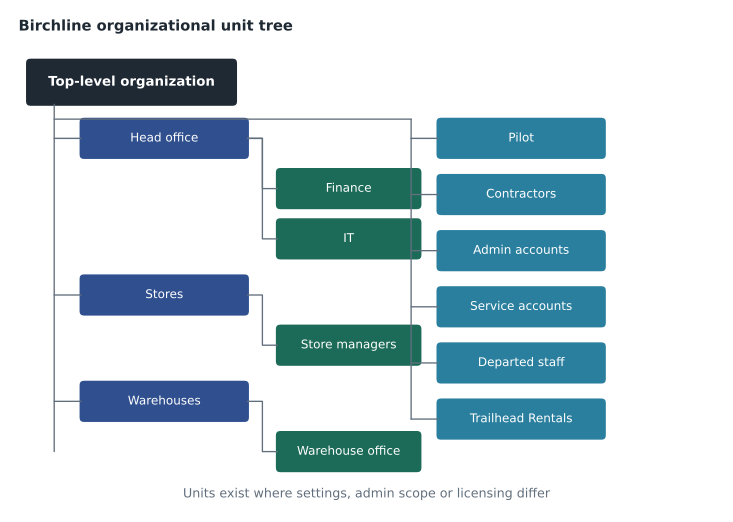
Department and store still matter, of course, for email lists, Drive access and reports. Those live in groups (lesson 5) and in user attributes such as department and cost centre, where they can change freely without moving anyone in the tree.
Configuration groups: settings that cross the tree
Some settings apply to people scattered across OUs. Birchline's 25 Gemini early testers sit in Head office, Stores and Warehouses; the bilingual customer service staff who need a particular Chat app are in three OUs. Moving them into a special OU would break the settings they get from their real OU. The answer is a configuration group: many settings pages let you apply a setting to a group instead of an OU, using the Groups tab next to the OU tree.
A setting applied to a group takes precedence over the OU setting for the group's members. When a user is in several groups that set the same thing differently, the console lets the administrator order the groups to decide which wins. Not every setting supports groups, and the console shows which do. Sofia's rule: OUs for the broad, stable shape of the organization; configuration groups for exceptions that cut across it; and nobody in more than two configuration groups for the same setting.
Creating, moving and deleting OUs
OUs are created in Directory, Organizational units: choose the parent, give a name and an optional description. Users are moved by selecting them in the user list and choosing a new OU, or in bulk with a CSV update, or by synchronization, which can place users in OUs based on directory attributes (lesson 7). Devices and Chrome browsers can be moved similarly.
An OU can be renamed or moved under a different parent. Renaming changes the OU path, which matters for anything that refers to the path: CSV files, scripts and synchronization rules that place users by path. An OU can be deleted only when it is empty. Before reorganizing, Sofia exports the list of overrides at each OU so that she can check that nothing was lost.
Testing changes with the pilot OU
Birchline's change process uses the Pilot OU as a gate. A new setting is first applied to Pilot, tested by the 14 IT users for at least a week, and only then applied to the wider OU. Because Pilot is a child of the top level, the pilot users otherwise receive the normal company defaults, so tests are realistic. When the pilot ends, the members will move to their real OUs, and Pilot will be kept for future testing with a few volunteers from each area.
A last design check is to read the tree aloud as a list of settings decisions. For each unit, Owen says in one sentence what is different there: Finance has stricter sharing and longer retention, Store managers have more sharing and AI features, Departed staff have every service off. A unit he cannot describe in one sentence is either doing too much or should not exist.
Common mistakes
MistakeCopying the organization chart into the OU tree.
InsteadCreate OUs only where settings, delegated administration or licensing differ; use groups for teams and departments.
MistakeChanging a setting at the top-level organization to solve one team's problem.
InsteadChange it at the team's OU or with a configuration group.
MistakeMoving a user to a special OU to give them one extra feature.
InsteadUse a configuration group so they keep their normal OU settings.
MistakeRenaming an OU without updating scripts and sync rules that use its path.
InsteadList every place the path is used and update them together.
Worked problem
Placing a new requirement
Three requests arrive in one week: (1) all 40 store managers need Gemini features in Gmail; (2) six people in Marketing, Finance and E-commerce who work with an outside agency need external sharing with that agency's domain only; (3) the new payroll officer in Finance needs the same settings as the rest of Finance. Where should each be configured?
Show solution
- Store managers already have their own OU, and the feature applies to all of them: enable it at /Stores/Store managers.
- The six people are in different OUs, so an OU change would be wrong: create a configuration group and apply the sharing exception to it (GCP-211 covers the sharing setting itself, and trust rules in GCP-212).
- The payroll officer simply belongs in /Head office/Finance; placing the user there gives them Finance's settings through inheritance.
- Record the store manager change and the group exception in the change log, and try both on Pilot first.
Answer: An OU setting for store managers, a configuration group for the cross-department six, and a normal OU placement for the payroll officer.
Summary and key terms
- An organizational unit is a container in the directory tree that holds users and devices; every user is in exactly one OU.
- OUs exist to apply settings, scope admin roles and drive automatic licensing.
- Settings inherit down the tree until an OU overrides them, and overrides can be reverted to inherit.
- A user's effective setting comes from the nearest level above them that sets it.
- Design OUs around differences in settings, keep the tree shallow and use groups for teams and projects.
- Configuration groups apply settings across OUs and can be ordered when they conflict.
- Moving a user to another OU changes their settings immediately.
- Test changes on a pilot OU first.
- Organizational unit (OU)
- A container in the Google directory used to apply settings to users and devices.
- Top-level organization
- The root of the OU tree; its settings are the defaults for everyone.
- Inheritance
- A child OU taking a setting's value from its parent.
- Override
- A value set at a child OU that replaces the inherited value.
- Effective setting
- The value that actually applies to a user after inheritance and overrides.
- Configuration group
- A group used to apply a setting to its members across OUs.
- OU path
- The full location of an OU in the tree, such as /Stores/Store managers.
Practice problems
Work each problem on paper first, then reveal the answer to check.
Why did Sofia reduce Owen's OU tree from 61 units to 14?
Show answer
Most of the 61 units did not need different settings; teams and stores are better expressed as groups and attributes.
A user moves from /Head office to /Stores. What happens to their settings?
Show answer
They immediately get the settings that apply in /Stores through inheritance and overrides.
When should a configuration group be used instead of an OU?
Show answer
When a setting applies to people spread across several OUs, so that they keep their normal OU settings.
Lesson quiz · 5 questions
Score 60% or more to complete this lesson.
Create a free account to save your progress, take quizzes and earn a certificate.