
GCP-210 · Lesson 6 of 12 · 19 min
Licences, editions and billing
▶ Video coming soon A video version of this lesson is on the way.
Dana Leclair, Birchline's CFO, joins the sixth session with the reseller's quote in a folder and one question: "Are we paying for the right thing?" The contract covers about 1,100 people, but they do very different work. A buyer at head office lives in Sheets and Meet all day; a store associate checks a shift schedule and reads announcements on a shared tablet. Owen's job today is to understand Workspace editions and licensing well enough to answer Dana, and to make sure the console assigns the licences Birchline has paid for to the right people.
Editions and what they decide
Google sells Workspace in editions, sometimes called plans or SKUs. Each edition includes a set of services, storage, security and management features, and a price per user. Editions fall into families aimed at different organizations: Business editions (Starter, Standard and Plus) for small and medium businesses; Enterprise editions (such as Enterprise Starter, Standard and Plus) for larger organizations with more security, compliance and management needs; Frontline editions for staff who work mainly on mobile devices or shared computers in stores, warehouses, clinics and factories; and Education and nonprofit editions with their own terms. Google adjusts the lineup and features from time to time, so administrators check the current comparison on Google's site rather than relying on memory.
Two facts about editions decide a lot. First, Business editions have a maximum number of users, which Google documents as 300 per account. An organization with 1,100 staff cannot put everyone on Business editions; it needs Enterprise editions (with no such cap), possibly mixed with Frontline. Second, the features an edition includes decide what admins can configure. Vault, advanced endpoint management, data regions, context-aware access and security-centre features appear in some editions and not others. An exam scenario that asks why a setting is missing from the console often has the answer "the edition does not include it."
| Family | Aimed at | Things to know |
|---|---|---|
| Business (Starter, Standard, Plus) | Small and medium organizations | Capped at 300 users; Business Plus adds Vault and stronger device management |
| Enterprise (Starter, Standard, Plus) | Large organizations | No user cap; adds advanced security, compliance and management features; priced by quote |
| Frontline (Starter, Standard, Plus) | Staff on mobile devices or shared computers | Lower price and less storage; Google sets terms on who qualifies |
| Education and nonprofit | Schools and registered charities | Separate eligibility and pricing |
| Cloud Identity Free and Premium | Identity only, no Workspace apps | Used for Google Cloud admins and for users who need sign-in but not apps |
Gemini in the editions
Generative AI features used to be sold as a separate add-on. Since early 2025, Google has included Gemini features in its Business and Enterprise editions and stopped selling the Gemini add-on; billing for the old add-on ended after January 31, 2025. Which AI features a user gets still varies by edition, and administrators can turn the Gemini app, NotebookLM and individual AI features on or off for OUs and groups. GCP-211 covers those settings. For licensing, the point is that Birchline does not need a separate AI licence for its Enterprise users, but it does need to check what the Frontline edition includes before promising AI features to store staff.
Birchline's licence mix
With the help of the reseller, Sofia and Dana settle on a mix. About 300 people, head office staff, warehouse office staff and the 40 store managers, get Enterprise Standard. About 800 store and warehouse floor staff get Frontline Standard, because they need email, Chat, Calendar, a little storage and mobile access but not a full desktop toolset. Former employees whose mail must be kept for seven years get Archived User licences (about 60 in the first year), so that Vault can keep their data without a full licence each.
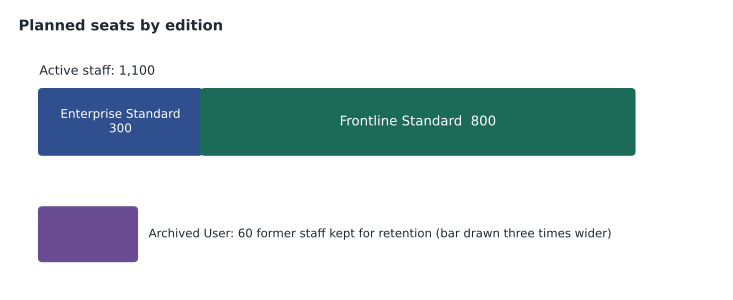
Dana wants to see the money. Owen writes a small model with illustrative prices; the real figures are in the reseller's quote, which is confidential.
# Illustrative monthly licence cost for Birchline's planned mix (Canadian dollars per user per month).
# Real prices come from the reseller's quote; these figures are for planning only.
plan = [
    ("Enterprise Standard", 300, 36.00),
    ("Frontline Standard", 800, 7.00),
    ("Archived User", 60, 5.00),
]
total = 0
for edition, seats, price in plan:
    cost = seats * price
    total += cost
    print(f"{edition:20} {seats:4} seats x {price:6.2f} = {cost:10,.2f}")
print(f"{'Monthly total':20} {'':26}{total:10,.2f}")
print(f"{'Annual total':20} {'':26}{total * 12:10,.2f}")
everyone_enterprise = (300 + 800) * 36.00 + 60 * 5.00
print(f"If all staff had Enterprise Standard: {everyone_enterprise * 12:,.2f} a year")
print(f"Saving from the frontline mix: {(everyone_enterprise - total) * 12:,.2f} a year")Enterprise Standard 300 seats x 36.00 = 10,800.00 Frontline Standard 800 seats x 7.00 = 5,600.00 Archived User 60 seats x 5.00 = 300.00 Monthly total 16,700.00 Annual total 200,400.00 If all staff had Enterprise Standard: 478,800.00 a year Saving from the frontline mix: 278,400.00 a year
What this code does
The model lists Birchline's planned licences, three editions, each with a number of seats and an illustrative monthly price in Canadian dollars. It multiplies seats by price for each edition, adds the results for a monthly total and multiplies by 12 for a year. It then works out what the year would cost if every employee had the knowledge-worker edition, and the difference shows how much the frontline licences save.
The model makes the case for the mix clearly: putting frontline staff on the knowledge-worker edition would cost more than twice as much for features most of them would never use. Dana's follow-up question is the right one: "What happens if a store associate becomes an assistant manager?" The answer is a licence change, which brings us to how licences are assigned.
Assigning licences
A user can use a Workspace service only if they hold a licence that includes it. Licences are managed in the console under Billing (subscriptions and licence settings) and on each user's page. There are two ways to assign them.
Automatic licence assignment gives every new user in an OU a licence of a chosen edition when the account is created or moved there. It is set per subscription and per OU, so Birchline sets Enterprise Standard automatically for /Head office, /Stores/Store managers and /Warehouses/Warehouse office, and Frontline Standard for /Stores and /Warehouses. Because synchronization (lesson 7) places users in OUs from Active Directory data, a new store associate will receive the right licence without anyone touching the console. Automatic assignment is turned off for /Admin accounts and /Service accounts, which need no Workspace services.
Manual assignment gives or removes a licence for a specific user, from the user's page or by CSV. It is used for exceptions. If the account runs out of licences, new users are created without one and cannot use services until a licence is available, which is a common cause of first-day complaints.
Licences follow policy, not people. When Priya Shah moves from a store to the head office e-commerce team, synchronization moves her account from /Stores to /Head office/E-commerce, and automatic assignment can switch her licence to Enterprise Standard. Her mail and files stay with her account. Owen checks how a licence change affects storage before approving such moves, because moving from a larger to a smaller storage allowance can leave a user over quota.
Subscriptions and payment plans
Behind the licences is the subscription, the commercial agreement for each edition. Google offers two main payment plans, and the choice affects how licences can change during the year.
| Plan | How it works | Fits |
|---|---|---|
| Flexible plan | Pay monthly for the licences in use; add or remove licences at any time | Seasonal staff numbers, trials, uncertain growth |
| Annual or fixed-term plan | Commit to a number of licences for the term, usually a year; add licences during the term but do not reduce until renewal; usually a lower price per user | Stable head counts |
| Reseller agreement | Buy through a Google partner, who bills you and may add support and services; terms come from the reseller contract | Organizations that want local billing, support or bundled services |
Birchline buys through a reseller on an annual plan for its stable head office and store manager licences. Because the stores hire about 120 seasonal staff for the holiday period, Sofia asks the reseller whether a portion of Frontline licences can be on a flexible plan. That request is a commercial question, not an admin one, and its answer depends on the reseller contract.
In the console's Billing area, administrators with billing privileges can see subscriptions, licence counts, invoices (when billed by Google) and payment settings. Billing access is powerful, so Birchline gives it to Sofia's super admin account and a billing-only admin role for Dana's finance team (lesson 9).
Watching licence use
Licences cost money every month, so unused ones are waste. Owen schedules a monthly review with Dana's team, using the console's licence and user reports.
The review looks for three things: licences assigned to suspended users who have left (suspension usually keeps the licence, so leavers should be deleted or archived after data transfer); licences assigned to accounts that have not signed in for a long period, which may belong to people who left without being offboarded; and editions that do not match the job, such as a store associate still on Enterprise Standard months after leaving head office. Reports in the console show last sign-in times and licence assignments, and they can be exported to Sheets for review.
Data regions and licensing
Teresa raises a question that depends on the edition: where will Birchline's data be stored? Workspace offers a data regions policy, available in specified editions, that lets administrators choose where certain data at rest is stored for an OU or group. Google's documentation lists the supported locations as the United States and Europe, with no preference as the default. That means a data regions policy cannot keep Workspace data in Canada. Birchline's privacy officer instead relies on Google's contractual commitments and its own assessment under PIPEDA and, for Quebec staff and customers, Law 25; customer data in Birchline's own Google Cloud projects stays in the Montréal and Toronto regions as planned in earlier courses. GCP-212 covers data regions in detail.
Trials and the first licences
Before signing, Birchline's IT team used a trial, which Google offers for a limited period with a small number of users. Trials let an organization verify its domain, test settings and migrate a few mailboxes before buying. When the trial converts to a paid subscription, the settings and data remain. Because Birchline's domain was already in a Cloud Identity account, the reseller added the subscription to that account directly, and the trial work carried over.
Licences also affect storage. Workspace editions include pooled storage for the organization, and administrators can set storage limits for OUs or groups so that one team cannot use the whole pool. Frontline editions include much less storage per user than Enterprise editions, which suits staff who rarely save files but matters when someone moves between them. Owen adds storage use to the monthly licence review so that surprises are caught early.
Common mistakes
MistakePlanning to put all 1,100 staff on a Business edition.
InsteadBusiness editions are capped at 300 users; large organizations use Enterprise editions, often mixed with Frontline.
MistakeLeaving leavers suspended indefinitely.
InsteadSuspended users usually still hold licences; transfer data and delete or archive the account.
MistakeAssigning licences one by one to every new user.
InsteadUse automatic licence assignment by OU, driven by synchronization.
MistakeAssuming every setting is available in every edition.
InsteadFeatures such as Vault, data regions and advanced device management depend on the edition.
Worked problem
Fixing a first-day complaint
Three new store associates synchronized from Active Directory on Monday cannot open Gmail. Their accounts exist and sit in /Stores. The licence report shows 800 of 800 Frontline Standard licences assigned. What happened, and what are the options?
Show solution
- Automatic licence assignment for /Stores tried to assign Frontline Standard, but every licence was already in use, so the three accounts were created without licences.
- Check for licences that can be released: suspended leavers, accounts that have not signed in for months, and staff who moved to head office but kept a Frontline licence.
- If releasing licences is not enough, add licences to the subscription (immediately on a flexible plan; on an annual plan additions are allowed during the term).
- Once licences are available, assign them to the three users (automatic assignment will not retry for existing users in every case, so check each account).
Answer: The subscription ran out of Frontline licences; free up unused ones or buy more, then assign licences to the three users.
Summary and key terms
- Editions decide which services and admin features users get and what they cost.
- Business editions are capped at 300 users; Enterprise editions suit large organizations; Frontline editions suit staff on mobile devices and shared computers; Archived User licences keep former employees' data for retention.
- Since 2025, Gemini features are included in Business and Enterprise editions and the separate add-on is gone.
- Automatic licence assignment by OU, combined with synchronization, gives users the right licence as they join and move; manual assignment handles exceptions.
- Flexible plans allow licences to change monthly; annual plans commit to a number for the term at a lower price.
- Review licence use monthly.
- Data regions depend on the edition and currently offer the United States and Europe.
- Edition
- A Workspace plan with a defined set of services, features and price per user.
- Licence
- The right for one user to use the services of an edition.
- Subscription
- The commercial agreement for an edition, with a payment plan and licence count.
- Automatic licence assignment
- A setting that gives users in chosen OUs a licence of a chosen edition automatically.
- Flexible plan
- A monthly payment plan where licences can be added or removed at any time.
- Annual plan
- A payment plan that commits to a number of licences for a term at a lower price.
- Frontline edition
- An edition designed for staff who work mainly on mobile devices or shared computers.
- Data regions
- A policy, in some editions, that sets where certain Workspace data is stored at rest.
Practice problems
Work each problem on paper first, then reveal the answer to check.
Why can't Birchline use Business Plus for everyone?
Show answer
Business editions are capped at 300 users, and Birchline has about 1,100.
A new user is created but cannot use Gmail. What licence problem should you check first?
Show answer
Whether the subscription has a licence available and whether one was assigned to the user.
What does an annual plan allow during the term?
Show answer
Adding licences, but not reducing the committed number until renewal.
Lesson quiz · 5 questions
Score 60% or more to complete this lesson.
Create a free account to save your progress, take quizzes and earn a certificate.