
GCP-210 · Lesson 11 of 12 · 18 min
Data migration into Google Workspace
▶ Video coming soon A video version of this lesson is on the way.
Birchline's Exchange servers hold about 14 terabytes of mail, calendars and contacts for 1,100 mailboxes, and the file servers hold another 9 terabytes of department shares, not counting the product photo library that moved to Cloud Storage earlier in the year. At the eleventh session, Sofia puts the numbers on the whiteboard and asks Owen the question every migration starts with: "What do people actually need on day one, and what can follow?" This lesson covers the strategies and Google tools for moving data into Workspace, and how to match them to a situation.
Migration is a project, not a button
A Workspace migration moves three kinds of thing: identities (accounts and groups, covered in lessons 3 to 7), data (mail, calendars, contacts and files) and people's habits (how they work, which needs training and support). The data part has its own decisions: what to move, in what order, with which tool, how long it will take, and how to keep both old and new systems working while the move happens.
Sofia's rule is that the plan is written before any tool is chosen. The plan answers who moves when (the waves), what moves for each wave (all mail or only recent years, which shared folders), how mail is delivered during the transition (coexistence), when the switch happens (cutover) and what happens if something goes wrong (rollback).
Migration strategies
There are three broad strategies, and most real migrations combine them.
A big bang migration moves everyone at once over a weekend. It avoids a long period with two systems, but everything must work at once and the support load on Monday morning is enormous. It suits small organizations, such as Trailhead Rentals with 48 people.
A phased (staged) migration moves people in waves over weeks or months, usually by department or location. Each wave learns from the last, and the help desk can cope, but the organization lives with two email systems for a while, so mail delivery and calendar free/busy information must work across them. It suits Birchline's 1,100 staff.
A pre-stage and cutover approach copies most historical data in the background before the switch, then copies only the recent changes (a delta) at cutover, so that users arrive in Gmail with their history already there. It can be combined with either of the others.
| Strategy | Pros | Cons | Fits |
|---|---|---|---|
| Big bang | Short transition; no long coexistence | All risk at once; huge support peak | Small organizations, simple environments |
| Phased waves | Manageable risk and support; lessons carried forward | Coexistence needed for weeks or months | Large organizations, many locations |
| Pre-stage and delta | Users arrive with history; short cutover | More planning; two copy runs | Any size, combined with the others |
Google's migration tools
Google provides several migration tools, each aimed at a different source and scale, and the exam expects you to match the tool to the situation. Product names and capabilities change, so check Google's current comparison before choosing.
| Tool | Runs where | Moves | Typical use |
|---|---|---|---|
| Data migration service (in the Admin console) | Google's cloud | Mail (and, for some sources, calendar and contacts) from IMAP servers, Microsoft Exchange or Microsoft 365, and another Google account | Small and medium migrations with no infrastructure to install |
| Google Workspace Migrate | Servers the organization runs (on premises or in Google Cloud) | Mail, calendars, contacts and files from Exchange, Microsoft 365, SharePoint, OneDrive, file shares and some other sources | Large enterprise migrations with many users and large volumes |
| Google Workspace Migration for Microsoft Exchange (GWMME) | A Windows computer the organization runs | Mail, calendars and contacts from Exchange, Microsoft 365, IMAP and PST files | Medium migrations needing more control than the data migration service |
| Drive for desktop and manual upload | Users' computers | Individual files and folders | Personal files; small amounts of data |
| User-led import (for example, a mail import from another account) | The user's Gmail settings | One user's mail and contacts | Individuals with personal or small business accounts |
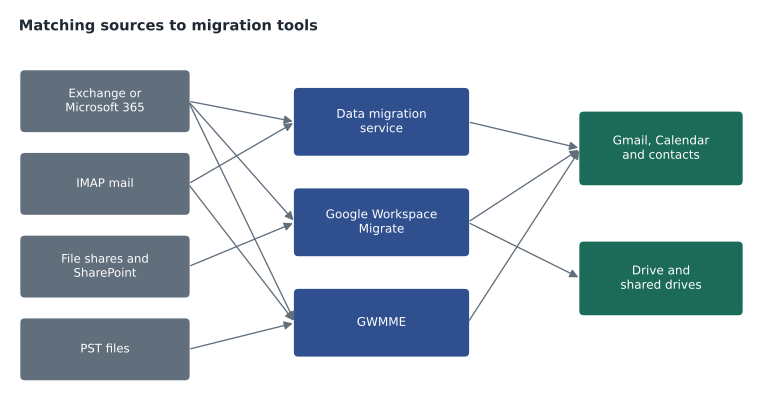
For Birchline, the choice follows from the scale and the sources. Mail, calendars and contacts for 1,100 Exchange mailboxes, plus 9 terabytes of department shares, point to Google Workspace Migrate, which handles both mail and files at enterprise scale. Sofia plans to run it on two virtual machines in the bl-shared-net project, which has network connectivity to the data room. Trailhead Rentals, with 48 mailboxes on a hosted IMAP service and a shared Dropbox, is a better fit for the data migration service in the console for mail, and a simple file transfer into a shared drive for the Dropbox content.
Planning waves and estimating time
Migrations take time because data must be read from the old system and written to Google within the limits both sides set. The old servers' capacity and Google's rate limits for writing mail and files decide the realistic speed, which is why tools let administrators tune the number of parallel workers. Owen does not try to predict exact speeds; he estimates with a planning rate measured in Birchline's own test migration, and then plans waves that fit into weekends.
# Plan migration waves from a planning rate measured in a test run.
# Mailbox sizes are totals per department in gigabytes (illustrative).
departments = [("IT pilot", 14, 120), ("Finance", 40, 610), ("Marketing", 35, 520),
               ("E-commerce", 30, 380), ("People and culture", 20, 240), ("Buying", 45, 900),
               ("Other head office", 60, 700), ("Warehouse office", 30, 300),
               ("Store managers", 40, 520), ("Store and warehouse floor", 786, 2400)]
GB_PER_HOUR = 55          # measured in Birchline's test migration with the planned workers
WEEKEND_HOURS = 40        # Friday 18:00 to Sunday 10:00
waves, current, hours = [], [], 0.0
for name, people, gb in departments[1:]:      # the pilot moves on its own first
    need = gb / GB_PER_HOUR
    if current and hours + need > WEEKEND_HOURS:
        waves.append((current, hours)); current, hours = [], 0.0
    current.append(name); hours += need
waves.append((current, hours))
print("Pilot:", round(120 / GB_PER_HOUR, 1), "hours")
for number, (names, h) in enumerate(waves, start=1):
print(f"Wave {number}: {round(h, 1):5} hours " + ", ".join(names))Pilot: 2.2 hours Wave 1: 31.8 hours Finance, Marketing, E-commerce, People and culture Wave 2: 34.5 hours Buying, Other head office, Warehouse office Wave 3: 9.5 hours Store managers Wave 4: 43.6 hours Store and warehouse floor
What this code does
The plan lists each department with its number of people and the total size of its mailboxes, plus two figures: how many gigabytes per hour the test migration achieved and how many hours a weekend allows. It skips the pilot, which moves alone, then adds departments to a wave in order until the next one would no longer fit in a weekend, and starts a new wave there. The output shows each weekend wave, how many hours of copying it needs and which departments it contains.
The plan produces several weekend waves for the main migration. The floor staff wave stands out: about 2.4 terabytes for 786 people, needing more than one weekend on its own. Sofia's response is to pre-stage it: copy mail older than 90 days during the weeks before the wave, so that the cutover weekend only needs to copy recent mail. Frontline staff also have small mailboxes and little history that matters, so Birchline will move only the last two years of mail for them, with older mail kept in Exchange archives until the legal retention period ends. That is a business decision documented with legal and HR.
Coexistence: two systems at once
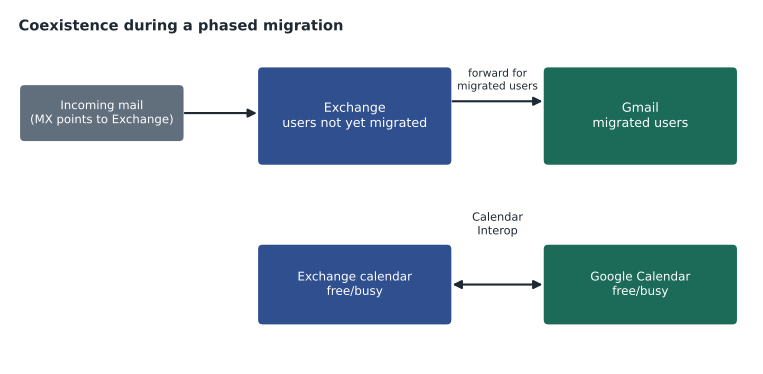
During a phased migration, some people are in Gmail and some still in Exchange, and they must be able to email each other, see each other's free/busy time and book meetings. Making this work is called coexistence, and it is the most technical part of a migration plan.
Mail routing must deliver each message to wherever its recipient currently lives. A common pattern is split delivery: the MX records stay pointed at the old system during the migration, and the old system forwards mail for migrated users to Google, using a routing address at a test subdomain or the Google-provided domain. When most users have moved, the MX records are switched to Google and the pattern reverses, with Google forwarding mail for remaining users to Exchange. GCP-211 covers mail routing settings.
Calendar interoperability lets Google Calendar and Exchange share free/busy information, so that a migrated user can see when a colleague still on Exchange is busy, and vice versa. Google provides Calendar Interop settings for Exchange and Microsoft 365. Directory consistency matters too: both systems should show everyone in the address book, which synchronization (lesson 7) provides on the Google side.
Cutover and the first day
Cutover is the moment a wave stops using the old system. For each Birchline wave, the cutover checklist runs from Friday evening: final delta migration, mail routing changed so the wave's mail goes to Gmail, Outlook profiles retired or reconfigured, devices signed in to the Google apps, and help desk staff and floor walkers ready on Monday morning. Before the wave, users receive guides on what changes and a short training session; after, there is a feedback survey and a list of problems for the next wave.
Every plan also says how to roll back: if a wave's cutover fails badly, mail routing can be returned to Exchange, where the mailboxes still exist, because Exchange is not decommissioned until every wave has moved and stabilized.
Files: shared drives and ownership
Moving files is not just copying. Department shares on a file server belong to departments, not people, so they should land in shared drives, where files belong to the shared drive and stay when people leave (GCP-211). Personal home folders map to each user's My Drive. Before migrating, Birchline's data owners review their shares: duplicate copies, old installers and archived project folders are left behind, and permissions are redesigned around the acl- groups from lesson 5 rather than copied from the file server's tangled permission lists.
| Source | Destination | Permissions |
|---|---|---|
| Department share (for example, Finance) | A shared drive per department | acl- group for the department, managed by the data owner |
| Project folders | A shared drive per project or a folder inside the department drive | Project acl- group |
| Personal home folders | Each user's My Drive | Owned by the user |
| Old archives not used in five years | Not migrated; kept on the file server until retention ends | Read-only, IT only |
Communication is part of every wave. Two weeks before cutover, each person in the wave receives a short message explaining what will change, when, and where to get help; one week before, a fifteen-minute training session shows Gmail, Calendar and Drive with Birchline examples; and on cutover morning, floor walkers in each office and a dedicated help desk queue handle questions. The feedback survey after each wave feeds directly into the next wave's messages and training.
Common mistakes
MistakeChoosing a migration tool before writing the plan.
InsteadDecide waves, scope, coexistence, cutover and rollback first; then pick the tool that fits.
MistakeSwitching MX records to Google before most users have moved.
InsteadKeep mail flowing to the system where most users live and route mail for the rest.
MistakeMigrating every byte of history for every user.
InsteadAgree retention and scope with the business; pre-stage history and move only what is needed.
MistakeCopying file-server permissions exactly.
InsteadRedesign access around shared drives and groups.
Worked problem
Matching tools to migrations
Owen is asked to recommend tools for three migrations: (1) Trailhead Rentals, 48 mailboxes on a hosted IMAP service; (2) Birchline, 1,100 Exchange mailboxes plus 9 terabytes of file shares; (3) a new head office hire who wants to bring 3 GB of mail from her previous personal account. Which tool fits each?
Show solution
- Trailhead's 48 IMAP mailboxes are a small migration from a supported source with no servers to run: the data migration service in the Admin console.
- Birchline's large Exchange and file-share migration needs enterprise scale and file support: Google Workspace Migrate, run on Birchline-managed servers, with waves and coexistence.
- The new hire's personal mail is a single-user import she can do herself in Gmail settings, if company policy allows personal mail to be brought in at all.
- In each case, check the current tool documentation for supported sources and limits before starting.
Answer: Data migration service for Trailhead, Google Workspace Migrate for Birchline and a user-led import for the individual.
Summary and key terms
- A migration moves identities, data and habits; write the plan (waves, scope, coexistence, cutover and rollback) before choosing tools.
- Big bang suits small organizations, phased waves suit large ones, and pre-staging history with a final delta shortens cutover.
- The data migration service in the console handles small and medium mail migrations without infrastructure; Google Workspace Migrate handles large enterprise migrations of mail, calendars, contacts and files; GWMME moves Exchange, IMAP and PST data from a Windows computer; individuals can import their own mail.
- Coexistence needs mail routing to wherever each user lives and calendar interoperability for free/busy.
- Keep the old system until every wave is stable, so rollback is possible.
- Move department shares into shared drives and redesign permissions around groups.
- Migration wave
- A group of users moved together in a phased migration.
- Big bang migration
- Moving everyone at once.
- Pre-staging
- Copying historical data before cutover so that only recent changes remain.
- Delta migration
- Copying only data that changed since the previous run.
- Coexistence
- Running old and new systems together, with mail and calendars working across them.
- Split delivery
- Routing mail so that each recipient's mail reaches the system where their mailbox currently is.
- Cutover
- The moment a group of users stops using the old system.
- Google Workspace Migrate
- Google's enterprise migration tool for large volumes of mail, calendar, contacts and files.
Practice problems
Work each problem on paper first, then reveal the answer to check.
Why does Birchline pre-stage mail for the floor staff wave?
Show answer
Its 2.4 terabytes would not copy in one weekend; copying older mail beforehand leaves only recent mail for cutover.
What two things must work during coexistence?
Show answer
Mail routing to wherever each user lives, and calendar free/busy across both systems.
Why are department shares moved to shared drives rather than to a person's My Drive?
Show answer
Files in shared drives belong to the drive and stay when people leave.
Lesson quiz · 5 questions
Score 60% or more to complete this lesson.
Create a free account to save your progress, take quizzes and earn a certificate.