
DCE-210 · Lesson 6 of 12 · 28 min
Network hardware: switches, routers and transceivers
The fabrics of Lesson 3 are built from physical boxes that occupy rack space, draw power, produce heat and fail. This lesson opens those boxes: what is inside a modern data centre switch, how switch chips have grown, why the radix of a switch decides how large a fabric can be, how routers differ from switches, what the pluggable transceivers do and how much power they use, and the practical details that affect the facility, from airflow direction to spares.
Inside a switch
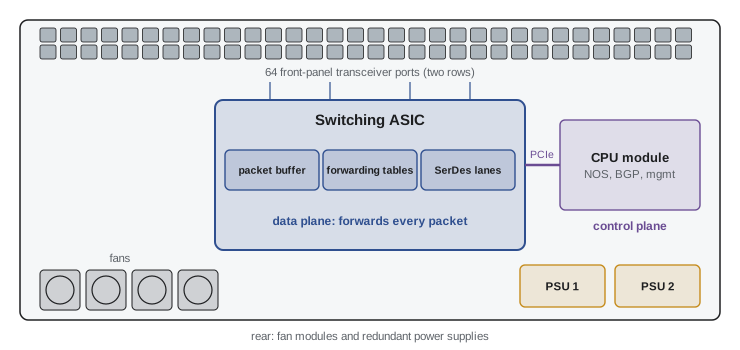
A data centre switch is built around a switching ASIC (application-specific integrated circuit), a single chip that receives, looks up, buffers and forwards every packet. Around it sit:
- SerDes (serializer/deserializer) circuits on the chip that drive the electrical lanes to the front-panel ports, today at 100 Gb/s or 200 Gb/s per lane.
- A packet buffer, usually on the chip and shared among all ports.
- Forwarding tables: MAC address tables, IP route tables and access control lists held in fast on-chip memory.
- A control-plane CPU, a small server on its own board running the network operating system, which runs routing protocols such as BGP, programs the ASIC's tables and provides management.
- Front-panel cages for pluggable transceivers, fans, and two or more hot-swappable power supplies.
The split between the data plane (the ASIC, forwarding packets at line rate) and the control plane (the CPU, deciding where packets should go) is fundamental. The CPU never touches ordinary packets; if it crashes, the ASIC may keep forwarding on its last instructions for a while, and if it is overloaded, routing protocols can time out even though the data plane is healthy.
Network operating systems
Traditionally each vendor supplied its switches with its own closed operating system. Large operators wanted to run the same software across hardware from several vendors and to change it themselves, which led to disaggregation: "white-box" or "bare-metal" switches sold without software, running an independent network operating system. SONiC, open-sourced by Microsoft in 2016 and now hosted by the Linux Foundation, is the most widely deployed open network operating system and runs on switches from many manufacturers. Vendors' own systems remain common in enterprises, where integrated support matters more than flexibility.
How switch chips have grown
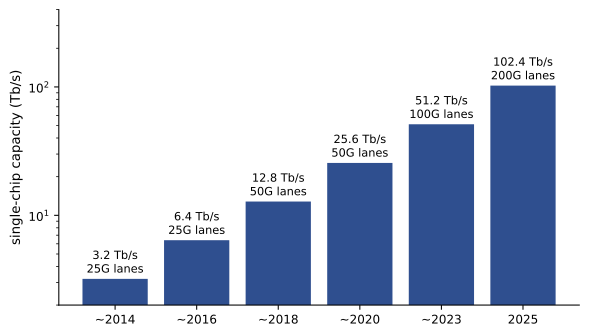
Switch ASIC capacity has roughly doubled every two years, driven by faster SerDes lanes and more of them on each chip. Capacities of 12.8 Tb/s around 2018 grew to 25.6 Tb/s around 2020 and 51.2 Tb/s around 2023, and the first 102.4 Tb/s chip, Broadcom's Tomahawk 6, began shipping in mid-2025, supporting configurations such as 64 ports of 1.6 Tb/s or 512 ports of 200 Gb/s.
Radix: why port count matters
The same chip can be configured as fewer fast ports or more slower ports. A 51.2 Tb/s chip might provide 64 × 800 Gb/s, 128 × 400 Gb/s or 256 × 200 Gb/s, using breakout cables or optics that split one physical port into several logical ones. The number of ports is the switch radix, and it decides how large a fabric can be built in a given number of layers.
In a non-blocking two-layer leaf-spine built from identical switches of radix \(k\), each leaf uses half its ports for servers and half for uplinks, and each spine connects to up to \(k\) leaves. The maximum number of server ports is
and a three-layer fat tree (Lesson 11) reaches \(k^{3}/4\).
Worked problem
Radix and fabric size
Compare the largest non-blocking two-tier fabric that can be built from 51.2 Tb/s switches configured as (a) 64 × 800 Gb/s or (b) 256 × 200 Gb/s. What does each provide in total server bandwidth?
Show solution
- (a) \(64^{2}/2 = 2{,}048\) server ports at 800 Gb/s: \(2{,}048 \times 0.8 = 1{,}638\) Tb/s.
- (b) \(256^{2}/2 = 32{,}768\) server ports at 200 Gb/s: \(32{,}768 \times 0.2 = 6{,}554\) Tb/s.
Answer: The high-radix configuration builds a fabric 16 times larger in ports and four times larger in total bandwidth from the same chip, without adding a third layer. High radix is why AI fabrics often run many 200 Gb/s or 400 Gb/s links rather than fewer, faster ones, and fewer layers means fewer switches, optics, hops and watts.
Switches and routers
Data centre switches and routers use similar hardware but are optimized differently:
- Data centre switches have very high capacity, low latency and relatively small tables and buffers, because inside a fabric there are only thousands of routes and the RTT is short.
- Routers at the edge of the data centre and in carrier backbones must hold the full internet routing table, roughly a million IPv4 routes and over 200,000 IPv6 routes in 2025, and growing. They need deep buffers (often gigabytes of external high-bandwidth memory) to handle long-RTT traffic, rich QoS, and features such as MPLS and large-scale encryption.
- Modular chassis routers and switches hold line cards and fabric cards in a single large enclosure, sometimes over 20U and 10 kW or more. They were once standard at the core of networks; in data centres they have largely given way to fabrics of fixed-configuration "pizza box" switches of 1U to 4U, which are cheaper, simpler and fail in smaller pieces.
Transceivers and cables
Each port takes a pluggable module whose form factor is named by the cage it fits:
- SFP and SFP28 for single-lane links up to 25 Gb/s (SFP56 and SFP112 for 50 and 100 Gb/s).
- QSFP28 and QSFP56 for four-lane 100 and 200 Gb/s.
- QSFP-DD and OSFP, with eight lanes, for 400 Gb/s and 800 Gb/s; OSFP is also used for 1.6 Tb/s.
The module may be an optical transceiver (Lesson 9), or the port may take a cable with the connectors built on: a direct-attach copper cable (DAC) for links of up to about 2 to 3 m within a rack, an active electrical cable (AEC) with signal-conditioning chips for a few metres more, or an active optical cable (AOC) with optics sealed into each end for longer runs. DACs use almost no power and are cheapest, so servers are connected to top-of-rack switches with copper wherever distance allows.
Optics power
As switch capacity has grown, the power used by the optics has grown with it, until in a fully populated switch the optics can use as much power as the switch itself.
Worked problem
Power of a loaded switch
A 51.2 Tb/s switch draws 1,200 W with no optics installed. It is fully populated with 64 × 800 Gb/s optical transceivers of 16 W each. (a) What is the total power and the energy per bit? (b) Linear-drive pluggable optics (LPO), which remove the digital signal processor from the module, use about 8 W each. What is the saving per switch, and across 500 switches over a year?
Show solution
- (a) Optics: \(64 \times 16 = 1{,}024\) W. Total: \(1{,}200 + 1{,}024 = 2{,}224\) W.
- Energy per bit: \(2{,}224 / 51.2 \times 10^{12} = 4.3 \times 10^{-11}\) J = 43 pJ/bit.
- (b) Saving per switch: \(64 \times (16 - 8) = 512\) W.
- Across 500 switches: \(500 \times 0.512 = 256\) kW; per year \(256 \times 8{,}760 = 2{,}243{,}000\) kWh, about 2.2 GWh, before counting the cooling energy saved.
Answer: About 2.2 kW and 43 pJ/bit per switch; LPO saves about 512 W per switch, about 2.2 GWh a year across 500 switches. Co-packaged optics (CPO), which place the optical engines on the same package as the switch ASIC and eliminate the electrical traces and module electronics, aim to cut optics power further still, and the first CPO switches were introduced in 2025.
Hardware details that matter to the facility
Airflow direction
Servers draw cool air in at the front and exhaust it at the rear. Switches, however, are often mounted with their ports facing the rear of the rack, where the server network cables are, so a switch's port side may face the hot aisle. Switches therefore come in two airflow versions, usually called port-side intake and port-side exhaust (vendors also use "front-to-back" and "back-to-front", whose meaning depends on which side the vendor calls the front). A switch mounted ports-to-the-rear in a hot-aisle/cold-aisle layout must use port-side exhaust, so that it takes air from the cold aisle through its power-supply side.
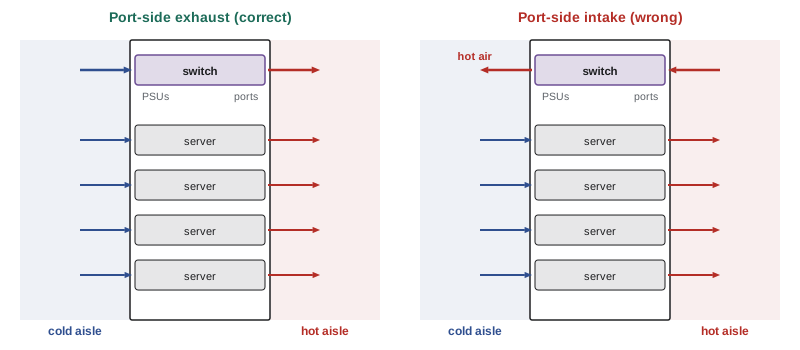
Getting this wrong is one of the most common installation errors in data centres: the switch ingests hot air, runs hot and may shut down, and its exhaust raises the inlet temperature of nearby servers. Fans and power supplies must all match; mixing directions in one switch is also a fault.
Power supplies and feeds
Switches have two or more hot-swappable power supplies, which should be fed from separate A and B power paths (DCE-200, Lesson 3). Supplies are available for AC input (100 V to 277 V) and for DC input, including −48 V DC for telecommunications facilities (Lesson 10) and higher-voltage DC in some data centres. A large switch's power supplies may each be rated 2 kW to 3 kW, and rack power plans should use the measured or vendor-typical load rather than the nameplate rating, which assumes worst-case optics and fan speeds.
Spares and failure rates
With thousands of switches and tens of thousands of transceivers, failures are routine events. Operators keep spares on site and design the fabric so that losing any one device causes only a small loss of capacity.
Worked problem
How many failures to expect
A campus has 2,000 switches with a mean time between failures (MTBF) of 300,000 hours and 60,000 optical transceivers with an annualized failure rate of 0.5%. How many failures should operations expect per year and per week?
Show solution
- Switch failures per year: \(2{,}000 \times 8{,}760 / 300{,}000 = 58.4\).
- Transceiver failures per year: \(60{,}000 \times 0.005 = 300\).
- Total: about 358 per year, or \(358/52 \approx 6.9\) per week.
Answer: About 360 failures a year, nearly 7 per week, most of them transceivers. Operations teams therefore treat hardware replacement as a routine process with spares, procedures and automation, and fabrics are designed so that a single failure goes almost unnoticed.
Lifecycle
Network equipment is typically refreshed every five to seven years, faster in AI clusters where each new generation of accelerators brings faster network interfaces. Each refresh changes rack power, heat and cabling. Data centre designs should leave room for the next generation of switches and the cable types it will need, rather than only today's.
Common mistakes
MistakeOrdering switches without specifying airflow direction.
InsteadChoose port-side intake or exhaust to match how the switch is mounted relative to the cold aisle.
MistakeBudgeting rack power from switch nameplate ratings only.
InsteadUse measured or typical loads including the optics actually installed.
MistakeForgetting optics power.
InsteadIn a loaded high-speed switch the optics can use as much power as the switch.
MistakeFeeding both switch power supplies from the same power path.
InsteadConnect them to separate A and B feeds.
MistakeTreating hardware failures as rare emergencies.
InsteadExpect several per week at scale; keep spares and procedures ready.
Summary and key terms
- A switch has a forwarding ASIC (data plane) and a CPU running the network operating system (control plane).
- Disaggregated switches run independent network operating systems such as SONiC.
- Switch chip capacity has doubled about every two years, to 102.4 Tb/s in 2025.
- Radix decides fabric size: k²/2 ports in two tiers, k³/4 in three.
- Edge routers need full internet tables and deep buffers; data centre switches favour capacity and latency.
- DACs, AECs, AOCs and optical transceivers connect ports; optics can match the switch in power.
- Airflow direction, A/B power, spares and refresh cycles connect network hardware to the facility.
- Switching ASIC
- The chip that forwards packets at line rate.
- Data plane
- The part of a device that forwards packets.
- Control plane
- The part that runs routing protocols and programs the data plane.
- Disaggregation
- Buying switch hardware and network operating system separately.
- SONiC
- An open-source network operating system for data centre switches.
- Radix
- The number of ports on a switch.
- Breakout
- Splitting one physical port into several slower logical ports.
- DAC
- Direct-attach copper cable for short links.
- LPO
- Linear-drive pluggable optics without a digital signal processor.
- CPO
- Co-packaged optics placed alongside the switch ASIC.
- Port-side exhaust
- Switch airflow that enters at the power supplies and leaves at the ports.
Practice problems
Work each problem on paper first, then reveal the answer to check.
What runs BGP in a switch, the ASIC or the CPU?
Show answer
The control-plane CPU.
A 25.6 Tb/s chip as 64 × 400 Gb/s ports. Maximum two-tier non-blocking server ports?
Show answer
64²/2 = 2,048.
Same chip as 128 × 200 Gb/s?
Show answer
128²/2 = 8,192.
Three-tier fat tree with radix 64?
Show answer
64³/4 = 65,536.
Why do edge routers need deep buffers?
Show answer
To absorb bursts for long-RTT flows across the WAN.
Which cable suits a 2 m link from server to top-of-rack switch?
Show answer
A direct-attach copper cable.
A switch draws 900 W plus 32 optics at 14 W. Total?
Show answer
1,348 W.
A switch mounted ports facing the hot aisle needs which airflow?
Show answer
Port-side exhaust.
800 switches, MTBF 400,000 h. Failures per year?
Show answer
About 17.5.
Why design for the next generation of switches?
Show answer
Refreshes every 5–7 years change power, heat and cabling.
Lesson quiz · 5 questions
Score 60% or more to complete this lesson.
Create a free account to save your progress, take quizzes and earn a certificate.