
APT-220 · Lesson 10 of 12 · 21 min
Barcodes, scanners and tracking
▶ Video coming soon A video version of this lesson is on the way.
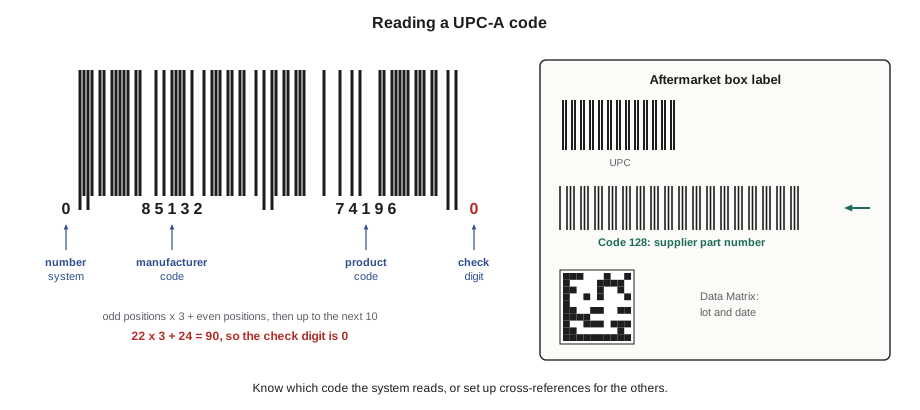
Linmore Tessaro had used handheld scanners for picking and cycle counting for years. Tessaro's own parts arrived with labels the DMS read perfectly: scan the label and the part number appeared on the screen. Aftermarket parts were another story. A Corvane sensor box might carry three barcodes: a retail product code, Corvane's own part number and a lot code. Scan the wrong one and the scanner said "item not found." Many staff had given up and typed the part numbers in by hand, which was slower and brought back the keying errors the scanners were supposed to stop.
Rolf asked Talia to fix it for the Corvane and Torvale lines. "Find out which barcode on each box the system can use," he said, "and get the rest into the system as cross-references." This lesson covers what she learned: how barcodes work, the main kinds used on parts and shipments, how scanners fit into the warehouse flow, how tracking works, and the mistakes that make a scanner less accurate than a careful person.
Why barcodes
A barcode is a pattern of bars and spaces, or of squares, that a machine can read as a string of numbers and letters. Reading a barcode is much faster than reading a part number and typing it, and much more accurate. A person typing a twelve-character part number can transpose two digits or miss one; a barcode either reads correctly or does not read at all, because barcodes include checks that catch most misreads.
In a parts warehouse, barcodes are used at nearly every step of the flow: to receive a shipment against its purchase order, to confirm a put-away location, to confirm a pick, to check a packed order, to count a bin, to print and track a shipping label and to record a delivery. Each scan is a small check that the right part is in the right place, and each scan also records the move in the system at the moment it happens, which keeps the information flow and the parts flow together (lesson 1).
Linear barcodes
Linear or one-dimensional barcodes are the familiar rows of bars. Several kinds, called symbologies, are common on parts and shipments:
- UPC-A: 12 digits, the standard retail product code in North America, printed on many aftermarket parts sold in stores. It identifies a product, not a part number, so the DMS must link each UPC to its part number.
- EAN-13: 13 digits, the international version of the retail code. A UPC-A can be read as an EAN-13 with a leading zero.
- Code 39: an older symbology that can carry capital letters, digits and a few symbols. Still found on some older part labels and bin labels.
- Code 128: a compact symbology that can carry the full set of letters, digits and symbols. Widely used for part numbers, bin labels and shipping labels. A standard form of it, called GS1-128, carries several pieces of information, such as a product code, a lot number and a date, in one barcode.
Retail codes such as UPC and EAN are assigned through GS1, the organization that manages product numbering standards worldwide. A company gets a company prefix from GS1 and uses it to number its products, so that every product code in the world is unique.
Check digits
The last digit of a UPC or EAN code is a check digit, calculated from the other digits. When a scanner reads the code, it recalculates the check digit; if the result does not match, the read is rejected. A check digit catches almost all single-digit errors and most cases where two neighbouring digits are swapped, which are the most common mistakes in keying a number by hand too.
For a UPC-A code, the check digit is found from the first 11 digits:
- Add the digits in the odd positions (first, third, fifth and so on) and multiply the sum by 3.
- Add the digits in the even positions.
- Add the two results.
- The check digit is the number that brings the total up to the next multiple of 10. If the total is already a multiple of 10, the check digit is 0.
Worked problem
Checking a UPC code
A Corvane sensor box carries the UPC 0 85132 74196 and a check digit. What should the check digit be?
Show solution
- Digits in odd positions (1st, 3rd, 5th, 7th, 9th, 11th):
- \[0 + 5 + 3 + 7 + 1 + 6 = 22\]
- Times 3:
- \[22 \times 3 = 66\]
- Digits in even positions (2nd, 4th, 6th, 8th, 10th):
- \[8 + 1 + 2 + 4 + 9 = 24\]
- Total:
- \[66 + 24 = 90\]
- Next multiple of 10:
- 90 is already a multiple of 10, so the check digit is 0
Answer: The full code is 0 85132 74196 0. If a scanner read any single digit wrongly, the total would not come to a multiple of 10 with that check digit, and the read would be rejected. The code is a sample.
EAN-13 codes use the same idea with the weights reversed: the first 12 digits are multiplied alternately by 1 and 3, starting with 1, and the check digit brings the total up to the next multiple of 10. Many part numbering systems, and the vehicle identification number covered in APT-120, use check digits for the same reason.
Two-dimensional codes
Two-dimensional (2D) codes store information in a grid of squares or dots. They hold far more data in a small space than a linear barcode, and they can still be read when part of the code is damaged, because the data is stored more than once with error correction.
- QR codes are square, with three large squares at the corners. They can hold web addresses, part numbers, serial numbers and more, and can be read by most phone cameras.
- Data Matrix codes are small and square or rectangular, with an L-shaped border on two sides. They are often marked directly onto parts by laser or dot peen, for example on castings, electronic modules and safety parts, to record the part number, serial number and production date.
- PDF417 codes are rectangular stacks of small linear codes, used on some shipping labels and on many driver's licences.
2D codes need an imager, a camera-based scanner, rather than the older laser scanners that read only linear barcodes. Most scanners sold today are imagers and read both kinds.
Scanners in the warehouse
Warehouse scanners come in several forms:
- Corded or cordless handheld scanners attached to a computer at the counter or the receiving desk. They read a code and send it to the screen as if it had been typed.
- Mobile computers: handheld devices with a built-in scanner, a screen and a keypad, connected to the DMS over the warehouse wireless network. The picker or receiver works through tasks on the device itself.
- Wearable scanners, such as ring scanners worn on a finger, which leave both hands free for handling parts.
- Fixed scanners mounted over a conveyor or at a packing station, which read every carton that passes.
- Phone or tablet apps that use the camera as an imager, common for proof of delivery and small operations.
Mobile computers can work in real time, sending each scan to the DMS as it happens, or in batch mode, storing scans and sending them all when the device is docked. Real-time scanning keeps the system up to date and can warn the user immediately about a wrong part or location. Batch scanning is useful where the wireless signal is weak, such as in a trailer or a basement, but errors are found later.
Labels the warehouse makes
Not all barcodes come from suppliers. A warehouse prints many of its own:
- Bin labels: each location's code in text and as a barcode, so that put-away and picking can confirm the location with a scan (lesson 4).
- Part labels: for parts that arrive without a readable barcode, the receiver prints a label with the DMS part number and sticks it on the part or its box.
- Licence plate labels: a unique number for each pallet, carton or tote, so the whole container can be tracked with a single scan. Many large warehouses use them; smaller ones use them for staging and returns.
- Shipping labels: printed from the courier's software, with the carrier's barcodes for sorting and tracking.
- Core and warranty tags with a barcode linking the tag to the invoice or claim (lesson 8).
Printed labels should be clear, the right size and placed where they can be scanned easily: on the front edge of a shelf, on the largest face of a carton, away from seams and folds. A thermal label printer at the receiving desk and another at the packing bench is common in dealerships.
Cross-references
When a supplier's barcode is not the DMS part number, the system needs a cross-reference: a record linking the barcode's value to the part number. Most dealer systems can store one or more alternate codes for each part, such as a UPC or a supplier's number. Once the cross-reference is set up, scanning any of the linked codes finds the part.
Talia started with the 62 Corvane part numbers Linmore Tessaro stocked. She scanned every code on a sample box of each one and compared what the scanner read with the part record. For 54 parts, the Code 128 barcode carried the Corvane part number exactly as the DMS stored it, and those already worked if staff scanned the right barcode. For the other 8, the DMS stored the number with a hyphen that the barcode left out; she added the UPC as a cross-reference for each. Then she made a one-page guide with a photo of a typical Corvane box and a circle around the barcode to scan, and taped a copy at the receiving desk and the packing bench. She did the same for Torvale the following week.
Tracking
Tracking means following a shipment or a part from one point to another by recording scans along the way. Outside the warehouse, every courier package and most freight shipments are tracked by the carrier: the package is scanned at pickup, at each terminal or sorting centre, onto the delivery vehicle and at delivery. The shipper and the customer can see these scan events online. When a scan is missing or a package stops moving, the carrier's exception report flags it.
Inside the warehouse, tracking follows parts through the flow: received at a time by a person, put away to a location, picked for an order, packed into a carton, loaded on a van. When a customer calls to ask where a part is, a well-scanned warehouse can answer in seconds. When a part goes missing, the scan history shows the last place it was seen and who handled it.
Proof of delivery completes the chain. Couriers capture the receiver's signature or a photo. On the dealership's own van, Gideon used a phone app to scan each box at delivery and capture the customer's signature on the screen, which gave the counter a time-stamped record of every delivery (lesson 11).
RFID, radio-frequency identification, is a different technology: small tags with a chip and antenna that a reader can detect by radio, without a line of sight, and many at once. RFID can count a whole carton or rack in seconds. It is common in large distribution centres and in some industries such as clothing, but the tags cost much more than a printed barcode, and most dealership parts departments still rely on barcodes.
When scanning goes wrong
Scanners make errors less likely, but not impossible. The common ways a scanner lets an error through are:
- Scanning the wrong barcode on a box with several codes, which may find a different part with a matching number.
- Scanning one part and picking several without counting, or scanning the same part twice to make up a quantity.
- Scanning the label, not the part: a carton labelled for one part but holding another (lesson 3).
- Overriding a warning by keying the expected part number when the scan does not match.
- Scanning a label from a list or a sheet instead of the bin or the part, which defeats the check completely.
- Old or wrong labels left on bins after a re-slot or on parts after a supersession.
The rule Sasha taught was that a scan is a check, not a substitute for looking. "When the scanner beeps a warning, stop. Don't make it go away; find out why it beeped."
Counting with scanners
Scanners make cycle counts faster and more reliable (APT-210). The counter scans the bin label, then each part or the part label and a quantity, and the device sends the count to the system, which compares it with the book quantity only after the count is recorded, so the count stays blind. A scanner also catches the common counting error of counting the right number of parts in a bin that holds the wrong part number. Labels must be readable for this to work, so damaged or faded bin labels are replaced whenever they are found, not saved up for a quiet day.
Common mistakes
MistakeTyping part numbers when the scanner says "item not found."
InsteadFind the right barcode, or set up a cross-reference.
MistakeScanning a cheat sheet instead of the part or bin.
InsteadScan the actual part and the actual location.
MistakeOverriding a scan warning.
InsteadStop and find out why the scanner warned.
MistakeLeaving old bin labels after a re-slot.
InsteadReplace labels as part of every move.
MistakeAssuming a scanned label proves the contents.
InsteadLook at the part as well as the label.
Summary and key terms
- Barcodes make each step faster and more accurate, and record moves as they happen.
- UPC-A and EAN-13 identify retail products; Code 39 and Code 128 carry part numbers and other text; GS1-128 carries several data fields.
- A check digit lets a scanner reject most misreads.
- 2D codes such as QR and Data Matrix hold more data and survive damage; they need an imager.
- Cross-references link supplier codes to DMS part numbers; tracking and proof of delivery complete the record.
- Symbology
- A particular type of barcode, such as UPC-A, Code 128 or QR.
- Check digit
- A digit calculated from the others in a code, used to detect errors.
- GS1
- The organization that manages global product numbering standards such as UPC and EAN.
- Imager
- A camera-based scanner that can read both linear and 2D codes.
- Cross-reference
- A record linking a supplier's code or barcode to a DMS part number.
- Proof of delivery
- A record, such as a signature or photo, that a shipment was delivered.
Practice problems
Work each problem on paper first, then reveal the answer to check.
What is the check digit for the UPC 0 41279 30562?
Show answer
Odd: 0+1+7+3+5+2 = 18; × 3 = 54. Even: 4+2+9+0+6 = 21. Total 75; next multiple of 10 is 80, so the check digit is 5.
Why can a 2D code be read when part of it is damaged?
Show answer
It stores data more than once with error correction.
What does a cross-reference do?
Show answer
It links a supplier's barcode value to the DMS part number, so scanning it finds the part.
Name two ways a scanner can let an error through.
Show answer
Scanning the wrong barcode, scanning a cheat sheet, overriding a warning, scanning a label not the part.
What is the difference between real-time and batch scanning?
Show answer
Real-time sends each scan as it happens; batch stores scans and sends them later.
Lesson quiz · 5 questions
Score 60% or more to complete this lesson.
Create a free account to save your progress, take quizzes and earn a certificate.