
APP-320 · Lesson 9 of 12 · 28 min
Fault codes and manufacturer tools
▶ Video coming soon A video version of this lesson is on the way.
On Sunday, November 8, Kiran spent the evening at his kitchen table with a laptop. Ade had set up his login to the service portal of one of Penfold's three brands the week before, and Harriet had asked him to finish the brand's online modules before his first factory-authorized call. There were modules on handling boards, on the brand's inverter refrigerators and on reading its tech sheets, each ending with a short test. In the portal's search box he typed the model number of the Northwind-style training washer from the shop, then remembered that Northwind was invented for Penfold's binder and was not in any portal. He laughed, typed in the model number of a real washer he had worked on with Dee instead, and found its service manual, three service bulletins and an exploded parts view with every part number. "That," he told Dee on Monday morning, "is a lot more than the tech sheet."
This lesson explains what fault codes are and how controls decide to set them, how to use a code without being misled by it, the different kinds of codes and blink patterns, and the manufacturer tools that support diagnosis: tech sheets, service manuals, bulletins, parts systems, service portals, technical support and diagnostic apps and interfaces.
What a fault code is
A fault code is the control's report that something it watches went outside the limits in its program. Each code has a condition (what the control measured), a threshold (the limit) and usually a time (how long the condition must last). The sample Northwind code F21, long drain, means the water level sensor did not show the tub empty within eight minutes of the drain pump being commanded on. F51 means the motor speed did not reach the commanded speed within the allowed time. F33 means a water temperature sensor reading was outside its possible range. The code describes the symptom the control saw, not the part that failed.
| Code (sample) | Condition the control saw | Common causes, in rough order |
|---|---|---|
| F10 | Fill level not reached in 8 minutes | Closed taps, clogged inlet screens, low supply pressure, siphoning drain hose, valve or its voltage |
| F21 | Tub not empty 8 minutes after drain started | Clogged drain filter, kinked hose, high standpipe, pump, pressure hose or air trap |
| F33 | Water temperature sensor out of range | Thermistor connector, harness, thermistor |
| F45 | Door lock did not confirm locked | Door not latched, strike or lock, lock voltage, lock switch |
| F51 | Motor did not reach commanded speed | Drum drag, belt or rotor, brushes or Hall sensor, motor control board |
| F60 | Communication lost between boards | Connectors and harness, board supply, configuration, a board |
| SUD | Excess suds detected | Detergent type and amount; not a part failure |
Codes can be active, meaning the condition is present now and the cycle has stopped, or stored, meaning it happened before and was recorded in the history (lesson 8). Some codes are shown to the customer as a simple message such as "check drain" while the full code appears only in the service mode. Some boards show secondary codes when one failure causes another: a failed motor board might set a communication code because it stopped talking, as well as a motor code. When several codes appear together, start with the one that would explain the others.
Using a code without being fooled
Dee's routine for a fault code is the same on every brand. Look it up on that model's tech sheet, not from memory or a website for a different model, because the same code can mean different things on different brands or years. Read the condition, so you know what the control actually measured. List the causes the tech sheet gives, and add the simple ones it may not list, such as closed taps, a kinked hose or the customer opening the door. Measure to narrow them down, starting with the quickest and most likely. Repair the root cause. Verify by running the cycle step that set the code. Then, and only then, clear the history and note that you did.
Worked problem
Choosing the order of checks for F21
A front-loader shows F21. The tech sheet lists the drain filter, the drain hose, the pump and the pressure system. Dee estimates that the filter takes 5 minutes to check, the hose 5 minutes, the pump's voltage and resistance 10 minutes and the pressure hose and air trap 15 minutes, and that in her experience the filter is the cause about half the time. In what order should she check, and how long would it take to reach the pump?
Show solution
- Check the quickest and most likely first: the filter (5 minutes).
- Then the hose (5 minutes), a quick look for kinks and the standpipe height.
- Then the pump (10 minutes).
- Time to finish the pump check:
- \[5 + 5 + 10 = 20 \text{ minutes}\]
Answer: Filter, hose, pump, then the pressure system. Half the time the first five minutes finds the fault; even if it is the pump, it is confirmed in about 20 minutes, without ordering a part on a guess.
Blink codes and coded beeps
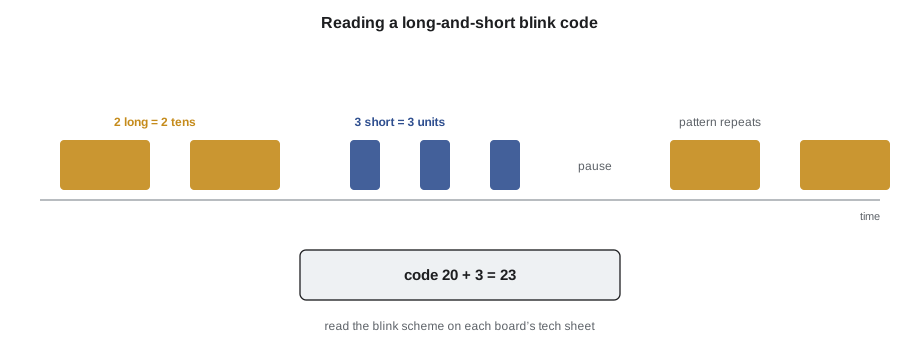
Boards without a display, such as inverter boards, some dryer and dishwasher controls and many refrigerator boards, report faults with blink codes on an LED or with a pattern of beeps. A common scheme uses long and short flashes: long flashes count the tens and short flashes the units, followed by a pause, repeating. Others count flashes in groups, or use a rhythm of fast and slow blinks for each fault. The tech sheet gives the scheme for each board; never assume one board uses another's.
Worked problem
Reading a long-and-short blink code
An inverter board's status light shows two long flashes, three short flashes, then a pause, repeating. Its tech sheet says long flashes are tens and short flashes are units, and lists code 23 as "compressor failed to start after repeated attempts" (a sample code). What does the board report, and what should be checked?
Show solution
- Two long flashes: 2 tens = 20.
- Three short flashes: 3 units.
- Code:
- \[20 + 3 = 23\]
- Sample meaning: compressor failed to start after repeated attempts.
Answer: Code 23. Check the compressor's windings and shell reading, and watch the start attempts with a clamp meter (lesson 5), before suspecting the inverter board.
The maker's documents
Every maker supports its technicians with a family of documents. Knowing what each holds saves time.
- Tech sheet. Folded inside the appliance; model-specific wiring diagram, component values, service mode steps and fault codes. The first thing to read.
- Service manual. A longer guide for a family of models: theory of operation, disassembly, detailed test procedures and troubleshooting charts. Usually on the maker's service portal.
- Service bulletins. Notices of known problems and their fixes: a revised part, a software update, a harness reroute, a new test. A bulletin can turn a puzzling fault into a ten-minute repair, as the door latch bulletin kit did in the first course.
- Parts system. An exploded view and parts list by model and serial number, with supersessions to newer part numbers and notes on which parts are returnable.
- Installation instructions and use and care guide. What the customer was told, and the installation requirements, which often explain "faults" caused by installation.
These documents belong to the maker. Authorized servicers usually reach them through a service portal with a login, and many makers now publish tech sheets and use and care guides openly. A technician uses them for the machines he or she services and does not copy or share them beyond what the maker allows.
Manufacturer tools and support
Beyond documents, makers offer tools that read the appliance directly. Some connect a diagnostic interface or cable to a service port on the board, with software on a laptop or phone that shows live data, the fault history and the configuration, runs tests and loads software updates. Connected appliances may let an authorized technician, with the customer's permission, read the same information through the maker's app or a technician app (lesson 10). Some makers use a code read by the phone: the appliance plays a pattern of tones or shows a symbol that an app decodes into a full fault report. These tools are designed for their brand and must be used as the maker instructs, partly because some can change a board's configuration or software.
Technical support is the maker's help line for servicers. It is most useful when the technician has done the basic checks and can report them: the model and serial number, the code and history, the measurements made and what they showed. Support may know of an unpublished issue, ask for a specific test or authorize a warranty part. Warranty claims in particular often require the measurements, photographs of the failed part or its label, and sometimes the return of the part, so recording them on every call is a habit worth having.
| Tool or source | Best for | Notes |
|---|---|---|
| Tech sheet | Values, pins, service mode, codes for this model | Inside the appliance; read it every time |
| Service manual | Theory, disassembly, detailed tests | Service portal |
| Service bulletin | Known problems and their fixes | Check before ordering a part for a puzzling fault |
| Parts system | Correct part number for model and serial | Shows supersessions and return rules |
| Diagnostic interface or app | Live data, history, configuration, updates | Brand-specific; follow the maker's instructions |
| Technical support line | Unusual faults, warranty authorization | Have your measurements ready |
Codes, parts and money
Most electrical parts, boards especially, cannot be returned once installed, and many are expensive. A wrong part also costs a second visit, and the customer's trust. Penfold tracks the share of calls completed on the first visit, about 78 in 100 at present, and the biggest single cause of a second visit is waiting for a part that was not on the van. The second biggest is a part ordered on a code without measurement that turned out not to be the fault.
Worked problem
What a wrong part costs
Penfold charges 95 dollars for a service call. A technician orders a 340-dollar board on a code alone. It does not fix the fault, and the real cause, a 35-dollar sensor, is found on a second visit. The board cannot be returned. If Penfold does not charge the customer for the wrong board or the second visit, what has the guess cost the company?
Show solution
- Wrong board, not returnable: 340 dollars.
- Second visit not charged: about 95 dollars of service call time.
- Total cost of the guess:
- \[340 + 95 = 435 \text{ dollars}\]
Answer: About 435 dollars, against perhaps 30 dollars of measuring time on the first visit. A code tells you where to start, and the measurement tells you what to order.
Kiran's portal evening turned up one more lesson. The real washer he looked up had a service bulletin for exactly the fault he and Dee had seen on it the week before, with a revised drain pump and a new filter housing. "We fixed it the long way," Dee said when he showed her. "Next time, read the bulletins first."
Codes the customer reports
Many calls begin with a code the customer read off the display and looked up online. That information is useful, but it needs checking. The customer may have read a similar-looking code (an E5 is not an F5), looked up the wrong model, or found a forum post about a different fault with the same code on a machine from another year. Some displays show a customer-friendly message, such as "check filter," while the technician's code in the service mode is more specific. When Fenna books a call, she records the code the customer reports, the model and serial number if the customer can read them, and what the customer was doing when the code appeared. Dee treats all of it as a lead to confirm, not as a diagnosis.
The same caution applies to parts customers have bought. A customer who has ordered a board online because a video said a code meant a bad board, as Rasmus Ekdahl had in lesson 3, deserves a clear, polite explanation of what the measurements show. Penfold installs customer-supplied parts only when the measurements prove that part is needed, and makes clear in writing that it cannot warranty a part it did not supply.
Worked problem
How a booking note saves time
Fenna books a call with the code, the model and serial number and what the customer was doing. Dee estimates this saves about 10 minutes on site, because she can read the tech sheet and the bulletins and load the likely parts before she arrives. If Penfold's technicians run 30 calls a week with useful booking notes, about how much time does that save in a week, and what is it worth at 110 dollars an hour?
Show solution
- Time saved:
- \[30 \times 10 = 300 \text{ minutes} = 5 \text{ h}\]
- Value:
- \[5 \times 110 = 550 \text{ dollars a week}\]
Answer: About 5 hours a week, worth about 550 dollars of technician time, and fewer second visits for parts that could have been on the van.
Fault codes also feed back to the makers. Warranty claims, technical support calls and connected appliance data help makers see patterns, issue bulletins and revise parts. A careful technician who reports the code, the measurements and the root cause is part of that loop.
Common mistakes
MistakeLooking up a code from memory or on a website for another model.
InsteadUse the tech sheet for the exact model; codes differ between brands and years.
MistakeOrdering the part named in the code's description.
InsteadThe code names the condition; measure to find the part.
MistakeAssuming one board's blink scheme works on another.
InsteadRead the blink code scheme on that board's tech sheet.
MistakeSkipping service bulletins.
InsteadCheck the portal's bulletins for the model before ordering a part for a puzzling fault.
MistakeCalling technical support before basic checks.
InsteadHave the model, serial, codes and measurements ready.
Summary and key terms
- A fault code reports a condition, a threshold and a time, not a failed part.
- Codes may be active or stored, and secondary codes can follow a primary failure.
- Look up, read the condition, list causes, measure, repair, verify, then clear.
- Check quick and likely causes first.
- Blink codes and beep patterns differ by board; read each tech sheet.
- Tech sheets, service manuals, bulletins and the parts system each have their use.
- Diagnostic interfaces and apps are brand-specific and must be used as the maker instructs.
- Measurements, photos and part returns support warranty claims and prevent costly wrong parts.
- Fault code
- A control's report that a watched condition went outside its limits.
- Active code
- A fault present now that has stopped the cycle.
- Stored code
- A past fault recorded in the history.
- Blink code
- A fault reported by flashes of an LED.
- Service bulletin
- A maker's notice of a known problem and its fix.
- Supersession
- A newer part number that replaces an older one.
- Service portal
- A maker's website for servicers, with documents and parts.
- Diagnostic interface
- A tool that connects to a board to read data and run tests.
Practice problems
Work each problem on paper first, then reveal the answer to check.
What does the sample code F21 mean?
Show answer
The tub was not empty eight minutes after the drain started.
Why is a code not enough to order a part?
Show answer
It reports a condition with several possible causes.
An LED shows two long and three short flashes, long = tens. What code is it?
Show answer
23.
Where are known problems and their fixes published?
Show answer
In the maker's service bulletins.
What should a technician have ready when calling technical support?
Show answer
Model, serial, codes and measurements.
Lesson quiz · 5 questions
Score 60% or more to complete this lesson.
Create a free account to save your progress, take quizzes and earn a certificate.