
APP-320 · Lesson 10 of 12 · 25 min
Connected and smart appliances
▶ Video coming soon A video version of this lesson is on the way.
Fitzroy Amadi called Penfold on Friday, August 28, because his washer had "stopped talking to the app." He lived in Gourley and liked starting a load from the bus on his way home. Dee arrived expecting a failed Wi-Fi module. The washer itself worked perfectly. Its Wi-Fi indicator blinked slowly, which the tech sheet said meant "no network." Two weeks earlier, Mr. Amadi's internet provider had replaced his router. The new router had a new network name and password, and it combined its two radio bands under one name, which the washer's module, a 2.4 GHz-only type like many appliance modules, struggled to join. Dee did not touch his router. She showed him the app's steps for re-connecting the washer, suggested he ask his provider how to give the 2.4 GHz band its own name if the washer would not join, and waited while he did it from his phone. The washer joined at the second try. Dee charged the service call and wrote "no appliance fault: home network change" on the work order.
This lesson explains what makes an appliance connected, how its Wi-Fi module, app and the maker's cloud fit together, what the Matter and Thread standards are and how far they reach appliances in 2026, how firmware updates work, the privacy and security points a technician should know, and how to sort an appliance fault from a home network problem.
What a connected appliance is
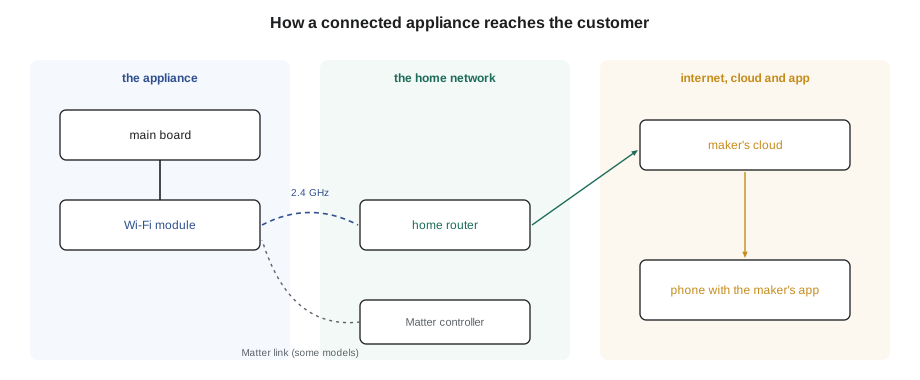
A connected appliance, often sold as a smart appliance, has a communication module, usually Wi-Fi and sometimes Bluetooth, that links its main board to the internet through the home's router. The customer installs the maker's app on a phone, creates an account, and pairs the appliance to it. The appliance then sends status to the maker's cloud servers, and the app shows it: cycle time left, a door left open, a filter due, a fault code. The app can also send commands back, such as starting or pausing a cycle, changing a temperature or downloading a special cycle. Some appliances also report energy use or respond to signals from the electricity utility to shift their running to cheaper or less busy times.
For the technician, the module is just another board. It has a supply from the main board, a communication link to it (lesson 7) and an antenna, and it can fail like any other part. What is new is that a connected appliance's "fault" may not be in the appliance at all, but in the customer's network, the app, the account or the maker's cloud. Sorting these out quickly, and knowing which are the technician's job, saves wasted parts and visits.
Radios, networks and signal
Most appliance Wi-Fi modules use the 2.4 GHz band, which travels farther through walls than 5 GHz and is cheaper to build in, though some newer modules support both. Many home routers broadcast both bands under one network name and steer devices between them; some appliance modules handle this well and some do not. Appliances are also hard places for radio. A refrigerator or a front-loader is a steel box, often in a corner, a basement or a closet, and the module's antenna sits inside it. Signal that is fine for a phone in the kitchen may be weak at the back of a laundry room.
The service mode or the app often shows the module's signal strength, in dBm, a negative number in which values closer to zero are stronger. As a rough guide, about −50 dBm is strong, −67 dBm is fine for most uses, −75 dBm is weak and below about −80 dBm the link will drop out (typical values; the app or tech sheet may give its own). A weak signal is a home network matter: moving the router, adding a mesh point or an extender. These are the customer's or their internet provider's choices, not the technician's.
Worked problem
How much data an appliance sends
A washer's module sends a status message of about 500 bytes once a minute while it is idle. How much data is that in a day?
Show solution
- Messages per day:
- \[24 \times 60 = 1{,}440\]
- Data per day:
- \[1{,}440 \times 500 = 720{,}000 \text{ bytes} \approx 0.72 \text{ MB}\]
Answer: Under a megabyte a day (a sample figure). Connected appliances use very little data, so a slow connection is rarely the problem; a dropped connection is.
Worked problem
Standby power of a connected module
A connected appliance's Wi-Fi module adds about 1 W of standby power, all year (a typical figure). How much energy is that in a year?
Show solution
- \[1 \text{ W} \times 8{,}760 \text{ h} = 8{,}760 \text{ Wh} \approx 8.8 \text{ kWh}\]
Answer: About 8.8 kWh a year, roughly twice the standby of a board without Wi-Fi from lesson 1. Energy rules in both countries limit standby power, and connected models are designed with that in mind.
Matter and Thread
Until recently, each brand's connected appliances worked only with that brand's app. Matter is an industry standard, developed by the Connectivity Standards Alliance and backed by the large phone and smart home companies, that lets devices from different brands work with the same smart home controllers and apps. Version 1.2, released in October 2023, added the first appliance device types: refrigerators, room air conditioners, dishwashers and laundry washers. Version 1.3, released in May 2024, added ovens, cooktops, microwave ovens and laundry dryers, and energy reporting. Later versions, 1.4 in November 2024 and 1.5 in November 2025, added more energy management features such as heat pumps, solar and batteries. By 2026 a growing number of appliance models support Matter, but most connected appliances still rely mainly on their maker's own app and cloud, and the Matter features they offer can be a subset of what the maker's app shows.
Thread is a low-power wireless mesh network that many Matter devices use, mainly small battery devices such as sensors and switches. A Thread network needs a border router, often built into a smart speaker or hub, to reach the home network. Large appliances usually connect by Wi-Fi rather than Thread, though they may work with Thread-based sensors such as leak detectors. For the technician, the point is practical: if a customer's appliance is controlled through a Matter controller, a fault may lie in the controller or its settings, not the appliance, and the maker's app remains the reference for what the appliance itself reports.
Firmware and software updates
The program in a board is its firmware. Connected appliances can receive over-the-air updates from the maker, usually when idle and often only after the customer approves. Updates fix faults, improve cycles and sometimes add features. A service bulletin may be nothing more than "update the firmware to version 3.1.4," and a fault that has puzzled several technicians may vanish after an update. Non-connected appliances can sometimes be updated with the maker's diagnostic tool (lesson 9).
Updates need care. An appliance must not be unplugged or switched off at the breaker during an update; a board left with half a program may not start. Before replacing a board for a software-like fault, such as a display that freezes or a cycle that behaves oddly, check the software version against the latest one the portal lists. After a board replacement, the new board may need an update or a configuration download to match the model (lessons 3 and 11).
Privacy and security
A connected appliance belongs to the customer, and so does the account it is paired with and the information it sends. Technicians handle that respectfully. Do not ask for the customer's account password, do not log in to their app on your own phone, and do not change their router or network settings. If a repair needs the appliance re-paired, guide the customer through the app's steps on their own phone, as Dee did. Where the maker offers a technician app that reads the appliance, use it only with the customer's permission and only as the maker allows.
When an appliance is sold, given away or hauled away, it may still be linked to the old owner's account. The use and care guide explains how to remove it from the account and reset its network settings; Penfold reminds customers of this when it replaces a connected appliance, and resets the module before a unit goes to Quarrington for recycling. Customers should also keep their apps and appliance firmware updated, use a strong router password and change any default passwords, which are basic security steps for any connected device.
| Symptom | Likely area | Who fixes it |
|---|---|---|
| App shows offline; appliance works; Wi-Fi light shows no network | Home network or changed password | Customer, with the app's steps; provider for router changes |
| Signal weak at the appliance | Router position or range | Customer or provider (extender, mesh point) |
| App works for others but not one user | Account or sharing settings | Customer, with the maker's support |
| Module shows no light and no supply from the main board | Module, harness or main board | Technician |
| Commands arrive but the appliance ignores them | Remote control not enabled at the machine, or a fault | Customer setting, or technician if a fault |
| Odd behaviour after an update | Firmware | Maker's support and bulletin; technician if a board is at fault |
Remote control and safety
Makers limit what can be done remotely for safety. Many require the customer to enable remote control at the appliance before each use, for example by pressing a key on the washer after loading it, so a cycle cannot start on an empty or open machine. Ovens and cooktops generally restrict remote starting of heating and may only allow remote monitoring, temperature changes or switching off, depending on the model and the safety standards it meets. A customer who complains that "remote start does not work" may simply not have armed it at the machine, and the use and care guide explains the rule.
Diagnosing a connected appliance follows the usual order with one extra step at the start: decide whether the appliance itself has a fault. If it works normally from its own controls, the connection problem lies in the module, the network, the account or the cloud, and the module's status light, the service mode's network screen and the app's messages will tell which. Only a module with no supply, no light or a confirmed hardware fault is a part to order. Dee's call at Mr. Amadi's ended without any part at all, and the customer was pleased to know his washer was not broken.
Energy management and utility programs
Some connected appliances do more than report their status. They can respond to demand response signals, messages from the electricity utility or an energy management system asking them to delay a cycle, lower power or pause a defrost when the grid is busy. A dishwasher may wait to start, a water heater may hold off reheating, and a refrigerator may postpone a defrost for a few hours. Customers sometimes join such programs for a credit on their bill, and then forget. A dishwasher that starts late, or a water heater that seems slow to recover, may be doing exactly what the program asked.
Energy efficiency programs in both countries recognize connected appliances that meet extra criteria for these features, and Matter's later versions added energy reporting and management features to support them. For the technician, the practical point is to ask about any energy program or smart home system before diagnosing a late start or a slow cycle, and to check the app's settings, such as a delayed start or an energy-saving mode, with the customer.
Worked problem
A dishwasher that starts late
A customer complains that the dishwasher, started at 6:00 p.m., does not begin until 9:00 p.m. The app shows an energy-saving setting enabled, and the customer's utility has higher rates from 4:00 p.m. to 9:00 p.m. How long is the delay, and is it a fault?
Show solution
- Delay:
- \[9{:}00 - 6{:}00 = 3 \text{ hours}\]
- The delay ends exactly when the higher-rate period ends.
Answer: A 3-hour delay that ends when the high-rate period ends is the energy-saving setting doing its job, not a fault. Show the customer the setting and let them choose.
When the module itself has failed
Sometimes the module is the problem. A Wi-Fi module with no status light, a module that cannot see any network even beside the router, or a module that the service mode reports as missing, needs checking like any other board: its supply from the main board, its communication harness (lesson 7) and its antenna lead, which on some models is a thin coaxial cable that can be pinched behind a panel. A replacement module may need to be paired with the appliance's main board in the service mode, and the customer will need to add it to their app again. Follow the maker's instructions, and handle the module with the same ESD care as any board (lesson 11).
Common mistakes
MistakeOrdering a Wi-Fi module because the app shows offline.
InsteadCheck the module's status light, the network and any recent router change first.
MistakeChanging the customer's router or network settings.
InsteadLeave network changes to the customer or their provider.
MistakeLogging in to the customer's app account.
InsteadGuide the customer through the app's steps on their own phone.
MistakeUnplugging an appliance during a firmware update.
InsteadWait for the update to finish.
MistakeRecycling a connected appliance still linked to an account.
InsteadRemove it from the account and reset its network settings first.
Summary and key terms
- Connected appliances link a module, the home network, the maker's cloud and an app.
- Many faults on connected appliances are network, account or app problems, not appliance faults.
- Most modules use 2.4 GHz Wi-Fi; steel cabinets and distance weaken the signal.
- Matter 1.2 and 1.3 added appliance device types; most appliances still rely on the maker's app in 2026.
- Thread is a low-power mesh mainly for small devices, reached through a border router.
- Firmware updates fix faults; check the version before replacing a board for a software-like fault.
- Respect the customer's account, passwords and network; never change them yourself.
- Remote control is often limited for safety and may need arming at the appliance.
- Connected appliance
- An appliance with a module that links it to the internet and an app.
- Communication module
- The board that provides Wi-Fi or Bluetooth for an appliance.
- Cloud
- The maker's servers that relay data between appliance and app.
- Matter
- An industry standard that lets smart home devices from different brands work together.
- Thread
- A low-power wireless mesh network used by many Matter devices.
- Border router
- A device that links a Thread network to the home network.
- Firmware
- The program stored in a board.
- Over-the-air update
- A firmware update delivered through the internet connection.
Practice problems
Work each problem on paper first, then reveal the answer to check.
A washer works normally but the app shows it offline after a new router was installed. What is the likely cause?
Show answer
The washer has not joined the new network.
Which Wi-Fi band do most appliance modules use?
Show answer
2.4 GHz.
Which Matter version first added refrigerators, dishwashers and laundry washers?
Show answer
Version 1.2, in October 2023.
Why must an appliance not be unplugged during a firmware update?
Show answer
The board may be left with an incomplete program.
What should happen before a connected appliance is recycled?
Show answer
Remove it from the account and reset its network settings.
Lesson quiz · 5 questions
Score 60% or more to complete this lesson.
Create a free account to save your progress, take quizzes and earn a certificate.