
PYTH-260 · Lesson 9 of 12 · 23 min
Deploying to the cloud
▶ Video coming soon A video version of this lesson is on the way.
In NET-120, Ridgeline chose where the wholesale ordering site would live: a cloud provider's region close to its customers, with serverless containers behind a load balancer, a managed PostgreSQL database and nightly backups to a second region, all for a budget of about 150 dollars a month. That course designed the infrastructure. This lesson is about the software side of the same move: how a Python application gets from a CI pipeline onto that infrastructure, repeatedly and safely, and how the team chooses between the many ways a cloud can run code.
For the US business, the site runs in the provider's Oregon region, with backups copied to a second US region, so customer data stays in the United States.
Ways to run code in the cloud
Cloud providers offer a spectrum of hosting models. They differ in how much the provider manages for you and how much control you keep. Moving from left to right in the list below, you write less operations code and pay for convenience; moving left, you gain control and responsibility.
- Virtual machines (Amazon EC2, Azure Virtual Machines, Google Compute Engine): you get a whole server and install everything yourself. Maximum control, maximum maintenance: operating system patches, scaling and recovery are yours.
- Container orchestration (Kubernetes services such as Amazon EKS, Azure AKS and Google GKE): you run containers on a cluster that the platform schedules and heals. Powerful and flexible, with a steep learning curve; worthwhile for many services and large teams.
- Serverless containers (AWS App Runner and ECS on Fargate, Azure Container Apps, Google Cloud Run): you hand over a container image and settings; the platform runs, scales and replaces it. No servers or clusters to manage.
- Platform as a service (AWS Elastic Beanstalk, Azure App Service, Heroku, Render): you push code or an image and the platform builds and runs it.
- Functions as a service (AWS Lambda, Azure Functions, Google Cloud Functions): you upload individual functions that run in response to events, billed per call. Ideal for small, occasional tasks such as Kai's roast-log upload.
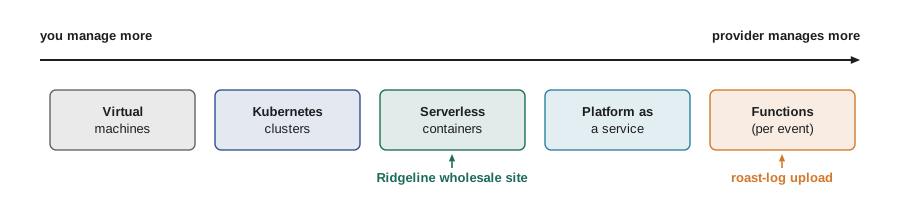
Ridgeline has one developer and no operations staff, so its choice is clear: serverless containers for the wholesale site, because they run the same Docker image built in lesson 6, scale to zero overnight if wanted, and need no cluster; and a function for the roast-log upload, which runs a few times a day. The morning report runs as a scheduled job on the same container platform.
options = {
    "virtual machine":      {"ops_work": 5, "control": 5, "runs_containers": True,  "scale_to_zero": False},
    "kubernetes":           {"ops_work": 4, "control": 5, "runs_containers": True,  "scale_to_zero": False},
    "serverless container": {"ops_work": 1, "control": 3, "runs_containers": True,  "scale_to_zero": True},
    "platform as a service": {"ops_work": 1, "control": 2, "runs_containers": True, "scale_to_zero": False},
    "function":             {"ops_work": 1, "control": 1, "runs_containers": False, "scale_to_zero": True},
}

def choose(needs_containers, max_ops_work):
    fits = [n for n, o in options.items()
            if o["ops_work"] <= max_ops_work and (o["runs_containers"] or not needs_containers)]
    return max(fits, key=lambda n: (options[n]["control"], options[n]["scale_to_zero"]), default=None)

print("wholesale site (container image, team of one):", choose(True, max_ops_work=1))
print("platform team with Kubernetes skills:", choose(True, max_ops_work=5))wholesale site (container image, team of one): serverless container platform team with Kubernetes skills: virtual machine
Infrastructure as code
The cloud resources behind the site, such as the container service, the database, the load balancer, the DNS records and the secrets, could be created by clicking through the provider's web console. That works once and then becomes a liability: nobody remembers exactly what was clicked, staging and production drift apart, and rebuilding after a mistake is guesswork. Infrastructure as code (IaC) describes resources in files that live in the repository, are reviewed in pull requests and are applied by a tool that creates, changes or deletes resources to match.
Common tools are Terraform and its open-source fork OpenTofu, which work with every major provider; each provider's own format (AWS CloudFormation, Azure Bicep, Google Cloud Deployment Manager); and Pulumi and the AWS CDK, which let you describe infrastructure in Python. The workflow is the same in each: write the desired state, run a plan to see what would change, review the plan, then apply it.
resource "aws_apprunner_service" "wholesale" {
  service_name = format("ridgeline-wholesale-%s", var.environment)
  source_configuration {
    image_repository {
      image_identifier      = var.image_digest
      image_repository_type = "ECR"
      image_configuration {
        port = "8000"
        runtime_environment_secrets = {
          RIDGELINE_DATABASE_URL = aws_secretsmanager_secret.db_url.arn
          RIDGELINE_SHOP_KEY     = aws_secretsmanager_secret.shop_key.arn
        }
      }
    }
  }
  health_check_configuration {
    path = "/readyz"
  }
}
One module describes the service; staging and production are two uses of it with different variables, such as the environment name, size limits and image digest. That is how the two environments stay alike: they are built from the same description. The image is referred to by digest, the secrets by reference to the secrets manager, and the health check uses the readiness endpoint from lesson 8.
desired = {"wholesale-service": {"cpu": 1, "memory": 2048, "max_instances": 6},
           "database": {"size": "small", "backups": "daily"},
           "dns-record": {"name": "wholesale.ridgeline.example"}}
actual = {"wholesale-service": {"cpu": 1, "memory": 1024, "max_instances": 6},
          "database": {"size": "small", "backups": "daily"},
          "old-test-balancer": {"type": "load balancer"}}

def plan(desired, actual):
    """What an infrastructure-as-code tool would do to make actual match desired."""
    steps = []
    for name in sorted(desired.keys() | actual.keys()):
        if name not in actual:
            steps.append(f"+ create  {name}")
        elif name not in desired:
            steps.append(f"- destroy {name}")
        elif desired[name] != actual[name]:
            changed = [k for k in desired[name] if desired[name][k] != actual[name].get(k)]
            steps.append(f"~ update  {name} ({', '.join(changed)})")
    return steps

print("\n".join(plan(desired, actual)))+ create dns-record - destroy old-test-balancer ~ update wholesale-service (memory)
The plan also caught something useful: an old test load balancer that nobody had removed, which was costing 18 dollars a month. Resources created by hand tend to be forgotten; resources in code are listed in one place.
Continuous delivery: from pipeline to production
Continuous delivery extends CI: every change that passes the pipeline produces a release that could be deployed, and deploying it is a routine, automated step. Continuous deployment goes one step further and deploys every passing change to production automatically. Ridgeline practices continuous delivery with an approval: changes merged to main deploy to staging automatically, and Jordan or Rosa approves the promotion to production with one click.
The pipeline needs permission to deploy, and that permission is a powerful credential. Rather than storing long-lived cloud keys as CI secrets, Ridgeline uses the same OpenID Connect trust described for package publishing in lesson 3: the cloud account trusts deployment requests from one workflow in one repository, and issues short-lived credentials for each run. The production deployment job is also restricted to the main branch and requires the approval, so a pull request from a fork can never deploy.
  deploy-staging:
    needs: [build-image]
    runs-on: ubuntu-latest
    environment: staging
    permissions:
      id-token: write        # allows OpenID Connect, no stored cloud keys
      contents: read
    steps:
      - uses: aws-actions/configure-aws-credentials@v4
        with:
          role-to-assume: arn:aws:iam::123456789012:role/ridgeline-deploy-staging
          aws-region: ca-west-1
      - run: ./deploy.sh staging          # deploys the digest recorded by build-image

  deploy-production:
    needs: [deploy-staging, smoke-test-staging]
    environment: production   # requires approval from Jordan or Rosa
    runs-on: ubuntu-latest
Deployment strategies
How a new version replaces the old one decides how much a bad release can hurt. Lesson 8 described rolling updates, which replace instances gradually. Two other strategies are widely used in the cloud.
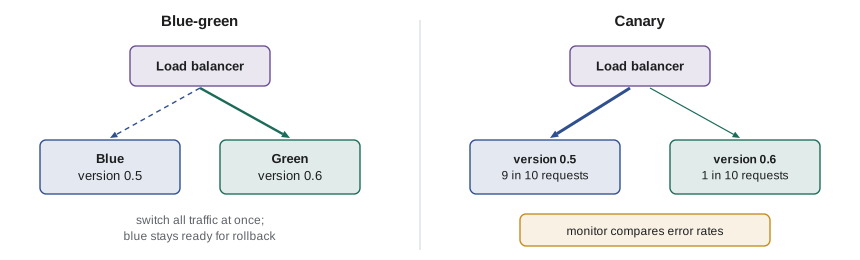
Blue-green deployment keeps two complete environments. Blue serves customers; green receives the new version and is tested in place. When green is ready, the load balancer switches all traffic to it in one step. If anything goes wrong, switching back to blue is equally quick, because blue is still running. The cost is running two environments during the switch.
Canary deployment sends a small share of real traffic, say one request in ten, to the new version while the rest stays on the old one, and compares error rates and response times. If the canary is as healthy as the old version, its share is raised step by step to all traffic; if not, it is withdrawn automatically. The name comes from the canaries miners once carried to detect dangerous gas. Canaries catch problems that only real traffic reveals, while limiting how many customers see them.
def canary_decision(baseline, canary, max_error_increase=0.005, max_latency_ratio=1.2, min_requests=200):
    """Promote, wait or roll back a canary by comparing it with the current version."""
    if canary["requests"] < min_requests:
        return "wait: not enough traffic yet"
    base_err = baseline["errors"] / baseline["requests"]
    can_err = canary["errors"] / canary["requests"]
    if can_err > base_err + max_error_increase:
        return f"roll back: error rate {can_err:.4f} vs {base_err:.4f}"
    if canary["p95_ms"] > baseline["p95_ms"] * max_latency_ratio:
        return f"roll back: p95 {canary['p95_ms']} ms vs {baseline['p95_ms']} ms"
    return "promote"

baseline = {"requests": 9000, "errors": 9, "p95_ms": 180}
print(canary_decision(baseline, {"requests": 120, "errors": 0, "p95_ms": 170}))
print(canary_decision(baseline, {"requests": 1000, "errors": 1, "p95_ms": 190}))
print(canary_decision(baseline, {"requests": 1000, "errors": 14, "p95_ms": 185}))wait: not enough traffic yet promote roll back: error rate 0.0140 vs 0.0010
This is the check that saved Ridgeline in the NET-120 launch story, when a rounding bug in orders of more than twenty lines raised the canary's error rate within fifteen minutes and the canary was rolled back before most cafes ever saw it.
Rollback
Every deployment plan needs a way back. With immutable images and deployments by digest, rolling back is simply deploying the previous digest, which the pipeline records for every release. Rollback is quick only if it is practiced; Ridgeline rehearses it in staging once a month. Two things can make rollback harder, and both should be designed for in advance: database migrations, which is why lesson 8's expand and contract steps keep the previous version compatible; and external effects, such as emails already sent or payments already taken, which cannot be undone by redeploying.
Scaling and cost
Serverless platforms add and remove instances automatically, based on requests per instance or CPU use, between a minimum and maximum you set. A minimum of one instance avoids a cold start, the delay while a new container starts for the first request; a minimum of zero saves money when nobody is ordering. The wholesale site keeps one instance overnight, because cafes order early in the morning, and allows up to six. Every limit is also a cost control: the maximum caps the bill if a bug or an attack sends floods of requests.
Cost is a design constraint like any other. Ridgeline's budget is about 150 dollars a month, and the team sets billing alarms at 120 and 150 dollars, so a surprise shows up long before the end of the month. Tagging every resource with its environment and purpose makes the monthly bill readable.
HOURS = 730   # hours in an average month

def monthly_cost(instances_by_hour, rate_per_instance_hour, fixed):
    """Average instances running over the month times the hourly rate, plus fixed services."""
    average = sum(instances_by_hour) / len(instances_by_hour)
    return round(average * HOURS * rate_per_instance_hour + sum(fixed.values()), 2)

# A typical day: one instance overnight, more during the morning order rush.
day = [1] * 6 + [3, 4, 4, 3, 2] + [1] * 13
fixed = {"database": 52.00, "load balancer and DNS": 21.00, "backups and logs": 9.00}
print(f"average instances: {sum(day) / len(day):.2f}")
print(f"estimated month: {monthly_cost(day, 0.064, fixed)} dollars")average instances: 1.46 estimated month: 150.13 dollars
Worked problem
Choosing a strategy for a risky release
Release 0.7 changes how wholesale prices are calculated. A mistake would overcharge or undercharge every cafe. The team can use a rolling update, blue-green or a canary. Which should it choose, and how?
Show solution
- A rolling update would send every customer to the new version within minutes; a pricing mistake would affect everyone before anyone noticed.
- Blue-green allows an instant switch back, but still exposes every customer the moment traffic switches.
- A canary exposes a small share of orders first. Comparing error rates is not enough here, because a wrong price is not an error: add a business check that compares order totals for the same carts on old and new versions in staging, and watch average order value during the canary.
- Use the canary with a slow ramp, one in twenty for an hour, then one in four, then all, with automatic rollback on errors and a person watching the pricing dashboard.
Answer: A canary with a slow ramp, automatic rollback on technical signals, and an extra business check on order totals, because a wrong price does not show up as an error.
Try it yourself
Try it yourself
Decide on a canary
Write decide(base_req, base_err, can_req, can_err) that returns "wait" if the canary has fewer than 100 requests; "rollback" if the canary's error rate is more than 0.01 higher than the baseline's (rates are errors divided by requests); otherwise "promote".
def decide(base_req, base_err, can_req, can_err):
    return "promote"
Try it yourself
Plan infrastructure changes
Write plan(desired, actual) where both map resource names to settings dictionaries. Return a sorted list of strings: "create NAME" for resources only in desired, "destroy NAME" for resources only in actual, and "update NAME" for resources in both whose settings differ.
def plan(desired, actual):
    return []
Try it yourself
Estimate the monthly bill
Write estimate(hourly_instances, rate, fixed) where hourly_instances is a list of 24 instance counts for a typical day, rate is the price per instance-hour and fixed is a dictionary of fixed monthly charges. Use 730 hours per month and return the total rounded to 2 decimal places.
def estimate(hourly_instances, rate, fixed):
    return 0
Common mistakes
MistakeCreating cloud resources by hand in the console.
InsteadDescribe them as code, review plans in pull requests, and apply them with a tool.
MistakeStoring long-lived cloud keys as CI secrets.
InsteadUse OpenID Connect so each pipeline run gets short-lived credentials.
MistakeDeploying straight to production with no smaller exposure first.
InsteadUse staging plus a canary or blue-green switch, with automatic rollback.
MistakeAssuming rollback will work without trying it.
InsteadRehearse rollbacks regularly, and design migrations so the previous version still works.
MistakeLeaving scaling limits and billing alarms unset.
InsteadSet maximum instances and budget alarms; they protect against bugs, floods and forgotten resources.
Summary and key terms
- Clouds offer virtual machines, Kubernetes, serverless containers, platforms as a service and functions; choose by team size and control needed.
- Infrastructure as code describes resources in reviewed files; tools plan and apply changes to match.
- Continuous delivery makes every passing change deployable; approvals and protected environments guard production.
- Pipelines should deploy with short-lived credentials obtained through OpenID Connect.
- Blue-green switches traffic between two environments; canaries test a new version on a slice of real traffic first.
- Rollback means redeploying the previous digest; practice it and keep migrations compatible.
- Autoscaling limits and billing alarms control both reliability and cost.
- serverless container
- A cloud service that runs a container image and scales it without servers to manage.
- infrastructure as code
- Describing cloud resources in versioned files that a tool applies.
- continuous delivery
- Keeping every passing change ready to deploy, with deployment as a routine automated step.
- blue-green deployment
- Running two environments and switching traffic from the old to the new in one step.
- canary deployment
- Sending a small share of traffic to a new version and comparing its health before full rollout.
- rollback
- Returning to the previous version after a problem.
- cold start
- The delay while a new instance starts before it can answer its first request.
Practice problems
Work each problem on paper first, then reveal the answer to check.
Why does Ridgeline choose serverless containers rather than Kubernetes?
Show answer
One developer and no operations staff: serverless containers run the same image with no cluster to manage.
What does an infrastructure-as-code plan show before anything changes?
Show answer
Which resources would be created, updated or destroyed to match the description.
A canary has served 1,000 requests with 20 errors; the old version has 10 errors per 10,000. Promote or roll back?
Show answer
Roll back: 2 in 100 is far above 1 in 1,000.
Why is a wrong price harder for a canary to catch than a crash?
Show answer
It does not produce errors, so you need business checks such as comparing order totals.
Lesson quiz · 5 questions
Score 60% or more to complete this lesson.
Create a free account to save your progress, take quizzes and earn a certificate.