
PYTH-260 · Lesson 7 of 12 · 24 min
Configuration and secrets
▶ Video coming soon A video version of this lesson is on the way.
The same Ridgeline image now runs in three places: on Jordan's laptop through Docker Compose, in a staging service the wholesale cafes never see, and in production. Each needs different settings. The database address differs, debug output is on only in development, the shop's payment API uses a sandbox everywhere except production, and production has its own passwords and keys. If those values lived in the code, every environment would need its own build, and every secret would sit in the repository for anyone with access to read. This lesson is about keeping configuration out of the code, loading it safely, and treating secrets with the care they need.
What counts as configuration
Configuration is everything that varies between deployments of the same code: addresses of databases and other services, credentials, feature switches, limits and timeouts, log levels, the name of the environment itself. A useful test from the twelve-factor guidelines is whether the codebase could be made public right now without exposing any credentials. If not, something that should be configuration is in the code.
Not every constant is configuration. The loyalty rules (one point per whole dollar, the Bean, Roast and Reserve tiers) are business logic: they are the same in every environment and changing them is a code change, reviewed and tested. The reorder point of ten bags might reasonably be either; Jordan keeps it in code until Theo asks to change it without a release. The question to ask is whether the value differs between environments, or must change without a new build.
Environment variables
The most portable way to pass configuration to a program is through environment variables: named text values that the operating system hands to every process it starts. Every language can read them, every platform can set them (shells, Docker, Compose, CI systems, cloud services), and they never end up in the repository by accident. In Python, os.environ is a dictionary-like mapping of them, and os.environ.get(name, default) reads one with a fallback.
import os

os.environ["RIDGELINE_ENV"] = "staging"            # normally set by the platform, not the code
os.environ["RIDGELINE_DATABASE_URL"] = "postgresql://ridgeline@staging-db/ridgeline"

env = os.environ.get("RIDGELINE_ENV", "development")
db = os.environ.get("RIDGELINE_DATABASE_URL", "sqlite:///ridgeline.db")
workers = int(os.environ.get("RIDGELINE_WORKERS", "2"))
debug = os.environ.get("RIDGELINE_DEBUG", "0") == "1"
print(f"env={env} db={db} workers={workers} debug={debug}")env=staging db=postgresql://ridgeline@staging-db/ridgeline workers=2 debug=False
Environment variables are always strings, so numbers and true-or-false switches must be converted. Conversion is a common source of bugs: bool("0") and bool("false") are both True in Python, because any non-empty string is true. A small helper that accepts a fixed set of words, and refuses anything else, avoids the trap. Ridgeline prefixes all its variables with RIDGELINE_, which avoids collisions with variables used by other programs and makes them easy to find.
Load once, validate at start-up
Scattering os.environ.get calls through the code makes configuration hard to see and easy to get wrong: a typo in a variable name silently uses the default. A better pattern is to read every setting in one place, at start-up, into a typed object, and validate it immediately. If a required value is missing or malformed, the program refuses to start, with a clear message, instead of failing an hour later in the middle of a customer's order. Fail fast is the rule.
from dataclasses import dataclass

TRUE, FALSE = {"1", "true", "yes", "on"}, {"0", "false", "no", "off", ""}

def to_bool(name, value):
    v = value.strip().lower()
    if v in TRUE:
        return True
    if v in FALSE:
        return False
    raise ValueError(f"{name} must be true or false, got {value!r}")

@dataclass(frozen=True)
class Settings:
    environment: str
    database_url: str
    debug: bool
    workers: int
    shop_api_key: str

def load_settings(env):
    missing = [k for k in ("RIDGELINE_DATABASE_URL", "RIDGELINE_SHOP_KEY") if not env.get(k)]
    if missing:
        raise SystemExit("missing required settings: " + ", ".join(missing))
    s = Settings(
        environment=env.get("RIDGELINE_ENV", "development"),
        database_url=env["RIDGELINE_DATABASE_URL"],
        debug=to_bool("RIDGELINE_DEBUG", env.get("RIDGELINE_DEBUG", "0")),
        workers=int(env.get("RIDGELINE_WORKERS", "2")),
        shop_api_key=env["RIDGELINE_SHOP_KEY"],
    )
    if s.environment == "production" and s.debug:
        raise SystemExit("debug must be off in production")
    return s

print(load_settings({"RIDGELINE_DATABASE_URL": "sqlite:///dev.db", "RIDGELINE_SHOP_KEY": "sandbox-123",
                     "RIDGELINE_DEBUG": "true"}))
try:
    load_settings({"RIDGELINE_ENV": "production"})
except SystemExit as e:
print("refused to start:", e)Settings(environment='development', database_url='sqlite:///dev.db', debug=True, workers=2, shop_api_key='sandbox-123') refused to start: missing required settings: RIDGELINE_DATABASE_URL, RIDGELINE_SHOP_KEY
Libraries such as pydantic-settings automate this pattern, with type conversion, validation and error messages generated from type hints. The idea matters more than the library: one place, typed values, checked before the program does any work.
Layers of configuration and precedence
Real programs often combine several sources: defaults in the code, an optional configuration file, environment variables, and command-line options for one-off runs. When sources disagree, a precedence order decides, and the conventional order runs from the most general to the most specific: built-in defaults are overridden by a file, which is overridden by environment variables, which are overridden by command-line flags. Theo can then run ridgeline report --format csv once without changing anything permanent.
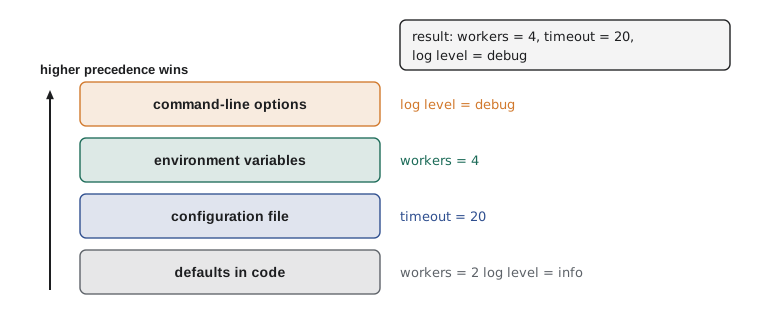
def merged(*layers):
    """Later layers override earlier ones; None means 'not set here'."""
    result = {}
    for layer in layers:
        result.update({k: v for k, v in layer.items() if v is not None})
    return result

defaults = {"workers": 2, "log_level": "info", "format": "text", "timeout": 30}
config_file = {"timeout": 20}
environment = {"workers": 4}
command_line = {"log_level": "debug", "format": None}

for key, value in merged(defaults, config_file, environment, command_line).items():
print(f"{key:<10} = {value}")workers = 4 log_level = debug format = text timeout = 20
.env files in development
Typing a dozen export commands before each development session is tedious. Many projects keep development values in a file called .env, which tools such as python-dotenv, Docker Compose and many editors load into the environment automatically. The file is convenient but dangerous, because it easily ends up holding real credentials. Two rules keep it safe: .env is listed in .gitignore and .dockerignore so it is never committed or built into an image, and a committed .env.example lists every variable with harmless placeholder values, so new developers know what to set.
# .env.example  (committed: placeholders only)
RIDGELINE_ENV=development
RIDGELINE_DATABASE_URL=postgresql://ridgeline:devpassword@localhost:5432/ridgeline
RIDGELINE_SHOP_KEY=replace-with-your-sandbox-key
RIDGELINE_DEBUG=1
RIDGELINE_WORKERS=2
Secrets
Secrets are the configuration values that grant access: database passwords, API keys for the shop and the shipping service, the key that signs session cookies, the token for the private package index. They need more care than other settings, because a leaked secret lets someone act as Ridgeline. The principles are few and firm:
- Never commit a secret, even to a private repository, even briefly. Git keeps history; deleting the line later does not remove it from earlier commits or from anyone's clone.
- Store secrets in a secrets manager in production: AWS Secrets Manager, Azure Key Vault, Google Secret Manager or HashiCorp Vault. The platform injects them into the container as environment variables or files at start-up, so they never appear in the image, the repository or the CI logs.
- Give each environment its own secrets. Staging must not use production's database password, so a mistake in staging cannot touch real orders.
- Grant least privilege. The morning report needs to read orders, not delete them; give it a database account that can only read.
- Rotate secrets: change them on a schedule and whenever someone with access leaves. Sam Okoye's co-op term ended after 0.5.0, so every key Sam could see was rotated that week.
- Keep secrets out of logs, error pages and tracebacks. Print settings with secrets masked.
import re

SECRET_KEYS = re.compile(r"(password|secret|token|key)", re.IGNORECASE)

def redact(settings):
    """A copy of settings that is safe to print or log."""
    safe = {}
    for name, value in settings.items():
        if SECRET_KEYS.search(name) and value:
            safe[name] = value[:2] + "*" * 6
        else:
            safe[name] = value
    return safe

settings = {"RIDGELINE_ENV": "production", "RIDGELINE_SHOP_KEY": "sk_live_8Hq2nW0v",
            "RIDGELINE_DB_PASSWORD": "c0rrect-h0rse", "RIDGELINE_WORKERS": "4"}
for k, v in redact(settings).items():
print(f"{k} = {v}")RIDGELINE_ENV = production RIDGELINE_SHOP_KEY = sk****** RIDGELINE_DB_PASSWORD = c0****** RIDGELINE_WORKERS = 4
Catching secrets before they leak
People make mistakes, so the pipeline should catch committed secrets automatically. Secret scanners such as gitleaks and detect-secrets search files and git history for strings that look like credentials: known key formats from cloud providers and payment services, private key headers, and long random strings assigned to names like password or token. GitHub and GitLab run similar scanning on pushes and can block a push that contains a recognized secret. Ridgeline runs a scanner as a pre-commit hook on developers' machines and again in CI, so a slip is caught twice.
If a secret does leak, the order of actions matters. First revoke or rotate the secret, so the leaked value stops working; only then clean up the history. Rewriting git history without rotating leaves a working credential in every clone, fork and cache that already copied it.
Worked problem
Responding to a leaked key
On Friday afternoon a scanner in CI reports that a pull request from Jordan added RIDGELINE_SHOP_KEY=sk_live_... to a test file. The pull request is not merged, but the branch was pushed to GitHub an hour ago. What should happen, in order?
Show solution
- Treat the key as compromised: it has been on the code host for an hour, and branches can be cloned or cached.
- Rotate first: create a new key in the payment provider's dashboard, store it in the secrets manager, restart the services so they pick it up, then revoke the old key.
- Check the payment provider's logs for any use of the old key from unfamiliar places during the exposed hour.
- Remove the key from the branch (amend or rewrite the commit before merging) and replace the test value with an obvious fake read from the environment.
- Record the incident and its cause; add the test file pattern to the scanner's allow-list only if it contains fakes.
Answer: Rotate and revoke the key first, check for misuse, then clean the branch and fix the test so it never needs a real key.
Configuration in containers and the cloud
Containers make the separation between build and configuration concrete. The image contains code and dependencies only. At run time the platform supplies configuration: docker run --env-file for local runs, the environment and secrets sections of compose.yaml, and in the cloud, environment variables and secret references attached to the service definition. Some platforms mount secrets as files, for example /run/secrets/shop_key, instead of environment variables, which keeps them out of process listings and crash dumps; a settings loader can accept both, reading RIDGELINE_SHOP_KEY_FILE when present.
import os, tempfile

def read_secret(name, env):
    """Read NAME from the environment, or from the file named by NAME_FILE (container secrets)."""
    if env.get(name):
        return env[name]
    path = env.get(name + "_FILE")
    if path:
        with open(path) as f:
            return f.read().strip()
    raise KeyError(f"{name} is not set")

folder = tempfile.mkdtemp()
path = os.path.join(folder, "shop_key")
with open(path, "w") as f:
    f.write("sk_test_from_file\n")

print(read_secret("RIDGELINE_SHOP_KEY", {"RIDGELINE_SHOP_KEY": "sk_test_from_env"}))
print(read_secret("RIDGELINE_SHOP_KEY", {"RIDGELINE_SHOP_KEY_FILE": path}))sk_test_from_env sk_test_from_file
Try it yourself
Try it yourself
Load typed settings
Write load(env) that takes a dictionary of environment variables and returns a dictionary with "workers" (int, default 2), "debug" (bool, default False; accept "1", "true", "yes" and "0", "false", "no" in any case, and raise ValueError for anything else) and "database_url" (required; raise KeyError if missing or empty).
def load(env):
    return {"workers": env.get("WORKERS", 2), "debug": bool(env.get("DEBUG")), "database_url": env.get("DATABASE_URL")}
Try it yourself
Merge by precedence
Write resolve(defaults, file, env, cli) that merges four dictionaries so that later ones win, except that a value of None means "not set" and never overrides. Return a new dictionary; do not change the arguments.
def resolve(defaults, file, env, cli):
    result = dict(defaults)
    result.update(cli)
    return result
Try it yourself
Spot a secret in a diff
Write suspicious_lines(text) that returns the 1-based line numbers of lines that assign a value of 16 or more non-space characters to a name containing password, secret, token or key (any case), using = or :. For example SHOP_KEY = "sk_live_8Hq2nW0vT7pXa1" is suspicious; key = os.environ["SHOP_KEY"] is not, because its value is not a literal string or bare value of 16+ characters without brackets.
def suspicious_lines(text):
    return []
Common mistakes
MistakeUsing bool(os.environ.get("DEBUG")) to read a switch.
InsteadAny non-empty string is true, including "0" and "false"; compare against fixed words instead.
MistakeReading environment variables all over the code.
InsteadLoad every setting once at start-up into a typed, validated object, and fail fast.
MistakeCommitting a .env file, or a secret "just for testing".
InsteadIgnore .env in git and Docker, commit only .env.example with placeholders, and use fake values in tests.
MistakeSharing one set of secrets between staging and production.
InsteadGive each environment its own secrets with the least privilege it needs.
MistakeCleaning a leaked secret out of git history without rotating it.
InsteadRotate or revoke first; history rewrites do not reach copies others already have.
Summary and key terms
- Configuration is whatever varies between deployments; it belongs outside the code, so one build runs everywhere.
- Environment variables are the portable way to supply configuration; they are strings and need careful conversion.
- Load all settings once at start-up into a typed object, validate them and refuse to start if anything is wrong.
- Combine defaults, files, environment and command-line options with a clear precedence order.
- .env files are for development only: never committed or built into images; .env.example documents the settings.
- Secrets live in a secrets manager, are injected at run time, differ per environment, follow least privilege and are rotated.
- Scan for secrets before commit and in CI; if one leaks, rotate first, then clean up.
- configuration
- Values that vary between deployments of the same code, such as addresses and credentials.
- environment variable
- A named text value passed by the operating system to a process.
- fail fast
- Detecting a problem, such as a missing setting, immediately at start-up rather than later.
- precedence
- The rule deciding which source wins when configuration sources disagree.
- secret
- A configuration value that grants access, such as a password or API key.
- secrets manager
- A service that stores secrets securely and supplies them to applications at run time.
- rotation
- Replacing a secret with a new value and revoking the old one.
- least privilege
- Giving each component only the access it needs.
Practice problems
Work each problem on paper first, then reveal the answer to check.
Is the loyalty rule "one point per whole dollar" configuration?
Show answer
No: it is the same in every environment and is business logic, changed through a reviewed code change.
What does bool("false") return in Python, and why does that matter?
Show answer
True, because the string is not empty; a debug switch read this way would always be on.
Defaults say workers=2, the file says 3, the environment says 4. What value is used?
Show answer
4: the environment overrides the file, which overrides the defaults.
A password was committed last month and removed in a later commit. Is it still exposed?
Show answer
Yes: it remains in the history and in every clone; rotate it.
Lesson quiz · 5 questions
Score 60% or more to complete this lesson.
Create a free account to save your progress, take quizzes and earn a certificate.