
PYTH-260 · Lesson 6 of 12 · 22 min
Containers with Docker
▶ Video coming soon A video version of this lesson is on the way.
A wheel and a lock file pin down Ridgeline's Python packages, but a running program depends on more than Python packages. It needs a particular Python interpreter, operating system libraries such as the C library and SSL certificates, environment settings, and a command to start it. The wholesale ordering site from NET-120 runs on a cloud service that starts copies of the application on demand, on machines Ridgeline never sees. To make that work, the whole runtime has to travel with the code. Containers are the standard way to do that.
This lesson explains what containers and images are, how a Dockerfile builds an image layer by layer, how to order instructions so builds are fast, how multi-stage builds keep images small, how to run containers safely as a non-root user, how images are named and stored in registries, and how Docker Compose runs the application with its database on a laptop.
Containers and images
A container is an isolated process, or group of processes, running on a shared operating system kernel, with its own view of the filesystem, network and process list. To the program inside, it looks like a small computer of its own; to the host, it is just a process with limits. Because containers share the host's kernel instead of running a whole guest operating system, they start in a fraction of a second and use far less memory than virtual machines. Linux provides the isolation through namespaces, which give each container its own view of resources, and control groups, which limit how much CPU and memory it may use.
An image is the template a container is started from: a read-only filesystem with everything the program needs, plus metadata such as the default command, the user to run as and the environment variables. An image is to a container what a class is to an object in Python: one image, many running containers. Images are built once, stored in a registry, and pulled to wherever they need to run, so the image tested in staging is byte for byte the image that runs in production.
Docker, released in 2013, made containers popular. Its image format and runtime were later standardized by the Open Container Initiative (OCI), so images built with Docker also run under Podman, containerd, Kubernetes and every major cloud's container services. This lesson uses Docker's commands, which are the most widely known.
Layers
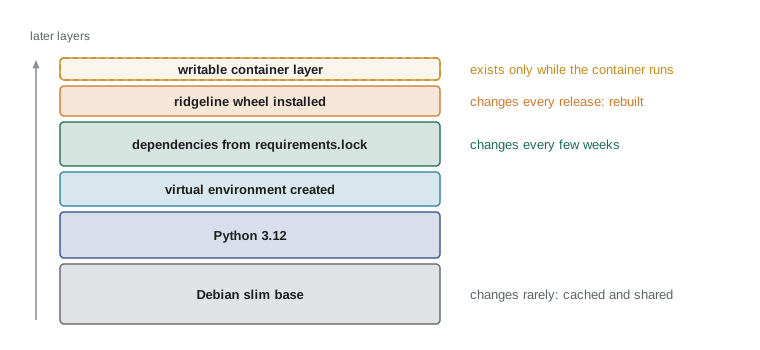
An image is a stack of layers. Each layer records the files added, changed or deleted by one build instruction. When a container starts, the layers are combined into a single view of the filesystem, with a thin writable layer on top for anything the running program writes. Layers are identified by a hash of their contents, so two images built on the same base share the base layers on disk and in the registry, and pushing or pulling an image transfers only the layers the other side does not already have.
Writing a Dockerfile
A Dockerfile is a text file of instructions that docker build runs from top to bottom. Each instruction that changes the filesystem creates a layer. The common instructions are FROM (the base image), WORKDIR (the working folder), COPY (copy files from the build context into the image), RUN (run a command during the build), ENV (set environment variables), USER (switch to a non-root user), EXPOSE (document the port the program listens on), and CMD (the default command when a container starts). Here is the Dockerfile Jordan writes for the wholesale site:
# syntax=docker/dockerfile:1
FROM python:3.12-slim AS build
WORKDIR /app
RUN python -m venv /venv
ENV PATH="/venv/bin:/usr/local/bin:/usr/bin:/bin"
COPY requirements.lock .
RUN pip install --no-cache-dir --require-hashes -r requirements.lock
COPY dist/ridgeline_tools-0.6.0-py3-none-any.whl /tmp/
RUN pip install --no-cache-dir --no-deps /tmp/ridgeline_tools-0.6.0-py3-none-any.whl

FROM python:3.12-slim
RUN useradd --create-home --uid 10001 ridgeline
COPY --from=build /venv /venv
ENV PATH="/venv/bin:/usr/local/bin:/usr/bin:/bin" PYTHONUNBUFFERED=1
USER ridgeline
WORKDIR /home/ridgeline
EXPOSE 8000
HEALTHCHECK --interval=30s --timeout=3s CMD python -c "import urllib.request; urllib.request.urlopen('http://localhost:8000/healthz')"
CMD ["gunicorn", "--bind", "0.0.0.0:8000", "--workers", "2", "ridgeline.web:app"]
It has two stages, explained below. In the first, named build, it starts from the official slim Python 3.12 image, creates a virtual environment, installs the exact dependencies from the hashed lock file (--require-hashes makes pip refuse anything not listed), then installs the ridgeline-tools wheel built in CI without letting pip fetch anything else (--no-deps). The second stage starts again from the slim image, creates an ordinary user, copies in only the finished virtual environment, switches to that user, and declares how to start the web server and how to check its health.
Ordering instructions for fast builds
Docker caches each layer. When you rebuild, it reuses a cached layer if the instruction and everything it depends on are unchanged, and rebuilds that layer and every layer after it otherwise. The order of instructions therefore decides how much work each rebuild does. The rule of thumb is to put things that change rarely at the top and things that change often at the bottom.
That is why the Dockerfile copies requirements.lock and installs dependencies before copying the wheel. Dependencies change every few weeks; the wheel changes with every release. With this order a typical release rebuilds only the last layer of the first stage, in seconds. If the wheel were copied first, every release would reinstall every dependency.
def rebuilt_layers(instructions, changed_files):
    """Simulate Docker's layer cache: the first instruction that touches a changed file,
    and every instruction after it, must be rebuilt."""
    for i, (instruction, files) in enumerate(instructions):
        if set(files) & set(changed_files):
            return [ins for ins, _ in instructions[i:]]
    return []

good_order = [
    ("FROM python:3.12-slim", []),
    ("COPY requirements.lock .", ["requirements.lock"]),
    ("RUN pip install -r requirements.lock", ["requirements.lock"]),
    ("COPY ridgeline wheel", ["ridgeline.whl"]),
    ("RUN pip install ridgeline wheel", ["ridgeline.whl"]),
]
bad_order = [good_order[0], good_order[3], good_order[1], good_order[2], good_order[4]]

for name, order in [("good order", good_order), ("bad order", bad_order)]:
    redo = rebuilt_layers(order, ["ridgeline.whl"])
print(f"{name}: new release rebuilds {len(redo)} layer(s): {redo}")good order: new release rebuilds 2 layer(s): ['COPY ridgeline wheel', 'RUN pip install ridgeline wheel'] bad order: new release rebuilds 4 layer(s): ['COPY ridgeline wheel', 'COPY requirements.lock .', 'RUN pip install -r requirements.lock', 'RUN pip install ridgeline wheel']
The build context matters too. docker build sends the folder you name, usually the current folder, to the builder, and COPY can only copy from it. A .dockerignore file, with the same syntax as .gitignore, keeps out files that should never reach an image: the .git folder, virtual environments, caches, test data and, above all, files holding secrets such as .env. Leaving them out also keeps unrelated changes from invalidating the cache.
# .dockerignore
.git
.venv
__pycache__/
*.pyc
.pytest_cache/
.env
tests/
docs/
Multi-stage builds and small images
Building software needs tools that running it does not: compilers, build front ends, header files, caches. A multi-stage build uses one stage to build and a final stage that copies in only the results, so the shipped image contains none of the build tools. Smaller images download and start faster, cost less to store, and, most importantly, have fewer packages that could contain vulnerabilities.
Base image choice matters as much. The full python:3.12 image is built on Debian with many development tools and is close to a gigabyte. python:3.12-slim is a minimal Debian with Python, a little over a hundred megabytes. Alpine-based images are smaller still, but use a different C library (musl rather than glibc), which means many Python wheels do not fit and packages must be compiled, so slim is the usual choice for Python. Distroless images go further and remove the shell entirely; they are excellent for production but harder to debug.
layers_mb = {
    "single stage, python:3.12 base": {"base": 1020, "build tools": 0, "dependencies": 38, "app": 1},
    "single stage, slim base + compiler": {"base": 125, "build tools": 210, "dependencies": 38, "app": 1},
    "multi-stage, slim final image": {"base": 125, "build tools": 0, "dependencies": 38, "app": 1},
}
for name, parts in layers_mb.items():
print(f"{name:<36} {sum(parts.values()):>5} MB")single stage, python:3.12 base 1059 MB single stage, slim base + compiler 374 MB multi-stage, slim final image 164 MB
Running containers safely
By default, the process inside a container runs as root. Container isolation is strong but not perfect, and a root process that escapes, or that is tricked into writing where it should not, can do far more damage than an ordinary user. The USER instruction switches to an unprivileged account, here ridgeline with user ID 10001, and every serious production image should do the same. Other good habits:
- Run one main process per container. The web server is one container; the database is another; the morning report job is a third, started on a schedule.
- Keep containers stateless and disposable. Anything worth keeping, such as uploaded files or the database, lives outside the container in a volume or a managed service, because a container can be replaced at any moment.
- Log to standard output and standard error, not to files inside the container. The platform collects the streams (lesson 10). PYTHONUNBUFFERED=1 makes Python write output immediately instead of buffering it.
- Never bake secrets into images. Anything in an image can be read by anyone who can pull it, even if a later layer deletes the file, because the earlier layer still contains it. Secrets are supplied at run time (lesson 7).
- Scan images for known vulnerabilities in CI with a scanner such as Trivy or Grype, and rebuild regularly so base image security fixes are picked up.
> docker build -t ridgeline-web:0.6.0 .
> docker run --rm -p 8000:8000 --env-file .env.local ridgeline-web:0.6.0
> docker ps
CONTAINER ID   IMAGE                 STATUS                    PORTS
3f2b9c1d8e77   ridgeline-web:0.6.0   Up 12 seconds (healthy)   0.0.0.0:8000->8000/tcp
> docker exec -it 3f2b9c1d8e77 whoami
ridgeline
Naming images: tags and digests
A full image reference looks like registry/repository:tag, for example ghcr.io/ridgeline-roasters/ridgeline-web:0.6.0. The registry is the server that stores images: Docker Hub, GitHub Container Registry, or a cloud provider's registry. The repository is the image's name. The tag is a human-friendly label, usually a version. Tags can be moved: someone can push a new image under the same tag, and latest is just a tag that by convention points at the newest build.
For deployments, that mobility is a problem: deploying ridgeline-web:latest today and tomorrow might run different code. Every image also has a digest, a sha256 hash of its contents, written after an @ sign. A digest can never point at different contents. Ridgeline's pipeline tags each image with its version and the git commit, but deploys by digest, so the staging test and the production release are provably the same image.
def parse_image(ref):
    """Split registry/repository:tag@digest into parts (simplified rules)."""
    digest = None
    if "@" in ref:
        ref, digest = ref.split("@", 1)
    name, tag = ref, None
    last = ref.rsplit("/", 1)[-1]
    if ":" in last:
        name, tag = ref.rsplit(":", 1)
    first = name.split("/", 1)[0]
    if "/" in name and ("." in first or ":" in first or first == "localhost"):
        registry, repo = name.split("/", 1)
    else:
        registry, repo = "docker.io", name
    if tag is None and digest is None:
        tag = "latest"
    return registry, repo, tag, digest

for ref in ["python:3.12-slim", "ghcr.io/ridgeline-roasters/ridgeline-web:0.6.0",
            "localhost:5000/ridgeline-web", "ghcr.io/ridgeline-roasters/ridgeline-web@sha256:4f2a9c01"]:
print(parse_image(ref))('docker.io', 'python', '3.12-slim', None)
('ghcr.io', 'ridgeline-roasters/ridgeline-web', '0.6.0', None)
('localhost:5000', 'ridgeline-web', 'latest', None)
('ghcr.io', 'ridgeline-roasters/ridgeline-web', None, 'sha256:4f2a9c01')Docker Compose for local development
The wholesale site needs PostgreSQL as well as the web app. Docker Compose describes several containers that run together in one YAML file, compose.yaml, and starts them with docker compose up. Jordan's file runs the web image and a PostgreSQL container on a private network, with the database's data in a named volume that survives restarts. A new developer can run the whole system with one command instead of installing a database by hand, and the development setup stays close to production, as the twelve-factor guidelines recommend.
services:
  web:
    build: .
    ports: ["8000:8000"]
    environment:
      RIDGELINE_DATABASE_URL: postgresql://ridgeline:devpassword@db:5432/ridgeline
      RIDGELINE_DEBUG: "1"
    depends_on:
      db:
        condition: service_healthy
  db:
    image: postgres:17
    environment:
      POSTGRES_USER: ridgeline
      POSTGRES_PASSWORD: devpassword
      POSTGRES_DB: ridgeline
    volumes: ["dbdata:/var/lib/postgresql/data"]
    healthcheck:
      test: ["CMD", "pg_isready", "-U", "ridgeline"]
volumes:
  dbdata:
Try it yourself
Try it yourself
Lint a Dockerfile
Write dockerfile_problems(text) that returns a list of problems found in a Dockerfile string, in this order: "no USER instruction" if no line starts with USER; "unpinned base image" for each FROM line whose image has no tag or uses the tag latest (ignore any "AS name" part); "secret copied into image" for each COPY or ADD line that mentions ".env". Instructions are case-insensitive.
def dockerfile_problems(text):
    return []
Try it yourself
Which layers rebuild?
Write rebuilt(instructions, changed) where instructions is a list of (instruction_text, files_it_uses) pairs in Dockerfile order and changed is a list of changed files. Return how many instructions must run again: the first instruction that uses a changed file and every instruction after it. Return 0 if nothing uses a changed file.
def rebuilt(instructions, changed):
    return len(instructions)
Try it yourself
Deploy by digest
Write deployable(ref) that returns True only for image references that are safe to deploy: they must include a digest written as "@sha256:" followed by at least 12 lower-case hexadecimal characters. Tags alone, including latest, are not enough.
def deployable(ref):
    return ":" in ref
Common mistakes
MistakeCopying the whole project before installing dependencies.
InsteadCopy the lock file and install dependencies first, then copy the code, so most builds reuse the dependency layer.
MistakeRunning the application as root inside the container.
InsteadCreate an unprivileged user and switch to it with USER.
MistakeCopying .env or other secrets into an image, even if a later step deletes them.
InsteadExclude them with .dockerignore and supply secrets at run time.
MistakeDeploying the latest tag.
InsteadDeploy a specific version, ideally by digest, so staging and production run the same image.
MistakeWriting logs to files inside the container.
InsteadWrite to standard output and let the platform collect the stream.
Summary and key terms
- A container is an isolated process sharing the host kernel; an image is the read-only template it starts from.
- Images are stacks of content-addressed layers, shared between images and cached between builds.
- A Dockerfile builds an image with FROM, COPY, RUN, ENV, USER, EXPOSE and CMD; order rarely changing steps first.
- Multi-stage builds and slim base images keep build tools out of the shipped image.
- Run as a non-root user, one process per container, stateless, logging to standard output, with no secrets baked in.
- Images are named registry/repository:tag; tags can move, digests cannot, so deploy by digest.
- Docker Compose runs the app with its database locally from one compose.yaml file.
- container
- An isolated process with its own view of the filesystem, network and processes, sharing the host kernel.
- image
- A read-only template of a filesystem plus metadata, from which containers are started.
- layer
- One step's filesystem changes in an image, identified by a hash of its contents.
- Dockerfile
- A file of instructions for building an image.
- multi-stage build
- A Dockerfile with separate build and final stages, so only results reach the final image.
- registry
- A server that stores and serves container images.
- digest
- A sha256 hash that identifies an image's exact contents.
- Docker Compose
- A tool that runs several related containers from one YAML file.
Practice problems
Work each problem on paper first, then reveal the answer to check.
Why does the Dockerfile copy requirements.lock before the wheel?
Show answer
Dependencies change less often than the app, so most rebuilds reuse the cached dependency layer.
A secret file was copied into one layer and deleted in the next. Is the image safe to share?
Show answer
No: the earlier layer still contains the file, and anyone with the image can extract it.
What is the difference between ridgeline-web:0.6.0 and ridgeline-web@sha256:...?
Show answer
The tag can be moved to a different image; the digest always names the same contents.
Why is python:3.12-slim usually preferred to an Alpine image for Python apps?
Show answer
Alpine uses musl instead of glibc, so many prebuilt wheels do not fit and packages must be compiled.
Lesson quiz · 5 questions
Score 60% or more to complete this lesson.
Create a free account to save your progress, take quizzes and earn a certificate.